 夜雨聆风
夜雨聆风


Excel VBA 编程基础 — 结构化数据类型(一)
-
用户自定义类型(UDT) -
数组(Array) -
集合(Collection) -
字典(Dictionary)
Type EmployeeId As LongName As StringDepartment As StringTitle As StringSalary As Currency ' 薪水用 Currency 表示IsActive As BooleanEnd Type
Dim ZhangSan As EmployeeDim LiSi As EmployeeWith ZhangSan.Id =1001.Name = "张三".Department = "采购部".Title = "采购员".Salary =8000.IsActive =TrueEndWithWith LiSi.Id =1010.Name = "李四".Department = "技术部".Title = "研发工程师".Salary =12000.IsActive =TrueEndWith
ZhangSan.Department = "市场部"ZhangSan.Title = "市场专员"
With LiSi.Title = "技术部副经理'.Salary = 15000End With
With LiSiDebug.Print .Name & ",职位:" & .Title & ",薪水:" & .SalaryEndWith
LiSi.IsActive = FalseDim Wang As EmployeeWang = LiSi ' UDT 变量可以进行整体赋值' 修改 Wang 的属性With Wang.Id = LiSi.Id +1.Name = "王老五".Title = "技术部经理".Salary =22000EndWith
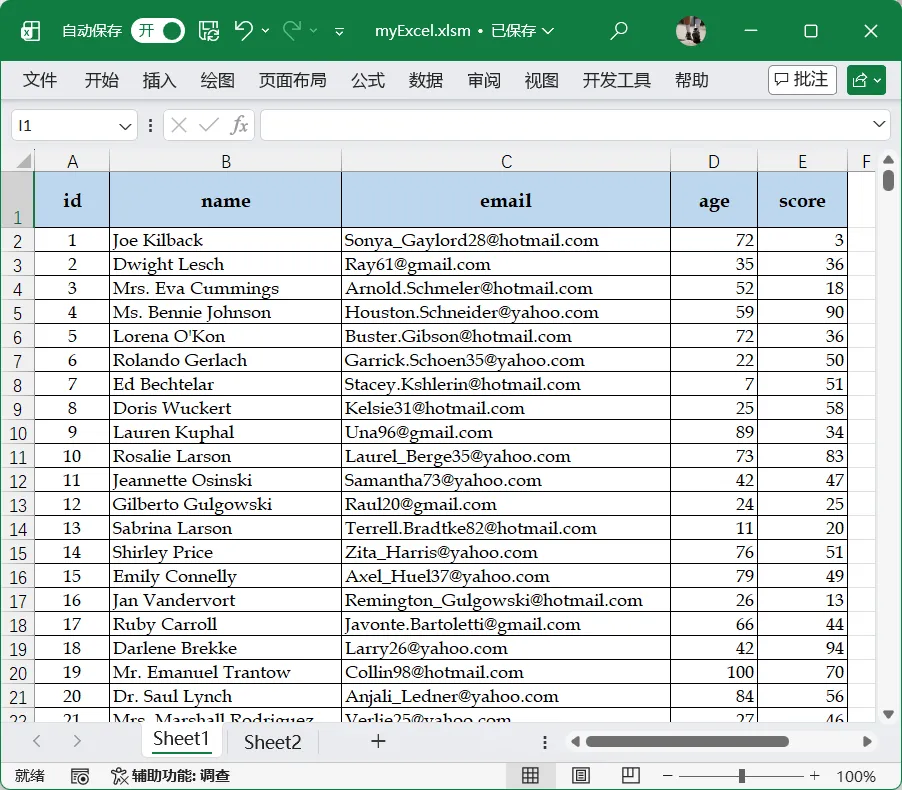
Type MathScoreid As Longname As Stringemail As Stringage As Integerscore As DoubleEnd Type
Dim mscore As MathScoreDim rowAsIntegerrow=2' 数据从第二行开始With mscore.id = CLng(Cells(row, 1).Value).name = Cells(row, 2).Value.email = Cells(row, 3).Value.age = CInt(Cells(row, 4).Value).score = CDbl(Cells(row, 5).Value)End WithDebug.Print mscore.name & ", " & mscore.score