夜雨聆风
夜雨聆风


WPF 高颜值手势密码解锁界面(附源码)
手势解锁
-
框架支持 .NET4 至 .NET8; -
Visual Studio 2022;
欢迎各位开发者下载并体验。如果在使用过程中遇到任何问题,欢迎随时向我们反馈[3]。
项目效果
控件功能
-
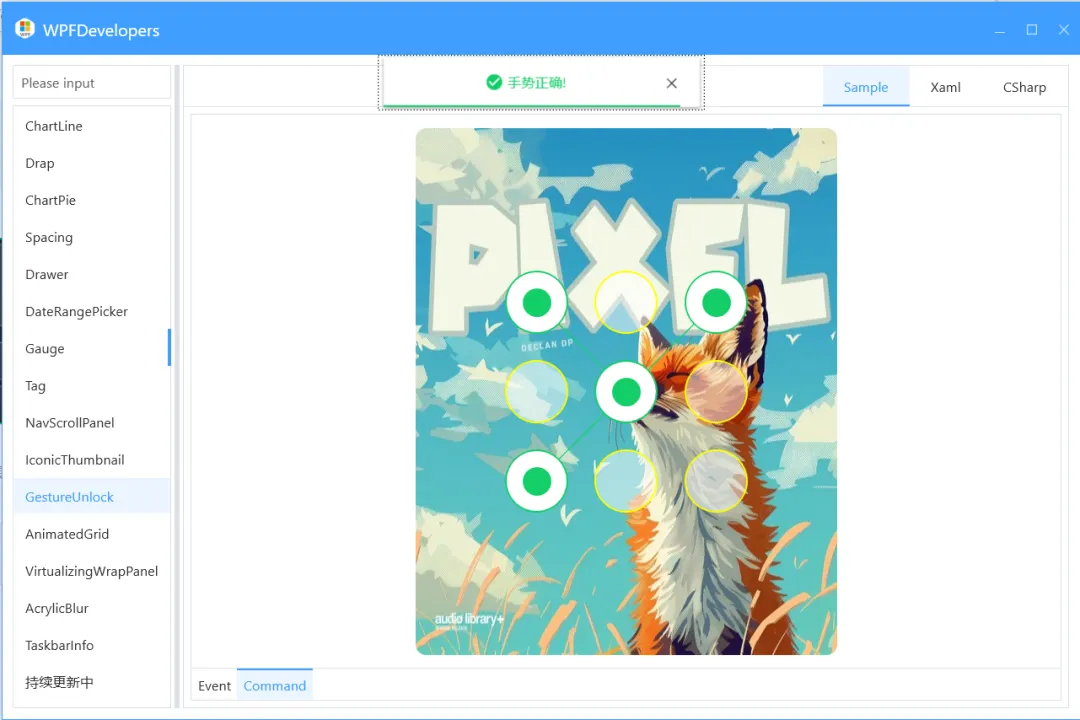
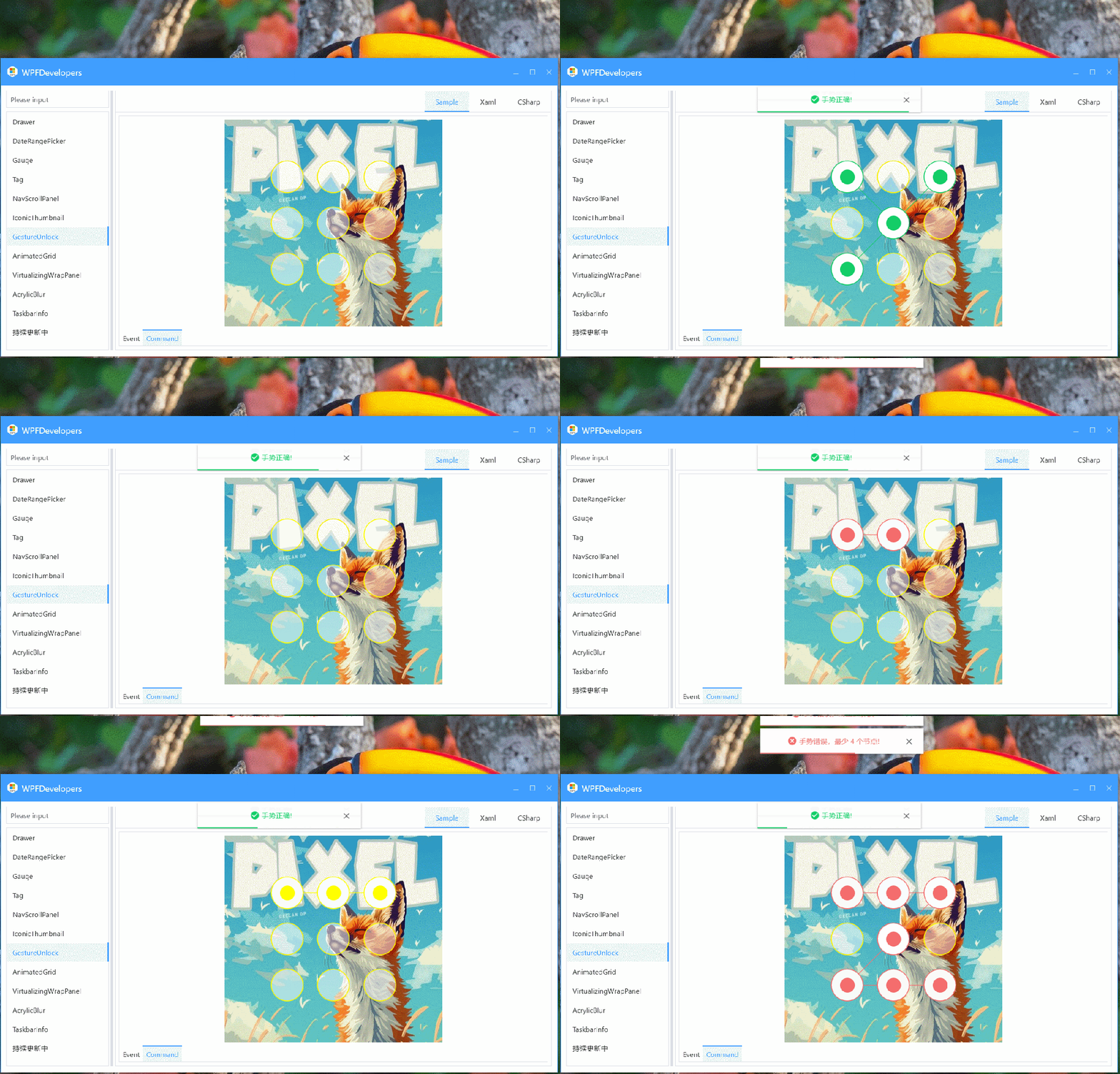
支持鼠标拖动 九宫格生成手势密码; -
State支持手势成功、失败状态; -
可自定义样式、圆角; -
事件 GestureCompleted命令GestureCompletedCommand双通道通知解锁结果;
1. 新增 GestureUnlock.cs
-
Password:记录绘制出的密码; -
State:用于控制GestureItem颜色(成功/错误); -
GestureCompletedCommand:支持绑定; -
GestureCompletedEvent:支持事件; -
绘制一个 3x3网格,每个格子是一个GestureItem; -
手势完成后,会触发状态切换,并自动 1.5秒后清除所有Ellipse和Polyline;
[TemplatePart(Name = CanvasTemplateName, Type = typeof(Canvas))]publicclassGestureUnlock : Control{privateconststring CanvasTemplateName = "PART_GestureUnlockCanvas";publicstaticreadonly DependencyProperty PasswordProperty = DependencyProperty.Register("Password", typeof(string), typeof(GestureUnlock),new PropertyMetadata(string.Empty));publicstaticreadonly DependencyProperty StateProperty = DependencyProperty.Register("State", typeof(GestureState), typeof(GestureUnlock),new PropertyMetadata(GestureState.None, OnIsErrorChanged));publicstaticreadonly DependencyProperty GestureCompletedCommandProperty = DependencyProperty.Register("GestureCompletedCommand", typeof(ICommand), typeof(GestureUnlock),new PropertyMetadata(null));publicstaticreadonly RoutedEvent GestureCompletedEvent = EventManager.RegisterRoutedEvent("GestureCompleted", RoutingStrategy.Bubble, typeof(RoutedEventHandler),typeof(GestureUnlock));private Canvas _canvas;privatereadonly List<GestureItem> _gestureItems = new List<GestureItem>();privatereadonly List<int> _gestures = new List<int>();private Polyline _line;private Line _moveLine;privatedouble _thickness = 1;private DispatcherTimer _timer;privatebool _tracking;privatebool _isEventHandled = false;staticGestureUnlock() { DefaultStyleKeyProperty.OverrideMetadata(typeof(GestureUnlock),new FrameworkPropertyMetadata(typeof(GestureUnlock))); }publicGestureUnlock() { SizeChanged -= GestureUnlock_SizeChanged; SizeChanged += GestureUnlock_SizeChanged; }publicstring Password {get => (string) GetValue(PasswordProperty);set => SetValue(PasswordProperty, value); }public GestureState State {get => (GestureState) GetValue(StateProperty);set => SetValue(StateProperty, value); }public ICommand GestureCompletedCommand {get => (ICommand) GetValue(GestureCompletedCommandProperty);set => SetValue(GestureCompletedCommandProperty, value); }privatestaticvoidOnIsErrorChanged(DependencyObject d, DependencyPropertyChangedEventArgs e) {var ctrl = d as GestureUnlock;if (ctrl != null) { ctrl.UpdateLineStroke();switch (ctrl.State) {case GestureState.Success:case GestureState.Error:if (ctrl._timer == null) { ctrl._timer = new DispatcherTimer { Interval = TimeSpan.FromSeconds(1.5) }; ctrl._timer.Tick += (sender, args) => { ctrl._timer.Stop(); ctrl.CleraGestureAndLine(); }; } ctrl._timer.Start();break; } } }publicevent RoutedEventHandler GestureCompleted {add => AddHandler(GestureCompletedEvent, value);remove => RemoveHandler(GestureCompletedEvent, value); }publicoverridevoidOnApplyTemplate() {base.OnApplyTemplate(); _canvas = GetTemplateChild(CanvasTemplateName) as Canvas;if (_canvas != null) { _canvas.MouseDown -= OnCanvas_MouseDown; _canvas.MouseDown += OnCanvas_MouseDown; _canvas.MouseMove -= OnCanvas_MouseMove; _canvas.MouseMove += OnCanvas_MouseMove; _canvas.MouseUp -= OnCanvas_MouseUp; _canvas.MouseUp += OnCanvas_MouseUp; Loaded += (s, e) => CreateGestureItems(); } }protectedoverridevoidOnMouseLeave(MouseEventArgs e) {base.OnMouseLeave(e);if (_tracking && !_isEventHandled) { _isEventHandled = true; CompleteGesture(); } _tracking = false; _isEventHandled = false; }privatevoidCleraGestureAndLine() { State = GestureState.None; _gestureItems.ForEach(x => { x.IsSelected = false; }); _gestures.Clear(); _line.Points.Clear(); _isEventHandled = false; }privatevoidResetMoveLine() {if (_moveLine != null) { _canvas.Children.Remove(_moveLine); _moveLine = null; } _moveLine = new Line { Stroke = _gestureItems.Count > 0 ? _gestureItems[0].BorderBrush : ThemeManager.Instance.PrimaryBrush, StrokeThickness = _thickness > 1 ? _thickness - 1 : _thickness }; }privatevoidGestureUnlock_SizeChanged(object sender, SizeChangedEventArgs e) { CreateGestureItems(); }privatevoidCreateGestureItems() { _gestureItems.Clear(); _canvas.Children.Clear();double radius = 20d;int cols = 3; int rows = 3; double gap = (300 - (3 * radius * 2)) / 4; gap = Math.Max(gap, radius);double totalWidth = (3 * radius * 2) + (2 * gap);double totalHeight = (3 * radius * 2) + (2 * gap);double startX = (ActualWidth - totalWidth) / 2 + radius;double startY = (ActualHeight - totalHeight) / 2 + radius;for (int i = 0; i < 9; i++) {int col = i % cols;int row = i / rows;double x = startX + col * (gap + radius * 2);double y = startY + row * (gap + radius * 2);var gestureItem = new GestureItem(); gestureItem.Number = i; gestureItem.Loaded += (s, e) => {double actualRadius = Math.Max(gestureItem.ActualWidth, gestureItem.ActualHeight) / 2; Canvas.SetLeft(gestureItem, x - actualRadius); Canvas.SetTop(gestureItem, y - actualRadius); ElementHelper.SetCornerRadius(gestureItem, new CornerRadius(actualRadius)); }; _canvas.Children.Add(gestureItem); _gestureItems.Add(gestureItem); } _line = new Polyline { Stroke = _gestureItems.Count > 0 ? _gestureItems[0].BorderBrush : ThemeManager.Instance.PrimaryBrush, StrokeThickness = _thickness }; _canvas.Children.Add(_line); Panel.SetZIndex(_line, -98); ResetMoveLine(); }privatevoidOnCanvas_MouseUp(object sender, MouseButtonEventArgs e) {if (!_isEventHandled) { _tracking = false; _isEventHandled = true; CompleteGesture(); } }voidCompleteGesture() {if (_gestures.Count == 0) return; Password = string.Join("", _gestures); GestureCompletedCommand?.Execute(Password); RaiseEvent(new RoutedEventArgs(GestureCompletedEvent, Password)); ResetMoveLine(); }privatevoidOnCanvas_MouseMove(object sender, MouseEventArgs e) {if (_tracking && e.LeftButton == MouseButtonState.Pressed) {var point = e.GetPosition(_canvas);if (_moveLine.X2 == 0 && _moveLine.Y1 == 0) { _moveLine.X1 = point.X; _moveLine.Y1 = point.Y; }if (_moveLine.X2 != point.X) _moveLine.X2 = point.X;if (_moveLine.Y2 != point.Y) _moveLine.Y2 = point.Y; TryAddPoint(point); } }privatevoidOnCanvas_MouseDown(object sender, MouseButtonEventArgs e) { CleraGestureAndLine();if (_timer != null) _timer.Stop(); ResetMoveLine(); _tracking = true; _isEventHandled = false;var point = e.GetPosition(_canvas); TryAddPoint(point); }privatevoidTryAddPoint(Point position) {for (var i = 0; i < _gestureItems.Count; i++) {var gestureItem = _gestureItems[i];var left = Canvas.GetLeft(gestureItem);var top = Canvas.GetTop(gestureItem);var centerX = left + gestureItem.Width / 2;var centerY = top + gestureItem.Height / 2;var dist = (position - new Point(centerX, centerY)).Length;if (dist <= gestureItem.Width / 2 && !_gestures.Contains(i)) {if(_gestures.Count == 1) {var brush = _gestureItems.Count > 0 ? _gestureItems[0].BorderBrush : ThemeManager.Instance.PrimaryBrush; _line.Stroke = brush; _moveLine.Stroke = brush; } _gestures.Add(i); _line.Points.Add(new Point(centerX, centerY)); gestureItem.IsSelected = true;if (_moveLine.X1 == 0 && _moveLine.Y1 == 0 && _moveLine.X2 == 0 && _moveLine.Y2 == 0) { _moveLine.X1 = centerX; _moveLine.Y1 = centerY; _canvas.Children.Add(_moveLine); }else {var endPoint = _line.Points.LastOrDefault(); _moveLine.X1 = endPoint.X; _moveLine.Y1 = endPoint.Y; } Panel.SetZIndex(_moveLine, -99); _moveLine.X2 = centerX; _moveLine.Y2 = centerY;break; } } }privatevoidUpdateLineStroke() {if (_line == null)return;switch (State) {case GestureState.Success: _line.Stroke = ThemeManager.Instance.Resources.TryFindResource<Brush>("WD.SuccessBrush");break;case GestureState.Error: _line.Stroke = ThemeManager.Instance.Resources.TryFindResource<Brush>("WD.DangerBrush");break;default: _line.Stroke = _gestureItems.Count > 0 ? _gestureItems[0].BorderBrush : ThemeManager.Instance.PrimaryBrush;break; } }}2. 新增 GestureItem.cs
-
Number:用于记录序号; -
IsSelected:用于标记是否选中;
publicclassGestureItem : Control{publicstaticreadonly DependencyProperty NumberProperty = DependencyProperty.Register("Number", typeof(int), typeof(GestureItem), new PropertyMetadata(0));publicstaticreadonly DependencyProperty IsSelectedProperty = DependencyProperty.Register("IsSelected", typeof(bool), typeof(GestureItem), new PropertyMetadata(false));staticGestureItem() { DefaultStyleKeyProperty.OverrideMetadata(typeof(GestureItem),new FrameworkPropertyMetadata(typeof(GestureItem))); }publicint Number {get => (int) GetValue(NumberProperty);set => SetValue(NumberProperty, value); }publicbool IsSelected {get => (bool) GetValue(IsSelectedProperty);set => SetValue(IsSelectedProperty, value); }}3. 新增 GestureUnlock.xaml
-
MultiDataTrigger多数据触发器: -
Error:设置BorderBrush为DangerBrush红色; -
Success:设置BorderBrush为SuccessBrush绿色; -
IsSelected:当控件被选中; -
State:控制颜色(成功/错误)
<Stylex:Key="WD.GestureItem"BasedOn="{StaticResource WD.ControlBasicStyle}"TargetType="{x:Type controls:GestureItem}"><SetterProperty="Width"Value="60" /><SetterProperty="VerticalAlignment"Value="Center" /><SetterProperty="HorizontalAlignment"Value="Center" /><SetterProperty="VerticalContentAlignment"Value="Stretch" /><SetterProperty="HorizontalContentAlignment"Value="Stretch" /><SetterProperty="Height"Value="60" /><SetterProperty="BorderThickness"Value="1.5" /><SetterProperty="Background"Value="#80FFFFFF" /><SetterProperty="BorderBrush"Value="{DynamicResource WD.PrimaryBrush}" /><SetterProperty="Padding"Value="15" /><SetterProperty="Template"><Setter.Value><ControlTemplateTargetType="{x:Type controls:GestureItem}"><Borderx:Name="PART_Border"Width="{TemplateBinding Width}"Height="{TemplateBinding Height}"Background="{TemplateBinding Background}"BorderBrush="{TemplateBinding BorderBrush}"BorderThickness="{TemplateBinding BorderThickness}"CornerRadius="{Binding Path=(helpers:ElementHelper.CornerRadius), RelativeSource={RelativeSource TemplatedParent}}"SnapsToDevicePixels="{TemplateBinding SnapsToDevicePixels}"UseLayoutRounding="{TemplateBinding UseLayoutRounding}"><Ellipsex:Name="PART_Ellipse"Margin="{TemplateBinding Padding}"HorizontalAlignment="{TemplateBinding HorizontalContentAlignment}"VerticalAlignment="{TemplateBinding VerticalContentAlignment}"Fill="{TemplateBinding BorderBrush}"Visibility="Collapsed" /></Border><ControlTemplate.Triggers><TriggerProperty="IsSelected"Value="True"><SetterTargetName="PART_Border"Property="Background"Value="{DynamicResource WD.BackgroundBrush}" /><SetterTargetName="PART_Ellipse"Property="Visibility"Value="Visible" /></Trigger><MultiDataTrigger><MultiDataTrigger.Conditions><ConditionBinding="{Binding IsSelected, RelativeSource={RelativeSource Self}}"Value="True" /><ConditionBinding="{Binding State, RelativeSource={RelativeSource AncestorType=controls:GestureUnlock}}"Value="Error" /></MultiDataTrigger.Conditions><SetterProperty="BorderBrush"Value="{DynamicResource WD.DangerBrush}" /></MultiDataTrigger><MultiDataTrigger><MultiDataTrigger.Conditions><ConditionBinding="{Binding IsSelected, RelativeSource={RelativeSource Self}}"Value="True" /><ConditionBinding="{Binding State, RelativeSource={RelativeSource AncestorType=controls:GestureUnlock}}"Value="Success" /></MultiDataTrigger.Conditions><SetterProperty="BorderBrush"Value="{DynamicResource WD.SuccessBrush}" /></MultiDataTrigger></ControlTemplate.Triggers></ControlTemplate></Setter.Value></Setter></Style><Stylex:Key="WD.GestureUnlock"BasedOn="{StaticResource WD.ControlBasicStyle}"TargetType="{x:Type controls:GestureUnlock}"><SetterProperty="Background"Value="{DynamicResource WD.BackgroundBrush}" /><SetterProperty="Width"Value="300" /><SetterProperty="VerticalAlignment"Value="Center" /><SetterProperty="HorizontalAlignment"Value="Center" /><SetterProperty="Height"Value="300" /><SetterProperty="Template"><Setter.Value><ControlTemplateTargetType="{x:Type controls:GestureUnlock}"><controls:WDBorderCornerRadius="{Binding Path=(helpers:ElementHelper.CornerRadius), RelativeSource={RelativeSource TemplatedParent}}"><Canvasx:Name="PART_GestureUnlockCanvas"Background="{TemplateBinding Background}"Clip="{Binding RelativeSource={RelativeSource AncestorType=controls:WDBorder}, Path=ContentClip}"SnapsToDevicePixels="True" /></controls:WDBorder></ControlTemplate></Setter.Value></Setter></Style><StyleBasedOn="{StaticResource WD.GestureItem}"TargetType="{x:Type controls:GestureItem}" /><StyleBasedOn="{StaticResource WD.GestureUnlock}"TargetType="{x:Type controls:GestureUnlock}" />3. 新增 GestureUnlockExample.xaml
-
TabItem Header="Event"事件示例; -
TabItem Header="Command"命令示例;
<TabControlTabStripPlacement="Bottom"><TabItemHeader="Event"><wd:GestureUnlockx:Name="myGestureUnlock"wd:ElementHelper.CornerRadius="5"GestureCompleted="GestureCompleted"><wd:GestureUnlock.Background><ImageBrushImageSource="pack://application:,,,/WPFDevelopers.Samples;component/Resources/Images/Chat/Right.jpg" /></wd:GestureUnlock.Background></wd:GestureUnlock></TabItem><TabItemHeader="Command"><TabItem.Resources><StyleBasedOn="{StaticResource WD.GestureItem}"TargetType="wd:GestureItem"><SetterProperty="BorderBrush"Value="Yellow" /></Style></TabItem.Resources><wd:GestureUnlockx:Name="myGestureUnlock2"Width="400"Height="500"wd:ElementHelper.CornerRadius="10"GestureCompletedCommand="{Binding GestureCompletedCommand}"><wd:GestureUnlock.Background><ImageBrushImageSource="pack://application:,,,/WPFDevelopers.Samples;component/Resources/Images/IconicThumbnail/LcupqA.jpg" /></wd:GestureUnlock.Background></wd:GestureUnlock></TabItem></TabControl>4. 新增 GestureUnlockExample.xaml.cs
-
_password字段存正确的密码"0426"。 -
HandleGestureUnlock手势解锁方法: -
如密码长度小于 4位,将状态设置Error并Push错误消息; -
如密码与 _password不匹配,也将状态设置Error并Push错误消息; -
如密码正确,状态设置 Success,并提示解锁成功。
publicpartialclassGestureUnlockExample : UserControl{privatestring _password = "0426";privateenum GestureUnlockType { Unlock1, Unlock2 }publicGestureUnlockExample() { InitializeComponent(); DataContext = this; }privatevoidHandleGestureUnlock(string pwd, GestureUnlockType unlockType) {if (pwd.Length < 4) { SetGestureState(unlockType, GestureState.Error); Message.PushDesktop("手势错误,最少 4 个节点!", MessageBoxImage.Error, true);return; }if (pwd != _password) { SetGestureState(unlockType, GestureState.Error); Message.PushDesktop("手势错误,请重新解锁!", MessageBoxImage.Error, true);return; } SetGestureState(unlockType, GestureState.Success); Message.Push("手势正确!", MessageBoxImage.Information, true); }privatevoidSetGestureState(GestureUnlockType unlockType, GestureState state) {if (unlockType == GestureUnlockType.Unlock1) { myGestureUnlock.State = state; }elseif (unlockType == GestureUnlockType.Unlock2) { myGestureUnlock2.State = state; } }privatevoidGestureCompleted(object sender, RoutedEventArgs e) {var pwd = e.OriginalSource.ToString(); HandleGestureUnlock(pwd, GestureUnlockType.Unlock1); }public ICommand GestureCompletedCommand => new RelayCommand(param => {var pwd = param.ToString(); HandleGestureUnlock(pwd, GestureUnlockType.Unlock2); });}作者:小码编匠

Avalonia 工业级实战:从 PLC 通信到 Web HMI 的完整方案
一个值得收藏的 WinForms 界面框架:流式菜单 + 分割容器 + 多标签页
C# 做动态数据看板?这个 WinForms 多图表方案值得参考
C# 面向自动化产线上位机开源项目(支持报警、日志与多语言)
真正能落地的 .NET 8/9/10 企业平台:集成权限、流程引擎与实时通信
WPF 工业组态界面既专业又现代?HandyControl + ElementUI 风格
不玩虚的,这款开源 .NET 低代码平台,开箱即用流程引擎、BI 报表、权限控制
WPF 双模式工业温湿度监控上位机,支持独立运行与 MES 对接
WinForm 过时了?3月技术盘点:类IDE上位机、3D仿真与 Modbus调试工具
不靠框架,一套能用的 WinForm 企业人事管理系统(附源码)
基于 WinForms 实现多设备、多语言的 HMI 上位机框架
WPF 桌面也能做工业级看板?LiveCharts 让数据可视化更出彩
C# 统一工业 CAN 设备通信:跨平台、多厂商、高性能的通信库
WinForm + PLC + SQLite 的上位机项目,真的值得你收藏!
.NET 8 + WPF 做工业机器人3D仿真?HelixToolkit 真香
AI 辅助开发如何重塑 .NET 9 + WPF 企业级应用架构?
WinForm 自适应布局神器:告别手动计算,轻松实现专业界面
用 C# + WinForms 手撸一个轻量级矢量图绘制系统
WPF + MVVM 工业生产监控平台,用户控件动态加载与流畅动画实现
VisionMaster 通讯太麻烦?.NET 8 + TCP 为工业视觉定制的轻量通信方案
谁说 .NET 桌面过时了?AI 协作开发 WPF + SQLite 监控工具
觉得有收获?不妨分享让更多人受益
关注「DotNet技术匠」,共同提升技术实力