 夜雨聆风
夜雨聆风


OpenAI Codex 插件开发指南:从 Plugin 到 Marketplace
摘要
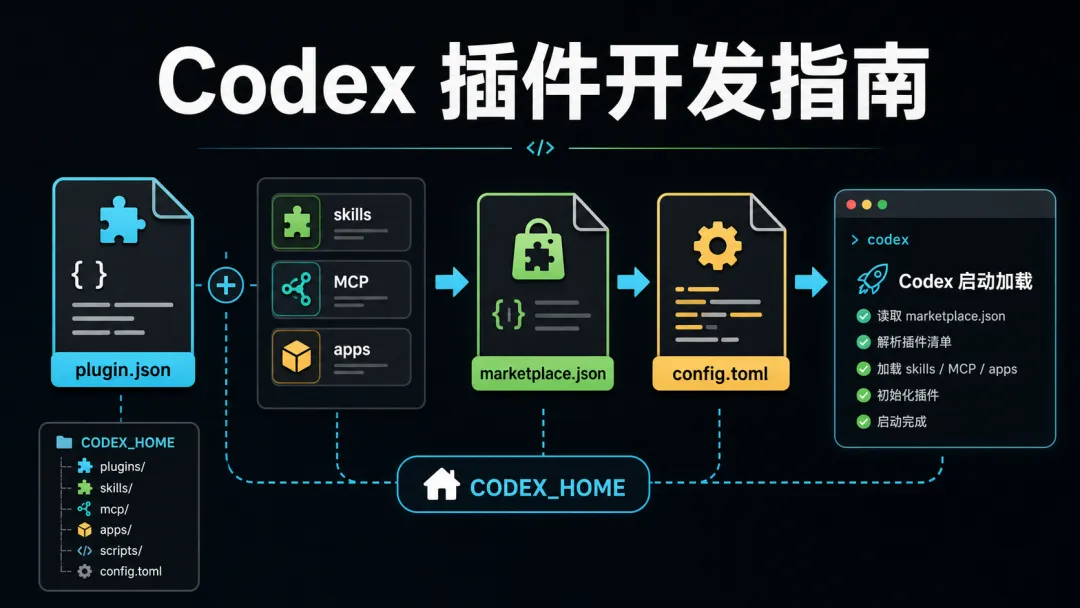
Codex 插件是一种把 skills、MCP server、apps、hooks、脚本和素材打包分发给 Codex 的机制。本文基于 OpenAI 官方 openai/plugins 仓库、Codex CLI 的 plugin marketplace 命令,以及一个本地验证过的 repo-doc-helper 示例,讲清楚 Codex 插件的目录结构、manifest 写法、marketplace 分发方式、验证流程和开发注意事项。
先说结论
开发一个 Codex 插件,最小需要两部分:
-
插件目录: plugins/<plugin-name>/.codex-plugin/plugin.json -
分发目录: .agents/plugins/marketplace.json
最小可用插件通常长这样:
my-codex-marketplace/├── .agents/│ └── plugins/│ └── marketplace.json└── plugins/ └── repo-doc-helper/ ├── .codex-plugin/ │ └── plugin.json ├── skills/ │ └── repo-doc-helper/ │ └── SKILL.md └── scripts/ └── repo-doc-summary.sh开发顺序建议:
-
先写 SKILL.md,把 Codex 的行为定义清楚。 -
再写 .codex-plugin/plugin.json,声明这个插件包含哪些能力。 -
再写 .agents/plugins/marketplace.json,让 Codex 能发现这个插件。 -
最后用 jq、脚本自测、codex plugin marketplace add做验证。
官方资料现状
截至 2026-05-04,OpenAI 对 Codex 插件最明确的公开参考主要在两个地方:
-
OpenAI 官方插件仓库:https://github.com/openai/plugins -
Codex 官方用例文档:https://developers.openai.com/codex/use-cases
OpenAI 官方 openai/plugins README 说明:每个插件位于 plugins/<name>/,并包含必需的 .codex-plugin/plugin.json manifest;插件还可以带 skills/、.app.json、.mcp.json、plugin-level agents/、commands/、hooks.json、assets/ 等伴随能力。
官方仓库里可以参考这些真实插件:
-
plugins/notion:Notion 工作流、app connector、skills -
plugins/figma:Figma 设计到代码、Code Connect、设计系统规则 -
plugins/build-web-apps:前端应用开发、资产生成、浏览器测试、支付和数据库工作流 -
plugins/netlify/plugins/vercel:部署相关工作流
官方 marketplace 示例位于:
.agents/plugins/marketplace.json这说明 Codex 插件不只是“一个 skill 文件”,而是可以被 marketplace 索引、展示、安装和治理的包。
Codex 插件解决什么问题
单个 SKILL.md 可以教 Codex 做一类任务,但插件把“可复用能力”做成了一个分发单元。
|
|
|
|
|---|---|---|
|
|
|
|
|
|
|
|
|
|
|
|
|
|
|
|
|
|
|
|
|
|
|
|
|
|
|
|
插件适合这些场景:
-
公司内部标准工程流程; -
某个 SaaS 或内部系统的 Codex 集成; -
一组相关 skills 的打包分发; -
带 MCP server 的工具能力; -
带 app connector 的业务系统接入; -
团队级、项目级、个人级 Codex 能力市场。
插件目录结构
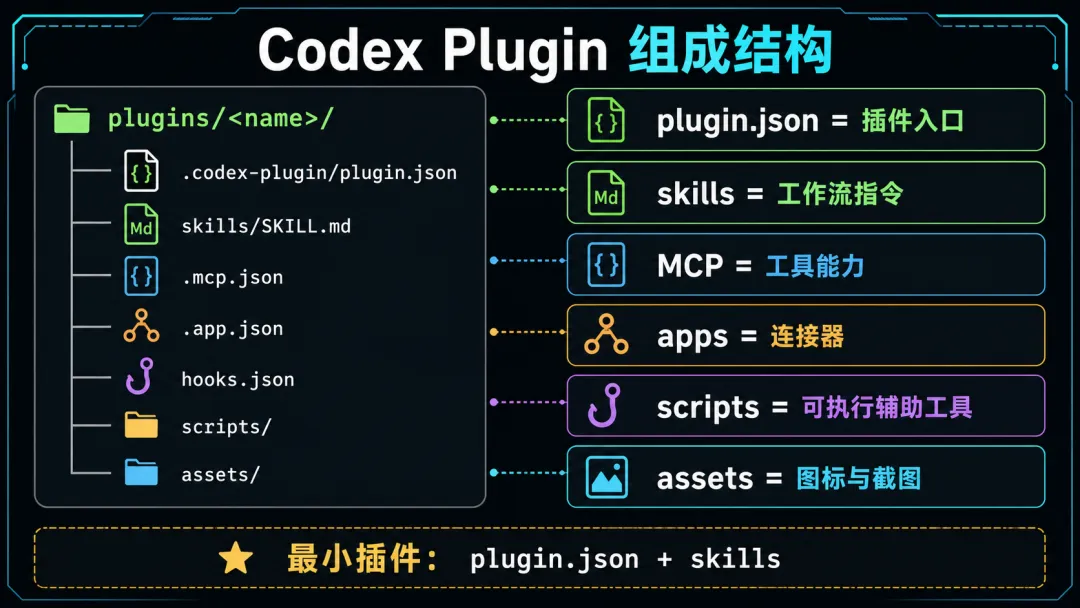
官方插件仓库采用的核心约定是:
plugins/<plugin-name>/└── .codex-plugin/ └── plugin.json常见完整结构:
plugins/<plugin-name>/├── .codex-plugin/│ └── plugin.json├── skills/│ ├── skill-a/│ │ └── SKILL.md│ └── skill-b/│ └── SKILL.md├── .mcp.json├── .app.json├── hooks.json├── scripts/├── assets/└── README.md各目录作用:
|
|
|
|
|---|---|---|
.codex-plugin/plugin.json |
|
|
skills/ |
|
|
.mcp.json |
|
|
.app.json |
|
|
hooks.json |
|
|
scripts/ |
|
|
assets/ |
|
|
plugin.json 怎么写
plugin.json 是插件的入口文件,位置固定为:
plugins/<plugin-name>/.codex-plugin/plugin.json一个实用的最小版本:
{"name": "repo-doc-helper","version": "0.1.0","description": "Help Codex inspect repository documentation and generate onboarding notes.","author": {"name": "Example Team","email": "dev@example.com","url": "https://example.com" },"homepage": "https://example.com/repo-doc-helper","repository": "https://github.com/example/repo-doc-helper","license": "MIT","keywords": ["docs", "onboarding", "repository", "summary"],"skills": "./skills/","interface": {"displayName": "Repo Doc Helper","shortDescription": "Summarize repo docs and produce onboarding notes","longDescription": "Repo Doc Helper teaches Codex how to inspect a repository's README, docs, manifests, and agent instructions, then produce practical onboarding notes with commands, directory maps, risks, and missing documentation.","developerName": "Example Team","category": "Productivity","capabilities": ["Interactive", "Read", "Write"],"websiteURL": "https://example.com","privacyPolicyURL": "https://example.com/privacy","termsOfServiceURL": "https://example.com/terms","defaultPrompt": ["Summarize this repository for a new engineer.","Create onboarding notes from README and docs.","Find missing setup instructions in this repo." ],"brandColor": "#2563EB","screenshots": [] }}顶层字段说明
|
|
|
|
|---|---|---|
name |
|
|
version |
|
0.1.0 |
description |
|
|
author |
|
|
homepage |
|
|
repository |
|
|
license |
|
MIT / Apache-2.0 |
keywords |
|
|
skills |
|
./skills/ |
mcpServers |
|
./.mcp.json |
apps |
|
./.app.json |
hooks |
|
./hooks.json |
interface |
|
|
interface 字段说明
interface 决定插件在 Codex 插件目录或 UI 里的展示方式。
|
|
|
|---|---|
displayName |
|
shortDescription |
|
longDescription |
|
developerName |
|
category |
Productivity、Coding、Design |
capabilities |
Interactive、Read、Write |
defaultPrompt |
|
brandColor |
|
composerIcon |
|
logo |
|
screenshots |
|
marketplace.json 怎么写
插件需要通过 marketplace 被 Codex 发现。一个本地 marketplace 的典型位置是:
.agents/plugins/marketplace.json示例:
{"name": "example-local-codex-plugins","interface": {"displayName": "Example Local Codex Plugins" },"plugins": [ {"name": "repo-doc-helper","source": {"source": "local","path": "./plugins/repo-doc-helper" },"policy": {"installation": "AVAILABLE","authentication": "ON_INSTALL" },"category": "Productivity" } ]}字段说明:
|
|
|
|---|---|
name |
|
interface.displayName |
|
plugins[] |
|
plugins[].name |
plugin.json 一致 |
source.source |
local |
source.path |
./plugins/<name> |
policy.installation |
|
policy.authentication |
|
category |
|
官方 OpenAI curated marketplace 也是这个思路:顶层是 marketplace 信息,plugins[] 里逐个声明插件名、source、policy 和 category。
Codex CLI 如何接入 marketplace
当前本机 codex-cli 0.125.0 的相关命令是:
codex plugin marketplace add <SOURCE>codex plugin marketplace upgrade [MARKETPLACE_NAME]codex plugin marketplace remove <MARKETPLACE_NAME>add 支持的 source 类型包括:
owner/repo[@ref]HTTP(S) Git URLSSH URLlocal marketplace root directory本地开发时最常用:
codex plugin marketplace add /absolute/path/to/my-codex-marketplace远程仓库可以用:
codex plugin marketplace add owner/repocodex plugin marketplace add owner/repo@maincodex plugin marketplace add https://github.com/owner/repo.git升级:
codex plugin marketplace upgradecodex plugin marketplace upgrade example-local-codex-plugins移除:
codex plugin marketplace remove example-local-codex-plugins不运行 add,如何让 Codex 启动时默认加载插件
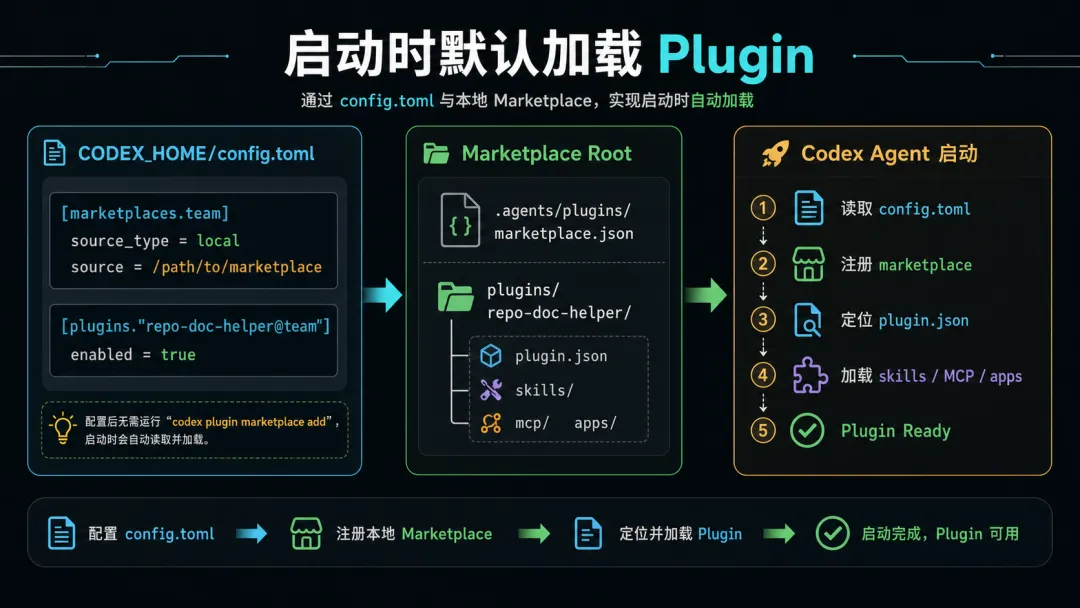
如果你已经准备好了插件目录,不想在启动时再执行:
codex plugin marketplace add <SOURCE>本质做法是:**提前把 marketplace 和 plugin enable 状态写进 Codex 的 config.toml**。
codex plugin marketplace add 做的事情并不神秘。以本文案例为例,在隔离 CODEX_HOME 中执行 add 后,Codex 写入了这样的配置:
[marketplaces.example-local-codex-plugins]last_updated = "2026-05-04T02:16:02Z"source_type = "local"source = "/Users/aihe/Documents/Obsidian Vault/codex-plugin-demo"[plugins."repo-doc-helper@example-local-codex-plugins"]enabled = true因此,如果你要在 Codex 启动时默认加载这个插件,可以直接预置:
[marketplaces.example-local-codex-plugins]last_updated = "2026-05-04T02:16:02Z"source_type = "local"source = "/absolute/path/to/codex-plugin-demo"[plugins."repo-doc-helper@example-local-codex-plugins"]enabled = true这里有几个关键点:
|
|
|
|---|---|
[marketplaces.<marketplace-name>] |
|
source_type = "local" |
|
source = "/absolute/path/to/marketplace-root" |
|
[plugins."plugin-name@marketplace-name"] |
|
enabled = true |
|
注意:source 应该指向包含 .agents/plugins/marketplace.json 和 plugins/ 的目录。例如本文案例中,应该指向:
/Users/aihe/Documents/Obsidian Vault/codex-plugin-demo而不是:
/Users/aihe/Documents/Obsidian Vault/codex-plugin-demo/plugins/repo-doc-helper因为 marketplace.json 里的 source.path 已经负责从 marketplace root 定位到具体插件:
{"source": {"source": "local","path": "./plugins/repo-doc-helper" }}在 Agent SDK 或自动化环境中预置
如果你用 Codex Agent SDK、自动化 runner、容器或 CI 环境启动 Codex,推荐把插件做成“随环境预置”的形式:
/opt/codex-home/├── config.toml└── plugins-marketplace/ ├── .agents/ │ └── plugins/ │ └── marketplace.json └── plugins/ └── repo-doc-helper/ ├── .codex-plugin/ │ └── plugin.json └── skills/ └── repo-doc-helper/ └── SKILL.md/opt/codex-home/config.toml:
[marketplaces.example-local-codex-plugins]last_updated = "2026-05-04T02:16:02Z"source_type = "local"source = "/opt/codex-home/plugins-marketplace"[plugins."repo-doc-helper@example-local-codex-plugins"]enabled = true启动时指定 CODEX_HOME:
CODEX_HOME=/opt/codex-home codex或者在你的 Agent SDK / runner 进程里设置环境变量:
export CODEX_HOME=/opt/codex-home这样 Codex 启动时就会读取这个 config.toml,发现 marketplace,并把 repo-doc-helper@example-local-codex-plugins 视为已启用插件。
本地用户级预置
如果是给当前机器当前用户预置,直接写入:
~/.codex/config.toml示例:
[marketplaces.team-local]last_updated = "2026-05-04T02:16:02Z"source_type = "local"source = "/Users/me/team-codex-plugins"[plugins."repo-doc-helper@team-local"]enabled = true然后正常启动:
codex项目级预置
如果你想让一个项目自带插件 marketplace,可以把插件目录放进项目:
my-repo/├── .agents/│ └── plugins/│ └── marketplace.json└── plugins/ └── repo-doc-helper/ └── .codex-plugin/ └── plugin.json然后在团队的 Codex home 模板中写:
[marketplaces.my-repo-plugins]last_updated = "2026-05-04T02:16:02Z"source_type = "local"source = "/absolute/path/to/my-repo"[plugins."repo-doc-helper@my-repo-plugins"]enabled = true这种方式适合:
-
固定开发机; -
devcontainer; -
CI runner; -
内部 agent runtime; -
企业统一 Codex 镜像。
配置验证
先用隔离目录验证,不要直接改真实 ~/.codex/config.toml:
rm -rf /tmp/codex-plugin-manual-homemkdir -p /tmp/codex-plugin-manual-homecat > /tmp/codex-plugin-manual-home/config.toml <<'EOF'[marketplaces.example-local-codex-plugins]last_updated = "2026-05-04T02:16:02Z"source_type = "local"source = "/Users/aihe/Documents/Obsidian Vault/codex-plugin-demo"[plugins."repo-doc-helper@example-local-codex-plugins"]enabled = trueEOFCODEX_HOME=/tmp/codex-plugin-manual-home codex --version如果配置语法错误,Codex 通常会在启动或读取配置时失败。再检查配置是否存在:
rg -n "example-local-codex-plugins|repo-doc-helper" /tmp/codex-plugin-manual-home/config.toml进一步可以在交互里测试:
Use repo-doc-helper to summarize this repository.这和 marketplace add 的区别
|
|
|
|
|---|---|---|
codex plugin marketplace add |
|
|
config.toml |
|
|
CODEX_HOME |
|
|
推荐策略:
-
开发调试时用 codex plugin marketplace add。 -
自动化部署时预置 CODEX_HOME/config.toml。 -
团队分发时把 plugins/和.agents/plugins/marketplace.json放入 Git 仓库,再由启动环境写入[marketplaces.*]和[plugins.*]。
重要限制
这部分配置是基于本机 codex-cli 0.125.0 的实际配置形态验证得出。OpenAI 官方公开仓库展示了插件和 marketplace 的文件结构,CLI help 展示了 marketplace add/upgrade/remove,但 config.toml 中 [marketplaces.*] / [plugins.*] 的完整 schema 目前不是一篇单独的稳定公开规范。
因此建议:
-
锁定 Codex CLI 版本; -
在 CI 里跑 smoke test; -
对 config.toml模板做版本管理; -
Codex 升级后重新验证; -
不要把 secrets 放进被复制的 CODEX_HOME。
实战案例:repo-doc-helper
这个案例目标很简单:做一个 Codex 插件,让 Codex 更擅长读一个代码仓库的文档,并输出新人 onboarding notes。
它包含:
-
一个 plugin.json -
一个 marketplace.json -
一个 SKILL.md -
一个辅助脚本 repo-doc-summary.sh
案例文件已经在本地创建并验证:
codex-plugin-demo/├── .agents/│ └── plugins/│ └── marketplace.json└── plugins/ └── repo-doc-helper/ ├── .codex-plugin/ │ └── plugin.json ├── skills/ │ └── repo-doc-helper/ │ └── SKILL.md └── scripts/ └── repo-doc-summary.shSkill 文件
plugins/repo-doc-helper/skills/repo-doc-helper/SKILL.md:
---name: repo-doc-helperdescription: Use when the user asks Codex to understand a repository, summarize documentation, or create onboarding notes for developers.---# Repo Doc Helper## Workflow1. Inspect `README.md`, `AGENTS.md`, `CLAUDE.md`, `docs/`, package manifests, and visible config files.2. Identify the project purpose, runtime stack, entry points, build commands, test commands, deployment notes, and important directories.3. If `scripts/repo-doc-summary.sh` exists, run it first to collect a quick file inventory.4. Produce a concise onboarding note with: - What this project does - How to run it locally - How to test it - Important directories and files - Required environment variables or credentials - Risks, missing docs, or unclear setup steps5. Prefer concrete file references over generic advice.这个 skill 的关键点:
-
name是 Codex 识别 skill 的稳定标识; -
description决定什么时候触发; -
workflow 要写成可执行步骤,不要写成泛泛的愿景; -
输出结构要固定,方便团队复用。
辅助脚本
plugins/repo-doc-helper/scripts/repo-doc-summary.sh:
#!/usr/bin/env bashset -euo pipefailroot="${1:-.}"echo"Repository: $(cd "$root" && pwd)"echoecho"Top-level docs:"find "$root" -maxdepth 2 \ \( -iname 'README*' -o -iname 'AGENTS.md' -o -iname 'CLAUDE.md' -o -path '*/docs/*' \) \ -type f | sort | sed 's#^\./##'echoecho"Package and build manifests:"find "$root" -maxdepth 3 \ \( -iname 'package.json' -o -iname 'pyproject.toml' -o -iname 'Cargo.toml' -o -iname 'go.mod' -o -iname 'pom.xml' -o -iname 'build.gradle' \) \ -type f | sort | sed 's#^\./##'这个脚本不是必须的,但它让案例更有说服力:插件不只是“提示词包”,也可以包含可复用工具。
如何验证插件
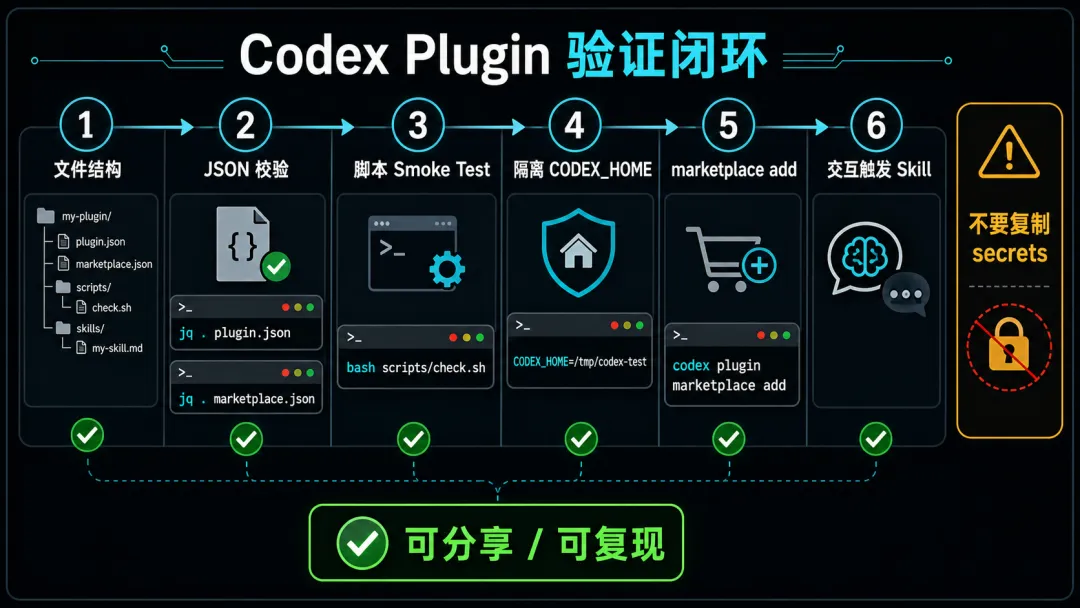
验证要分三层:文件结构、插件内容、Codex 接入。
1. 验证文件存在
find codex-plugin-demo -maxdepth 6 -type f -print | sort本地验证输出:
codex-plugin-demo/.agents/plugins/marketplace.jsoncodex-plugin-demo/plugins/repo-doc-helper/.codex-plugin/plugin.jsoncodex-plugin-demo/plugins/repo-doc-helper/scripts/repo-doc-summary.shcodex-plugin-demo/plugins/repo-doc-helper/skills/repo-doc-helper/SKILL.md2. 验证 JSON 合法
jq . codex-plugin-demo/plugins/repo-doc-helper/.codex-plugin/plugin.json >/tmp/plugin-json.okjq . codex-plugin-demo/.agents/plugins/marketplace.json >/tmp/marketplace-json.okecho"json ok"本地验证结果:
json ok这一步能发现:
-
JSON 语法错误; -
少逗号、多逗号; -
引号错误; -
文件为空。
3. 验证脚本可运行
bash codex-plugin-demo/plugins/repo-doc-helper/scripts/repo-doc-summary.sh .本地验证输出:
Repository: /Users/aihe/Documents/Obsidian VaultTop-level docs:CLAUDE.mdPackage and build manifests:这说明插件附带脚本可以执行,且能从当前仓库提取基础文档信息。
4. 用隔离 CODEX_HOME 验证 marketplace add
为了不污染当前全局 Codex 配置,可以用临时 CODEX_HOME:
rm -rf /tmp/codex-plugin-demo-homemkdir -p /tmp/codex-plugin-demo-homeCODEX_HOME=/tmp/codex-plugin-demo-home \ codex plugin marketplace add "/Users/aihe/Documents/Obsidian Vault/codex-plugin-demo"本地验证输出:
Added marketplace `example-local-codex-plugins` from /Users/aihe/Documents/Obsidian Vault/codex-plugin-demo.Installed marketplace root: /Users/aihe/Documents/Obsidian Vault/codex-plugin-demo此时临时配置写入:
[marketplaces.example-local-codex-plugins]last_updated = "2026-05-04T02:16:02Z"source_type = "local"source = "/Users/aihe/Documents/Obsidian Vault/codex-plugin-demo"这个验证说明:
-
marketplace 名称能被 Codex 识别; -
本地 marketplace root 能被 Codex 接受; -
Codex 能把 marketplace 注册到 config.toml; -
不需要改动真实 ~/.codex/config.toml。
5. 进一步验证插件启用
当前 codex-cli 0.125.0 暴露的公开命令主要是 marketplace 级别:
codex plugin marketplace addcodex plugin marketplace upgradecodex plugin marketplace remove插件安装、启用、禁用在不同 Codex 版本和 UI 中可能由插件目录或配置管理接管。当前本机全局配置里已安装插件的形态类似:
[plugins."github@openai-curated"]enabled = true[plugins."superpowers@openai-curated"]enabled = true因此,如果需要在团队内做完整验收,可以增加这些检查:
rg -n "repo-doc-helper|example-local-codex-plugins" ~/.codex/config.toml以及在 Codex 交互里测试:
Use repo-doc-helper to summarize this repository.期望行为:
-
Codex 识别 repo-doc-helperskill; -
先扫描 README、docs、manifest、agent instructions; -
如可用,运行 repo-doc-summary.sh; -
输出 onboarding notes。
常见开发模式
模式 1:纯 Skill 插件
适合:
-
工作流; -
团队规范; -
代码审查模板; -
部署 playbook; -
文档生成。
结构:
plugins/my-workflow/├── .codex-plugin/plugin.json└── skills/my-workflow/SKILL.md这是最推荐的入门方式,因为没有外部服务、没有认证、没有运行时依赖。
模式 2:Skill + Script 插件
适合:
-
固定检查脚本; -
批处理工具; -
代码扫描; -
文档索引; -
内部 CLI 包装。
结构:
plugins/my-tool/├── .codex-plugin/plugin.json├── skills/my-tool/SKILL.md└── scripts/check.sh注意:
-
脚本要可重复运行; -
输出尽量结构化; -
不要默认执行 destructive 操作; -
依赖要写清楚。
模式 3:Skill + MCP 插件
适合:
-
数据库查询; -
内部系统 API; -
SaaS 集成; -
多工具能力。
结构:
plugins/my-service/├── .codex-plugin/plugin.json├── .mcp.json└── skills/my-service/SKILL.mdplugin.json 中声明:
{"mcpServers": "./.mcp.json"}注意:
-
MCP server 的认证方式要清楚; -
不要把 token 写进仓库; -
工具名要稳定; -
输出 schema 要稳定。
模式 4:Skill + App Connector 插件
适合:
-
Gmail、GitHub、Notion、Figma 这类 app; -
需要用户授权; -
需要 connector tools。
结构:
plugins/my-app/├── .codex-plugin/plugin.json├── .app.json├── skills/my-app/SKILL.md└── assets/plugin.json 中声明:
{"apps": "./.app.json"}注意:
-
授权时机和权限范围要写清楚; -
policy.authentication要和实际体验一致; -
默认 prompt 不要诱导用户授权过宽权限。
发布和分发方式
本地分发
适合个人或小团队:
codex plugin marketplace add /path/to/my-codex-marketplace优点:
-
简单; -
不需要远程仓库; -
适合内测。
缺点:
-
团队同步困难; -
版本管理较弱; -
不适合跨机器分发。
GitHub 仓库分发
适合团队或开源:
codex plugin marketplace add owner/repocodex plugin marketplace add owner/repo@main优点:
-
可版本化; -
可 review; -
可加 CI 验证; -
可追踪变更。
建议:
-
把 marketplace 放在仓库根目录约定位置; -
插件都放在 plugins/<name>/; -
每个插件都有 README; -
PR 必须跑 JSON 校验和脚本 smoke test。
内部企业分发
适合公司内部:
-
私有 Git 仓库; -
内部插件 marketplace; -
固定 review 流程; -
安全扫描; -
版本锁定; -
发布说明。
建议在 PR 中要求:
-
plugin.jsondiff; -
marketplace.jsondiff; -
所有 SKILL.mddiff; -
MCP/app 权限说明; -
验证日志; -
回滚方式。
最佳实践
1. 插件名稳定
插件目录名、plugin.json.name、marketplace.plugins[].name 保持一致:
repo-doc-helper不要一处叫 repo-doc-helper,另一处叫 repo-docs-helper。
2. 从纯 Skill 开始
不要一上来就做 MCP 和 app connector。先把工作流写成 skill,验证 Codex 真的会按预期执行,再逐步加工具。
3. description 要像触发器
差的 description:
Helps with docs.好的 description:
Use when the user asks Codex to understand a repository, summarize documentation, or create onboarding notes for developers.Codex 需要靠 description 判断何时加载 skill,所以它应该描述明确触发场景。
4. Skill 要给步骤,不要只给愿景
差:
Help users write better docs.好:
1. Read README.md, docs/, AGENTS.md, and package manifests.2. Identify setup, build, test, deploy commands.3. Output onboarding notes with risks and missing docs.5. 脚本输出要稳定
给 Codex 用的脚本最好:
-
stdout 清晰; -
错误走 stderr; -
exit code 准确; -
不依赖当前 shell alias; -
支持传入路径; -
默认只读。
6. 不要在插件里写 secrets
不要把这些写进仓库:
-
API key; -
OAuth token; -
cookie; -
私有 SSH key; -
内部系统密码; -
真实用户数据。
用环境变量、系统凭据、app connector 授权或 MCP server 自己的认证机制。
7. 每个插件都要有 smoke test
最小 smoke test:
jq . plugins/repo-doc-helper/.codex-plugin/plugin.jsonjq . .agents/plugins/marketplace.jsonbash plugins/repo-doc-helper/scripts/repo-doc-summary.sh .CODEX_HOME=/tmp/codex-plugin-test codex plugin marketplace add "$PWD"常见问题
插件和 skill 有什么区别?
Skill 是 Codex 的一组任务说明,插件是一个分发包。一个插件可以包含多个 skills,也可以包含 MCP、apps、hooks、scripts、assets。
一定要有 marketplace.json 吗?
如果你只是自己手动放 skill,可以不需要。但如果你希望 Codex 以插件形式发现、安装、管理,就需要 marketplace。
source.path 可以指向仓库根目录吗?
实践上更推荐指向 ./plugins/<plugin-name>。不要把插件直接放在 marketplace root;这样容易和 marketplace 自身混在一起,也可能遇到路径解析限制。
插件可以访问网络吗?
插件本身只是声明和文件包。是否访问网络取决于:
-
skill 指示 Codex 运行的命令; -
MCP server; -
app connector; -
当前 Codex 的 sandbox、approval、网络策略。
插件可以自动执行危险操作吗?
不建议。插件应把危险操作写成需要确认的步骤,尤其是删除文件、部署生产、修改数据库、发送邮件、支付、权限变更等。
一份开发检查清单
开发前:
-
明确插件解决的问题; -
确认是纯 skill、script、MCP 还是 app connector; -
确认是否需要认证; -
确认是否需要写操作。
开发中:
-
目录是 plugins/<name>/; -
manifest 在 .codex-plugin/plugin.json; -
plugin.json.name与目录名一致; -
skills路径是相对路径; -
SKILL.md有 frontmatter; -
description 有明确触发场景; -
脚本默认只读或需要确认; -
不包含 secrets。
验证:
-
jq校验 JSON; -
find检查文件结构; -
脚本 smoke test; -
隔离 CODEX_HOME执行codex plugin marketplace add; -
在 Codex 中实际触发 skill; -
记录验证日志。
发布:
-
marketplace 条目已加入; -
README 写清楚用途和安装方式; -
版本号更新; -
changelog 更新; -
PR 附验证结果; -
安全和权限说明齐全。
本文案例文件
本文生成并验证的案例文件位于:
/Users/aihe/Documents/Obsidian Vault/codex-plugin-demo核心文件:
/Users/aihe/Documents/Obsidian Vault/codex-plugin-demo/.agents/plugins/marketplace.json/Users/aihe/Documents/Obsidian Vault/codex-plugin-demo/plugins/repo-doc-helper/.codex-plugin/plugin.json/Users/aihe/Documents/Obsidian Vault/codex-plugin-demo/plugins/repo-doc-helper/skills/repo-doc-helper/SKILL.md/Users/aihe/Documents/Obsidian Vault/codex-plugin-demo/plugins/repo-doc-helper/scripts/repo-doc-summary.sh验证过的命令:
jq . codex-plugin-demo/plugins/repo-doc-helper/.codex-plugin/plugin.jsonjq . codex-plugin-demo/.agents/plugins/marketplace.jsonbash codex-plugin-demo/plugins/repo-doc-helper/scripts/repo-doc-summary.sh .CODEX_HOME=/tmp/codex-plugin-demo-home codex plugin marketplace add "/Users/aihe/Documents/Obsidian Vault/codex-plugin-demo"参考资料
-
OpenAI 官方插件仓库:https://github.com/openai/plugins -
OpenAI 官方插件 README:https://github.com/openai/plugins/blob/main/README.md -
OpenAI 官方 marketplace 示例:https://github.com/openai/plugins/blob/main/.agents/plugins/marketplace.json -
OpenAI 官方 Notion 插件示例:https://github.com/openai/plugins/blob/main/plugins/notion/.codex-plugin/plugin.json -
OpenAI 官方 Build Web Apps 插件示例:https://github.com/openai/plugins/blob/main/plugins/build-web-apps/.codex-plugin/plugin.json -
Codex 官方用例文档:https://developers.openai.com/codex/use-cases -
本机验证版本: codex-cli 0.125.0