 夜雨聆风
夜雨聆风


OpenClaw 插件开发初体验
什么是插件?
Plugins extend OpenClaw with new capabilities: channels, model providers, agent harnesses, tools, skills, speech, realtime transcription, realtime voice, media-understanding, image generation, video generation, web fetch, web search, and more. Some plugins are core (shipped with OpenClaw), others are external. Most external plugins are published and discovered through ClawHub. Npm remains supported for direct installs and for a temporary set of OpenClaw-owned plugin packages while that migration finishes.
插件可以扩展 OpenClaw 能力,可以用插件新增工具、接入消息平台、添加模型提供商、拦截各种事件、注册 CLI 命令、挂载 HTTP 路由、或者跑后台服务。
内置的插件一般在 extensions/ 目录,外部的可以通过 ClawHub 安装。
具体能扩展什么能力
|
|
|
|---|---|
| 工具(Tools) |
|
| 消息渠道(Channels) |
|
| 模型提供商(Providers) |
|
| 网页抓取(Web Fetch) |
|
| 网页搜索(Web Search) |
|
| Hook |
|
| CLI 命令 | openclaw my-command
|
插件管理
存放位置
OpenClaw 按以下优先级扫描插件:
|
|
|
|
|---|---|---|
|
|
|
|
|
|
|
|
|
|
|
|
|
|
|
|
注意:workspace 和 global 目录中的插件默认禁用,需要显式启用。
插件格式
OpenClaw 支持两种插件格式:
|
|
|
|---|---|
| Native OpenClaw |
openclaw.plugin.json 声明 |
| Bundle |
|
生态兼容:Codex、Claude、Cursor 等平台已有成熟的插件生态,通过支持 Bundle 格式,OpenClaw 可以直接复用这些插件,无需二次开发。
安装来源
|
|
|
|---|---|
| ClawHub |
|
| npm |
|
| git |
|
| 本地路径 |
|
发布到 ClawHub:
npm i -g clawhubclawhub loginclawhub package publish your-org/your-plugin@v1.0.0常用命令
# 列出插件openclaw plugins listopenclaw plugins list --enabled # 只看已启用的openclaw plugins list --verbose # 详细输出openclaw plugins list --json # JSON 格式(用于脚本)# 搜索和安装openclaw plugins search <name>openclaw plugins install clawhub:<name> # 从 ClawHub 安装openclaw plugins install npm:<name> # 从 npm 安装openclaw plugins install ./my-plugin # 本地路径openclaw plugins install --link ./my-plugin # 开发链接# 安装指定版本openclaw plugins install <package>@1.2.3openclaw plugins install <package>@betaopenclaw plugins install git:github.com/acme/openclaw-plugin@v1.0.0# 更新openclaw plugins update <plugin-id>openclaw plugins update --all# 卸载openclaw plugins uninstall <plugin-id># 检查插件运行时注册openclaw plugins inspect <plugin-id> --jsoninspect 输出详解
openclaw plugins inspect <plugin-id> 返回插件的完整详细信息:
|
|
|
|
|---|---|---|
|
|
Name
id / description / Status |
|
|
|
Format
Bundle format |
openclaw
bundle,bundle 的话显示具体格式 |
|
|
Source |
|
|
|
Origin |
|
|
|
Shape |
plain-capability
hybrid-capability、hook-only、non-capability |
开发步骤
1. 创建 package.json
{ "name": "@myorg/openclaw-my-plugin", "type": "module", "openclaw": { "extensions": ["./index.ts"], "runtimeExtensions": ["./dist/index.js"], "compat": { "pluginApi": ">=2026.3.24-beta.2", "minGatewayVersion": "2026.3.24-beta.2" } }}extensions 是源码入口(jiti 加载),runtimeExtensions 是构建后的 JS(生产优先用)。
2. 写 manifest
清单文件是Plugin的身份证,加载插件时候,首先读取该文件。
{ "id": "my-plugin", "name": "My Plugin", "contracts": { "tools": ["my_tool"] }, "activation": { "onStartup":true }}3. 写入口代码
import { definePluginEntry } from "openclaw/plugin-sdk/plugin-entry";import { Type } from "@sinclair/typebox";export default definePluginEntry({ id: "my-plugin", name: "My Plugin", register(api) { // 注册工具 api.registerTool({ name: "my_tool", description: "做点什么", parameters: Type.Object({ input: Type.String() }), async execute(_id, params) { return { content: [{ type: "text", text: params.input }] }; }, }); // 或者注册 Hook api.on("before_tool_call", async (event) => { // ... }); },});注册能力列表:
|
|
|
|---|---|
|
|
api.registerProvider(...) |
|
|
api.registerCliBackend(...) |
|
|
api.registerChannel(...) |
|
|
api.registerSpeechProvider(...) |
|
|
api.registerRealtimeTranscriptionProvider(...) |
|
|
api.registerRealtimeVoiceProvider(...) |
|
|
api.registerMediaUnderstandingProvider(...) |
|
|
api.registerImageGenerationProvider(...) |
|
|
api.registerMusicGenerationProvider(...) |
|
|
api.registerVideoGenerationProvider(...) |
|
|
api.registerWebFetchProvider(...) |
|
|
api.registerWebSearchProvider(...) |
|
|
api.registerAgentToolResultMiddleware(...) |
|
|
api.registerTool(...) |
|
|
api.registerCommand(...) |
|
|
api.on(...) |
|
|
api.registerHook(...) |
|
|
api.registerHttpRoute(...) |
|
|
api.registerCli(...) |
4. 安装插件
# 链接式安装(开发时推荐,改代码自动生效)openclaw plugins install --link ./my-plugin# 或者直接安装openclaw plugins install ./my-plugin# 装完记得重启 Gatewayopenclaw gateway restart# 验证一下openclaw plugins inspect my-plugin --json举个例子-自定义个工具
工具是 LLM 可以调用的函数,带类型参数和返回值。
自定义工具,让Agent拥有新技能
注册一个工具,需要 name、description、parameters 和 execute:
#package.json{ "name": "plugin1", "version": "1.0.0", "type": "module", "openclaw": { "extensions": [ "./index.ts" ], "compat": { "pluginApi": ">=2026.3.24-beta.2", "minGatewayVersion": "2026.3.24-beta.2" }, "build": { "openclawVersion": "2026.3.24-beta.2", "pluginSdkVersion": "2026.3.24-beta.2" } }, "dependencies": { "@sinclair/typebox": "^0.34.49" }}#openclaw.plugin.json{ "id": "plugin1", "name": "Plugin 1", "description": "A simple plugin that prints hello world", "configSchema": { "type": "object", "additionalProperties": false }}#入口文件index.tsimport { definePluginEntry } from "openclaw/plugin-sdk/plugin-entry";import { Type } from "@sinclair/typebox";export default definePluginEntry({ id: "plugin1", name: "Plugin 1", description: "A simple plugin that prints hello world", register(api) { api.registerTool({ name: "say_hello", description: "Prints hello world", parameters: Type.Object({}), async execute(_id, _params) { console.log("say_hello tool called!"); return { content: [{ type: "text", text: "hello world" }] }; }, }); },});execute 函数接收 _id(工具调用 ID)和 params(LLM 传入的参数),返回 { content: [...] } 格式的结果。
#openclaw.json开启该插件"plugins": { "enabled": true, "allow": [ "plugin1" ] }openclaw plugins inspect plugin1Plugin 1id: plugin1A simple plugin that prints hello worldStatus: loadedFormat: openclawSource: ~/.openclaw/workspace/.openclaw/extensions/plugin1/index.tsOrigin: workspaceVersion: 1.0.0Shape: non-capabilityCapability mode: noneLegacy before_agent_start: noTools:say_hello执行效果
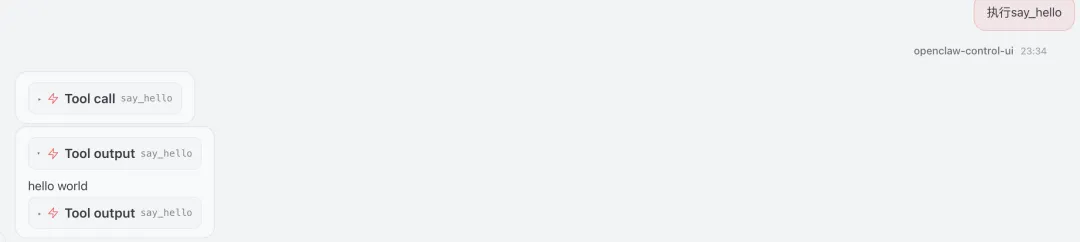
工具命名
-
• 不要和核心工具重名(冲突会被跳过)
Hook
OpenClaw 有 30+ 个 Hook,分成这几类:https://docs.openclaw.ai/plugins/hooks#hook-catalog
|
|
|
|---|---|
|
|
|
|
|
|
|
|
|
|
|
|
|
|
|
|
|
|
|
|
|
常用 Hook
-
• before_tool_call:审批、重写参数、阻止 -
• before_prompt_build:改 system prompt、加上下文 -
• llm_input/llm_output:日志
优先级
同一个Hook按 priority 降序执行:
api.on("before_tool_call", handler, { priority: 100 }); // 先执行api.on("before_tool_call", handler, { priority: 50 }); // 后执行超时
可以配置 Hook 的超时:
{ "plugins": { "entries": { "my-plugin": { "hooks": { "timeoutMs": 30000, "timeouts": { "before_prompt_build": 90000 } } } } }}可阻断Hook
有些 Hook 可以阻断流程,比如,
|
|
|
|
|---|---|---|
before_tool_call |
|
block: true
requireApproval / params |
message_sending |
|
cancel: true |
before_install |
|
block: true |
|
|
|
|
举个例子-拦截高危删除命令
阻止危险操作
#openclaw.plugin.json{ "id": "exec-protector", "name": "exec protector", "description": "Block dangerous shell exec commands", "configSchema": { "type": "object", "additionalProperties": false, "properties": { "blockedPatterns": { "type": "array", "items": { "type": "string" }, "default": ["rm -rf", "rm --recursive", "rm --force"], "description": "Array of command patterns to block" } } }}#package.json{ "name": "@workspace/exec-protector", "version": "1.0.0", "type": "module", "openclaw": { "extensions": ["./index.ts"] }}#入口文件index.tsimport { definePluginEntry } from "openclaw/plugin-sdk/plugin-entry";export default definePluginEntry({ id: "exec-protector", name: "Exec Protector", description: "Blocks dangerous exec commands to prevent accidental data loss", configSchema: { type: "object", additionalProperties: false, properties: { blockedPatterns: { type: "array", items: { type: "string" }, default: ["rm -rf", "rm --recursive", "rm --force"], description: "Array of command patterns to block" } } }, register(api, config) { const blockedPatterns: string[] = config?.blockedPatterns ?? [ "rm -rf", "rm --recursive", "rm --force", ]; // Convert string patterns to regex const compiledPatterns = blockedPatterns.map( (p) => new RegExp(p.replace(/[.*+?^${}()|[\]\\]/g, "\\$&"), "i") ); api.on("before_tool_call", async (ctx) => { const toolName = ctx.toolName ?? ""; const args = ctx.params ?? {}; if (toolName === "exec" || toolName === "shell" || toolName === "bash") { const command = args.command ?? args.cmd ?? args.script ?? ""; if (typeof command === "string") { const blocked = compiledPatterns.some((p) => p.test(command)); if (blocked) { api.logger.warn(`Blocked dangerous command: ${command}`); return { block: true, reason: `exec-protector: Command matched blocked pattern. Use safe alternatives.`, }; } } } return { block: false }; }, { name: "exec-protector-hook" }); api.logger.info("Exec Protector plugin registered with patterns:", blockedPatterns); },});openclaw plugins inspect exec-protectorExec Protectorid: exec-protectorBlocks dangerous exec commands to prevent accidental data lossStatus: loadedFormat: openclawSource: ~/.openclaw/extensions/exec-protector/index.tsOrigin: globalVersion: 1.0.0Shape: hook-onlyCapability mode: noneLegacy before_agent_start: noTyped hooks:before_tool_call#openclaw.json开启插件并且配置参数"plugins": { "enabled": true, "allow": [ "exec-protector" ], "entries": { "exec-protector": { "config": { "blockedPatterns": [ "rm -rf", "rm --recursive", "rm --force" ] } } }执行效果
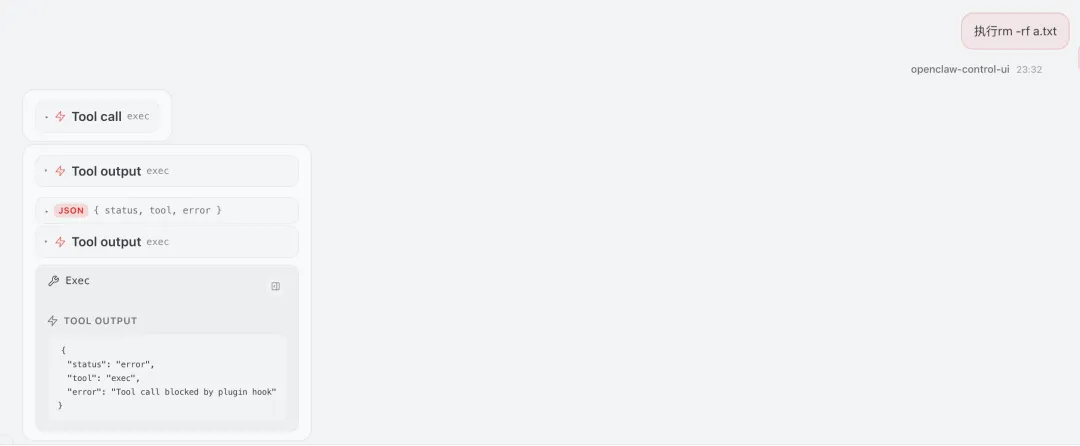
通过以上 OpenClaw 插件开发实践,可以提炼出以下两点核心设计思想:
1. 能力标准化与依赖倒置核心框架仅定义标准接口(抽象),具体功能由插件实现。这使得核心保持稳定,插件以无侵入方式扩展能力,真正实现可插拔架构。
2. 清单驱动与精确加载每个插件通过清单文件(manifest)自我声明其所提供的能力,框架根据声明类型(能力/钩子/……)按需精确加载。这种方式避免了盲目执行,兼顾了安全性、兼容性与高性能。