ARTICLE · 1316929
机器视觉工程师软件开发入门05- C#产品检测计数案例
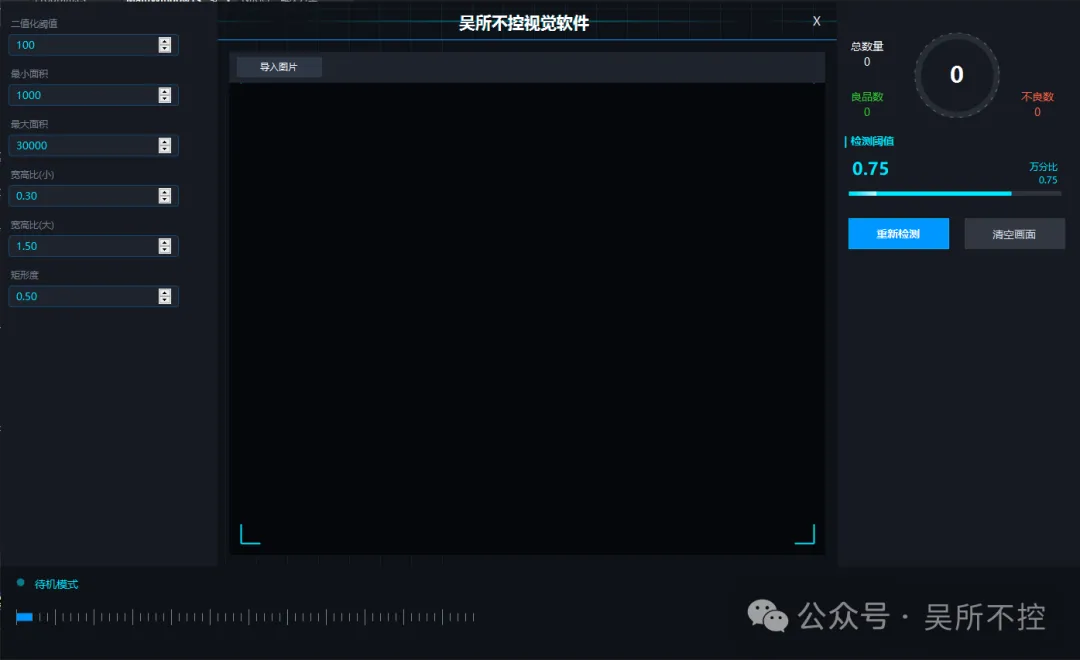
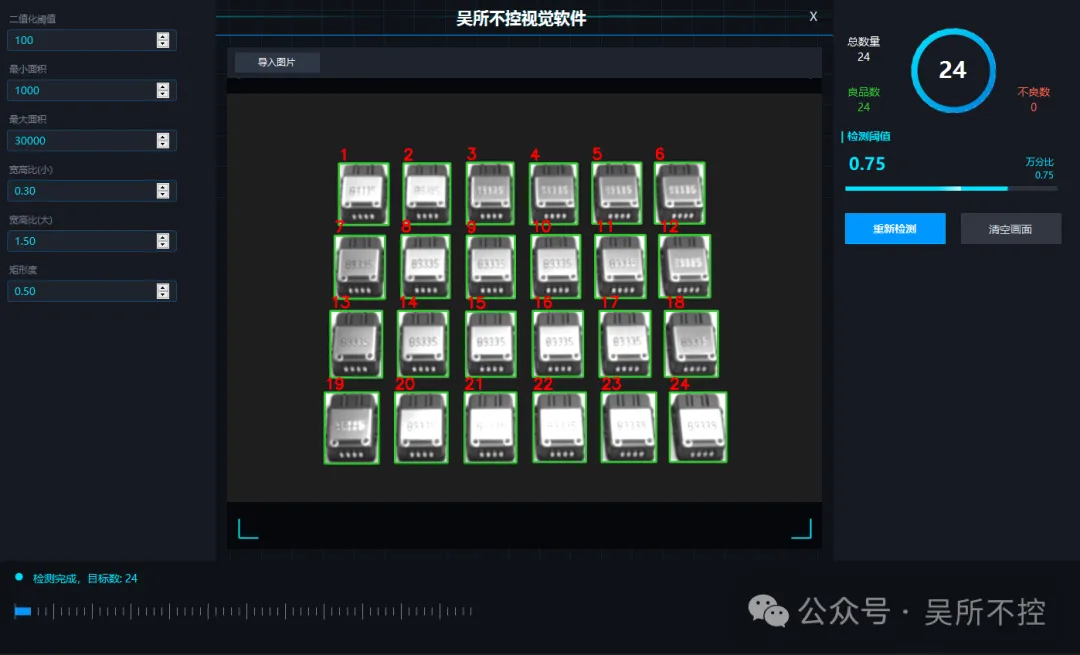
WinForms + OpenCvSharp的工业视觉检测软件,主要功能
1.导入图片自动转为灰度图片
2.高斯模糊 + 二值化 + 形态学闭运算预处理
3.轮廓提取与多条件筛选(面积、宽高比、矩形度)
4.智能排序:从上到下、从左到右排列检测框
5.目标标注(绿色边框 + 序号)
6.深色科技风 UI + 网格背景动画 + 扫描线动画 + 呼吸灯效果
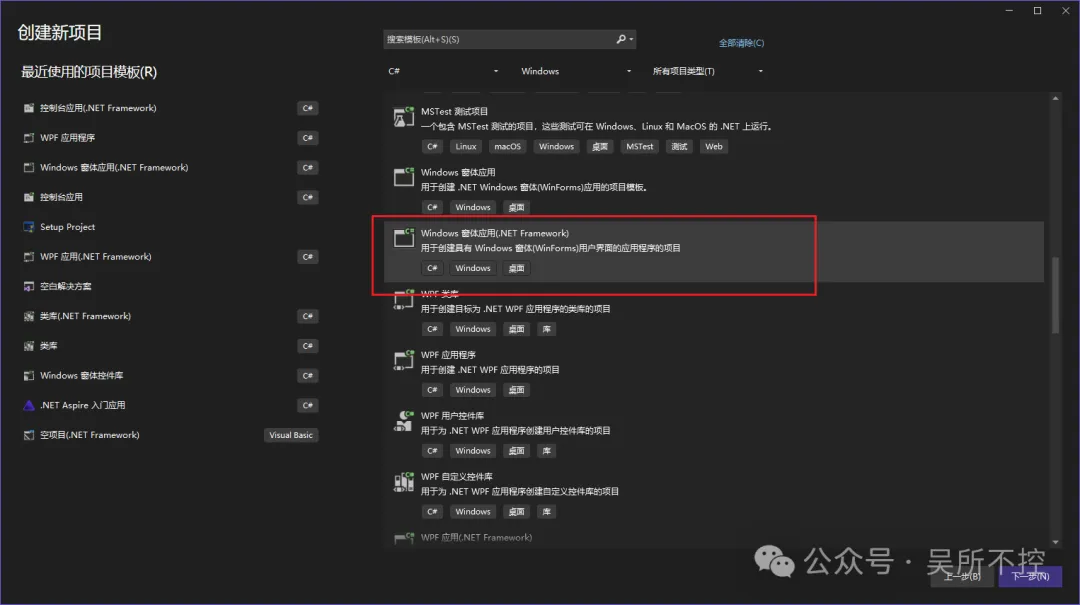
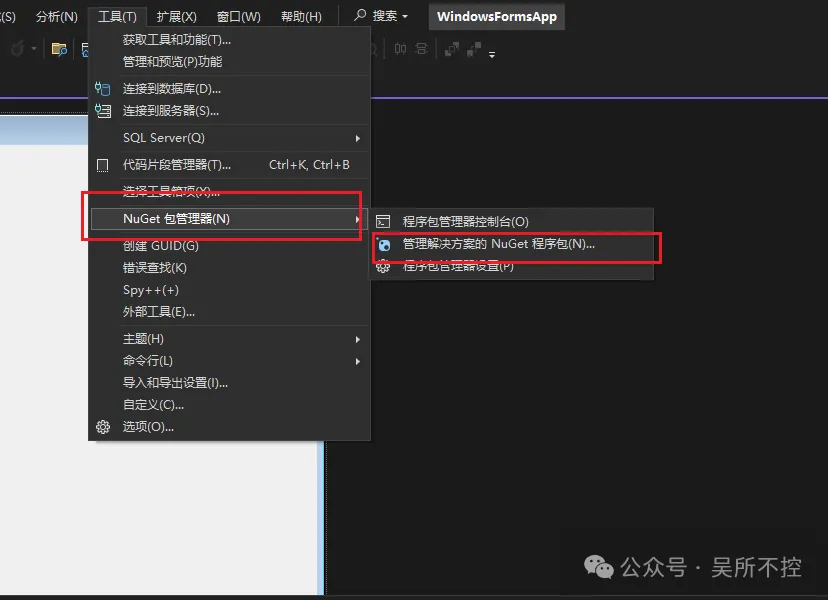
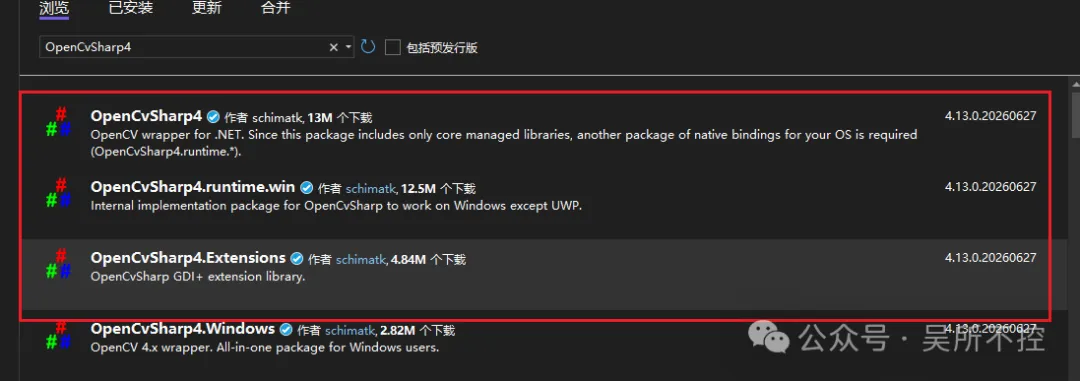
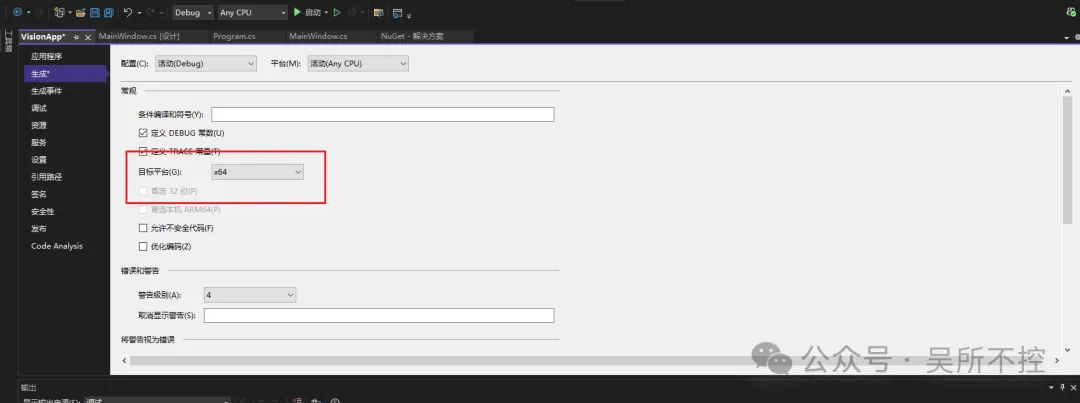
二、代码详细解释
命名空间与核心变量声明
using System;using System.Collections.Generic;using System.Drawing;using System.Drawing.Drawing2D;using System.Windows.Forms;using OpenCvSharp;using OpenCvSharp.Extensions;using System.Threading.Tasks;// 【注意】请把这行改成你实际项目的命名空间namespace WindowsFormsApp{ public class MainWindow : Form { // ==================== 核心变量 ==================== // currentImagePath: 当前加载的图片文件路径,用于后续检测时读取 private string currentImagePath = ""; // picDisplay: 用于显示图片/检测结果的 PictureBox 控件 private PictureBox picDisplay; // ringProgress: 环形进度条控件,显示检测数量 private RingProgressBar ringProgress; // lblTotal / lblGood / lblBad / lblStatus: 四个 Label 控件 // lblTotal → 总数量 // lblGood → 良品数 // lblBad → 不良数 // lblStatus → 底部状态栏文字 private Label lblTotal, lblGood, lblBad, lblStatus; // statusLight: 状态指示灯面板(带呼吸动画的圆形灯) private Panel statusLight; // progressBar: 进度条面板(右侧面板的装饰性进度条) private Panel progressBar; // ==================== 核心调试参数控件 ==================== // 以下 NumericUpDown 控件对应左侧面板的6个可调参数: // numThreshold → 二值化阈值(0~255) // numMinArea → 最小面积阈值 // numMaxArea → 最大面积阈值 // numMinRatio → 最小宽高比 // numMaxRatio → 最大宽高比 // numExtent → 最小矩形度(面积/外接矩形面积) private NumericUpDown numThreshold, numMinArea, numMaxArea, numMinRatio, numMaxRatio, numExtent; // ==================== 动画变量 ==================== // animTimer: 动画定时器,每30ms刷新一次,驱动所有动画效果 private Timer animTimer; // animOffset: 背景网格的偏移量,实现网格流动动画 private float animOffset = 0; // scanLineY: 扫描线的 Y 坐标,实现从上到下的扫描动画 private float scanLineY = 0; // isScanning: 是否正在扫描检测(控制扫描线动画的开关) private bool isScanning = false; // breathAlpha: 呼吸灯的透明度值(0.2~1.0 之间循环) private float breathAlpha = 1.0f; // breathDir: 呼吸方向(-1=变暗,1=变亮) private int breathDir = -1; // ==================== 颜色体系 ==================== // 定义整个软件的深色科技风配色方案: private Color bgColor = Color.FromArgb(15, 18, 24); // 主背景色(深蓝黑) private Color panelColor = Color.FromArgb(22, 26, 34); // 面板背景色(稍浅的蓝黑) private Color inputBgColor = Color.FromArgb(30, 35, 45); // 输入框背景色 private Color textColor = Color.FromArgb(220, 225, 235); // 主文字色(浅灰白) private Color subTextColor = Color.FromArgb(120, 130, 145); // 副文字色(深灰) private Color accentBlue = Color.FromArgb(0, 150, 255); // 强调蓝(按钮/边框) private Color accentCyan = Color.FromArgb(0, 230, 255); // 强调青(标题/高亮)
构造函数与背景绘制
public MainWindow() { // 去掉窗口边框(自定义标题栏) this.FormBorderStyle = FormBorderStyle.None; // 设置窗口大小 1400x850 this.Size = new System.Drawing.Size(1400, 850); // 设置主背景色 this.BackColor = bgColor; // 开启双缓冲,防止绘制闪烁 this.DoubleBuffered = true; // 窗口启动时居中显示 this.StartPosition = FormStartPosition.CenterScreen; // 创建动画定时器,间隔30ms(约33FPS) animTimer = new Timer { Interval = 30 }; // 初始化UI布局 SetupUI(); // 启动动画循环 StartAnimation(); } /// <summary> /// 重写背景绘制方法,绘制流动网格背景 /// </summary> protected override void OnPaintBackground(PaintEventArgs e) { // 先清空背景为深色 e.Graphics.Clear(bgColor); // 开启抗锯齿,让线条更平滑 e.Graphics.SmoothingMode = SmoothingMode.AntiAlias; int gridSize = 40; // 网格间距40像素 // 计算当前偏移量(用于动画) int offset = (int)(animOffset % gridSize); // 创建半透明蓝色网格画笔 using (Pen gridPen = new Pen(Color.FromArgb(25, accentBlue), 1)) { // 绘制垂直线(带水平偏移动画) for (int x = -gridSize + offset; x < this.Width; x += gridSize) e.Graphics.DrawLine(gridPen, x, 0, x, this.Height); // 绘制水平线(带垂直偏移动画) for (int y = -gridSize + offset; y < this.Height; y += gridSize) e.Graphics.DrawLine(gridPen, 0, y, this.Width, y); } }
动画系统
/// <summary> /// 启动动画定时器,每帧更新所有动画变量并触发重绘 /// </summary> private void StartAnimation() { animTimer.Tick += (s, e) => { // 更新网格偏移量(实现网格流动效果) animOffset += 1.5f; // 防止数值溢出,超过10000归零 if (animOffset > 10000) animOffset = 0; // 如果正在扫描,更新扫描线位置 if (isScanning && picDisplay != null && picDisplay.Height > 0) { scanLineY += 8f; // 扫描线每次下移8像素 if (scanLineY > picDisplay.Height) scanLineY = 0; // 超出图片高度后回到顶部 } // 更新呼吸灯透明度(在0.2~1.0之间来回变化) breathAlpha += 0.05f * breathDir; if (breathAlpha <= 0.2f) { breathAlpha = 0.2f; breathDir = 1; } // 最暗时反转方向 if (breathAlpha >= 1.0f) { breathAlpha = 1.0f; breathDir = -1; } // 最亮时反转方向 // 触发主窗口和关键控件重绘 this.Invalidate(); if (picDisplay != null) picDisplay.Invalidate(); if (statusLight != null) statusLight.Invalidate(); if (progressBar != null) progressBar.Invalidate(); }; animTimer.Start(); }
UI 布局搭建
/// <summary> /// 搭建主窗口UI布局:顶部标题栏 + 左侧参数面板 + 右侧统计面板 + 底部状态栏 + 中间图片显示区 /// </summary> private void SetupUI() { // ===== 顶部标题栏 ===== Panel topBar = new Panel { Dock = DockStyle.Top, Height = 50, BackColor = Color.Transparent }; // 开启DoubleBuffered(通过反射设置私有属性)防止标题栏重绘闪烁 topBar.GetType().GetProperty("DoubleBuffered", System.Reflection.BindingFlags.Instance | System.Reflection.BindingFlags.NonPublic).SetValue(topBar, true, null); // 标题栏绘制事件:绘制渐变装饰线 + 标题文字(带阴影效果) topBar.Paint += (s, e) => { Graphics g = e.Graphics; g.SmoothingMode = SmoothingMode.AntiAlias; // 绘制顶部渐变装饰线(青色渐变,带流动动画) using (LinearGradientBrush brush = new LinearGradientBrush( new PointF(animOffset * 3 - 300, 25), new PointF(animOffset * 3, 25), Color.Transparent, Color.FromArgb(120, accentCyan))) { brush.WrapMode = WrapMode.TileFlipX; g.DrawLine(new Pen(brush, 2), 0, 25, topBar.Width, 25); } // 绘制标题文字(带阴影偏移效果) string title = "吴所不控视觉软件"; Font f = new Font("微软雅黑", 16, FontStyle.Bold); SizeF size = g.MeasureString(title, f); float centerX = (topBar.Width - size.Width) / 2; // 先画阴影(黑色半透明,右下偏移1像素) g.DrawString(title, f, new SolidBrush(Color.FromArgb(150, 0, 0, 0)), centerX + 1, 12 + 1); // 再画青色描边效果(左上偏移1像素) g.DrawString(title, f, new SolidBrush(Color.FromArgb(80, accentCyan)), centerX - 1, 12); // 最后画白色正文 g.DrawString(title, f, new SolidBrush(Color.White), centerX, 12); // 绘制标题栏底部蓝色分割线 g.DrawLine(new Pen(accentBlue, 1), 0, topBar.Height - 1, topBar.Width, topBar.Height - 1); }; // 创建关闭按钮(右上角红色X按钮) Button closeBtn = new Button { Text = "X", Dock = DockStyle.Right, Width = 50, FlatStyle = FlatStyle.Flat, ForeColor = textColor, BackColor = Color.Transparent, Font = new Font("微软雅黑", 12) }; closeBtn.FlatAppearance.BorderSize = 0; // 去掉边框 closeBtn.FlatAppearance.MouseOverBackColor = Color.Red; // 鼠标悬停变红 closeBtn.Click += (s, e) => this.Close(); // 点击关闭窗口 // 标题栏鼠标拖拽移动窗口(发送Windows消息) topBar.MouseDown += (s, e) => { if (e.Button == MouseButtons.Left) { ReleaseCapture(); SendMessage(Handle, 0xA1, 0x2, 0); } }; topBar.Controls.Add(closeBtn); this.Controls.Add(topBar); // ===== 左侧参数面板 ===== Panel leftPanel = new Panel { Dock = DockStyle.Left, Width = 280, BackColor = panelColor, Padding = new Padding(15, 30, 15, 15), AutoScroll = true }; DrawLeftPanel(leftPanel); this.Controls.Add(leftPanel); // ===== 右侧统计面板 ===== Panel rightPanel = new Panel { Dock = DockStyle.Right, Width = 320, BackColor = panelColor, Padding = new Padding(15, 30, 15, 15) }; DrawRightPanel(rightPanel); this.Controls.Add(rightPanel); // ===== 底部状态栏 ===== Panel bottomPanel = new Panel { Dock = DockStyle.Bottom, Height = 120, BackColor = Color.FromArgb(15, 18, 24), Padding = new Padding(20) }; DrawBottomPanel(bottomPanel); this.Controls.Add(bottomPanel); // ===== 中间图片显示区(放在最上层) ===== Panel centerPanel = new Panel { Dock = DockStyle.Fill, BackColor = Color.Transparent, Padding = new Padding(15) }; DrawCenterPanel(centerPanel); this.Controls.Add(centerPanel); centerPanel.BringToFront(); // 确保图片显示区在最上层 }
左侧参数面板
/// <summary> /// 绘制左侧参数调节面板(6个数值输入框) /// </summary> private void DrawLeftPanel(Panel panel) { int startY = 20; // 第一个控件的起始Y坐标 int gap = 65; // 每个参数项之间的间距 // 定义一个工厂方法,用于创建参数输入控件 // 参数说明:name=标签文字, y=Y坐标, defVal=默认值, min=最小值, max=最大值, assign=赋值回调 Action<string, int, decimal, decimal, decimal, Action<NumericUpDown>> createParam = (name, y, defVal, min, max, assign) => { // 创建参数标签 Label lbl = new Label { Text = name, ForeColor = subTextColor, Location = new System.Drawing.Point(10, y), AutoSize = true, Font = new Font("微软雅黑", 9) }; // 创建输入框背景面板(带圆角边框) Panel inputBox = new Panel { Location = new System.Drawing.Point(10, y + 22), Size = new System.Drawing.Size(220, 28), BackColor = inputBgColor }; inputBox.Paint += (s, e) => { Graphics g = e.Graphics; g.SmoothingMode = SmoothingMode.AntiAlias; // 绘制圆角矩形边框 GraphicsPath path = GetRoundRectPath(new System.Drawing.Rectangle(0, 0, 219, 27), 4); g.DrawPath(new Pen(Color.FromArgb(80, accentBlue), 1), path); }; // 创建数值输入框控件 NumericUpDown num = new NumericUpDown { Location = new System.Drawing.Point(10, 4), Size = new System.Drawing.Size(200, 22), Minimum = min, Maximum = max, Value = defVal, // 部分参数保留2位小数 DecimalPlaces = (name == "宽高比(小)" || name == "宽高比(大)" || name == "矩形度") ? 2 : 0, BackColor = inputBgColor, ForeColor = accentCyan, BorderStyle = BorderStyle.None, Font = new Font("微软雅黑", 10) }; // 通过回调将控件引用赋值给类字段 assign(num); inputBox.Controls.Add(num); panel.Controls.Add(lbl); panel.Controls.Add(inputBox); }; // 依次创建6个参数控件 createParam("二值化阈值", startY, 100, 0, 255, n => numThreshold = n); createParam("最小面积", startY + gap, 1000, 0, 100000, n => numMinArea = n); createParam("最大面积", startY + gap * 2, 30000, 0, 200000, n => numMaxArea = n); createParam("宽高比(小)", startY + gap * 3, 0.30m, 0.1m, 5.0m, n => numMinRatio = n); createParam("宽高比(大)", startY + gap * 4, 1.50m, 0.1m, 5.0m, n => numMaxRatio = n); createParam("矩形度", startY + gap * 5, 0.50m, 0.1m, 1.0m, n => numExtent = n); }
右侧统计面板
/// <summary> /// 绘制右侧统计面板(环形进度条 + 统计数据 + 操作按钮) /// </summary> private void DrawRightPanel(Panel panel) { // 创建环形进度条控件 ringProgress = new RingProgressBar { Location = new System.Drawing.Point(100, 40), Size = new System.Drawing.Size(110, 110), Value = 0, MaxValue = 1 }; panel.Controls.Add(ringProgress); // 创建统计标签 lblTotal = new Label { Text = "总数量\n0", ForeColor = Color.White, Location = new System.Drawing.Point(5, 45), Size = new System.Drawing.Size(70, 45), Font = new Font("微软雅黑", 10), TextAlign = ContentAlignment.MiddleCenter }; lblGood = new Label { Text = "良品数\n0", ForeColor = Color.LimeGreen, Location = new System.Drawing.Point(5, 110), Size = new System.Drawing.Size(70, 45), Font = new Font("微软雅黑", 10), TextAlign = ContentAlignment.MiddleCenter }; lblBad = new Label { Text = "不良数\n0", ForeColor = Color.Tomato, Location = new System.Drawing.Point(225, 110), Size = new System.Drawing.Size(70, 45), Font = new Font("微软雅黑", 10), TextAlign = ContentAlignment.MiddleCenter }; panel.Controls.Add(lblTotal); panel.Controls.Add(lblGood); panel.Controls.Add(lblBad); // 创建"检测阈值"标题和进度条数值显示 Label title3 = new Label { Text = "| 检测阈值", ForeColor = accentCyan, Font = new Font("微软雅黑", 10, FontStyle.Bold), Location = new System.Drawing.Point(5, 170), AutoSize = true }; panel.Controls.Add(title3); Label lblThreshold = new Label { Text = "0.75", ForeColor = accentCyan, Font = new Font("微软雅黑", 16, FontStyle.Bold), Location = new System.Drawing.Point(15, 200), AutoSize = true }; Label lblThrRight = new Label { Text = "万分比\n0.75", ForeColor = accentCyan, Location = new System.Drawing.Point(200, 205), Size = new System.Drawing.Size(90, 40), Font = new Font("微软雅黑", 9), TextAlign = ContentAlignment.TopRight }; // 创建装饰性进度条面板(带流动光效) progressBar = new Panel { Location = new System.Drawing.Point(15, 245), Size = new System.Drawing.Size(275, 6), BackColor = Color.FromArgb(45, 50, 60) }; progressBar.Paint += (s, e) => { Graphics g = e.Graphics; g.SmoothingMode = SmoothingMode.AntiAlias; int fillWidth = 210; // 进度条填充宽度 // 绘制青色底色进度条 g.FillRectangle(new SolidBrush(accentCyan), 0, 0, fillWidth, 6); // 绘制流动高光效果(用一个裁剪区域限制高光只在进度条范围内显示) GraphicsState state = g.Save(); g.SetClip(new System.Drawing.Rectangle(0, 0, fillWidth, 6)); // 计算高光条的当前位置(基于动画偏移量) int pPos = (int)(animOffset * 4 % (fillWidth + 30)) - 30; // 绘制渐变高光条 using (LinearGradientBrush brush = new LinearGradientBrush( new System.Drawing.Point(pPos, 0), new System.Drawing.Point(pPos + 30, 0), Color.Transparent, Color.FromArgb(200, 255, 255, 255))) { g.FillRectangle(brush, pPos, 0, 30, 6); } g.Restore(state); }; panel.Controls.Add(lblThreshold); panel.Controls.Add(lblThrRight); panel.Controls.Add(progressBar); // 创建"重新检测"按钮(蓝色主按钮) Button btnStart = new Button { Text = "重新检测", Location = new System.Drawing.Point(15, 280), Size = new System.Drawing.Size(130, 40), FlatStyle = FlatStyle.Flat, BackColor = accentBlue, ForeColor = Color.White, Font = new Font("微软雅黑", 10, FontStyle.Bold) }; btnStart.FlatAppearance.BorderSize = 0; btnStart.Click += BtnStartDetect_Click; // 绑定点击事件 // 按钮绘制:添加青色边框 btnStart.Paint += (s, e) => { e.Graphics.DrawRectangle(new Pen(Color.FromArgb(100, accentCyan), 1), 0, 0, btnStart.Width - 1, btnStart.Height - 1); }; // 创建"清空画面"按钮(灰色次按钮) Button btnStop = new Button { Text = "清空画面", Location = new System.Drawing.Point(165, 280), Size = new System.Drawing.Size(130, 40), FlatStyle = FlatStyle.Flat, BackColor = Color.FromArgb(50, 55, 65), ForeColor = textColor, Font = new Font("微软雅黑", 10) }; btnStop.FlatAppearance.BorderSize = 0; btnStop.Click += (s, e) => { // 释放旧图片资源 if (picDisplay.Image != null) { picDisplay.Image.Dispose(); picDisplay.Image = null; } currentImagePath = ""; // 清空路径 ResetStats(); // 重置统计数据 lblStatus.Text = "待机模式"; // 更新状态 isScanning = false; // 停止扫描动画 }; panel.Controls.Add(btnStart); panel.Controls.Add(btnStop); }
中间图片显示区
/// <summary> /// 绘制中间图片显示区域(带四角标记 + 扫描线动画) /// </summary> private void DrawCenterPanel(Panel panel) { // 创建顶部工具栏 Panel toolBar = new Panel { Dock = DockStyle.Top, Height = 40, BackColor = Color.FromArgb(30, 35, 45) }; // 创建"导入图片"按钮 Button btnImport = new Button { Text = "导入图片", Location = new System.Drawing.Point(10, 7), Size = new System.Drawing.Size(110, 26), FlatStyle = FlatStyle.Flat, BackColor = Color.FromArgb(45, 55, 70), ForeColor = Color.White, Font = new Font("微软雅黑", 9) }; btnImport.FlatAppearance.BorderSize = 0; btnImport.Click += BtnImport_Click; // 绑定导入事件 toolBar.Controls.Add(btnImport); panel.Controls.Add(toolBar); // 创建图片显示控件 picDisplay = new PictureBox { Dock = DockStyle.Fill, SizeMode = PictureBoxSizeMode.Zoom, BackColor = Color.FromArgb(5, 7, 10) }; picDisplay.Paint += (s, e) => { Graphics g = e.Graphics; g.SmoothingMode = SmoothingMode.AntiAlias; int margin = 15; // 角标距离边缘的偏移 int len = 25; // 角标线条长度 Pen cornerPen = new Pen(accentCyan, 2); // 绘制左上角标记(水平线 + 垂直线) g.DrawLine(cornerPen, margin, margin, margin + len, margin); g.DrawLine(cornerPen, margin, margin, margin, margin + len); // 绘制右上角标记 g.DrawLine(cornerPen, picDisplay.Width - margin, margin, picDisplay.Width - margin - len, margin); g.DrawLine(cornerPen, picDisplay.Width - margin, margin, picDisplay.Width - margin, margin + len); // 绘制左下角标记 g.DrawLine(cornerPen, margin, picDisplay.Height - margin, margin + len, picDisplay.Height - margin); g.DrawLine(cornerPen, margin, picDisplay.Height - margin, margin, picDisplay.Height - margin - len); // 绘制右下角标记 g.DrawLine(cornerPen, picDisplay.Width - margin, picDisplay.Height - margin, picDisplay.Width - margin - len, picDisplay.Height - margin); g.DrawLine(cornerPen, picDisplay.Width - margin, picDisplay.Height - margin, picDisplay.Width - margin, picDisplay.Height - margin - len); // 如果正在扫描,绘制扫描线动画效果 if (isScanning) { // 创建从上到下的渐变画笔(青色→透明) using (LinearGradientBrush brush = new LinearGradientBrush( new System.Drawing.Point(0, (int)scanLineY), new System.Drawing.Point(picDisplay.Width, (int)scanLineY), accentCyan, Color.Transparent)) { // 绘制扫描线(青色实线) g.DrawLine(new Pen(Color.FromArgb(180, accentCyan), 2), 0, scanLineY, picDisplay.Width, scanLineY); // 绘制扫描线下方渐变区域(模拟扫描余晖) g.FillRectangle(new SolidBrush(Color.FromArgb(30, accentCyan)), 0, scanLineY, picDisplay.Width, 20); } } }; panel.Controls.Add(picDisplay); }
底部状态栏
/// <summary> /// 绘制底部状态栏(状态指示灯 + 状态文字 + 刻度尺动画) /// </summary> private void DrawBottomPanel(Panel panel) { // 创建状态指示灯(带呼吸动画的圆形灯) statusLight = new Panel { Location = new System.Drawing.Point(20, 15), Size = new System.Drawing.Size(12, 12), BackColor = Color.Transparent }; statusLight.Paint += (s, e) => { e.Graphics.SmoothingMode = SmoothingMode.AntiAlias; // 绘制圆形,透明度由breathAlpha控制(实现呼吸效果) e.Graphics.FillEllipse(new SolidBrush(Color.FromArgb((int)(breathAlpha * 255), 0, 230, 255)), 0, 0, 10, 10); }; panel.Controls.Add(statusLight); // 创建状态文字标签 lblStatus = new Label { Text = "待机模式", ForeColor = accentCyan, Location = new System.Drawing.Point(40, 12), AutoSize = true, Font = new Font("微软雅黑", 10) }; panel.Controls.Add(lblStatus); // 创建刻度尺控件(带流动标记动画) PictureBox scale = new PictureBox { Location = new System.Drawing.Point(20, 40), Size = new System.Drawing.Size(600, 50), BackColor = Color.Transparent }; scale.Paint += (s, e) => { Graphics g = e.Graphics; g.SmoothingMode = SmoothingMode.AntiAlias; Pen p = new Pen(subTextColor, 1); // 绘制刻度线(每50像素画长线,其余画短线) for (int i = 0; i < 600; i += 10) { int height = (i % 50 == 0) ? 10 : 5; g.DrawLine(p, i, 25 - height, i, 25 + height); } // 绘制流动标记(蓝色方块沿刻度尺移动) int pos = (int)(animOffset * 2 % 600); g.FillRectangle(new SolidBrush(accentBlue), pos, 20, 20, 10); }; panel.Controls.Add(scale); }
图片导入功能
/// <summary> /// 导入图片按钮点击事件 /// 打开文件对话框 → 读取图片 → 转为灰度图 → 显示到PictureBox /// </summary> private void BtnImport_Click(object sender, EventArgs e) { // 创建文件打开对话框 using (OpenFileDialog ofd = new OpenFileDialog()) { // 设置文件过滤器(只允许选择图片文件) ofd.Filter = "图片文件 (*.jpg;*.jpeg;*.png;*.bmp)|*.jpg;*.jpeg;*.png;*.bmp"; // 用户点击确定 if (ofd.ShowDialog() == DialogResult.OK) { // 保存文件路径 currentImagePath = ofd.FileName; // 释放旧图片资源 if (picDisplay.Image != null) picDisplay.Image.Dispose(); try { // 读取图片文件字节数组 byte[] imageBytes = System.IO.File.ReadAllBytes(currentImagePath); // 使用OpenCvSharp解码图片为灰度图 using (Mat grayMat = Cv2.ImDecode(imageBytes, ImreadModes.Grayscale)) { // 检查图片是否有效 if (grayMat != null && !grayMat.Empty()) { // 将OpenCv的Mat转为Bitmap并显示 picDisplay.Image = BitmapConverter.ToBitmap(grayMat); } } } catch (Exception ex) { MessageBox.Show("图片读取失败:" + ex.Message); } // 重置统计数据 ResetStats(); // 更新状态栏文字 lblStatus.Text = "已就绪 (工业灰度图)"; } } }
核心检测逻辑(重点!)
/// <summary> /// 重新检测按钮点击事件(核心图像处理流程) /// 流程:读取图片 → 灰度化 → 高斯模糊 → 二值化 → 形态学闭运算 → 轮廓提取 → 多条件筛选 → 智能排序 → 标注绘制 /// </summary> private async void BtnStartDetect_Click(object sender, EventArgs e) { // 检查是否已导入图片 if (string.IsNullOrEmpty(currentImagePath) || !System.IO.File.Exists(currentImagePath)) { MessageBox.Show("请先导入图片!"); return; } // 设置扫描状态为true(触发扫描线动画) isScanning = true; scanLineY = 0; lblStatus.Text = "正在扫描检测..."; // 异步等待800ms(让用户看到扫描动画开始) await Task.Delay(800); try { // ===== 第1步:读取图片 ===== byte[] imageBytes = System.IO.File.ReadAllBytes(currentImagePath); // 解码为灰度图Mat Mat srcMat = Cv2.ImDecode(imageBytes, ImreadModes.Grayscale); Mat binary = new Mat(); // ===== 第2步:读取用户调节的参数 ===== double thresholdVal = (double)numThreshold.Value; // 二值化阈值 double minArea = (double)numMinArea.Value; // 最小面积 double maxArea = (double)numMaxArea.Value; // 最大面积 double minRatio = (double)numMinRatio.Value; // 最小宽高比 double maxRatio = (double)numMaxRatio.Value; // 最大宽高比 double minExtent = (double)numExtent.Value; // 最小矩形度 // ===== 第3步:图像预处理 ===== // 高斯模糊:消除噪声,模糊半径5x5,标准差0(自动计算) Cv2.GaussianBlur(srcMat, srcMat, new OpenCvSharp.Size(5, 5), 0); // 二值化:大于阈值的变黑,小于阈值的变白(BinaryInv反二值化) Cv2.Threshold(srcMat, binary, thresholdVal, 255, ThresholdTypes.BinaryInv); // 形态学闭运算:先膨胀后腐蚀,用于连接断裂的轮廓边缘 Mat kernel = Cv2.GetStructuringElement(MorphShapes.Rect, new OpenCvSharp.Size(5, 5)); Cv2.MorphologyEx(binary, binary, MorphTypes.Close, kernel); // ===== 第4步:轮廓提取 ===== // 提取外部轮廓(RetrievalModes.External只提取最外层轮廓) // ContourApproximationModes.ApproxSimple 简化轮廓(减少点数) Cv2.FindContours(binary, out OpenCvSharp.Point[][] contours, out HierarchyIndex[] hierarchy, RetrievalModes.External, ContourApproximationModes.ApproxSimple); // 创建掩膜(用于后续提取检测区域) Mat mask = new Mat(srcMat.Size(), MatType.CV_8UC1, Scalar.Black); List<OpenCvSharp.Rect> validRects = new List<OpenCvSharp.Rect>(); // ===== 第5步:遍历所有轮廓,多条件筛选 ===== foreach (var contour in contours) { // 计算轮廓面积 double area = Cv2.ContourArea(contour); // 获取轮廓的最小外接矩形 OpenCvSharp.Rect rect = Cv2.BoundingRect(contour); // 多条件筛选: // 1. 面积在[minArea, maxArea]范围内 // 2. 宽度和高度都大于10像素(过滤噪点) if (area >= minArea && area <= maxArea && rect.Width > 10 && rect.Height > 10) { // 计算矩形度(轮廓面积 / 外接矩形面积),越接近1越接近矩形 double rectArea = rect.Width * rect.Height; double extent = area / rectArea; // 计算宽高比 double aspectRatio = (double)rect.Width / rect.Height; // 矩形度和宽高比也需满足条件 if (extent >= minExtent && aspectRatio >= minRatio && aspectRatio <= maxRatio) { // 通过筛选,保存到有效矩形列表 validRects.Add(rect); // 在掩膜上绘制白色矩形(标记检测区域) Cv2.Rectangle(mask, rect, Scalar.White, -1); } } } // ==================== 【核心:智能排序逻辑】 ==================== // 排序目标:按照"从上到下,同一行内从左到右"的顺序排列检测框 // 应用场景:适用于传送带上零件依次排列的场景,序号需要按阅读顺序标注 validRects.Sort((rect1, rect2) => { // 计算两个矩形的中心点Y坐标 int cy1 = rect1.Y + rect1.Height / 2; int cy2 = rect2.Y + rect2.Height / 2; // 如果两个框的Y中心点相差不超过矩形高度的一半,认为在同一行 if (Math.Abs(cy1 - cy2) < rect1.Height / 2) { // 同一行 → 按X坐标从小到大排序(从左到右) return rect1.X.CompareTo(rect2.X); } else { // 不同行 → 按Y中心点从小到大排序(从上到下) return cy1.CompareTo(cy2); } }); // ============================================================== // ===== 第6步:图像处理与结果绘制 ===== // 用掩膜提取检测区域(背景变黑,检测区域保留原图) Mat maskedGray = new Mat(); srcMat.CopyTo(maskedGray, mask); // 增强对比度(乘1.3倍亮度 + 加30偏移),让检测区域更清晰 maskedGray.ConvertTo(maskedGray, -1, 1.3, 30); // 将灰度图转为BGR彩色图(OpenCv的Rectangle/PutText需要彩色图才能显示彩色) Mat result = new Mat(); Cv2.CvtColor(maskedGray, result, ColorConversionCodes.GRAY2BGR); // 按排序后的顺序,依次绘制绿色边框和红色序号 for (int i = 0; i < validRects.Count; i++) { // 绘制绿色矩形边框(粗细2像素) Cv2.Rectangle(result, validRects[i], Scalar.LimeGreen, 2); // 在矩形左上角上方绘制红色序号文字 Cv2.PutText(result, (i + 1).ToString(), new OpenCvSharp.Point(validRects[i].X, validRects[i].Y - 5), HersheyFonts.HersheySimplex, 0.7, Scalar.Red, 2); } // ===== 第7步:更新UI(必须用Invoke切换到UI线程) ===== this.Invoke(new Action(() => { // 释放旧图片 if (picDisplay.Image != null) picDisplay.Image.Dispose(); // 显示检测结果 picDisplay.Image = BitmapConverter.ToBitmap(result); int count = validRects.Count; // 更新环形进度条 ringProgress.Value = count; ringProgress.MaxValue = count > 0 ? count : 1; ringProgress.Invalidate(); // 更新统计标签 lblTotal.Text = $"总数量\n{count}"; lblGood.Text = $"良品数\n{count}"; lblBad.Text = $"不良数\n0"; // 更新状态栏 lblStatus.Text = $"检测完成,目标数: {count}"; isScanning = false; // 停止扫描动画 })); // ===== 资源释放(防止内存泄漏) ===== mask.Dispose(); maskedGray.Dispose(); binary.Dispose(); srcMat.Dispose(); result.Dispose(); } catch (Exception ex) { MessageBox.Show("异常: " + ex.Message); lblStatus.Text = "检测出错"; isScanning = false; } }
辅助方法与自定义控件
/// <summary> /// 重置统计数据(导入新图片时调用) /// </summary> private void ResetStats() { ringProgress.Value = 0; ringProgress.MaxValue = 1; ringProgress.Invalidate(); lblTotal.Text = "总数量\n0"; lblGood.Text = "良品数\n0"; lblBad.Text = "不良数\n0"; } /// <summary> /// 绘制圆角矩形路径(用于输入框的圆角边框效果) /// </summary> /// <param name="rect">矩形区域</param> /// <param name="radius">圆角半径</param> /// <returns>圆角矩形路径</returns> private GraphicsPath GetRoundRectPath(System.Drawing.Rectangle rect, int radius) { GraphicsPath path = new GraphicsPath(); float r2 = radius * 2F; // 直径 // 依次添加四个角的圆弧(左上→右上→右下→左下) path.AddArc(rect.X, rect.Y, r2, r2, 180, 90); // 左上角 path.AddArc(rect.Width - r2, rect.Y, r2, r2, 270, 90); // 右上角 path.AddArc(rect.Width - r2, rect.Height - r2, r2, r2, 0, 90); // 右下角 path.AddArc(rect.X, rect.Height - r2, r2, r2, 90, 90); // 左下角 path.CloseFigure(); // 闭合路径 return path; } // ===== Windows API 导入 ===== // ReleaseCapture: 释放鼠标捕获(配合拖拽窗口使用) [System.Runtime.InteropServices.DllImport("user32.dll")] public static extern bool ReleaseCapture(); // SendMessage: 发送Windows消息(0xA1=WM_NCLBUTTONDOWN, 0x2=HTCAPTION表示标题栏) // 组合使用实现:在标题栏区域按住鼠标左键拖动窗口 [System.Runtime.InteropServices.DllImport("user32.dll")] public static extern bool SendMessage(IntPtr hWnd, int msg, int wParam, int lParam); } // ==================== 自定义控件:环形进度条 ==================== public class RingProgressBar : Control { // Value: 当前值(检测到的目标数量) public int Value { get; set; } = 0; // MaxValue: 最大值(用于计算百分比) public int MaxValue { get; set; } = 100; public RingProgressBar() { // 开启双缓冲防止绘制闪烁 this.DoubleBuffered = true; } /// <summary> /// 绘制环形进度条 /// 绘制逻辑:先画灰色底环 → 再画青色渐变进度弧 → 再画虚线外圈装饰 → 最后画中心数字 /// </summary> protected override void OnPaint(PaintEventArgs e) { base.OnPaint(e); Graphics g = e.Graphics; g.SmoothingMode = SmoothingMode.AntiAlias; int thickness = 8; // 圆环粗细 int margin = thickness / 2; // 边距 // 计算圆环绘制区域(去掉粗细占用的空间) System.Drawing.Rectangle rect = new System.Drawing.Rectangle(margin, margin, Width - thickness, Height - thickness); // 1. 绘制灰色底环(完整的360度圆环) using (Pen bgPen = new Pen(Color.FromArgb(40, 45, 55), thickness)) g.DrawArc(bgPen, rect, 0, 360); // 2. 计算进度弧的角度(Value/MaxValue * 360度) float sweepAngle = (float)Value / MaxValue * 360; // 3. 绘制青色渐变进度弧 using (LinearGradientBrush brush = new LinearGradientBrush( new System.Drawing.Point(0, 0), new System.Drawing.Point(Width, Height), Color.FromArgb(0, 230, 255), Color.FromArgb(0, 120, 215))) using (Pen progressPen = new Pen(brush, thickness)) { // 设置圆头端帽,让弧线两端更圆润 progressPen.StartCap = LineCap.Round; progressPen.EndCap = LineCap.Round; // 绘制进度弧(从-90度开始,即从顶部开始顺时针绘制) g.DrawArc(progressPen, rect, -90, sweepAngle); } // 4. 绘制虚线外圈装饰(增加科技感) using (Pen dashPen = new Pen(Color.FromArgb(80, Color.White), 1)) { dashPen.DashStyle = DashStyle.Dash; dashPen.DashPattern = new float[] { 4f, 8f }; // 虚线模式:4像素实线 + 8像素间隔 g.DrawArc(dashPen, new System.Drawing.Rectangle(0, 0, Width - 1, Height - 1), 0, 360); } // 5. 绘制中心数字 string text = Value.ToString(); using (Font font = new Font("微软雅黑", 22, FontStyle.Bold)) using (Brush brush = new SolidBrush(Color.White)) { // 计算文字居中位置 SizeF textSize = g.MeasureString(text, font); g.DrawString(text, font, brush, (Width - textSize.Width) / 2, (Height - textSize.Height) / 2); } } }}
三、核心流程图解
用户操作代码执行流程│ │▼ ▼点击"导入图片" ──────────→ BtnImport_Click()│ │├─ 打开文件对话框 ├─ 读取图片文件字节├─ 选择图片文件 ├─ Cv2.ImDecode 解码为灰度图└─ 显示到PictureBox └─ 重置统计数据│点击"重新检测" ──────────→ BtnStartDetect_Click()│ │├─ 检查图片是否已导入 ├─ 读取图片 → 灰度Mat├─ 启动扫描动画 ├─ 高斯模糊去噪│ ├─ 二值化(阈值分割)│ ├─ 形态学闭运算(连接断裂)│ ├─ FindContours 提取轮廓│ ├─ 多条件筛选(面积/宽高比/矩形度)│ ├─ 【智能排序】从上到下、从左到右│ ├─ 绘制绿色边框 + 红色序号│ ├─ 更新UI(Invoke切换到UI线程)│ └─ 释放Mat资源└─ 显示检测结果 └─ 更新统计标签
四、关键知识点总结
<font face="宋体">知识点</font> | <font face="宋体">对应代码位置</font> | <font face="宋体">说明</font> |
<font face="宋体">双缓冲防闪烁</font> | `DoubleBuffered = true` | WinForms<font face="宋体">绘制必备,避免画面撕裂</font> |
<font face="宋体">高斯模糊</font> | `Cv2.GaussianBlur` | <font face="宋体">消除图像噪声,为二值化做准备</font> |
<font face="宋体">二值化</font> | `Cv2.Threshold` | <font face="宋体">将灰度图转为黑白图,分离目标与背景</font> |
<font face="宋体">形态学闭运算</font> | `Cv2.MorphologyEx(MorphTypes.Close)` | <font face="宋体">填充目标内部空洞,连接断裂边缘</font> |
<font face="宋体">轮廓提取</font> | `Cv2.FindContours` | <font face="宋体">提取图像中目标的轮廓信息</font> |
<font face="宋体">多条件筛选</font> | `foreach` <font face="宋体">循环内判断</font> | <font face="宋体">通过面积、宽高比、矩形度过滤噪点</font> |
<font face="宋体">智能排序</font> | `validRects.Sort` | <font face="宋体">先按</font>Y<font face="宋体">分行、同行按</font><font face="Consolas">X</font><font face="宋体">排序,模拟阅读顺序</font> |
<font face="宋体">异步等待</font> | `await Task.Delay` | <font face="宋体">不阻塞</font>UI<font face="宋体">线程的前提下延迟执行</font> |
UI<font face="宋体">线程切换</font> | `this.Invoke` | WinForms<font face="宋体">中非</font><font face="Consolas">UI</font><font face="宋体">线程更新控件必须用</font><font face="Consolas">Invoke</font> |
<font face="宋体">资源释放</font> | `Mat.Dispose()` | OpenCv<font face="宋体">的</font><font face="Consolas">Mat</font><font face="宋体">是非托管资源,必须手动释放</font> |
五、使用建议
调试参数技巧:先用默认参数跑通流程,再逐步调整二值化阈值,直到目标轮廓完整分离 适配不同产品:修改左侧6个参数即可适配不同尺寸/形状的检测目标 性能优化:如果轮廓数量很大,可以考虑缩小图片分辨率后再处理 扩展方向:可在排序后加入OCR识别、尺寸测量、颜色检测等功能
教程完。如有疑问欢迎留言讨论。
全部完整代码分享:
using System;using System.Collections.Generic;using System.Drawing;using System.Drawing.Drawing2D;using System.Windows.Forms;using OpenCvSharp;using OpenCvSharp.Extensions;using System.Threading.Tasks;// 【注意】请把这行改成你实际项目的命名空间namespace WindowsFormsApp{public class MainWindow : Form{// 核心变量private string currentImagePath = "";private PictureBox picDisplay;private RingProgressBar ringProgress;private Label lblTotal, lblGood, lblBad, lblStatus;private Panel statusLight;private Panel progressBar;// 核心调试参数控件private NumericUpDown numThreshold, numMinArea, numMaxArea, numMinRatio, numMaxRatio, numExtent;// 动画变量private Timer animTimer;private float animOffset = 0;private float scanLineY = 0;private bool isScanning = false;private float breathAlpha = 1.0f;private int breathDir = -1;// 颜色体系private Color bgColor = Color.FromArgb(15, 18, 24);private Color panelColor = Color.FromArgb(22, 26, 34);private Color inputBgColor = Color.FromArgb(30, 35, 45);private Color textColor = Color.FromArgb(220, 225, 235);private Color subTextColor = Color.FromArgb(120, 130, 145);private Color accentBlue = Color.FromArgb(0, 150, 255);private Color accentCyan = Color.FromArgb(0, 230, 255);public MainWindow(){this.FormBorderStyle = FormBorderStyle.None;this.Size = new System.Drawing.Size(1400, 850);this.BackColor = bgColor;this.DoubleBuffered = true;this.StartPosition = FormStartPosition.CenterScreen;animTimer = new Timer { Interval = 30 };SetupUI();StartAnimation();}protected override void OnPaintBackground(PaintEventArgs e){e.Graphics.Clear(bgColor);e.Graphics.SmoothingMode = SmoothingMode.AntiAlias;int gridSize = 40;int offset = (int)(animOffset % gridSize);using (Pen gridPen = new Pen(Color.FromArgb(25, accentBlue), 1)){for (int x = -gridSize + offset; x < this.Width; x += gridSize)e.Graphics.DrawLine(gridPen, x, 0, x, this.Height);for (int y = -gridSize + offset; y < this.Height; y += gridSize)e.Graphics.DrawLine(gridPen, 0, y, this.Width, y);}}private void StartAnimation(){animTimer.Tick += (s, e) =>{animOffset += 1.5f;if (animOffset > 10000) animOffset = 0;if (isScanning && picDisplay != null && picDisplay.Height > 0){scanLineY += 8f;if (scanLineY > picDisplay.Height) scanLineY = 0;}breathAlpha += 0.05f * breathDir;if (breathAlpha <= 0.2f) { breathAlpha = 0.2f; breathDir = 1; }if (breathAlpha >= 1.0f) { breathAlpha = 1.0f; breathDir = -1; }this.Invalidate();if (picDisplay != null) picDisplay.Invalidate();if (statusLight != null) statusLight.Invalidate();if (progressBar != null) progressBar.Invalidate();};animTimer.Start();}private void SetupUI(){Panel topBar = new Panel { Dock = DockStyle.Top, Height = 50, BackColor = Color.Transparent };topBar.GetType().GetProperty("DoubleBuffered", System.Reflection.BindingFlags.Instance | System.Reflection.BindingFlags.NonPublic).SetValue(topBar, true, null);topBar.Paint += (s, e) => {Graphics g = e.Graphics;g.SmoothingMode = SmoothingMode.AntiAlias;using (LinearGradientBrush brush = new LinearGradientBrush(new PointF(animOffset * 3 - 300, 25), new PointF(animOffset * 3, 25),Color.Transparent, Color.FromArgb(120, accentCyan))){brush.WrapMode = WrapMode.TileFlipX;g.DrawLine(new Pen(brush, 2), 0, 25, topBar.Width, 25);}string title = "吴所不控视觉软件";Font f = new Font("微软雅黑", 16, FontStyle.Bold);SizeF size = g.MeasureString(title, f);float centerX = (topBar.Width - size.Width) / 2;g.DrawString(title, f, new SolidBrush(Color.FromArgb(150, 0, 0, 0)), centerX + 1, 12 + 1);g.DrawString(title, f, new SolidBrush(Color.FromArgb(80, accentCyan)), centerX - 1, 12);g.DrawString(title, f, new SolidBrush(Color.White), centerX, 12);g.DrawLine(new Pen(accentBlue, 1), 0, topBar.Height - 1, topBar.Width, topBar.Height - 1);};Button closeBtn = new Button { Text = "X", Dock = DockStyle.Right, Width = 50, FlatStyle = FlatStyle.Flat, ForeColor = textColor, BackColor = Color.Transparent, Font = new Font("微软雅黑", 12) };closeBtn.FlatAppearance.BorderSize = 0;closeBtn.FlatAppearance.MouseOverBackColor = Color.Red;closeBtn.Click += (s, e) => this.Close();topBar.MouseDown += (s, e) => { if (e.Button == MouseButtons.Left) { ReleaseCapture(); SendMessage(Handle, 0xA1, 0x2, 0); } };topBar.Controls.Add(closeBtn);this.Controls.Add(topBar);Panel leftPanel = new Panel { Dock = DockStyle.Left, Width = 280, BackColor = panelColor, Padding = new Padding(15, 30, 15, 15), AutoScroll = true };DrawLeftPanel(leftPanel);this.Controls.Add(leftPanel);Panel rightPanel = new Panel { Dock = DockStyle.Right, Width = 320, BackColor = panelColor, Padding = new Padding(15, 30, 15, 15) };DrawRightPanel(rightPanel);this.Controls.Add(rightPanel);Panel bottomPanel = new Panel { Dock = DockStyle.Bottom, Height = 120, BackColor = Color.FromArgb(15, 18, 24), Padding = new Padding(20) };DrawBottomPanel(bottomPanel);this.Controls.Add(bottomPanel);Panel centerPanel = new Panel { Dock = DockStyle.Fill, BackColor = Color.Transparent, Padding = new Padding(15) };DrawCenterPanel(centerPanel);this.Controls.Add(centerPanel);centerPanel.BringToFront();}private void DrawLeftPanel(Panel panel){int startY = 20;int gap = 65;Action<string, int, decimal, decimal, decimal, Action<NumericUpDown>> createParam = (name, y, defVal, min, max, assign) => {Label lbl = new Label { Text = name, ForeColor = subTextColor, Location = new System.Drawing.Point(10, y), AutoSize = true, Font = new Font("微软雅黑", 9) };Panel inputBox = new Panel { Location = new System.Drawing.Point(10, y + 22), Size = new System.Drawing.Size(220, 28), BackColor = inputBgColor };inputBox.Paint += (s, e) => {Graphics g = e.Graphics;g.SmoothingMode = SmoothingMode.AntiAlias;GraphicsPath path = GetRoundRectPath(new System.Drawing.Rectangle(0, 0, 219, 27), 4);g.DrawPath(new Pen(Color.FromArgb(80, accentBlue), 1), path);};NumericUpDown num = new NumericUpDown{Location = new System.Drawing.Point(10, 4),Size = new System.Drawing.Size(200, 22),Minimum = min,Maximum = max,Value = defVal,DecimalPlaces = (name == "宽高比(小)" || name == "宽高比(大)" || name == "矩形度") ? 2 : 0,BackColor = inputBgColor,ForeColor = accentCyan,BorderStyle = BorderStyle.None,Font = new Font("微软雅黑", 10)};assign(num);inputBox.Controls.Add(num);panel.Controls.Add(lbl);panel.Controls.Add(inputBox);};createParam("二值化阈值", startY, 100, 0, 255, n => numThreshold = n);createParam("最小面积", startY + gap, 1000, 0, 100000, n => numMinArea = n);createParam("最大面积", startY + gap * 2, 30000, 0, 200000, n => numMaxArea = n);createParam("宽高比(小)", startY + gap * 3, 0.30m, 0.1m, 5.0m, n => numMinRatio = n);createParam("宽高比(大)", startY + gap * 4, 1.50m, 0.1m, 5.0m, n => numMaxRatio = n);createParam("矩形度", startY + gap * 5, 0.50m, 0.1m, 1.0m, n => numExtent = n);}private void DrawRightPanel(Panel panel){ringProgress = new RingProgressBar { Location = new System.Drawing.Point(100, 40), Size = new System.Drawing.Size(110, 110), Value = 0, MaxValue = 1 };panel.Controls.Add(ringProgress);lblTotal = new Label { Text = "总数量\n0", ForeColor = Color.White, Location = new System.Drawing.Point(5, 45), Size = new System.Drawing.Size(70, 45), Font = new Font("微软雅黑", 10), TextAlign = ContentAlignment.MiddleCenter };lblGood = new Label { Text = "良品数\n0", ForeColor = Color.LimeGreen, Location = new System.Drawing.Point(5, 110), Size = new System.Drawing.Size(70, 45), Font = new Font("微软雅黑", 10), TextAlign = ContentAlignment.MiddleCenter };lblBad = new Label { Text = "不良数\n0", ForeColor = Color.Tomato, Location = new System.Drawing.Point(225, 110), Size = new System.Drawing.Size(70, 45), Font = new Font("微软雅黑", 10), TextAlign = ContentAlignment.MiddleCenter };panel.Controls.Add(lblTotal); panel.Controls.Add(lblGood); panel.Controls.Add(lblBad);Label title3 = new Label { Text = "| 检测阈值", ForeColor = accentCyan, Font = new Font("微软雅黑", 10, FontStyle.Bold), Location = new System.Drawing.Point(5, 170), AutoSize = true };panel.Controls.Add(title3);Label lblThreshold = new Label { Text = "0.75", ForeColor = accentCyan, Font = new Font("微软雅黑", 16, FontStyle.Bold), Location = new System.Drawing.Point(15, 200), AutoSize = true };Label lblThrRight = new Label { Text = "万分比\n0.75", ForeColor = accentCyan, Location = new System.Drawing.Point(200, 205), Size = new System.Drawing.Size(90, 40), Font = new Font("微软雅黑", 9), TextAlign = ContentAlignment.TopRight };progressBar = new Panel { Location = new System.Drawing.Point(15, 245), Size = new System.Drawing.Size(275, 6), BackColor = Color.FromArgb(45, 50, 60) };progressBar.Paint += (s, e) => {Graphics g = e.Graphics;g.SmoothingMode = SmoothingMode.AntiAlias;int fillWidth = 210;g.FillRectangle(new SolidBrush(accentCyan), 0, 0, fillWidth, 6);GraphicsState state = g.Save();g.SetClip(new System.Drawing.Rectangle(0, 0, fillWidth, 6));int pPos = (int)(animOffset * 4 % (fillWidth + 30)) - 30;using (LinearGradientBrush brush = new LinearGradientBrush(new System.Drawing.Point(pPos, 0), new System.Drawing.Point(pPos + 30, 0),Color.Transparent, Color.FromArgb(200, 255, 255, 255))){g.FillRectangle(brush, pPos, 0, 30, 6);}g.Restore(state);};panel.Controls.Add(lblThreshold); panel.Controls.Add(lblThrRight); panel.Controls.Add(progressBar);Button btnStart = new Button { Text = "重新检测", Location = new System.Drawing.Point(15, 280), Size = new System.Drawing.Size(130, 40), FlatStyle = FlatStyle.Flat, BackColor = accentBlue, ForeColor = Color.White, Font = new Font("微软雅黑", 10, FontStyle.Bold) };btnStart.FlatAppearance.BorderSize = 0;btnStart.Click += BtnStartDetect_Click;btnStart.Paint += (s, e) => { e.Graphics.DrawRectangle(new Pen(Color.FromArgb(100, accentCyan), 1), 0, 0, btnStart.Width - 1, btnStart.Height - 1); };Button btnStop = new Button { Text = "清空画面", Location = new System.Drawing.Point(165, 280), Size = new System.Drawing.Size(130, 40), FlatStyle = FlatStyle.Flat, BackColor = Color.FromArgb(50, 55, 65), ForeColor = textColor, Font = new Font("微软雅黑", 10) };btnStop.FlatAppearance.BorderSize = 0;btnStop.Click += (s, e) => {if (picDisplay.Image != null) { picDisplay.Image.Dispose(); picDisplay.Image = null; }currentImagePath = ""; ResetStats(); lblStatus.Text = "待机模式"; isScanning = false;};panel.Controls.Add(btnStart); panel.Controls.Add(btnStop);}private void DrawCenterPanel(Panel panel){Panel toolBar = new Panel { Dock = DockStyle.Top, Height = 40, BackColor = Color.FromArgb(30, 35, 45) };Button btnImport = new Button { Text = "导入图片", Location = new System.Drawing.Point(10, 7), Size = new System.Drawing.Size(110, 26), FlatStyle = FlatStyle.Flat, BackColor = Color.FromArgb(45, 55, 70), ForeColor = Color.White, Font = new Font("微软雅黑", 9) };btnImport.FlatAppearance.BorderSize = 0;btnImport.Click += BtnImport_Click;toolBar.Controls.Add(btnImport);panel.Controls.Add(toolBar);picDisplay = new PictureBox { Dock = DockStyle.Fill, SizeMode = PictureBoxSizeMode.Zoom, BackColor = Color.FromArgb(5, 7, 10) };picDisplay.Paint += (s, e) => {Graphics g = e.Graphics;g.SmoothingMode = SmoothingMode.AntiAlias;int margin = 15, len = 25;Pen cornerPen = new Pen(accentCyan, 2);g.DrawLine(cornerPen, margin, margin, margin + len, margin);g.DrawLine(cornerPen, margin, margin, margin, margin + len);g.DrawLine(cornerPen, picDisplay.Width - margin, margin, picDisplay.Width - margin - len, margin);g.DrawLine(cornerPen, picDisplay.Width - margin, margin, picDisplay.Width - margin, margin + len);g.DrawLine(cornerPen, margin, picDisplay.Height - margin, margin + len, picDisplay.Height - margin);g.DrawLine(cornerPen, margin, picDisplay.Height - margin, margin, picDisplay.Height - margin - len);g.DrawLine(cornerPen, picDisplay.Width - margin, picDisplay.Height - margin, picDisplay.Width - margin - len, picDisplay.Height - margin);g.DrawLine(cornerPen, picDisplay.Width - margin, picDisplay.Height - margin, picDisplay.Width - margin, picDisplay.Height - margin - len);if (isScanning){using (LinearGradientBrush brush = new LinearGradientBrush(new System.Drawing.Point(0, (int)scanLineY), new System.Drawing.Point(picDisplay.Width, (int)scanLineY),accentCyan, Color.Transparent)){g.DrawLine(new Pen(Color.FromArgb(180, accentCyan), 2), 0, scanLineY, picDisplay.Width, scanLineY);g.FillRectangle(new SolidBrush(Color.FromArgb(30, accentCyan)), 0, scanLineY, picDisplay.Width, 20);}}};panel.Controls.Add(picDisplay);}private void DrawBottomPanel(Panel panel){statusLight = new Panel { Location = new System.Drawing.Point(20, 15), Size = new System.Drawing.Size(12, 12), BackColor = Color.Transparent };statusLight.Paint += (s, e) => {e.Graphics.SmoothingMode = SmoothingMode.AntiAlias;e.Graphics.FillEllipse(new SolidBrush(Color.FromArgb((int)(breathAlpha * 255), 0, 230, 255)), 0, 0, 10, 10);};panel.Controls.Add(statusLight);lblStatus = new Label { Text = "待机模式", ForeColor = accentCyan, Location = new System.Drawing.Point(40, 12), AutoSize = true, Font = new Font("微软雅黑", 10) };panel.Controls.Add(lblStatus);PictureBox scale = new PictureBox { Location = new System.Drawing.Point(20, 40), Size = new System.Drawing.Size(600, 50), BackColor = Color.Transparent };scale.Paint += (s, e) =>{Graphics g = e.Graphics;g.SmoothingMode = SmoothingMode.AntiAlias;Pen p = new Pen(subTextColor, 1);for (int i = 0; i < 600; i += 10){int height = (i % 50 == 0) ? 10 : 5;g.DrawLine(p, i, 25 - height, i, 25 + height);}int pos = (int)(animOffset * 2 % 600);g.FillRectangle(new SolidBrush(accentBlue), pos, 20, 20, 10);};panel.Controls.Add(scale);}private void BtnImport_Click(object sender, EventArgs e){using (OpenFileDialog ofd = new OpenFileDialog()){ofd.Filter = "图片文件 (*.jpg;*.jpeg;*.png;*.bmp)|*.jpg;*.jpeg;*.png;*.bmp";if (ofd.ShowDialog() == DialogResult.OK){currentImagePath = ofd.FileName;if (picDisplay.Image != null) picDisplay.Image.Dispose();try{byte[] imageBytes = System.IO.File.ReadAllBytes(currentImagePath);using (Mat grayMat = Cv2.ImDecode(imageBytes, ImreadModes.Grayscale)){if (grayMat != null && !grayMat.Empty()){picDisplay.Image = BitmapConverter.ToBitmap(grayMat);}}}catch (Exception ex){MessageBox.Show("图片读取失败:" + ex.Message);}ResetStats();lblStatus.Text = "已就绪 (工业灰度图)";}}}private async void BtnStartDetect_Click(object sender, EventArgs e){if (string.IsNullOrEmpty(currentImagePath) || !System.IO.File.Exists(currentImagePath)){MessageBox.Show("请先导入图片!");return;}isScanning = true;scanLineY = 0;lblStatus.Text = "正在扫描检测...";await Task.Delay(800);try{byte[] imageBytes = System.IO.File.ReadAllBytes(currentImagePath);Mat srcMat = Cv2.ImDecode(imageBytes, ImreadModes.Grayscale);Mat binary = new Mat();double thresholdVal = (double)numThreshold.Value;double minArea = (double)numMinArea.Value;double maxArea = (double)numMaxArea.Value;double minRatio = (double)numMinRatio.Value;double maxRatio = (double)numMaxRatio.Value;double minExtent = (double)numExtent.Value;Cv2.GaussianBlur(srcMat, srcMat, new OpenCvSharp.Size(5, 5), 0);Cv2.Threshold(srcMat, binary, thresholdVal, 255, ThresholdTypes.BinaryInv);Mat kernel = Cv2.GetStructuringElement(MorphShapes.Rect, new OpenCvSharp.Size(5, 5));Cv2.MorphologyEx(binary, binary, MorphTypes.Close, kernel);Cv2.FindContours(binary, out OpenCvSharp.Point[][] contours, out HierarchyIndex[] hierarchy, RetrievalModes.External, ContourApproximationModes.ApproxSimple);Mat mask = new Mat(srcMat.Size(), MatType.CV_8UC1, Scalar.Black);List<OpenCvSharp.Rect> validRects = new List<OpenCvSharp.Rect>();foreach (var contour in contours){double area = Cv2.ContourArea(contour);OpenCvSharp.Rect rect = Cv2.BoundingRect(contour);if (area >= minArea && area <= maxArea && rect.Width > 10 && rect.Height > 10){double rectArea = rect.Width * rect.Height;double extent = area / rectArea;double aspectRatio = (double)rect.Width / rect.Height;if (extent >= minExtent && aspectRatio >= minRatio && aspectRatio <= maxRatio){validRects.Add(rect);Cv2.Rectangle(mask, rect, Scalar.White, -1);}}}validRects.Sort((rect1, rect2) =>{// 计算中心点 Y 坐标int cy1 = rect1.Y + rect1.Height / 2;int cy2 = rect2.Y + rect2.Height / 2;if (Math.Abs(cy1 - cy2) < rect1.Height / 2){// 同一行,按 X 坐标从左到右排序return rect1.X.CompareTo(rect2.X);}else{// 不同行,按 Y 坐标从上到下排序return cy1.CompareTo(cy2);}});// ==============================================================Mat maskedGray = new Mat();srcMat.CopyTo(maskedGray, mask);maskedGray.ConvertTo(maskedGray, -1, 1.3, 30);Mat result = new Mat();Cv2.CvtColor(maskedGray, result, ColorConversionCodes.GRAY2BGR);// 排序完成后,再依次画框和标号,保证序号是 1,2,3,4...for (int i = 0; i < validRects.Count; i++){Cv2.Rectangle(result, validRects[i], Scalar.LimeGreen, 2);Cv2.PutText(result, (i + 1).ToString(), new OpenCvSharp.Point(validRects[i].X, validRects[i].Y - 5), HersheyFonts.HersheySimplex, 0.7, Scalar.Red, 2);}this.Invoke(new Action(() =>{if (picDisplay.Image != null) picDisplay.Image.Dispose();picDisplay.Image = BitmapConverter.ToBitmap(result);int count = validRects.Count;ringProgress.Value = count; ringProgress.MaxValue = count > 0 ? count : 1; ringProgress.Invalidate();lblTotal.Text = $"总数量\n{count}";lblGood.Text = $"良品数\n{count}";lblBad.Text = $"不良数\n0";lblStatus.Text = $"检测完成,目标数: {count}";isScanning = false;}));mask.Dispose(); maskedGray.Dispose(); binary.Dispose(); srcMat.Dispose(); result.Dispose();}catch (Exception ex){MessageBox.Show("异常: " + ex.Message);lblStatus.Text = "检测出错";isScanning = false;}}private void ResetStats(){ringProgress.Value = 0; ringProgress.MaxValue = 1; ringProgress.Invalidate();lblTotal.Text = "总数量\n0"; lblGood.Text = "良品数\n0"; lblBad.Text = "不良数\n0";}private GraphicsPath GetRoundRectPath(System.Drawing.Rectangle rect, int radius){GraphicsPath path = new GraphicsPath();float r2 = radius * 2F;path.AddArc(rect.X, rect.Y, r2, r2, 180, 90);path.AddArc(rect.Width - r2, rect.Y, r2, r2, 270, 90);path.AddArc(rect.Width - r2, rect.Height - r2, r2, r2, 0, 90);path.AddArc(rect.X, rect.Height - r2, r2, r2, 90, 90);path.CloseFigure();return path;}[System.Runtime.InteropServices.DllImport("user32.dll")]public static extern bool ReleaseCapture();[System.Runtime.InteropServices.DllImport("user32.dll")]public static extern bool SendMessage(IntPtr hWnd, int msg, int wParam, int lParam);}public class RingProgressBar : Control{public int Value { get; set; } = 0;public int MaxValue { get; set; } = 100;public RingProgressBar() { this.DoubleBuffered = true; }protected override void OnPaint(PaintEventArgs e){base.OnPaint(e);Graphics g = e.Graphics;g.SmoothingMode = SmoothingMode.AntiAlias;int thickness = 8; int margin = thickness / 2;System.Drawing.Rectangle rect = new System.Drawing.Rectangle(margin, margin, Width - thickness, Height - thickness);using (Pen bgPen = new Pen(Color.FromArgb(40, 45, 55), thickness))g.DrawArc(bgPen, rect, 0, 360);float sweepAngle = (float)Value / MaxValue * 360;using (LinearGradientBrush brush = new LinearGradientBrush(new System.Drawing.Point(0, 0), new System.Drawing.Point(Width, Height),Color.FromArgb(0, 230, 255), Color.FromArgb(0, 120, 215)))using (Pen progressPen = new Pen(brush, thickness)){progressPen.StartCap = LineCap.Round;progressPen.EndCap = LineCap.Round;g.DrawArc(progressPen, rect, -90, sweepAngle);}using (Pen dashPen = new Pen(Color.FromArgb(80, Color.White), 1)){dashPen.DashStyle = DashStyle.Dash;dashPen.DashPattern = new float[] { 4f, 8f };g.DrawArc(dashPen, new System.Drawing.Rectangle(0, 0, Width - 1, Height - 1), 0, 360);}string text = Value.ToString();using (Font font = new Font("微软雅黑", 22, FontStyle.Bold))using (Brush brush = new SolidBrush(Color.White)){SizeF textSize = g.MeasureString(text, font);g.DrawString(text, font, brush, (Width - textSize.Width) / 2, (Height - textSize.Height) / 2);}}}}
因为是入门教程,我没有分层,后面我会使用WPF界面制作,会出一个完整的视觉检测软件。