 夜雨聆风
夜雨聆风📑 目录
Liquid Glass — 全新设计语言 Foundation Models — 端侧大模型框架 App Intents — 无处不在的应用入口 Live Translation — 实时翻译 API Declared Age Range — 年龄适配 API Games & Challenges — 游戏社交化 SwiftUI & Swift 6.2 更新 适配路线图
全景概览
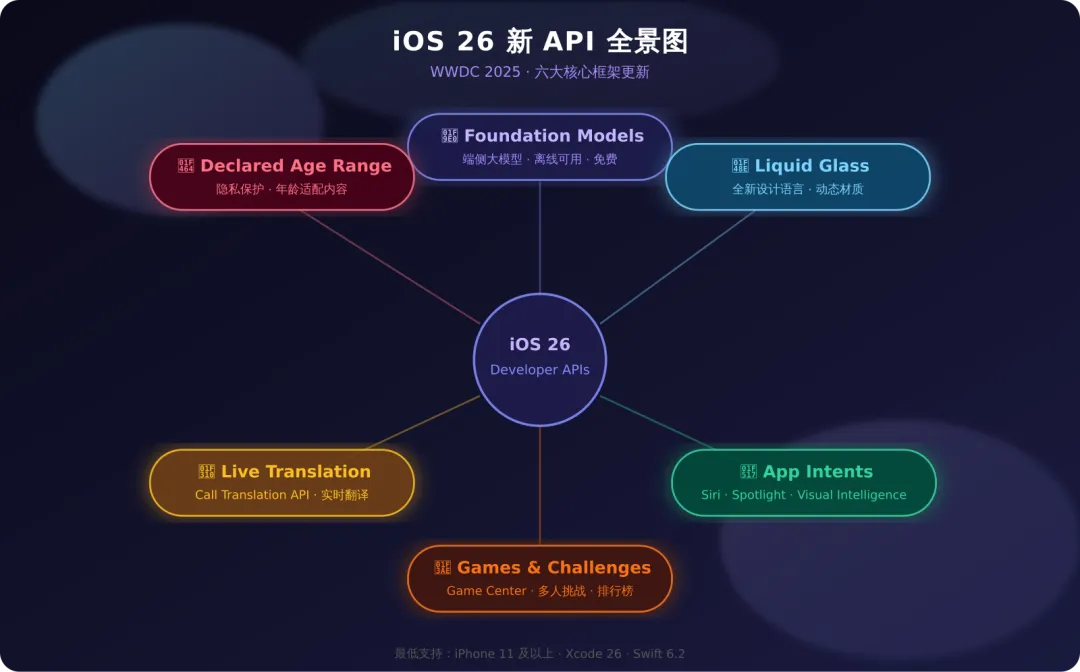
iOS 26 是自 iOS 7 以来变化最大的一次系统更新。苹果统一了全平台命名(iOS 26 / macOS 26 / watchOS 26),引入了全新的 Liquid Glass设计语言,并首次向第三方开发者开放了端侧大模型能力。以下是六大核心框架更新的深度解读。
1. Liquid Glass — 全新设计语言
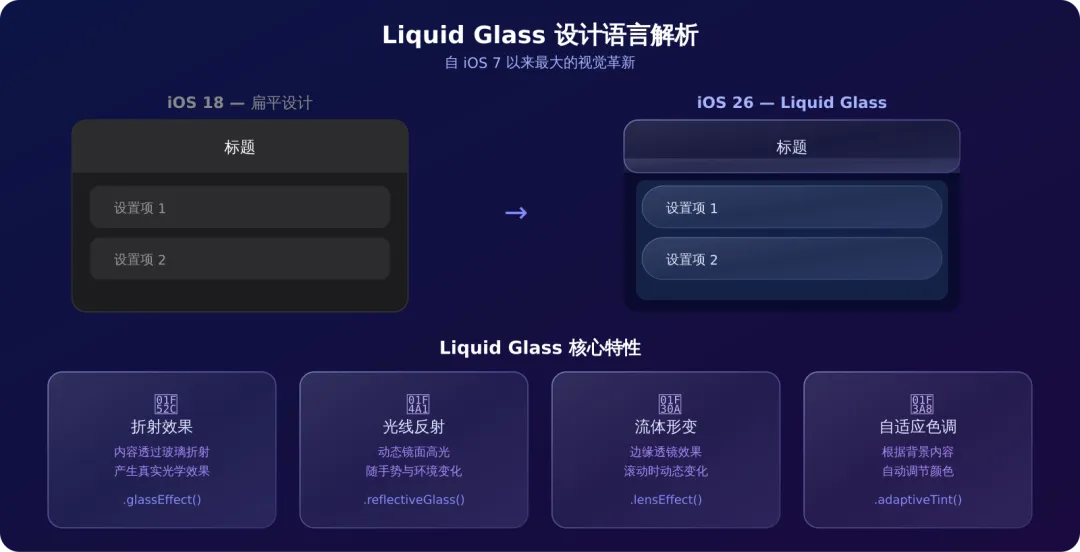
什么是 Liquid Glass?
Liquid Glass(液态玻璃)是 iOS 26 引入的全新动态材质,它将玻璃的光学特性与流体的动态感结合,能折射下层内容、反射周围光线,并在边缘产生透镜效果。
对开发者的影响
核心变化:你的 App 默认就会使用 Liquid Glass 样式。不需要主动开启——只要用 iOS 26 SDK 编译,系统控件(导航栏、Tab Bar、Sheet、Toolbar 等)会自动呈现液态玻璃效果。
关键 API
// 1. 玻璃效果修饰符 — 应用到自定义视图VStack{Text("Hello, Liquid Glass!")}.glassEffect()// 默认玻璃材质// 2. 带形状的玻璃效果.glassEffect(in:.rect(cornerRadius:16))// 3. 反射式玻璃(更强烈的光泽).glassEffect(.reflective)// 4. 透镜效果 — 边缘光学变形.lensEffect()// 5. 自适应色调 — 根据背景自动调节.adaptiveTint()适配建议
| 去掉 | |
减少shadow,Liquid Glass 自带深度感 | |
.glassEffect(.separator)替代传统 Divider | |
.glassEffect()获得系统一致的视觉风格 | |
// ❌ iOS 18 风格:硬编码背景VStack{Text("设置")}.background(Color(.systemGroupedBackground))// ✅ iOS 26 风格:让玻璃材质自然呈现VStack{Text("设置")}// 不设置 background — 系统自动应用 Liquid Glass2. Foundation Models — 端侧大模型框架
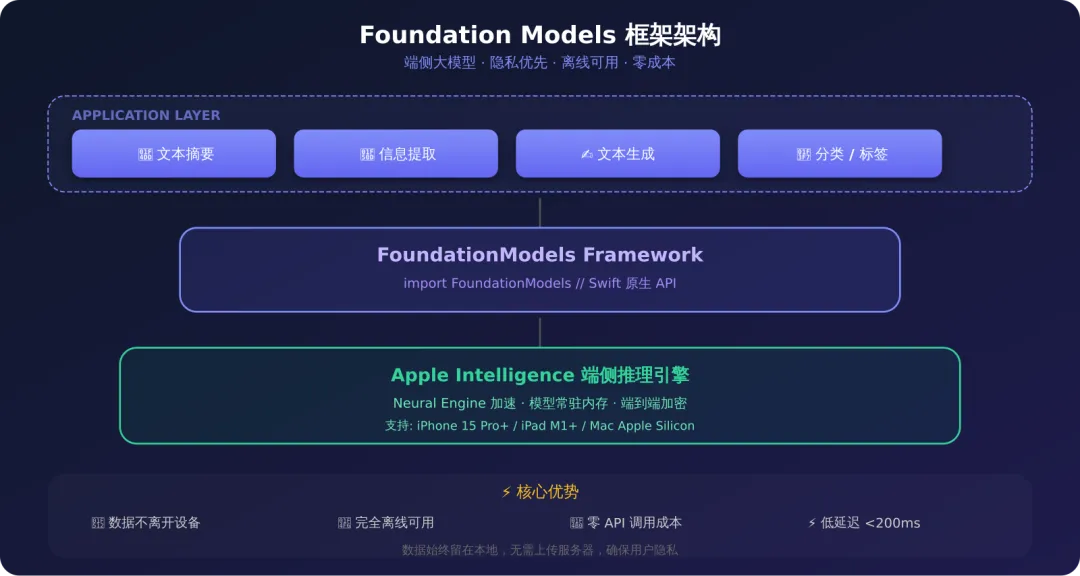
概述
Foundation Models 是 iOS 26 最重磅的开发者 API。它将驱动 Apple Intelligence 的端侧大语言模型直接暴露给第三方 App 使用,支持文本摘要、信息提取、文本生成、分类等能力。
三大核心优势:
🔒 隐私优先:数据完全留在设备上,不上传任何服务器 📶 离线可用:不需要网络连接,功能始终可用 💰 零成本:无 API 调用费用,无 token 计费
快速上手
importFoundationModels// 1. 创建一个文本摘要任务let session =LanguageModelSession()let article ="这是一篇很长的文章..."let summary =tryawait session.respond( to:"请用一句话总结以下内容:\(article)", generating:String.self)print(summary)// 2. 结构化信息提取structContactInfo:Generable{var name:Stringvar email:Stringvar phone:String?}let result =tryawait session.respond( to:"从以下文本中提取联系人信息:\(rawText)", generating:ContactInfo.self)print(result.content.name)// "张三"print(result.content.email)// "zhangsan@example.com"// 3. 分类任务enumSentiment:String,Generable{case positive ="正面"case negative ="负面"case neutral ="中性"}let sentiment =tryawait session.respond( to:"判断以下评论的情感倾向:\(review)", generating:Sentiment.self)适用场景
| 智能摘要 | |
| 信息提取 | |
| 内容分类 | |
| 智能搜索 | |
| 写作辅助 |
注意事项
// 检查设备是否支持importFoundationModelsifLanguageModelSession.isAvailable {// 可以使用端侧模型}else{// 降级到云端 API 或提示用户// 支持设备: iPhone 15 Pro+, iPad M1+, Mac Apple Silicon}3. App Intents — 无处不在的应用入口
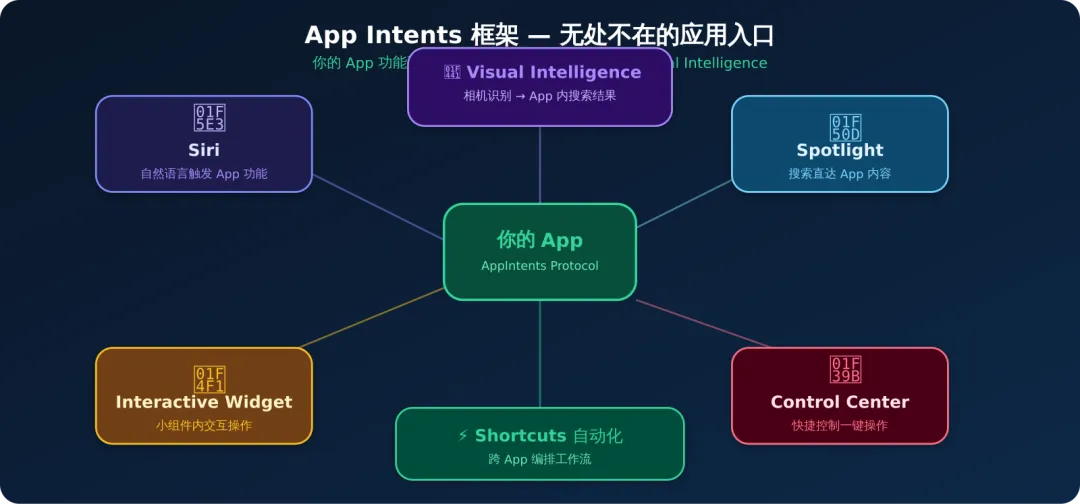
iOS 26 的重大更新
App Intents 框架在 iOS 26 中获得了全面升级,让你的 App 功能延伸到系统的每一个角落:
3.1 Visual Intelligence 集成
// 将 App 的搜索逻辑接入 Visual IntelligencestructProductSearchIntent:AppIntent{staticvar title:LocalizedStringResource="搜索商品"staticvar description =IntentDescription("通过相机识别商品并搜索")@Parameter(title:"图片")var image:IntentImagefuncperform()asyncthrows->someIntentResult&ProvidesVisualSearchResult{let product =tryawaitsearchProduct(from: image)return.result( visualSearch:VisualSearchResult( title: product.name, subtitle: product.price, deepLink:URL(string:"myapp://product/\(product.id)")!))}}用户通过相机拍摄商品 → Visual Intelligence 识别 → 调用你的 App 搜索 → 直接跳转到结果页。
3.2 Interactive Widget
// iOS 26: Widget 内支持交互操作structTodoWidget:Widget{var body:someWidgetConfiguration{AppIntentConfiguration( kind:"todo", provider:TodoProvider()){ entry inTodoWidgetView(entry: entry)}}}structTodoWidgetView:View{let entry:TodoEntryvar body:someView{VStack{ForEach(entry.todos){ todo inHStack{Text(todo.title)Spacer()// ✅ iOS 26: Widget 内直接切换完成状态Button(intent:ToggleTodoIntent(id: todo.id)){Image(systemName: todo.isDone ?"checkmark.circle.fill":"circle")}.buttonStyle(.borderless)}}}}}3.3 Action Button 智能场景
// 根据上下文自动推荐 Action Button 功能structSmartAction:AppIntent{staticvar title:LocalizedStringResource="智能操作"// 系统根据时间、位置、使用习惯自动推荐staticvar suggestedInvocationPhrase:String?="执行智能操作"funcperform()asyncthrows->someIntentResult{// 根据当前上下文执行不同操作let context =awaitAppContext.currentswitch context {case.morning:return.result(dialog:"已为您打开今日日程")case.driving:return.result(dialog:"已开启驾驶模式")case.meeting:return.result(dialog:"已静音并开启勿扰")}}}3.4 其他 App Intents 更新
- Spotlight 深度集成
:App 内容可被 Spotlight 索引并直接展示 - Shortcuts 自动化增强
:支持更复杂的跨 App 工作流编排 - Control Center 快捷控制
:一键触发 App 核心功能
4. Live Translation — 实时翻译 API
Call Translation API
iOS 26 开放了 Call Translation API,让你的 VoIP 或通信类 App 支持实时翻译通话。
importCallTranslation// 在 VoIP 通话中启用实时翻译classCallManager:NSObject,CallTranslationDelegate{let translationController =CallTranslationController()funcstartTranslatedCall(to recipient:String){ translationController.sourceLanguage =.chinese translationController.targetLanguage =.english translationController.delegate =self// 发起通话并启用实时翻译 translationController.startTranslation(for: activeCall)}// 实时翻译回调funccallTranslation(_ controller:CallTranslationController, didTranslate text:String, from source:Locale.Language, to target:Locale.Language){// 显示翻译后的字幕 subtitleLabel.text = text}}FaceTime 翻译字幕
FaceTime 现在支持实时翻译字幕,基于完全端侧的 Apple 自研模型,确保对话隐私。
5. Declared Age Range — 年龄适配 API
隐私保护的年龄适配
新的 Declared Age Range API 允许家长在保护隐私的前提下,向 App 分享孩子的年龄范围,以便 App 提供适龄内容。
importFamilyControls// 请求年龄范围信息funccheckAgeRange()async{do{let ageRange =tryawaitDeclaredAgeRange.currentswitch ageRange {case.under13:// 儿童模式:简化 UI,移除社交功能enableChildMode()case.age13to17:// 青少年模式:部分内容限制enableTeenMode()case.adult:// 成人模式:完整功能enableFullMode()case.unknown:// 用户未授权分享年龄,默认安全模式enableSafeMode()}}catch{// 处理错误enableSafeMode()}}使用要点
- 完全自愿
:用户/家长可以选择不分享 - 范围而非精确值
:只提供年龄段,不暴露精确年龄 - 隐私合规
:符合 COPPA 等儿童隐私保护法规 - 向下兼容
:低版本 iOS 返回 .unknown
6. Games & Challenges — 游戏社交化
Apple Games App
iOS 26 推出了全新的 Apple Games应用,作为游戏发现和社交中心。你的游戏会自动出现在 Games App 中。
Challenges(挑战)系统
基于 Game Center 排行榜,Challenges 将单人游戏转变为社交体验:
importGameKit// 创建一个挑战funccreateChallenge()async{let leaderboard =GKLeaderboard() leaderboard.identifier ="high_score_weekly"// 基于排行榜创建挑战let challenge =tryawaitGKChallenge.create( leaderboard: leaderboard, players: selectedFriends, message:"来比比谁本周得分最高!")// 发送挑战tryawait challenge.issue()}// 接收挑战结果classChallengeDelegate:NSObject,GKChallengeDelegate{funcplayer(_ player:GKPlayer, didComplete challenge:GKChallenge, issuedByFriend friendPlayer:GKPlayer){// 挑战完成 — 展示结果showChallengeResult(challenge: challenge, winner: player)}}7. SwiftUI & Swift 6.2 更新
SwiftUI 新特性
// 1. 动态自适应布局 — DynamicLayoutDynamicLayout{ context in// 根据设备、分屏、窗口大小自动调整if context.horizontalSizeClass ==.compact {VStack{ content }}else{HStack{ content }}}// 2. 增强的动画系统 — 复杂动画帧率提升 30%+withAnimation(.spring(response:0.6, dampingFraction:0.8)){ isExpanded.toggle()}.animation(.smooth, value: isExpanded)// 3. 改进的搜索体验.searchable(text: $query, placement:.toolbar).searchSuggestions {ForEach(suggestions){ suggestion inText(suggestion.title).searchCompletion(suggestion.text)}}Swift 6.2 关键变化
| Strict Concurrency | |
| @Sendable 改进 | |
| Actor 隔离增强 | |
| 性能优化 |
// Swift 6.2: 更安全的并发代码@MainActorclassViewModel:Sendable{var items:[Item]=[]// 编译器会检查是否安全funcload()async{// ✅ 自动在 MainActor 上执行 items =tryawaitfetchItems()// fetchItems 返回 @Sendable}}8. 适配路线图
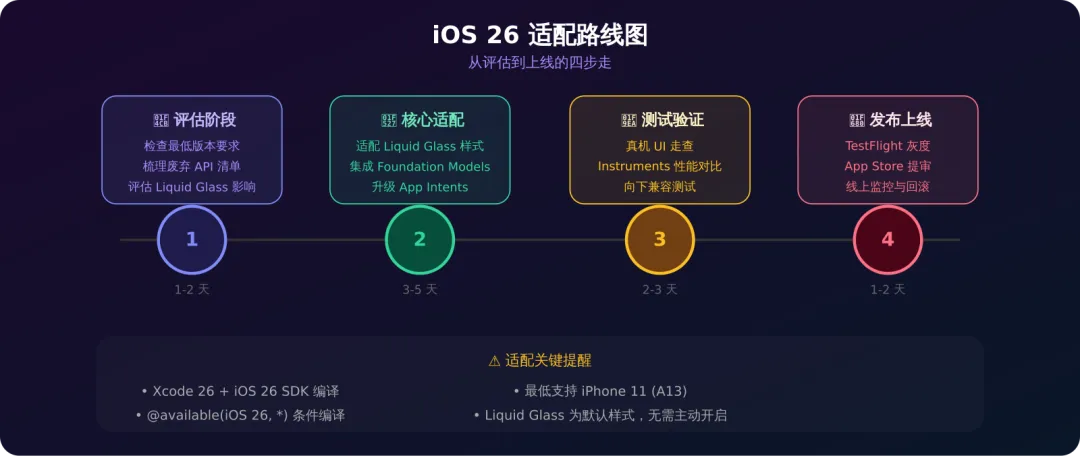
快速检查清单
□ 安装 Xcode 26,设置 Deployment Target 为 iOS 26□ 用 iOS 26 SDK 编译,检查编译警告□ 检查 Liquid Glass 对现有 UI 的影响 - 导航栏、Tab Bar、Sheet 自动变为玻璃材质 - 自定义背景色可能需要调整□ 评估 Foundation Models 集成机会 - 有文本处理需求的场景 → 优先考虑端侧模型□ 升级 App Intents - 支持 Visual Intelligence - Widget 交互化□ 测试向下兼容 - @available(iOS 26, *) 条件编译 - 低版本 iOS 的降级方案□ TestFlight 灰度验证□ App Store 提交条件编译示例
// 同时支持 iOS 26 新特性和旧版本funcconfigureAppearance(){if#available(iOS 26,*){// 使用 Liquid Glass 样式// 系统控件自动适配,无需额外代码}else{// iOS 18 及以下的传统样式let appearance =UINavigationBarAppearance() appearance.configureWithOpaqueBackground()UINavigationBar.appearance().standardAppearance = appearance}}// SwiftUI 中的条件适配structContentView:View{var body:someView{VStack{Text("Hello")}.ifAvailable(.glassEffect())// iOS 26+}}extensionView{@ViewBuilderfuncifAvailable<Modifier:ViewModifier>(_ modifier:Modifier)->someView{if#available(iOS 26,*){self.modifier(modifier)}else{self}}}📊 总结对比
| 设计语言 | |||
| AI 能力 | |||
| App 入口 | |||
| 翻译 | |||
| 隐私 | |||
| 游戏 | |||
| Swift |
🔗 参考资源
Apple Developer — What's New in iOS 26 WWDC25 — Build a SwiftUI app with the new design Foundation Models Framework 文档 App Intents Framework 更新
一句话总结:iOS 26 = Liquid Glass 视觉革新 + Foundation Models 智能开放 + App Intents 全面渗透。这是一次设计 + AI + 生态的三重升级,值得每个 iOS 开发者认真对待。