 夜雨聆风
夜雨聆风详解cni插件cilium篇一:它为什么这么快?它还有哪些高级功能?
cilium介绍
Cilium 是一款基于eBPF技术的云原生网络、安全与可观测性一体化解决方案,作为 CNCF 毕业项目,已成为 Kubernetes 生态中最先进的容器网络接口(CNI)之一,彻底革新了传统容器网络的实现方式与能力边界。
eBPF介绍
首先cilium是基于eBPF技术开发的,先要了解一下什么是eBPF?
eBPF(extended Berkeley Packet Filter)是一项革命性的内核可编程技术,它允许在不修改内核源码、不加载内核模块的前提下,将安全的沙箱程序注入 Linux 内核的任意执行路径,实现网络、安全、可观测性等场景的内核级增强。它彻底打破了传统内核 “静态、封闭” 的特性,让内核具备了动态可编程能力,成为云原生、高性能网络、安全监控等领域的核心底层技术。
其最初仅用于网络包过滤,后续通过层层迭代,支持了XDP(高性能网络处理)、Traffic Control(内核层网络流量的转发、控制及策略)以及内核的事件监控和函数动态跟踪等高级功能。
cilium架构和组件
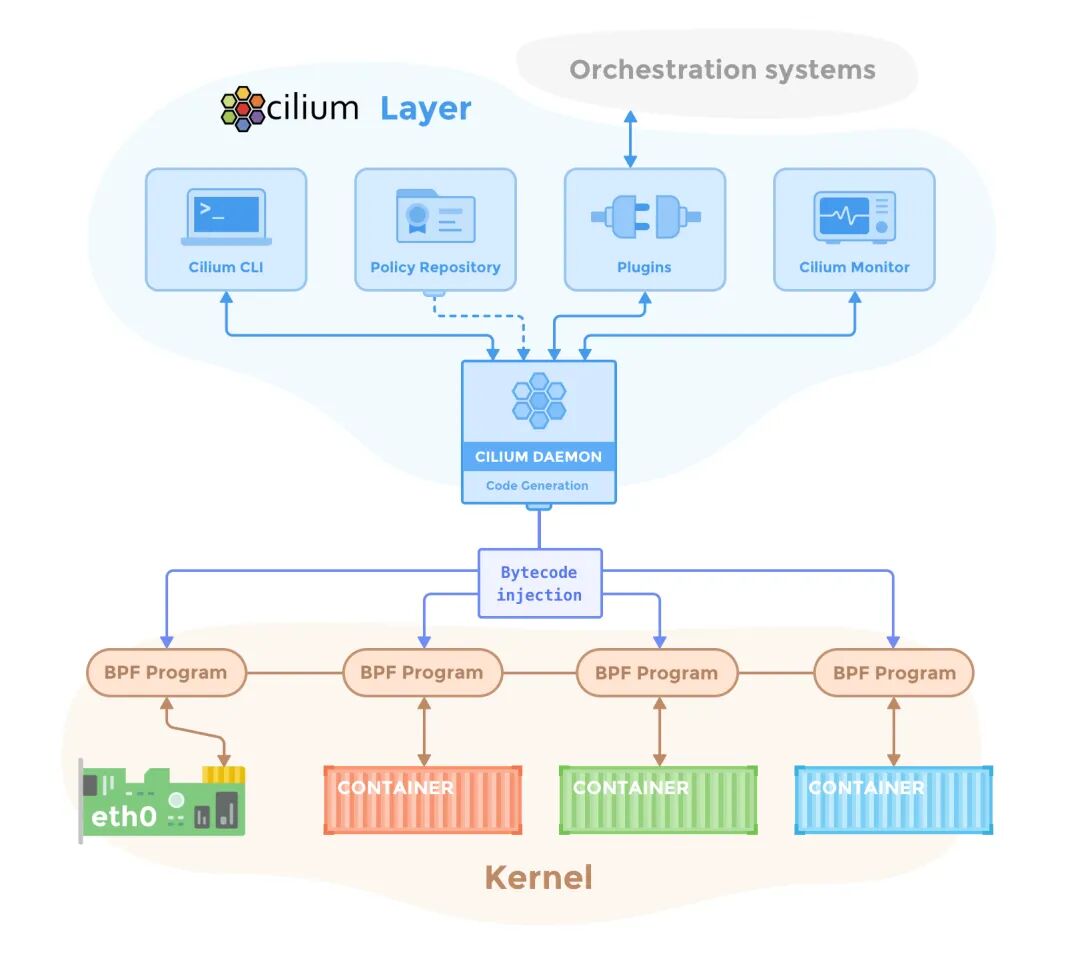
cilium核心功能
CNI (Container Network Interface)
首先其有k8s CNI插件最基础的功能,容器网络通信,且相较于flannel、calico等插件,cilium结合eBPF实现了在内核态直接处理网络流量,这直接带来了三大优势:
• 零拷贝转发:避免用户态 - 内核态切换,大大降低了延迟和提高了吞吐量 • 动态可编程:eBPF 程序可动态加载 / 更新,无需重启内核或服务,支持热升级 • 事件驱动:基于内核事件触发,精准捕获网络行为,实现更细粒度流量控制
其支持两种L3层的网络模型,分别为覆盖网络(Overlay,基于 VXLAN/Geneve)和原生路由(Native Routing),根据不同的基础设施环境来选择。
• Overlay networking: 基于封装技术的虚拟网络,可跨所有主机部署,支持VXLAN和Geneve协议。该技术几乎适用于任何网络基础设施,唯一要求是主机间的IP连通性。 • Native routing mode: 使用Linux主机的常规路由表。要求网络能够路由应用程序容器的IP地址。该模式可与云路由器、路由守护进程和原生IPv6基础设施集成。
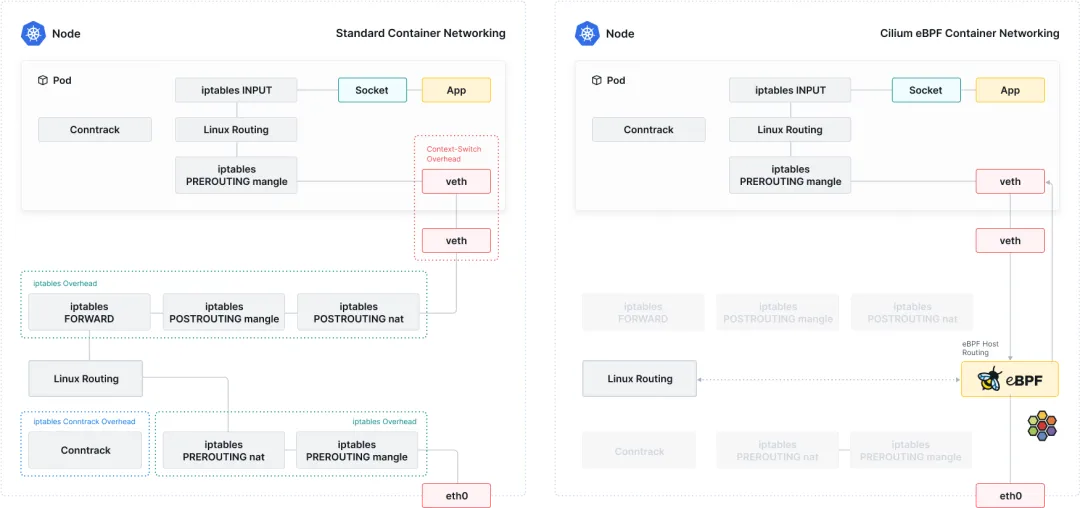
Load Balancing负载均衡
k8s集群中,负载均衡的工作一般由kube-proxy组件来完成,但kube-proxy不管是iptables、ipvs还是nftables都有一定的延迟,cilium通过eBPF实现高性能负载均衡,可以彻底替换kube-proxy,解决性能瓶颈的问题,官网中还有其与kube-proxy的压测数据对比。
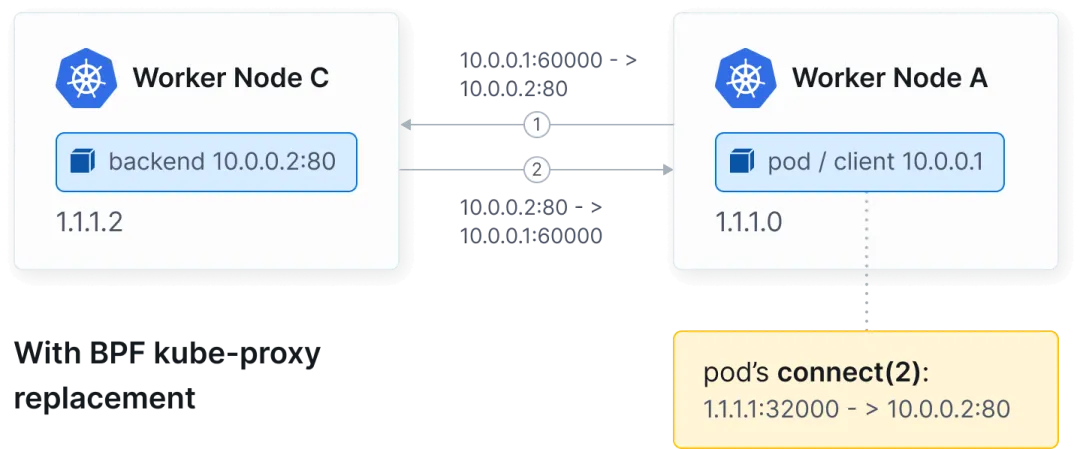
东西向负载均衡在套接字层(connect())重写服务连接,避免了NAT转发的开销。
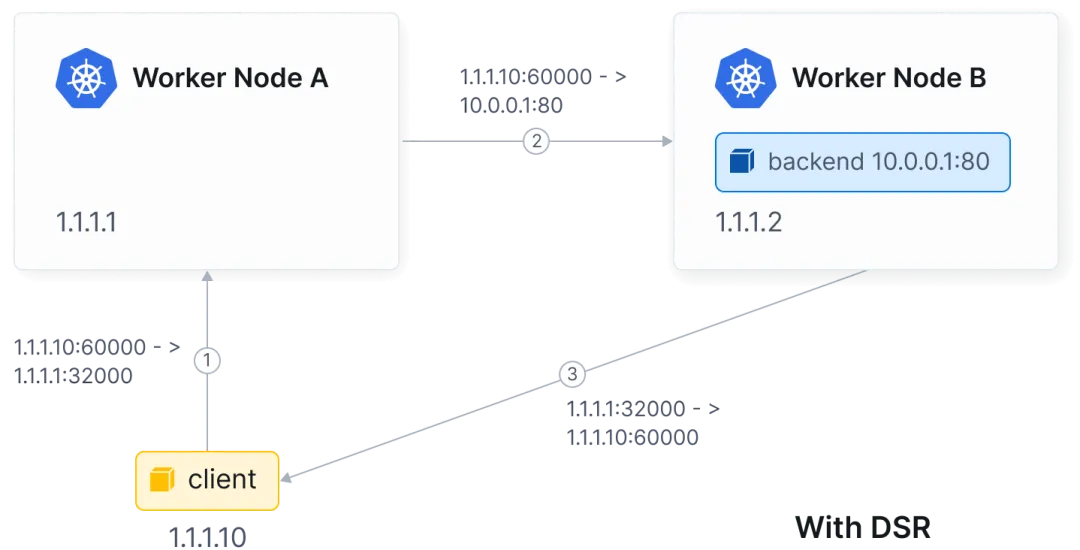
南北向负载均衡支持XDP加速应对高吞吐场景,并支持Direct Server Return(DSR)将响应直接返回给客户端,提升高流量服务吞吐量,减少网络链路开销,以及Maglev哈希算法实现后端稳定高效的负载分配。
Network Policy网络策略
cilium提供了L3-L7层全面的防护策略:
• L3/L4层策略:基于pod或namespace的标签、协议和端口来限制流量出入 • L7层策略:支持通过HTTP方法、URL路径、header头和gRPC调用等方式来限制流量。例如只允许对 /public/.*发起GET请求;仅允许存在类似X-Token: [0-9]+的标头的请求通过• FQDN策略:基于域名的访问控制,无需解析 IP 地址,适配动态服务发现场景 • CIDR策略:在出口或入口限制某ip段访问
Service Mesh服务网格
cilium通过eBPF技术实现了轻量级服务网格能力,无需 Sidecar 代理,其主要功能包括:
• 流量治理:支持负载均衡、故障注入、流量镜像、重试/超时控制等 • 可观测性:与 Hubble 深度集成,提供服务级、方法级的流量指标与追踪 • 安全增强:支持 mTLS 加密、身份认证与授权,实现服务间零信任安全 • 深度结合Kubernetes Gateway API:充当Gateway API的数据平面,可以使用Kubernetes-native CRDs管理ingress、流量拆分和路由行为等
Observability可观测性
cilium从一开始就内置了丰富的可观测性,帮助排查链路问题:
• Hubble:一个深度集成的可观测性平台,提供实时的服务图,精准记录pod间、pod与外部服务的所有网络交互,包括TCP/UDP连接、HTTP请求、DNS查询等等 • Metrics和alerting:集成了Prometheus和Grafana,提供了延迟、吞吐量、丢包率等等指标
Cluster Mesh集群网格
cilium可以将多个Kubernetes集群的无缝连接,出于故障隔离、可扩展性和地理分布等原因,通常会采用多集群Kubernetes设置。这种方法可能会导致网络复杂性。
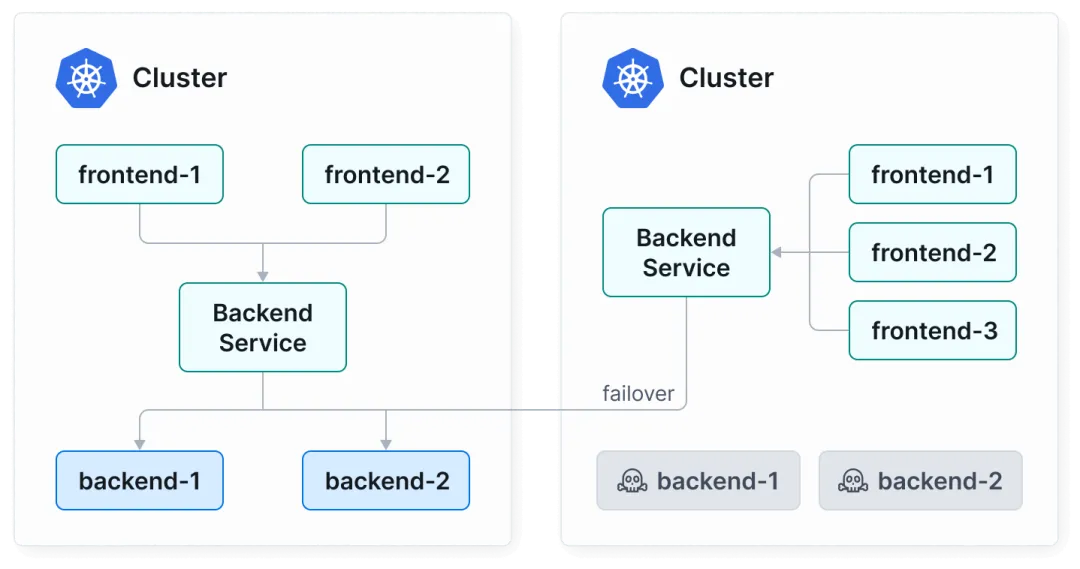
• 故障转移:cilium支持在多个不同区域或可用区集群间运行,如果某一集群资源不可用,会发生故障转移,将流量转发至其他可用集群中,确保高可用
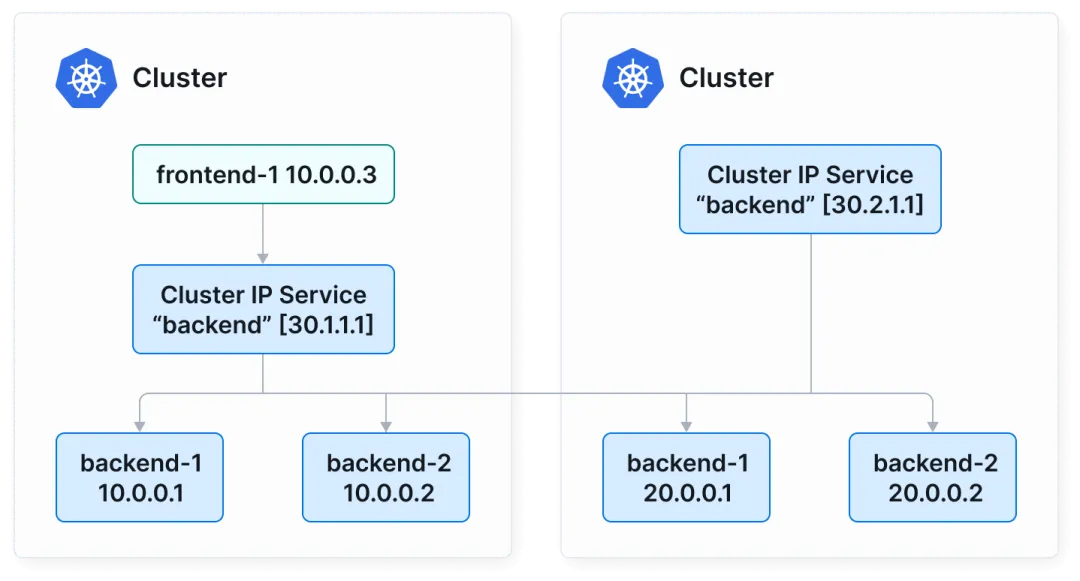
• 服务发现:cilium会自动将不同k8s集群间具有相同namespace和service的资源合并为全局service,这就表示不管是否在同一集群中,都可以互相服务发现和交互
cilium网络模式
Overlay模式
cilium原生支持两种主流的隧道封装协议,均通过eBPF实现,分别为VXLAN和Geneve,默认情况下使用VXLAN协议,两者区别如下:
| VXLAN | |||
| Geneve |
核心组件和作用:
• 隧道设备: Cilium为每个节点创建专属的Overlay隧道设备,cilium_vxlan或cilium_geneve,绑定节点网卡(eth0)作为隧道出口 • pod网络命名空间: Cilium通过CNI为每个pod创建独立网络命名空间,配置ip,网关指向cilium_net虚拟网桥 • eBPF映射表: Cilium通过eBPF Map(如cilium_node_map)存储所有节点ip+隧道设备端口+pod CIDR映射关系,实现pod ip到目标节点的快速寻址 • IPAM: cilium为pod分配ip,分配策略支持集群范围CIDR、节点本地CIDR等,ip信息同步至eBPF map
Cilium和传统Overlay方案对比
Underlay模式
其模式就是让Pod IP直接在物理网络上路由,流量包不封装、不隧道,直接走节点的真实网络(交换机、路由器)。
cilium支持两种Underlay模式,生产最常用的是原生路由模式(Native Routing),其需要满足所有节点在同一个二层网络的条件,流量直走物理网络,无任何封装,节点之间通过ARP+直连路由互相访问Pod。适合在同一机房,二层网络打通的物理机集群。
第二种是BGP模式(跨子网Underlay),其需要满足节点跨网段、跨机房,需要路由器支持BGP的条件,cilium会在每个节点跑一个BGP客户端,并把本机的Pod CIDR通过BGP发布给物理交换机/路由器。适合大规模跨子网集群。
cilium流量走向
当我们将cilium安装完成后,会发现每个节点都会增加几个网络接口配置:
# ip a3: tunl0@NONE: <NOARP> mtu 1480 qdisc noop state DOWN group default qlen 1000link/ipip 0.0.0.0 brd 0.0.0.04: cilium_net@cilium_host: <BROADCAST,MULTICAST,NOARP,UP,LOWER_UP> mtu 1500 qdisc noqueue state UP group default link/ether fe:fa:16:70:ef:9d brd ff:ff:ff:ff:ff:ff inet6 fe80::fcfa:16ff:fe70:ef9d/64 scope link proto kernel_ll valid_lft forever preferred_lft forever5: cilium_host@cilium_net: <BROADCAST,MULTICAST,NOARP,UP,LOWER_UP> mtu 1500 qdisc noqueue state UP group default qlen 1000link/ether 7a:07:9e:c3:61:55 brd ff:ff:ff:ff:ff:ff inet 10.98.0.198/32 scope global cilium_host valid_lft forever preferred_lft forever inet6 fe80::7807:9eff:fec3:6155/64 scope link proto kernel_ll valid_lft forever preferred_lft forever6: cilium_vxlan: <BROADCAST,MULTICAST,UP,LOWER_UP> mtu 1500 qdisc noqueue state UNKNOWN group default link/ether d2:83:09:54:db:9e brd ff:ff:ff:ff:ff:ff inet6 fe80::d083:9ff:fe54:db9e/64 scope link proto kernel_ll valid_lft forever preferred_lft forever8: lxc_health@if7: <BROADCAST,MULTICAST,UP,LOWER_UP> mtu 1500 qdisc noqueue state UP group default qlen 1000link/ether 36:59:e8:94:4f:b5 brd ff:ff:ff:ff:ff:ff link-netnsid 0 inet6 fe80::3459:e8ff:fe94:4fb5/64 scope link proto kernel_ll valid_lft forever preferred_lft forever• cilium_net: pod与节点通信的核心虚拟网桥,是pod网络命名空间与节点主机网络的“桥梁”,所有Pod的网络流量,都要经由它进出内核。Pod的默认网关是指向cilium_net的,同节点的Pod流量无需走内核路由,直接通过cilium_net网桥转发;对外的流量先到cilium_net,进行eBPF策略校验,通过的流量再由cilium的eBPF程序决定转发路径 • cilium_host: 虚拟网卡,实现Pod访问节点主机(如eth0)、节点主机与外部网络的通信。所有出节点的流量会先经过cilium_host,由eBPF程序处理SNAT/策略校验;所有入节点的流量会先到cilium_host,再转发到目标Pod或主机进程 • cilium_vxlan: Overlay模式下的VxLAN 隧道设备,如果是Geneve模式的话则是cilium_geneve,负责跨节点Pod通信的数据包封装和解封装 • tunl0: ipip隧道设备,默认不启用,仅显式配置了ipip=true或DSR跨节点时自动创建 • lxc_health: 为健康检查端点创建的虚拟网卡,用于监控Cilium Agent和节点网络的可用性
同一节点下pod之间流量走向
在Overlay模式下,我们先在demo-worker-01节点启动两个不同的pod,再进行抓包测试。
# kubectl get po -o wide NAME READY STATUS RESTARTS AGE IP NODE busybox-client 1/1 Running 0 49s 10.98.2.119 demo-worker-01busybox-server 1/1 Running 0 6s 10.98.2.250 demo-worker-01此时demo-worker-01节点的pod之间的网卡关系如下:
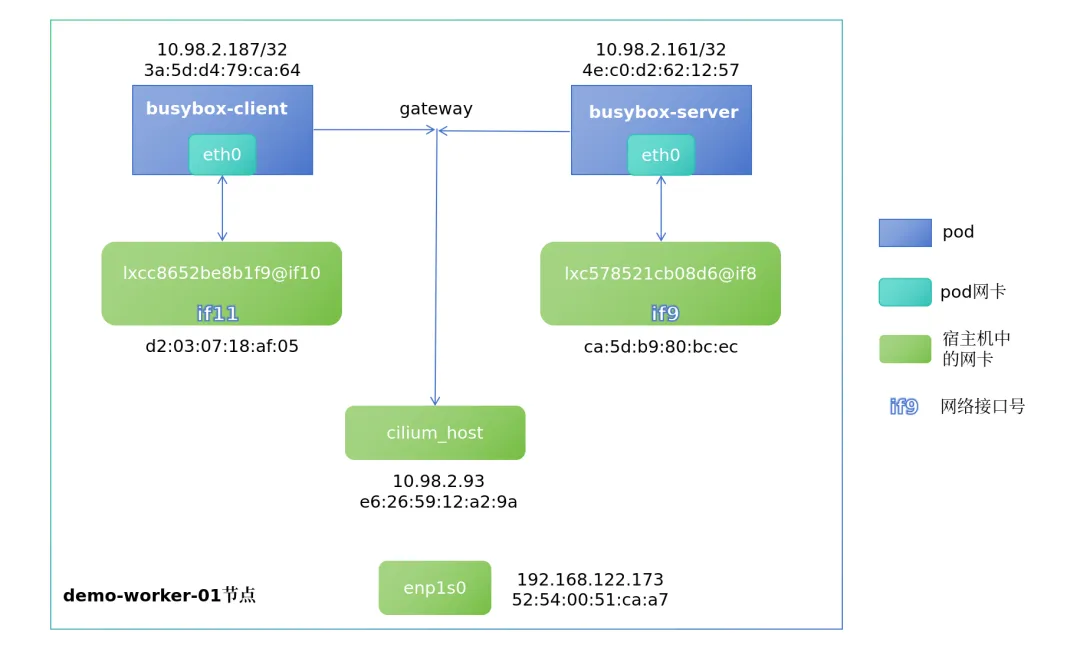
1. busybox-client和busybox-server两个pod的ip及mac如上图所示,且其gateway均指向cilium_host的ip地址: # kubectl exec -it busybox-server -- route -nKernel IP routing tableDestination Gateway Genmask Flags Metric Ref Use Iface0.0.0.0 10.98.2.93 0.0.0.0 UG 0 0 0 eth010.98.2.93 0.0.0.0 255.255.255.255 UH 0 0 0 eth0# kubectl exec -it busybox-client -- route -nKernel IP routing tableDestination Gateway Genmask Flags Metric Ref Use Iface0.0.0.0 10.98.2.93 0.0.0.0 UG 0 0 0 eth010.98.2.93 0.0.0.0 255.255.255.255 UH 0 0 0 eth02. busybox-client和busybox-server对应的veth对可以通过网络接口号(ifxx)来查看对应关系 # kubectl exec -it busybox-client -- ip a# kubectl exec -it busybox-server -- ip a3. 查看pod的arp表发现,cilium_host的ip对应的mac地址却是主机对应veth对lxc网卡的mac,这点后续抓包时也有体现 # kubectl exec -it busybox-client -- arp -a loaclhost (10.98.2.93) at d2:03:07:18:af:05 [ether] on eth0# kubectl exec -it busybox-server -- arp -a loaclhost (10.98.2.93) at ca:5d:b9:80:bc:ec [ether] on eth0
抓包验证流量走向
分别在client和server的网卡,以及其在宿主机对应的veth对lxc网卡进行tcpdump抓包程序,随后在client的pod中发起ping请求至server的pod。
• 抓包命令: tcpdump -pne -i <网卡名称>• 发起ping请求: kubectl exec -it busybox-client -- ping -c 1 10.98.2.161
tcpdump抓包结果:
busybox-client pod:
# tcpdump -pne -i eth0 listening on eth0, link-type EN10MB (Ethernet), snapshot length 262144 bytes14:46:17.238621 3a:5d:d4:79:ca:64 > d2:03:07:18:af:05, ethertype IPv4 (0x0800), length 98: 10.98.2.187 > 10.98.2.161: ICMP echo request, id 7442, seq 0, length 6414:46:17.238767 d2:03:07:18:af:05 > 3a:5d:d4:79:ca:64, ethertype IPv4 (0x0800), length 98: 10.98.2.161 > 10.98.2.187: ICMP echo reply, id 7442, seq 0, length 6414:46:22.713015 3a:5d:d4:79:ca:64 > d2:03:07:18:af:05, ethertype ARP (0x0806), length 42: Request who-has 10.98.2.93 tell 10.98.2.187, length 2814:46:22.713123 d2:03:07:18:af:05 > 3a:5d:d4:79:ca:64, ethertype ARP (0x0806), length 42: Reply 10.98.2.93 is-at d2:03:07:18:af:05, length 28busybox-client veth对lxc:
# tcpdump -pne -i lxcc8652be8b1f9 listening on lxcc8652be8b1f9, link-type EN10MB (Ethernet), snapshot length 262144 bytes14:46:17.238652 3a:5d:d4:79:ca:64 > d2:03:07:18:af:05, ethertype IPv4 (0x0800), length 98: 10.98.2.187 > 10.98.2.161: ICMP echo request, id 7442, seq 0, length 6414:46:17.238765 d2:03:07:18:af:05 > 3a:5d:d4:79:ca:64, ethertype IPv4 (0x0800), length 98: 10.98.2.161 > 10.98.2.187: ICMP echo reply, id 7442, seq 0, length 6414:46:22.713109 3a:5d:d4:79:ca:64 > d2:03:07:18:af:05, ethertype ARP (0x0806), length 42: Request who-has 10.98.2.93 tell 10.98.2.187, length 2814:46:22.713117 d2:03:07:18:af:05 > 3a:5d:d4:79:ca:64, ethertype ARP (0x0806), length 42: Reply 10.98.2.93 is-at d2:03:07:18:af:05, length 28busybox-server pod:
# tcpdump -pne -i eth0 listening on eth0, link-type EN10MB (Ethernet), snapshot length 262144 bytes14:46:17.238719 ca:5d:b9:80:bc:ec > 4e:c0:d2:62:12:57, ethertype IPv4 (0x0800), length 98: 10.98.2.187 > 10.98.2.161: ICMP echo request, id 7442, seq 0, length 6414:46:17.238746 4e:c0:d2:62:12:57 > ca:5d:b9:80:bc:ec, ethertype IPv4 (0x0800), length 98: 10.98.2.161 > 10.98.2.187: ICMP echo reply, id 7442, seq 0, length 6414:46:22.712989 4e:c0:d2:62:12:57 > ca:5d:b9:80:bc:ec, ethertype ARP (0x0806), length 42: Request who-has 10.98.2.93 tell 10.98.2.161, length 2814:46:22.713119 ca:5d:b9:80:bc:ec > 4e:c0:d2:62:12:57, ethertype ARP (0x0806), length 42: Reply 10.98.2.93 is-at ca:5d:b9:80:bc:ec, length 28busybox-server veth对lxc:
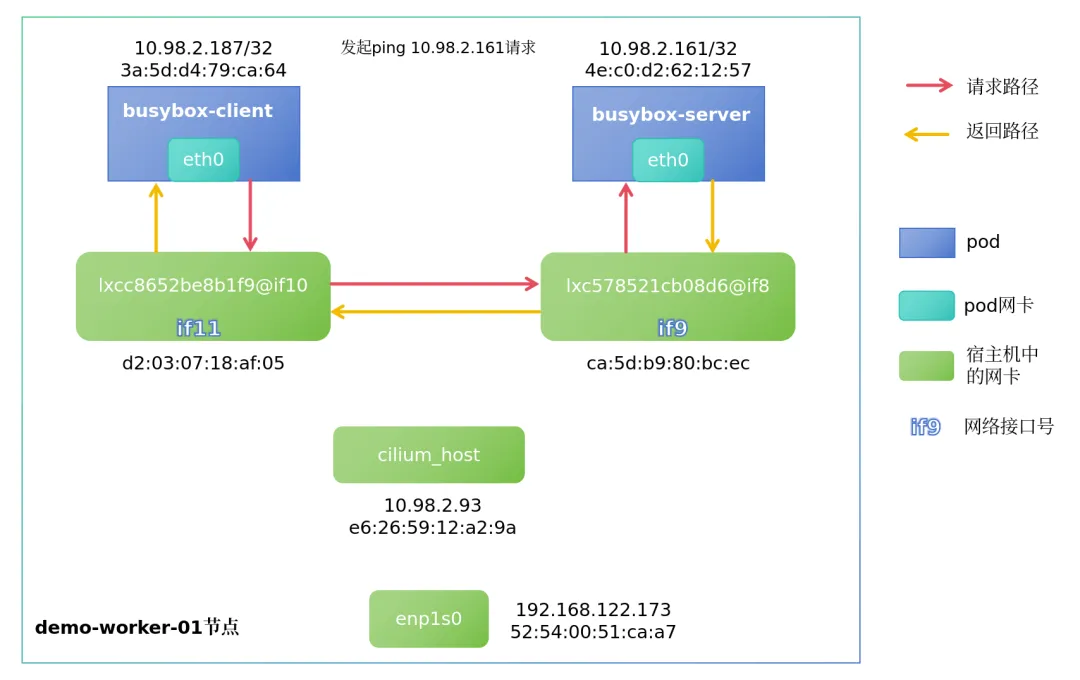
# tcpdump -pne -i lxc578521cb08d6 listening on lxc578521cb08d6, link-type EN10MB (Ethernet), snapshot length 262144 bytes14:46:17.238712 ca:5d:b9:80:bc:ec > 4e:c0:d2:62:12:57, ethertype IPv4 (0x0800), length 98: 10.98.2.187 > 10.98.2.161: ICMP echo request, id 7442, seq 0, length 6414:46:17.238748 4e:c0:d2:62:12:57 > ca:5d:b9:80:bc:ec, ethertype IPv4 (0x0800), length 98: 10.98.2.161 > 10.98.2.187: ICMP echo reply, id 7442, seq 0, length 6414:46:22.713073 4e:c0:d2:62:12:57 > ca:5d:b9:80:bc:ec, ethertype ARP (0x0806), length 42: Request who-has 10.98.2.93 tell 10.98.2.161, length 2814:46:22.713103 ca:5d:b9:80:bc:ec > 4e:c0:d2:62:12:57, ethertype ARP (0x0806), length 42: Reply 10.98.2.93 is-at ca:5d:b9:80:bc:ec, length 28通过上述抓包记录可以发现,四个网卡均抓取到了icmp报文的request和reply请求,但每个网卡所抓取到的mac地址走向均不同,这就说明了,同一节点内的pod互相访问时,是通过宿主机的lxc网卡进行转发通信的。
后续还有两条arp的请求和响应,也证实了以上第三点所描述的arp配置。
pwru抓包结果:
[root@demo-worker-01 ~]# pwru host 10.98.2.161# 返回内容有点多,不粘贴了,自己尝试下就好以上两种抓包方式均能体现出同节点下的pod之间通信路径,如下图所示:
不同节点中pod之间流量走向
默认跨节点通信是隧道模式通过vxlan传输,可以通过cilium config view | grep tunnel验证,其默认端口为UDP 8472。
我们在demo-master-02节点新启动一个Pod,用于与demo-worker-01节点的pod进行测试:
[root@demo-master-01 ~]# kubectl get pod -o wide NAME READY STATUS RESTARTS AGE IP NODE busybox-client 1/1 Running 0 6d20h 10.98.2.187 demo-worker-01busybox-master2 1/1 Running 0 5d18h 10.98.1.117 demo-master-02此时两pod的架构图如下:
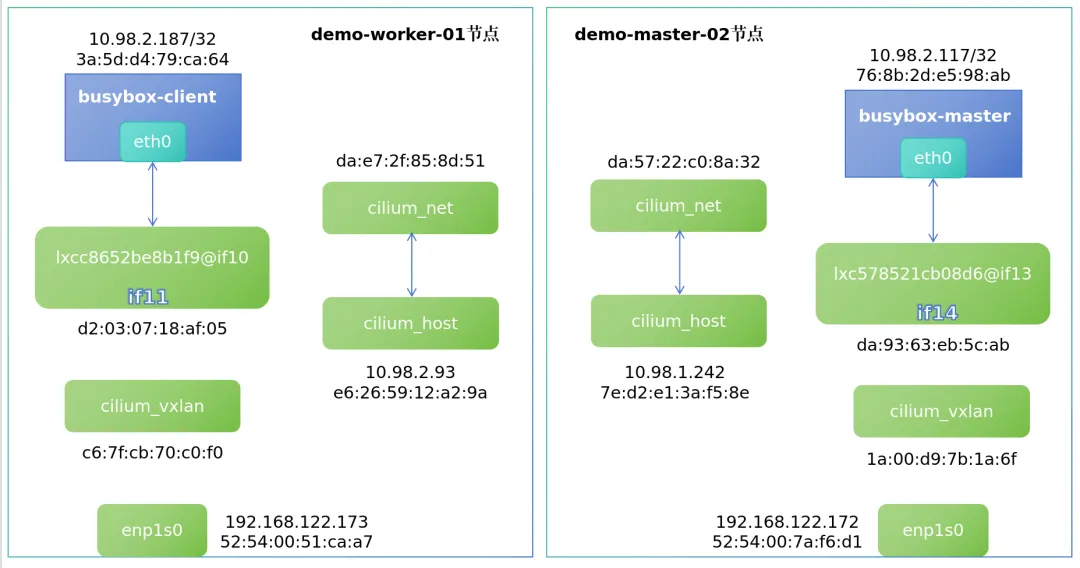
进入demo-worker-01节点的cilium pod内,查看bpf ipcache规则:
root@demo-worker-01:/home/cilium# cilium-dbg bpf ipcache list IP PREFIX/ADDRESS IDENTITY10.98.2.93/32 identity=1 encryptkey=0 tunnelendpoint=0.0.0.0 flags=<none> 10.98.2.161/32 identity=33997 encryptkey=0 tunnelendpoint=0.0.0.0 flags=<none> 10.98.2.210/32 identity=4 encryptkey=0 tunnelendpoint=0.0.0.0 flags=<none> 192.168.122.173/32 identity=1 encryptkey=0 tunnelendpoint=0.0.0.0 flags=<none> 10.98.0.199/32 identity=4 encryptkey=0 tunnelendpoint=192.168.122.171 flags=hastunnel 10.98.1.232/32 identity=21600 encryptkey=0 tunnelendpoint=192.168.122.172 flags=hastunnel 10.98.1.242/32 identity=6 encryptkey=0 tunnelendpoint=192.168.122.172 flags=hastunnel 192.168.122.171/32 identity=7 encryptkey=0 tunnelendpoint=0.0.0.0 flags=<none> 192.168.122.172/32 identity=7 encryptkey=0 tunnelendpoint=0.0.0.0 flags=<none> 10.98.1.0/24 identity=2 encryptkey=0 tunnelendpoint=192.168.122.172 flags=hastunnel 10.98.2.187/32 identity=64096 encryptkey=0 tunnelendpoint=0.0.0.0 flags=<none> 0.0.0.0/0 identity=2 encryptkey=0 tunnelendpoint=0.0.0.0 flags=<none> 10.98.0.198/32 identity=6 encryptkey=0 tunnelendpoint=192.168.122.171 flags=hastunnel 10.98.0.0/24 identity=2 encryptkey=0 tunnelendpoint=192.168.122.171 flags=hastunnel 10.98.1.44/32 identity=4 encryptkey=0 tunnelendpoint=192.168.122.172 flags=hastunnel 10.98.1.85/32 identity=21600 encryptkey=0 tunnelendpoint=192.168.122.172 flags=hastunnel 10.98.2.107/32 identity=33088 encryptkey=0 tunnelendpoint=0.0.0.0 flags=<none> 10.98.2.166/32 identity=59078 encryptkey=0 tunnelendpoint=0.0.0.0 flags=<none> 10.98.1.117/32 identity=62921 encryptkey=0 tunnelendpoint=192.168.122.172 flags=hastunnel可以看到,集群内每个ip到达flags的方式是什么,例如:
• busybox-client pod的ip为10.98.2.187,由于其就在demo-worker-01节点上,故 flags=<none>• busybox-master2 pod在demo-master-02节点中,ip为10.98.1.117,busybox-client想要向其发送数据,就需要通过隧道,故 flags=hastunnel,且tunnelendpoint=192.168.122.172是demo-master-02的enp1s0网卡ip
抓包验证流量走向
使用pwru命令在demo-worker-01对enp1s0网卡进行抓包,查看pod跨节点通信时的流量走向:
[root@demo-worker-01 opt]# pwru icmp host 10.98.2.187在busybox-client发起ping请求:
[root@demo-master-01 ~]# kubectl exec -it busybox-client -- ping -c 1 10.98.1.117抓包结果如下:
[root@demo-worker-01 opt]# pwru host 10.98.2.1872026/03/06 15:35:14 INFO Attaching kprobes via=kprobe-multi1559 / 1559 [--------------------------------------------------------------------------------------------------------------------------------] 100.00% ? p/s2026/03/06 15:35:14 INFO Attached ignored=02026/03/06 15:35:14 INFO Listening for events..SKB CPU PROCESS NETNS MARK/x IFACE PROTO MTU LEN TUPLE FUNC0xffff9efad3961380 1 ~in/ping:1510593 4026532600 0 0 0x0000 1450 84 10.98.2.187:0->10.98.1.117:0(icmp) __ip_local_out0xffff9efad3961380 1 ~in/ping:1510593 4026532600 0 0 0x0800 1450 84 10.98.2.187:0->10.98.1.117:0(icmp) ip_output0xffff9efad3961380 1 ~in/ping:1510593 4026532600 0 eth0:10 0x0800 1450 84 10.98.2.187:0->10.98.1.117:0(icmp) ip_finish_output0xffff9efad3961380 1 ~in/ping:1510593 4026532600 0 eth0:10 0x0800 1450 84 10.98.2.187:0->10.98.1.117:0(icmp) __ip_finish_output0xffff9efad3961380 1 ~in/ping:1510593 4026532600 0 eth0:10 0x0800 1450 84 10.98.2.187:0->10.98.1.117:0(icmp) ip_finish_output20xffff9efad3961380 1 ~in/ping:1510593 4026532600 0 eth0:10 0x0800 1450 84 10.98.2.187:0->10.98.1.117:0(icmp) neigh_resolve_output0xffff9efad3961380 1 ~in/ping:1510593 4026532600 0 eth0:10 0x0800 1450 84 10.98.2.187:0->10.98.1.117:0(icmp) __neigh_event_send0xffff9efad3961380 1 ~in/ping:1510593 4026532600 0 eth0:10 0x0800 1450 84 10.98.2.187:0->10.98.1.117:0(icmp) eth_header0xffff9efad3961380 1 ~in/ping:1510593 4026532600 0 eth0:10 0x0800 1450 84 10.98.2.187:0->10.98.1.117:0(icmp) skb_push0xffff9efad3961380 1 ~in/ping:1510593 4026532600 0 eth0:10 0x0800 1450 98 10.98.2.187:0->10.98.1.117:0(icmp) __dev_queue_xmit0xffff9efad3961380 1 ~in/ping:1510593 4026532600 0 eth0:10 0x0800 1450 98 10.98.2.187:0->10.98.1.117:0(icmp) qdisc_pkt_len_init0xffff9efad3961380 1 ~in/ping:1510593 4026532600 0 eth0:10 0x0800 1500 98 10.98.2.187:0->10.98.1.117:0(icmp) netdev_core_pick_tx0xffff9efad3961380 1 ~in/ping:1510593 4026532600 0 eth0:10 0x0800 1500 98 10.98.2.187:0->10.98.1.117:0(icmp) validate_xmit_skb0xffff9efad3961380 1 ~in/ping:1510593 4026532600 0 eth0:10 0x0800 1500 98 10.98.2.187:0->10.98.1.117:0(icmp) netif_skb_features0xffff9efad3961380 1 ~in/ping:1510593 4026532600 0 eth0:10 0x0800 1500 98 10.98.2.187:0->10.98.1.117:0(icmp) passthru_features_check0xffff9efad3961380 1 ~in/ping:1510593 4026532600 0 eth0:10 0x0800 1500 98 10.98.2.187:0->10.98.1.117:0(icmp) skb_network_protocol0xffff9efad3961380 1 ~in/ping:1510593 4026532600 0 eth0:10 0x0800 1500 98 10.98.2.187:0->10.98.1.117:0(icmp) validate_xmit_xfrm0xffff9efad3961380 1 ~in/ping:1510593 4026532600 0 eth0:10 0x0800 1500 98 10.98.2.187:0->10.98.1.117:0(icmp) dev_hard_start_xmit0xffff9efad3961380 1 ~in/ping:1510593 4026532600 0 eth0:10 0x0800 1500 98 10.98.2.187:0->10.98.1.117:0(icmp) skb_clone_tx_timestamp0xffff9efad3961380 1 ~in/ping:1510593 4026532600 0 eth0:10 0x0800 1500 98 10.98.2.187:0->10.98.1.117:0(icmp) __dev_forward_skb0xffff9efad3961380 1 ~in/ping:1510593 4026532600 0 eth0:10 0x0800 1500 98 10.98.2.187:0->10.98.1.117:0(icmp) __dev_forward_skb20xffff9efad3961380 1 ~in/ping:1510593 4026532600 0 eth0:10 0x0800 1500 98 10.98.2.187:0->10.98.1.117:0(icmp) skb_scrub_packet0xffff9efad3961380 1 ~in/ping:1510593 4026532600 0 eth0:10 0x0800 1500 98 10.98.2.187:0->10.98.1.117:0(icmp) eth_type_trans0xffff9efad3961380 1 ~in/ping:1510593 4026531840 0 ~c8652be8b1f9:11 0x0800 1500 84 10.98.2.187:0->10.98.1.117:0(icmp) __netif_rx0xffff9efad3961380 1 ~in/ping:1510593 4026531840 0 ~c8652be8b1f9:11 0x0800 1500 84 10.98.2.187:0->10.98.1.117:0(icmp) netif_rx_internal0xffff9efad3961380 1 ~in/ping:1510593 4026531840 0 ~c8652be8b1f9:11 0x0800 1500 84 10.98.2.187:0->10.98.1.117:0(icmp) enqueue_to_backlog0xffff9efad3961380 1 ~in/ping:1510593 4026531840 0 ~c8652be8b1f9:11 0x0800 1500 84 10.98.2.187:0->10.98.1.117:0(icmp) __netif_receive_skb0xffff9efad3961380 1 ~in/ping:1510593 4026531840 0 ~c8652be8b1f9:11 0x0800 1500 84 10.98.2.187:0->10.98.1.117:0(icmp) __netif_receive_skb_one_core0xffff9efad3961380 1 ~in/ping:1510593 4026531840 0 ~c8652be8b1f9:11 0x0800 1500 98 10.98.2.187:0->10.98.1.117:0(icmp) skb_ensure_writable0xffff9efad3961380 1 ~in/ping:1510593 4026531840 fa600f00 ~c8652be8b1f9:11 0x0800 0 98 10.98.2.187:0->10.98.1.117:0(icmp) skb_do_redirect0xffff9efad3961380 1 ~in/ping:1510593 4026531840 fa600f00 ~c8652be8b1f9:11 0x0800 0 98 10.98.2.187:0->10.98.1.117:0(icmp) __bpf_redirect0xffff9efad3961380 1 ~in/ping:1510593 4026531840 fa600f00 cilium_vxlan:5 0x0800 0 98 10.98.2.187:0->10.98.1.117:0(icmp) __dev_queue_xmit0xffff9efad3961380 1 ~in/ping:1510593 4026531840 fa600f00 cilium_vxlan:5 0x0800 0 98 10.98.2.187:0->10.98.1.117:0(icmp) qdisc_pkt_len_init0xffff9efad3961380 1 ~in/ping:1510593 4026531840 fa600400 cilium_vxlan:5 0x0800 0 98 10.98.2.187:0->10.98.1.117:0(icmp) netdev_core_pick_tx0xffff9efad3961380 1 ~in/ping:1510593 4026531840 fa600400 cilium_vxlan:5 0x0800 0 98 10.98.2.187:0->10.98.1.117:0(icmp) validate_xmit_skb0xffff9efad3961380 1 ~in/ping:1510593 4026531840 fa600400 cilium_vxlan:5 0x0800 0 98 10.98.2.187:0->10.98.1.117:0(icmp) netif_skb_features0xffff9efad3961380 1 ~in/ping:1510593 4026531840 fa600400 cilium_vxlan:5 0x0800 0 98 10.98.2.187:0->10.98.1.117:0(icmp) skb_network_protocol0xffff9efad3961380 1 ~in/ping:1510593 4026531840 fa600400 cilium_vxlan:5 0x0800 0 98 10.98.2.187:0->10.98.1.117:0(icmp) validate_xmit_xfrm0xffff9efad3961380 1 ~in/ping:1510593 4026531840 fa600400 cilium_vxlan:5 0x0800 0 98 10.98.2.187:0->10.98.1.117:0(icmp) dev_hard_start_xmit0xffff9efad3961380 1 ~in/ping:1510593 4026531840 fa600400 cilium_vxlan:5 0x0800 0 98 10.98.2.187:0->10.98.1.117:0(icmp) __skb_get_hash0xffff9efad3961380 1 ~in/ping:1510593 4026531840 fa600400 cilium_vxlan:5 0x0800 0 98 10.98.2.187:0->10.98.1.117:0(icmp) skb_tunnel_check_pmtu0xffff9efad3961380 1 ~in/ping:1510593 4026531840 fa600400 cilium_vxlan:5 0x0800 0 98 10.98.2.187:0->10.98.1.117:0(icmp) pskb_expand_head0xffff9efad3961380 1 ~in/ping:1510593 4026531840 fa600400 cilium_vxlan:5 0x0800 0 98 10.98.2.187:0->10.98.1.117:0(icmp) skb_free_head0xffff9efad3961380 1 ~in/ping:1510593 4026531840 fa600400 cilium_vxlan:5 0x0800 0 98 10.98.2.187:0->10.98.1.117:0(icmp) iptunnel_handle_offloads0xffff9efad3961380 1 ~in/ping:1510593 4026531840 fa600400 cilium_vxlan:5 0x0800 0 114 10.98.2.187:0->10.98.1.117:0(icmp) udp_set_csum0xffff9efad3961380 1 ~in/ping:1510593 4026531840 fa600400 cilium_vxlan:5 0x0800 0 114 10.98.2.187:0->10.98.1.117:0(icmp) iptunnel_xmit0xffff9efad3961380 1 ~in/ping:1510593 4026531840 fa600400 cilium_vxlan:5 0x0800 0 114 10.98.2.187:0->10.98.1.117:0(icmp) skb_scrub_packet0xffff9efad3961380 1 ~in/ping:1510593 4026531840 fa600400 cilium_vxlan:5 0x0800 1500 114 10.98.2.187:0->10.98.1.117:0(icmp) skb_push0xffff9efad3961380 1 ~in/ping:1510593 4026531840 fa600400 cilium_vxlan:5 0x0800 1500 134 192.168.122.173:45180->192.168.122.172:8472(udp) ip_local_out0xffff9efad3961380 1 ~in/ping:1510593 4026531840 fa600400 cilium_vxlan:5 0x0800 1500 134 192.168.122.173:45180->192.168.122.172:8472(udp) __ip_local_out0xffff9efad3961380 1 ~in/ping:1510593 4026531840 fa600400 cilium_vxlan:5 0x0800 1500 134 192.168.122.173:45180->192.168.122.172:8472(udp) nf_hook_slow0xffff9efad3961380 1 ~in/ping:1510593 4026531840 fa600400 cilium_vxlan:5 0x0800 1500 134 192.168.122.173:45180->192.168.122.172:8472(udp) ip_output0xffff9efad3961380 1 ~in/ping:1510593 4026531840 fa600400 enp1s0:2 0x0800 1500 134 192.168.122.173:45180->192.168.122.172:8472(udp) nf_hook_slow0xffff9efad3961380 1 ~in/ping:1510593 4026531840 fa600400 enp1s0:2 0x0800 1500 134 192.168.122.173:45180->192.168.122.172:8472(udp) ip_finish_output0xffff9efad3961380 1 ~in/ping:1510593 4026531840 fa600400 enp1s0:2 0x0800 1500 134 192.168.122.173:45180->192.168.122.172:8472(udp) __ip_finish_output0xffff9efad3961380 1 ~in/ping:1510593 4026531840 fa600400 enp1s0:2 0x0800 1500 134 192.168.122.173:45180->192.168.122.172:8472(udp) ip_finish_output20xffff9efad3961380 1 ~in/ping:1510593 4026531840 fa600400 enp1s0:2 0x0800 1500 148 192.168.122.173:45180->192.168.122.172:8472(udp) __dev_queue_xmit通过上述抓包信息,出站流量走向很直观的体现了出来:
eth0:10 -> c8652be8b1f9:11 -> cilium_vxlan:5 -> enp1s0:2 -> demo-master-02物理网卡
:10是网络接口if10
返回的入站流量与出站的顺序正好相反,整体的流程如下图:
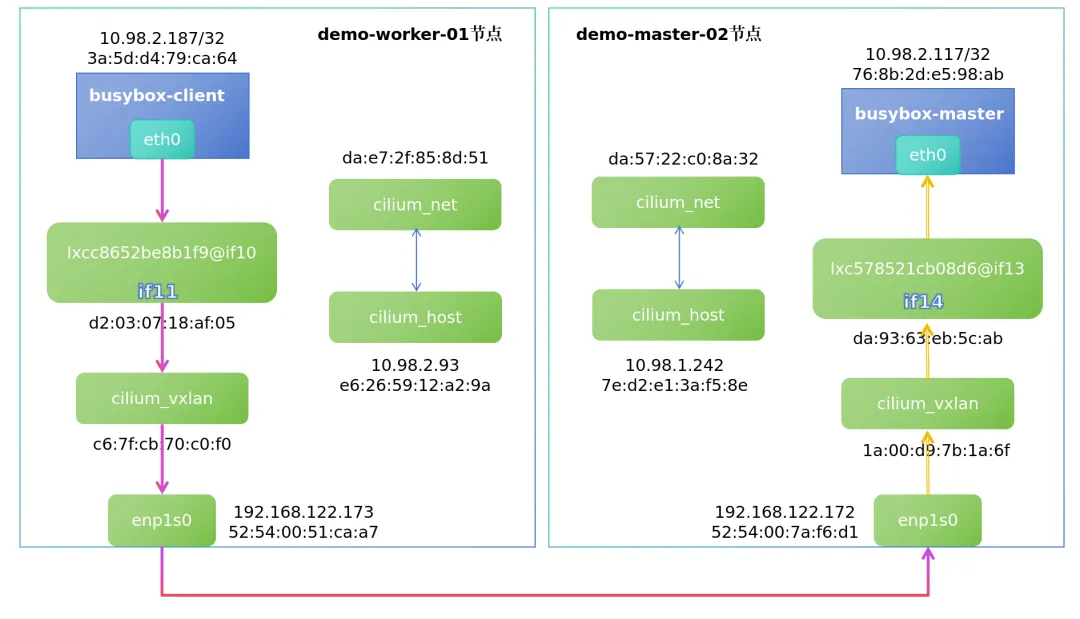
由此以来,基于cilium vxlan模式的pod之间的流量走向就搞清楚了,后续我们来体验一下cilium的其他高级功能。
cilium高级功能体验
hubble可观测性测试
部署hubble
直接执行cilium hubble enable即可安装,安装完成后会在kube-system下创建以下两个pod:
# kubectl get po -n kube-system | grep hubbhubble-relay-66495f87cb-78gpg 1/1 Runninghubble-ui-7bcb645fcd-g99rm 2/2 Running查看cilium状态:cilium status,hubble相关服务正常running即可。
配置hubble-ui
hubble-ui的service默认为ClusterIP模式,将其更改为NodePort后,即可通过浏览器访问:
kubectl edit svc -n kube-system hubble-ui配置hubble cli工具
wget https://github.com/cilium/hubble/releases/download/v1.18.6/hubble-linux-amd64.tar.gzsudo tar xzvfC hubble-linux-amd64.tar.gz /usr/local/bin创建demo演示服务
# kubectl create -f https://raw.githubusercontent.com/cilium/cilium/1.19.2/examples/minikube/http-sw-app.yamlservice/deathstar createddeployment.apps/deathstar createdpod/tiefighter createdpod/xwing created此demo为cilium官方推荐的,我们就用它来测试hubble,服务详情如下:
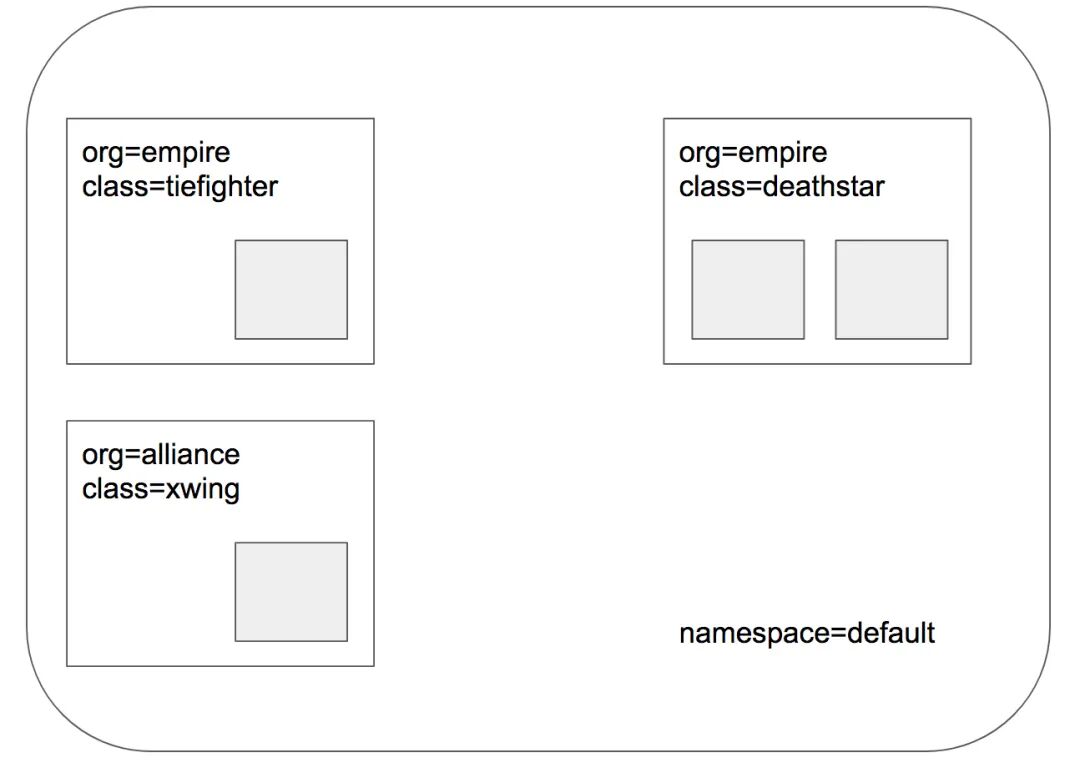
也可以通过
kubectl -n kube-system exec ds/cilium -- cilium-dbg endpoint list来查看对应节点的endpoint详情
测试hubble-ui
发起请求:
## 内部服务访问# kubectl exec xwing -- curl -s -XPOST deathstar.default.svc.cluster.local/v1/request-landingShip landed## 内部服务访问# kubectl exec tiefighter -- curl -s -XPOST deathstar.default.svc.cluster.local/v1/request-landingShip landed## 外部服务访问# kubectl exec tiefighter -- curl www.baidu.com查看hubble-ui:
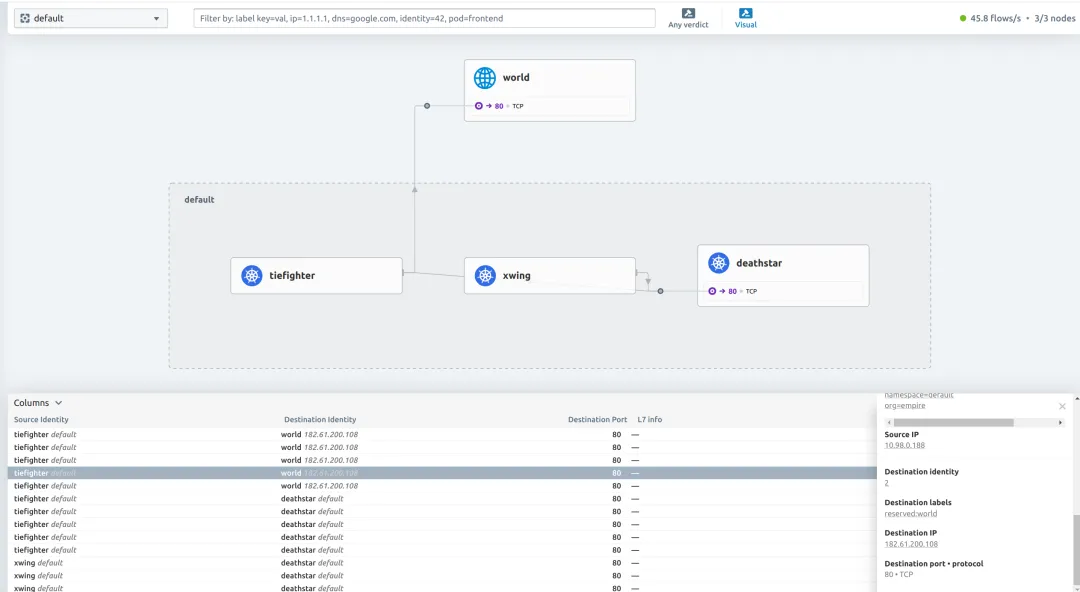
可以一目了然的看到很多网络信息,如:
• 服务之间的调用关系,比架构图还要准确 • 流量是否正常转发,是否被拦截、超时等 • 哪个服务访问了外部网络 • 源ip,目的ip+端口,协议,状态等
网络策略Network Policy测试
L3/L4策略
vim rule1.yaml
apiVersion: "cilium.io/v2"kind: CiliumNetworkPolicymetadata: name: "rule1"spec: description: "L3-L4 policy to restrict deathstar access to empire ships only" endpointSelector: matchLabels: org: empire class: deathstar ingress: - fromEndpoints: - matchLabels: org: empire toPorts: - ports: - port: "80" protocol: TCP(1)这条策略仅对带有org: empire和class: deathstar两个标签的Pod生效,本例中就是deathstar服务;
(2)且只允许来源带有org: empire标签的Pod访问上面的目标Pod
(3)且只允许访问目标Pod的TCP 80端口,其他均不可
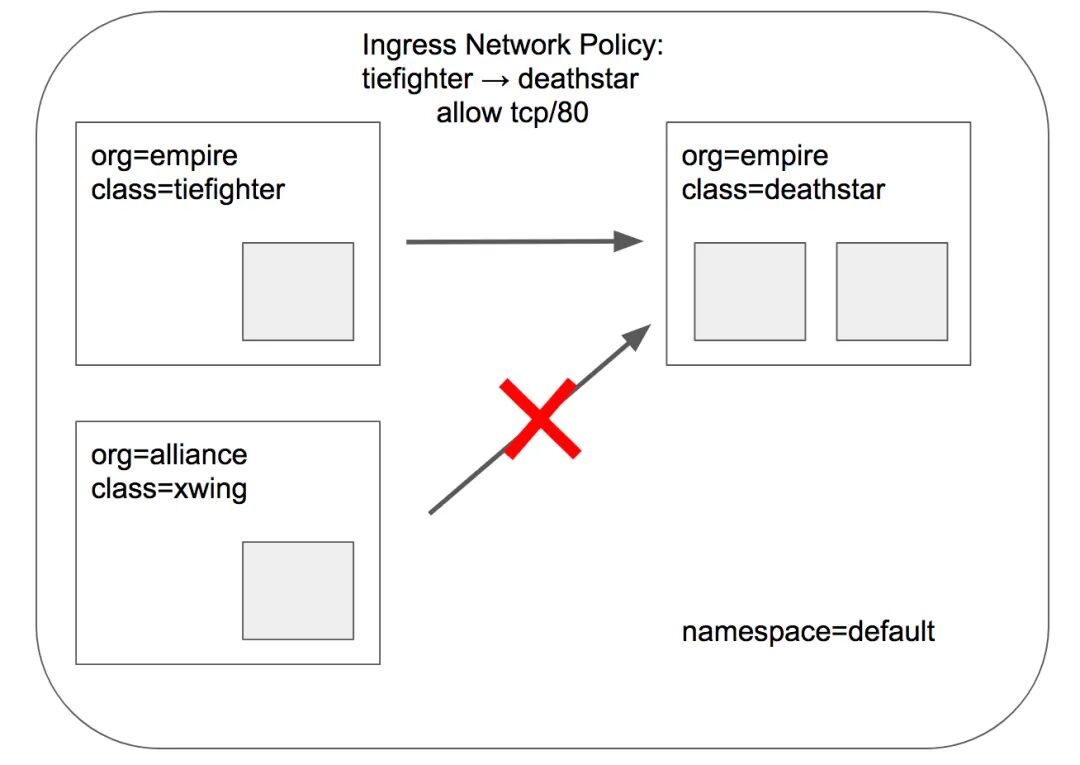
开始测试:
# 通过kubectl exec tiefighter -- curl -s -XPOST deathstar.default.svc.cluster.local/v1/request-landing# xwing无org: empire标签,流量全部deny,Drop reason的值为Policy deniedkubectl exec xwing -- curl -s -XPOST deathstar.default.svc.cluster.local/v1/request-landin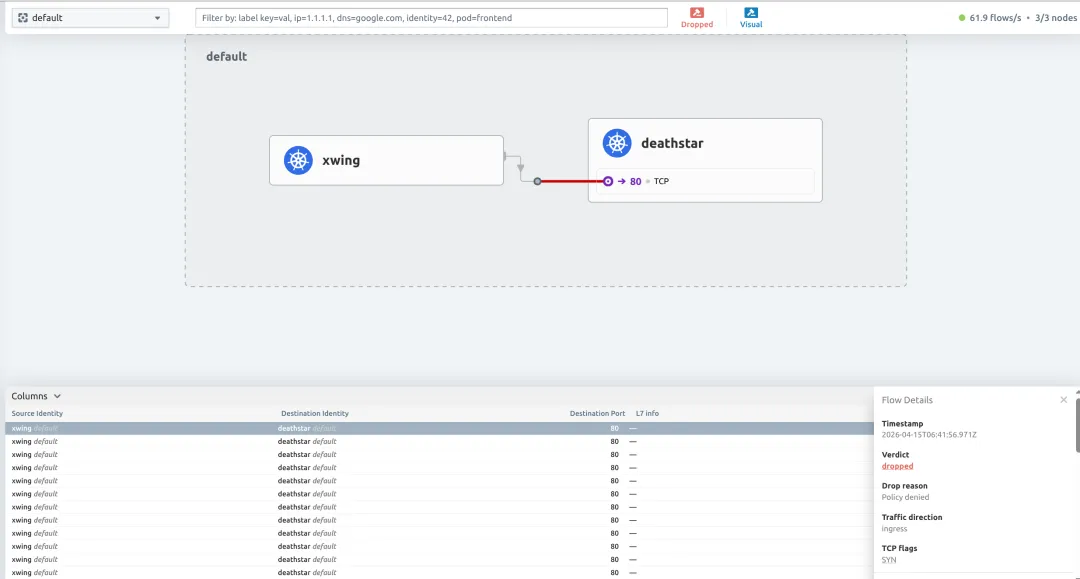
查看endpoint端点,deathstar服务的POLICY (ingress)已经是Enabled:
# kubectl exec -it -n kube-system cilium-nnl6k -- cilium-dbg endpoint list ENDPOINT POLICY (ingress) POLICY (egress) IDENTITY LABELS (source:key[=value])803 Enabled Disabled 30171 k8s:app.kubernetes.io/name=deathstarL7策略
vim rule2.yaml
apiVersion: "cilium.io/v2"kind: CiliumNetworkPolicymetadata: name: "rule2"spec: description: "L7 policy to restrict access to specific HTTP call" endpointSelector: matchLabels: org: empire class: deathstar ingress: - fromEndpoints: - matchLabels: org: empire toPorts: - ports: - port: "80" protocol: TCP rules: http: - method: "POST" path: "/v1/request-landing"(1)这条策略仅对带有org: empire和class: deathstar两个标签的Pod生效,本例中就是deathstar服务;
(2)且只允许来源带有org: empire标签的Pod访问上面的目标Pod
(3)且只允许使用POST方法访问目标Pod TCP 80端口的Path "/v1/request-landing"
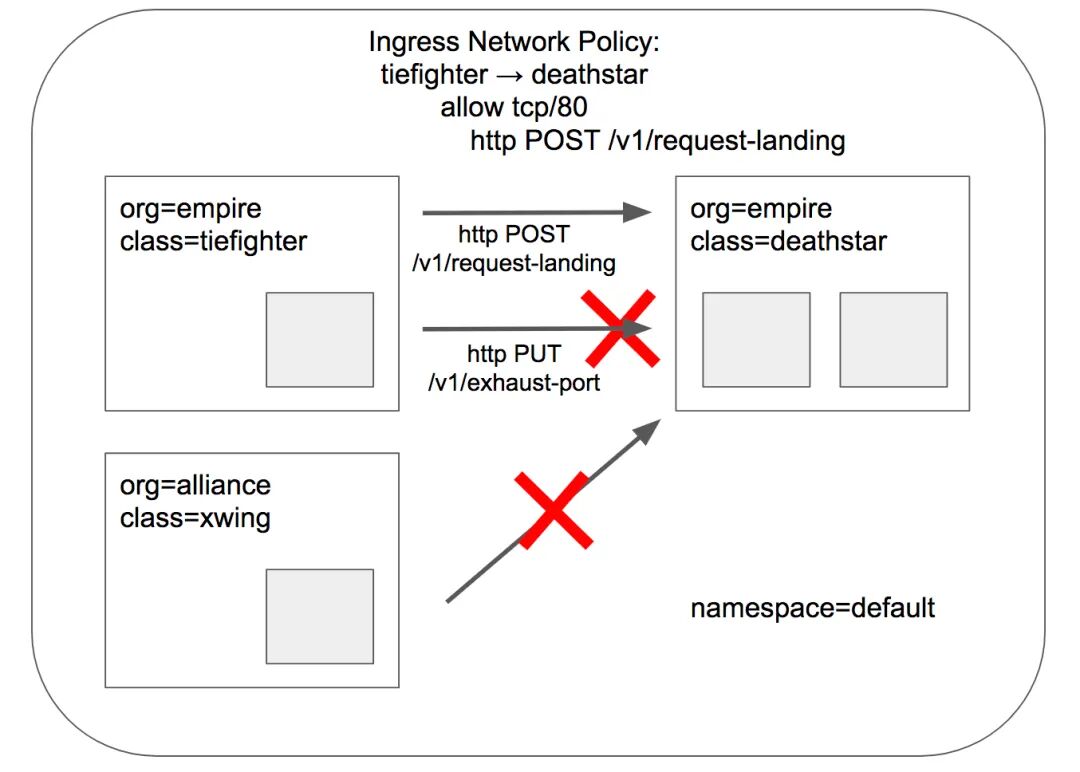
开始测试:
# 通过kubectl exec tiefighter -- curl -s -XPOST deathstar.default.svc.cluster.local/v1/request-landing# POST请求,path错误,Access deniedkubectl exec tiefighter -- curl -s -XPUT deathstar.default.svc.cluster.local/v1/exhaust-url# PUT请求,Access deniedkubectl exec tiefighter -- curl -s -XPUT deathstar.default.svc.cluster.local/v1/exhaust-port# 无org: empire标签,超时kubectl exec xwing -- curl -s -XPOST deathstar.default.svc.cluster.local/v1/request-landing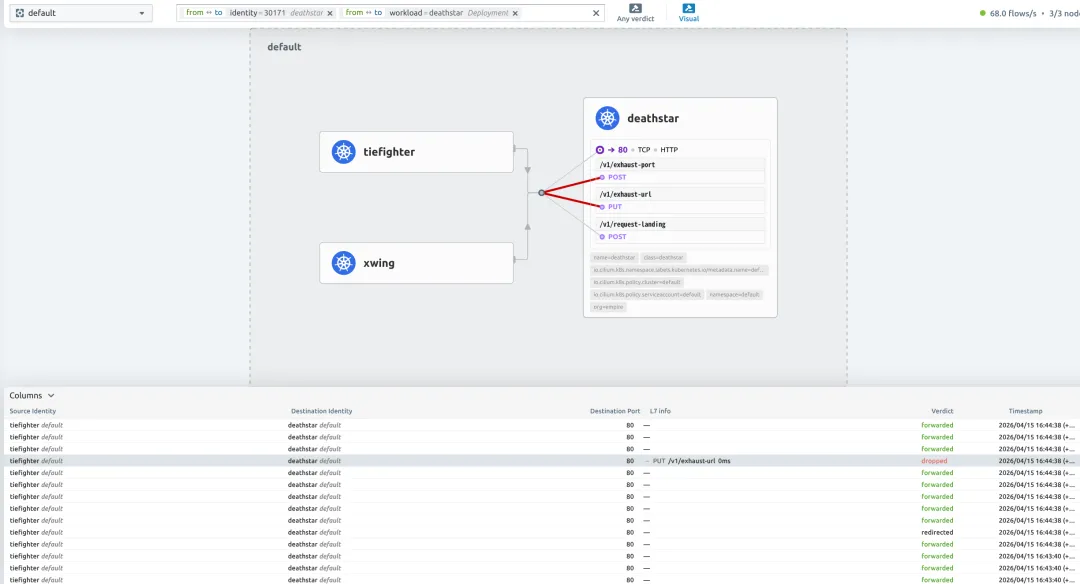
如果想要允许访问/v1/下所有的路径,则可使用正则表达:
path: "/v1/.*"测试完成后,可删除策略:kubectl delete -f rule2.yaml
服务网格Service Mesh测试
cilium的Service Mesh目前支持较为传统的Kubernetes Ingress入口和更全面的流量管理平台Gateway API,ingress和ingress-nginx等ingressClass一样,简单的应用或从其他ingressClass迁移时可以使用,但是想要功能更全面,且向k8s未来流量管理的标准靠近的话,还是推荐使用Gateway API。
Gateway API目前支持以下多种资源类型:
• GatewayClass • Gateway • HTTPRoute • GRPCRoute • TLSRoute (experimental) • ReferenceGrant
想要使用Gateway API需要满足以下前提:
1. 必须使用cilium替代kube-proxy,配置 kubeProxyReplacement=true2. L7 proxy参数必须为true(默认就为true) 3. 必须先将GatewayClass、Gateway、HTTPRoute、GRPCRoute和ReferenceGrant五个CRDs资源创建完成,如果使用TLSRoute的话,也许提前创建其CRD: $ kubectl apply -f https://raw.githubusercontent.com/kubernetes-sigs/gateway-api/v1.4.1/config/crd/standard/gateway.networking.k8s.io_gatewayclasses.yaml$ kubectl apply -f https://raw.githubusercontent.com/kubernetes-sigs/gateway-api/v1.4.1/config/crd/standard/gateway.networking.k8s.io_gateways.yaml$ kubectl apply -f https://raw.githubusercontent.com/kubernetes-sigs/gateway-api/v1.4.1/config/crd/standard/gateway.networking.k8s.io_httproutes.yaml$ kubectl apply -f https://raw.githubusercontent.com/kubernetes-sigs/gateway-api/v1.4.1/config/crd/standard/gateway.networking.k8s.io_referencegrants.yaml$ kubectl apply -f https://raw.githubusercontent.com/kubernetes-sigs/gateway-api/v1.4.1/config/crd/standard/gateway.networking.k8s.io_grpcroutes.yaml$ kubectl apply -f https://raw.githubusercontent.com/kubernetes-sigs/gateway-api/v1.4.1/config/crd/experimental/gateway.networking.k8s.io_tlsroutes.yaml
install gatewayAPI
helm upgrade cilium cilium/cilium --version 1.19.3 \ --namespace kube-system \ --reuse-values \ --set kubeProxyReplacement=true \ # 替代kube-proxy --set gatewayAPI.enabled=true \ # 开启gatewayAPI --set loadBalancer.l7.backend=envoy \ # loadBalancer的svc l7后端状态 --set nodeIPAM.enabled=true# 为LoadBalancer的Service分配IP,无需依赖云厂商或物理负载均衡设备kubectl -n kube-system rollout restart deployment/cilium-operatorkubectl -n kube-system rollout restart ds/cilium创建LoadBalancerIPPool:
cat <<EOF | kubectl apply -f -apiVersion: "cilium.io/v2"kind: CiliumLoadBalancerIPPoolmetadata: name: default-poolspec: blocks: # - cidr: "192.168.122.0/24" # 修改为本地可访问的地址段 - start: "192.168.122.5" # 开始ip和结束ip stransform: translateY( "192.168.122.150" serviceSelector: matchLabels: {} # 匹配所有servicesEOFhttp示例
1. 部署demo app kubectl apply -f https://raw.githubusercontent.com/istio/istio/release-1.11/samples/bookinfo/platform/kube/bookinfo.yaml2. 创建cilium gateway及HTTPRoute cat <<EOF | kubectl apply -f ----apiVersion: gateway.networking.k8s.io/v1kind: Gatewaymetadata: name: my-gatewayspec:# 创建http协议的gateway入口,监听80端口,且仅允许同命名空间的HTTPRoute使用这个网关 gatewayClassName: cilium listeners: - protocol: HTTP port: 80 name: web-gw allowedRoutes: namespaces: from: Same---apiVersion: gateway.networking.k8s.io/v1kind: HTTPRoutemetadata: name: http-app-1spec:# 这条HTTPRoute规则挂载的gateway名称 parentRefs: - name: my-gateway namespace: default rules:# 请求路径以/details开头的流量转发给后端为details的service的9080端口 - matches: - path: type: PathPrefix value: /details backendRefs: - name: details port: 9080# 请求头必须包含magic=foo,URL参数必须包含great=example,请求路径为/,且是GET请求# 满足以上条件,将流量转发给后端为productpage的service的9080端口 - matches: - headers: - type: Exact name: magic value: foo queryParams: - type: Exact name: great value: example path: type: PathPrefix value: / method: GET backendRefs: - name: productpage port: 9080EOF3. 查看gateway和service # kubectl get gateway my-gateway NAME CLASS ADDRESS PROGRAMMED AGEmy-gateway cilium 192.168.122.5 True 22m[root@demo-master-01 yaml]# kubectl get svc cilium-gateway-my-gateway NAME TYPE CLUSTER-IP EXTERNAL-IP PORT(S) cilium-gateway-my-gateway LoadBalancer 10.96.188.250 192.168.122.5 80:30887/TCP4. 测试访问 # GATEWAY=$(kubectl get gateway my-gateway -o jsonpath='{.status.addresses[0].value}')# curl --fail -s http://"$GATEWAY"/details/1 | jq{"id": 1,"author": "William Shakespeare","year": 1595,"type": "paperback","pages": 200,"publisher": "PublisherA","language": "English","ISBN-10": "1234567890","ISBN-13": "123-1234567890"}# curl -v -H 'magic: foo' http://"$GATEWAY"\?great\=example* Trying 192.168.122.5:80...* Connected to 192.168.122.5 (192.168.122.5) port 80> GET /?great=example HTTP/1.1> Host: 192.168.122.5> User-Agent: curl/8.4.0> Accept: */*> magic: foo> < HTTP/1.1 200 OK...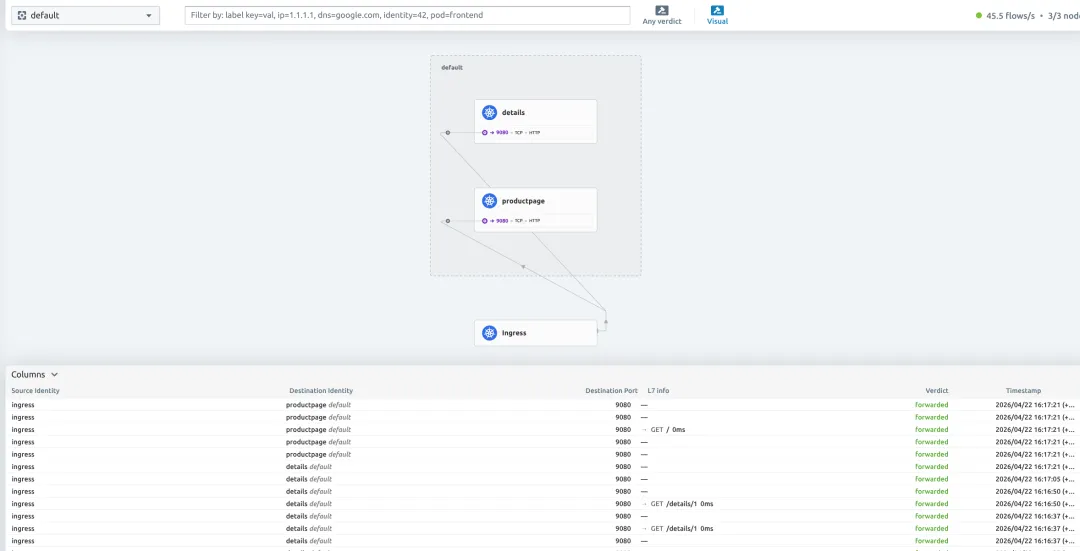
gateway_http_ingress
达到预期。
https示例
1. 安装cert-manager证书管理工具 helm repo add jetstack https://charts.jetstack.iohelm pull jetstack/cert-manager --untar --version v1.16.2helm install cert-manager jetstack/cert-manager --version v1.16.2 \ --namespace cert-manager \ --set crds.enabled=true \ --create-namespace \ --set config.apiVersion="controller.config.cert-manager.io/v1alpha1" \ --set config.kind="ControllerConfiguration" \ --set config.enableGatewayAPI=true2. 创建CA Issuer kubectl apply -f https://raw.githubusercontent.com/cilium/cilium/1.19.3/examples/kubernetes/servicemesh/ca-issuer.yaml3. 创建tls-gateway与HTTPRoute kubectl apply -f https://raw.githubusercontent.com/cilium/cilium/1.19.3/examples/kubernetes/gateway/basic-https.yaml4. 将tls-gateway添加注释,并检查secret、httproute是否创建,gateway是否绑定ip kubectl annotate gateway tls-gateway cert-manager.io/issuer=ca-issuer# kubectl get certificate,secretNAME READY SECRET AGEcertificate.cert-manager.io/ca True ca 92mNAME TYPE DATA AGEsecret/ca kubernetes.io/tls 3 92m# kubectl get gateway tls-gatewayNAME CLASS ADDRESS PROGRAMMED AGEtls-gateway cilium 192.168.122.6 True 84m# kubectl get httproutes https-app-route-1 https-app-route-2NAME HOSTNAMES AGEhttps-app-route-1 ["bookinfo.cilium.rocks"] 84mhttps-app-route-2 ["hipstershop.cilium.rocks"] 84m5. 添加hosts解析,测试访问 echo >> '192.168.122.6 bookinfo.cilium.rocks hipstershop.cilium.rocks' /etc/hosts
提示私有证书可加-k参数跳过tls检验,或将ca.crt证书copy到系统的ca-trust目录中,让系统信任此CA,操作如下:curl https://bookinfo.cilium.rocks/details/1curl https://hipstershop.cilium.rocks/kubectl get secrets ca -oyaml | grep ca.crt | awk '{print $2}' | base64 -d > ca.crtcp ca.crt /etc/pki/ca-trust/source/anchors/update-ca-trust
流量分割示例
1. 部署echo app kubectl apply -f https://raw.githubusercontent.com/cilium/cilium/1.19.3/examples/kubernetes/gateway/echo.yaml2. 创建cilium gateway及HTTPRoute cat <<EOF | kubectl apply -f ----apiVersion: gateway.networking.k8s.io/v1kind: Gatewaymetadata: name: cilium-gwspec: gatewayClassName: cilium listeners: - protocol: HTTP port: 80 name: web-gw-echo allowedRoutes: namespaces: from: Same---apiVersion: gateway.networking.k8s.io/v1kind: HTTPRoutemetadata: name: example-route-1spec: parentRefs: - name: cilium-gw rules: - matches: - path: type: PathPrefix value: /echo backendRefs: - kind: Service name: echo-1 port: 8080# 50%的流量到echo-1 weight: 50 - kind: Service name: echo-2 port: 8090# 50%的流量到echo-2 weight: 50EOF3. 检查gateway是否绑定成功 # kubectl get gateway cilium-gwNAME CLASS ADDRESS PROGRAMMED AGEcilium-gw cilium 192.168.122.7 True 2m4. 开始测试 ## 配置GATEWAY变量GATEWAY=$(kubectl get gateway cilium-gw -o jsonpath='{.status.addresses[0].value}')## 循环发起请求whiletrue; do curl -s -k "http://$GATEWAY/echo" >> curlresponses.txt ;done## 检查权重cat curlresponses.txt| grep -c "Hostname: echo-1"1120cat curlresponses.txt| grep -c "Hostname: echo-2"1200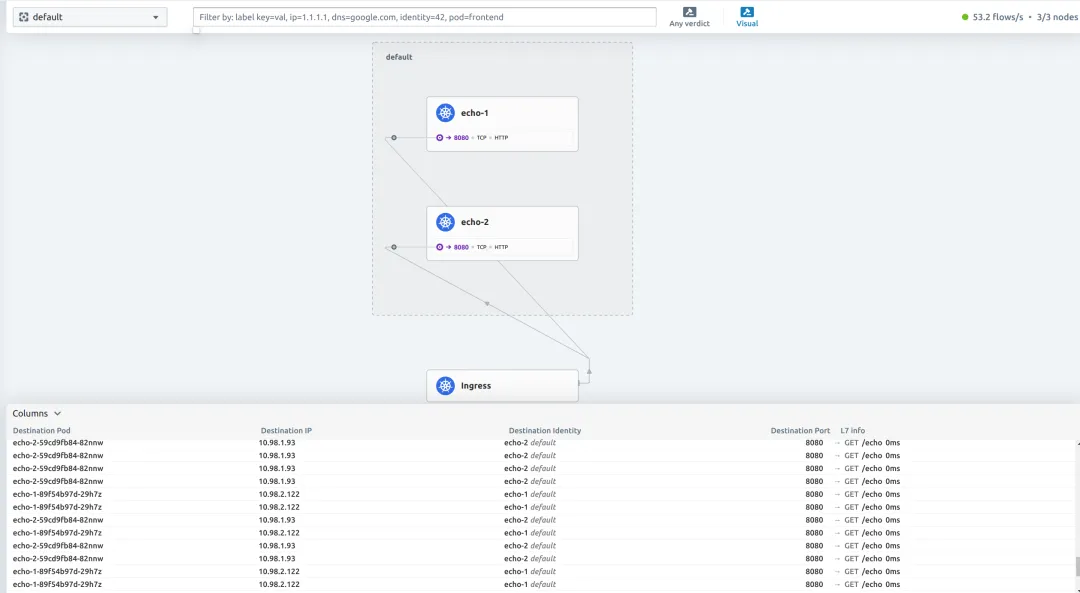
weight
http请求头修改示例
1. 创建gateway与httproute cat <<EOF | kubectl apply -f ----apiVersion: gateway.networking.k8s.io/v1kind: Gatewaymetadata: name: cilium-gwspec: gatewayClassName: cilium listeners: - protocol: HTTP port: 80 name: web-gw-echo allowedRoutes: namespaces: from: Same---apiVersion: gateway.networking.k8s.io/v1kind: HTTPRoutemetadata: name: header-http-echospec: parentRefs: - name: cilium-gw rules:# 添加请求头,path:/add-a-request-header,header:my-header-name=my-header-value - matches: - path: type: PathPrefix value: /add-a-request-header filters: - type: RequestHeaderModifier requestHeaderModifier: add: - name: my-header-name value: my-header-value backendRefs: - name: echo-1 port: 8080# 删除请求头,path:/remove-a-request-header,删除header:x-request-id - matches: - path: type: PathPrefix value: /remove-a-request-header filters: - type: RequestHeaderModifier requestHeaderModifier: remove: ['x-request-id'] backendRefs: - name: echo-1 port: 8080# 删除请求头,path:/set-a-request-header,修改header:user-agent - matches: - path: type: PathPrefix value: /set-a-request-header filters: - type: RequestHeaderModifier requestHeaderModifier: set: - name: user-agent value: 'Mozilla/5.0 (X11; Linux x86_64) AppleWebKit/537.36 (KHTML, like Gecko) Chrome/143.0.0.0 Safari/537.36' backendRefs: - name: echo-1 port: 8080EOF2. 访问测试 ## 配置GATEWAY变量GATEWAY=$(kubectl get gateway cilium-gw -o jsonpath='{.status.addresses[0].value}')# curl -s http://$GATEWAY/add-a-request-header | grep -A 8 "Request Headers"Request Headers: accept=*/* host=192.168.122.7 my-header-name=my-header-value user-agent=curl/8.4.0 x-envoy-internal=true x-forwarded-for=192.168.122.171 x-forwarded-proto=http x-request-id=310a78bd-5333-4ef5-bdbd-0e5edf25f97b [root@demo-master-01 header]# curl -s http://$GATEWAY/remove-a-request-header | grep -A 8 "Request Headers"Request Headers: accept=*/* host=192.168.122.7 user-agent=curl/8.4.0 x-envoy-internal=true x-forwarded-for=192.168.122.171 x-forwarded-proto=http [root@demo-master-01 header]# curl -s http://$GATEWAY/set-a-request-header | grep -A 8 "Request Headers"Request Headers: accept=*/* host=192.168.122.7 user-agent=Mozilla/5.0 (X11; Linux x86_64) AppleWebKit/537.36 (KHTML, like Gecko) Chrome/143.0.0.0 Safari/537.36 x-envoy-internal=true x-forwarded-for=192.168.122.171 x-forwarded-proto=http x-request-id=20a37381-acd9-4062-b2b1-bad27e818de6结果均达到预期
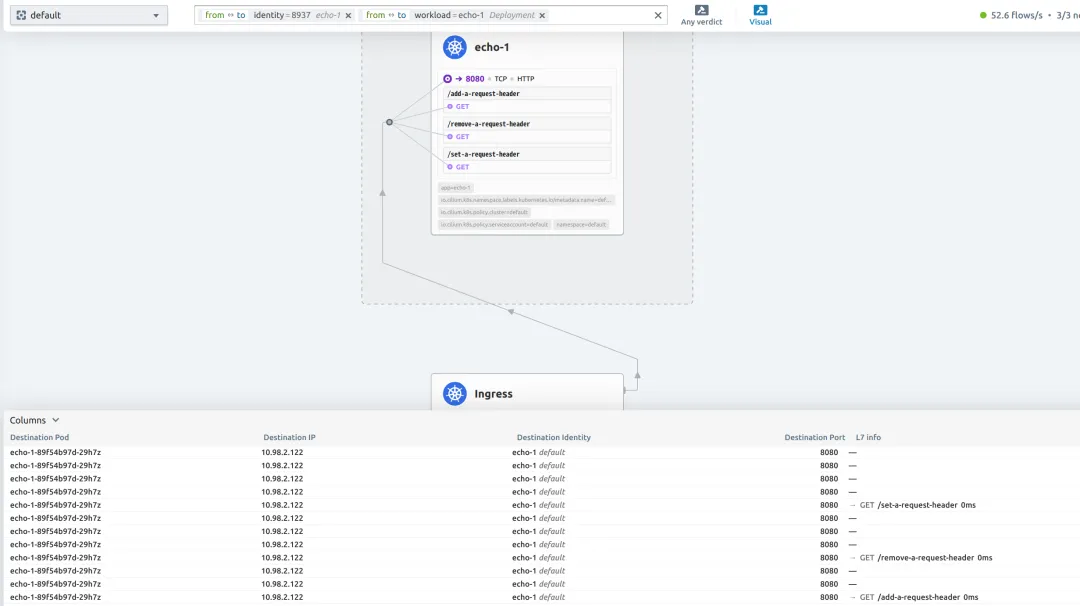
header-modify
gRPC示例
1. bookinfo的demo app已部署(同http示例章节),cert-manager已部署(同https示例章节) 2. 创建tls-gateway与grpcroute kubectl apply -f https://raw.githubusercontent.com/cilium/cilium/1.19.3/examples/kubernetes/gateway/grpc-tls-termination.yaml3. 检查gateway、grpcroute、secret等配置 # kubectl get secrets NAME TYPE DATA AGEca kubernetes.io/tls 3 14dgrpc-certificate kubernetes.io/tls 3 18m# kubectl get grpcroutesNAME HOSTNAMES AGEgrpc-route 19m4. 配置hosts文件,下载grpccurl工具 ehco '192.168.122.6 grpc-echo.cilium.rocks' >> /etc/hostswget https://github.com/fullstorydev/grpcurl/releases/download/v1.9.3/grpcurl_1.9.3_linux_amd64.rpm5. 开始测试 # grpcurl grpc-echo.cilium.rocks:443 proto.EchoTestService/Echo{"message": "RequestHeader=user-agent:grpcurl/v1.9.3 grpc-go/1.61.0\nRequestHeader=grpc-accept-encoding:gzip\nRequestHeader=x-forwarded-proto:https\nRequestHeader=x-request-id:77a7e1a3-9f3c-455a-802e-d94ab220b1fd\nHost=grpc-echo.cilium.rocks:443\nRequestHeader=:authority:grpc-echo.cilium.rocks:443\nRequestHeader=content-type:application/grpc\nRequestHeader=x-forwarded-for:192.168.122.171\nRequestHeader=x-envoy-internal:true\nStatusCode=200\nServiceVersion=\nServicePort=7070\nIP=10.98.0.17\nProto=GRPC\nEcho=\nHostname=grpc-echo-58ff785c48-xznjn\n"}
GatewayClass参数修改示例
cilium gateway默认是会自动创建LoadBalancer类型的svc,但有些场景我们没有云厂商所提供的负载均衡,这时就可以将其配置为自动创建NodePort类型的svc。
1. bookinfo的demo app已部署(同http示例章节) 2. 创建新的GatewayClass及Gateway
检查其状态:cat <<EOF | kubectl apply -f ----apiVersion: gateway.networking.k8s.io/v1kind: GatewayClassmetadata: name: nodeport-gateway-classspec: controllerName: io.cilium/gateway-controller description: The default Cilium GatewayClass parametersRef: group: cilium.io kind: CiliumGatewayClassConfig name: nodeport-gateway-config namespace: default---apiVersion: cilium.io/v2alpha1kind: CiliumGatewayClassConfigmetadata: name: nodeport-gateway-config namespace: defaultspec: service: type: NodePort---apiVersion: gateway.networking.k8s.io/v1kind: Gatewaymetadata: name: nodeport-gatewayspec: gatewayClassName: nodeport-gateway-class listeners: - protocol: HTTP port: 80 name: web-gw allowedRoutes: namespaces: from: Same---apiVersion: gateway.networking.k8s.io/v1kind: HTTPRoutemetadata: name: http-app-1spec: parentRefs: - name: nodeport-gateway namespace: default rules: - matches: - path: type: PathPrefix value: /details backendRefs: - name: details port: 9080EOF# kubectl get services cilium-gateway-nodeport-gatewayNAME TYPE CLUSTER-IP EXTERNAL-IP PORT(S) cilium-gateway-nodeport-gateway NodePort 10.96.26.108 <none> 80:31146/TCP3. 通过NodePort测试访问 # curl http://localhost:31146/details/1{"id":1,"author":"William Shakespeare","year":1595,"type":"paperback","pages":200,"publisher":"PublisherA","language":"English","ISBN-10":"1234567890","ISBN-13":"123-1234567890"}
未完待续
由于篇幅问题,本文暂时只介绍了cilium的核心功能、流量走向和部分高级功能,后续还要针对Cluster Mesh这种多集群网络通信、对接prometheus、使用Service Mesh完成灰度发布、以及多集群之间完成灰度和高可用等等功能进行实战探索,体验到现在感觉cilium真的是一款功能非常多且性能很高的CNI插件,相信后续还会发布更多有意思的功能,未来可期。
欢迎继续关注后续的文章,且本文若有不正确的部分也欢迎指出,交流的过程就是在进步。