 夜雨聆风
夜雨聆风30寸主副驾长联屏getDimension出现负数,导致资源加载崩溃问题分析
1. 现象描述
应用(如 `com.tencent.newslite`)在启动或渲染阶段发生崩溃,抛出如下 `IllegalArgumentException`,导致应用无法正常运行。
**Crash 堆栈:**
04-20 15:44:00.385 E/AndroidRuntime(11013): FATAL EXCEPTION: main04-20 15:44:00.385 E/AndroidRuntime(11013): Process: com.tencent.newslite, PID: 1101304-20 15:44:00.385 E/AndroidRuntime(11013): java.lang.IllegalArgumentException: lightZ must be a finite positive, given=-2199.357704-20 15:44:00.385 E/AndroidRuntime(11013): at android.graphics.HardwareRenderer.validatePositive(HardwareRenderer.java:975)04-20 15:44:00.385 E/AndroidRuntime(11013): at android.graphics.HardwareRenderer.setLightSourceGeometry(HardwareRenderer.java:233)04-20 15:44:00.385 E/AndroidRuntime(11013): at android.view.ThreadedRenderer.setLightCenter(ThreadedRenderer.java:610)04-20 15:44:00.385 E/AndroidRuntime(11013): at android.view.ThreadedRenderer.setup(ThreadedRenderer.java:539)04-20 15:44:00.385 E/AndroidRuntime(11013): at android.view.ViewRootImpl.performTraversals(ViewRootImpl.java:3369)04-20 15:44:00.385 E/AndroidRuntime(11013): at android.view.ViewRootImpl.doTraversal(ViewRootImpl.java:2390)04-20 15:44:00.385 E/AndroidRuntime(11013): at android.view.ViewRootImpl$TraversalRunnable.run(ViewRootImpl.java:9347)04-20 15:44:00.385 E/AndroidRuntime(11013): at android.view.Choreographer$CallbackRecord.run(Choreographer.java:1231)04-20 15:44:00.385 E/AndroidRuntime(11013): at android.view.Choreographer$CallbackRecord.run(Choreographer.java:1239)04-20 15:44:00.385 E/AndroidRuntime(11013): at android.view.Choreographer.doCallbacks(Choreographer.java:899)04-20 15:44:00.385 E/AndroidRuntime(11013): at android.view.Choreographer.doFrame(Choreographer.java:832)04-20 15:44:00.385 E/AndroidRuntime(11013): at android.view.Choreographer$FrameDisplayEventReceiver.run(Choreographer.java:1214)04-20 15:44:00.385 E/AndroidRuntime(11013): at android.os.Handler.handleCallback(Handler.java:942)04-20 15:44:00.385 E/AndroidRuntime(11013): at android.os.Handler.dispatchMessage(Handler.java:99)04-20 15:44:00.385 E/AndroidRuntime(11013): at android.os.Looper.loopOnce(Looper.java:201)04-20 15:44:00.385 E/AndroidRuntime(11013): at android.os.Looper.loop(Looper.java:288)04-20 15:44:00.385 E/AndroidRuntime(11013): at android.app.ActivityThread.main(ActivityThread.java:7918)04-20 15:44:00.385 E/AndroidRuntime(11013): at java.lang.reflect.Method.invoke(Native Method)04-20 15:44:00.385 E/AndroidRuntime(11013): at com.android.internal.os.RuntimeInit$MethodAndArgsCaller.run(RuntimeInit.java:553)04-20 15:44:00.385 E/AndroidRuntime(11013): at com.android.internal.os.ZygoteInit.main(ZygoteInit.java:946)
2. 问题排查过程
2.1 初始疑点:Framework 资源为何为负数?
在 `ThreadedRenderer.java` 的构造函数中,系统会从 `Context` 的 `Theme` 中加载 `lightZ` 和 `lightRadius` 等光照属性:
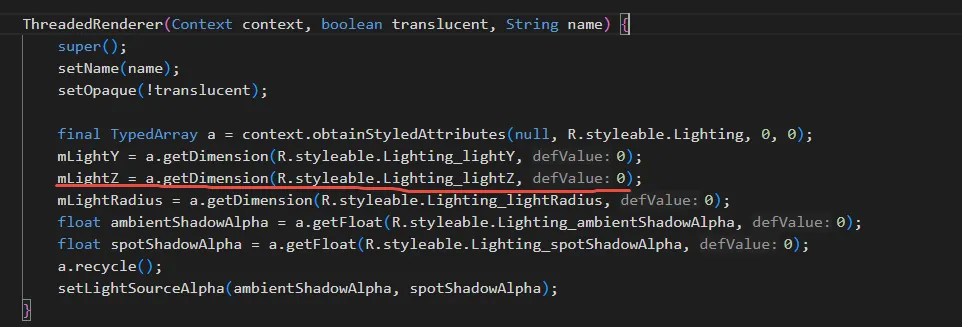
通过在 framework 源码中搜索,发现 `core/res/res/values/dimens.xml` 中明确定义了这些值为**正数**:
*`<dimen name="light_z">500dp</dimen>`
*`<dimen name="light_radius">800dp</dimen>`
2.2 如何确定是app的config出错还是framework的config出错
使用了 android.util.TypedValue 来捕获 lightZ 和 lightRadius 属性在加载时的元数据。修改后的代码如下:
1 android.util.TypedValue outValueZ = new android.util.TypedValue();2 a.getValue(R.styleable.Lighting_lightZ, outValueZ);3 android.util.TypedValue outValueR = new android.util.TypedValue();4 a.getValue(R.styleable.Lighting_lightRadius, outValueR);56 Log.w("debug200", "ThreadedRenderer, mLightRadius = " + mLightRadius7 + " (ResID=0x" + Integer.toHexString(outValueR.resourceId)8 + ", Cookie=" + outValueR.assetCookie + ")"9 + ", mLightZ = " + mLightZ10 + " (ResID=0x" + Integer.toHexString(outValueZ.resourceId)11 + ", Cookie=" + outValueZ.assetCookie + ")"12 + ", cb = ", new Throwable());
如何定位来源:
编译并运行后,请观察 debug200 标签输出的 Log:
1. 查看 ResID (资源 ID):
* 如果以 0x01 开头(例如 0x01050xxx):说明使用的是 Framework (系统框架) 资源。
* 如果以 0x7f 开头:说明使用的是 App 自身 定义的资源。
2. 查看 Cookie (资产索引):
* Cookie = 1:通常代表资源直接来自 /system/framework/framework-res.apk。
* Cookie > 1:代表资源来自 App 内部,或者是一个加载在系统上的 RRO (Runtime Resource Overlay) 覆盖包。
通过这两个值,您可以立刻结案:到底是应用腾讯新闻自己改了光照属性,还是系统层的某个 Overlay 包(针对该机型的适配包)把这两个全局属性给改坏了。
96476: 05-19 10:59:30.009407 4599 4599 W debug200: ThreadedRenderer, mLightRadius = -2415.566 (ResID=0x1050206, Cookie=1), mLightZ = -1509.7286 (ResID=0x1050208, Cookie=1) 然而,通过添加针对 `TypedValue` 的调试日志,我们发现:
即使通过 `TypedValue` 确认该值确实来源于 `framework-res.apk`(ResID=`0x01...`, Cookie=`1`)。
读取出的维度依然是负数,例如 `mLightRadius = -2415.566`。
即使将 framework 中的 `500dp` 修改为 `50dp`,读取出的值等比例变为 `-150.97`。
2.3 根因定位:布局计算溢出导致应用区域高度为负
进一步分析系统 `DisplayInfo` 相关日志,发现了极其关键的异常数据:
`smallest app 1600 x -1088`
后续在 `DisplayPolicy.java` 中增加日志追踪,彻底揭示了崩溃的源头:
05-19 13:19:12.311153 debug300: update, mConfigFrame = Rect(0, 2560 - 5120, 1472), displayFrame = Rect(0, 0 - 5120, 1600), mConfigInsets = Rect(0, 2560 - 0, 128)05-19 13:19:12.311455 debug300: adjustDisplaySizeRanges, h = -1088, displayInfo.smallestNominalAppHeight = -1088
3. 根本原因(Root Cause)
这是一个由 UI 布局参数错误配置引发的链式系统崩溃,其完整传导链条如下:
1.**Insets 配置错误(起因)**:在系统 UI 栏(如 StatusBar, NavigationBar 或定制的车机 ClimateBar)的高度或位置计算中,引入了一个非法的 **Top Inset 偏移量:`2560px`**。考虑到 8295 屏幕的总宽度正好是 `5120px`,这里的 `2560px`(即宽度的一半)极有可能是在处理贯穿屏左右分屏逻辑时,将“水平宽度偏移”误写或误传为了“垂直高度偏移 (Top Inset)”。
2.**可用屏幕高度溢出**:屏幕物理总高度为 `1600px`。当 `DisplayPolicy` 减去这个巨大的 Top Inset 时,应用可用高度变成了负数:`1600 (height) - 2560 (top inset) - 128 (bottom inset) = -1088px`。
3.**显示信息“毒化”**:这个负数高度被赋值给 `DisplayInfo.smallestNominalAppHeight`。
4.**兼容性缩放反转(核心机制)**:当系统为 App 创建 `CompatibilityInfo` 时,它使用这个负高度来计算尺寸兼容比例(SizeCompatMode scaling)。由于分子为负,计算出的 `applicationInvertedScale` 变成了负数(约 `-2.01`)。
5.**资源加载崩溃(最终表现)**:当 `ThreadedRenderer` 在应用启动时读取 `500dp` 时,系统底层(`TypedValue.applyDimension`)使用带有负缩放系数的 `DisplayMetrics`,将正数乘成了负数(`-1500+px`)。这导致 `HardwareRenderer.setLightSourceGeometry` 校验失败并抛出 `IllegalArgumentException`,导致 App 闪退。
4. 解决方案(Solutions)
4.1 彻底修复(根治源头)
排查 WMS (`WindowManagerService`) 和 SystemUI 中处理 Insets 的相关代码,寻找是谁向 `InsetsState` 注入了 `Top = 2560` 的源。
* **重点检查**:`DisplayPolicy.java` 中的相关逻辑,以及车机定制的 System UI Bar(如副驾屏控制栏)的布局配置,修正宽度/高度参数混用的错误。
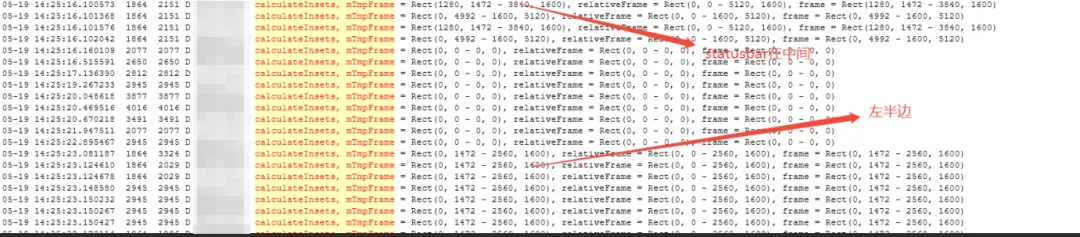
由于30寸长联屏新项目的特殊性,statusbar开始是在5120x1600的屏幕中间,后面等副驾屏这一块虚拟屏创建出来之后,才调整到主驾屏的位置,最终导致Insets计算出错,出现了本题中的config出现负数的情况。
private Insets calculateInsets(Rect relativeFrame, Rect frame, boolean ignoreVisibility) {if (!ignoreVisibility && !mVisible) {return Insets.NONE;}// During drag-move and drag-resizing, the caption insets position may not get updated// before the app frame get updated. To layout the app content correctly during drag events,// we always return the insets with the corresponding height covering the top.if (!CAPTION_ON_SHELL && getType() == ITYPE_CAPTION_BAR) {return Insets.of(0, frame.height(), 0, 0);}// Checks for whether there is shared edge with insets for 0-width/height window.final boolean hasIntersection = relativeFrame.isEmpty()? getIntersection(frame, relativeFrame, mTmpFrame): mTmpFrame.setIntersect(frame, relativeFrame);if (!hasIntersection) {return Insets.NONE;}// TODO: Currently, non-floating IME always intersects at bottom due to issues with cutout.// However, we should let the policy decide from the server.if (getType() == ITYPE_IME) {return Insets.of(0, 0, 0, mTmpFrame.height());}// Intersecting at top/bottomif (mTmpFrame.width() == relativeFrame.width()) {if (mTmpFrame.top == relativeFrame.top) {return Insets.of(0, mTmpFrame.height(), 0, 0);} else if (mTmpFrame.bottom == relativeFrame.bottom) {return Insets.of(0, 0, 0, mTmpFrame.height());}// TODO: remove when insets are shell-customizable.// This is a hack that says "if this is a top-inset (eg statusbar), always apply it// to the top". It is used when adjusting primary split for IME.if (mTmpFrame.top == 0) {return Insets.of(0, mTmpFrame.height(), 0, 0);}}// Intersecting at left/rightelse if (mTmpFrame.height() == relativeFrame.height()) {if (mTmpFrame.left == relativeFrame.left) {return Insets.of(mTmpFrame.width(), 0, 0, 0);} else if (mTmpFrame.right == relativeFrame.right) {return Insets.of(0, 0, mTmpFrame.width(), 0);}}//add for multi display START//This parameter is used to solve the problem that the windowBound width is// different from the frame width in split screens,// causing the inset value of the navigation bar and status bar to be 0.else if (MultiDisplayConfigs.isMultiScreenEnable() && relativeFrame.width() > 2 * frame.width() - 10) {if (mType == ITYPE_NAVIGATION_BAR) {//bottom 128return Insets.of(0, 0, 0, mTmpFrame.height());} else if (mType == ITYPE_STATUS_BAR) {//top 120return Insets.of(0, mTmpFrame.height(), 0, 0);}}//add for multi display ENDreturn Insets.NONE;}