 夜雨聆风
夜雨聆风写在前面
大家好,我是一名写了十多年 Web 前端的老兵。从 jQuery 时代一路走到 React/Vue,CSS3 动画、requestAnimationFrame、Web Animation API 这些都算是看家本领。
去年,我开始转战鸿蒙生态,用 ArkTS 开发 App,这一路踩了不少坑,也积累了不少心得。
上一篇,我们解决了"怎么录制慢动作视频"的问题,这篇来解决"怎么管理滑板技巧数据"的问题。
这个需求在 Web 端很常见,比如用localStorage、IndexedDB、或者后端 API。鸿蒙端的@ohos.data.preferences对应 Web 的localStorage。思路是一样的:设计数据结构、封装存储服务、实现 CRUD 操作。
这篇文章聊什么
板动录的数据管理,核心要解决的问题是:
- 技巧库怎么设计 — 滑板技巧的分类和属性
- 练习记录怎么存储 — 每次练习的数据结构
- 连招怎么管理 — 连招的创建、编辑、排序
- 统计怎么实现 — 练习趋势、技巧分布、成功率

第一步:设计技巧库
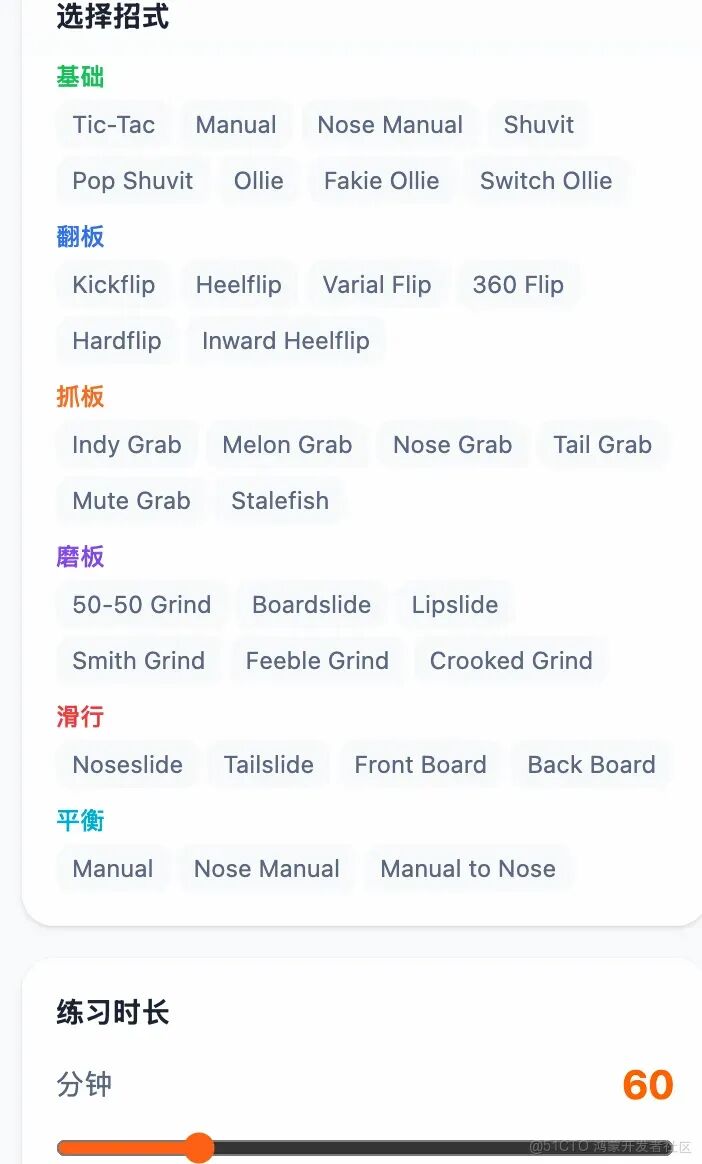
板动录有丰富的滑板技巧,覆盖 6 大类别:


// ArkTS - 技巧数据结构interface Trick {id: string;name: string;category: 'basic' | 'flip' | 'grab' | 'grind' | 'slide' | 'balance';categoryName: string;difficulty: 'beginner' | 'intermediate' | 'advanced';description: string;tips: string[];}// 技巧分类const TRICK_CATEGORIES = [{ id: 'basic', name: '基础', color: '#3b82f6' },{ id: 'flip', name: '翻板', color: '#22c55e' },{ id: 'grab', name: '抓板', color: '#f59e0b' },{ id: 'grind', name: '磨板', color: '#ef4444' },{ id: 'slide', name: '滑行', color: '#8b5cf6' },{ id: 'balance', name: '平衡', color: '#ec4899' }];// 示例技巧const ALL_TRICKS: Trick[] = [{id: 'ollie',name: 'Ollie',category: 'basic',categoryName: '基础',difficulty: 'beginner',description: '滑板最基础的跳跃动作',tips: ['后脚点板', '前脚刷板', '同时起跳']},{id: 'kickflip',name: 'Kickflip',category: 'flip',categoryName: '翻板',difficulty: 'intermediate',description: '让滑板沿纵轴旋转一周',tips: ['后脚点板', '前脚刷板角', '接板落地']},// ... 更多技巧];
React 对应版本:
// React - 技巧数据const TRICK_CATEGORIES = [{ id: 'basic', name: '基础', color: '#3b82f6' },{ id: 'flip', name: '翻板', color: '#22c55e' },{ id: 'grab', name: '抓板', color: '#f59e0b' },{ id: 'grind', name: '磨板', color: '#ef4444' },{ id: 'slide', name: '滑行', color: '#8b5cf6' },{ id: 'balance', name: '平衡', color: '#ec4899' }];const ALL_TRICKS = [{id: 'ollie',name: 'Ollie',category: 'basic',categoryName: '基础',difficulty: 'beginner',description: '滑板最基础的跳跃动作',tips: ['后脚点板', '前脚刷板', '同时起跳']},// ... 更多技巧];
第二步:设计练习记录

每次练习的数据结构:
// ArkTS - 练习记录数据结构interface SessionRecord {id: number;date: string;spot: string; // 练习地点duration: number; // 分钟weather: string; // 天气trainingType: string; // 训练类型notes: string;tricks: SessionTrick[];}interface SessionTrick {id: string;name: string;category: string;difficulty: string;landed: boolean; // 是否成功attempts: number; // 尝试次数}
React 对应版本:
// React - 练习记录数据const createSessionRecord = (data) => ({id: Date.now(),date: new Date().toISOString().slice(0, 10),spot: data.spot || '练习',duration: data.duration,weather: data.weather,trainingType: data.trainingType,notes: data.notes,tricks: data.tricks});
第三步:封装存储服务
用@ohos.data.preferences封装存储服务:
// StorageService.etsimport { preferences } from '@kit.ArkData';import { common } from '@kit.AbilityKit';export class StorageService {private static instance: StorageService;private prefInstance: preferences.Preferences | null = null;private context: common.UIAbilityContext;private constructor(context: common.UIAbilityContext) {this.context = context;}static getInstance(context: common.UIAbilityContext): StorageService {if (!StorageService.instance) {StorageService.instance = new StorageService(context);}return StorageService.instance;}async getPreferences(): Promise<preferences.Preferences> {if (!this.prefInstance) {this.prefInstance = await preferences.getPreferences(this.context, 'bandonglu');}return this.prefInstance;}async getItem<T>(key: string, defaultValue: T): Promise<T> {try {const pref = await this.getPreferences();const value = await pref.get(key, JSON.stringify(defaultValue));return JSON.parse(value as string);} catch (err) {return defaultValue;}}async setItem<T>(key: string, value: T): Promise<boolean> {try {const pref = await this.getPreferences();await pref.put(key, JSON.stringify(value));await pref.flush();return true;} catch (err) {return false;}}}
React 对应版本:
// React - 存储服务const StorageService = {getItem: (key, defaultValue) => {try {const value = localStorage.getItem(`app_bandonglu_${key}`);return value ? JSON.parse(value) : defaultValue;} catch (err) {return defaultValue;}},setItem: (key, value) => {try {localStorage.setItem(`app_bandonglu_${key}`, JSON.stringify(value));return true;} catch (err) {return false;}}};
第四步:实现连招管理
// ComboService.etsinterface Combo {id: number;name: string;tricks: ComboTrick[];createdAt: number;updatedAt: number;}interface ComboTrick {trickId: string;trickName: string;order: number;}export class ComboService {private storage: StorageService;constructor(context: common.UIAbilityContext) {this.storage = StorageService.getInstance(context);}async getAll(): Promise<Combo[]> {return await this.storage.getItem<Combo[]>('combos', []);}async add(combo: Combo): Promise<boolean> {const combos = await this.getAll();combos.push({ ...combo, createdAt: Date.now(), updatedAt: Date.now() });return await this.storage.setItem('combos', combos);}async update(combo: Combo): Promise<boolean> {const combos = await this.getAll();const index = combos.findIndex(c => c.id === combo.id);if (index === -1) return false;combos[index] = { ...combo, updatedAt: Date.now() };return await this.storage.setItem('combos', combos);}async delete(id: number): Promise<boolean> {const combos = await this.getAll();const filtered = combos.filter(c => c.id !== id);return await this.storage.setItem('combos', filtered);}async reorderTricks(comboId: number, trickIds: string[]): Promise<boolean> {const combos = await this.getAll();const combo = combos.find(c => c.id === comboId);if (!combo) return false;combo.tricks = trickIds.map((id, index) => ({trickId: id,trickName: ALL_TRICKS.find(t => t.id === id)?.name || '',order: index}));combo.updatedAt = Date.now();return await this.storage.setItem('combos', combos);}}
React 对应版本:
// React - 连招服务const ComboService = {getAll: () => StorageService.getItem('combos', []),add: (combo) => {const combos = ComboService.getAll();combos.push({ ...combo, createdAt: Date.now(), updatedAt: Date.now() });return StorageService.setItem('combos', combos);},update: (combo) => {const combos = ComboService.getAll();const index = combos.findIndex(c => c.id === combo.id);if (index === -1) return false;combos[index] = { ...combo, updatedAt: Date.now() };return StorageService.setItem('combos', combos);},delete: (id) => {const combos = ComboService.getAll();const filtered = combos.filter(c => c.id !== id);return StorageService.setItem('combos', filtered);},reorderTricks: (comboId, trickIds) => {const combos = ComboService.getAll();const combo = combos.find(c => c.id === comboId);if (!combo) return false;combo.tricks = trickIds.map((id, index) => ({trickId: id,trickName: ALL_TRICKS.find(t => t.id === id)?.name || '',order: index}));combo.updatedAt = Date.now();return StorageService.setItem('combos', combos);}};
第五步:实现数据统计

// StatsService.etsexport class StatsService {private storage: StorageService;constructor(context: common.UIAbilityContext) {this.storage = StorageService.getInstance(context);}async getOverview(): Promise<{totalSessions: number;totalMinutes: number;totalTricks: number;successRate: number;currentStreak: number;}> {const sessions = await this.storage.getItem<SessionRecord[]>('sessions', []);const totalSessions = sessions.length;const totalMinutes = sessions.reduce((sum, s) => sum + s.duration, 0);let totalAttempts = 0;let totalLanded = 0;sessions.forEach(s => {s.tricks.forEach(t => {totalAttempts += t.attempts;if (t.landed) totalLanded++;});});const successRate = totalAttempts > 0 ? Math.round((totalLanded / totalAttempts) * 100) : 0;const dates = [...new Set(sessions.map(s => s.date))].sort();const currentStreak = this.calculateStreak(dates);return { totalSessions, totalMinutes, totalTricks: totalAttempts, successRate, currentStreak };}async getCategoryDistribution(): Promise<{ category: string; categoryName: string; count: number; color: string }[]> {const sessions = await this.storage.getItem<SessionRecord[]>('sessions', []);const categoryMap = new Map<string, number>();sessions.forEach(s => {s.tricks.forEach(t => {categoryMap.set(t.category, (categoryMap.get(t.category) || 0) + 1);});});return Array.from(categoryMap.entries()).map(([category, count]) => {const cat = TRICK_CATEGORIES.find(c => c.id === category);return {category,categoryName: cat?.name || category,count,color: cat?.color || '#6b7280'};});}async getWeeklyTrend(): Promise<{ week: string; count: number }[]> {const sessions = await this.storage.getItem<SessionRecord[]>('sessions', []);const weekMap = new Map<string, number>();sessions.forEach(s => {const date = new Date(s.date);const weekStart = new Date(date);weekStart.setDate(date.getDate() - date.getDay());const weekKey = weekStart.toISOString().slice(0, 10);weekMap.set(weekKey, (weekMap.get(weekKey) || 0) + 1);});return Array.from(weekMap.entries()).map(([week, count]) => ({ week, count })).sort((a, b) => a.week.localeCompare(b.week)).slice(-12);}async getMostPracticedTricks(): Promise<{ trickId: string; trickName: string; count: number }[]> {const sessions = await this.storage.getItem<SessionRecord[]>('sessions', []);const trickMap = new Map<string, number>();sessions.forEach(s => {s.tricks.forEach(t => {trickMap.set(t.id, (trickMap.get(t.id) || 0) + 1);});});return Array.from(trickMap.entries()).map(([trickId, count]) => ({trickId,trickName: ALL_TRICKS.find(t => t.id === trickId)?.name || trickId,count})).sort((a, b) => b.count - a.count).slice(0, 10);}private calculateStreak(dates: string[]): number {if (dates.length === 0) return 0;const today = new Date().toISOString().slice(0, 10);const yesterday = new Date(Date.now() - 86400000).toISOString().slice(0, 10);if (dates[dates.length - 1] !== today && dates[dates.length - 1] !== yesterday) {return 0;}let streak = 1;for (let i = dates.length - 2; i >= 0; i--) {const curr = new Date(dates[i + 1]);const prev = new Date(dates[i]);const diffDays = (curr.getTime() - prev.getTime()) / 86400000;if (diffDays === 1) {streak++;} else {break;}}return streak;}}
React 对应版本:
// React - 统计服务const StatsService = {getOverview: () => {const sessions = StorageService.getItem('sessions', []);const totalSessions = sessions.length;const totalMinutes = sessions.reduce((sum, s) => sum + s.duration, 0);let totalAttempts = 0;let totalLanded = 0;sessions.forEach(s => {s.tricks.forEach(t => {totalAttempts += t.attempts;if (t.landed) totalLanded++;});});const successRate = totalAttempts > 0 ? Math.round((totalLanded / totalAttempts) * 100) : 0;const dates = [...new Set(sessions.map(s => s.date))].sort();const currentStreak = calculateStreak(dates);return { totalSessions, totalMinutes, totalTricks: totalAttempts, successRate, currentStreak };},getCategoryDistribution: () => {const sessions = StorageService.getItem('sessions', []);const categoryMap = {};sessions.forEach(s => {s.tricks.forEach(t => {categoryMap[t.category] = (categoryMap[t.category] || 0) + 1;});});return Object.entries(categoryMap).map(([category, count]) => {const cat = TRICK_CATEGORIES.find(c => c.id === category);return {category,categoryName: cat?.name || category,count,color: cat?.color || '#6b7280'};});},getWeeklyTrend: () => {const sessions = StorageService.getItem('sessions', []);const weekMap = {};sessions.forEach(s => {const date = new Date(s.date);const weekStart = new Date(date);weekStart.setDate(date.getDate() - date.getDay());const weekKey = weekStart.toISOString().slice(0, 10);weekMap[weekKey] = (weekMap[weekKey] || 0) + 1;});return Object.entries(weekMap).map(([week, count]) => ({ week, count })).sort((a, b) => a[0].localeCompare(b[0])).slice(-12);},getMostPracticedTricks: () => {const sessions = StorageService.getItem('sessions', []);const trickMap = {};sessions.forEach(s => {s.tricks.forEach(t => {trickMap[t.id] = (trickMap[t.id] || 0) + 1;});});return Object.entries(trickMap).map(([trickId, count]) => ({trickId,trickName: ALL_TRICKS.find(t => t.id === trickId)?.name || trickId,count})).sort((a, b) => b.count - a.count).slice(0, 10);}};
第六步:在页面中集成


// ArkTS - 统计页面@Componentstruct Stats {@State overview: any = {};@State categoryDistribution: any[] = [];@State mostPracticed: any[] = [];async aboutToAppear() {const statsService = new StatsService(getContext());this.overview = await statsService.getOverview();this.categoryDistribution = await statsService.getCategoryDistribution();this.mostPracticed = await statsService.getMostPracticedTricks();}build() {Scroll() {Column() {// 总览卡片Card() {Grid() {GridItem() {Text(this.overview.totalSessions?.toString() || '0').fontSize(24).fontWeight(FontWeight.Bold)Text('练习次数').fontSize(12).fontColor('#666')}GridItem() {Text(`${this.overview.successRate || 0}%`).fontSize(24).fontWeight(FontWeight.Bold)Text('成功率').fontSize(12).fontColor('#666')}GridItem() {Text(this.overview.currentStreak?.toString() || '0').fontSize(24).fontWeight(FontWeight.Bold)Text('连续练习天数').fontSize(12).fontColor('#666')}}.columnsTemplate('1fr 1fr 1fr')}// 分类分布Card() {Text('技巧分类分布').fontSize(16).fontWeight(FontWeight.Bold).margin({ bottom: 8 })ForEach(this.categoryDistribution, (item: any) => {Row() {Circle({ width: 12, height: 12 }).fill(item.color)Text(item.categoryName).fontSize(14).margin({ left: 8 }).layoutWeight(1)Text(`${item.count}次`).fontSize(14).fontColor('#666')}.padding(4)})}// 最常练习的技巧Card() {Text('最常练习的技巧').fontSize(16).fontWeight(FontWeight.Bold).margin({ bottom: 8 })ForEach(this.mostPracticed, (item: any, index: number) => {Row() {Text(`${index + 1}`).fontSize(14).fontColor('#666').width(24)Text(item.trickName).fontSize(14).layoutWeight(1)Text(`${item.count}次`).fontSize(14).fontColor('#666')}.padding(4)})}}.padding(16)}}}
React 对应版本:
// React - 统计页面function Stats() {const [overview, setOverview] = useState({});const [categoryDistribution, setCategoryDistribution] = useState([]);const [mostPracticed, setMostPracticed] = useState([]);useEffect(() => {setOverview(StatsService.getOverview());setCategoryDistribution(StatsService.getCategoryDistribution());setMostPracticed(StatsService.getMostPracticedTricks());}, []);return (<divclassName="p-4"><divclassName="grid grid-cols-3 gap-4 mb-4"><divclassName="text-center"><pclassName="text-2xl font-bold">{overview.totalSessions || 0}</p><pclassName="text-xs text-gray-500">练习次数</p></div><divclassName="text-center"><pclassName="text-2xl font-bold">{overview.successRate || 0}%</p><pclassName="text-xs text-gray-500">成功率</p></div><divclassName="text-center"><pclassName="text-2xl font-bold">{overview.currentStreak || 0}</p><pclassName="text-xs text-gray-500">连续练习天数</p></div></div><divclassName="mb-4"><h3className="font-semibold mb-2">技巧分类分布</h3>{categoryDistribution.map(item => (<divkey={item.category}className="flex items-center gap-2 py-1"><divclassName="w-3 h-3 rounded-full"style={{background:item.color }} /><spanclassName="flex-1">{item.categoryName}</span><spanclassName="text-gray-500">{item.count}次</span></div>))}</div><div><h3className="font-semibold mb-2">最常练习的技巧</h3>{mostPracticed.map((item, index) => (<divkey={item.trickId}className="flex items-center gap-2 py-1"><spanclassName="text-gray-500 w-6">{index + 1}</span><spanclassName="flex-1">{item.trickName}</span><spanclassName="text-gray-500">{item.count}次</span></div>))}</div></div>);}
踩坑提醒
数据迁移:如果 App 升级后数据结构变了,需要做数据迁移。建议在存储时加上版本号。
存储限制:
preferences适合存储小量数据(几 KB),如果数据量大(几 MB),建议用关系型数据库。异步操作:鸿蒙的存储 API 都是异步的,需要
async/await,不能在build()里直接调用。数据备份:建议提供数据导出功能,防止用户卸载 App 后数据丢失。
性能优化:如果练习记录很多(几千条),查询和统计会很慢。建议用索引或者缓存优化。
总结
这篇文章带你走了一遍数据管理的完整流程:
- 技巧库设计:丰富的滑板技巧,6 大类别
- 练习记录:每次练习的数据结构
- 存储服务:用 preferences 封装 CRUD 操作
- 连招管理:连招的创建、编辑、排序
- 数据统计:练习趋势、技巧分布、成功率
核心思想就一个:设计好数据结构,封装好存储服务。数据结构是基础,存储服务是桥梁,业务逻辑是上层建筑。
两篇文章下来,板动录的核心功能 —— 慢动作录制和技巧记录 —— 就讲完了。如果你对滑板 App 开发感兴趣,可以去鸿蒙应用市场下载板动录体验一下,看看实际效果。