 夜雨聆风
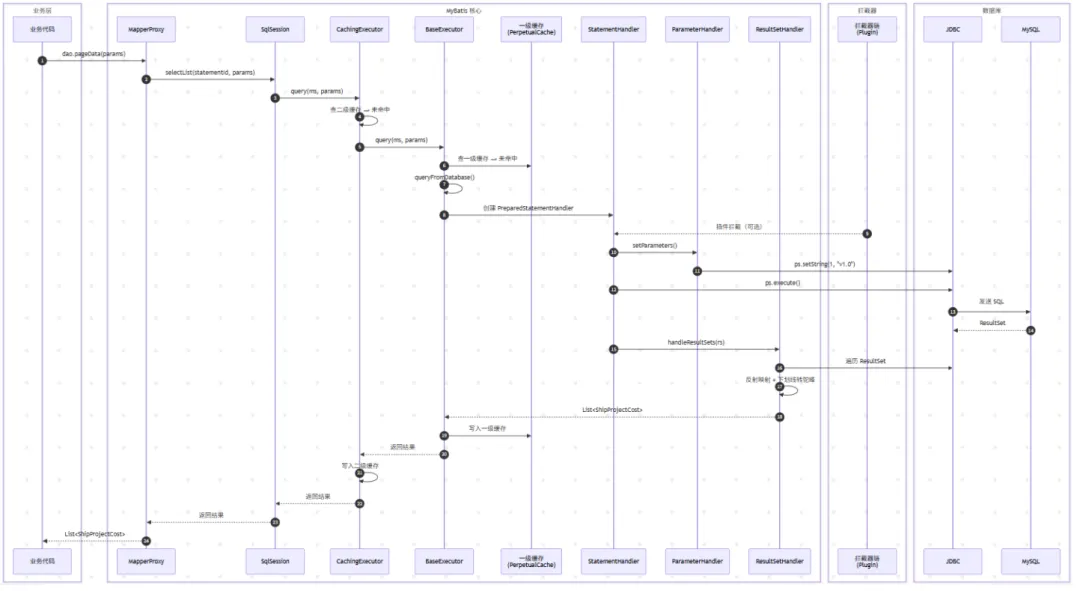
夜雨聆风先看完整执行流程
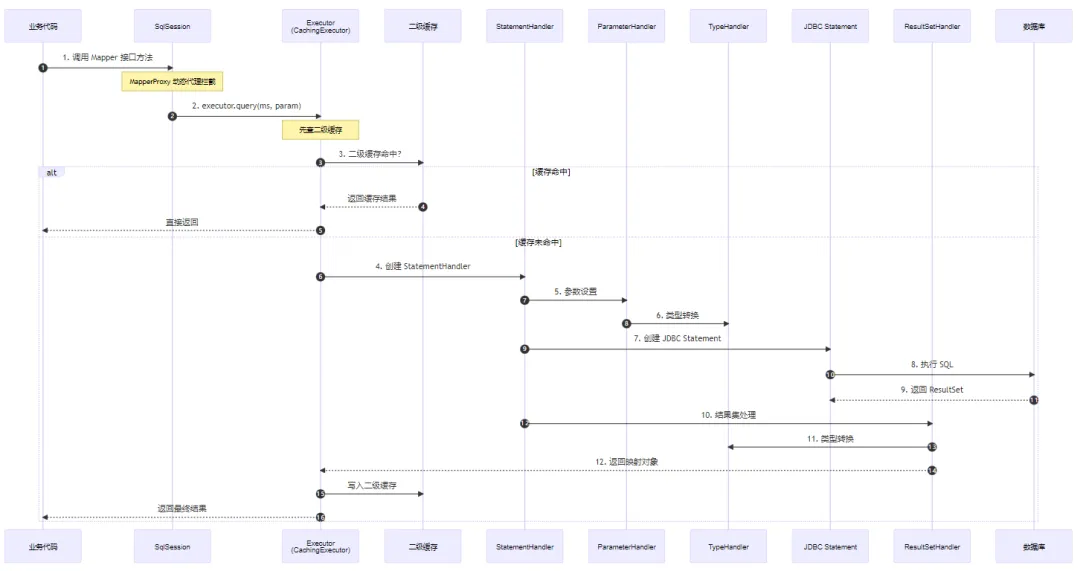
二、逐层拆解:每一步到底发生了什么
第 1 步:调用 Mapper 接口 —— 代理的魔法
接口代码:
public interface DesignWorkHourFillDao extends BaseMapper<DesignWorkHourFill> {List<DeptYearHour> getDeptYearHour();List<ShipHour> getAllByProjectIds(@Param("projectIds") List<String> projectIds);IPage<CostPredictDesignHourDto> pageHour(IPage<CostPredictDesignHourDto> page,@Param("year")int year);List<CostPredictDesignHourDto> listHour(@Param("year")int year);List<CostPredictDesignHourDto> actualHour(@Param("year")int year);List<ProjectNoName> noNameMap();List<YearHour> yearHour(int year);}
调用它:
List<ProjectNoName>projectNoNames=mapper.noNameMap();MyBatis 通过 JDK 动态代理 生成了一个 MapperProxy:
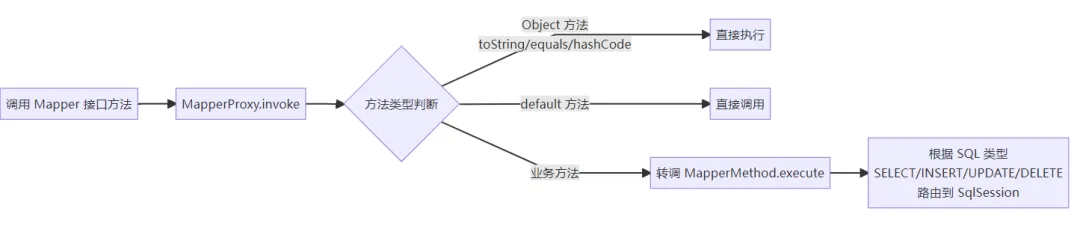
核心源码逻辑(简化):
// MapperProxy.invoke()public Object invoke(Object proxy, Method method, Object[] args) {// 1. 如果是 Object 的方法(toString 等),直接执行if (Object.class.equals(method.getDeclaringClass())) {return method.invoke(this, args);}// 2. 从缓存中获取 MapperMethodMapperMethod mapperMethod = cachedMapperMethod(method);// 3. 委托给 MapperMethod 执行return mapperMethod.execute(sqlSession, args);}
第 2 步:SqlSession —— 门面角色,不干重活
SqlSession 是用户操作数据库的门面,它不直接执行 SQL,而是将请求委托给 Executor:
// DefaultSqlSession.selectList()public <E> List<E> selectList(String statement, Object parameter) {// 从 Configuration 中获取 MappedStatementMappedStatement ms = configuration.getMappedStatement(statement);// 委托给 Executor 执行return executor.query(ms, wrapCollection(parameter),RowBounds.DEFAULT, Executor.NO_RESULT_HANDLER);}
| 职责 | SqlSession | Executor |
|---|---|---|
| 事务管理 | ✅ 提交/回滚 | ❌ |
| 获取 MappedStatement | ✅ | ❌ |
| 执行 SQL | ❌ 委托出去 | ✅ |
| 缓存管理 | ❌ | ✅ |
| 插件拦截 | ❌ | ✅ |
获取sqlSession过程
String resource = "mybatis‐config.xml";Reader reader;try {//将XML配置文件构建为Configuration配置类reader = Resources.getResourceAsReader(resource);// 通过加载配置文件流构建一个SqlSessionFactory DefaultSqlSessionFactorySqlSessionFactory sqlFactory = new SqlSessionFactoryBuilder().build(reader);// 数据源 执行器 DefaultSqlSessionSqlSession session = sqlFactory.openSession();try {// 执行查询 底层执行jdbcDesignWorkHourFillDao mapper = session.getMapper(DesignWorkHourFillDao.class);System.out.println(mapper.getClass());List<ProjectNoName> projectNoNames = mapper.noNameMap();for (ProjectNoName projectNoName : projectNoNames) {System.out.println(projectNoName);}} catch (Exception e) {e.printStackTrace();}finally {session.close();}} catch (IOException e) {e.printStackTrace();}@Overridepublic SqlSession openSession() {return openSessionFromDataSource(configuration.getDefaultExecutorType(), null, false);}private SqlSession openSessionFromDataSource(ExecutorType execType, TransactionIsolationLevel level, boolean autoCommit) {Transaction tx = null;try {final Environment environment = configuration.getEnvironment();final TransactionFactory transactionFactory = getTransactionFactoryFromEnvironment(environment);tx = transactionFactory.newTransaction(environment.getDataSource(), level, autoCommit);///获取执行器,这边获得的执行器已经代理拦截器的功能final Executor executor = configuration.newExecutor(tx, execType);//根据创建的执行器创建sqlSessionreturn new DefaultSqlSession(configuration, executor, autoCommit);} catch (Exception e) {closeTransaction(tx); // may have fetched a connection so lets call close()throw ExceptionFactory.wrapException("Error opening session. Cause: " + e, e);} finally {ErrorContext.instance().reset();}}
第 3-4 步:Executor —— 执行器的三层组装
这是 MyBatis 设计的精髓。Executor 的创建经历了 策略选择 → 缓存装饰 → 插件代理 三层组装:
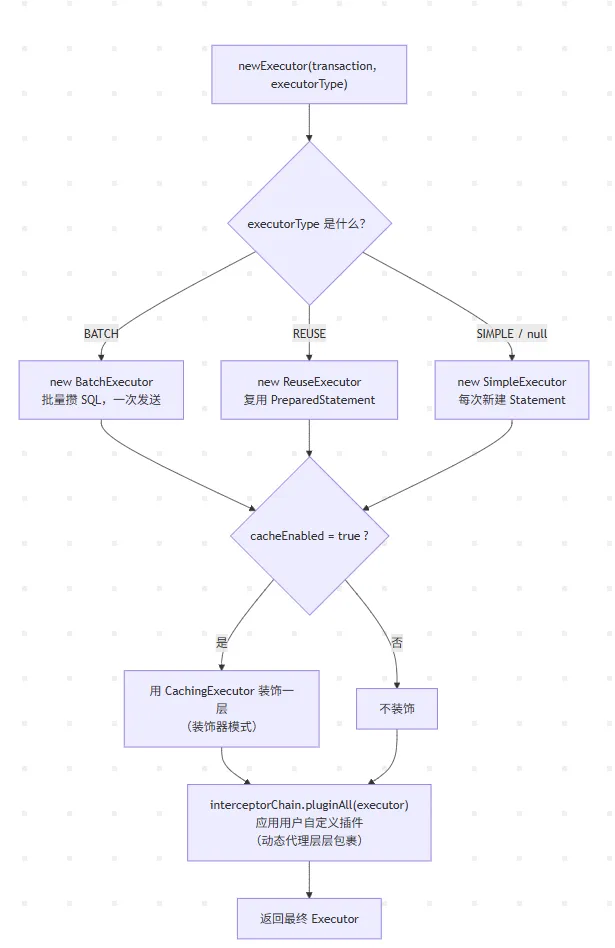
代码:
//获取执行器的代码//将最终组装好的 executor(经过了 类型选择 → 缓存装饰 → 插件代理 三个步骤)返回给调用者(通常是 SqlSession)。public Executor newExecutor(Transaction transaction, ExecutorType executorType) {executorType = executorType == null ? defaultExecutorType : executorType;executorType = executorType == null ? ExecutorType.SIMPLE : executorType;Executor executor;if (ExecutorType.BATCH == executorType) {//批处理模式 — 如果类型是 BATCH,创建 BatchExecutor。它会攒多条相同 SQL 的 addBatch() 调用,最后一次性 executeBatch() 发送给数据库,适合批量 INSERT/UPDATE/DELETE 场景(JDBC 的addBatch/executeBatch)。executor = new BatchExecutor(this, transaction);} else if (ExecutorType.REUSE == executorType) {//复用模式 — 如果是 REUSE,创建 ReuseExecutor。它会缓存 PreparedStatement,相同 SQL 不会重复编译(prepareStatement),而是复用之前的 Statement 对象,减少 SQL 预编译开销。executor = new ReuseExecutor(this, transaction);} else {//默认/简单模式 — 其他情况(即 SIMPLE)创建 SimpleExecutor。每次执行都创建新的 Statement,用完即关,行为最直观,适合大多数场景。executor = new SimpleExecutor(this, transaction);}if (cacheEnabled) {executor = new CachingExecutor(executor);}//插件拦截链 — 将配置中的所有 MyBatis 插件(Interceptor)应用到 executor 上。MyBatis 插件的本质是 JDK 动态代理,pluginAll() 会返回一个层层代理包装后的对象。这样用户自定义的拦截器(比如分页插件、SQL日志、读写分离等)就能拦截 Executor 的 query、update、commit 等方法。executor = (Executor) interceptorChain.pluginAll(executor);return executor;}
三种基础执行器的区别
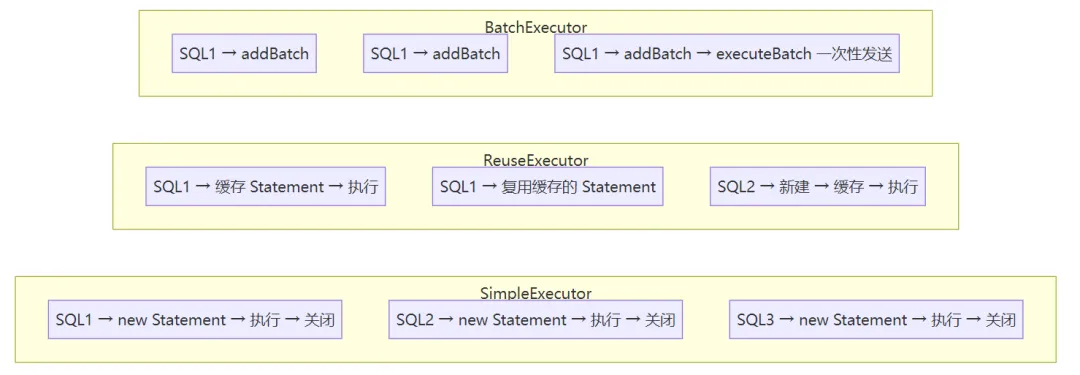
| 执行器 | 特点 | 适用场景 |
|---|---|---|
| SimpleExecutor | 每次执行创建新 Statement,用完关闭 | 日常查询(默认) |
| ReuseExecutor | 执行update或select,以sql作为key查找Statement对象,存在就使用,不存在就创建,用完后,不关闭Statement对象,而是放置于Map<String, Statement>内,供下一次使用。简言之,就是重复使用Statement对象。 | 频繁重复 SQL 查询 |
| BatchExecutor | 攒多条 SQL,调用 executeBatch 批量发送 | 大批量 INSERT/UPDATE |
Executor分成两大类,一类是CacheExecutor,另一类是普通Executor。普通Executor又分为三种基本的Executor执行器,SimpleExecutor,ReuseExecutor、BatchExecutor。
CacheExecutor其实是封装了普通的Executor,和普通的区别是在查询前先会查询缓存中是否存在结果,如果存在就使用缓存中的结果,如果不存在还是使用普通的Executor进行查询,再将查询出来的结果存入缓存。
第 5 步:缓存检查 —— 二级缓存与一级缓存
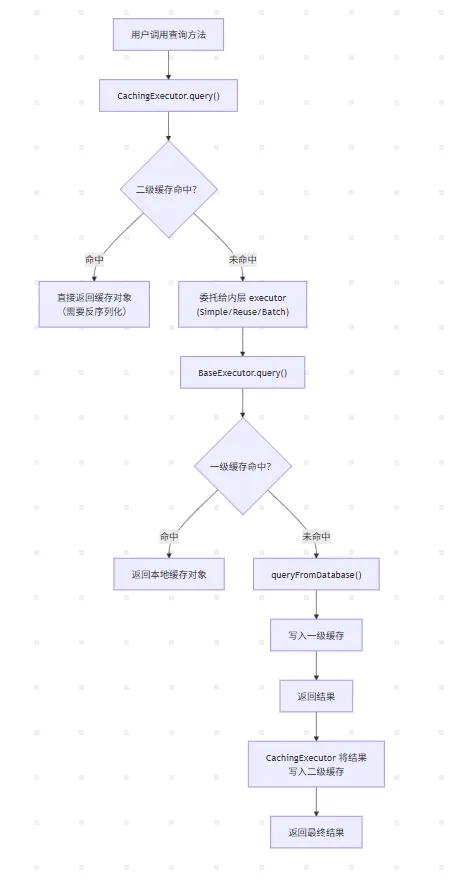
两张缓存的区别:
| 维度 | 一级缓存 | 二级缓存 |
|---|---|---|
| 作用域 | SqlSession 级别 | namespace(Mapper)级别 |
| 默认状态 | 默认开启,无法关闭 | 默认开启但需手动配置<cache/> |
| 生命周期 | 随 SqlSession 关闭而清空 | 随应用运行一直存在 |
| 共享范围 | 同一 SqlSession 内 | 跨 SqlSession、跨线程 |
| 存储位置 | JVM 堆内存(Map) | 可配置 Ehcache / Redis 等 |
| 清空时机 | update / commit / close | update / <cache-ref> / 手动清空 |
⚠️ 注意:在 Spring 环境下,每次查询 SqlSession 都是新的,一级缓存几乎失效。此时应优先考虑业务层面的缓存方案。
第 6 步:创建 StatementHandler —— 又一个策略模式
// Configuration.newStatementHandler()public StatementHandler newStatementHandler(Executor executor, MappedStatement mappedStatement, Object parameterObject, RowBounds rowBounds, ResultHandler resultHandler, BoundSql boundSql) {StatementHandler statementHandler = new RoutingStatementHandler(executor, mappedStatement, parameterObject, rowBounds, resultHandler, boundSql);statementHandler = (StatementHandler) interceptorChain.pluginAll(statementHandler);return statementHandler;}
RoutingStatementHandler 根据 MappedStatement.statementType 路由到不同实现:
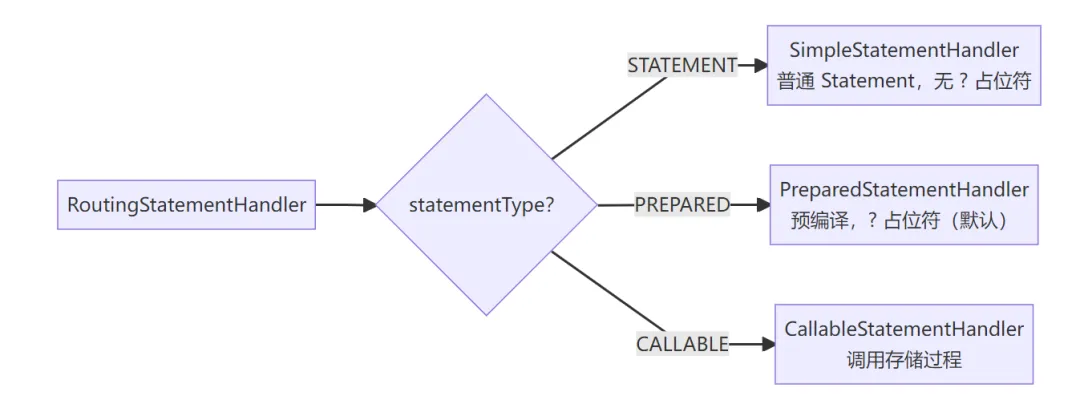
项目中 99% 的情况都是 PreparedStatementHandler,它是默认且最安全的(防止 SQL 注入)。
第 7-9 步:参数处理与 SQL 执行
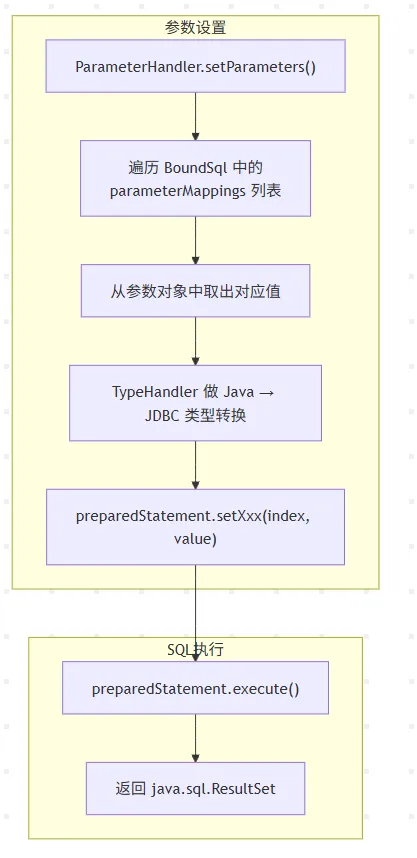
BoundSql 是这里的关键对象,它里面保存了三样东西:
以如下例子进行说明
<selectid="selectUser"> SELECT id,name,age FROM user WHERE name = #{userName} AND age = #{userAge} AND create\_time = ${createTime}</select>
public classBoundSql{/**解析完成后的纯预处理 SQL- 所有 `#{xxx}` 全部替换为 JDBC 占位符 `?`- `${xxx}` 直接替换成对应字符串(直接拼接,无占位符)- 去掉 XML 中的换行、多余空格,生成可给 `PreparedStatement` 使用的 SQL如:SELECT id,name,age FROM user WHERE name = ? AND age = ? AND create_time = '2026-07-26'*/private final String sql;/**占位符 `?` 对应的参数元数据列表**SQL 里有几个`?`,集合里就有几个`ParameterMapping`对象。每个`ParameterMapping`记录:占位符对应的参数名称、参数类型、是否允许 null 等信息。ParameterMapping 内部关键属性:- `property`:参数名(userName /userAge)- `javaType`:参数 Java 类型(String / Integer)- `jdbcType`:数据库字段类型(VARCHAR / INT)*/private final List<ParameterMapping> parameterMappings;/**用户传入的主参数对象就是调用 Mapper 方法时传入的参数,可以是实体类、Map、普通基础类型。*/private final Object parameterObject;/**附加参数容器,存放不属于主 parameterObject 的额外变量典型来源:1. `<foreach>` 循环变量(item、index)2. `${}` 表达式自定义变量3. MyBatis 内置分页参数、自定义上下文参数*/private final Map<String, Object> additionalParameters;/**additionalParameters的包装工具对象,用于便捷读取 / 修改附加参数 Map`MetaObject` 是 MyBatis 内置反射工具,专门用来:- 快速 get/set Map、实体对象的属性,不用手动反射- 统一处理参数取值逻辑,封装反射细节*/private final MetaObject metaParameters;}
TypeHandler 的转换逻辑:
| 数据库类型 | Java 类型 | TypeHandler |
|---|---|---|
| VARCHAR / CHAR | String | StringTypeHandler |
| INTEGER / INT | Integer / int | IntegerTypeHandler |
| BIGINT | Long / long | LongTypeHandler |
| DECIMAL | BigDecimal | BigDecimalTypeHandler |
| DATE / DATETIME | java.util.Date | DateTypeHandler |
| TIMESTAMP | java.time.LocalDateTime | LocalDateTimeTypeHandler |
| 自定义枚举 | Enum | 自定义 EnumTypeHandler |
第 10-12 步:结果集映射
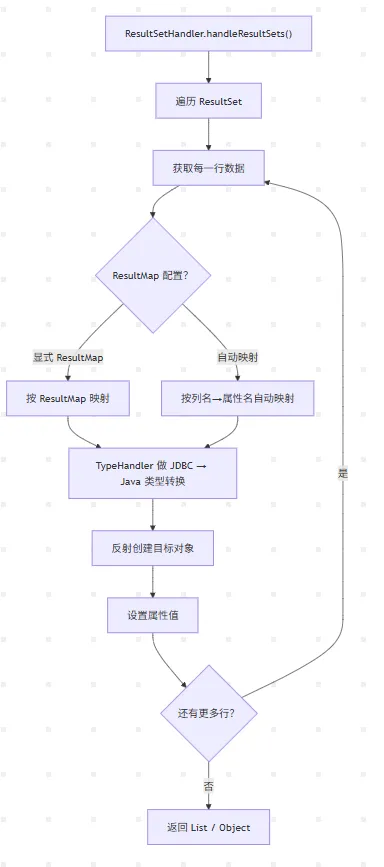
映射规则(项目中 mapUnderscoreToCamelCase=true):
数据库列名 Java 属性名────────────────────────────────────────────project_code → 自动映射 → projectCodedelivery_date → 自动映射 → deliveryDateship_type → 自动映射 → shipTypegross_profit → 自动映射 → grossProfit
三、穿插一个关键角色:插件拦截链
MyBatis 四大组件都可以被插件拦截:
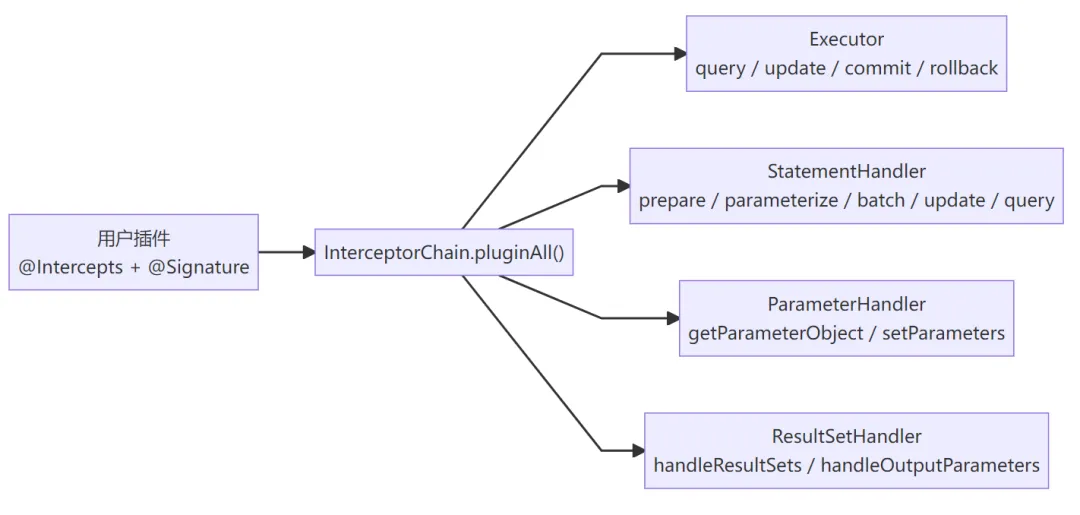
最经典的应用就是分页插件 PageHelper:
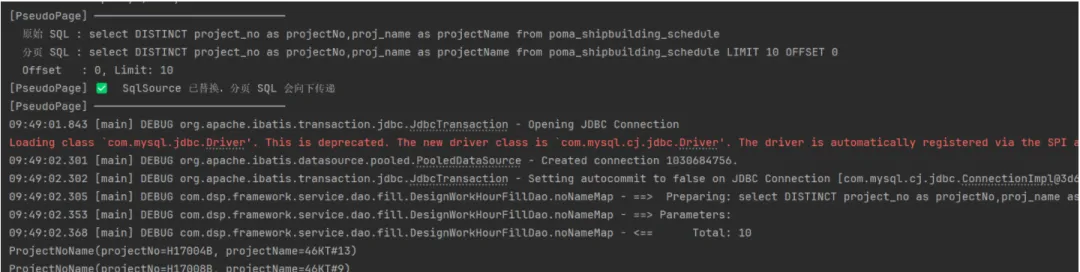
一个自定义的简单分页插件
@Intercepts({@Signature(type = Executor.class,method = "query",args = {MappedStatement.class, Object.class, RowBounds.class, ResultHandler.class})})public class PseudoPageInterceptor implements Interceptor {@Overridepublic Object intercept(Invocation invocation) throws Throwable {Object[] args = invocation.getArgs();MappedStatement ms = (MappedStatement) args[0];Object parameter = args[1];RowBounds rowBounds = (RowBounds) args[2];// 这里写死演示分页参数int offset = rowBounds.getOffset();int limit = 10;// 1. 获取原始 BoundSql(包含 SQL + 参数映射)BoundSql boundSql = ms.getBoundSql(parameter);String originalSql = boundSql.getSql();String pagedSql = originalSql + " LIMIT " + limit + " OFFSET " + offset;System.out.println("[PseudoPage] ─────────────────────────────");System.out.println(" 原始 SQL : " + originalSql.replaceAll("\\s+", " ").trim());System.out.println(" 分页 SQL : " + pagedSql.replaceAll("\\s+", " ").trim());System.out.println(" Offset : " + offset + ", Limit: " + limit);// :替换 SqlSource,这样无论谁调 getBoundSql() 都能拿到分页 SQL。SqlSource newSqlSource = new BoundSqlSqlSource(ms.getConfiguration(), pagedSql, boundSql.getParameterMappings(), parameter);replaceSqlSource(ms, newSqlSource);System.out.println("[PseudoPage] ✅ SqlSource 已替换,分页 SQL 会向下传递");System.out.println("[PseudoPage] ─────────────────────────────");// 放行 → 下一个拦截器 → CachingExecutor → BaseExecutor → 数据库return invocation.proceed();}/*** 通过反射替换 MappedStatement 中的 sqlSource 字段*/private void replaceSqlSource(MappedStatement ms, SqlSource newSqlSource) {try {Field field = MappedStatement.class.getDeclaredField("sqlSource");field.setAccessible(true);field.set(ms, newSqlSource);} catch (Exception e) {System.err.println("[PseudoPage] 替换 SqlSource 失败: " + e.getMessage());}}/*** 一个简单的 SqlSource 实现:直接返回指定的 SQL 和参数映射* 不重新解析,直接用我们构造好的分页 SQL*/static class BoundSqlSqlSource implements SqlSource {private final Configuration configuration;private final String sql;private final List<ParameterMapping> parameterMappings;private final Object parameterObject;BoundSqlSqlSource(Configuration configuration, String sql,List<ParameterMapping> parameterMappings, Object parameterObject) {this.configuration = configuration;this.sql = sql;this.parameterMappings = parameterMappings;this.parameterObject = parameterObject;}@Overridepublic BoundSql getBoundSql(Object parameterObject) {// 优先用构造时传入的参数(原始 BoundSql 中已解析好的)Object param = parameterObject != null ? parameterObject : this.parameterObject;return new BoundSql(configuration, sql, parameterMappings, param);}}@Overridepublic Object plugin(Object target) {return Plugin.wrap(target, this);}@Overridepublic void setProperties(Properties properties) {System.out.println("[PseudoPage] 初始化完成");}}
拦截器包装后的调用链:
调用方 → Plugin(分页拦截器) → Plugin(日志拦截器) → 原始 Executor ↓ 改 SQL 加 LIMIT ↓ 打印 SQL 耗时
执行结果,成功实现分页:
四、带插件的完整执行流程
五、关键设计模式总结
| 设计模式 | 出现位置 | 作用 |
|---|---|---|
| 代理模式 | MapperProxy → Mapper 接口 | 接口无实现类,动态代理拦截 |
| 门面模式 | SqlSession | 统一对外接口,屏蔽内部复杂性 |
| 策略模式 | Executor(Simple/Reuse/Batch) | 根据不同场景选择不同执行策略 |
| 装饰器模式 | CachingExecutor 包装基础 Executor | 不改变接口,动态增加缓存功能 |
| 模板方法模式 | BaseExecutor.query() → queryFromDatabase() | 固定流程骨架,子类实现具体步骤 |
| 责任链模式 | InterceptorChain → Plugin | 多个拦截器依次处理 |
| 建造者模式 | MappedStatement.Builder | 复杂对象的构建 |
| 工厂模式 | Configuration 各种 newXxx 方法 | 统一创建组件 |
常见面试问题速答
Q1:一级缓存和二级缓存的区别?
一级缓存是 SqlSession 级别的,默认开启,无法跨会话共享;二级缓存是 namespace 级别的,需手动配置
<cache/>,可跨会话共享。
Q2:MyBatis 如何防止 SQL 注入?
使用
#{param}占位符(PreparedStatement),参数值会被TypeHandler处理后通过setXxx()设入,不会直接拼接到 SQL 字符串中。而${param}是直接字符串替换,存在注入风险。
Q3:插件的执行顺序?
InterceptorChain.pluginAll()中按插件配置顺序依次生成代理对象。例如先配置 A 再配置 B,则调用链为:调用方 → PluginA代理 → PluginB代理 → 原始对象。
Q4:#{} 和 ${} 的区别?
#{}→ 预编译占位符?,安全、可防止注入。${}→ 直接字符串拼接,有注入风险,通常用于动态表名或 ORDER BY 字段名。
Q5:MyBatis 的执行器有哪些?
SIMPLE(默认,每次新建 Statement)、REUSE(复用 Statement)、BATCH(批量执行)。可通过
<setting name="defaultExecutorType" value="BATCH"/>配置。