 夜雨聆风
夜雨聆风从Python依赖地狱到一键扫描的完整踩坑记录
httpx和dirsearch是渗透测试前期信息收集阶段的两把快刀——前者做存活探测,后者做目录爆破。但两者在Windows上的安装过程堪称依赖地狱。本文记录了一套在Windows和Linux上均可复现的安装方案,附带常见报错的根因分析。
工具定位:信息收集阶段的双引擎
在渗透测试的标准流程中,目标确认后的第一步就是信息收集。httpx和dirsearch分别承担两个关键环节:
两者的协同方式:先用httpx筛选出存活的Web服务,再把存活列表喂给dirsearch做目录爆破。
子域名收集(subfinder) → 存活探测(httpx) → 目录扫描(dirsearch)httpx:双平台安装与配置
httpx是ProjectDiscovery生态的核心工具之一,Go语言编写,理论上跨平台无依赖——但Windows上仍有路径和终端兼容性问题。
Linux安装
方式一:Go安装(推荐,版本最新)
# 需要Go 1.21+go install -v github.com/projectdiscovery/httpx/cmd/httpx@latest# 确认安装httpx -version
Go安装的可执行文件默认在 ~/go/bin/,确认该路径在 $PATH 中。若不在,追加到 .bashrc:
echo 'export PATH=$PATH:$HOME/go/bin' >> ~/.bashrcsource ~/.bashrc
方式二:包管理器
# Kali/Debiansudo apt install httpx-toolkit# 注意:Kali仓库版本通常落后最新版2-3个大版本,# 部分新特性(如 -tls-grab)不可用
方式三:预编译二进制
# 从GitHub Releases下载wget https://github.com/projectdiscovery/httpx/releases/latest/download/httpx_linux_amd64.zipunzip httpx_linux_amd64.zipsudo mv httpx /usr/local/bin/
三种方式的取舍:
go install | ||||
apt upgrade | ||||
Windows安装
Windows上httpx有三种安装方式,但都不如Linux顺滑。
方式一:Go安装(需预装Go)
# 先装Go(https://go.dev/dl/ 下载msi,安装后重启终端)go env GOPATH# 输出类似 C:\Users\Administrator\gogo install -v github.com/projectdiscovery/httpx/cmd/httpx@latest
安装后的exe在 %GOPATH%\bin\httpx.exe。将 C:\Users<用户名>\go\bin 加入系统环境变量Path。
坑点1:Windows上go install下载的依赖可能触发杀软误报。httpx内嵌的端口扫描模块和TLS指纹库(ja3)特征被Windows Defender标记为"潜在恶意软件"。解决:在Windows安全中心 → 病毒和威胁防护 → 排除项中添加
%GOPATH%\bin目录。
坑点2:部分公司网络环境下
go install无法拉取golang.org/x/下的依赖。解决:设置GOPROXY代理——go env -w GOPROXY=https://goproxy.cn,direct。
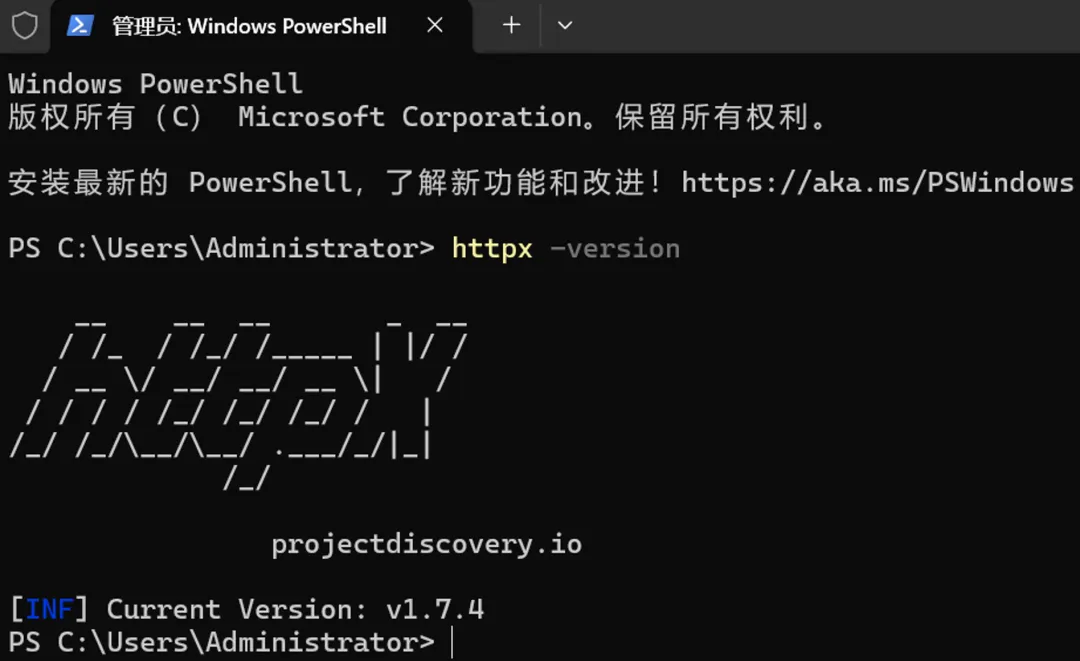
方式二:预编译exe
从GitHub Releases下载 httpx_windows_amd64.zip,解压到 C:\tools\httpx\(建议统一管理安全工具目录)。将路径加入系统Path后,可在PowerShell和CMD中直接使用。
坑点3:Windows终端(CMD/PowerShell)的管道编码问题。httpx从stdin读取URL列表时,若文件为UTF-8 with BOM编码(Windows记事本的默认格式),httpx会解析出乱码。解决:用Notepad++或VS Code保存为UTF-8 without BOM,或在PowerShell中
Get-Content urls.txt | httpx前确认编码。
方式三:WSL内安装(实际上等于Linux安装)
# 在WSL2中go install -v github.com/projectdiscovery/httpx/cmd/httpx@latest# 或sudo apt install httpx-toolkit
WSL内的httpx可直接处理 /mnt/c/ 下的Windows文件,绕过了Windows终端的编码问题。
httpx常用参数速查
# 基础存活探测httpx -l urls.txt -o alive.txt# 显示标题、状态码、Web服务器httpx -l urls.txt -title -status-code -web-server# 探测HTTP方法(GET/POST/PUT/DELETE等)httpx -l urls.txt -method# 提取响应头中的Server/X-Powered-By字段httpx -l urls.txt -tech-detect# JSON格式输出(便于后续脚本处理)httpx -l urls.txt -json -o result.json# 指定线程数与超时httpx -l urls.txt -threads 100 -timeout 5# 批量探测 + 目录扫描联动httpx -l subs.txt -o alive.txt && dirsearch -l alive.txt
dirsearch:双平台安装与配置
dirsearch是Python编写的Web目录扫描器,核心依赖只有Python 3.7+和少量标准库外的包。Windows上最大的坑在于Python版本和编码问题。
Linux安装
# 克隆仓库git clone https://github.com/maurosoria/dirsearch.gitcd dirsearch# 安装依赖pip3 install -r requirements.txt# 依赖列表很短:urllib3, certifi, chardet等,都是常见库# 直接运行python3 dirsearch.py -u http://target.com
推荐创建软链接或alias简化调用:
sudo ln -s $(pwd)/dirsearch.py /usr/local/bin/dirsearch# 或写入 .bashrcalias dirsearch='python3 ~/tools/dirsearch/dirsearch.py'
Windows安装(重点:Python版本冲突与编码问题)
环境要求:Python 3.7以上。确认安装状态:
python --version# 如果系统同时存在python(3.11)和python3(3.14),# 统一用python调用,避免pip/pip3的混乱
安装步骤:
# 克隆到统一工具目录mkdir C:\toolscd C:\toolsgit clone https://github.com/maurosoria/dirsearch.gitcd dirsearch# 安装依赖pip install -r requirements.txt# 运行python dirsearch.py -u http://target.com
坑点1(Windows特有):pip和Python版本不对应。如果系统同时存在Python 3.11和Python 3.14,
pip可能指向某一个版本而python指向另一个。验证方式:python -m pip --version如果输出显示版本与当前python版本不一致,始终使用
python -m pip代替裸pip。
坑点2:路径中的中文字符。如果dirsearch目录在
C:\用户\Administrator\桌面\下,Python读取字典文件时因编码问题报UnicodeDecodeError。解决:将工具目录放在纯英文路径下(如C:\tools\dirsearch)。
坑点3:Windows终端对ANSI颜色码的支持不一致。dirsearch的输出大量使用彩色标记(红=错误、绿=200、黄=重定向)。CMD默认不支持ANSI转义序列,PowerShell 5.1部分支持。推荐在Windows Terminal中运行或使用
--no-color参数禁用颜色。
坑点4:Git Bash中的Python调用。Git Bash的路径转换机制会将
/c/tools/dirsearch自动转为C:\tools\dirsearch,但传给Python的参数中若包含/可能被误解。在Git Bash中使用python -u明确指定脚本路径。

Windows与Linux运行dirsearch的行为差异
--no-color | ||
/ | \ | |
dirsearch常用参数速查
# 标准扫描(默认字典)python dirsearch.py -u http://target.com# 指定字典python dirsearch.py -u http://target.com -w /path/to/dict.txt# 递归扫描(发现目录后进入子目录继续爆破)python dirsearch.py -u http://target.com -r --deep-recursive# 指定扩展名(减少无效请求)python dirsearch.py -u http://target.com -e php,asp,aspx,jsp,txt,bak,zip# 多目标批量扫描python dirsearch.py -l urls.txt -e php,asp --format=json -o result.json# 自定义线程与超时python dirsearch.py -u http://target.com -t 50 --timeout 5# 使用代理(配合Burp Suite分析)python dirsearch.py -u http://target.com --proxy http://127.0.0.1:8080# 静默模式 + 仅报告200/301/403python dirsearch.py -u http://target.com --quiet -i 200,301,403
字典选择策略
dirsearch自带字典位于 dirsearch/db/ 目录,常用几组:
策略建议:先用 common.txt 快速摸底(30秒内完成),发现存活后换 big.txt 做第二轮。如果目标是Java应用,追加 api/springboot.txt。不要一上来就用大字典——请求量大时目标WAF可能触发IP封禁。
实战联动:从子域名到漏洞入口
以下是一次完整信息收集的命令序列(Linux环境):
# 假设已通过subfinder获取子域名列表 subs.txt# 第一步:存活探测(httpx)cat subs.txt | httpx -title -status-code -web-server -o alive.txt# 第二步:筛选Web服务(排除404/502/超时)cat alive.txt | grep -E '\[200\]|\[301\]|\[403\]|\[401\]' | awk '{print $1}' > web.txt# 第三步:目录扫描(dirsearch)python3 dirsearch.py -l web.txt -e php,asp,aspx,jsp,txt,bak,zip,conf,log \-t 50 --format=json -o dirscan.json# 第四步:提取高价值路径(后台、备份、配置文件)grep -E '200|301|403' dirscan.json | jq '.url' | sort -u > targets.txt
Windows下的等效流程(PowerShell):
# httpxGet-Content subs.txt | httpx -title -status-code -o alive.txt# 筛选Select-String -Path alive.txt -Pattern '200|301|403' | ForEach-Object { ($_ -split '\s+')[0] } > web.txt# dirsearchpython dirsearch.py -l web.txt -e php,asp,aspx,jsp,txt,bak --format=json -o result.json
常见错误与解决方案汇总
httpx
exec: "httpx": executable file not found in %PATH% | ||
dial tcp: lookup xxx: no such host | -resolver 8.8.8.8 | |
context deadline exceeded | -timeout 或 -retries | |
dirsearch
ModuleNotFoundError: No module named 'xxx' | pip install -r requirements.txt | |
UnicodeDecodeError | ||
ConnectionError | --random-agent 和 --delay | |
[CRITICAL] target URL is not valid | http:// 或 https:// | |
python -m pip 代替裸pip |
总结
httpx和dirsearch本质上解决的是信息收集阶段的两个核心问题:哪些目标还活着(httpx),活着的目标有哪些值得探索的路径(dirsearch)。Windows上的安装核心难点不在工具本身,而在Python多版本管理、环境变量配置和终端编码兼容三个系统层面。
两个工具放在一起形成了一条低成本的信息收集流水线:域名列表进入httpx过一遍筛子,存活的服务交给dirsearch挖具体路径。整条链路无需付费工具,全部开源。
本文环境:Windows 10 / Kali Linux 2024.x,httpx v1.6+(ProjectDiscovery),dirsearch v0.4.3。

