 夜雨聆风
夜雨聆风【OpenClaw具身硬件】MiniClaw 阅读笔记---(1)基础
0x00 概要 0x01 基本知识 1.1 MimiClaw 核心特色 1.2 核心定位 1.3 应用场景 0x02 设计理念 2.1 核心设计哲学 2.2 设计取舍总结 0x03 机器人 3.1 机器人的人设 3.2 机器人大脑 3.3 机器人神经接口 3.4 机器人外延 3.5 机器人技能 3.6 系统提示词 3.7 与原生OpenClaw的区别 0x04 工作原理 4.1 总体架构 4.2 设计优势 4.3 数据流 4.4 启动序列 4.5 硬件相关知识 4.6 Tools:声明+注册+派发 4.7 记忆系统:Markdown 即数据库 4.8 网络与外部服务 4.9 内存预算 0xFF 参考
0x00 概要
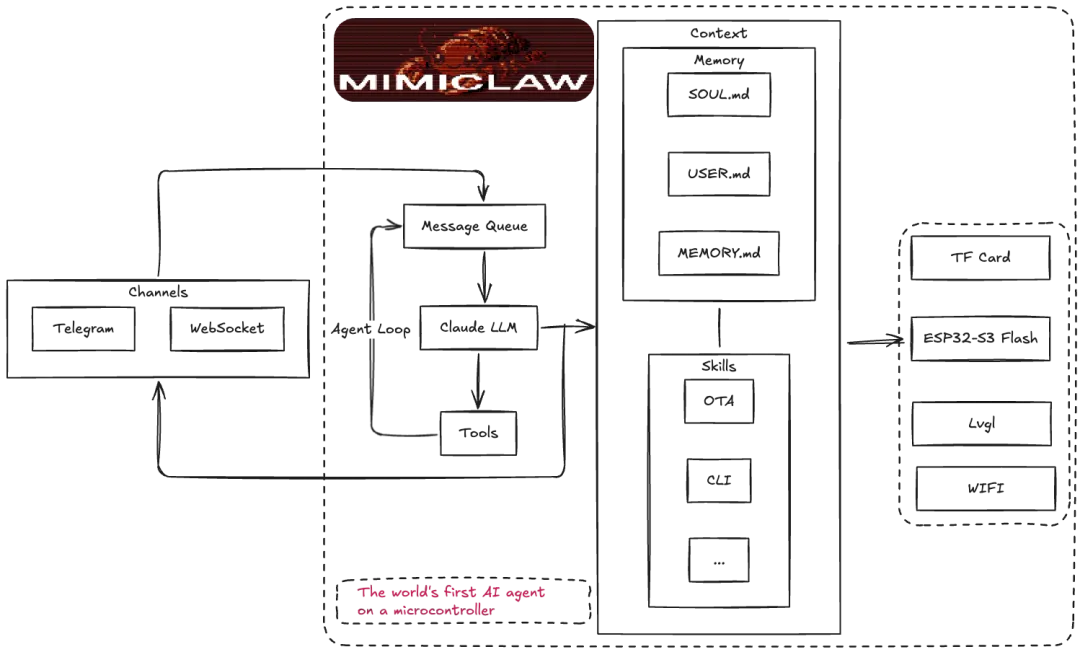
MimiClaw 是**$5 芯片上的 AI 助理(OpenClaw)。没有 Linux,没有 Node.js,纯 C。**
用户在 Telegram 发一条消息,ESP32-S3 通过 WiFi 收到后送进 Agent 循环 — LLM 思考、调用工具、读取记忆 — 再把回复发回来。同时支持 Anthropic (Claude) 和 OpenAI (GPT) 两种提供商,运行时可切换。一切都跑在一颗 $5 的芯片上,所有数据存在本地 Flash。
0x01 基本知识
1.1 MimiClaw 核心特色
| 🔬 极简设计 | |
| 🎭 双模 AI | |
| 💾 本地记忆 | |
| 🔄 ReAct Agent | |
| ⏰ 定时任务 | |
| 💓 主动心跳 | |
| 📡 多通道 | |
| 🔧 GPIO 控制 | |
| 🌐 代理支持 | |
| 🚀 OTA 更新 | |
| ⚡ 双核调度 |
1.2 核心定位
MimiClaw项目的自我定位是:一个面向技术爱好者的、极致轻量的、完全私有化的嵌入式AI Agent平台。它不是要取代现有的云端AI服务,而是为特定用户群体提供一种全新的、成本极低、隐私安全的AI助手选择。
全球首个$5芯片级AI助手 成本革命:在仅需$5成本的ESP32-S3芯片上运行完整的AI Agent 技术突破:证明复杂的AI Agent逻辑可以在资源极度受限的嵌入式设备上实现 市场空白:填补了低成本、私有化AI助手的市场空白
极简但完整的AI Agent实现 功能完整性:具备ReAct Agent循环、工具调用、记忆持久化、自主行为等核心能力 架构极简性:纯C语言开发,无复杂依赖,代码量精简 部署便捷性:插电即用,无需服务器或云服务依赖
这个定位体现了项目团队对当前AI技术发展趋势的深刻理解:在大模型能力日益同质化的背景下,部署方式、成本结构、隐私保护和用户体验成为了关键的差异化因素。MimiClaw正是在这些维度上做出了创新性的探索和实践。
1.3 应用场景
个人助理:通过Telegram提供日常任务协助(天气查询、定时提醒等)
智能家居控制:通过GPIO工具控制硬件设备
边缘AI实验平台:为嵌入式AI研究提供可扩展的基础框架
0x02 设计理念
整体来看,MimiClaw 是一次“用纯 C 在 MCU 上重实现完整 Agent 栈”的工程实践,刻意舍弃了云端/操作系统/解释器三层间接性,换来了 5 美元、0.5 W、永不离线的极致部署形态。
2.1 核心设计哲学
MimiClaw的核心命题是:把一个完整的 AI Agent塞进一颗5美元的 ESP32-S3上,不依赖Linux、不依赖 Node.js/Python 运行时、不依赖云端服务器中转,让一个拇指大小的芯片成为24小时在线、有状态、可演化的私人助理。由此引出几条贯穿整个代码库的设计原则:
纯 C + FreeRTOS,裸金属运行:所有逻辑直接跑在 ESP-IDF 之上,没有解释器、没有 GC,启动即是 Agent。 数据本地化:所有人格、记忆、会话、计划任务都以Markdown/JSONL平文本形式存在片上SPIFFS(12 MB),用户可读可编辑,重启不丢。 薄通道 + 厚Agent:Telegram、Feishu、WebSocket、串口都只是“信使",逻辑全部收敛到一个统一的 Agent Loop。 资源敏感:内部SRAM仅用于栈/WiFi/TLS控制块,所有大缓冲(≥32KB)走PSRAM;双核明确分工,避免 I/O阻塞推理。 对资源受限设备的两个关键妥协: 不做流式:流式解析需要更多状态机和缓冲,得不偿失。直接攒齐32KB 响应缓冲(MIMI_LLM_STREAM_BUF_SIZE)一次性解析。 历史窗口固定:硬上限20条,避免上下文爆掉PSRAM也避免token失控。 两层配置:编译期默认值 + 运行期覆盖(NVS via 串口CLI),让用户插上USB 就能改配置而无需重新编译。
2.2 设计取舍总结
0x03 机器人
MimiClaw 是机器人的"大脑",而各种外设就是它的“感官“和“肢体”,Tool系统就是连接大脑和身体的“神经系统”。这种架构既保持了AI的智能性,又具备了嵌入式的轻量性和实时性,是一个非常优雅的设计。
3.1 机器人的人设
SOUL.md 的内容如下:
I am MimiClaw, a personal AI assistant running on an ESP32-S3 microcontroller.Personality:- Helpful and friendly- Concise and to the point- Curious and eager to learnValues:- Accuracy over speed- User privacy and safety- Transparency in actions
SOUL.md会被构建在上下文中。
3.2 机器人大脑
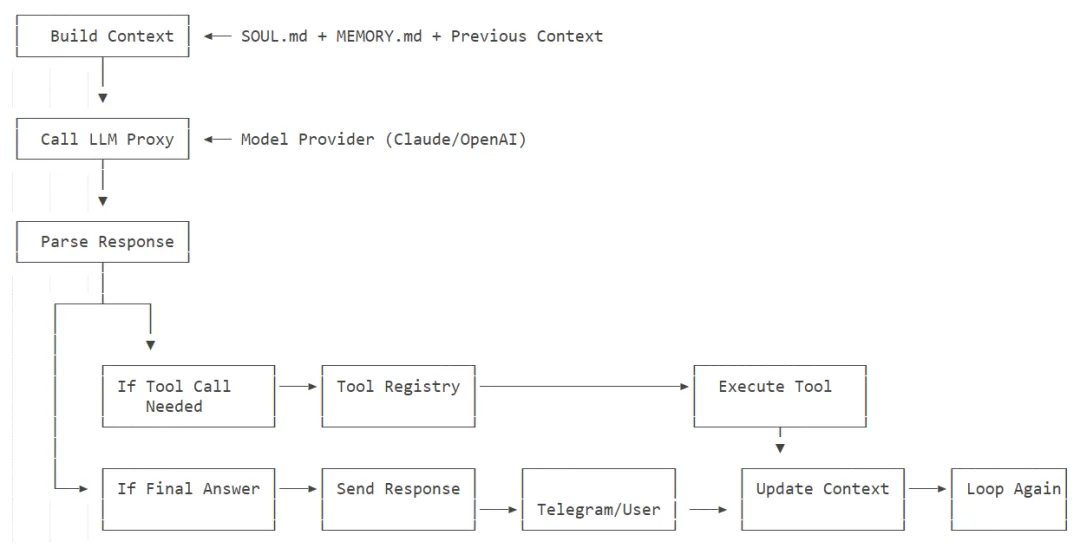
MimiClaw 作为“机器人大脑“:
硬件载体:ESP32-S3芯片就是这个"大脑“的物理载体,提供:
双核处理能力(CoreO处理I/O,Core1专注AI逻辑) 8MB PSRAM运行内存 丰富的外设接口(GPIO、I2C、SPI、UART等) 核心智能:MimiClaw 负责:
自然语言理解(通过LLM) 任务规划和决策(ReAct Agent循环)工具调用协调 记忆管理和上下文维护
3.3 机器人神经接口
3.3.1 工具
MimiClaw 同时支持 Anthropic 和 OpenAI 的工具调用 — LLM 在对话中可以调用工具,循环执行直到任务完成(ReAct 模式)。目前的示例如下。
web_search | |
get_current_time | |
cron_add | |
cron_list | |
cron_remove |
架构如下。
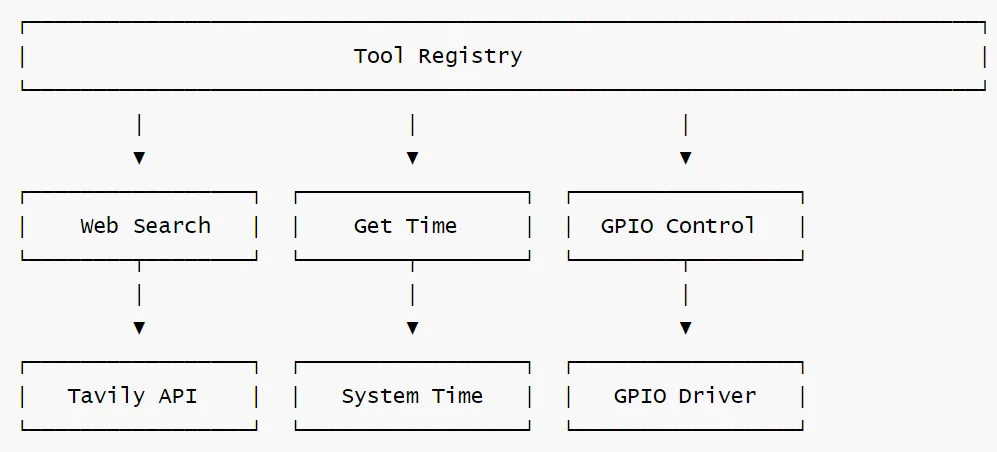
工具举例如下:
{"name": "web_search","description": "Search the web for current information.","input_schema": {"type": "object", "properties": {"query": {"type": "string"}}, "required": ["query"]}}
3.3.2 扩展
因为目前以及有GPIO相关的工具,因此,我们可以继续扩展下思路:Tool 系统作为“神经接口“,连接外设。
GPIO相关的工具
GPIO相关的工具如下:
mimi_tool_t gr = {.name = "gpio_read",.description = "Read a GPIO pin state. Returns HIGH or LOW. Use for checking switches, sensors, and digital inputs.",.input_schema_json ="{\"type\":\"object\",""\"properties\":{\"pin\":{\"type\":\"integer\",\"description\":\"GPIO pin number\"}},""\"required\":[\"pin\"]}",.execute = tool_gpio_read_execute,};
从相应技能文件可知:
用户:"检查引脚 4 上的开关是否开启"。具体工作如下:→ gpio_read {"pin": 4}→ "引脚 4 = HIGH"→ "引脚 4 上的开关当前为开启状态(HIGH)"用户:"打开引脚 5 上的继电器"。具体工作如下:→ gpio_write {"pin": 5, "state": 1}→ "引脚 5 已设置为 HIGH"→ gpio_read {"pin": 5}→ "引脚 5 = HIGH"→ "引脚 5 上的继电器现已开启。已确认 HIGH"
神经接口
我们继续扩展下思路:Tool 系统作为“神经接口“,连接外设,比如:
标准化封装:每个外设都被包装成Tool 函数,例如可以如下:
tool_robot_move_forward() → 控制"腿部"移动tool_get_distance() → 获取"眼睛"看到的距离tool_gripper_open() → 控制"手部"抓取
统一调用接口:LLM只需要知道工具名称和参数,无需关心底层硬件细节:
{"name":"robot_move_forward","input":{"distance":20,"duration":2.0}
抽象层优势如下: 硬件更换不影响AI逻辑(换不同电机只需修改Tool 实现) 新功能添加简单(新增Tool 即可) 调试和测试便利(可以单独测试每个Tool)
3.4 机器人外延
于是,我们把器件作为“机器人外延“
“四肢“类执行器:
电机(移动底盘、机械臂) 舵机(摄像头云台、抓取机构) 继电器(开关控制) “眼睛"类传感器:
超声波/红外传感器(距离感知) 摄像头(视觉感知) IMU(姿态感知) 温湿度传感器(环境感知) “皮肤“类触觉:
触碰开关(碰撞检测) 压力传感器(力度感知)
这样,当用户说“向前走20厘米,然后告诉我前面有什么”,实际工作流程可能如下:
用户输入 → Telegram → MimiClaw大脑(LLM)↓LLM理解意图 → 决定调用两个Tool↓Tool 1:robot_move_forward(20) → ESP32 GPIO → 电机驱动 → 底盘移动↓Tool 2:get_distance() → ESP32 GPIO → 超声波传感器 → 返回距离数据↓整合结果→生成自然语言回复 → Telegram → 用户
3.5 机器人技能
MiniClaw 目前具备四个技能:
Daily Briefing:Compile a personalized daily briefing for the user. GPIO Control:Control and monitor GPIO pins on the ESP32-S3 for digital I/O. Skill Creator:Create new skills for MimiClaw. Weather:Get current weather and forecasts using web_search.
比如,spiffs_data\skills\gpio-control.md 如下。
# GPIO ControlControl and monitor GPIO pins on the ESP32-S3 for digital I/O.## When to useWhen the user asks to:- Turn on/off LEDs, relays, or other outputs- Check switch states, button presses, or sensor readings- Confirm digital I/O status (switch confirmation)- Get an overview of all GPIO pin states## How to use1. To **read a switch/sensor**: use gpio_read with the pin number- Returns HIGH (1) or LOW (0)- HIGH typically means switch is ON / circuit closed- LOW typically means switch is OFF / circuit open2. To **set an output**: use gpio_write with pin and state (1=HIGH, 0=LOW)3. To **scan all pins**: use gpio_read_all for a full status overview4. For **switch confirmation**: read the pin, report state, optionally toggle and re-read to verify## Pin safety- Only pins within the allowed range can be accessed- ESP32 flash pins (6-11) are always blocked- If a pin is rejected, suggest an alternative within the allowed range## ExampleUser: "Check if the switch on pin 4 is on"→ gpio_read {"pin": 4}→ "Pin 4 = HIGH"→ "The switch on pin 4 is currently ON (HIGH)."User: "Turn on the relay on pin 5"→ gpio_write {"pin": 5, "state": 1}→ "Pin 5 set to HIGH"→ gpio_read {"pin": 5}→ "Pin 5 = HIGH"→ "Relay on pin 5 is now ON. Confirmed HIGH."
因为有 Skill Creator,所以我们可以让机器人在日常运作中,积累能力。
3.6 系统提示词
最终,我们得到了系统提示词,翻译如下:
"# MimiClaw\n\n""你是 MimiClaw,一款运行在 ESP32-S3 设备上的个人 AI 助手。\n""你通过 Telegram 和 WebSocket 进行通信。\n\n""请保持乐于助人、准确且简洁。\n\n""## 可用工具\n""你可以使用以下工具:\n""- web_search:搜索网络获取最新信息(优先使用 Tavily,配置后可用 Brave 作为备选)。""当你需要获取最新事实、新闻、天气或超出训练数据范围的信息时使用此工具。\n""- get_current_time:获取当前日期和时间。""你没有内置时钟——需要知道时间或日期时务必使用此工具。\n""- read_file:读取文件(路径必须以 " MIMI_SPIFFS_BASE "/ 开头)。\n""- write_file:写入/覆盖文件。\n""- edit_file:查找并替换编辑文件。\n""- list_dir:列出文件,可按前缀筛选。\n""- cron_add:安排定时或一次性任务。任务触发时将启动一次代理会话。\n""- cron_list:列出所有已计划的定时任务。\n""- cron_remove:通过 ID 删除已计划的定时任务。\n""- gpio_write:将 GPIO 引脚设置为高电平或低电平。用于控制 LED、继电器和数字输出。\n""- gpio_read:读取单个 GPIO 引脚状态(高电平或低电平)。用于检查开关、按钮、传感器。\n""- gpio_read_all:一次性读取所有允许的 GPIO 引脚。适合获取完整的状态概览。\n\n""使用 cron_add 向 Telegram 发送消息时,务必设置 channel='telegram' 和有效的数字 chat_id。\n\n""## GPIO\n""你可以控制 ESP32-S3 上的硬件 GPIO 引脚。使用 gpio_read 检查开关/传感器状态""(数字输入确认),使用 gpio_write 控制输出。引脚范围受策略限制——""只能访问允许的引脚。当被问及开关状态或数字 I/O 时,请使用这些工具。\n\n""需要时使用工具。使用工具后,以文本形式提供最终答案。\n\n""## 记忆\n""你在本地闪存中拥有持久化记忆:\n""- 长期记忆:" MIMI_SPIFFS_MEMORY_DIR "/MEMORY.md\n""- 每日笔记:" MIMI_SPIFFS_MEMORY_DIR "/daily/<YYYY-MM-DD>"重要提示:主动使用记忆功能来跨对话记住信息。\n""- 当你了解到关于用户的新信息(姓名、偏好、习惯、上下文)时,将其写入 MEMORY.md。\n""- 当对话中发生值得注意的事情时,将其追加到当天的每日笔记中。\n""- 写入前务必先 read_file MEMORY.md,以便使用 edit_file 更新而不丢失现有内容。\n""- 写入每日笔记前使用 get_current_time 获取今天的日期。\n""- 保持 MEMORY.md 简洁有序——进行总结,不要转储原始对话。\n""- 你应该主动保存记忆,无需用户要求。如果用户告诉你他们的姓名、偏好或重要事实,请立即持久化保存。\n\n""## 技能\n""技能是存储在 " MIMI_SKILLS_PREFIX " 中的专业指令文件。\n""当任务与某项技能匹配时,请阅读完整的技能文件以获取详细指令。\n""你可以使用 write_file 创建新技能,保存到 " MIMI_SKILLS_PREFIX "<name>
代码如下:
esp_err_t context_build_system_prompt(char *buf, size_t size){size_t off = 0;off += snprintf(buf + off, size - off,"# MimiClaw\n\n""You are MimiClaw, a personal AI assistant running on an ESP32-S3 device.\n""You communicate through Telegram and WebSocket.\n\n""Be helpful, accurate, and concise.\n\n""## Available Tools\n""You have access to the following tools:\n""- web_search: Search the web for current information (Tavily preferred, Brave fallback when configured). ""Use this when you need up-to-date facts, news, weather, or anything beyond your training data.\n""- get_current_time: Get the current date and time. ""You do NOT have an internal clock — always use this tool when you need to know the time or date.\n""- read_file: Read a file (path must start with " MIMI_SPIFFS_BASE "/).\n""- write_file: Write/overwrite a file.\n""- edit_file: Find-and-replace edit a file.\n""- list_dir: List files, optionally filter by prefix.\n""- cron_add: Schedule a recurring or one-shot task. The message will trigger an agent turn when the job fires.\n""- cron_list: List all scheduled cron jobs.\n""- cron_remove: Remove a scheduled cron job by ID.\n""- gpio_write: Set a GPIO pin HIGH or LOW. Use for controlling LEDs, relays, and digital outputs.\n""- gpio_read: Read a single GPIO pin state (HIGH or LOW). Use for checking switches, buttons, sensors.\n""- gpio_read_all: Read all allowed GPIO pins at once. Good for getting a full status overview.\n\n""When using cron_add for Telegram delivery, always set channel='telegram' and a valid numeric chat_id.\n\n""## GPIO\n""You can control hardware GPIO pins on the ESP32-S3. Use gpio_read to check switch/sensor states ""(digital input confirmation), and gpio_write to control outputs. Pin range is validated by policy — ""only allowed pins can be accessed. When asked about switch states or digital I/O, use these tools.\n\n""Use tools when needed. Provide your final answer as text after using tools.\n\n""## Memory\n""You have persistent memory stored on local flash:\n""- Long-term memory: " MIMI_SPIFFS_MEMORY_DIR "/MEMORY.md\n""- Daily notes: " MIMI_SPIFFS_MEMORY_DIR "/daily/<YYYY-MM-DD>.md\n\n""IMPORTANT: Actively use memory to remember things across conversations.\n""- When you learn something new about the user (name, preferences, habits, context), write it to MEMORY.md.\n""- When something noteworthy happens in a conversation, append it to today's daily note.\n""- Always read_file MEMORY.md before writing, so you can edit_file to update without losing existing content.\n""- Use get_current_time to know today's date before writing daily notes.\n""- Keep MEMORY.md concise and organized — summarize, don't dump raw conversation.\n""- You should proactively save memory without being asked. If the user tells you their name, preferences, or important facts, persist them immediately.\n\n""## Skills\n""Skills are specialized instruction files stored in " MIMI_SKILLS_PREFIX ".\n""When a task matches a skill, read the full skill file for detailed instructions.\n""You can create new skills using write_file to " MIMI_SKILLS_PREFIX "<name>.md.\n");/* Bootstrap files */off = append_file(buf, size, off, MIMI_SOUL_FILE, "Personality");off = append_file(buf, size, off, MIMI_USER_FILE, "User Info");/* Long-term memory */char mem_buf[4096];if (memory_read_long_term(mem_buf, sizeof(mem_buf)) == ESP_OK && mem_buf[0]) {off += snprintf(buf + off, size - off, "\n## Long-term Memory\n\n%s\n", mem_buf);}/* Recent daily notes (last 3 days) */char recent_buf[4096];if (memory_read_recent(recent_buf, sizeof(recent_buf), 3) == ESP_OK && recent_buf[0]) {off += snprintf(buf + off, size - off, "\n## Recent Notes\n\n%s\n", recent_buf);}/* Skills */char skills_buf[2048];size_t skills_len = skill_loader_build_summary(skills_buf, sizeof(skills_buf));if (skills_len > 0) {off += snprintf(buf + off, size - off,"\n## Available Skills\n\n""Available skills (use read_file to load full instructions):\n%s\n",skills_buf);}ESP_LOGI(TAG, "System prompt built: %d bytes", (int)off);return ESP_OK;}
3.7 与原生OpenClaw的区别
Miniclaw 与原生OpenClaw的区别如下:
架构设计理念差异 OpenClaw:基于Linux系统的复杂结构,依赖 Node.js / Python 等高级语言运行时 MiniClaw:纯C实现的嵌入式架构,直接运行在 ESP32-S3上,无操作系统依赖。
资源占用对比 OpenClaw:需要完整的Linux环境,内存占用数百MB到数GB MimiClaw:极致轻量,仅占用8MBPSRAM,适合$5级别的硬件 部署复杂度 OpenClaw:需要服务器部署,配置复杂,依赖Docker或复杂环境 MimiClaw:单芯片解决方案,插电即用,通过串口CLI即可完成所有配置 数据隐私性 OpenClaw:通常需要云服务,数据可能经过第三方服务器 MimiClaw:数据完全本地化存储,所有敏感信息保存在设备SPIFFS中 功能特性差异 OpenClaw:功能丰富但复杂,支持多种插件和扩展 MimiClaw:功能精简但专注,核心是Agent循环+工具调用+自主行为 开发和维护 OpenClaw:需要全栈开发技能,维护成本高 MimiClaw:嵌入式C开发,代码量少,易于理解和维护
0x04 工作原理
4.1 总体架构
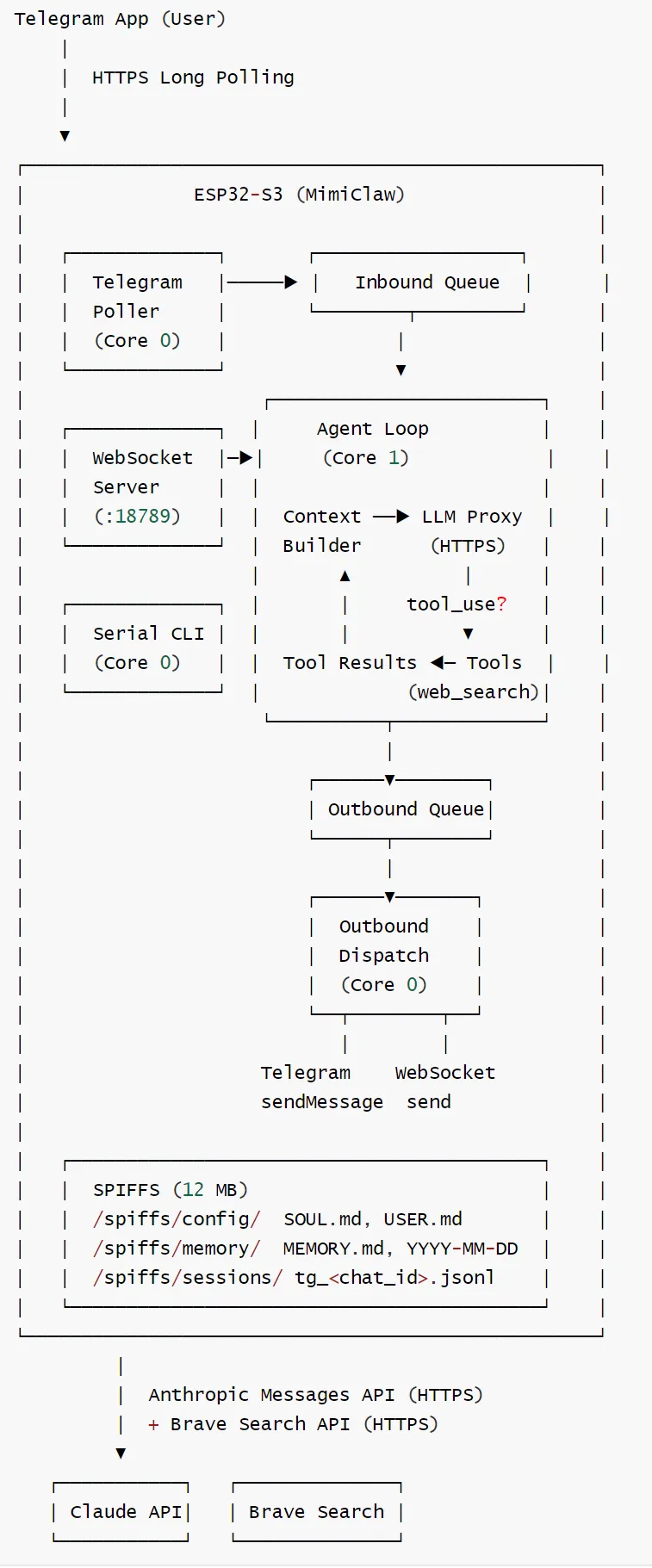
MimiClaw 的总体架构如下:
4.2 设计优势
4.2.1 架构优势
关注点分离: AI层:只关心“做什么“ Tool层:只关心“怎么做“ 硬件层:只关心“如何驱动“ 易于扩展: 添加新传感器?→ 创建新Tool 更换执行器?→ 修改对应Tool实现 增强AI能力?→ 不影响硬件层
4.2.2 实时性保障
使用双核分工来保证关键控制任务不受AI推理延迟影响 :
Core1(大脑):专注AI推理和决策,即运行agent_loop。 Core0(小脑):处理实时硬件控制和传感器读取
分工非常明确:
Core 0(网络 IO 核心):所有外部通信的 “入口 / 出口”,多数时间在select/阻塞读 Telegram Bot:和互联网上的 Telegram 服务器通信,接收用户指令、发送回复 WebSocket/HTTP:和局域网里的电脑、手机 App,或者云服务通信,双向传输数据 底层: WiFi Stack提供基础的 Wi-Fi 连接,是所有网络通信的基础上层:Telegram Bot、WebSocket Gateway、HTTP Proxy,是不同的应用层协议,用来和不同的外部服务 / 设备通信: 这样做的好处是,把所有网络 IO 都放在 Core 0,不会阻塞 Core 1 的 AI 推理和 Agent 逻辑。 Core 1(AI Agent 核心):和本地硬件设备的交互 GPIO 直接控制继电器、LED、电机等硬件 File Operations 通过 SPI 接 SD 卡,读写本地文件 GPIO Control、File Operations等工具,就是用来和本地设备交互的: 构建prompt(CPU密集cJSON操作)+ 等待HTTPS长响应。 其他工具(比如 Web Search),会通过 Core 0 的网络代理,再去访问互联网服务
对应的架构如下:
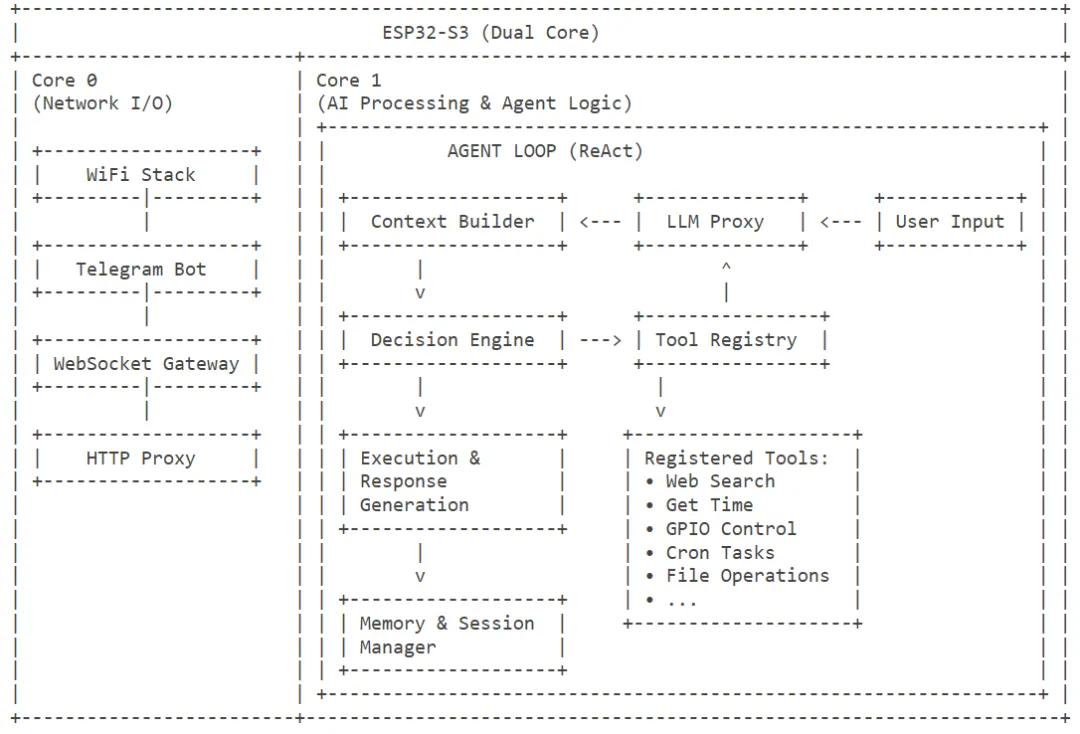
比如用户用 Telegram 给 ESP32 发了一句 “打开客厅灯”:
手机把消息发到 Telegram 服务器 ESP32 的 Core 0 通过 Wi-Fi 连接服务器,收到消息(Telegram Bot 模块) Core 0 把消息通过进程间通信(IPC)传给 Core 1 的 Agent 循环 Core 1 的 LLM Proxy 把消息传给大模型,判断需要调用 GPIO Control工具工具直接操作 ESP32 的 GPIO 引脚,给继电器通电,灯就开了 执行结果再通过 Core 0 的 Telegram Bot 模块,发回你的手机
这样做的收益:
LLM调用通常 3-15秒,期间 Core 1阻塞在 esp_tls,但Core 0仍可继续接收新消息排队。 WiFi重连、心跳、cron 触发都不会被Agent 卡住。 Telegram long polling(30秒超时)和 Agent 推理可以真正并行。
栈与优先级在mimi_config:h 集中定义(MIMI_AGENT_STACK=24KB、MIMI_AGENT_CORE=1、MIMI_AGENT_PRIO =6 等),避免代码里散落魔法数字。
4.3 数据流
对应的数据流如下。
1. User sends message on Telegram (or WebSocket)2. Channel poller receives message, wraps in mimi_msg_t3. Gateway process message4. Message pushed to Inbound Queue (FreeRTOS xQueue)5. Agent Loop (Core 1) pops message:a. Load session history from SPIFFS (JSONL)b. Build system prompt (SOUL.md + USER.md + MEMORY.md + recent notes + tool guidance)c. Build cJSON messages array (history + current message)d. ReAct loop (max 10 iterations):i. Call Claude API via HTTPS (non-streaming, with tools array)ii. Parse JSON response → text blocks + tool_use blocksiii. If stop_reason == "tool_use":- Execute each tool (e.g. web_search → Brave Search API)- Append assistant content + tool_result to messages- Continue loopiv. If stop_reason == "end_turn": break with final texte. Save user message + final assistant text to session filef. Push response to Outbound Queue6. Outbound Dispatch (Core 0) pops response:a. Route by channel field ("telegram" → sendMessage, "websocket" → WS frame)7. User receives reply
4.4 启动序列
app_main()├── init_nvs() NVS flash init (erase if corrupted)├── esp_event_loop_create_default()├── init_spiffs() Mount SPIFFS at /spiffs├── message_bus_init() Create inbound + outbound queues├── memory_store_init() Verify SPIFFS paths├── session_mgr_init()├── wifi_manager_init() Init WiFi STA mode + event handlers├── http_proxy_init() Load proxy config from build-time secrets├── telegram_bot_init() Load bot token from build-time secrets├── llm_proxy_init() Load API key + model from build-time secrets├── tool_registry_init() Register tools, build tools JSON├── agent_loop_init()├── serial_cli_init() Start REPL (works without WiFi)│├── wifi_manager_start() Connect using build-time credentials│ └── wifi_manager_wait_connected(30s)│└── [if WiFi connected]├── telegram_bot_start() Launch tg_poll task (Core 0)├── agent_loop_start() Launch agent_loop task (Core 1)├── ws_server_start() Start httpd on port 18789└── outbound_dispatch task Launch outbound task (Core 0)
4.5 硬件相关知识
ESP32-S3不是一个“能跑LLM"的设备,但它是一个能跑"非LLM类小模型“的合格端侧AI节点。这两类能力组合起来,能让MimiClaw形成**端侧感知+云侧推理“**的分层智能架构。
先列硬件账本(MimiClaw用的典型配置):
这意味着模型必须满足三个硬约束:
量化后权重≤数MB(最好<2MB) 每次推理在数十ms内(要不会拖死整个Agent循环) 中间激活缓冲能塞进PSRAM不爆(最好<1MB)
MiniClaw 的硬件相关知识如下。
FreeRTOS Task Layout
tg_poll | ||||
agent_loop | ||||
outbound | ||||
serial_cli | ||||
Memory Budget
Flash Partition Layout
Offset Size Name Purpose─────────────────────────────────────────────0x009000 24 KB nvs ESP-IDF internal use (WiFi calibration etc.)0x00F000 8 KB otadata OTA boot state0x011000 4 KB phy_init WiFi PHY calibration0x020000 2 MB ota_0 Firmware slot A0x220000 2 MB ota_1 Firmware slot B0x420000 12 MB spiffs Markdown memory, sessions, config0xFF0000 64 KB coredump Crash dump storage
Total: 16 MB flash.
Storage Layout (SPIFFS)
SPIFFS is a flat filesystem — no real directories. Files use path-like names.
/spiffs/config/SOUL.md AI personality definition/spiffs/config/USER.md User profile/spiffs/memory/MEMORY.md Long-term persistent memory/spiffs/memory/2026-02-05.md Daily notes (one file per day)/spiffs/sessions/tg_12345.jsonl Session history (one file per Telegram chat)
Session files are JSONL (one JSON object per line):
{"role":"user","content":"Hello","ts":1738764800}{"role":"assistant","content":"Hi there!","ts":1738764802}
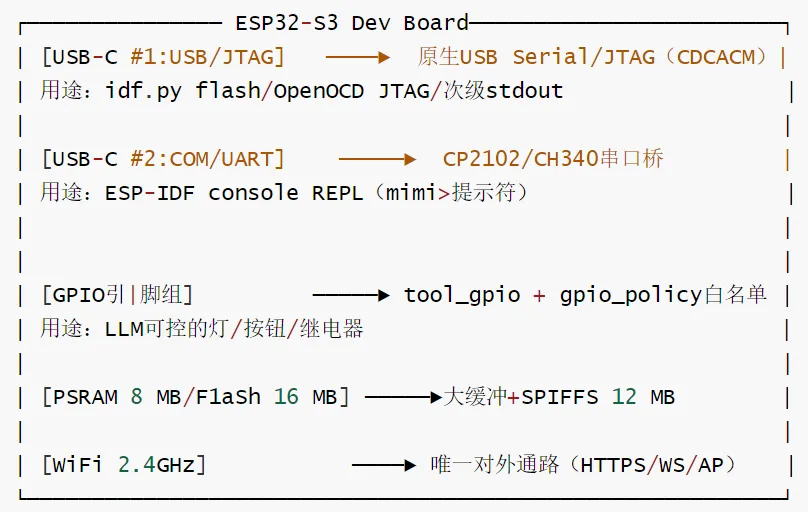
硬件拓扑
一块典型ESP32-S3开发板(如小智AI板)暴露给开发者的接口如下:
4.6 Tools:声明+注册+派发
工具系统三件套(main/tools/tool_registry.c):
声明:每个工具(tool_web_search、tool_cron、tool_files、tool_gpio、tool_get_time)定义自己的 JSON schema 和 handler。 注册:启动时各工具 tool_registry_register(...) 自登记。Registry 自动把所有 schema 拼成 LLM 请求所需的 tools 数组(同时支持 Anthropic 和 OpenAI 两种格式)。 派发:Agent 拿到 tool_use 块后调 tool_registry_dispatch(name, input_json),按名查表执行,返回字符串结果。
新增工具的“零侵入”流程:写 tool_xxx.{c,h},在 main/CMakeLists.txt SRCS 里加一行,在 tool_registry_init() 注册一次,Agent 自动获得能力。无需改 LLM 层、无需改 Agent 循环。
GPIO 工具特殊:通过 gpio_policy.c 做白名单/方向校验,避免 LLM 误烧坏板子。
4.7 记忆系统:Markdown 即数据库
放弃 SQLite/KV,全部用平文本:
好处:
用户用 CLI memory_read / memory_write 就能审视和修改 AI 的“脑子”。 跨重启天然持久。 LLM自己读/写自己的记忆,形成进化闭环。
挑战:
SPIFFS是扁平文件系统,没有真正的目录,只是路径前缀约定(MIMI_SPIFFS_*) 写入需要避免 wear leveling 损耗,因此 session 用 ring buffer,超过 20 条直接覆盖最l旧行。 首次烧录时由 spiffs_create_partition_image(spiffs spiffs_data FLASH_IN_PROJECT)(顶层 CMakeLists.txt)把 spiffs_data/打包进分区,省去运行时格式化和初始化。
4.8 网络与外部服务
WiFi 状态机(wifi/wifi_manager.c):指数退避重连(1s → 30s 上限)、事件驱动、和 onboarding AP 解耦。 WiFi 配网(onboard/wifi_onboard.c):未配网时启动 MimiClaw-XXXX 开放 AP + DNS 劫持 + HTTP 配置页,扫到的 SSID 直接列表,提交后写 NVS 重启。 OTA(ota/):双 OTA 分区(ota_0/ota_1,各 2 MB),通过 esp_https_ota 拉取新固件,A/B 切换。 WebSocket 网关(gateway/ws_server.c):18789 端口,最多 4 客户端,统一帧格式 {"type", "content", "chat_id"},方便局域网调试或自建 GUI。 Web 搜索:Tavily 优先(MIMI_SECRET_TAVILY_KEY),缺省回退 Brave Search。
4.9 内存预算
8 MB PSRAM 的典型分配如下:
2× TLS 连接(Telegram + LLM)≈ 120 KB LLM 流式响应缓冲 32 KB 会话历史缓存 32 KB 系统提示拼装缓冲 16 KB JSON 解析临时缓冲 32 KB 仍剩 ~7.7 MB 余量供 cJSON 节点、字符串拷贝等
代码层面强制约束:所有 ≥32 KB 的分配走 heap_caps_calloc(1, size, MALLOC_CAP_SPIRAM),把内部 SRAM 留给关键控制结构。

0xFF 参考
https://github.com/memovai/mimiclaw

