 夜雨聆风
夜雨聆风


Openclaw?不不不,是“龙虾U盘”
【教学如何一步步完成U-Openclaw的制作】
💻 导语:前段时间很火的openclaw,有大牛在github上,上传了便携U盘的项目,可谓是点燃了潜力市场啊。我研究了下,不说废话,分享一下我的openclaw(便携U盘版)制作步骤,带大家完成属于自己的U-Openclaw。
✨ 本文核心看点目录:
✅ U盘版如何制作(一步一步教)?
✅ 常见问题排查(避坑指南)
-
能联网
-
获取Github上大牛的开源项目链接,可以Dowload Zip,或者直接Clone下来也行 https://github.com/dongsheng123132/u-claw
github
-
将下载好的u-claw,解压出来(无需解压的,可以忽略) -
打开文件可以看到里面是下面这样的 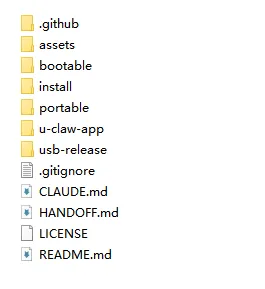
-
然后打开里面的一个文件夹(portable) -
然后找到里面的setup.bat,右键选择编辑 -
然后用记事本查看,并将setup.bat里面的内容,删掉,然后替换为下面我这个内容 @echo offsetlocal EnableDelayedExpansionchcp 65001 >nul 2>&1title U-Claw Portable Setupset "SCRIPT_DIR=%~dp0"set "APP_DIR=%SCRIPT_DIR%app"set "CORE_DIR=%APP_DIR%\core"set "RUNTIME_DIR=%APP_DIR%\runtime"set "MIRROR=https://registry.npmmirror.com"set "NODE_MIRROR=https://npmmirror.com/mirrors/node"set "NODE_VERSION=v22.22.1"set "ALL_PLATFORMS=false"if /i "%~1"=="--all-platforms" set "ALL_PLATFORMS=true"echo.echo ========================================echo U-Claw Portable Setup ^(Windows x64^)echo ========================================echo.if not exist "%RUNTIME_DIR%" mkdir "%RUNTIME_DIR%"if not exist "%CORE_DIR%" mkdir "%CORE_DIR%":: ---- 1. Node.js ----set "NODE_DIR_NAME=node-win-x64"set "NODE_TARGET=%RUNTIME_DIR%\%NODE_DIR_NAME%"if not exist "%NODE_TARGET%\node.exe" (echo [1/4] Downloading Node.js %NODE_VERSION% ^(win-x64^)...set "NODE_URL=%NODE_MIRROR%/%NODE_VERSION%/node-%NODE_VERSION%-win-x64.zip"set "TMP_ZIP=%TEMP%\node-win-x64-%RANDOM%.zip"set "TMP_DIR=%TEMP%\node-extract-%RANDOM%"curl --retry 3 --connect-timeout 30 --max-time 300 -fSL "!NODE_URL!" -o "!TMP_ZIP!"if !errorlevel! neq 0 (echo [ERROR] Node.js download failedpauseexit /b 1)echo Extracting...powershell -command "Expand-Archive -Path '!TMP_ZIP!' -DestinationPath '!TMP_DIR!' -Force"xcopy /s /e /q /y "!TMP_DIR!\node-%NODE_VERSION%-win-x64\*" "!NODE_TARGET!\" >nulrmdir /s /q "!TMP_DIR!" 2>nuldel /f /q "!TMP_ZIP!" 2>nulecho [OK] Node.js installed) else (echo [1/4] Node.js already exists, skip):: ---- Mac runtimes (optional) ----if "%ALL_PLATFORMS%"=="true" (for %%p in (arm64 x64) do (set "MAC_TARGET=%RUNTIME_DIR%\node-mac-%%p"if not exist "!MAC_TARGET!\bin\node" (set "MAC_URL=%NODE_MIRROR%/%NODE_VERSION%/node-%NODE_VERSION%-darwin-%%p.tar.gz"set "TMP_TAR=%TEMP%\node-mac-%%p-%RANDOM%.tar.gz"curl --retry 2 -fSL "!MAC_URL!" -o "!TMP_TAR!" 2>nulif !errorlevel! equ 0 (mkdir "!MAC_TARGET!" 2>nultar -xzf "!TMP_TAR!" -C "!MAC_TARGET!" --strip-components 1del "!TMP_TAR!" 2>nul)))):: ---- 2. OpenClaw ----if not exist "%CORE_DIR%\node_modules\openclaw" (echo [2/4] Installing OpenClaw...if not exist "%CORE_DIR%\package.json" (echo { "name": "u-claw-core", "version": "1.0.0", "private": true, "dependencies": { "openclaw": "latest" } } > "%CORE_DIR%\package.json")cd /d "%CORE_DIR%"call "%NODE_TARGET%\npm.cmd" install --registry="%MIRROR%" --no-audit --no-fundif !errorlevel! neq 0 (echo [ERROR] OpenClaw install failedpauseexit /b 1)echo [OK] OpenClaw installed) else (echo [2/4] OpenClaw already exists, skip):: ---- 3. QQ Plugin ----if not exist "%CORE_DIR%\node_modules\@sliverp\qqbot" (echo [3/4] Installing QQ Plugin...cd /d "%CORE_DIR%"call "%NODE_TARGET%\npm.cmd" install @sliverp/qqbot@latest --registry="%MIRROR%" --no-audit --no-fund 2>nulecho [OK] QQ Plugin installed) else (echo [3/4] QQ Plugin already exists, skip):: ---- 4. Skills ----set "SKILLS_CN=%SCRIPT_DIR%skills-cn"set "SKILLS_TARGET=%CORE_DIR%\node_modules\openclaw\skills"if exist "%SKILLS_CN%" if exist "%SKILLS_TARGET%" (echo [4/4] Installing China skills...set "COUNT=0"for /d %%s in ("%SKILLS_CN%\*") do (if not exist "%SKILLS_TARGET%\%%~nxs" (xcopy /s /e /q /y "%%s" "%SKILLS_TARGET%\%%~nxs\" >nul 2>&1set /a COUNT+=1))echo [OK] !COUNT! skills installed) else (echo [4/4] Skills skipped):: ---- Done ----echo.echo ========================================echo Setup Complete!echo ========================================echo.echo Start: Double-click Windows-Start.batecho.pause
-
将这个setup.bat文件保存 -
选中这个setup.bat文件右键,选择管理员运行,然后等待一段时间 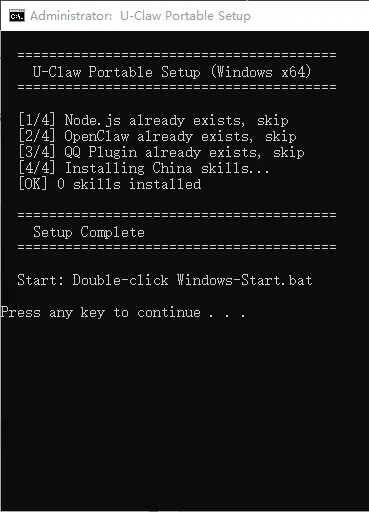
等出现press any key to continue…,就说明ok了 -
然后关闭这个cmd(上面的黑框)窗口 -
重新回到portable内,查看文件夹app中的内容是否是下面这样的 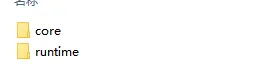
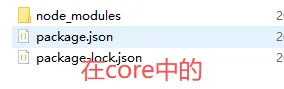
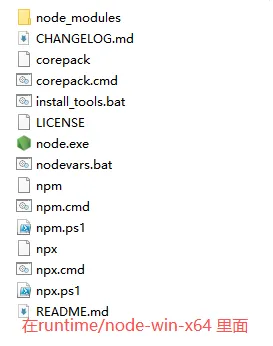
-
确认前面的内容基本无误后,回来最外面的文件目录(与portable同级的目录) 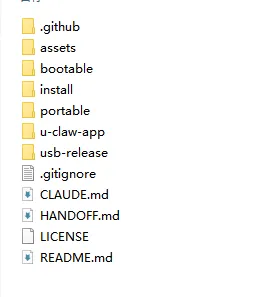
-
复制这个portable整个文件夹到空U盘中,等待一段时间 -
复制进度条结束后,就完成了最关键的制作部分。
-
完成步骤2后,打开U盘里面复制的portable文件夹,找到portable里面的Windows-Start.bat文件 -
双击运行即可启动龙虾,同时启动过程中,它会调用电脑的浏览器,进行龙虾准备页面 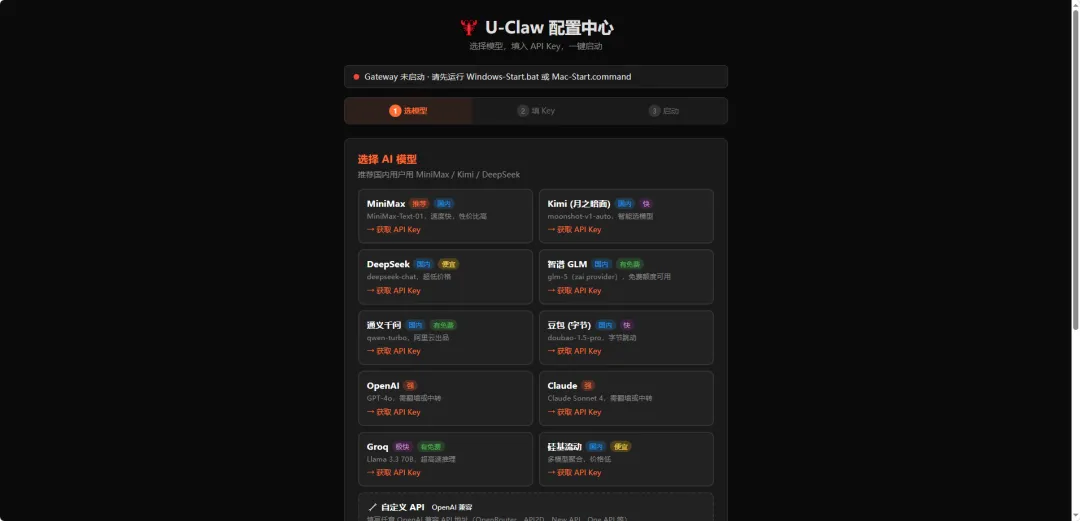
-
根据页面中的选模型、填key、启动,按照上面的提示去操作即可。
🖴避坑提醒/注意事项
-
其中的依赖下载,可能会遇到下载慢的情况,建议先在电脑的硬盘上完成后再进行最后一步复制,避免直接在U盘上直接完成,而导致下载卡住。
📌 结语
以上就是对于制作U-OpenClaw的思路和流程,如果有其他的想法,或者觉得文章有启发,欢迎互动交流!!!
点赞 👍在看 👀留言 💬
关注我们 ↓↓↓ 获取更多精彩内容