夜雨聆风
夜雨聆风


stagewise:让AI与代码编辑器无缝连接
前言
Stagewise 是一个旨在提高开发效率的工具,它允许 Cursor、GitHub Copilot 和 Windsurf 等工具与浏览器交互,支持对任何 DOM 元素进行注释,并将实际上下文发送给 Windsurf,提供了一种时间节省的方法,减少手动选择文件的需要,支持 React、Next.js、Vue 和 Nuxt.js 等框架。今日前端早读课文章由@飘飘分享。
在现代前端开发中,开发者常常需要在浏览器和代码编辑器之间来回切换,尤其是在调试和修改 UI 时。为了简化这一流程,提高开发效率,stagewise 应运而生。stagewise 是一个创新的浏览器工具栏插件,它将前端 UI 元素直接连接到你的 AI 代码助手,帮助开发者节省时间、减少重复操作。
🌟 什么是 stagewise?
stagewise 是一款集成在浏览器中的工具栏插件,旨在连接前端 UI 和 AI 代理(AI Agent)。通过这个工具,你可以:
-
在网页应用中选择任意元素 -
直接在页面上对该元素进行评论 -
让 AI 代理自动处理相关任务
stagewise 的核心理念是让 AI 更智能地理解你正在编辑的内容,从而提供更精准的帮助。相比传统的开发方式,它无需手动复制路径或反复粘贴信息,而是直接通过浏览器为 AI 提供实时上下文。
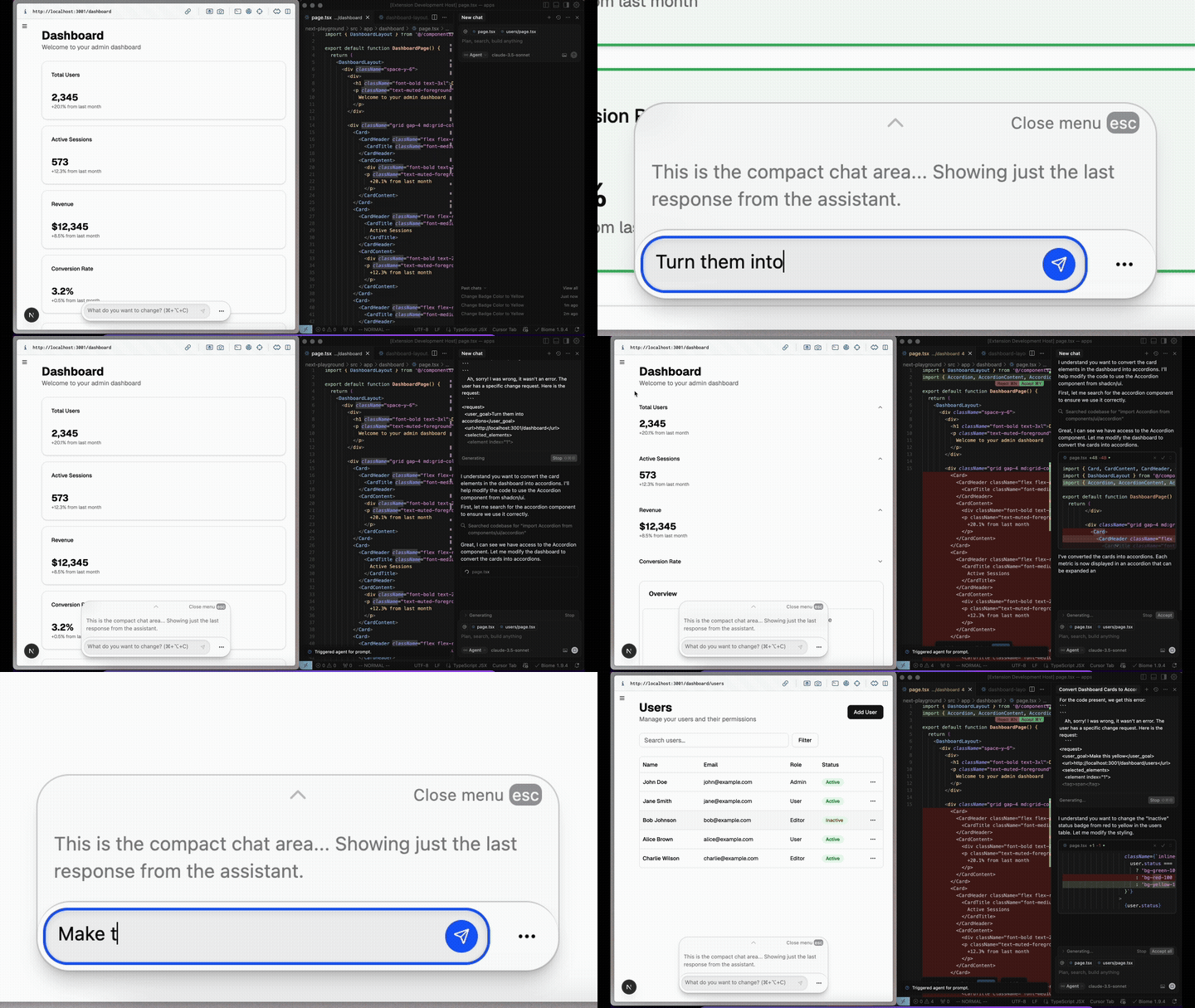
⚡ stagewise 的核心优势
1、开箱即用
安装后即可立即使用,无需复杂配置。
2、高度可定制
支持自定义配置文件,满足不同项目需求。
3、支持 MCP 服务器
可连接你自己的 MCP(Model Control Protocol)服务器,实现更强大的 AI 功能。
4、不影响包体积
工具完全独立于你的应用打包过程,不会增加应用体积。
5、丰富的功能支持
-
能够向 AI 代理发送 DOM 元素、截图和元数据。 -
支持直接在浏览器中对元素进行注释。 -
提供 React、Vue、Svelte 等框架的示例环境。
💡 如何安装和使用?
✅ 安装扩展
你可以从 Visual Studio Marketplace:https://marketplace.visualstudio.com/items?itemName=stagewise.stagewise-vscode-extension 安装 stagewise 扩展。
🔧 配置方式
自动安装(AI 引导)
-
在 Cursor 编辑器中,按下 CMD + Shift + P -
输入 setupToolbar -
执行命令后,工具栏会自动初始化
手动安装
pnpm i -D @stagewise/toolbar然后在你的应用初始化代码中注入 stagewise:
import { initToolbar } from '@stagewise/toolbar';const stagewiseConfig = { plugins:[ { name:'example-plugin', description:'Adds additional context for your components', shortInfoForPrompt:()=>{ return "Context information about the selected element"; }, mcp:null, actions:[ { name:'Example Action', description:'Demonstrates a custom action', execute:()=>{ window.alert('This is a custom action!'); }, }, ], }, ],};function setupStagewise(){ if(process.env.NODE_ENV==='development'){ initToolbar(stagewiseConfig); }}setupStagewise();📦 支持主流前端框架
stagewise 提供了针对主流前端框架的专用组件,方便快速集成:
React.js
// src/main.tsximport { StrictMode } from 'react';import { createRoot } from 'react-dom/client';import App from './App.tsx';import { StagewiseToolbar } from'@stagewise/toolbar-react';import './index.css';createRoot(document.getElementById('root')!).render( <StrictMode> <App /> </StrictMode>,); document.addEventListener('DOMContentLoaded',()=>{ const toolbarRoot = document.createElement('div'); toolbarRoot.id ='stagewise-toolbar-root'; document.body.appendChild(toolbarRoot); createRoot(toolbarRoot).render( <StrictMode> <StagewiseToolbar config={{ plugins:[]// Add your custom plugins here }}/> </StrictMode> );});Next.js
// src/app/layout.tsximport { StagewiseToolbar } from '@stagewise/toolbar-next';export default function RootLayout({ children,}: Readonly<{ children: React.ReactNode;}>){ return( <html lang="en"> <body> <StagewiseToolbar config={{ plugins:[],// Add your custom plugins here }} /> {children} </body> </html> );}Vue.js / Nuxt.js
<!-- app.vue --><script setup lang="ts">import { StagewiseToolbar, type ToolbarConfig } from '@stagewise/toolbar-vue';const config: ToolbarConfig ={ plugins:[],// Add your custom plugins here};</script><template> <NuxtRouteAnnouncer /> <ClientOnly> <StagewiseToolbar :config="config"/> </ClientOnly> <NuxtWelcome /></template>SvelteKit
<!-- src/routes/+layout.svelte --><script lang="ts">import { onMount } from 'svelte';import { browser }from '$app/environment';import { initToolbar, type ToolbarConfig } from '@stagewise/toolbar';onMount(()=>{ if(browser){ const stagewiseConfig: ToolbarConfig ={ plugins:[ // Add your Svelte-specific plugins or configurations here ], }; initToolbar(stagewiseConfig); }});</script><slot />🤖 支持的 AI Agents
|
|
|
|---|---|
|
|
|
|
|
|
|
|
|
|
|
|
|
|
|
|
|
|
|
|
|
|
|
|
|
|
|
|
|
|
GitHub 仓库:https://github.com/stagewise-io/stagewise
🎯 总结
stagewise 是一款正在改变前端开发流程的强大工具。它不仅提升了开发者与 AI 之间的互动效率,还通过灵活的架构支持多种前端框架和 AI 平台。无论你是个人开发者还是企业团队,都可以从中受益。
如果你希望提升开发效率、减少重复劳动,stagewise 绝对值得一试!现在就去安装体验吧!
写在最后
我是悬笔e绝,如果我的文章对你有帮助,请点个赞👍🏻 支持我一下
若有什么疑问,也可以加我微信:
yllg_xbyj,一起交流心得❤️ 看完三件事
如果你觉得这篇内容对你挺有启发,我想邀请你帮我三个小忙:
点个「在看」,让更多的人也能看到这篇内容
关注公众号「悬笔e绝」,持续为你推送精选好文,回复「加群」加入交流群