 夜雨聆风
夜雨聆风前置阅读:第 2 篇 — 工具注册
本篇讲解 OpenClaw 的技能系统。技能(Skills)是用 Markdown 编写的 Agent 行为指令——它告诉 Agent 在什么场景下应该做什么、怎么做。如果说工具是 Agent 的「手」,那么技能就是 Agent 的「脑子」中关于如何用手的知识。
01
—
技能、工具、插件的关系
技能解决「何时做」和「怎么做」——行为指导
工具解决「做什么」——能力定义
插件解决「怎么实现」——代码承载
一个没有技能的 Agent 有工具但不知道何时用。一个有技能但没工具的 Agent 知道该做什么但做不到。三者缺一不可。
—
技能的结构
技能以 Markdown 文件(SKILL.md)的形式存在。一个技能文件通常包含以下部分:---name: code-reviewdescription: Perform thorough code review on provided codetrigger: when the user asks for code review, or when reviewing a pull requesttools: [read, edit, exec]---# Code Review Skill## When to UseActivate this skill when:- User explicitly asks for a code review- A pull request is submitted for review- User shares code and asks for feedback## How to Review### 1. Read and UnderstandFirst, use the `read` tool to examine the code files.### 2. AnalyzeCheck for:- **Correctness**: Does the code do what it's supposed to?- **Security**: Are there any vulnerabilities?- **Performance**: Are there obvious performance issues?- **Readability**: Is the code clear and well-documented?### 3. ReportStructure your review as:- Summary of changes- Issues found (categorized by severity)- Suggestions for improvement## Rules- Always read the full file context before commenting- Don't suggest style changes unless asked- Prioritize correctness and security over style
Frontmatter 字段
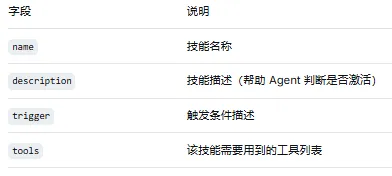
技能文件开头的 YAML frontmatter(用 --- 包裹的部分)定义了技能的元数据。这些元数据不直接展示给 Agent,但影响 OpenClaw 如何发现和管理这个技能:
03
—
技能的来源
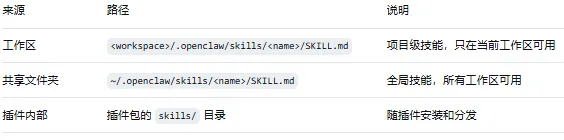
发现顺序:插件技能 → 全局技能 → 工作区技能。当多个位置存在同名技能时,优先级高的会覆盖优先级低的。这意味着你可以:在工作区中用自定义的技能覆盖插件自带的技能。
插件中的技能目录
如果想让插件自带技能文件(随插件安装和分发),在插件的清单文件中声明技能目录:
{"id": "my-plugin","skills": "skills" // 技能目录相对于插件根目录}
my-plugin/├── openclaw.plugin.json├── index.ts└── skills/├── code-review/│ └── SKILL.md├── deploy/│ └── SKILL.md└── testing/└── SKILL.md
04
—
技能与 Bundle 的映射
OpenClaw 支持导入 Claude、Codex、Cursor 等生态的兼容性捆绑包(Bundle)。导入时,这些平台中的命令和技能文件会被自动映射到 OpenClaw 的技能系统:
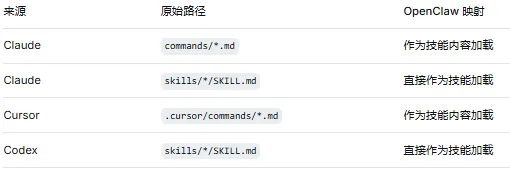
这意味着你在 Claude 或 Cursor 生态中已有的命令和技能,可以直接在 OpenClaw 中使用。
05
—
技能的触发机制
Agent 在每次收到用户消息时,会扫描可用的技能文件,根据以下因素决定是否激活某个技能:
技能的
description和trigger字段:描述是否与当前场景匹配技能的
tools字段:当前可用的工具是否包含技能所需的工具上下文相关性:对话内容是否与技能主题相关
当一个技能被激活后,其内容(SKILL.md 的主体部分)会被注入到 Agent 的系统提示中,作为 Agent 推理时的行为指导。
06
—
技能与工具的协作
技能文件的核心价值在于精确引导 Agent 使用工具。一个编写良好的技能文件会:
明确告知 Agent 何时使用哪个工具
定义工具调用的顺序和参数
处理工具调用失败的情况
将多个工具调用组合成完整的工作流
示例:多步骤工作流技能
---name: deploy-workflowdescription: Deploy application to staging or production environmenttrigger: when user asks to deploy, or mentions deploymenttools: [exec, read, browser]---# Deployment Workflow## Steps### Step 1: Pre-flight CheckUse `exec` to run tests:exec: npm testtextIf tests fail, STOP and report the failures. Do not proceed with deployment.### Step 2: BuildUse `exec` to build:exec: npm run buildtext### Step 3: Verify BuildUse `read` to check the build output:read: dist/index.js (first 50 lines)text### Step 4: DeployIf target is staging:exec: npm run deploy:stagingtextIf target is production:- First ask user for confirmation- Then run:exec: npm run deploy:productiontext### Step 5: VerifyUse `browser` to verify the deployment:browser: navigate to https://app.example.com/healthtextCheck that the health endpoint returns 200 OK.## Error Handling- If any step fails, report the error and suggest how to fix it- Never skip steps, even if user asks to "just deploy"- If the user asks to deploy to production, always double-check their intent
示例:条件分支技能
---name: api-debuggerdescription: Debug API issues by analyzing logs, testing endpoints, and checking configurationstrigger: when user reports API errors, 500 errors, or unexpected API behaviortools: [read, exec, browser, web_search]---# API Debugger## Decision Tree### Is the error reproducible?- **Yes** → Use `exec` to reproduce and capture the full error:exec: curl -v https://api.example.com/problematic-endpointtextAnalyze the response status code, headers, and body.- **No** → Check recent logs:read: logs/app.log (last 100 lines)textSearch for error patterns.### Is it a client error (4xx)?- Check authentication configuration- Verify request format and parameters- Review API documentation with `web_search`### Is it a server error (5xx)?- Check server logs for stack traces- Verify database connectivity- Check recent deployments for regressions## Reporting FormatWhen reporting findings, structure as:1. **Symptom**: What the user is experiencing2. **Root Cause**: What is actually wrong3. **Evidence**: Logs, error messages, test results4. **Solution**: Specific steps to fix the issue5. **Prevention**: How to avoid this in the future
07
—
编写高质量技能的原则
1. 描述要具体
# 不好的描述description: Help with code# 好的描述description: Perform code review focusing on security vulnerabilities,performance issues, and code correctness. Activate when usershares code and asks for review or feedback.
2. 触发条件要明确
# 不好的触发条件trigger: when needed# 好的触发条件trigger: activate when user asks to "review code", "check for bugs","is this secure?", or shares a pull request URL
3. 步骤要有序
技能文件中的步骤应该有明确的顺序,每一步做什么、用什么工具、期望什么结果都要写清楚。
4. 处理边界情况
## Edge Cases- If the file is larger than 1000 lines, use `exec` with grep firstto narrow down the relevant section- If the API returns a redirect (3xx), follow it and check the final response- If the user is not authenticated, ask for credentials before proceeding
5. 不要过度约束
技能是行为指导,不是硬编码的流程。应该给 Agent 留有合理判断的空间:
# 不好:过于僵化Always run step 1, then step 2, then step 3. Never skip any step.# 好:有合理的灵活性Generally follow the order: 1 → 2 → 3. However, if you alreadyhave the information from step 1 (e.g., from a previous analysis),you may skip directly to step 3.
08
—
技能的实际效果
当技能被激活后,Agent 的行为会发生可感知的变化。例如,一个没有技能的 Agent 在收到「帮我审查这段代码」的请求时,可能会:
直接给出文字建议(没有读代码)
漏掉安全检查
格式混乱
而激活了 code-review 技能后,同一个 Agent 会:
先用
read工具读取代码按照技能定义的框架逐项检查
用结构化的格式输出审查结果
包含严重程度分级
技能不改变 Agent 的能力——它改变的是 Agent 使用能力的策略和纪律。
09
—
小结
本篇覆盖了 OpenClaw 技能系统的核心机制:
技能是用 Markdown 编写的 Agent 行为指导
技能定义「何时做」「怎么做」,工具定义「做什么」
技能来源:工作区、全局目录、插件内部
Claude/Codex/Cursor 的命令和技能可以兼容映射
高质量技能的核心:具体描述、明确触发、有序步骤、边界处理
下一篇:高级实战 — 从零构建一个完整插件。我们将综合运用本系列所有知识,从零构建一个生产级的 OpenClaw 插件。