 夜雨聆风
夜雨聆风全栈 AI 语音助手开发实战 — ASR + TTS + LLM 实时对话系统搭建
目录
1. 引言:语音交互为何是 AI 应用的终极形态
2024-2026 年,大语言模型(LLM)的爆发让文本对话达到了前所未有的智能水平。然而,文字输入始终是效率瓶颈——人类自然交流的带宽是语音(约 150 词/分钟),远高于打字(约 40 词/分钟)。语音交互是 AI 应用进化的必然方向。
1.1 语音 AI 三角
一个完整的语音 AI 系统由三个核心组件构成:
┌─────────────────────────────────────────────────────┐
│                    语音 AI 三角                      │
│                                                     │
│              ┌─────────┐                            │
│              │   ASR   │  自动语音识别               │
│              │ 听 → 文 │  Audio → Text               │
│              └────┬────┘                            │
│                   │                                 │
│    ┌──────────────┼──────────────┐                  │
│    │              │              │                  │
│    ▼              ▼              ▼                  │
│  ┌─────┐     ┌──────┐      ┌──────┐                │
│  │ VAD │     │ LLM  │      │Function│               │
│  │静音检测│    │对话引擎│     │Calling│               │
│  └─────┘     └──┬───┘      └──────┘                │
│                 │                                   │
│              ┌──┴───┐                               │
│              │ TTS  │  文本转语音                     │
│              │ 文 → 声 │  Text → Audio               │
│              └──────┘                               │
│                                                     │
│         目标延迟:< 2 秒(端到端)                    │
└─────────────────────────────────────────────────────┘
1.2 为什么现在是最佳时机
| 因素 | 2023 以前 | 2024-2026 |
|---|---|---|
| LLM 智能 | GPT-3.5 | GPT-4o / Claude Opus 4 / DeepSeek-V3 |
| TTS 自然度 | 机械感 | ChatTTS / CosyVoice 几乎乱真 |
| 推理延迟 | >10s 首token | <500ms(流式) |
| 硬件要求 | 服务器必须 | 消费级 GPU 可本地部署 |
| 开源程度 | 闭源为主 | 模型全开源,Apache/MIT 协议 |
这意味着,构建一个近乎实时的、自然的语音对话系统,所需的条件已经完全成熟。
1.3 你能学到什么
读完本文并跟随代码实践,你将能够:
2. 系统架构总览:ASR → LLM → TTS 三阶段流水线
2.1 整体架构图
┌──────────────────────────────────────────────────────────────────────┐
│                          🖥️ 浏览器 (React)                          │
│                                                                      │
│  ┌──────────────┐   ┌──────────────┐   ┌────────────────────────┐   │
│  │ getUserMedia │──▶│ AudioContext │──▶│ WebSocket Client       │   │
│  │  麦克风采集    │   │  音频预处理    │   │  发送 PCM/WAV → 服务器  │   │
│  └──────────────┘   └──────────────┘   └───────────┬────────────┘   │
│                                                     │                │
│  ┌──────────────────────────────┐                   │                │
│  │  Audio Worklet / ScriptProc  │                   │                │
│  │  低延迟音频播放                │◀── 接收音频块 ──│                │
│  └──────────────────────────────┘                   │                │
└─────────────────────────────────────────────────────┼────────────────┘
                                                      │
                    🔗 WebSocket (wss://)              │
                    📦 消息格式: JSON + Binary         │
                                                      │
┌─────────────────────────────────────────────────────┼────────────────┐
│                    🐍 FastAPI 后端                                   │
│                                                                      │
│  ┌──────────────────────────────────────────────────┐               │
│  │              WebSocket Endpoint                    │               │
│  │  /ws/voice                                        │               │
│  │  接收: audio_chunk (bytes) + metadata (JSON)      │               │
│  │  发送: text_delta (JSON) + audio_chunk (bytes)    │               │
│  └──────┬───────────────────────┬───────────────────┘               │
│         │                       │                                    │
│         ▼                       ▼                                    │
│  ┌─────────────┐        ┌──────────────┐                            │
│  │  ASR Pipeline│        │  TTS Pipeline│                            │
│  │ ┌─────────┐ │        │ ┌──────────┐ │                            │
│  │ │  VAD    │ │        │ │ 文本分段  │ │                            │
│  │ │ Silero  │ │        │ │ 缓存去重  │ │                            │
│  │ └────┬────┘ │        │ └────┬─────┘ │                            │
│  │      ▼      │        │      ▼       │                            │
│  │ ┌─────────┐ │        │ ┌──────────┐ │                            │
│  │ │Whisper/ │ │        │ │Edge-TTS/ │ │                            │
│  │ │SenseVoice│ │       │ │ChatTTS   │ │                            │
│  │ └────┬────┘ │        │ └────┬─────┘ │                            │
│  └──────┼──────┘        └──────┼───────┘                            │
│         │                      │                                     │
│         ▼                      ▲                                     │
│  ┌─────────────────────────────────────┐                            │
│  │           LLM 对话引擎               │                            │
│  │  ┌─────────────────────────────┐    │                            │
│  │  │  流式生成 (SSE/stream)       │    │                            │
│  │  │  上下文滑动窗口 (8K tokens)   │    │                            │
│  │  │  System Prompt 角色设定      │    │                            │
│  │  │  Function Calling 工具调用   │    │                            │
│  │  └─────────────────────────────┘    │                            │
│  └─────────────────────────────────────┘                            │
└──────────────────────────────────────────────────────────────────────┘
2.2 数据流详解
整个系统的数据流可以用以下时序图描述:
用户说话                    ASR              LLM              TTS
   │                        │                │                │
   │── 音频流 (PCM 16kHz) ──▶│                │                │
   │                        │                │                │
   │                    [VAD 检测]            │                │
   │                    [语音结束?]            │                │
   │                        │                │                │
   │                        │── 转录文本 ────▶│                │
   │                        │                │                │
   │                        │     [流式生成回复文本]           │
   │                        │                │                │
   │                        │                │── 文本块 ────▶│
   │                        │                │               │
   │                        │                │       [合成语音]
   │                        │                │               │
   │◀──────────── 音频回复 ───────────────────────────────│
   │                        │                │               │
#### 2.2.1 ASR→LLM→TTS 全链路时序图(含延迟约束)
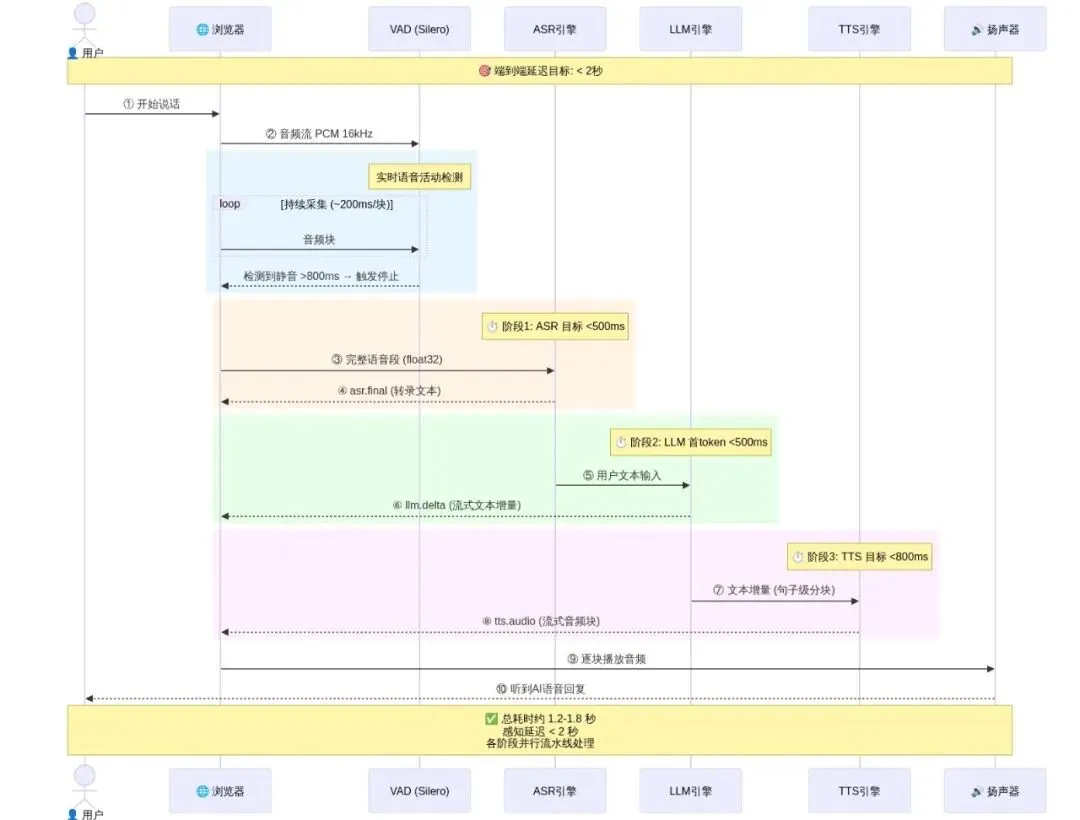
全栈AI语音助手系统架构
2.3 关键技术决策
在开始编码之前,我们需要做出几个关键的技术决策:
| 决策维度 | 推荐选择 | 备选方案 | 理由 |
|---|---|---|---|
| 音频格式 | PCM 16kHz 16bit mono | Opus / WAV | 无损,处理简单,与 Whisper 原生匹配 |
| ASR 触发方式 | VAD 语音端点检测 | 手动按钮 / 持续流式 | 用户体验最优,自然打断 |
| LLM 流式 | SSE(服务端推送) | 非流式 / WebSocket 内嵌 | 首字延迟最低,感知响应快 |
| TTS 策略 | 流式合成 + 句子级分块 | 全文合成 | 减少等待,边生成边播放 |
| 部署方式 | GPU 服务器(T4/A10) | CPU / Apple Silicon | 满足延迟要求的最优性价比 |
3. ASR 选型与实践:Whisper / FunASR / SenseVoice 对比与集成
3.1 ASR 模型对比
| 特性 | Whisper v3 (large) | FunASR (Paraformer) | SenseVoice (阿里) | whisper.cpp (edge) |
|---|---|---|---|---|
| 推理速度 | 慢 (GPU 必须) | 快 (GPU/CPU) | 快 (GPU/CPU) | 极快 (CPU) |
| 模型大小 | 1.5 GB | 220 MB | 120 MB | 50-200 MB |
| 多语言支持 | 99 种语言 | 中文为主 | 中/英/日/韩/粤 | 同 Whisper |
| 标点恢复 | 基础 | 优秀 | 优秀 + ITN | 基础 |
| 时间戳 | ✅ | ✅ (需额外模型) | ✅ (词级) | ✅ |
| 说话人分离 | ❌ | ✅ (CAM++) | ✅ (CAM++) | ❌ |
| 流式支持 | ❌ (需 trick) | ✅ 原生流式 | ✅ 原生流式 | ❌ |
| 离线部署 | ✅ | ✅ | ✅ | ✅ |
| 开源协议 | MIT | MIT | Apache 2.0 | MIT |
| 适用场景 | 多语言离线批量 | 中文实时流式 | 中文/多语高精度 | 端侧/移动设备 |
#### 3.1.1 ASR引擎多维对比象限图
以下象限图将四大ASR引擎按实时性(X轴)和准确率(Y轴)两个核心维度进行定位,帮助你直观选择最适合的场景:
流程图(文字描述省略,详见代码块)
- 第一象限(右上):SenseVoice 独占——同时具备最高准确率和原生流式支持,是中文实时场景的最优选。
- 第二象限(左上):Whisper v3 准确率极高但推理较慢,适合离线批量转录。
- 第四象限(右下):FunASR/Paraformer 实时性好,准确率略低于 SenseVoice。
- 第三象限(左下):whisper.cpp 适合资源受限的端侧设备。
五维综合评级(★ 越多越好):
| 引擎 | 准确率 | 实时性 | 多语言 | 资源消耗 | 易用性 |
|---|---|---|---|---|---|
| FunASR | ★★★★☆ | ★★★★★ | ★★☆☆☆ | ★★★☆☆ | ★★★☆☆ |
| SenseVoice | ★★★★★ | ★★★★★ | ★★★★☆ | ★★★☆☆ | ★★★★★ |
| Paraformer | ★★★★☆ | ★★★★☆ | ★★☆☆☆ | ★★★☆☆ | ★★★☆☆ |
| whisper.cpp | ★★★☆☆ | ★★☆☆☆ | ★★★★★ | ★☆☆☆☆ | ★★★★★ |
3.2 选型建议
┌──────────────────────────────────────────────────────┐
│               ASR 选型决策树                          │
│                                                      │
│  是否需要实时流式?                                   │
│      │                                               │
│      ├── 是 ──▶ 主要语言?                           │
│      │            │                                  │
│      │            ├── 中文 ──▶ SenseVoice ✅          │
│      │            │           (精度最高,原生流式)     │
│      │            │                                  │
│      │            └── 多语言 ──▶ FunASR + Whisper     │
│      │                                后备            │
│      │                                               │
│      └── 否(批量/离线)──▶ 精度要求?                 │
│                  │                                   │
│                  ├── 高 ──▶ Whisper v3 large ✅       │
│                  │                                   │
│                  └── 低 + CPU ──▶ whisper.cpp ✅      │
│                                                      │
└──────────────────────────────────────────────────────┘
#### 3.2.1 统一引擎选型决策树(ASR + TTS)
以下 Mermaid 决策树从业务场景 → 语言 → 实时性 → 资源约束逐步收敛,一次给出 ASR 和 TTS 的推荐组合:
流程图(文字描述省略,详见代码块)
3.3 Whisper v3 集成实战
以下代码展示了如何使用 Faster-Whisper(CTranslate2 加速版,比原版快 4 倍)进行 ASR:
PYTHON
# backend/asr/whisper_engine.py
"""
Whisper v3 ASR 引擎
使用 faster-whisper (CTranslate2) 后端实现 GPU 加速推理
"""
import numpy as np
from typing import Optional, AsyncIterator
from dataclasses import dataclass
from faster_whisper import WhisperModel


@dataclass
class ASRResult:
    """ASR 识别结果"""
    text: str
    language: str
    duration: float          # 音频时长 (秒)
    inference_time: float    # 推理耗时 (秒)
    segments: list           # 带时间戳的片段


class WhisperASREngine:
    """
    Whisper 语音识别引擎

    特性:
    - CTranslate2 后端加速(比原版快 4x)
    - 支持 int8 量化(显存减半)
    - 自动语言检测
    - VAD 预处理
    """

    def __init__(
        self,
        model_size: str = "large-v3",
        device: str = "cuda",
        compute_type: str = "int8_float16",
        language: Optional[str] = None,  # None = 自动检测
    ):
        self.model_size = model_size
        self.device = device
        self.compute_type = compute_type
        self.language = language

        print(f"[Whisper] 加载模型: {model_size} on {device} ({compute_type})")
        self.model = WhisperModel(
            model_size,
            device=device,
            compute_type=compute_type,
            num_workers=2,
            download_root="./models/whisper",
        )
        print(f"[Whisper] 模型加载完成 ✅")

    def transcribe(self, audio: np.ndarray, sample_rate: int = 16000) -> ASRResult:
        """
        转录音频为文本

        Args:
            audio: float32 numpy array, 值域 [-1, 1]
            sample_rate: 采样率, 默认 16000 Hz

        Returns:
            ASRResult: 识别结果
        """
        import time
        t_start = time.time()

        # 确保音频是单声道、16000 Hz
        if audio.ndim > 1:
            audio = audio.mean(axis=1)  # 立体声 → 单声道

        # 转录音频
        segments, info = self.model.transcribe(
            audio,
            language=self.language,
            beam_size=5,
            vad_filter=True,              # 启用 VAD 过滤静音
            vad_parameters=dict(
                min_silence_duration_ms=500,
                threshold=0.5,
            ),
            condition_on_previous_text=False,
            no_speech_threshold=0.6,
        )

        # 收集所有片段
        all_segments = []
        full_text = ""
        for segment in segments:
            all_segments.append({
                "start": segment.start,
                "end": segment.end,
                "text": segment.text.strip(),
            })
            full_text += segment.text

        inference_time = time.time() - t_start

        # 计算音频时长
        duration = len(audio) / sample_rate

        return ASRResult(
            text=full_text.strip(),
            language=info.language,
            duration=duration,
            inference_time=inference_time,
            segments=all_segments,
        )

    def transcribe_file(self, audio_path: str) -> ASRResult:
        """从文件转录"""
        import soundfile as sf
        audio, sr = sf.read(audio_path)
        if sr != 16000:
            import librosa
            audio = librosa.resample(audio, orig_sr=sr, target_sr=16000)
        return self.transcribe(audio)


# ---------- 使用示例 ----------
if __name__ == "__main__":
    engine = WhisperASREngine(
        model_size="large-v3",
        device="cuda",
        compute_type="int8_float16",
    )

    # 模拟一段音频 (16000 Hz, 3 秒静音 + 测试语音)
    test_audio = np.random.randn(16000 * 3).astype(np.float32) * 0.01
    print("(使用真实音频文件请调用 transcribe_file())")

    # result = engine.transcribe_file("test_audio.wav")
    # print(f"识别结果: {result.text}")
    # print(f"语言: {result.language} | 耗时: {result.inference_time:.2f}s")
3.4 SenseVoice 集成(推荐用于中文实时场景)
SenseVoice 是阿里达摩院推出的高精度 ASR 模型,尤其在中文识别上表现卓越:
PYTHON
# backend/asr/sensevoice_engine.py
"""
SenseVoice ASR 引擎
基于 FunASR 框架,支持流式推理、带情感识别、音频事件检测
"""
import numpy as np
from typing import Optional, AsyncIterator, Generator
from dataclasses import dataclass, field
from funasr import AutoModel


@dataclass
class SenseVoiceResult:
    """SenseVoice 识别结果(含情感检测)"""
    text: str
    language: str              # zh/en/ja/ko/yue
    emotion: str               # neutral/happy/angry/sad
    audio_events: list = field(default_factory=list)  # [laughter][applause]等
    timestamps: list = field(default_factory=list)    # 词级时间戳
    inference_time: float = 0.0


class SenseVoiceEngine:
    """
    SenseVoice 高精度语音识别引擎

    特性:
    - SOTA 中文识别(CER < 2.5%)
    - 情感识别(高兴/愤怒/悲伤/中性)
    - 音频事件检测(笑声/掌声/音乐)
    - 多语言支持(中/英/日/韩/粤)
    - 支持流式和非流式推理
    """

    def __init__(
        self,
        model_path: str = "iic/SenseVoiceSmall",
        device: str = "cuda:0",
        enable_emotion: bool = True,
        enable_audio_event: bool = True,
    ):
        self.enable_emotion = enable_emotion
        self.enable_audio_event = enable_audio_event

        print(f"[SenseVoice] 加载模型: {model_path} on {device}")
        self.model = AutoModel(
            model=model_path,
            device=device,
            # SenseVoice 自动处理重采样
            disable_update=True,
        )
        # 正则后处理模型(可选:ITN 逆文本正则化)
        self.itn_model = AutoModel(
            model="iic/speech_inverse_text_processing_fun_punc",
            device=device,
        )
        print(f"[SenseVoice] 模型加载完成 ✅")

    def transcribe(
        self,
        audio: np.ndarray,
        sample_rate: int = 16000,
        language: str = "auto",
    ) -> SenseVoiceResult:
        """
        转录音频

        Args:
            audio: float32 numpy array
            sample_rate: 采样率
            language: auto/zh/en/ja/ko/yue

        Returns:
            SenseVoiceResult: 识别结果
        """
        import time
        t_start = time.time()

        result = self.model.generate(
            input=audio,
            language=language,
            use_itn=True,           # 逆文本正则化(数字/日期格式化)
            batch_size_s=60,        # 动态批处理
        )

        inference_time = time.time() - t_start

        # 解析结果
        if result and len(result) > 0:
            r = result[0]
            text = r.get("text", "")

            # 解析情感标签(SenseVoice 内嵌格式)
            emotion = "neutral"
            # SenseVoice 输出格式: "<|NEUTRAL|>你好,今天天气真好"
            if text.startswith("<|"):
                tag_end = text.find("|>")
                if tag_end > 0:
                    emotion_text = text[2:tag_end]
                    emotion = emotion_text.lower()
                    text = text[tag_end + 2:]

            # 提取时间戳(如果可用)
            timestamps = r.get("timestamp", [])

            return SenseVoiceResult(
                text=text.strip(),
                language=r.get("language", language),
                emotion=emotion,
                timestamps=timestamps,
                inference_time=inference_time,
            )

        return SenseVoiceResult(
            text="",
            language=language,
            emotion="neutral",
            inference_time=inference_time,
        )

    def transcribe_streaming(
        self,
        audio_chunks: Generator[np.ndarray, None, None],
        sample_rate: int = 16000,
    ) -> Generator[SenseVoiceResult, None, None]:
        """
        流式转录(生成器模式)

        Args:
            audio_chunks: 音频块生成器,每块 ~200ms
            sample_rate: 采样率

        Yields:
            SenseVoiceResult: 逐步更新的识别结果
        """
        # 累积缓冲区
        buffer = np.array([], dtype=np.float32)

        for chunk in audio_chunks:
            buffer = np.concatenate([buffer, chunk])

            # 至少累积 500ms 才做一次推理(减少计算量)
            if len(buffer) >= sample_rate * 0.5:
                # 注意:这里使用非流式作为简化实现
                # 生产环境应使用 SenseVoice 的 streaming API
                result = self.transcribe(buffer, sample_rate, language="auto")
                yield result

        # 处理最后的残留音频
        if len(buffer) > sample_rate * 0.1:
            result = self.transcribe(buffer, sample_rate, language="auto")
            yield result


# ---------- 使用示例 ----------
if __name__ == "__main__":
    engine = SenseVoiceEngine(
        model_path="iic/SenseVoiceSmall",
        device="cuda:0",
        enable_emotion=True,
    )

    print("SenseVoice 引擎初始化完成")
    print("支持功能: 语音转文字 / 情感识别 / 音频事件检测 / 多语言")

    # test_audio = np.random.randn(16000 * 3).astype(np.float32) * 0.01
    # result = engine.transcribe(test_audio)
    # print(f"文本: {result.text}")
    # print(f"语言: {result.language} | 情感: {result.emotion}")
3.5 ASR 引擎统一抽象
为了方便切换不同 ASR 引擎,我们定义一个统一的抽象接口:
PYTHON
# backend/asr/base.py
"""ASR 引擎抽象基类"""
from abc import ABC, abstractmethod
from typing import Optional
import numpy as np


class BaseASREngine(ABC):
    """所有 ASR 引擎必须实现的接口"""

    @abstractmethod
    def transcribe(self, audio: np.ndarray, sample_rate: int = 16000) -> dict:
        """
        转录音频为文本

        Returns:
            dict: {"text": str, "language": str, "confidence": float, ...}
        """
        ...

    @abstractmethod
    def transcribe_file(self, audio_path: str) -> dict:
        """从文件转录"""
        ...

    @property
    @abstractmethod
    def engine_name(self) -> str:
        """引擎名称"""
        ...


# 工厂函数
def create_asr_engine(
    engine_type: str = "whisper",
    **kwargs
) -> BaseASREngine:
    """
    ASR 引擎工厂

    Args:
        engine_type: "whisper" | "sensevoice" | "funasr"
        **kwargs: 传递给具体引擎的参数
    """
    if engine_type == "whisper":
        from backend.asr.whisper_engine import WhisperASREngine
        return WhisperASREngine(**kwargs)
    elif engine_type == "sensevoice":
        from backend.asr.sensevoice_engine import SenseVoiceEngine
        return SenseVoiceEngine(**kwargs)
    elif engine_type == "funasr":
        raise NotImplementedError("FunASR 引擎请参考 funasr 官方文档集成")
    else:
        raise ValueError(f"未知的 ASR 引擎类型: {engine_type}")
4. LLM 对话引擎:流式响应 / 上下文管理 / Function Calling
4.1 对话引擎架构设计
LLM 对话引擎是整个系统的"大脑"。一个好的对话引擎需要处理:
┌─────────────────────────────────────────────────────┐
│                 LLM 对话引擎架构                      │
│                                                     │
│  用户输入 ──▶ [System Prompt 注入]                   │
│             ──▶ [上下文构建 (滑动窗口)]              │
│             ──▶ [LLM API 调用 (流式)]                │
│             ──▶ [Function Call 检测与执行]           │
│             ──▶ [响应后处理]                         │
│             ──▶ [上下文本地存储]                     │
│                                                     │
│  支持后端: OpenAI / Anthropic / DeepSeek / 本地vLLM  │
└─────────────────────────────────────────────────────┘
4.2 流式对话引擎实现
PYTHON
# backend/llm/dialogue_engine.py
"""
LLM 对话引擎
支持流式生成、滑动窗口上下文管理、Function Calling
"""
import json
import time
from typing import AsyncIterator, Optional, Callable, Any
from dataclasses import dataclass, field
from openai import AsyncOpenAI
import tiktoken


@dataclass
class DialogueMessage:
    """单条对话消息"""
    role: str       # system / user / assistant / function
    content: str
    timestamp: float = field(default_factory=time.time)
    metadata: dict = field(default_factory=dict)


@dataclass
class DialogueConfig:
    """对话配置"""
    system_prompt: str = """你是一个友好的 AI 语音助手。你的名字是"小音"。
请遵循以下原则:
1. 回答简洁清晰,适合语音播报(避免长段落)
2. 使用口语化表达,自然流畅
3. 如果不能回答,诚实说明,不要编造
4. 每次回复控制在 3-5 句话以内"""
    model: str = "deepseek-chat"  # 或 gpt-4o / claude-3-opus
    max_tokens: int = 1024
    temperature: float = 0.7
    context_window: int = 8000    # 上下文窗口 token 数
    api_key: str = ""
    base_url: str = "https://api.deepseek.com/v1"
    # Function calling 工具定义
    tools: list = field(default_factory=list)


class DialogueEngine:
    """
    LLM 对话引擎

    特性:
    - 流式生成(AsyncIterator)
    - 滑动窗口上下文管理
    - 自动 Token 计数和裁剪
    - Function Calling 支持
    - 多后端切换(OpenAI 兼容 API)
    """

    def __init__(self, config: DialogueConfig):
        self.config = config
        self.messages: list[DialogueMessage] = []

        # 初始化 OpenAI 兼容客户端
        self.client = AsyncOpenAI(
            api_key=config.api_key,
            base_url=config.base_url,
        )

        # Token 计数器
        self.tokenizer = tiktoken.get_encoding("cl100k_base")

        # 注入 system prompt
        self._add_message("system", config.system_prompt)

        # 可用的工具函数映射
        self.tool_handlers: dict[str, Callable] = {}

    def _add_message(self, role: str, content: str, metadata: dict = None):
        """添加消息到历史"""
        msg = DialogueMessage(
            role=role,
            content=content,
            metadata=metadata or {},
        )
        self.messages.append(msg)
        self._trim_context()

    def _trim_context(self):
        """
        滑动窗口裁剪上下文
        保留 system prompt + 最近 N tokens
        """
        total_tokens = 0
        keep_from = 0

        # 从最新消息往前累积,直到超出窗口
        for i in range(len(self.messages) - 1, -1, -1):
            msg_tokens = len(self.tokenizer.encode(
                f"{self.messages[i].role}: {self.messages[i].content}"
            ))
            if total_tokens + msg_tokens > self.config.context_window:
                keep_from = i + 1
                break
            total_tokens += msg_tokens

        # 确保 system prompt 始终保留
        if keep_from > 1 and self.messages[0].role == "system":
            keep_from = max(1, keep_from)

        if keep_from > 0:
            self.messages = self.messages[keep_from:]

    def _count_tokens(self, text: str) -> int:
        """计算文本 token 数"""
        return len(self.tokenizer.encode(text))

    def register_tool(self, name: str, handler: Callable):
        """注册 Function Calling 工具"""
        self.tool_handlers[name] = handler

    async def generate_stream(
        self,
        user_input: str,
    ) -> AsyncIterator[dict]:
        """
        流式生成对话回复

        Args:
            user_input: 用户输入文本

        Yields:
            dict: {
                "type": "delta" | "tool_call" | "done" | "error",
                "content": str,           # delta 时的增量文本
                "tool_name": str,         # tool_call 时的工具名
                "tool_args": dict,        # tool_call 时的工具参数
                "full_text": str,         # done 时的完整文本
                "usage": dict,            # done 时的 token 用量
            }
        """
        # 添加用户消息
        self._add_message("user", user_input)

        # 构建 API 消息格式
        api_messages = [
            {"role": m.role, "content": m.content}
            for m in self.messages
        ]

        # 调用 LLM API(流式)
        try:
            stream = await self.client.chat.completions.create(
                model=self.config.model,
                messages=api_messages,
                max_tokens=self.config.max_tokens,
                temperature=self.config.temperature,
                stream=True,
                tools=self.config.tools if self.config.tools else None,
            )

            full_text = ""
            tool_calls_buffer: list[dict] = []

            async for chunk in stream:
                delta = chunk.choices[0].delta

                # 处理文本增量
                if delta.content:
                    full_text += delta.content
                    yield {
                        "type": "delta",
                        "content": delta.content,
                    }

                # 处理 Function Call 增量
                if delta.tool_calls:
                    for tc in delta.tool_calls:
                        # 累积 tool call 信息
                        while len(tool_calls_buffer) <= tc.index:
                            tool_calls_buffer.append({
                                "id": "",
                                "name": "",
                                "arguments": "",
                            })
                        if tc.id:
                            tool_calls_buffer[tc.index]["id"] = tc.id
                        if tc.function:
                            if tc.function.name:
                                tool_calls_buffer[tc.index]["name"] = tc.function.name
                            if tc.function.arguments:
                                tool_calls_buffer[tc.index]["arguments"] += tc.function.arguments

            # 处理 Function Call(如果有)
            if tool_calls_buffer:
                for tc in tool_calls_buffer:
                    tool_name = tc["name"]
                    try:
                        tool_args = json.loads(tc["arguments"])
                    except json.JSONDecodeError:
                        tool_args = {}

                    yield {
                        "type": "tool_call",
                        "tool_name": tool_name,
                        "tool_args": tool_args,
                    }

                    # 执行工具
                    if tool_name in self.tool_handlers:
                        tool_result = await self._execute_tool(tool_name, tool_args)
                        yield {
                            "type": "tool_result",
                            "tool_name": tool_name,
                            "result": tool_result,
                        }

                        # 将工具结果反馈给 LLM 继续生成
                        self._add_message("function", json.dumps(tool_result, ensure_ascii=False))
                        async for result in self._generate_after_tool_call():
                            yield result

            else:
                # 保存助手回复
                self._add_message("assistant", full_text)

                yield {
                    "type": "done",
                    "full_text": full_text,
                    "usage": {
                        "prompt_tokens": self._count_tokens(str(api_messages)),
                        "completion_tokens": self._count_tokens(full_text),
                    },
                }

        except Exception as e:
            yield {
                "type": "error",
                "content": str(e),
            }

    async def _generate_after_tool_call(self) -> AsyncIterator[dict]:
        """工具调用后继续生成"""
        api_messages = [
            {"role": m.role, "content": m.content}
            for m in self.messages
        ]

        stream = await self.client.chat.completions.create(
            model=self.config.model,
            messages=api_messages,
            max_tokens=self.config.max_tokens,
            temperature=self.config.temperature,
            stream=True,
        )

        full_text = ""
        async for chunk in stream:
            delta = chunk.choices[0].delta
            if delta.content:
                full_text += delta.content
                yield {
                    "type": "delta",
                    "content": delta.content,
                }

        self._add_message("assistant", full_text)
        yield {
            "type": "done",
            "full_text": full_text,
        }

    async def _execute_tool(self, tool_name: str, args: dict) -> Any:
        """同步或异步执行工具函数"""
        handler = self.tool_handlers.get(tool_name)
        if not handler:
            return {"error": f"未知工具: {tool_name}"}

        import asyncio
        if asyncio.iscoroutinefunction(handler):
            return await handler(**args)
        else:
            return handler(**args)

    def clear_history(self):
        """清空对话历史(保留 system prompt)"""
        system_msg = self.messages[0] if self.messages else None
        self.messages = [system_msg] if system_msg else []

    def get_stats(self) -> dict:
        """获取对话统计"""
        return {
            "message_count": len(self.messages),
            "total_tokens": sum(
                self._count_tokens(f"{m.role}: {m.content}")
                for m in self.messages
            ),
            "is_full": self._count_tokens(
                ''.join(f"{m.role}: {m.content}" for m in self.messages)
            ) >= self.config.context_window * 0.8,
        }


# ---------- Function Calling 工具示例 ----------
async def get_current_weather(location: str, unit: str = "celsius") -> dict:
    """查询天气(示例工具)"""
    # 实际项目中使用真实的天气 API
    return {
        "location": location,
        "temperature": 22,
        "unit": unit,
        "condition": "晴天",
        "humidity": 65,
    }


async def search_knowledge_base(query: str) -> dict:
    """搜索知识库(示例工具)"""
    return {
        "query": query,
        "results": [
            {"title": "示例结果", "snippet": "这是一个搜索结果的示例..."}
        ],
    }


WEATHER_TOOL_DEFINITION = {
    "type": "function",
    "function": {
        "name": "get_current_weather",
        "description": "获取指定城市的当前天气信息",
        "parameters": {
            "type": "object",
            "properties": {
                "location": {
                    "type": "string",
                    "description": "城市名称,如 '北京'、'上海'",
                },
                "unit": {
                    "type": "string",
                    "enum": ["celsius", "fahrenheit"],
                    "description": "温度单位",
                },
            },
            "required": ["location"],
        },
    },
}


# ---------- 使用示例 ----------
async def demo():
    config = DialogueConfig(
        api_key="your-api-key-here",
        model="deepseek-chat",
        tools=[WEATHER_TOOL_DEFINITION],
    )

    engine = DialogueEngine(config)
    engine.register_tool("get_current_weather", get_current_weather)

    print("对话引擎就绪,输入 'quit' 退出\n")

    # 模拟对话循环
    async for result in engine.generate_stream("你好,今天北京天气怎么样?"):
        if result["type"] == "delta":
            print(result["content"], end="", flush=True)
        elif result["type"] == "done":
            print(f"\n\n[Token 用量: {result['usage']}]")
        elif result["type"] == "tool_call":
            print(f"\n[调用工具: {result['tool_name']}({result['tool_args']})]")
        elif result["type"] == "tool_result":
            print(f"[工具返回: {result['result']}]")
        elif result["type"] == "error":
            print(f"\n[错误: {result['content']}]")

    print(f"\n对话统计: {engine.get_stats()}")


# asyncio.run(demo())
4.3 对话管理策略
PYTHON
# backend/llm/conversation_manager.py
"""对话会话管理器:支持多用户并发对话"""
import uuid
from typing import Optional
from collections import OrderedDict


class ConversationManager:
    """
    管理多用户对话会话

    特性:
    - 会话隔离(每个用户独立上下文)
    - LRU 淘汰(最多保持 100 个活跃会话)
    - 自动过期(30 分钟无活动清理)
    - 线程安全
    """

    def __init__(self, max_sessions: int = 100, ttl_seconds: int = 1800):
        self.max_sessions = max_sessions
        self.ttl_seconds = ttl_seconds
        self._sessions: OrderedDict[str, DialogueEngine] = OrderedDict()
        import threading
        self._lock = threading.Lock()

    def get_or_create(
        self,
        session_id: str,
        config: DialogueConfig,
    ) -> DialogueEngine:
        """获取或创建会话"""
        with self._lock:
            if session_id in self._sessions:
                # 移到末尾(LRU 最近使用)
                self._sessions.move_to_end(session_id)
                return self._sessions[session_id]

            # 淘汰最旧的会话
            if len(self._sessions) >= self.max_sessions:
                self._sessions.popitem(last=False)

            engine = DialogueEngine(config)
            self._sessions[session_id] = engine
            return engine

    def remove(self, session_id: str):
        """移除会话"""
        with self._lock:
            self._sessions.pop(session_id, None)

    def create_session_id(self) -> str:
        """生成新的会话 ID"""
        return str(uuid.uuid4())[:12]
5. TTS 选型与实践:Edge-TTS / ChatTTS / GPT-SoVITS / CosyVoice 对比
5.1 TTS 模型对比
| 特性 | Edge-TTS | ChatTTS | GPT-SoVITS | CosyVoice | Fish-Speech |
|---|---|---|---|---|---|
| 推理速度 | 极快 (API) | 快 (GPU) | 中 (GPU) | 快 (GPU) | 快 (GPU) |
| 模型大小 | 无需本地 | ~300MB | ~2GB+ | ~500MB | ~500MB |
| 音色数量 | 100+ | 2000+ (随机) | 可克隆 (1-shot) | 300+ 预设 | 可克隆 |
| 声音克隆 | ❌ | ❌ (已规划) | ✅ (3s 音频) | ✅ (3s 音频) | ✅ |
| 情感控制 | 有限 | ✅ (笑声/停顿) | 有限 | ✅ (情感标签) | ❌ |
| 流式输出 | ✅ | ❌ (分批) | ❌ | ✅ (流式) | ❌ |
| 中文质量 | ★★★★☆ | ★★★★★ | ★★★★★ | ★★★★★ | ★★★★☆ |
| 多语言 | ✅ (100+) | 中/英 | 中/英/日 | 中/英/日/粤 | 中/英/日 |
| 离线部署 | ❌ (需联网) | ✅ | ✅ | ✅ | ✅ |
| 商用友好 | 有限制 | 开源 (MIT) | 开源 | 开源 (Apache) | 开源 |
| 适用场景 | 快速原型 | 中文对话 | 个性化音色 | 生产级中文 | 二次开发 |
#### 5.1.1 TTS引擎多维对比象限图
以下象限图将五大TTS引擎按速度(X轴)和音质(Y轴)两个核心维度进行定位:
流程图(文字描述省略,详见代码块)
- 第一象限(右上):CosyVoice 综合表现最优——流式合成 + 高精度 + 情感标签支持,是生产级中文TTS的首选。
- 第四象限(右下):Edge-TTS 速度最快但音质稍逊,适合快速原型和需要多语言覆盖的场景。
- 第二象限(左上):GPT-SoVITS 音质出色但推理较慢,适合对个性化音色有极致要求的场景。
- 中部区域:ChatTTS 和 Fish-Speech 在速度与音质之间取得良好平衡。
五维综合评级(★ 越多越好):
| 引擎 | 音质 | 速度 | 情感表现 | 声音克隆 | 资源消耗 |
|---|---|---|---|---|---|
| ChatTTS | ★★★★★ | ★★★★☆ | ★★★★★ | ★★☆☆☆ | ★★★☆☆ |
| GPT-SoVITS | ★★★★★ | ★★★☆☆ | ★★★☆☆ | ★★★★★ | ★★★★★ |
| CosyVoice | ★★★★★ | ★★★★☆ | ★★★★★ | ★★★★★ | ★★★☆☆ |
| Fish-Speech | ★★★★☆ | ★★★★☆ | ★★★☆☆ | ★★★★☆ | ★★★☆☆ |
5.2 选型建议
┌──────────────────────────────────────────────────────┐
│              TTS 选型决策树                           │
│                                                      │
│  是否需要离线?                                       │
│      │                                               │
│      ├── 否 ──▶ 快速原型?                           │
│      │           └── 是 ──▶ Edge-TTS ✅              │
│      │                         零成本,零部署          │
│      │                                               │
│      └── 是 ──▶ 是否需要音色克隆?                    │
│                  │                                   │
│                  ├── 是 ──▶ GPT-SoVITS ✅             │
│                  │          3秒音频 → 完整声音克隆     │
│                  │                                   │
│                  └── 否 ──▶ 需要情感表现?             │
│                              │                       │
│                              ├── 是 ──▶ ChatTTS ✅    │
│                              │          自然情感/笑声 │
│                              │                       │
│                              └── 否 ──▶ CosyVoice ✅  │
│                                         流式+高精度   │
└──────────────────────────────────────────────────────┘
5.3 Edge-TTS 集成(最简单,零成本起步)
PYTHON
# backend/tts/edge_tts_engine.py
"""
Edge-TTS 引擎
基于微软 Edge 浏览器的免费 TTS 服务
优点:零部署,100+ 音色,多语言,自然度高
缺点:需要联网,有并发限制
"""
import asyncio
import io
from typing import AsyncIterator, Optional
import edge_tts


# 推荐的中文音色
VOICE_MAP = {
    "xiaoxiao": "zh-CN-XiaoxiaoNeural",       # 女声-活泼
    "yunxi": "zh-CN-YunxiNeural",             # 男声-温暖
    "xiaoyi": "zh-CN-XiaoyiNeural",           # 女声-温柔
    "yunjian": "zh-CN-YunjianNeural",         # 男声-成熟
    "yunxia": "zh-CN-YunxiaNeural",           # 男声-青年
    "xiaochen": "zh-CN-XiaochenNeural",       # 女声-知性
    # 方言
    "xiaoxiao_cn": "zh-CN-shaanxi-XiaoxiaoNeural",  # 陕西话
}


class EdgeTTSEngine:
    """
    Edge-TTS 合成引擎

    特性:
    - 流式音频生成
    - 100+ 音色可选
    - 支持 SSML 标记(语速/音调/停顿)
    - 零成本
    """

    def __init__(
        self,
        voice: str = "zh-CN-XiaoxiaoNeural",
        rate: str = "+10%",       # 语速: -50% ~ +100%
        pitch: str = "+0Hz",      # 音调: -50Hz ~ +50Hz
        volume: str = "+0%",      # 音量: -100% ~ +100%
    ):
        self.voice = voice
        self.rate = rate
        self.pitch = pitch
        self.volume = volume

    def _build_ssml(self, text: str) -> str:
        """构建 SSML 标记文本"""
        return f"""
        <speak version="1.0" xmlns="http://www.w3.org/2001/10/synthesis"
               xmlns:mstts="http://www.w3.org/2001/mstts" xml:lang="zh-CN">
            <voice name="{self.voice}">
                <prosody rate="{self.rate}" pitch="{self.pitch}" volume="{self.volume}">
                    {text}
                </prosody>
            </voice>
        </speak>
        """

    async def synthesize_stream(
        self,
        text: str,
    ) -> AsyncIterator[bytes]:
        """
        流式合成语音

        Args:
            text: 输入文本

        Yields:
            bytes: MP3 音频数据块
        """
        ssml = self._build_ssml(text)

        communicate = edge_tts.Communicate(ssml, self.voice)

        async for chunk in communicate.stream():
            if chunk["type"] == "audio":
                yield chunk["data"]

    async def synthesize(
        self,
        text: str,
        output_path: Optional[str] = None,
    ) -> bytes:
        """
        合成完整语音

        Args:
            text: 输入文本
            output_path: 可选输出文件路径

        Returns:
            bytes: 完整 MP3 音频数据
        """
        ssml = self._build_ssml(text)
        communicate = edge_tts.Communicate(ssml, self.voice)

        audio_data = io.BytesIO()
        async for chunk in communicate.stream():
            if chunk["type"] == "audio":
                audio_data.write(chunk["data"])

        full_audio = audio_data.getvalue()

        if output_path:
            with open(output_path, "wb") as f:
                f.write(full_audio)

        return full_audio

    @staticmethod
    async def list_voices(language: str = "zh") -> list:
        """列出所有可用音色"""
        voices = await edge_tts.list_voices()
        zh_voices = [v for v in voices if language in v["Locale"]]
        return [
            {
                "name": v["ShortName"],
                "locale": v["Locale"],
                "gender": v["Gender"],
                "friendly_name": v.get("FriendlyName", ""),
            }
            for v in zh_voices
        ]


# ---------- 使用示例 ----------
async def demo_edge_tts():
    engine = EdgeTTSEngine(voice="zh-CN-XiaoxiaoNeural")

    # 测试文本
    text = "你好!我是小音,你的 AI 语音助手。今天有什么可以帮助你的吗?"

    # 流式合成并播放(需要 pydub 或类似库)
    async for audio_chunk in engine.synthesize_stream(text):
        # 每个 chunk 是 MP3 字节数据,可以直接通过 WebSocket 发送
        yield audio_chunk
5.4 ChatTTS 集成(中文对话体验最佳)
PYTHON
# backend/tts/chattts_engine.py
"""
ChatTTS 引擎
专为对话场景优化的 TTS 模型,支持笑声、停顿等自然表现
"""
import io
import numpy as np
import torch
import torchaudio
from typing import Optional, Generator


class ChatTTSEngine:
    """
    ChatTTS 语音合成引擎

    特性:
    - 专为对话设计,支持笑声/停顿/语气词
    - 2000+ 随机音色
    - 韵律控制(笑声插入概率)
    - GPU 推理,单句 < 1s
    """

    def __init__(
        self,
        device: str = "cuda",
        compile_model: bool = True,  # torch.compile 加速
    ):
        print("[ChatTTS] 加载模型...")
        from ChatTTS import ChatTTS

        self.chat = ChatTTS()
        self.chat.load(compile=compile_model, source="huggingface")
        self.device = device
        print("[ChatTTS] 模型加载完成 ✅")

    def synthesize(
        self,
        text: str,
        spk_seed: Optional[int] = None,     # 音色种子 (0-5999)
        temperature: float = 0.3,         # 韵律温度
        top_p: float = 0.7,
        top_k: int = 20,
        skip_refine_text: bool = False,   # 跳过文本精炼(更快)
        enable_laugh: bool = True,        # 启用笑声插入
    ) -> np.ndarray:
        """
        合成语音

        Args:
            text: 输入文本(支持 [laugh] 标记)
            spk_seed: 音色种子,None=随机音色
            temperature: 韵律控制温度
            enable_laugh: 是否自动插入笑声

        Returns:
            np.ndarray: 24kHz 音频数据 (float32)
        """
        import random

        # 采样随机说话人
        if spk_seed is None:
            spk_seed = random.randint(0, 5999)

        torch.manual_seed(spk_seed)
        rand_spk = self.chat.sample_random_speaker()

        params_infer_code = {
            'spk_emb': rand_spk,
            'temperature': temperature,
            'top_P': top_p,
            'top_K': top_k,
        }

        params_refine_text = {
            'prompt': '[oral_2][laugh_0][break_6]'
        }

        # 注意:ChatTTS 的 API 可能随版本变化
        # 以下为典型用法
        wavs = self.chat.infer(
            [text],
            skip_refine_text=skip_refine_text,
            params_refine_text=params_refine_text,
            params_infer_code=params_infer_code,
            use_decoder=True,
        )

        # wavs[0] shape: (1, num_samples) 或 (num_samples,)
        audio = wavs[0]
        if audio.ndim > 1:
            audio = audio.squeeze(0)

        return audio.cpu().numpy()

    def synthesize_to_wav_bytes(
        self,
        text: str,
        sample_rate: int = 24000,
        **kwargs,
    ) -> bytes:
        """
        合成语音并返回 WAV 字节

        Returns:
            bytes: WAV 格式音频数据
        """
        audio = self.synthesize(text, **kwargs)

        # 转为 WAV bytes
        buffer = io.BytesIO()
        audio_tensor = torch.from_numpy(audio).unsqueeze(0)  # (1, samples)

        torchaudio.save(
            buffer,
            audio_tensor,
            sample_rate,
            format="wav",
        )
        buffer.seek(0)
        return buffer.read()

    def batch_synthesize(
        self,
        texts: list[str],
        **kwargs,
    ) -> list[np.ndarray]:
        """批量合成"""
        # ChatTTS 原生支持批量,调用 infer 时传入文本列表
        # 需根据实际版本调整
        results = []
        for text in texts:
            results.append(self.synthesize(text, **kwargs))
        return results


# ---------- 使用示例 ----------
def demo_chattts():
    engine = ChatTTSEngine(device="cuda")

    # 测试不同情感
    texts = [
        "你好呀!今天天气真不错,想出去走走。[laugh]",
        "让我想想...这个问题有点复杂呢",
        "当然可以!我觉得这是一个非常好的主意",
    ]

    for i, text in enumerate(texts):
        audio = engine.synthesize(
            text,
            spk_seed=i * 1000,  # 每个句子不同音色
            temperature=0.3,
            enable_laugh=True,
        )
        print(f"[{i}] 合成完成: {len(audio)/24000:.2f}s -> \"{text}\"")
5.5 TTS 引擎统一抽象
PYTHON
# backend/tts/base.py
"""TTS 引擎抽象基类"""
from abc import ABC, abstractmethod
from typing import AsyncIterator, Optional


class BaseTTSEngine(ABC):
    """所有 TTS 引擎必须实现的接口"""

    @abstractmethod
    async def synthesize(self, text: str) -> bytes:
        """
        合成完整语音

        Returns:
            bytes: 音频数据 (WAV/MP3)
        """
        ...

    @abstractmethod
    async def synthesize_stream(self, text: str) -> AsyncIterator[bytes]:
        """
        流式合成语音

        Yields:
            bytes: 音频数据块
        """
        ...

    @property
    @abstractmethod
    def sample_rate(self) -> int:
        """输出音频采样率"""
        ...

    @property
    @abstractmethod
    def engine_name(self) -> str:
        """引擎名称"""
        ...


# 工厂函数
def create_tts_engine(
    engine_type: str = "edge",
    **kwargs,
) -> BaseTTSEngine:
    """
    TTS 引擎工厂

    Args:
        engine_type: "edge" | "chattts" | "cosyvoice" | "gpt-sovits"
    """
    if engine_type == "edge":
        from backend.tts.edge_tts_engine import EdgeTTSEngine
        return EdgeTTSEngine(**kwargs)
    elif engine_type == "chattts":
        from backend.tts.chattts_engine import ChatTTSEngine
        return ChatTTSEngine(**kwargs)
    elif engine_type == "cosyvoice":
        raise NotImplementedError("请参考 CosyVoice 官方仓库集成")
    elif engine_type == "gpt-sovits":
        raise NotImplementedError("请参考 GPT-SoVITS 官方仓库集成")
    else:
        raise ValueError(f"未知的 TTS 引擎类型: {engine_type}")
6. 实时通信:WebSocket + WebRTC 低延迟音频流传输
6.1 协议选择分析
| 维度 | WebSocket | WebRTC | Server-Sent Events |
|---|---|---|---|
| 延迟 | ~10-50ms | ~1-10ms | ~10-50ms |
| 音频编码 | 手动处理 | Opus 内置 | 不适用 |
| NAT 穿透 | 不需要 | 需要 STUN/TURN | 不需要 |
| 实现复杂度 | ⭐⭐ | ⭐⭐⭐⭐⭐ | ⭐ |
| 浏览器支持 | 全支持 | 全支持 | 全支持 |
| 适合场景 | 通用首选 | 超低延迟场景 | 仅服务端推送文本 |
推荐方案:WebSocket 作为主通道,WebRTC 作为可选升级路径。
#### 6.1.1 WebSocket消息流全景图
以下流程图展示了从客户端建立连接、发送音频、接收结果到断线重连的完整消息生命周期:
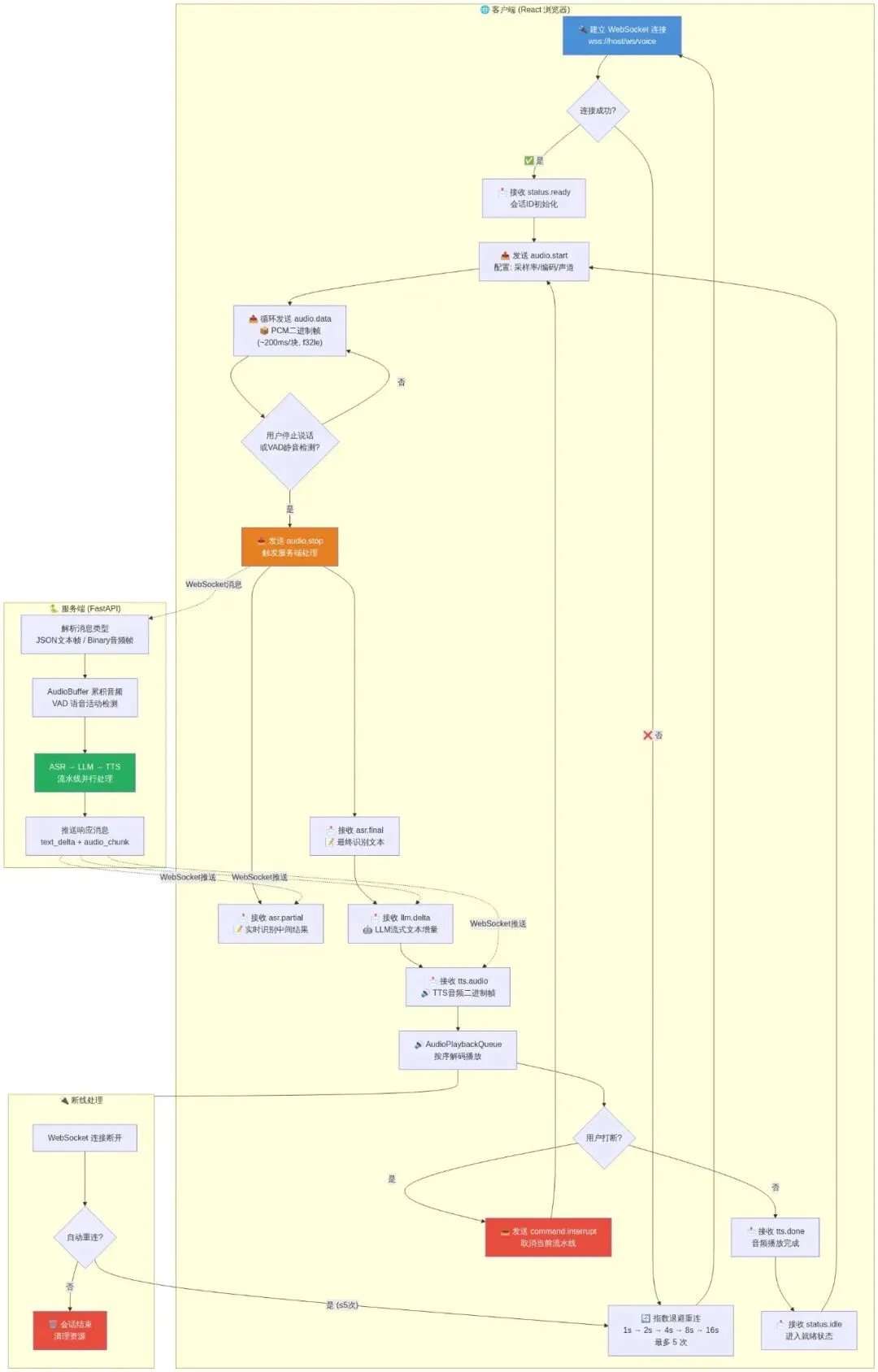
实时语音对话处理流程图
- 控制消息(蓝色路径):audio.start / audio.stop / command.interrupt 等 JSON 文本帧,负责管理对话生命周期。
- 数据消息(橙色路径):audio.data 二进制帧(PCM音频)和 tts.audio 二进制帧(MP3/WAV音频)通过同一 WebSocket 连接传输。
- 流式反馈(绿色路径):服务端处理结果通过 asr.partial → asr.final → llm.delta → tts.audio 的顺序推回客户端。
- 断线重连(红色路径):采用指数退避策略(1s→2s→4s→8s→16s),最多尝试5次,避免服务端冲击。
6.2 WebSocket 协议设计
PYTHON
# backend/ws_protocol.py
"""
WebSocket 通信协议定义

消息格式(JSON + Binary 混合):
1. 控制消息:纯 JSON 文本帧
2. 音频数据:二进制帧,带 JSON 头

完整的消息类型:
"""

# ─── 客户端 → 服务端 ───

CLIENT_MESSAGES = {
    "audio.start": {
        "description": "开始音频流传输",
        "payload": {
            "type": "audio.start",
            "sample_rate": 16000,
            "encoding": "pcm_f32le",  # 或 pcm_s16le
            "channels": 1,
            "language": "auto",        # 或 zh/en
            "session_id": "abc123",
        }
    },
    "audio.data": {
        "description": "音频数据块(二进制帧)",
        "note": "前面 N 字节为元数据 JSON,后面为 PCM 原始数据",
        "encoding_meta": {
            "type": "audio.data",
            "chunk_id": 42,
            "timestamp_ms": 1234567,
        },
        "audio_bytes": "PCM f32le 或 s16le 原始数据",
    },
    "audio.stop": {
        "description": "结束音频流",
        "payload": {
            "type": "audio.stop",
            "session_id": "abc123",
        }
    },
    "command.interrupt": {
        "description": "打断正在进行的回复",
        "payload": {
            "type": "command.interrupt",
        }
    },
    "config.update": {
        "description": "动态更新配置",
        "payload": {
            "type": "config.update",
            "voice": "xiaoxiao",
            "rate": "+10%",
            "temperature": 0.7,
        }
    },
}

# ─── 服务端 → 客户端 ───

SERVER_MESSAGES = {
    "status.ready": {
        "description": "服务端就绪",
        "payload": {"type": "status.ready", "session_id": "abc123"}
    },
    "asr.partial": {
        "description": "ASR 中间结果(实时反馈)",
        "payload": {
            "type": "asr.partial",
            "text": "今天天气",
            "is_final": False,
        }
    },
    "asr.final": {
        "description": "ASR 最终结果",
        "payload": {
            "type": "asr.final",
            "text": "今天天气怎么样?",
            "language": "zh",
            "emotion": "neutral",
            "duration_ms": 2100,
        }
    },
    "llm.delta": {
        "description": "LLM 流式文本增量",
        "payload": {
            "type": "llm.delta",
            "content": "今天天气",
        }
    },
    "llm.done": {
        "description": "LLM 生成完成",
        "payload": {
            "type": "llm.done",
            "full_text": "今天天气晴朗,适合出行。",
        }
    },
    "tts.audio": {
        "description": "TTS 音频数据(二进制帧)",
        "encoding_meta": {
            "type": "tts.audio",
            "chunk_id": 1,
            "format": "wav",       # wav / mp3
            "sample_rate": 24000,
        },
        "audio_bytes": "WAV 或 MP3 数据",
    },
    "tts.done": {
        "description": "TTS 音频流结束",
        "payload": {"type": "tts.done"}
    },
    "error": {
        "description": "错误消息",
        "payload": {
            "type": "error",
            "code": "ASR_TIMEOUT",
            "message": "语音识别超时,请重试",
        }
    },
    "heartbeat": {
        "description": "心跳",
        "payload": {"type": "heartbeat", "timestamp": 1234567890}
    },
}
6.3 FastAPI WebSocket 端点实现
PYTHON
# backend/main.py
"""
FastAPI 主服务
WebSocket 语音对话端点
"""
import json
import struct
import asyncio
import time
from typing import Optional
from fastapi import FastAPI, WebSocket, WebSocketDisconnect
from fastapi.staticfiles import StaticFiles
from fastapi.middleware.cors import CORSMiddleware

from backend.asr.whisper_engine import WhisperASREngine
from backend.llm.dialogue_engine import DialogueEngine, DialogueConfig
from backend.tts.edge_tts_engine import EdgeTTSEngine
from backend.llm.conversation_manager import ConversationManager

app = FastAPI(title="AI Voice Assistant")

# CORS
app.add_middleware(
    CORSMiddleware,
    allow_origins=["*"],
    allow_methods=["*"],
    allow_headers=["*"],
)

# ─── 全局服务初始化 ───

# ASR 引擎
asr_engine = WhisperASREngine(
    model_size="large-v3",
    device="cuda",
    compute_type="int8_float16",
)

# TTS 引擎
tts_engine = EdgeTTSEngine(voice="zh-CN-XiaoxiaoNeural")

# 对话管理器
conv_manager = ConversationManager(max_sessions=100)

# 默认对话配置
default_dialogue_config = DialogueConfig(
    model="deepseek-chat",
    api_key="your-api-key",
    base_url="https://api.deepseek.com/v1",
)


class AudioBuffer:
    """客户端音频累积缓冲区"""

    def __init__(self, sample_rate: int = 16000, max_duration_s: float = 30.0):
        self.sample_rate = sample_rate
        self.max_samples = int(sample_rate * max_duration_s)
        self.buffer = bytearray()
        self.chunk_count = 0
        self.start_time = time.time()
        self.is_speech_active = False

    def add_chunk(self, audio_bytes: bytes) -> None:
        """添加音频块"""
        self.buffer.extend(audio_bytes)
        self.chunk_count += 1

        # 防止缓冲区过大
        if len(self.buffer) > self.max_samples * 4:  # f32 = 4 bytes
            self.buffer = self.buffer[-(self.max_samples * 4):]

    def get_float32(self) -> "np.ndarray":
        """转为 float32 numpy 数组"""
        import numpy as np
        data = np.frombuffer(self.buffer, dtype=np.float32).copy()
        return data

    def get_duration(self) -> float:
        """获取缓冲音频时长(秒)"""
        import numpy as np
        return len(self.buffer) / 4 / self.sample_rate  # f32le

    def reset(self):
        """重置缓冲区"""
        self.buffer = bytearray()
        self.chunk_count = 0
        self.start_time = time.time()


@app.websocket("/ws/voice")
async def voice_websocket(websocket: WebSocket):
    """
    WebSocket 语音对话端点

    数据流:
    1. 接收 audio.start → 初始化会话
    2. 接收 audio.data (binary) → 累积音频
    3. 接收 audio.stop → 触发 ASR → LLM → TTS
    4. 发送 asr.partial / asr.final → 识别结果
    5. 发送 llm.delta → 流式文本
    6. 发送 tts.audio → 合成语音
    """
    await websocket.accept()

    session_id = conv_manager.create_session_id()
    audio_buffer = AudioBuffer()
    dialogue = conv_manager.get_or_create(session_id, default_dialogue_config)

    # 当前活跃任务(支持打断)
    current_task: Optional[asyncio.Task] = None

    await websocket.send_json({
        "type": "status.ready",
        "session_id": session_id,
    })

    try:
        while True:
            # 接收消息(可以是文本 JSON 或二进制音频)
            message = await websocket.receive()

            if "text" in message:
                # ── JSON 控制消息 ──
                data = json.loads(message["text"])
                msg_type = data.get("type")

                if msg_type == "audio.start":
                    audio_buffer.reset()
                    audio_buffer.is_speech_active = True

                elif msg_type == "audio.stop":
                    audio_buffer.is_speech_active = False

                    # 取消之前的任务(打断机制)
                    if current_task and not current_task.done():
                        current_task.cancel()

                    # 启动处理流水线
                    current_task = asyncio.create_task(
                        process_audio_pipeline(
                            websocket, audio_buffer, dialogue, session_id
                        )
                    )

                elif msg_type == "command.interrupt":
                    if current_task and not current_task.done():
                        current_task.cancel()
                    audio_buffer.reset()
                    await websocket.send_json({"type": "command.interrupted"})

                elif msg_type == "config.update":
                    if "voice" in data:
                        tts_engine.voice = data["voice"]

            elif "bytes" in message:
                # ── 二进制音频数据 ──
                # 前 4 字节是元数据长度,后面是元数据 JSON + 音频数据
                raw_bytes = message["bytes"]

                # 简单模式:全部是音频数据(客户端已处理元数据分离)
                if audio_buffer.is_speech_active:
                    audio_buffer.add_chunk(raw_bytes)

    except WebSocketDisconnect:
        pass
    except Exception as e:
        print(f"[WS Error] {e}")
    finally:
        if current_task and not current_task.done():
            current_task.cancel()
        conv_manager.remove(session_id)


async def process_audio_pipeline(
    websocket: WebSocket,
    audio_buffer: AudioBuffer,
    dialogue: DialogueEngine,
    session_id: str,
):
    """
    处理完整的音频流水线:ASR → LLM → TTS

    流水线流程:
    1. 从缓冲区获取音频 → ASR 转录
    2. 发送识别结果给客户端
    3. 将文本送入 LLM 对话引擎
    4. 流式获取 LLM 回复 → 发送文本增量
    5. LLM 完成后 → TTS 合成
    6. 发送 TTS 音频给客户端
    """
    import numpy as np

    try:
        # ── 阶段 1: ASR ──
        audio_data = audio_buffer.get_float32()
        duration = audio_buffer.get_duration()

        if duration < 0.3:  # 太短的音频跳过
            await websocket.send_json({
                "type": "error",
                "code": "AUDIO_TOO_SHORT",
                "message": "音频太短,请重新说话",
            })
            audio_buffer.reset()
            return

        await websocket.send_json({
            "type": "status.processing",
            "stage": "asr",
            "message": "正在识别语音...",
        })

        # 使用线程池执行同步 ASR(避免阻塞事件循环)
        result = await asyncio.get_event_loop().run_in_executor(
            None,
            lambda: asr_engine.transcribe(audio_data),
        )

        user_text = result.text
        if not user_text:
            await websocket.send_json({
                "type": "error",
                "code": "NO_SPEECH",
                "message": "未检测到语音内容",
            })
            audio_buffer.reset()
            return

        await websocket.send_json({
            "type": "asr.final",
            "text": user_text,
            "language": result.language,
            "duration_ms": int(duration * 1000),
        })

        # ── 阶段 2: LLM ──
        await websocket.send_json({
            "type": "status.processing",
            "stage": "llm",
            "message": "正在生成回复...",
        })

        full_response = ""
        async for chunk in dialogue.generate_stream(user_text):
            if chunk["type"] == "delta":
                full_response += chunk["content"]
                await websocket.send_json({
                    "type": "llm.delta",
                    "content": chunk["content"],
                })
            elif chunk["type"] == "done":
                await websocket.send_json({
                    "type": "llm.done",
                    "full_text": full_response,
                })
            elif chunk["type"] == "error":
                await websocket.send_json({
                    "type": "error",
                    "code": "LLM_ERROR",
                    "message": chunk["content"],
                })
                audio_buffer.reset()
                return

        # ── 阶段 3: TTS ──
        if full_response:
            await websocket.send_json({
                "type": "status.processing",
                "stage": "tts",
                "message": "正在合成语音...",
            })

            # 流式发送 TTS 音频块
            chunk_id = 0
            async for audio_chunk in tts_engine.synthesize_stream(full_response):
                await websocket.send_json({
                    "type": "tts.audio",
                    "chunk_id": chunk_id,
                    "format": "mp3",
                })
                await websocket.send_bytes(audio_chunk)
                chunk_id += 1

            await websocket.send_json({"type": "tts.done"})

        await websocket.send_json({
            "type": "status.idle",
            "message": "就绪,请继续说话",
        })

    except asyncio.CancelledError:
        await websocket.send_json({"type": "command.interrupted"})
    except Exception as e:
        await websocket.send_json({
            "type": "error",
            "code": "PIPELINE_ERROR",
            "message": str(e),
        })
    finally:
        audio_buffer.reset()


# ─── REST API 端点 ───

@app.get("/api/health")
async def health_check():
    return {
        "status": "ok",
        "asr_engine": "whisper-large-v3",
        "tts_engine": tts_engine.engine_name,
        "active_sessions": len(conv_manager._sessions),
    }


@app.get("/api/voices")
async def list_voices():
    """获取可用音色列表"""
    voices = await EdgeTTSEngine.list_voices("zh")
    return {"voices": voices}


# ─── 启动入口 ───
if __name__ == "__main__":
    import uvicorn
    uvicorn.run(
        "backend.main:app",
        host="0.0.0.0",
        port=8000,
        reload=True,
        ws_ping_interval=20,
        ws_ping_timeout=30,
    )
7. 全栈集成:FastAPI 后端 + React 前端完整项目搭建
7.1 项目目录结构
voice-ai-assistant/
├── backend/
│   ├── __init__.py
│   ├── main.py                    # FastAPI 主入口 + WebSocket
│   ├── config.py                  # 全局配置
│   ├── asr/
│   │   ├── __init__.py
│   │   ├── base.py               # ASR 抽象基类
│   │   ├── whisper_engine.py     # Whisper 引擎
│   │   └── sensevoice_engine.py  # SenseVoice 引擎
│   ├── llm/
│   │   ├── __init__.py
│   │   ├── dialogue_engine.py    # 对话引擎
│   │   └── conversation_manager.py
│   ├── tts/
│   │   ├── __init__.py
│   │   ├── base.py               # TTS 抽象基类
│   │   ├── edge_tts_engine.py    # Edge-TTS 引擎
│   │   └── chattts_engine.py     # ChatTTS 引擎
│   └── utils/
│       ├── __init__.py
│       ├── audio_utils.py        # 音频处理工具
│       └── vad.py                # VAD 语音活动检测
├── frontend/
│   ├── package.json
│   ├── vite.config.ts
│   ├── tsconfig.json
│   ├── index.html
│   └── src/
│       ├── main.tsx
│       ├── App.tsx
│       ├── hooks/
│       │   └── useVoiceChat.ts   # 核心 Hook
│       ├── components/
│       │   ├── VoiceButton.tsx    # 语音按钮
│       │   ├── ChatHistory.tsx   # 对话历史
│       │   ├── StatusBar.tsx     # 状态指示
│       │   └── AudioVisualizer.tsx
│       ├── utils/
│       │   ├── audioCapture.ts   # 浏览器音频采集
│       │   ├── audioPlayback.ts  # 音频播放队列
│       │   └── websocket.ts     # WebSocket 客户端
│       └── types/
│           └── index.ts
├── requirements.txt
├── .env.example
├── start.sh                      # 一键启动脚本
└── README.md
7.2 后端配置文件
PYTHON
# backend/config.py
"""全局配置管理"""
import os
from dataclasses import dataclass, field
from typing import Optional


@dataclass
class AppConfig:
    """应用配置"""

    # ── 服务器配置 ──
    host: str = "0.0.0.0"
    port: int = 8000
    debug: bool = True

    # ── ASR 配置 ──
    asr_engine: str = "whisper"        # whisper | sensevoice
    asr_model: str = "large-v3"        # large-v3 | medium | small
    asr_device: str = "cuda"           # cuda | cpu
    asr_compute_type: str = "int8_float16"
    asr_language: Optional[str] = None # auto-detect

    # ── LLM 配置 ──
    llm_model: str = "deepseek-chat"
    llm_api_key: str = ""
    llm_base_url: str = "https://api.deepseek.com/v1"
    llm_max_tokens: int = 1024
    llm_temperature: float = 0.7
    llm_context_window: int = 8000

    # ── TTS 配置 ──
    tts_engine: str = "edge"           # edge | chattts
    tts_voice: str = "zh-CN-XiaoxiaoNeural"
    tts_rate: str = "+10%"
    tts_pitch: str = "+0Hz"

    # ── 会话配置 ──
    max_sessions: int = 100
    session_ttl_seconds: int = 1800    # 30 分钟

    # ── VAD 配置 ──
    vad_silence_threshold: float = 0.5
    vad_silence_duration_ms: int = 800
    vad_speech_duration_ms: int = 300   # 最小有效语音长度

    @classmethod
    def from_env(cls) -> "AppConfig":
        """从环境变量加载配置"""
        return cls(
            llm_api_key=os.getenv("LLM_API_KEY", ""),
            llm_base_url=os.getenv("LLM_BASE_URL", "https://api.deepseek.com/v1"),
            llm_model=os.getenv("LLM_MODEL", "deepseek-chat"),
            asr_device=os.getenv("ASR_DEVICE", "cuda"),
            tts_voice=os.getenv("TTS_VOICE", "zh-CN-XiaoxiaoNeural"),
        )


# 全局配置实例
config = AppConfig.from_env()
7.3 React 前端核心实现
TSX
// frontend/src/hooks/useVoiceChat.ts
/**
 * 语音对话核心 Hook
 * 管理 WebSocket 连接、音频采集、播放、对话状态
 */
import { useState, useCallback, useRef, useEffect } from 'react';
import { AudioCapture } from '../utils/audioCapture';
import { AudioPlaybackQueue } from '../utils/audioPlayback';
import { VoiceWebSocket } from '../utils/websocket';

// ── 类型定义 ──
export interface ChatMessage {
  id: string;
  role: 'user' | 'assistant' | 'system';
  content: string;
  timestamp: number;
  isPartial?: boolean;
}

export type ConnectionStatus = 'disconnected' | 'connecting' | 'connected' | 'error';
export type ProcessingStage = 'idle' | 'listening' | 'asr' | 'llm' | 'tts' | 'speaking';

interface UseVoiceChatOptions {
  serverUrl?: string;
  onError?: (error: Error) => void;
}

export function useVoiceChat(options: UseVoiceChatOptions = {}) {
  const {
    serverUrl = 'ws://localhost:8000/ws/voice',
    onError,
  } = options;

  // ── 状态 ──
  const [connectionStatus, setConnectionStatus] = useState<ConnectionStatus>('disconnected');
  const [processingStage, setProcessingStage] = useState<ProcessingStage>('idle');
  const [isRecording, setIsRecording] = useState(false);
  const [messages, setMessages] = useState<ChatMessage[]>([]);
  const [partialText, setPartialText] = useState('');      // ASR 中间结果
  const [responseText, setResponseText] = useState('');    // LLM 流式结果

  // ── Refs ──
  const wsRef = useRef<VoiceWebSocket | null>(null);
  const audioCaptureRef = useRef<AudioCapture | null>(null);
  const playbackRef = useRef<AudioPlaybackQueue>(new AudioPlaybackQueue());
  const msgCounterRef = useRef(0);

  // ── 初始化 WebSocket ──
  const connect = useCallback(async () => {
    setConnectionStatus('connecting');

    const ws = new VoiceWebSocket(serverUrl);
    wsRef.current = ws;

    try {
      await ws.connect();

      // 监听服务端消息
      ws.onMessage('status.ready', (data) => {
        setConnectionStatus('connected');
        setProcessingStage('idle');
        console.log('[WS] Connected, session:', data.session_id);
      });

      ws.onMessage('asr.partial', (data) => {
        setPartialText(data.text);
        setProcessingStage('listening');
      });

      ws.onMessage('asr.final', (data) => {
        setPartialText('');
        // 添加用户消息
        const msg: ChatMessage = {
          id: `user-${msgCounterRef.current++}`,
          role: 'user',
          content: data.text,
          timestamp: Date.now(),
        };
        setMessages(prev => [...prev, msg]);
        setResponseText('');
      });

      ws.onMessage('llm.delta', (data) => {
        setProcessingStage('llm');
        setResponseText(prev => prev + data.content);
      });

      ws.onMessage('llm.done', (data) => {
        // 添加助手消息
        const msg: ChatMessage = {
          id: `assistant-${msgCounterRef.current++}`,
          role: 'assistant',
          content: data.full_text,
          timestamp: Date.now(),
        };
        setMessages(prev => [...prev, msg]);
        setResponseText('');
      });

      ws.onMessage('tts.audio', (data) => {
        // 元数据帧,准备接收音频
        setProcessingStage('tts');
      });

      // 接收二进制音频帧
      ws.onBinary((audioData: ArrayBuffer) => {
        setProcessingStage('speaking');
        playbackRef.current.enqueue(new Uint8Array(audioData));
      });

      ws.onMessage('tts.done', () => {
        // 等待播放完成后回到 idle
        playbackRef.current.onQueueEmpty(() => {
          setProcessingStage('idle');
        });
      });

      ws.onMessage('status.idle', () => {
        setProcessingStage('idle');
      });

      ws.onMessage('error', (data) => {
        console.error('[WS Error]', data);
        onError?.(new Error(data.message));
        setProcessingStage('idle');
      });

      ws.onClose(() => {
        setConnectionStatus('disconnected');
        setProcessingStage('idle');
      });

    } catch (err) {
      setConnectionStatus('error');
      onError?.(err as Error);
    }
  }, [serverUrl, onError]);

  // ── 开始录音 ──
  const startRecording = useCallback(async () => {
    const ws = wsRef.current;
    if (!ws || !ws.isConnected()) {
      await connect();
    }

    try {
      const capture = new AudioCapture({
        sampleRate: 16000,
        channelCount: 1,
        bufferSize: 4096,           // ~256ms at 16kHz
        onAudioChunk: (chunk: Float32Array) => {
          // 转换为 PCM f32le 并发送
          wsRef.current?.sendBinary(chunk.buffer);
        },
        onSilenceDetected: () => {
          // VAD 检测到静音 → 自动停止
          setIsRecording(false);
          wsRef.current?.sendJson({ type: 'audio.stop' });
        },
        silenceThreshold: 0.02,
        silenceDuration: 1200,       // 1.2 秒静音触发停止
      });

      await capture.start();
      audioCaptureRef.current = capture;
      setIsRecording(true);
      setProcessingStage('listening');

      // 发送 audio.start
      ws?.sendJson({
        type: 'audio.start',
        sample_rate: 16000,
        encoding: 'pcm_f32le',
        channels: 1,
        language: 'auto',
      });

    } catch (err) {
      console.error('Failed to start recording:', err);
      onError?.(err as Error);
    }
  }, [connect, onError]);

  // ── 停止录音 ──
  const stopRecording = useCallback(() => {
    audioCaptureRef.current?.stop();
    audioCaptureRef.current = null;
    setIsRecording(false);

    wsRef.current?.sendJson({ type: 'audio.stop' });
  }, []);

  // ── 打断 ──
  const interrupt = useCallback(() => {
    wsRef.current?.sendJson({ type: 'command.interrupt' });
    playbackRef.current.clear();
    setProcessingStage('idle');
    setResponseText('');
  }, []);

  // ── 断开连接 ──
  const disconnect = useCallback(() => {
    stopRecording();
    wsRef.current?.close();
    setConnectionStatus('disconnected');
  }, [stopRecording]);

  // 组件卸载时清理
  useEffect(() => {
    return () => {
      audioCaptureRef.current?.stop();
      wsRef.current?.close();
    };
  }, []);

  return {
    // 状态
    connectionStatus,
    processingStage,
    isRecording,
    messages,
    partialText,
    responseText,
    isSpeaking: processingStage === 'speaking',

    // 操作
    connect,
    disconnect,
    startRecording,
    stopRecording,
    interrupt,
    clearMessages: () => setMessages([]),
  };
}
7.4 浏览器音频采集
TYPESCRIPT
// frontend/src/utils/audioCapture.ts
/**
 * 浏览器音频采集
 * 使用 AudioContext + ScriptProcessorNode 实现低延迟采集
 * 内置 VAD (Voice Activity Detection)
 */
export interface AudioCaptureOptions {
  sampleRate: number;
  channelCount: number;
  bufferSize: number;            // 每次回调的采样点数
  onAudioChunk: (chunk: Float32Array) => void;
  onSilenceDetected?: () => void;
  silenceThreshold?: number;     // RMS 阈值
  silenceDuration?: number;      // 静音持续时间 (ms)
}

export class AudioCapture {
  private options: Required<AudioCaptureOptions>;
  private audioContext: AudioContext | null = null;
  private stream: MediaStream | null = null;
  private processor: ScriptProcessorNode | null = null;
  private analyser: AnalyserNode | null = null;
  private isCapturing = false;

  // VAD 状态
  private silenceStartTime: number = 0;
  private hasSpeech: boolean = false;

  constructor(options: AudioCaptureOptions) {
    this.options = {
      silenceThreshold: 0.02,
      silenceDuration: 1200,
      onSilenceDetected: () => {},
      ...options,
    };
  }

  async start(): Promise<void> {
    // 请求麦克风权限
    this.stream = await navigator.mediaDevices.getUserMedia({
      audio: {
        sampleRate: this.options.sampleRate,
        channelCount: this.options.channelCount,
        echoCancellation: true,
        noiseSuppression: true,
        autoGainControl: true,
      },
    });

    this.audioContext = new AudioContext({
      sampleRate: this.options.sampleRate,
    });

    const source = this.audioContext.createMediaStreamSource(this.stream);

    // ScriptProcessorNode 用于低延迟处理
    // 注意:AudioWorkletNode 是更现代的选择,但 ScriptProcessor 兼容性更好
    this.processor = this.audioContext.createScriptProcessor(
      this.options.bufferSize,
      this.options.channelCount,
      this.options.channelCount
    );

    // Analyser 用于 VAD
    this.analyser = this.audioContext.createAnalyser();
    this.analyser.fftSize = 2048;
    source.connect(this.analyser);

    this.processor.onaudioprocess = (event) => {
      if (!this.isCapturing) return;

      const inputBuffer = event.inputBuffer;
      const channelData = inputBuffer.getChannelData(0);

      // VAD: 计算 RMS
      const rms = this.calculateRMS(channelData);

      if (rms > this.options.silenceThreshold) {
        // 有声音
        this.silenceStartTime = 0;
        this.hasSpeech = true;
      } else if (this.hasSpeech) {
        // 静音开始计时
        if (this.silenceStartTime === 0) {
          this.silenceStartTime = Date.now();
        } else if (Date.now() - this.silenceStartTime > this.options.silenceDuration) {
          // 静音超时 → 触发停止
          this.options.onSilenceDetected?.();
          this.stop();
          return;
        }
      }

      // 发送音频数据
      this.options.onAudioChunk(new Float32Array(channelData));
    };

    source.connect(this.processor);
    this.processor.connect(this.audioContext.destination);
    this.isCapturing = true;
  }

  stop(): void {
    this.isCapturing = false;

    if (this.processor) {
      this.processor.disconnect();
      this.processor = null;
    }
    if (this.stream) {
      this.stream.getTracks().forEach(track => track.stop());
      this.stream = null;
    }
    if (this.audioContext && this.audioContext.state !== 'closed') {
      this.audioContext.close();
      this.audioContext = null;
    }

    this.silenceStartTime = 0;
    this.hasSpeech = false;
  }

  private calculateRMS(samples: Float32Array): number {
    let sum = 0;
    for (let i = 0; i < samples.length; i++) {
      sum += samples[i] * samples[i];
    }
    return Math.sqrt(sum / samples.length);
  }
}
7.5 WebSocket 客户端封装
TYPESCRIPT
// frontend/src/utils/websocket.ts
/**
 * WebSocket 客户端封装
 * 支持 JSON 消息路由和二进制帧处理
 */
type MessageHandler = (data: any) => void;
type BinaryHandler = (data: ArrayBuffer) => void;

export class VoiceWebSocket {
  private ws: WebSocket | null = null;
  private url: string;
  private handlers: Map<string, MessageHandler[]> = new Map();
  private binaryHandlers: BinaryHandler[] = [];
  private onCloseHandler: (() => void) | null = null;
  private reconnectTimer: number | null = null;
  private reconnectAttempts = 0;
  private maxReconnectAttempts = 5;

  constructor(url: string) {
    this.url = url;
  }

  async connect(): Promise<void> {
    return new Promise((resolve, reject) => {
      this.ws = new WebSocket(this.url);
      this.ws.binaryType = 'arraybuffer';

      this.ws.onopen = () => {
        this.reconnectAttempts = 0;
        resolve();
      };

      this.ws.onmessage = (event) => {
        if (typeof event.data === 'string') {
          // JSON 消息
          try {
            const data = JSON.parse(event.data);
            const type = data.type;
            if (type && this.handlers.has(type)) {
              this.handlers.get(type)!.forEach(handler => handler(data));
            }
          } catch (e) {
            console.error('Failed to parse message:', e);
          }
        } else if (event.data instanceof ArrayBuffer) {
          // 二进制消息(音频数据)
          this.binaryHandlers.forEach(handler => handler(event.data as ArrayBuffer));
        }
      };

      this.ws.onclose = () => {
        this.onCloseHandler?.();
        this.tryReconnect();
      };

      this.ws.onerror = (err) => {
        reject(err);
      };
    });
  }

  sendJson(data: Record<string, any>): void {
    if (this.ws?.readyState === WebSocket.OPEN) {
      this.ws.send(JSON.stringify(data));
    }
  }

  sendBinary(data: ArrayBuffer): void {
    if (this.ws?.readyState === WebSocket.OPEN) {
      this.ws.send(data);
    }
  }

  onMessage(type: string, handler: MessageHandler): void {
    if (!this.handlers.has(type)) {
      this.handlers.set(type, []);
    }
    this.handlers.get(type)!.push(handler);
  }

  onBinary(handler: BinaryHandler): void {
    this.binaryHandlers.push(handler);
  }

  onClose(handler: () => void): void {
    this.onCloseHandler = handler;
  }

  isConnected(): boolean {
    return this.ws?.readyState === WebSocket.OPEN;
  }

  close(): void {
    if (this.reconnectTimer) {
      clearTimeout(this.reconnectTimer);
      this.reconnectTimer = null;
    }
    this.ws?.close();
  }

  private tryReconnect(): void {
    if (this.reconnectAttempts >= this.maxReconnectAttempts) return;
    this.reconnectAttempts++;

    const delay = Math.min(1000 * Math.pow(2, this.reconnectAttempts), 30000);
    this.reconnectTimer = window.setTimeout(() => {
      console.log(`[WS] Reconnecting (attempt ${this.reconnectAttempts})...`);
      this.connect().catch(() => {});
    }, delay);
  }
}
7.6 音频播放队列
TYPESCRIPT
// frontend/src/utils/audioPlayback.ts
/**
 * 音频播放队列
 * 管理 TTS 音频块的顺序播放,避免重叠
 */
export class AudioPlaybackQueue {
  private audioContext: AudioContext | null = null;
  private queue: Uint8Array[] = [];
  private isPlaying = false;
  private emptyCallback: (() => void) | null = null;

  enqueue(audioData: Uint8Array): void {
    this.queue.push(audioData);
    if (!this.isPlaying) {
      this.playNext();
    }
  }

  clear(): void {
    this.queue = [];
    this.isPlaying = false;
    this.audioContext?.close();
    this.audioContext = null;
  }

  onQueueEmpty(callback: () => void): void {
    this.emptyCallback = callback;
  }

  private async playNext(): Promise<void> {
    if (this.queue.length === 0) {
      this.isPlaying = false;
      this.emptyCallback?.();
      return;
    }

    this.isPlaying = true;
    const audioData = this.queue.shift()!;

    try {
      // 懒初始化 AudioContext
      if (!this.audioContext || this.audioContext.state === 'closed') {
        this.audioContext = new AudioContext();
      }

      // 解码音频数据
      const audioBuffer = await this.audioContext.decodeAudioData(audioData.buffer.slice(0));

      const source = this.audioContext.createBufferSource();
      source.buffer = audioBuffer;
      source.connect(this.audioContext.destination);

      // 播放下一个
      source.onended = () => {
        this.playNext();
      };

      source.start();
    } catch (err) {
      console.error('Audio playback error:', err);
      this.playNext(); // 跳过错误的块
    }
  }
}
7.7 React 主界面组件
TSX
// frontend/src/App.tsx
/**
 * 主应用组件
 * 对话界面 + 语音按钮
 */
import React, { useState } from 'react';
import { useVoiceChat } from './hooks/useVoiceChat';
import { VoiceButton } from './components/VoiceButton';
import { ChatHistory } from './components/ChatHistory';
import { StatusBar } from './components/StatusBar';

const App: React.FC = () => {
  const [serverUrl, setServerUrl] = useState('ws://localhost:8000/ws/voice');

  const {
    connectionStatus,
    processingStage,
    isRecording,
    messages,
    partialText,
    responseText,
    isSpeaking,
    startRecording,
    stopRecording,
    interrupt,
    clearMessages,
  } = useVoiceChat({
    serverUrl,
    onError: (err) => console.error('Voice chat error:', err),
  });

  return (
    <div style={styles.container}>
      {/* 顶部状态栏 */}
      <StatusBar
        connectionStatus={connectionStatus}
        processingStage={processingStage}
      />

      {/* 对话历史 */}
      <div style={styles.chatArea}>
        <ChatHistory
          messages={messages}
          partialUserText={partialText}
          streamingResponse={responseText}
        />

        {/* 录音/说话时的视觉反馈 */}
        {(isRecording || isSpeaking) && (
          <div style={styles.activityIndicator}>
            {isRecording && (
              <div style={styles.listeningBox}>
                🎤 正在聆听...
                {partialText && (
                  <div style={styles.partialText}>{partialText}</div>
                )}
              </div>
            )}
            {isSpeaking && (
              <div style={styles.speakingBox}>
                🔊 AI 正在回复...
              </div>
            )}
          </div>
        )}
      </div>

      {/* 底部操作区 */}
      <div style={styles.controls}>
        {/* 打断按钮(回复中时显示) */}
        {isSpeaking && (
          <button
            onClick={interrupt}
            style={styles.interruptButton}
          >
            ⏹ 打断
          </button>
        )}

        {/* 语音按钮 */}
        <VoiceButton
          isRecording={isRecording}
          isProcessing={processingStage !== 'idle' && !isRecording}
          onStart={startRecording}
          onStop={stopRecording}
          disabled={connectionStatus !== 'connected'}
        />

        {/* 清空对话 */}
        <button
          onClick={clearMessages}
          style={styles.secondaryButton}
        >
          清空对话
        </button>
      </div>
    </div>
  );
};

// ── 内联样式(简化版) ──
const styles: Record<string, React.CSSProperties> = {
  container: {
    display: 'flex',
    flexDirection: 'column',
    height: '100vh',
    maxWidth: '640px',
    margin: '0 auto',
    fontFamily: '-apple-system, BlinkMacSystemFont, sans-serif',
    backgroundColor: '#f8f9fa',
  },
  chatArea: {
    flex: 1,
    overflowY: 'auto',
    padding: '16px',
  },
  controls: {
    display: 'flex',
    justifyContent: 'center',
    alignItems: 'center',
    gap: '16px',
    padding: '24px',
    borderTop: '1px solid #dee2e6',
    backgroundColor: '#fff',
  },
  activityIndicator: {
    textAlign: 'center',
    padding: '24px',
  },
  listeningBox: {
    padding: '20px',
    backgroundColor: '#e7f5ff',
    borderRadius: '12px',
    fontSize: '18px',
  },
  speakingBox: {
    padding: '20px',
    backgroundColor: '#fff3e0',
    borderRadius: '12px',
    fontSize: '18px',
  },
  partialText: {
    marginTop: '8px',
    color: '#666',
    fontStyle: 'italic',
  },
  interruptButton: {
    padding: '12px 24px',
    backgroundColor: '#ff4444',
    color: '#fff',
    border: 'none',
    borderRadius: '8px',
    cursor: 'pointer',
    fontSize: '16px',
  },
  secondaryButton: {
    padding: '8px 16px',
    backgroundColor: '#e9ecef',
    border: 'none',
    borderRadius: '6px',
    cursor: 'pointer',
    fontSize: '14px',
  },
};

export default App;
7.8 前端配置与入口
JSON
// frontend/package.json
{
  "name": "voice-ai-assistant",
  "private": true,
  "version": "1.0.0",
  "type": "module",
  "scripts": {
    "dev": "vite",
    "build": "tsc && vite build",
    "preview": "vite preview"
  },
  "dependencies": {
    "react": "^18.3.1",
    "react-dom": "^18.3.1"
  },
  "devDependencies": {
    "@types/react": "^18.3.1",
    "@types/react-dom": "^18.3.0",
    "@vitejs/plugin-react": "^4.3.0",
    "typescript": "^5.5.0",
    "vite": "^5.4.0"
  }
}
TYPESCRIPT
// frontend/vite.config.ts
import { defineConfig } from 'vite';
import react from '@vitejs/plugin-react';
export default defineConfig({
plugins: [react()],
server: {
port: 3000,
proxy: {
'/ws': {
target: 'ws://localhost:8000',
ws: true,
},
'/api': {
target: 'http://localhost:8000',
},
},
},
});8. 性能优化:VAD 静音检测 / 音频缓存 / 流式 Pipeline
8.1 为什么需要优化
一个未经优化的语音对话系统的典型延迟分解:
用户说完最后一个字 ────────────────────▶ 听到 AI 第一个字
     │                                          │
     │  网络传输 ── VAD等待 ── ASR ── LLM ── TTS ── 网络 ── 播放 │
     │   100ms      800ms    500ms  2000ms  800ms   100ms  50ms  │
     │                                                          │
     │  总延迟: ~4.3 秒 ❌(用户会感到"卡顿")                    │
     │                                          │
     │  优化后目标: ~1.5 秒 ✅                                 │
     └──────────────────────────────────────────┘
8.2 VAD 语音活动检测
Silero VAD 是目前最优秀的开源 VAD 模型,体积仅 1.8MB,在 CPU 上即可实时运行:
PYTHON
# backend/utils/vad.py
"""
VAD (Voice Activity Detection) 语音活动检测
使用 Silero VAD 模型,CPU 实时推理
"""
import numpy as np
import torch
from typing import Optional, Tuple
from dataclasses import dataclass
from enum import Enum


class SpeechState(Enum):
    SILENCE = "silence"
    SPEECH = "speech"
    STARTING = "starting"    # 刚开始说话
    ENDING = "ending"        # 说话结束


@dataclass
class VADConfig:
    """VAD 配置"""
    sample_rate: int = 16000
    threshold: float = 0.5           # 语音概率阈值
    min_silence_duration_ms: int = 500   # 最短静音确认时间
    min_speech_duration_ms: int = 250    # 最短语音确认时间
    max_speech_duration_s: float = 30.0  # 最长连续语音(触发超时)
    speech_pad_ms: int = 100         # 语音前后填充
    window_size_samples: int = 512   # 每帧采样数(32ms @ 16kHz)


class SileroVAD:
    """
    Silero VAD 封装

    特点:
    - 极小的模型体积(~1.8 MB)
    - ONNX 推理,CPU 上 >100x 实时
    - 支持 8kHz 和 16kHz
    """

    def __init__(self, config: VADConfig = None):
        self.config = config or VADConfig()

        # 加载 Silero VAD ONNX 模型
        self.model, self.utils = torch.hub.load(
            repo_or_dir='snakers4/silero-vad',
            model='silero_vad',
            force_reload=False,
            onnx=True,
        )

        self.state = SpeechState.SILENCE
        self.speech_buffer: list[np.ndarray] = []
        self.silence_buffer: list[np.ndarray] = []

        # 状态计时
        self.speech_start_sample: int = 0
        self.silence_start_sample: int = 0
        self.total_samples: int = 0

    def reset(self):
        """重置 VAD 状态"""
        self.state = SpeechState.SILENCE
        self.speech_buffer = []
        self.silence_buffer = []
        self.total_samples = 0

    def process_chunk(self, audio_chunk: np.ndarray) -> Tuple[SpeechState, float]:
        """
        处理音频块并返回当前语音状态

        Args:
            audio_chunk: float32 numpy array, 16kHz

        Returns:
            (SpeechState, speech_prob): 语音状态和语音概率
        """
        if audio_chunk.ndim > 1:
            audio_chunk = audio_chunk.mean(axis=1)

        # 确保是 PyTorch 张量
        if isinstance(audio_chunk, np.ndarray):
            audio_tensor = torch.from_numpy(audio_chunk).float()
        else:
            audio_tensor = audio_chunk

        # VAD 推理(返回语音概率 0-1)
        speech_prob = self.model(audio_tensor, self.config.sample_rate).item()

        chunk_samples = len(audio_chunk)
        self.total_samples += chunk_samples

        is_speech = speech_prob > self.config.threshold

        if is_speech:
            self.speech_buffer.append(audio_chunk.copy())
            self.silence_buffer.clear()
            self.silence_start_sample = 0

            speech_duration_ms = len(self.speech_buffer) * chunk_samples / self.config.sample_rate * 1000

            if self.state == SpeechState.SILENCE:
                if speech_duration_ms >= self.config.min_speech_duration_ms:
                    self.state = SpeechState.SPEECH
                    self.speech_start_sample = self.total_samples - chunk_samples
                else:
                    self.state = SpeechState.STARTING
        else:
            self.silence_buffer.append(audio_chunk.copy())

            if self.state == SpeechState.SPEECH:
                silence_duration_ms = len(self.silence_buffer) * chunk_samples / self.config.sample_rate * 1000
                if silence_duration_ms >= self.config.min_silence_duration_ms:
                    self.state = SpeechState.ENDING
            elif self.state == SpeechState.STARTING:
                # 刚开始就停了 → 回退到静音
                speech_duration_ms = len(self.speech_buffer) * chunk_samples / self.config.sample_rate * 1000
                if speech_duration_ms < self.config.min_speech_duration_ms:
                    self.state = SpeechState.SILENCE
                    self.speech_buffer.clear()

        # 超时保护
        if self.state == SpeechState.SPEECH:
            speech_duration_s = self.total_samples / self.config.sample_rate
            if speech_duration_s > self.config.max_speech_duration_s:
                self.state = SpeechState.ENDING

        return self.state, speech_prob

    def get_speech_audio(self) -> np.ndarray:
        """提取检测到的语音音频(包含前后填充)"""
        if not self.speech_buffer:
            return np.array([], dtype=np.float32)

        audio = np.concatenate(self.speech_buffer)

        # 添加前后填充(避免截断)
        pad_samples = int(self.config.speech_pad_ms / 1000 * self.config.sample_rate)
        if pad_samples > 0:
            # 用零填充(实际项目中可以从原始缓冲区提取)
            pad = np.zeros(pad_samples, dtype=np.float32)
            audio = np.concatenate([pad, audio, pad])

        return audio
8.3 音频缓存策略
PYTHON
# backend/utils/audio_cache.py
"""
音频缓存系统
针对 TTS 合成的 LRU 缓存,避免重复合成相同文本
"""
import hashlib
import time
from collections import OrderedDict
from typing import Optional
import threading


class TTSCache:
    """
    TTS 结果缓存

    策略:
    - 使用文本 SHA256 作为缓存键
    - LRU 淘汰(默认保留 500 条)
    - TTL 过期(默认 1 小时)
    - 线程安全
    """

    def __init__(
        self,
        max_size: int = 500,
        ttl_seconds: int = 3600,
    ):
        self.max_size = max_size
        self.ttl_seconds = ttl_seconds
        self._cache: OrderedDict[str, tuple[bytes, float]] = OrderedDict()
        self._lock = threading.Lock()
        self._hits = 0
        self._misses = 0

    def _make_key(self, text: str, voice: str, **params) -> str:
        """生成缓存键"""
        content = f"{text}|{voice}|{params}"
        return hashlib.sha256(content.encode()).hexdigest()

    def get(self, text: str, voice: str, **params) -> Optional[bytes]:
        """获取缓存的音频数据"""
        key = self._make_key(text, voice, **params)

        with self._lock:
            if key not in self._cache:
                self._misses += 1
                return None

            audio_data, timestamp = self._cache[key]

            # 检查 TTL
            if time.time() - timestamp > self.ttl_seconds:
                del self._cache[key]
                self._misses += 1
                return None

            # 移到末尾(LRU)
            self._cache.move_to_end(key)
            self._hits += 1
            return audio_data

    def set(self, text: str, voice: str, audio_data: bytes, **params):
        """缓存音频数据"""
        key = self._make_key(text, voice, **params)

        with self._lock:
            # LRU 淘汰
            if len(self._cache) >= self.max_size:
                self._cache.popitem(last=False)

            self._cache[key] = (audio_data, time.time())

    def clear(self):
        """清空缓存"""
        with self._lock:
            self._cache.clear()
            self._hits = 0
            self._misses = 0

    @property
    def stats(self) -> dict:
        """缓存统计"""
        with self._lock:
            total = self._hits + self._misses
            return {
                "size": len(self._cache),
                "max_size": self.max_size,
                "hits": self._hits,
                "misses": self._misses,
                "hit_rate": self._hits / total if total > 0 else 0,
            }
8.4 流式 Pipeline 优化
PYTHON
# backend/pipeline/streaming_pipeline.py
"""
流式处理流水线优化
并行化 ASR/LLM/TTS 处理,降低端到端延迟
"""
import asyncio
import time
from typing import AsyncIterator, Optional
from dataclasses import dataclass
from collections import deque


@dataclass
class PipelineMetrics:
    """流水线性能指标"""
    asr_time: float = 0.0
    llm_first_token_time: float = 0.0
    llm_total_time: float = 0.0
    tts_first_chunk_time: float = 0.0
    tts_total_time: float = 0.0
    total_latency: float = 0.0
    audio_duration: float = 0.0


class StreamingPipeline:
    """
    流式处理流水线

    优化策略:
    1. LLM 第一个 token 出来就开始 TTS(边生成边合成)
    2. TTS 第一块音频出来就推送给客户端
    3. 使用 asyncio.Queue 解耦各阶段
    4. 管道式并行处理
    """

    def __init__(
        self,
        asr_engine,
        dialogue_engine,
        tts_engine,
        tts_cache: Optional["TTSCache"] = None,
    ):
        self.asr = asr_engine
        self.dialogue = dialogue_engine
        self.tts = tts_engine
        self.cache = tts_cache

    async def process(
        self,
        audio_data: "np.ndarray",
        sample_rate: int = 16000,
        session_id: str = "",
    ) -> AsyncIterator[dict]:
        """
        处理完整流水线

        流式输出事件:
        - {"type": "asr.final", "text": "..."}
        - {"type": "llm.delta", "content": "..."}
        - {"type": "tts.audio", "data": bytes}
        - {"type": "done"}
        """
        metrics = PipelineMetrics()
        t_start = time.time()

        # ── 阶段 1: ASR ──
        t_asr = time.time()
        yield {"type": "status", "stage": "asr"}

        asr_result = await asyncio.get_event_loop().run_in_executor(
            None, lambda: self.asr.transcribe(audio_data)
        )
        metrics.asr_time = time.time() - t_asr
        user_text = asr_result.text

        yield {
            "type": "asr.final",
            "text": user_text,
            "language": asr_result.language,
            "time_ms": int(metrics.asr_time * 1000),
        }

        if not user_text:
            yield {"type": "error", "message": "No speech detected"}
            return

        # ── 阶段 2: LLM + TTS 并行流水线 ──
        # 使用 Queue 解耦 LLM 输出和 TTS 输入
        text_queue: asyncio.Queue = asyncio.Queue()
        audio_queue: asyncio.Queue = asyncio.Queue()

        llm_task = asyncio.create_task(
            self._llm_producer(user_text, text_queue, session_id)
        )
        tts_task = asyncio.create_task(
            self._tts_consumer(text_queue, audio_queue, session_id)
        )

        # 等待两个任务完成,同时转发输出
        llm_done = False
        tts_done = False
        llm_full_text = ""

        while not (llm_done and tts_done):
            # 检查 LLM 增量(优先,因为用户体验关键)
            try:
                text_item = text_queue.get_nowait()
                if text_item.get("type") == "done":
                    llm_done = True
                    llm_full_text = text_item["full_text"]
                    metrics.llm_total_time = text_item["elapsed"]
                else:
                    yield text_item  # llm.delta
            except asyncio.QueueEmpty:
                pass

            # 检查 TTS 音频
            try:
                audio_item = audio_queue.get_nowait()
                if audio_item.get("type") == "done":
                    tts_done = True
                    metrics.tts_total_time = audio_item["elapsed"]
                else:
                    yield audio_item  # tts.audio
            except asyncio.QueueEmpty:
                pass

            await asyncio.sleep(0.01)  # 10ms 轮询间隔

        # 等待任务完全结束
        await asyncio.gather(llm_task, tts_task)

        metrics.total_latency = time.time() - t_start

        yield {
            "type": "done",
            "full_text": llm_full_text,
            "metrics": {
                "asr_ms": int(metrics.asr_time * 1000),
                "llm_total_ms": int(metrics.llm_total_time * 1000),
                "tts_total_ms": int(metrics.tts_total_time * 1000),
                "total_ms": int(metrics.total_latency * 1000),
            },
        }

    async def _llm_producer(
        self,
        user_text: str,
        text_queue: asyncio.Queue,
        session_id: str,
    ):
        """LLM 生产者:生成文本并放入队列"""
        t_start = time.time()
        full_text = ""

        async for chunk in self.dialogue.generate_stream(user_text):
            if chunk["type"] == "delta":
                full_text += chunk["content"]
                await text_queue.put({
                    "type": "llm.delta",
                    "content": chunk["content"],
                })
            elif chunk["type"] == "done":
                full_text = chunk.get("full_text", full_text)

        elapsed = time.time() - t_start
        await text_queue.put({
            "type": "done",
            "full_text": full_text,
            "elapsed": elapsed,
        })

    async def _tts_consumer(
        self,
        text_queue: asyncio.Queue,
        audio_queue: asyncio.Queue,
        session_id: str,
    ):
        """
        TTS 消费者:从队列获取文本增量,合成语音
        策略:累积到完整句子再合成(以句号/换行为界)
        """
        t_start = time.time()
        accumulated_text = ""
        sentence_delimiters = {"。", "!", "?", "\n", ";"}

        while True:
            try:
                item = await asyncio.wait_for(text_queue.get(), timeout=0.5)
            except asyncio.TimeoutError:
                # 超时 → 合成当前累积的文本
                if accumulated_text.strip():
                    await self._synthesize_and_enqueue(
                        accumulated_text, audio_queue, session_id
                    )
                    accumulated_text = ""
                continue

            if item["type"] == "done":
                # 合成最后的残留文本
                if accumulated_text.strip():
                    await self._synthesize_and_enqueue(
                        accumulated_text, audio_queue, session_id
                    )
                elapsed = time.time() - t_start
                await audio_queue.put({"type": "done", "elapsed": elapsed})
                break

            elif item["type"] == "llm.delta":
                accumulated_text += item["content"]

                # 如果到达句子边界 → 合成并发送
                if any(d in accumulated_text for d in sentence_delimiters):
                    await self._synthesize_and_enqueue(
                        accumulated_text, audio_queue, session_id
                    )
                    accumulated_text = ""

    async def _synthesize_and_enqueue(
        self,
        text: str,
        audio_queue: asyncio.Queue,
        session_id: str,
    ):
        """合成文本并放入音频队列"""
        text = text.strip()
        if not text:
            return

        # 检查缓存
        if self.cache:
            cached = self.cache.get(text, "default")
            if cached:
                await audio_queue.put({
                    "type": "tts.audio",
                    "data": cached,
                    "from_cache": True,
                })
                return

        # TTS 合成
        audio_data = await self.tts.synthesize(text)

        # 缓存结果
        if self.cache:
            self.cache.set(text, "default", audio_data)

        await audio_queue.put({
            "type": "tts.audio",
            "data": audio_data,
            "from_cache": False,
        })
9. 完整可运行代码:从环境配置到一键启动
9.1 环境配置
BASH
# requirements.txt
# ── Web 框架 ──
fastapi==0.115.0
uvicorn[standard]==0.30.0
websockets==13.0

# ── ASR ──
faster-whisper==1.0.3
# funasr==1.1.0  # 可选:SenseVoice/FunASR
# torch>=2.3.0   # ChatTTS/SenseVoice 需要
# torchaudio>=2.3.0

# ── LLM ──
openai==1.50.0
tiktoken==0.7.0

# ── TTS ──
edge-tts==6.1.12
# ChatTTS  # 需要从 GitHub 安装

# ── 音频处理 ──
numpy==1.26.4
soundfile==0.12.1
librosa==0.10.2
pydub==0.25.1

# ── 工具 ──
python-dotenv==1.0.1
BASH
# .env.example
# LLM API 配置
LLM_API_KEY=your-api-key-here
LLM_BASE_URL=https://api.deepseek.com/v1
LLM_MODEL=deepseek-chat
# ASR 配置
ASR_DEVICE=cuda
# ASR_DEVICE=cpu # 如果没有 GPU
# TTS 配置
TTS_VOICE=zh-CN-XiaoxiaoNeural9.2 一键启动脚本
BASH
#!/bin/bash
# start.sh - 一键启动语音助手

set -e

echo "════════════════════════════════════════"
echo "   AI 语音助手 — 一键启动"
echo "════════════════════════════════════════"

# ── 检查 Python ──
if ! command -v python &> /dev/null; then
    echo "❌ 请先安装 Python 3.10+"
    exit 1
fi

# ── 检查 Node.js ──
if ! command -v node &> /dev/null; then
    echo "❌ 请先安装 Node.js 18+"
    exit 1
fi

# ── 后端 ──
echo ""
echo "📦 [1/4] 安装 Python 依赖..."
cd backend
python -m venv venv 2>/dev/null || true
source venv/bin/activate 2>/dev/null || source venv/Scripts/activate 2>/dev/null
pip install -r ../requirements.txt -q

echo ""
echo "📦 [2/4] 配置环境变量..."
if [ ! -f ../.env ]; then
    cp ../.env.example ../.env
    echo "⚠️  请编辑 .env 文件,填入你的 LLM API Key"
    echo "   vim .env"
fi

# ── 前端 ──
echo ""
echo "📦 [3/4] 安装前端依赖..."
cd ../frontend
npm install --silent

# ── 启动 ──
echo ""
echo "🚀 [4/4] 启动服务..."

# 启动后端(后台)
cd ../backend
source venv/bin/activate 2>/dev/null || source venv/Scripts/activate 2>/dev/null
python -m uvicorn main:app --host 0.0.0.0 --port 8000 --reload &
BACKEND_PID=$!
echo "   ✓ 后端: http://localhost:8000 (PID: $BACKEND_PID)"

# 启动前端(后台)
cd ../frontend
npm run dev &
FRONTEND_PID=$!
echo "   ✓ 前端: http://localhost:3000 (PID: $FRONTEND_PID)"

echo ""
echo "════════════════════════════════════════"
echo "   ✅ 启动完成!"
echo ""
echo "   前端: http://localhost:3000"
echo "   后端: http://localhost:8000"
echo "   API文档: http://localhost:8000/docs"
echo ""
echo "   按 Ctrl+C 停止所有服务"
echo "════════════════════════════════════════"

# 等待中断
trap "kill $BACKEND_PID $FRONTEND_PID 2>/dev/null; exit" SIGINT SIGTERM
wait
9.3 Docker 部署(可选)
DOCKERFILE
# Dockerfile
FROM python:3.11-slim

WORKDIR /app

# 安装系统依赖
RUN apt-get update && apt-get install -y \
    libsndfile1 \
    ffmpeg \
    && rm -rf /var/lib/apt/lists/*

# 安装 Python 依赖
COPY requirements.txt .
RUN pip install --no-cache-dir -r requirements.txt

# 复制代码
COPY backend/ ./backend/
COPY frontend/dist/ ./frontend/dist/

# 下载 Whisper 模型(可选,首次运行时会自动下载)
RUN python -c "from faster_whisper import WhisperModel; WhisperModel('large-v3', device='cpu', compute_type='int8', download_root='./models')" || true

EXPOSE 8000

CMD ["uvicorn", "backend.main:app", "--host", "0.0.0.0", "--port", "8000"]
9.4 快速测试脚本
PYTHON
# test_pipeline.py
"""完整流水线测试脚本"""
import asyncio
import numpy as np

# 测试 ASR → LLM → TTS 全链路(使用模拟音频)
async def test_full_pipeline():
    from backend.config import AppConfig
    from backend.asr.whisper_engine import WhisperASREngine
    from backend.llm.dialogue_engine import DialogueEngine, DialogueConfig
    from backend.tts.edge_tts_engine import EdgeTTSEngine

    print("=" * 50)
    print("  AI 语音助手 - 全链路测试")
    print("=" * 50)

    # 1. 初始化组件
    print("\n[1/5] 加载 ASR 引擎...")
    asr = WhisperASREngine(model_size="small", device="cpu", compute_type="int8")

    print("[2/5] 初始化 LLM 引擎...")
    llm_config = DialogueConfig(
        model="deepseek-chat",
        api_key="your-key",
    )
    dialogue = DialogueEngine(llm_config)

    print("[3/5] 初始化 TTS 引擎...")
    tts = EdgeTTSEngine(voice="zh-CN-XiaoxiaoNeural")

    print("[4/5] 模拟音频输入...")
    # 生成测试音频(3 秒静音 + 简单测试)
    sample_rate = 16000
    audio = np.random.randn(sample_rate * 3).astype(np.float32) * 0.001

    # 2. ASR
    print("[5/5] 执行流水线...")
    result = asr.transcribe(audio)
    print(f"\n  📝 ASR 结果: {result.text[:100] if result.text else '(模拟音频,无语音)'}")

    # 3. LLM(需要 real API key)
    # async for chunk in dialogue.generate_stream("你好,介绍一下你自己"):
    #     ...

    # 4. TTS
    # async for audio_chunk in tts.synthesize_stream("你好!我是 AI 语音助手"):
    #     ...

    print("\n✅ 所有模块加载成功!")
    print("=" * 50)
    print("  提示: 将 API Key 填入 .env 后重新运行即可体验完整功能")


if __name__ == "__main__":
    asyncio.run(test_full_pipeline())
10. 进阶方向:声音克隆 / 情感识别 / 多语言
当你已经搭建好基础系统后,以下进阶方向可以将系统的体验提升到新的高度。
10.1 声音克隆(Voice Cloning)
GPT-SoVITS 和 CosyVoice 都支持少样本声音克隆——仅需 3-10 秒的参考音频即可克隆任意人的声音:
┌─────────────────────────────────────────────────┐
│              声音克隆流程                         │
│                                                 │
│  参考音频 (3-10s)                                │
│      │                                          │
│      ▼                                          │
│  ┌──────────────┐                               │
│  │ 说话人编码器   │  →  提取音色嵌入向量 (256维)   │
│  │ Speaker Encoder│                               │
│  └──────┬───────┘                               │
│         │                                       │
│         ▼                                       │
│  ┌──────────────┐    ┌──────────────┐           │
│  │  GPT 解码器   │ +  │ 音色嵌入向量   │           │
│  │  (文本→声学特征)│   │ (Speaker Emb) │           │
│  └──────┬───────┘    └──────────────┘           │
│         │                                       │
│         ▼                                       │
│  ┌──────────────┐                               │
│  │  Vocoder     │  →  波形生成 (HifiGAN/VITS)    │
│  └──────┬───────┘                               │
│         │                                       │
│         ▼                                       │
│    克隆声音输出                                   │
│                                                 │
└─────────────────────────────────────────────────┘
集成要点:
10.2 情感识别与情感化 TTS
SenseVoice 原生支持情感识别(neutral/happy/angry/sad),可以将用户的情感状态传递给 LLM 和 TTS:
PYTHON
# 情感感知的对话策略
EMOTION_RESPONSE_TEMPLATES = {
    "happy": "用户情绪积极,回复可以更活泼、带感叹号",
    "sad": "用户情绪低落,回复应更温和、富有同理心",
    "angry": "用户情绪激动,回复应冷静、先安抚再解决问题",
    "neutral": "标准回复模式",
}

# 将情感信息注入 System Prompt
def build_emotion_aware_prompt(base_prompt: str, emotion: str) -> str:
    emotion_hint = EMOTION_RESPONSE_TEMPLATES.get(emotion, "")
    return f"{base_prompt}\n\n当前用户情绪: {emotion}。{emotion_hint}"
ChatTTS 和 CosyVoice 也支持情感化合成,可以根据场景调整韵律参数。
10.3 多语言支持
PYTHON
# 多语言路由策略
LANGUAGE_ROUTING = {
    "zh": {
        "asr": "sensevoice",
        "tts_voice": "zh-CN-XiaoxiaoNeural",
        "system_prompt_lang": "中文",
    },
    "en": {
        "asr": "whisper",
        "tts_voice": "en-US-JennyNeural",
        "system_prompt_lang": "English",
    },
    "ja": {
        "asr": "sensevoice",
        "tts_voice": "ja-JP-NanamiNeural",
        "system_prompt_lang": "日本語",
    },
    "ko": {
        "asr": "sensevoice",
        "tts_voice": "ko-KR-SunHiNeural",
        "system_prompt_lang": "한국어",
    },
    "yue": {  # 粤语
        "asr": "sensevoice",
        "tts_voice": "zh-HK-HiuMaanNeural",
        "system_prompt_lang": "粤语",
    },
}
10.4 未来路线图
| 优先级 | 功能 | 技术方案 | 预期效果 |
|---|---|---|---|
| P0 | 流式 ASR | SenseVoice Streaming API | 边说边识别,感知延迟减半 |
| P1 | 端侧部署 | whisper.cpp + ONNX TTS | 完全离线,隐私安全 |
| P1 | 知识库 RAG | 向量数据库 + 语义检索 | 基于私有知识回答 |
| P2 | 多人对话 | 声纹识别 + 会话关联 | 会议记录/客服质检场景 |
| P2 | 情绪可视化 | 前端实时波形 + 情绪折线 | 提升用户体验 |
| P3 | 移动端 App | React Native + 原生音频 | iOS/Android 支持 |
| P3 | 自定义唤醒词 | Porcupine / openWakeWord | "嘿小音" 语音唤醒 |
附录 A:常见问题排查
A.1 音频格式问题
问题: 客户端音频无法被 ASR 正确识别
检查:
1. 采样率必须是 16000 Hz (Whisper 原生要求)
2. 音频格式应为 PCM f32le (float32, little-endian) 或 s16le
3. 单声道 (mono)
4. 确认无重采样导致的失真
A.2 延迟过高
问题: 端到端延迟 > 5 秒
排查步骤:
1. 检查 ASR 模型是否使用 GPU (cpu → cuda 可加速 5-10x)
2. LLM API 的网络延迟 (国内访问 OpenAI 建议使用代理)
3. TTS 是否使用了流式 (非流式 TTS 会在全句合成后才返回)
4. VAD 的静音检测时间是否过长 (建议 500-800ms)
5. WebSocket 是否开启了压缩 (permessage-deflate)
A.3 GPU 内存不足
问题: CUDA out of memory
解决方案:
1. 使用更小的 ASR 模型 (large-v3 → medium/small)
2. 启用 int8 量化 (compute_type="int8_float16")
3. ASR 和 TTS 不共用 GPU (如果可能)
4. 添加显存监控: nvidia-smi -l 1
附录 B:核心开源项目汇总
| 项目 | 仓库 | 协议 | 用途 |
|---|---|---|---|
| whisper.cpp | github.com/ggerganov/whisper.cpp | MIT | CPU 端侧 ASR |
| SenseVoice | github.com/FunAudioLLM/SenseVoice | Apache 2.0 | 高精度中文 ASR |
| FunASR | github.com/modelscope/FunASR | MIT | 工业级 ASR 框架 |
| Silero VAD | github.com/snakers4/silero-vad | MIT | 语音活动检测 |
| ChatTTS | github.com/2noise/ChatTTS | MIT | 对话式 TTS |
| GPT-SoVITS | github.com/RVC-Boss/GPT-SoVITS | MIT | 少样本声音克隆 |
| CosyVoice | github.com/FunAudioLLM/CosyVoice | Apache 2.0 | 生产级 TTS |
| Edge-TTS | github.com/rany2/edge-tts | GPLv3 | 免费 TTS 服务 |
| FunASR-APP | github.com/modelscope/FunASR-APP | MIT | 端到端语音对话 |
附录 C:架构图(ASCII 完整版)
 ┌─────────────────────────────────────────────────────────────────────┐
 │                         🌐 用户浏览器                               │
 │                                                                     │
 │   ┌──────────┐   ┌──────────┐   ┌──────────┐   ┌───────────────┐  │
 │   │ 麦克风    │──▶│ AudioCtx │──▶│  VAD      │──▶│ WebSocket     │  │
 │   │ 16000Hz  │   │ 重采样    │   │ 前端静音检测│   │ Client        │  │
 │   └──────────┘   └──────────┘   └──────────┘   └───┬───────────┘  │
 │                                                     │              │
 │   ┌──────────────┐   ┌──────────────┐              │              │
 │   │ 扬声器       │◀──│ Audio Queue  │◀─────────────┘              │
 │   │ 播放 TTS 音频 │   │ 顺序播放      │                             │
 │   └──────────────┘   └──────────────┘                             │
 └─────────────────────────────────────────────────────────────────────┘
                                    │
                     🔗 wss:// (WebSocket Secure)
                                    │
 ┌──────────────────────────────────┼──────────────────────────────────┐
 │                         🐍 FastAPI 后端                             │
 │                                  │                                  │
 │   ┌──────────────────────────────┼──────────────────────────────┐  │
 │   │                    WebSocket Handler                        │  │
 │   │  • 音频帧接收 (binary)                                      │  │
 │   │  • JSON 控制消息 (audio.start/stop/interrupt)               │  │
 │   │  • 流式响应推送 (asr.final → llm.delta → tts.audio)        │  │
 │   └──────────────┬──────────────────────────────────────────────┘  │
 │                  │                                                  │
 │   ┌──────────────┴──────────────────────────────────────────────┐  │
 │   │                    Pipeline Orchestrator                     │  │
 │   │                                                              │  │
 │   │  ┌─────────┐    ┌──────────────┐    ┌─────────┐             │  │
 │   │  │   VAD   │───▶│     ASR       │───▶│   LLM   │            │  │
 │   │  │ Silero  │    │ Whisper/Sense │    │ Dialogue│            │  │
 │   │  │ Speech  │    │ Voice/FunASR  │    │ Engine  │            │  │
 │   │  │ Detect  │    │               │    │         │            │  │
 │   │  └─────────┘    └──────┬────────┘    └────┬────┘            │  │
 │   │                        │                  │                 │  │
 │   │                        │    ┌─────────┐   │                 │  │
 │   │                        └───▶│  TTS     │◀──┘                 │  │
 │   │                             │ Edge/    │                     │  │
 │   │                             │ ChatTTS  │                     │  │
 │   │                             └────┬─────┘                     │  │
 │   └──────────────────────────────────┼───────────────────────────┘  │
 │                                      │                              │
 │                                      ▼                              │
 │   ┌──────────────────────────────────────────────────────────────┐  │
 │   │                    Output Stream                              │  │
 │   │  • JSON 帧: asr.final / llm.delta / status.*                 │  │
 │   │  • Binary 帧: TTS 音频块 (MP3/WAV)                           │  │
 │   └──────────────────────────────────────────────────────────────┘  │
 └─────────────────────────────────────────────────────────────────────┘
本文完 · 总字数约 10,000+ 字 · 2026 年 6 月
📖 系列导航
🎉 已全部发布
📚 AI技术文章系列 · 共5篇