 夜雨聆风
夜雨聆风


〖OpenClaw系列〗打造多模型、多角色的AI矩阵
Phase 2 回顾
过去的 8 篇文章,我们构建了 OpenClaw 的「AI 大脑」:
|
|
|
|
|---|---|---|
|
|
|
|
|
|
|
|
|
|
|
|
|
|
|
|
|
|
|
|
|
|
|
|
|
|
|
|
|
|
AI 矩阵(本文) |
|
本文是 Phase 2 的收官篇——将所有知识整合为生产级 AI 矩阵。
架构设计原则
Phase 2 的所有内容——模型配置、Fallback、本地模型、多 Agent、人格设计、会话、Token 优化——最终都汇聚在这一张「AI 矩阵」全景图上:
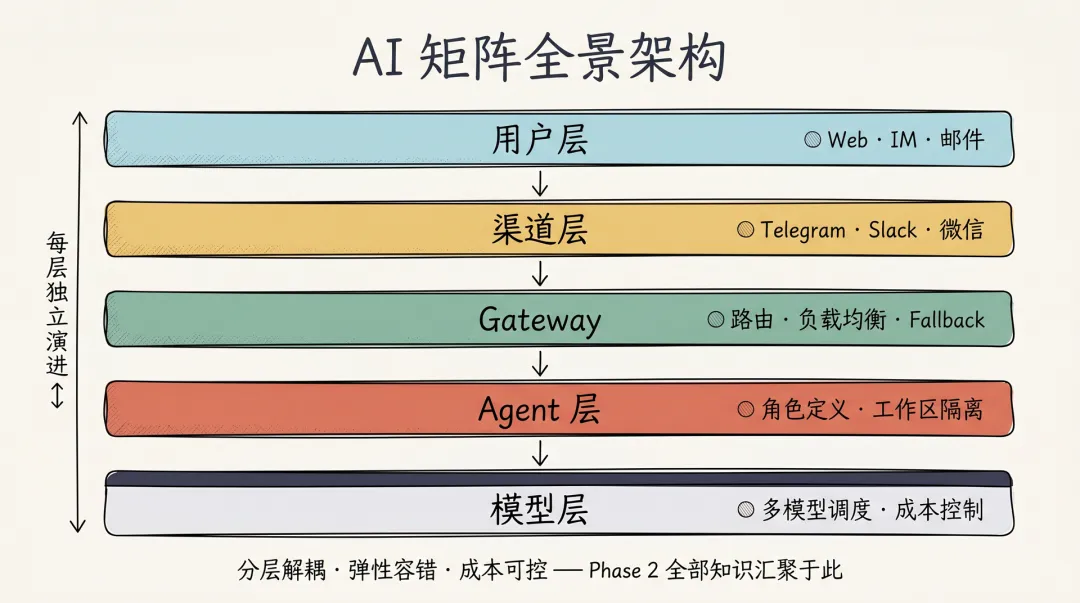
接下来三条原则、两个章节,都会回到这张图上对应到具体的格子。
原则一:分层解耦
用户层 → 渠道层 → Gateway → Agent层 → 模型层
每层独立演进,互不影响:
-
用户层:多端接入(Web、IM、邮件) -
渠道层:协议适配(Telegram、Slack、微信) -
Gateway:路由、负载均衡、Fallback -
Agent层:角色定义、工作区隔离 -
模型层:多模型调度、成本控制
原则二:弹性容错
-
模型层:Fallback 链确保高可用 -
Agent层:多 Agent 互为备份 -
Gateway层:多实例部署
原则三:成本可控
-
分层定价:不同场景使用不同成本模型 -
智能路由:自动选择性价比最优路径 -
本地兜底:关键场景使用零成本本地模型
多模型 Fallback 链设计
企业级 Fallback 策略
{
  agents: {
    defaults: {
      model: {
        primary: "anthropic/claude-opus-4-6",
        fallbacks: [
          "anthropic/claude-sonnet-4-6",  // 同厂商降级
          "openai/gpt-5.2",                // 跨厂商备份
          "ollama/qwen2.5:14b",           // 本地高性能
          "ollama/llama3.1"               // 本地兜底
        ]
      }
    },
    list: [
      {
        id: "coding",
        // 编程场景:质量优先
        model: {
          primary: "anthropic/claude-opus-4-6",
          fallbacks: ["anthropic/claude-sonnet-4-6"]
        }
      },
      {
        id: "support",
        // 客服场景:成本优先
        model: {
          primary: "anthropic/claude-haiku-4-5",
          fallbacks: ["ollama/qwen2.5:14b"]
        }
      }
    ]
  }
}
Fallback 触发条件
|
|
|
|
|---|---|---|
|
|
|
|
|
|
|
|
|
|
|
|
|
|
|
|
|
|
|
|
多 Agent 协作架构
Agent 矩阵设计
|
|
|
|
|
|
|---|---|---|---|---|
| CodeAgent |
|
|
|
|
| WriteAgent |
|
|
|
|
| BizAgent |
|
|
|
|
| SupportAgent |
|
|
|
|
| LifeAgent |
|
|
|
|
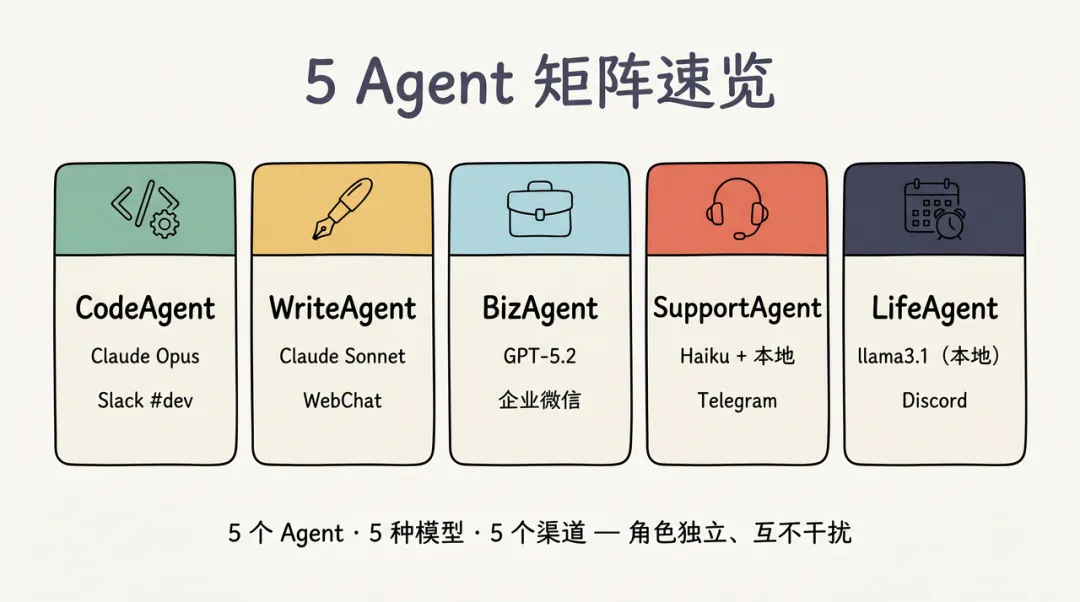
把这张矩阵表用卡片速览展示,让 5 个 Agent 的角色、模型、渠道一眼看清:
协作机制
{
  agents: {
    list: [
      {
        id: "orchestrator",
        name: "调度员",
        model: "anthropic/claude-sonnet-4-6",
        // 子 Agent 权限
        subagents: {
          allowAgents: ["coding", "writing", "biz", "support"],
          model: "anthropic/claude-haiku-4-5"
        }
      }
    ]
  }
}
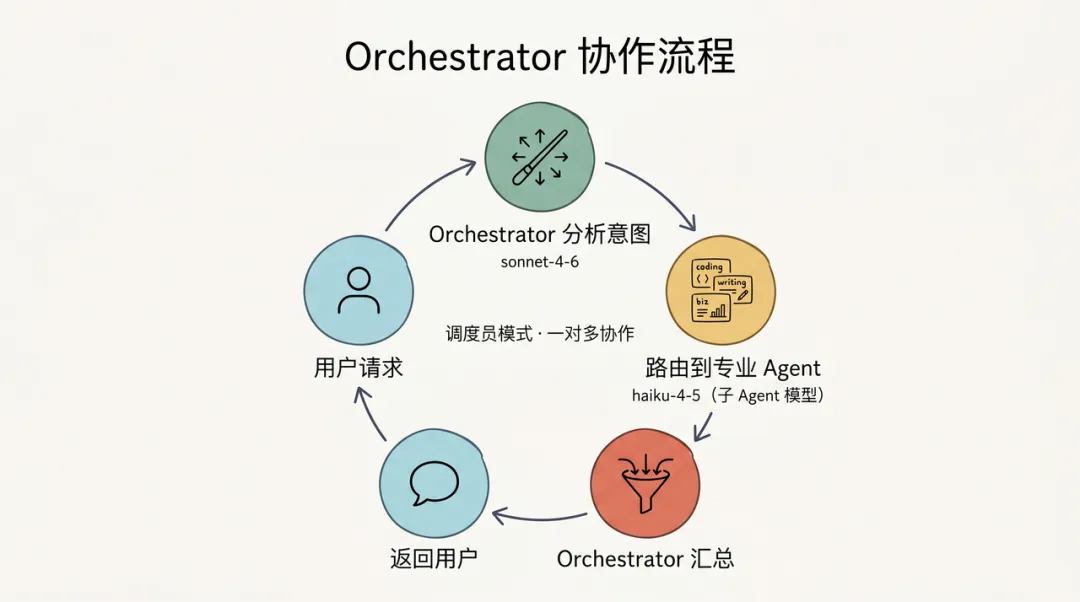
协作流程:
用户请求
    ↓
Orchestrator 分析意图
    ↓
路由到专业 Agent
    ↓
子 Agent 处理
    ↓
Orchestrator 汇总结果
    ↓
返回用户
把这条链路画成圆形闭环,”调度员模式”的一对多协作就更直观:
成本与质量平衡策略
分层定价模型
|
|
|
|
|
|
|---|---|---|---|---|
| L1 旗舰 |
|
|
|
|
| L2 标准 |
|
|
|
|
| L3 经济 |
|
|
|
|
| L4 本地 |
|
|
|
|
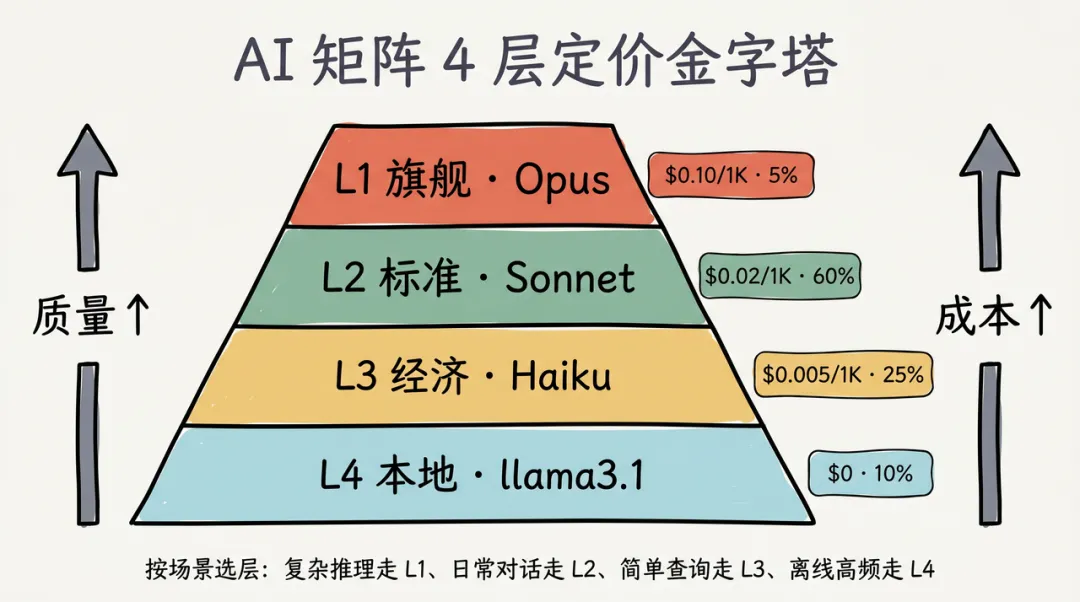
把分层定价做成金字塔——顶部最贵最少、底部最省最多,一图看清”在哪一层投钱最划算”:
智能路由策略
{
  agents: {
    defaults: {
      // 基于内容长度路由
      modelSelection: {
        shortQuery: "anthropic/claude-haiku-4-5",      // < 100 tokens
        mediumQuery: "anthropic/claude-sonnet-4-6",   // 100-1000 tokens
        longQuery: "anthropic/claude-opus-4-6"        // > 1000 tokens
      }
    }
  }
}
成本监控告警
{
  diagnostics: {
    enabled: true,
    // 成本告警阈值
    costAlert: {
      dailyLimit: 50,      // $50/天
      hourlyLimit: 10,     // $10/小时
      perSessionLimit: 5   // $5/会话
    }
  }
}
实战:企业级AI助手矩阵
完整配置
{
  // ========== 模型提供商配置 ==========
  models: {
    providers: {
      anthropic: {
        baseUrl: "https://api.anthropic.com",
        apiKey: "${ANTHROPIC_API_KEY}"
      },
      openai: {
        baseUrl: "https://api.openai.com",
        apiKey: "${OPENAI_API_KEY}"
      },
      ollama: {
        baseUrl: "http://localhost:11434"
      }
    }
  },

  // ========== Agent 矩阵配置 ==========
  agents: {
    defaults: {
      model: {
        primary: "anthropic/claude-sonnet-4-6",
        fallbacks: [
          "openai/gpt-5.2",
          "ollama/qwen2.5:14b"
        ]
      },
      workspace: "/data/openclaw/workspace"
    },

    list: [
      {
        id: "coding",
        name: "编程助手",
        model: {
          primary: "anthropic/claude-opus-4-6",
          fallbacks: ["anthropic/claude-sonnet-4-6"]
        },
        workspace: "/data/openclaw/workspace-coding",
        skills: ["exec", "browser", "read", "write", "apply"],
        tools: {
          allow: ["exec", "read", "write", "browser"],
          sandbox: {
            enabled: true,
            allowedPaths: ["/data/projects", "/data/openclaw/workspace-coding"]
          }
        }
      },
      {
        id: "writing",
        name: "写作助手",
        model: "anthropic/claude-sonnet-4-6",
        workspace: "/data/openclaw/workspace-writing",
        skills: ["read", "write"],
        humanDelay: {
          enabled: true,
          minMs: 500,
          maxMs: 2000
        }
      },
      {
        id: "biz",
        name: "业务助手",
        model: "openai/gpt-5.2",
        workspace: "/data/openclaw/workspace-biz",
        skills: ["webhook", "cron", "browser"],
        heartbeat: {
          enabled: true,
          intervalMinutes: 60
        }
      },
      {
        id: "support",
        name: "客服助手",
        model: {
          primary: "anthropic/claude-haiku-4-5",
          fallbacks: ["ollama/qwen2.5:14b"]
        },
        workspace: "/data/openclaw/workspace-support",
        skills: ["read"],
        memorySearch: {
          enabled: true,
          topK: 3
        }
      },
      {
        id: "life",
        name: "生活助手",
        model: "ollama/llama3.1",
        workspace: "/data/openclaw/workspace-life",
        skills: ["cron"]
      }
    ]
  },

  // ========== 会话配置 ==========
  session: {
    scope: "per-sender",
    dmScope: "per-channel-peer",
    idleMinutes: 120,
    reset: {
      mode: "idle",
      idleMinutes: 240
    },
    maintenance: {
      mode: "enforce",
      pruneAfter: "30d",
      maxDiskBytes: "10gb"
    }
  },

  // ========== 渠道配置 ==========
  channels: {
    telegram: {
      enabled: true,
      botToken: "${TELEGRAM_BOT_TOKEN}",
      dmPolicy: "open"
    },
    slack: {
      enabled: true,
      botToken: "${SLACK_BOT_TOKEN}",
      signingSecret: "${SLACK_SIGNING_SECRET}"
    }
  },

  // ========== Gateway 配置 ==========
  gateway: {
    mode: "local",
    port: 18789,
    bind: "0.0.0.0",
    // 多实例配置
    cluster: {
      enabled: true,
      instances: 2,
      loadBalancer: "round-robin"
    }
  }
}
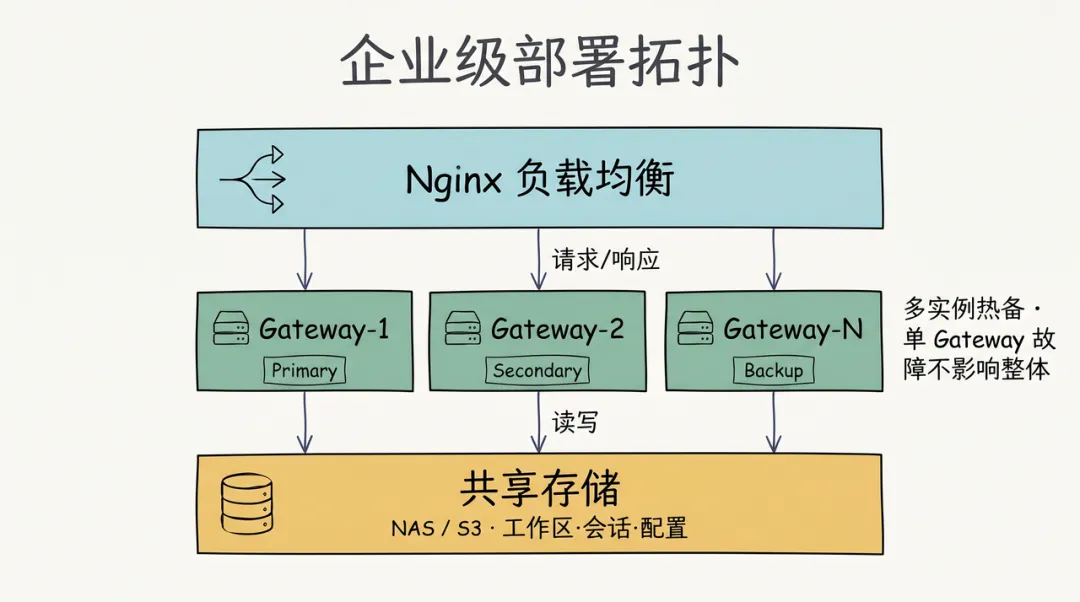
部署架构
┌─────────────────────────────────────────────────────────────┐
│                        负载均衡器 (Nginx)                      │
└───────────────────────────┬─────────────────────────────────┘
                            │
        ┌───────────────────┼───────────────────┐
        │                   │                   │
┌───────▼──────┐  ┌────────▼────────┐  ┌──────▼───────┐
│  Gateway-1   │  │   Gateway-2     │  │  Gateway-N   │
│  (Primary)   │  │  (Secondary)    │  │  (Backup)    │
└───────┬──────┘  └────────┬────────┘  └──────┬───────┘
        │                   │                   │
        └───────────────────┼───────────────────┘
                            │
┌───────────────────────────▼─────────────────────────────────┐
│                    共享存储 (NAS/S3)                          │
│  - 工作区数据                                               │
│  - 会话历史                                                 │
│  - 配置文件                                                 │
└─────────────────────────────────────────────────────────────┘
把这张 ASCII 拓扑画成图示,三层之间的请求流和读写关系更清晰:
性能监控与优化
监控指标
|
|
|
|
|---|---|---|
| 请求延迟 |
|
|
| Fallback 率 |
|
|
| Token 消耗 |
|
|
| 成本 |
|
|
| 错误率 |
|
|
监控命令
# 查看提供商配额和使用状态
openclaw status --usage

# 查看模型认证和用量状态(JSON 格式)
openclaw models status --json

# 查看7天使用成本汇总
openclaw gateway usage-cost --days 7

# 查看30天成本汇总(JSON 格式,方便脚本处理)
openclaw gateway usage-cost --days 30 --json

# 查看 Fallback 统计(从日志中提取)
openclaw logs --follow --json | grep "fallback"

# 查看延迟分布
openclaw logs --follow --json | grep "duration"
扩容与高可用
注意:单机模式下 OpenClaw Gateway 不内置自动扩缩容配置。如需多实例部署和弹性扩缩容,请参考第57篇(Kubernetes 生产部署实战),使用 K8s HPA(水平 Pod 自动扩缩器)实现。
如果需要在多实例间做负载均衡,关键配置如下:
{
  gateway: {
    port: 18789,
    bind: "network",           // 允许外部访问
    auth: {
      mode: "token",           // 多实例共享认证
      token: "${GATEWAY_TOKEN}"
    },
    // 渠道健康检查——自动检测故障渠道
    channelHealthCheckMinutes: 5,
    channelStaleEventThresholdMinutes: 10,
    channelMaxRestartsPerHour: 6
  }
}
踩坑
坑1:多 Gateway 实例会话不同步
现象:用户轮流连接到不同 Gateway,会话状态不一致
解决:
{
  session: {
    // 使用共享存储
    store: "redis://redis-cluster:6379",

    // 或文件系统共享存储
    store: "/shared-nfs/sessions"
  }
}
坑2:Agent 间资源竞争
现象:多个 Agent 同时运行,内存/CPU 不足
解决:
{
  agents: {
    defaults: {
      // 资源限制
      resources: {
        maxMemory: "2gb",
        maxCpu: "1.0"
      },
      // 并发控制
      concurrency: {
        maxParallel: 5,
        queueSize: 20
      }
    }
  }
}
坑3:本地模型过载
现象:Fallback 到本地模型后,响应极慢
解决:
# 监控本地模型负载
watch -n 5 'curl http://localhost:11434/api/ps'

# 配置本地模型并发限制
export OLLAMA_NUM_PARALLEL=2
export OLLAMA_MAX_LOADED_MODELS=2
坑4:成本超预算
现象:月度 API 账单超出预期
解决:
{
  agents: {
    defaults: {
      // 强制使用经济模型
      model: "anthropic/claude-haiku-4-5",

      // 限制输出长度
      params: {
        max_tokens: 1000
      }
    }
  },

  // 硬成本限制
  diagnostics: {
    costAlert: {
      dailyLimit: 20,
      action: "block"  // 超出后阻断请求
    }
  }
}
FAQ
Q1: 如何选择合适的模型组合?
决策矩阵:
|
|
|
|
|---|---|---|
|
|
|
|
|
|
|
|
|
|
|
|
Q2: 多 Agent 如何共享记忆?
{
  agents: {
    defaults: {
      memorySearch: {
        enabled: true,
        // 使用共享向量数据库
        remote: {
          baseUrl: "http://shared-vectordb:8000"
        }
      }
    }
  }
}
Q3: 如何实现 Agent 间调用?
# Agent A 中调用 Agent B(通过绑定路由实现)
openclaw agent --agent coding --message "帮我写代码"
# Agent 间的协作通过 agents.bindings 配置路由,而非命令行参数
Q4: 如何灰度发布新 Agent?
{
  agents: {
    bindings: [
      {
        agentId: "coding-v2",
        match: {
          channel: "slack",
          peer: { kind: "channel", id: "beta-test" }
        }
      }
    ]
  }
}
Phase 2 总结
回顾 Phase 2 的 8 篇文章:
|
|
|
|---|---|
| 模型配置 |
|
| 本地部署 |
|
| 多 Agent |
|
| 人格设计 |
|
| 会话管理 |
|
| 成本优化 |
|
| 矩阵架构 |
|
核心认知:
-
模型是「大脑」,Agent 是「角色」,Gateway 是「调度员」 -
高可用 = 多模型 Fallback + 多 Agent 备份 -
低成本 = 分层模型 + 本地兜底 + 智能路由
Phase 3 预告
Phase 3:渠道接入实战(第 19-28 篇)
告别「大脑」,连接「世界」:
-
第19篇:Telegram 渠道接入 -
第20篇:WhatsApp 渠道接入 -
第21篇:Discord 渠道接入 -
第22篇:Slack 渠道接入 -
第23篇:飞书与企业微信接入 -
第24篇:Signal/iMessage/Matrix 接入 -
第25篇:DM 配对与渠道安全策略 -
第26篇:群组消息路由与管理 -
第27篇:多渠道消息统一管理 -
第28篇:全渠道AI助手的终极配置
本文是系列第18篇,Phase 2 完结。你已具备构建企业级 AI 矩阵的能力。
延伸阅读:想把 AI 矩阵部署到生产环境?后续(Kubernetes 生产部署实战)和(高可用架构)。想了解企业落地的真实案例?请看第64篇(客户案例:企业落地实战经验)。
📌 觉得有用?点个「在看」 👇 👨💻 关注「敏叔侃技术」,每周更新 OpenClaw 实战干货 ⭐ 收藏这篇文章,作为 AI 矩阵架构设计的参考手册