 夜雨聆风
夜雨聆风


文档提取器节点
1.文档提取器
1.1定义
文档提取器节点将上传的文件转换为大型语言模型可以处理的文本。由于LLM 自身无法直接读取或解释PDF或DOCX等文档格式的内容。因此需要将用户上传的文档,通过文档提取器节点解析并读取文档文件中的信息,转化文本之后再将内容传给 LLM 以实现对于文件内容的处理。
1.2支持的文件类型
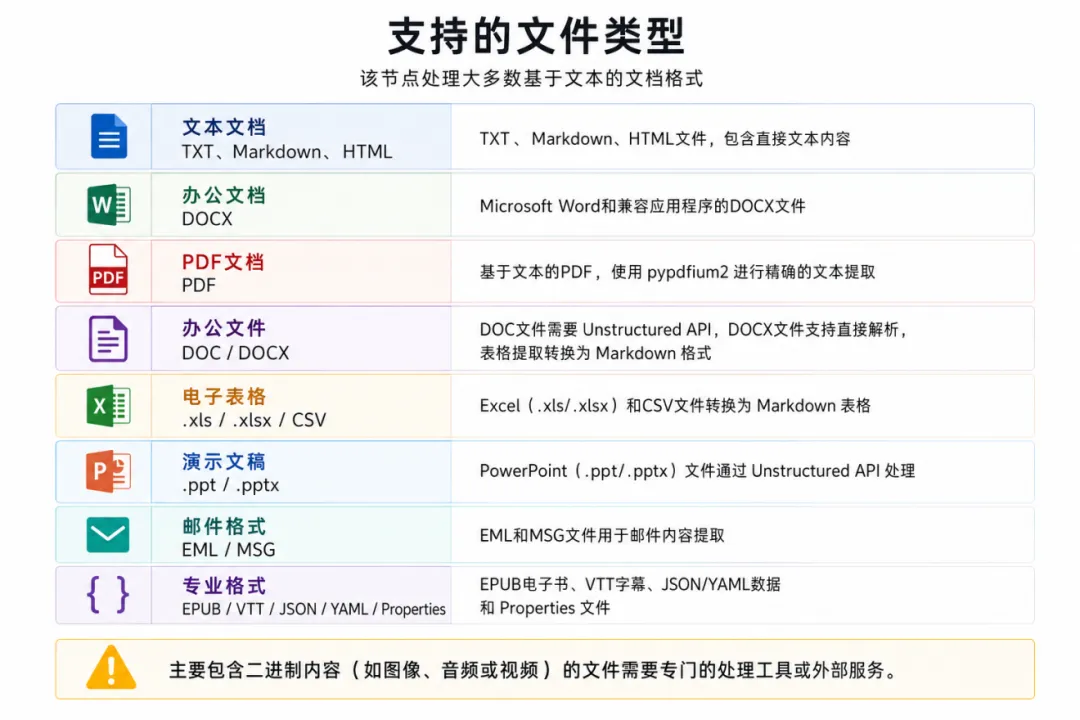 注意:有的大模型含有图片识别功能,可以直接用LLM识别处理
1.3应用场景
·文档问答应用 – 构建ChatPDF风格的应用,用户上传文档并询问其内容相关问题。
·内容分析 – 处理合同、报告或研究论文以提取关键信息和见解。
·批量文档处理 – 同时从多个文档提取文本用于分析、索引或迁移。
·文档转换 – 将各种文档格式转换为纯文本以进行进一步处理或存储。
1.4节点功能
文档提取器节点可以理解为一个信息处理中心,通过识别并读取输入变量中的文件,提取信息后并转化为 string 类型输出变量,供下游节点调用。
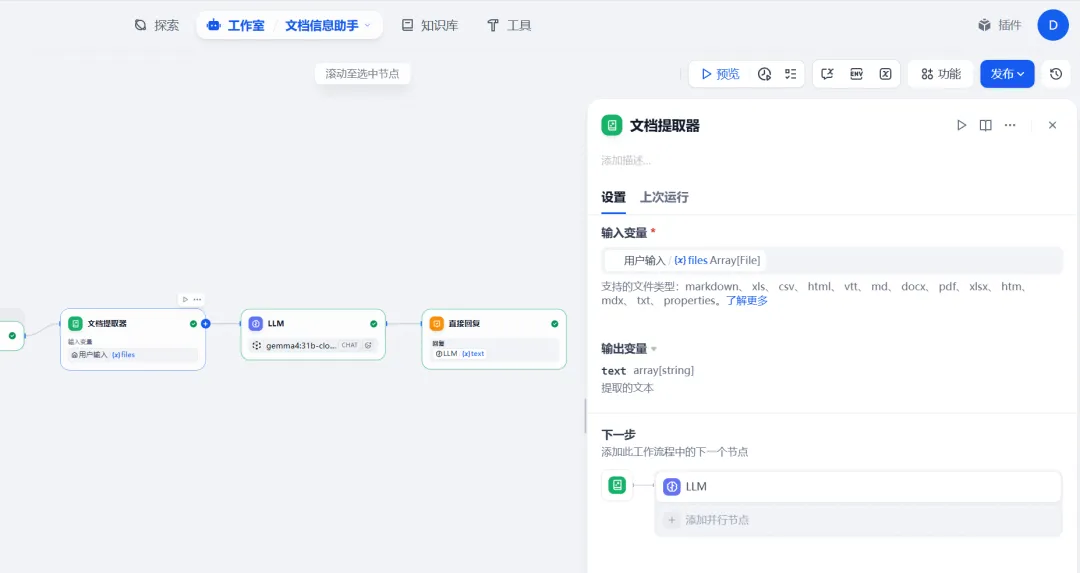
文档提取器节点结构分为输入变量、输出变量。
(1)输入变量
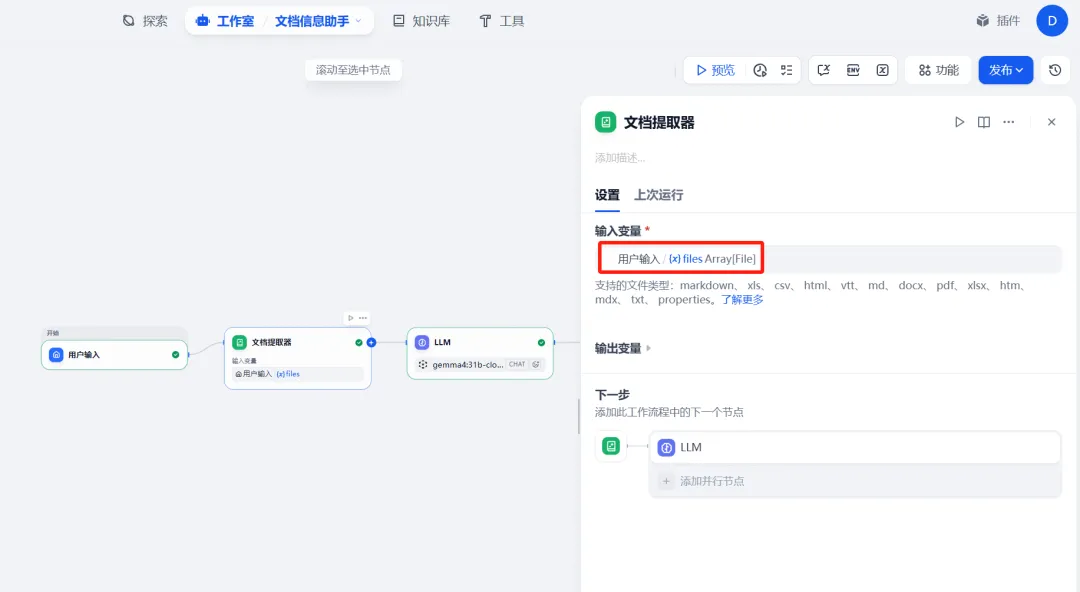
文档提取器仅接受以下数据结构的变量:
·File,来自文件变量的单个文件输入(通常来自开始节点)
·Array[File],用于批量文档处理的多个文件数组
文档提取器仅能够提取文档类型文件中的信息,例如 TXT、Markdown、PDF、HTML、DOCX 格式文件的内容,无法处理图片、音频、视频等格式文件。
(2)输出变量
输出变量固定命名为 text。输出的变量类型取决于输入变量:
·输入变量为 File,输出变量为 string
·输入变量为 Array[File],输出变量为 array[string]
Array 数组变量一般需配合列表操作节点使用
2.文档信息助手案例
2.1创建开始节点
创建一个chatflow,添加开始节点
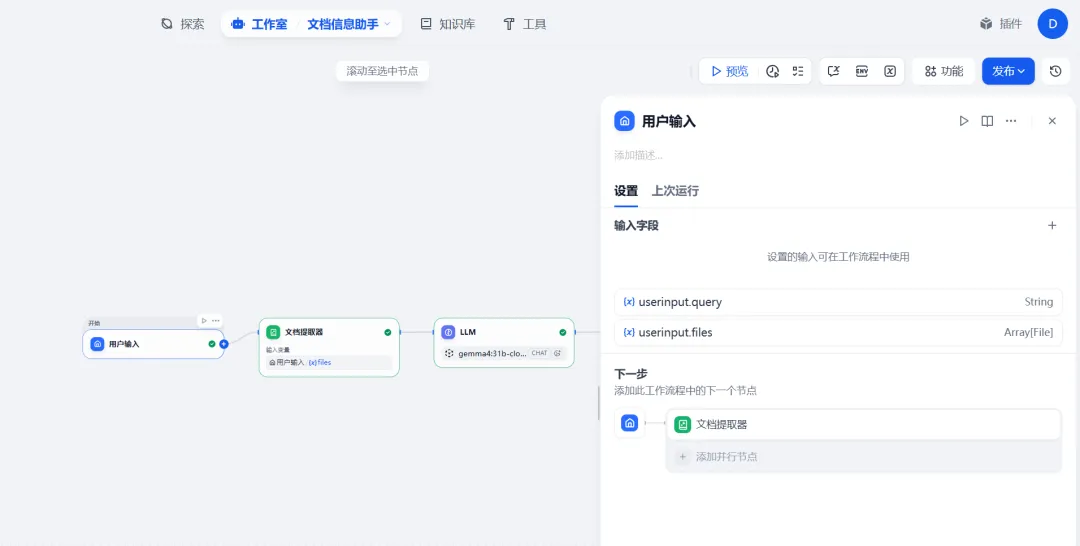
2.2添加文档提取节点
在输入变量中选择系统默认的变量Array[File]:
2.3添加LLM节点
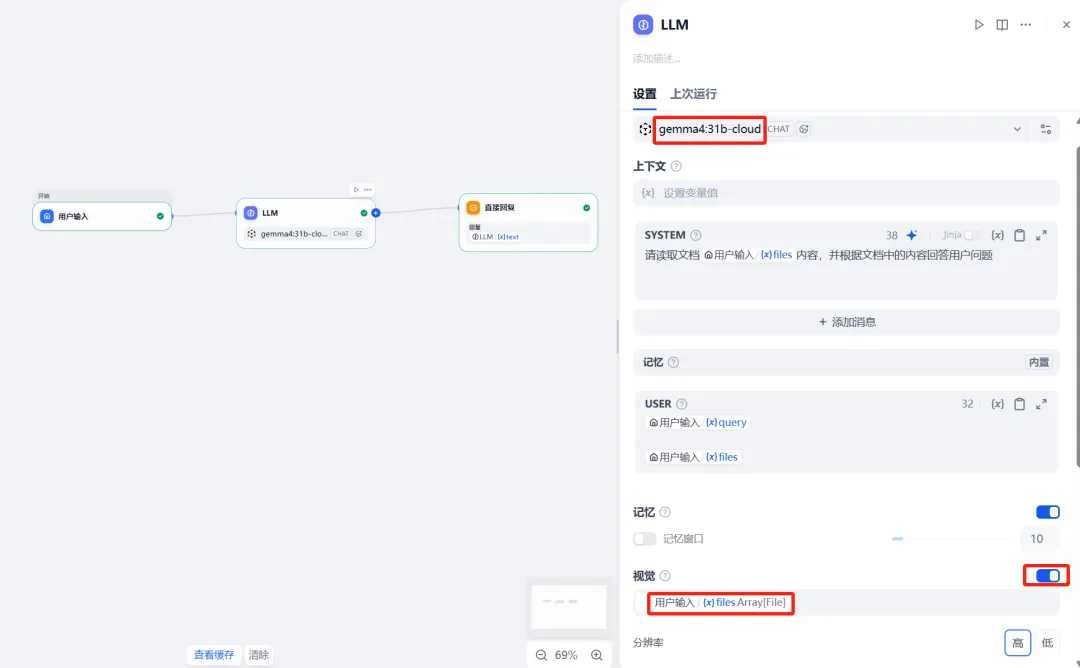
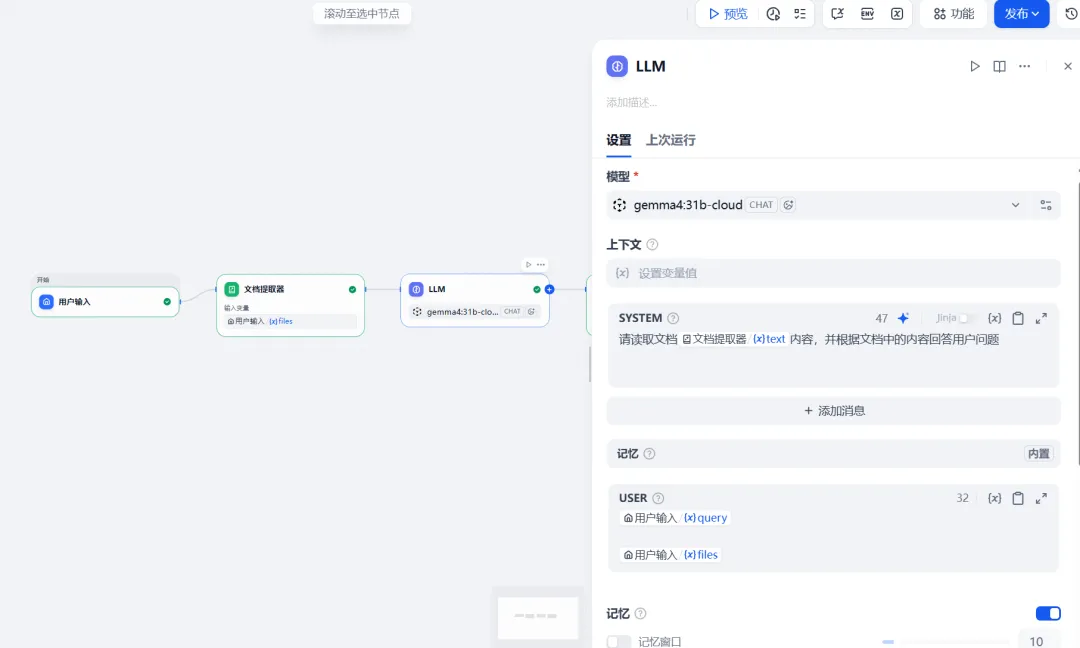
LLM节点中设置系统提示词:“请读取文档{{text}}内容,并根据文档中的内容回答用户问题”。
注意:text为文档提取器输出变量,不要选择Array[File]变量,因为LLM无法直接读取直接读取PDF文件变量。
2.4添加直接回复节点
输出模型结果: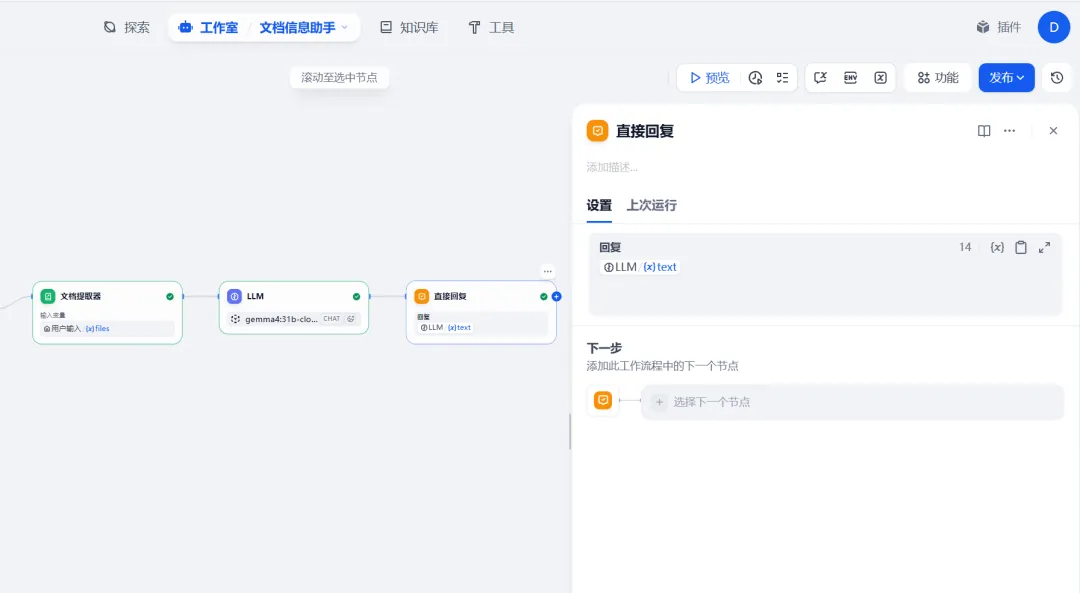
2.5添加文件上传功能
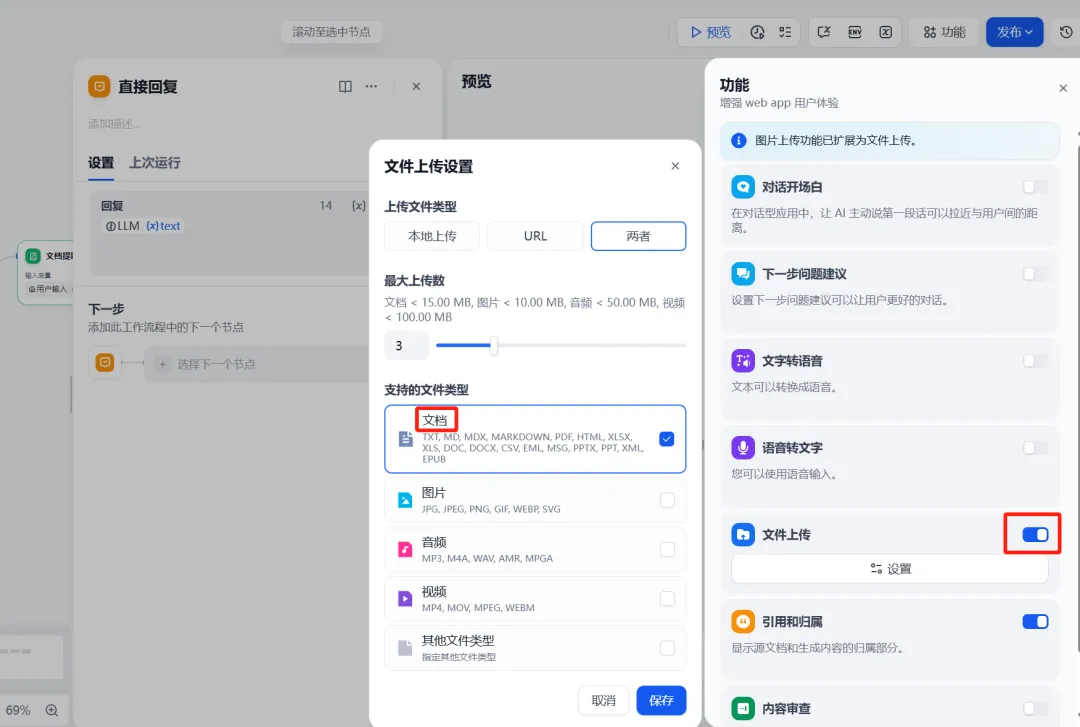
配置完成后,应用将具备文件上传功能,使用者可以上传 PDF 文件并展开对话。
点击预览,点击管理,配置文件上传功能
2.6测试并发布chatflow
预览测试:
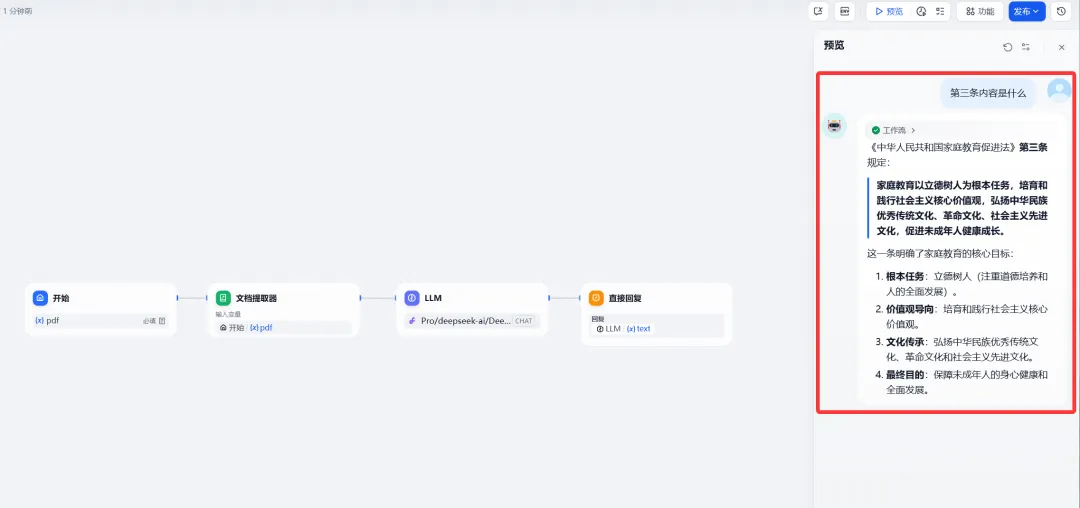
发布使用:
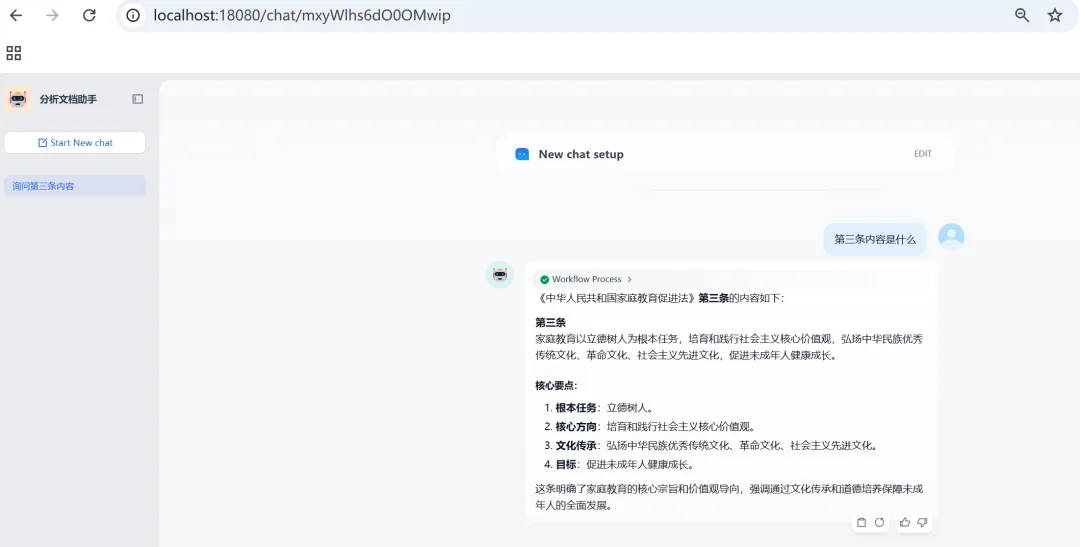
3.案例配置脚本
|
YAML app: description:” icon:🤖 icon_background:‘#FFEAD5’ icon_type:emoji mode:advanced-chat name:文档信息助手 use_icon_as_answer_icon:false dependencies: – current_identifier: null type:marketplace value: marketplace_plugin_unique_identifier:langgenius/openai_api_compatible:0.0.43@b7fa7104746a68fddeeaea15809ada8c141ebf6dc1938525743ca64cb6566909 version:null kind: app version: 0.6.0 workflow: conversation_variables:[] environment_variables:[] features: file_upload: allowed_file_extensions: –.JPG –.JPEG –.PNG –.GIF –.WEBP –.SVG allowed_file_types: –document allowed_file_upload_methods: –remote_url –local_file enabled:true fileUploadConfig: attachment_image_file_size_limit:2 audio_file_size_limit:50 batch_count_limit:5 file_size_limit:15 file_upload_limit:20 image_file_batch_limit:10 image_file_size_limit:10 single_chunk_attachment_limit:10 video_file_size_limit:100 workflow_file_upload_limit:10 image: enabled:false number_limits:3 transfer_methods: –local_file –remote_url number_limits:3 opening_statement:” retriever_resource: enabled:true sensitive_word_avoidance: enabled:false speech_to_text: enabled:false suggested_questions:[] suggested_questions_after_answer: enabled:false text_to_speech: enabled:false language:” voice:” graph: edges: –data: sourceType:llm targetType:answer id:llm-answer source:llm sourceHandle:source target:answer targetHandle:target type:custom –data: isInIteration:false isInLoop:false sourceType:start targetType:document-extractor id:1778641552621-source-1778641562525-target source:‘1778641552621’ sourceHandle:source target:‘1778641562525’ targetHandle:target type:custom zIndex:0 –data: isInIteration:false isInLoop:false sourceType:document-extractor targetType:llm id:1778641562525-source-llm-target source:‘1778641562525’ sourceHandle:source target:llm targetHandle:target type:custom zIndex:0 nodes: –data: selected:false title:用户输入 type:start variables:[] height:72 id:‘1778641552621’ position: x:81 y:281 positionAbsolute: x:81 y:281 selected:false sourcePosition:right targetPosition:left type:custom width:242 –data: context: enabled:false variable_selector:[] memory: query_prompt_template:‘{{#sys.query#}} {{#sys.files#}}’ role_prefix: assistant:” user:” window: enabled:false size:10 model: completion_params: temperature:0.7 mode:chat name:gemma4:31b-cloud provider:langgenius/openai_api_compatible/openai_api_compatible prompt_template: –id: 5298c3fe-be56-4f52-af77-51aa12e32ef5 role:system text:请读取文档{{#1778641562525.text#}}内容,并根据文档中的内容回答用户问题 selected:false title:LLM type:llm vision: enabled:false height:87 id:llm position: x:680 y:282 positionAbsolute: x:680 y:282 selected:false sourcePosition:right targetPosition:left type:custom width:241 –data: answer:‘{{#llm.text#}}’ selected:false title:直接回复 type:answer variables:[] height:102 id:answer position: x:980 y:282 positionAbsolute: x:980 y:282 selected:false sourcePosition:right targetPosition:left type:custom width:241 –data: is_array_file:true selected:true title:文档提取器 type:document-extractor variable_selector: –sys –files height:103 id:‘1778641562525’ position: x:381.20302503608207 y:282 positionAbsolute: x:381.20302503608207 y:282 selected:true sourcePosition:right targetPosition:left type:custom width:241 viewport: x:171.10243779773123 y:47.91150548536518 zoom:0.690956439983888 rag_pipeline_variables:[] |
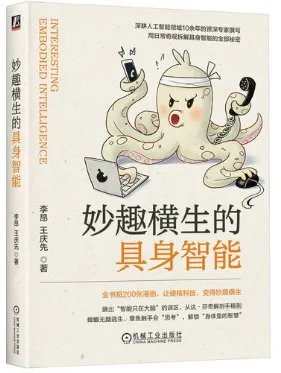
本书是一部颠覆认知的跨学科探索之作,以身体为透镜,重新解码智能的本质与未来。本书融合了生物学、工程学、人工智能领域的研究成果与实践经验,系统阐述具身智能的核心逻辑、分布式协作机制及落地应用范式,层层拆解从身体原生智慧到技术转化的底层原理,搭配海量自然案例与科技实例,助你从零构建对具身智能的完整认知。本书内容分为三个部分。
第一部分为“身体,被遗忘的智慧”,从达·芬奇解剖手稿到蟑螂无脑逃生,从盲人感受世界到运动员的快速反应等,引出具身智能的概念。
第二部分为“分布式智能,具身智能的行为方式”,重点介绍具身智能的底层原理,采用生活案例进行对比说明,方便读者理解。例如:婴儿学步的过程及基于该过程如何设计机器人的行走策略,通过对章鱼触手的介绍说明分布式智能对于具身智能的意义:蚂蚁筑巢原理与自发式交通系统的关系等。
第三部分为“具身智能的应用范式”,介绍如何利用具身智能技术对人体进行增强改造。这一部分既包含真实案例,也涉及对未来科技的幻想,同时还介绍了如何利用VR技术开展具身智能的教学与应用。