 夜雨聆风
夜雨聆风





给 OpenClaw 换上DeepSeek
hi,吾友!
见字如面,我是杏壳。
今天聊一聊 OpenClaw 的模型配置。如果你也在用 OpenClaw,应该有过类似的体验:搭好了飞书 IM,消息能通,但一问问题,等半天才出回复。明明用的是国产模型,明明 API 响应很快,为什么到 OpenClaw 这儿就慢了?
最近排查了一下这个问题,最终把响应时间从 10 秒降到了 4 秒,并且让飞书卡片底部能直观看到耗时。过程中踩了几个坑,也摸清了 OpenClaw 对 DeepSeek 思考模式(thinking)的处理逻辑。
先聊聊背景:这套系统链路长什么样
在进入排查之前,先简单交代一下这套系统的参与方。整个调用链路其实不复杂:

-
飞书 :聊天入口 -
OpenClaw :部署在云服务器上的龙虾,负责消息路由、会话管理、工具调用 -
teamorouter :聚合平台,一个 API Key 通多家模型,省去分别注册的麻烦 -
DeepSeek V4 Flash :最终的国产模型,便宜,够快
问题:飞书回复的很慢
先说现象。我在云服务器上用 openclaw 用户部署了 OpenClaw 2026.6.6 版本,接了飞书 IM。配置了 teamorouter 聚合平台的 DeepSeek V4 Flash 模型,直接 curl 测试 API,响应只要 1.2 秒,挺快的。
但一通过飞书对话,单条消息就要等 7-10 秒。
排查:thinking 模式在偷偷工作
第一步是看 OpenClaw 的 gateway 日志。在服务器上执行:
su - openclaw -c "openclaw logs --follow"然后飞书发条消息,盯着日志看时间戳。发现 LLM 调用这一步就花了 6 秒多。
于是回到最原始的方法——直接 curl 对比。同样的「你好」,带不同参数测:
root@i-6a2ce94c20a852ddacf4524b:~# su - openclaw -s /bin/bash -c 'curl -w "\n\n耗时: %{time_total}s\n"-X POST https://api.teamorouter.com/v1/chat/completions-H "Authorization: Bearer sk-teamo-xxx"-H "Content-Type: application/json"-d "{"model":"deepseek-v4-flash","messages":[{"role":"user","content":"你好"}],"max_tokens":100}"'{"id":"210965ef-5745-48ef-aa01-523b676e652f","object":"chat.completion","created":1784188803,"model":"deepseek-v4-flash","choices":[{"index":0,"message":{"role":"assistant","content":"","reasoning_content":"好的,用户发来一个简单的问候“你好”。这是一个非常基础的社交开场,没有附带任何具体问题或请求。用户可能只是礼貌性地打招呼,或者刚接触我,想先确认互动是否正常。\n\n深层需求可能是想开启对话,测试我的响应是否友好、及时。不需要复杂分析,直接以热情、开放的态度回复,表明身份和可用性,并主动提供支持方向,引导用户提出具体需求。\n\n想到了用“你好!很高兴见到你!”开头,"},"logprobs":null,"finish_reason":"length"}],"usage":{"prompt_tokens":5,"completion_tokens":100,"total_tokens":105,"prompt_tokens_details":{"cached_tokens":0},"completion_tokens_details":{"reasoning_tokens":100},"prompt_cache_hit_tokens":0,"prompt_cache_miss_tokens":5},"system_fingerprint":"fp_8b330d02d0_prod0820_fp8_kvcache_20260402"}耗时: 3.795064s'
返回里有 reasoning_content 字段,而且 reasoning_tokens: 100。也就是说,DeepSeek V4 默认开启了思考模式,每次请求都会先「想一想」再回答。这一想,就是 3-4 秒。
再测一次显式关闭思考:
root@i-6a2ce94c20a852ddacf4524b:~# su - openclaw -s /bin/bash -c 'curl -w "\n\n耗时: %{time_total}s\n"-X POST https://api.teamorouter.com/v1/chat/completions-H "Authorization: Bearer sk-teamo-xxx"-H "Content-Type: application/json"-d "{"model":"deepseek-v4-flash","messages":[{"role":"user","content":"你好"}],"max_tokens":100,"thinking":{"type":"disabled"}}"'{"id":"18839efe-1d64-4ede-9ea1-a4752117e9c1","object":"chat.completion","created":1784188986,"model":"deepseek-v4-flash","choices":[{"index":0,"message":{"role":"assistant","content":"你好!很高兴见到你~有什么可以帮你的吗?😊"},"logprobs":null,"finish_reason":"stop"}],"usage":{"prompt_tokens":5,"completion_tokens":14,"total_tokens":19,"prompt_tokens_details":{"cached_tokens":0},"prompt_cache_hit_tokens":0,"prompt_cache_miss_tokens":5},"system_fingerprint":"fp_8b330d02d0_prod0820_fp8_kvcache_20260402"}耗时: 1.242883s
返回里 reasoning_content 没了,耗时降到 1.2 秒。
真相大白:OpenClaw 没有自动关闭 DeepSeek 的思考模式,每次请求都让模型先想 3-4 秒。对一个「你好」这种问题来说,思考完全是无用功。
第一个坑:thinking 参数格式
知道原因后,第一反应是在 OpenClaw 配置里把 thinking 关掉。
直接在请求里加 “thinking”: false?不行,API 报错:
thinking: invalid type: boolean `false`, expected struct ThinkingOptions原来 thinking 不是布尔值,是一个对象。正确的格式是:
"thinking": { "type": "disabled" }这个细节卡了我一会儿,后来看了眼文档解决了。
第二个坑:Provider 名字决定 thinking 支持
关掉 thinking 后,新的问题来了。
在 OpenClaw 里用 /think:low 想临时开个低强度思考,结果飞书回我一句:
Thinking level "low" is not supported for teamorouter/deepseek-v4-flash.Use one of: off.只能 off,其他都不支持?
查了 OpenClaw 的文档才搞明白:OpenClaw 对 DeepSeek 思考模式的自动处理,只对 deepseek/* 前缀的模型生效。我之前把 provider 名写成了 teamorouter,模型 ID 是 teamorouter/deepseek-v4-flash,OpenClaw 不认,所以 thinking 控制基本失效。
这就像你明明装的是 DeepSeek,但因为门口挂牌写的是「teamorouter」,OpenClaw 就把你当普通 OpenAI 兼容 API 处理了,特殊功能一律不给。
解决方案:改个名字就好
修复方法出乎意料地简单——把配置文件里的 provider 名从 teamorouter 改成 deepseek:
"deepseek": {"baseUrl": "https://api.teamorouter.com/v1","apiKey": "sk-teamo-xxx","api": "openai-completions","models": [{"id": "deepseek-v4-flash","name": "deepseek-v4-flash","reasoning": true,"contextWindow": 1000000,"maxTokens": 384000,"cost": {"input": 0.14,"output": 0.28,"cacheRead": 0.0028 } }]}注意三点:
-
provider 名必须是 deepseek——这是 OpenClaw 识别原生支持的关键 -
reasoning: true——告诉 OpenClaw 此模型支持思考模式 -
baseUrl 仍指向 teamorouter——聚合平台的入口不变,只是换个「挂牌」
然后默认模型改成 deepseek/deepseek-v4-flash,重启 gateway,再测。
第三个发现:DeepSeek的思考模式其实只有 3 档
配好之后,我在飞书里测试不同档位。翻了 OpenClaw 官方文档,发现一个有意思的细节——OpenClaw 整体提供了 9 档思考强度(off/minimal/low/medium/high/xhigh/adaptive/max/ultra),但 并不是所有模型都支持全部档位 ,DeepSeek V4 只暴露了其中一部分。
OpenClaw 文档原文:
Direct DeepSeek V4 models expose /think xhigh|max ; both map to DeepSeek reasoning_effort: “max” while lower non-off levels map to high .
DeepSeek 官方文档也印证了这一点:
In thinking mode, for compatibility,
lowandmediumare mapped tohigh, andxhighis mapped tomax
对应关系是这样的:
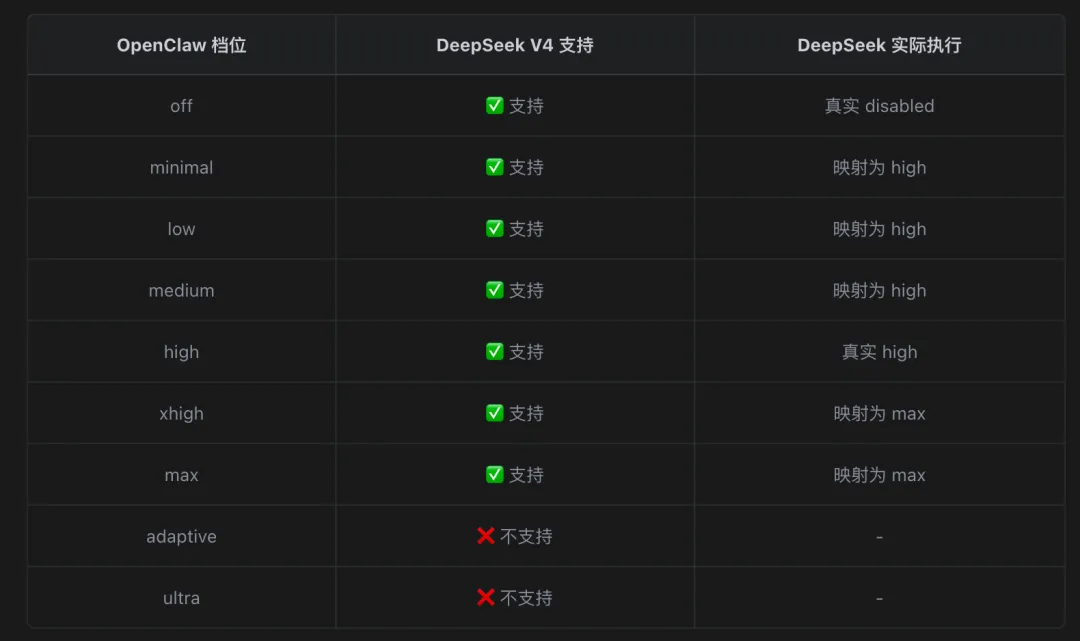
也就是说, DeepSeek V4 真实档位只有三个:off / high / max 。minimal/low/medium 是 OpenClaw 为了接口统一设计的「名义档位」,传到 DeepSeek 这儿都会被「向下取整」到 high;xhigh 和 max 则等价,都映射到 DeepSeek 的 max。
这个细节挺重要的——意味着你用 /think:low 期待「稍微想一想」,但实际执行的是 high。 想省时间,只能 off;想多想一会儿,直接 high 就够;最复杂的场景用 xhigh 或 max,它们等价 。
至于 adaptive(自适应思考)和 ultra(带子代理编排的最大思考),那是 Claude 、Gemini等模型的专属,DeepSeek 暂时还不支持。
验证:数据说话
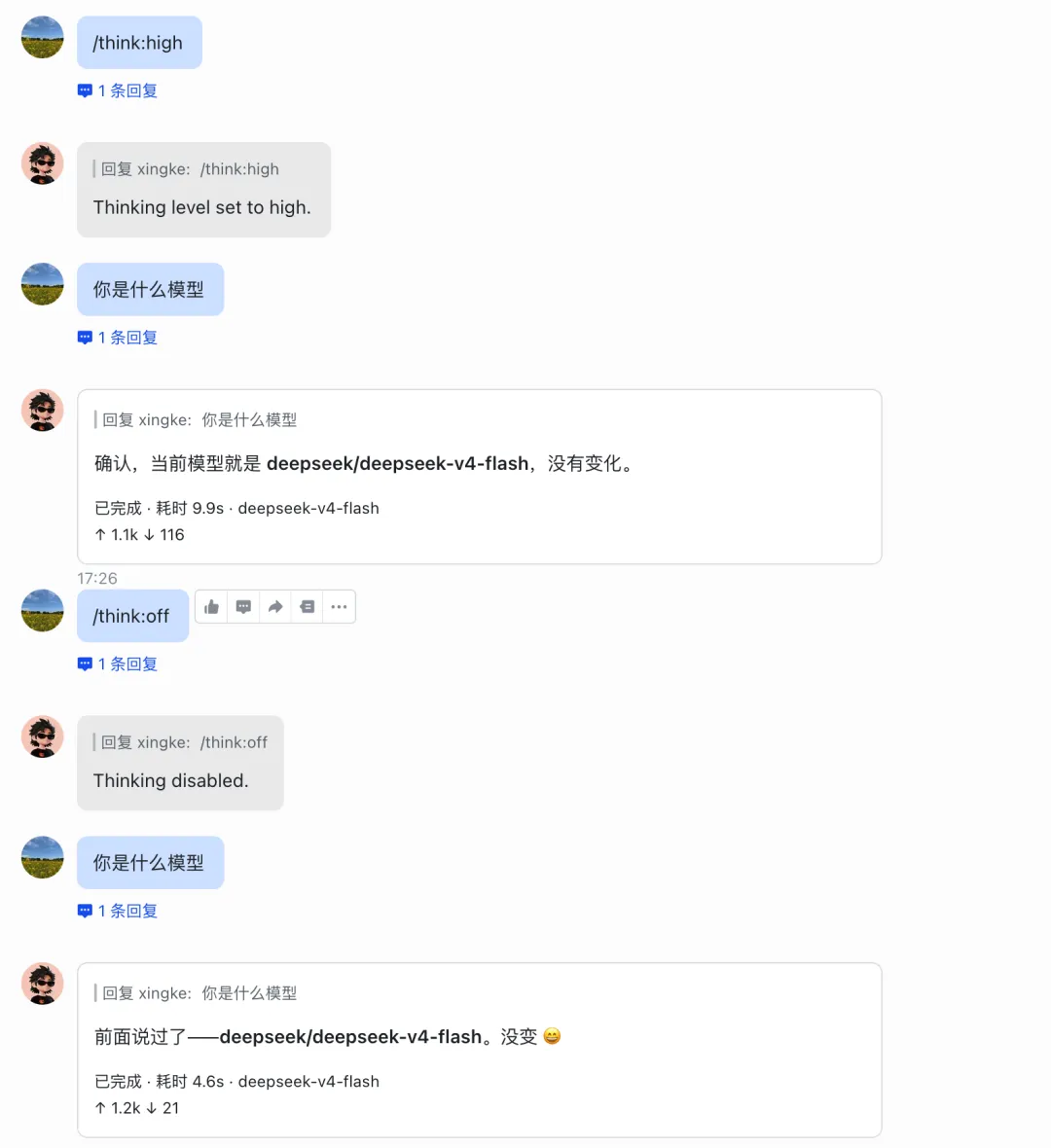
配置生效后,做对比测试。同一句「你是什么模型」,不同 thinking level:
|
|
|
|
|---|---|---|
|
|
|
|
|
|
|
|
而配置前的默认状态是 7-10 秒——也就是说,之前每次对话都在「无意识思考」,白白多花 4-5 秒。
从「无脑思考」到「按需思考」,这就是这次优化的核心。
第四步:让飞书卡片显示耗时
优化做完之后,我想让每次回复都直接显示耗时,不用每次都去翻日志。
翻了 OpenClaw 官方文档,发现飞书渠道原生支持 footer 显示,包括耗时、状态、token 用量、模型名等信息。直接打开。
su - openclaw -c "openclaw config set channels.feishu.streaming true"su - openclaw -c "openclaw config set channels.feishu.replyMode streaming"su - openclaw -c "openclaw config set channels.feishu.footer.elapsed true"su - openclaw -c "openclaw config set channels.feishu.footer.status true"su - openclaw -c "openclaw config set channels.feishu.footer.tokens true"su - openclaw -c "openclaw config set channels.feishu.footer.model true"su - openclaw -c "openclaw config set channels.feishu.footer.cache true"su - openclaw -c "openclaw gateway restart"
写在最后
如果你想给自己的 OpenClaw 配上国产模型,几个建议:
-
选 DeepSeek V4 Flash——便宜、够快、支持中文。日常对话完全够用。 -
聚合平台(如 teamorouter)——因为我之前用了他家的GPT系列,不想单独再到deepseek充值、管 key,一个 API key 通多家模型。 -
日常用 /think:off——闲聊、简单问答完全不需要思考。 -
复杂任务临时开 /think:high——写代码、做架构设计时再开,成本和体验最佳平衡。
最后祝大家玩的开心~
参考
-
https://api-docs.deepseek.com/zh-cn/guides/thinking_mode/ -
https://docs.openclaw.ai/providers/deepseek -
https://docs.openclaw.ai/tools/thinking