 夜雨聆风
夜雨聆风
一、背景
最近OpenClaw如日中天,俨然已经是当下最热门并实用的个人助理。OpenClaw已经是我每日深度使用的效率工具,作为技术人,忍不住想系统性扒一下其技术架构与实现细节。当然了,本文也是通过与一堆Agent协作完成,包括OpenClaw、OpenCode、ClaudeCode、NotebookLLM、 DeRisk等。
OpenClaw 在面向个人助手方向上,不仅仅体现在其灵活先进的智能体架构,还有其围绕个人助手方向的各种工具与生态的完整实现,是各类技术与工具的集大成者。 最让人惊讶的是,这些能力的基本全部通过AI-Coding实现,可以说彻底改变了软件开发的范式,而且清晰简洁的架构设计与表达,比传统人类编程的系统具有更高的标准,可以说是开启新的软件构建范式的开山之作,非常值得深入的研究。
由于OpenClaw涉及的技术点非常多,所以文章篇幅会显得很长。 这里建议大家按照感兴趣的模块,分模块阅读了解:
1.统一控制平面Gateway网关
2.Agentic Loop/Pi Loop
3.定时任务系统
4.工具系统
5.Channels
6.上下文管理
7.SubAgent子智能体
8.SandBox沙箱系统
9.记忆管理
10.Skills模块
11.Session管理
12.自进化机制
13.工作区与Agent路由
14.Nodes
15.安全策略
16.配置管理
二、OpenClaw总体架构
如下图所示为OpenClaw的技术架构图,其架构设计上是以本地优先(Local-First)多端联动为核心,建立一个高度灵活且可拓展的个人AI助手系统。其架构可以概括为一个以Gateway(网关)为核心的控制平面的分布式系统。
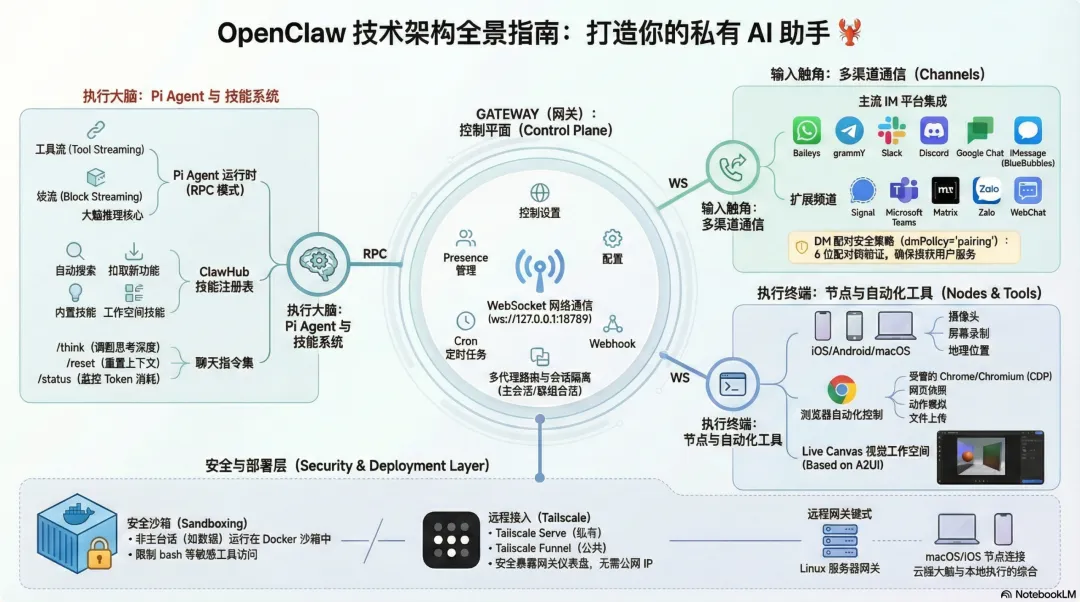
以下是对OpenClaw技术架构设计的详细解读:
1.核心控制平面: Gateway(网关)
Gateway是OpenClaw的心脏,充当系统的单一控制平面
功能职责: 负责管理会话(Sessions)、状态感知(Presence)、配置、定时任务(Cron)、网络钩子(Webhooks)以及控制界面(Control UI)和Canvas宿主
通信协议: 基于WebSocket(WS) 网络构建,为所有客户端、工具和事件提供统一的连接通道。
运行环境: 推荐在 Node ≥22 环境下运行,通常作为守护进程(Daemon)常驻后台。
2.智能体运行时: Pi Agent
Pi Agent是处理逻辑和生成回复的核心引擎:
RPC模型: Pi Agent以RPC(远程过程调用)模式运行,支持工具流(Tool Streaming)和块流(Block Streaming),确保响应的高效与实时性。
多智能体路由: 系统能够将来自不同频道、账户或同伴的输入路由到相互隔离的智能体(拥有独立的Workspace和会话)
会话模型: 提供
main模式用户直接对话,并支持群组隔离、激活模式切换和队列管理。
3.连接生态: Channels(频道)
OpenClaw的一大特色是其极强的连接性,它将AI能力注入到用户已有的社交生态中。
多频道集成:原生支持包括 WhatsApp、Telegram、Slack、Discord、Google Chat、Signal、iMessage、Microsoft Teams、Matrix 以及 Zalo 等多种通讯平台
路由规则: 具备复杂的群组路由逻辑,包括提及门控(Mention gating)、回复标签处理以及针对不同频道的自动消息分块。
4.设备节点与伴侣应用: Nodes & Apps
通过将不同设备定义为“节点”,OpenClaw 实现了跨设备的硬件控制:
跨平台支持:包括 macOS 菜单栏应用、iOS 节点和 Android 节点。
硬件能力调用:通过
node.invoke协议,智能体可以远程调用各节点上的硬件功能,如摄像头拍照/录码、屏幕录制、地理位置获取以及 macOS 特有的系统命令执行(system.run)。Voice Wake & Talk Mode:利用 ElevenLabs 等技术,在 macOS/iOS/Android 上提供始终在线的语音唤醒和连续对话能力。
5.工具与自动化:Tools & Skills
架构中集成了丰富的生产力工具:
浏览器控制:内置托管的 Chrome/Chromium 实例,支持快照、动作执行和文件上传。
Live Canvas:基于 A2UI 构建的实时交互画布,允许智能体驱动视觉化的工作空间。
技能平台 (ClawHub):提供技能注册表,支持捆绑技能、托管技能和工作区技能的自动搜索与安装。
6.安全与沙箱机制 (Security & Sandboxing)
由于 OpenClaw 会连接到真实的社交媒体和本地文件系统,安全性被置于重要位置:
DM 配对策略:默认情况下,未知发送者必须通过配对码验证,bot 才会处理其消息,以防止不受信任的输入。
Docker 沙箱:支持将 非主会话(如群组或外部频道)放入独立的 Docker 容器中运行,限制其对主机的访问权限,并对敏感工具(如浏览器、系统命令)进行黑白名单管理。
7.部署与远程访问
本地/远程灵活部署:Gateway 可以运行在本地或小型 Linux 实例上。
内网穿透:集成 Tailscale Serve/Funnel 或 SSH 隧道,使用户能够安全地从远程访问 Gateway 面板和 WebSocket 服务。
三、各系统模块详解
3.1 统一控制平面Gateway网关
3.1.1、核心定位
Gateway 是 OpenClaw 的统一控制平面,是一个 WebSocket 服务器,负责:
1.消息路由 - 所有频道(Telegram、Discord、Slack 等)的消息路由
2.会话管理 - Agent 会话的生命周期管理
3.工具调用 - Agent 工具的执行协调
4.节点通信 - iOS/Android 等移动节点的通信桥接
5.HTTP API - 提供 OpenAI 兼容的 REST API
3.1.2、架构模型
┌─────────────────────────────────────────────────────┐│ Gateway 进程 ││ ┌──────────┐ ┌──────────┐ ┌──────────┐ ││ │WebSocket │ │ HTTP API │ │ Control │ ││ │ Server │ │ (OpenAI) │ │ UI │ ││ └────┬─────┘ └────┬─────┘ └────┬─────┘ ││ │ │ │ ││ └─────────────┴─────────────┘ ││ │ ││ ┌──────┴──────┐ ││ │ RPC Router │ ││ └──────┬──────┘ ││ ┌─────────────┼─────────────┐ ││ ┌────┴────┐ ┌─────┴─────┐ ┌────┴────┐ ││ │Channels │ │ Agents │ │ Nodes │ ││ │(消息路由)│ │ (会话管理) │ │(设备节点)│ ││ └─────────┘ └───────────┘ └─────────┘ │└─────────────────────────────────────────────────────┘
3.1.3、关键特性
特性 | 说明 |
单端口复用 | WebSocket RPC + HTTP API + Control UI 共用一个端口(默认 18789) |
协议版本化 | 客户端声明 |
角色分离 |
|
作用域控制 | 细粒度的 scopes 控制( |
设备认证 | 支持设备身份验证和配对机制 |
热重载 | 支持 |
3.1.4、协议机制
连接握手流程:
Gateway Client│ ││◄──── connect.challenge ────────│ (可选:带 nonce 的挑战)│ ││─────── connect (req) ─────────►│ 携带 auth + role + scopes│ ││◄────── hello-ok (res) ─────────│ 返回 policy + 设备令牌│ ││◄─────── events ────────────────│ 持续推送状态变更
帧类型:
Request:
{type:"req", id, method, params}Response:
{type:"res", id, ok, payload|error}Event:
{type:"event", event, payload, seq?, stateVersion?}
3.1.5、认证模式
模式 | 使用场景 |
| 共享令牌认证(默认) |
| 共享密码认证 |
| 反向代理认证(如 Pomerium) |
| 设备身份认证(配对后自动获取) |
安全强制:
非环回地址绑定必须启用认证
明文
ws://禁止连接非本机地址(CWE-319)
3.1.6、绑定模式
模式 | 地址 | 用途 |
| 127.0.0.1 | 默认,仅本机访问 |
| 0.0.0.0 | 局域网访问 |
| Tailscale IP | Tailscale 网络 |
| 自动选择 | 根据环境自动判断 |
| 自定义地址 | 特定绑定需求 |
3.1.7、服务生命周期
macOS (launchd):
openclaw gateway install # 安装 LaunchAgentopenclaw gateway start # 启动服务openclaw gateway stop # 停止服务openclaw gateway restart # 重启服务
Linux (systemd):
openclaw gateway installsystemctl --user enable --now openclaw-gateway.service
3.1.8、配置热重载
模式 | 行为 |
| 不重载 |
| 仅应用安全热更新 |
| 需要重启时自动重启 |
| 安全时热更新,必要时重启(默认) |
3.1.9、关键配置项
{"gateway": {"port": 18789,"bind": "loopback","mode": "local","auth": {"mode": "token","token": "your-token"},"tls": {"enabled": true,"certPath": "/path/to/cert.pem","keyPath": "/path/to/key.pem"},"reload": {"mode": "hybrid","debounceMs": 300}}}
3.1.10、常用命令
# 启动网关openclaw gateway --port 18789# 查看状态openclaw gateway statusopenclaw gateway status --deep # 深度检查# 健康检查openclaw gateway healthopenclaw channels status --probe# 发现局域网网关openclaw gateway discover# 查看日志openclaw logs --follow
3.1.11、核心源码位置
模块 | 路径 |
CLI 入口 |
|
客户端 |
|
协议定义 |
|
服务端 HTTP |
|
配置类型 |
|
3.2 Agentic Loop / Pi Loop
如下图所示为OpenClaw的整个推理循环架构,也是构成整个系统执行的大脑思考核心。系统中所有的运行逻辑都由推理循环架构来控制,也就是AgenticLoop,OpenClaw的推理循环是一个事件驱动的架构:
1.主循环 (run.ts) 负责错误处理、重试、profile轮换
2.尝试层 (attempt.ts) 负责单次LLM调用的完整生命周期
3.事件订阅 (subscribe.ts) 处理流式响应和工具调用
4.工具循环 由底层SDK自动管理,当模型返回tool_use时自动执行工具并继续调用。
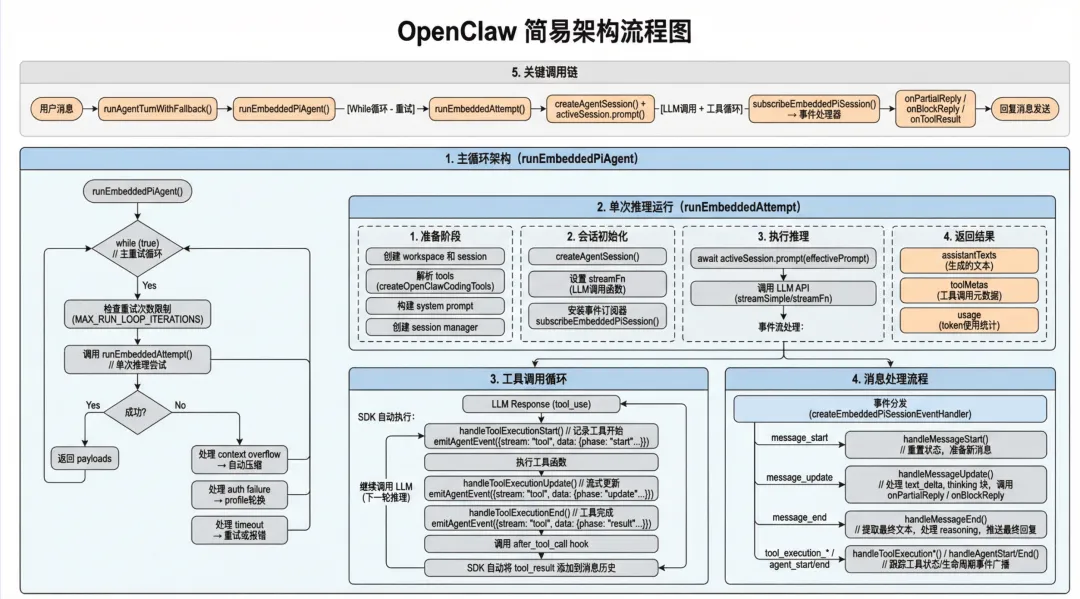 下面是OpenClaw推理(inference/reasoning)循环实现的核心设计流程。
3.2.1 核心推理循环
主循环架构 (runEmbeddedPiAgent in run.ts:192)
runEmbeddedPiAgent()└── while (true) { // 行538 - 主重试循环├── 检查重试次数限制 (MAX_RUN_LOOP_ITERATIONS)├── 调用 runEmbeddedAttempt() // 单次推理尝试├── 处理 context overflow → 自动压缩├── 处理 auth failure → profile轮换├── 处理 timeout → 重试或报错└── 成功则返回 payloads}
单次推理尝试 (runEmbeddedAttempt in run/attempt.ts:306)
runEmbeddedAttempt()├── 1. 准备阶段│ ├── 创建 workspace 和 session│ ├── 解析 tools (createOpenClawCodingTools)│ ├── 构建 system prompt│ └── 创建 session manager│├── 2. 会话初始化│ ├── createAgentSession() // 行688│ ├── 设置 streamFn (LLM调用函数)│ └── 安装事件订阅器 subscribeEmbeddedPiSession() // 行921│├── 3. 执行推理│ ├── await activeSession.prompt(effectivePrompt) // 行1180-1182│ │ └── 调用 LLM API(streamSimple/streamFn)│ ││ └── 事件流处理:│ ├── message_start/message_update/message_end → handleMessageStart/Update/End│ ├── tool_execution_start/update/end → handleToolExecutionStart/Update/End│ └── agent_start/agent_end → handleAgentStart/End│└── 4. 返回结果├── assistantTexts(生成的文本)├── toolMetas(工具调用元数据)└── usage(token使用统计)
工具调用循环
工具调用由底层 SDK (@mariozechner/pi-coding-agent) 的 createAgentSession 自动管理。当模型返回 tool_use 时:
LLM Response(tool_use)└── SDK 自动执行:├── handleToolExecutionStart() // 记录工具开始│ └── emitAgentEvent({stream: "tool", data: {phase: "start", name, toolCallId, args}})│├── 执行工具函数│├── handleToolExecutionUpdate() // 流式更新│ └── emitAgentEvent({stream: "tool", data: {phase: "update", ...}})│└── handleToolExecutionEnd() // 工具完成├── emitAgentEvent({stream: "tool", data: {phase: "result", ...}})├── 调用 after_tool_call hook└── SDK 自动将 tool_result 添加到消息历史└── 继续调用 LLM(下一轮推理)
消息处理流程 (subscribeEmbeddedPiSession in pi-embedded-subscribe.ts:34)
事件分发 (createEmbeddedPiSessionEventHandler):├── message_start → handleMessageStart()│ └── 重置状态,准备新消息│├── message_update → handleMessageUpdate()│ ├── 处理 text_delta│ ├── 处理 thinking 块│ └── 调用 onPartialReply / onBlockReply│├── message_end → handleMessageEnd()│ ├── 提取最终文本│ ├── 处理 reasoning│ └── 推送最终回复│├── tool_execution_* → handleToolExecution*()│ └── 跟踪工具状态,发送工具事件│└── agent_start/end → handleAgentStart/End()└── 生命周期事件广播
3.2.2 关键调用链
用户消息↓runAgentTurnWithFallback() (agent-runner-execution.ts:72)↓runEmbeddedPiAgent() (pi-embedded-runner/run.ts:192)↓ [while循环 - 重试]runEmbeddedAttempt() (pi-embedded-runner/run/attempt.ts:306)↓createAgentSession() + activeSession.prompt()↓ [LLM调用 + 工具循环]subscribeEmbeddedPiSession() → 事件处理器↓onPartialReply / onBlockReply / onToolResult↓回复消息发送
3.2.3 LLM调用函数
实际的LLM API调用通过 streamFn 完成:
默认:
streamSimple(来自@mariozechner/pi-ai)Ollama:
createOllamaStreamFn()可通过
applyExtraParamsToAgent()包装添加额外参数
3.3 定时任务系统
在OpenClaw中,定时任务是非常重要的一个基础设施,OpenClaw非常多的工作都是长任务,定时任务可以很好的满足这些长任务在后台单次或者周期性运行的诉求,同时与Heatbeat交互使得整个系统的交互更加拟人化,有些定时回复与交流,往往给人意想不到的拟人化体验。
3.3.1 、核心架构
┌─────────────────────────────────────────────────────────────────────┐│ CronService ││ (src/cron/service.ts) │├─────────────────────────────────────────────────────────────────────┤│ ┌───────────────┐ ┌──────────────┐ ┌────────────────────┐ ││ │ Timer │ │ Store │ │ State │ ││ │ (timer.ts) │ │ (store.ts) │ │ (state.ts) │ ││ └───────┬───────┘ └──────┬───────┘ └────────────────────┘ ││ │ │ ││ ▼ ▼ ││ ┌─────────────────────────────────────────────────────────┐ ││ │ Jobs Collection(jobs.json) │ ││ └─────────────────────────────────────────────────────────┘ │└─────────────────────────────────────────────────────────────────────┘
3.3.2、调度类型
type CronSchedule =| { kind: "at"; at: string } // 一次性任务,指定时间| { kind: "every"; everyMs: number; anchorMs?: number } // 周期性任务| { kind: "cron"; expr: string; tz?: string; staggerMs?: number } // Cron表达式
支持的调度模式:
1.at - 一次性任务,执行后自动禁用
2.every - 固定间隔执行
3.cron - 标准cron表达式,支持时区和stagger
3.3.3、定时器机制
核心实现在 src/cron/service/timer.ts:
const MAX_TIMER_DELAY_MS = 60_000; // 最大延迟60秒const MIN_REFIRE_GAP_MS = 2_000; // 最小重触发间隔2秒// 定时器armed函数export function armTimer(state: CronServiceState){const nextAt = nextWakeAtMs(state); // 计算下次唤醒时间const delay = Math.max(nextAt - now, 0);const clampedDelay = Math.min(delay, MAX_TIMER_DELAY_MS);state.timer = setTimeout(() => {void onTimer(state).catch(...);}, clampedDelay);}
关键特性:
定时器最大延迟60秒,防止时钟漂移
支持并发运行控制 (
maxConcurrentRuns)错误指数退避 (30s → 1min → 5min → 15min → 60min)
自动清理卡住的任务 (2小时超时)
3.3.4、任务持久化机制
存储位置:
默认路径:
~/.openclaw/cron/jobs.json可通过配置
cron.store自定义
存储格式:
type CronStoreFile = {version: 1;jobs: CronJob[];};type CronJob = {id: string;name: string;enabled: boolean;schedule: CronSchedule;sessionTarget: "main" | "isolated";payload: CronPayload;state: CronJobState; // 运行时状态// ...};
持久化流程:
1.原子写入(临时文件 + rename)
2.自动备份
3.支持热重载(文件修改时间检测)
运行日志:
路径:
~/.openclaw/cron/runs/<jobId>.jsonl自动裁剪(默认2MB,保留2000行)
3.3.5、任务恢复机制
启动恢复流程 (src/cron/service/ops.ts):
export async function start(state: CronServiceState){// 1. 加载存储await ensureLoaded(state, { skipRecompute: true });// 2. 清理卡住的任务for (const job of jobs) {if (job.state.runningAtMs) {job.state.runningAtMs = undefined; // 清除过期标记}}// 3. 运行错过的任务await runMissedJobs(state);// 4. 重新计算下次运行时间recomputeNextRuns(state);// 5. 启动定时器armTimer(state);}
3.3.6、任务执行类型
两种执行模式:
1.Main Session (sessionTarget: "main")
注入系统事件到主会话
payload必须为
{ kind: "systemEvent", text: string }
2.Isolated Agent (sessionTarget: "isolated")
独立agent会话执行
payload必须为
{ kind: "agentTurn", message: string, ... }支持模型覆盖、thinking模式、超时设置
超时控制:
export async function executeJobCoreWithTimeout(state, job){const jobTimeoutMs = resolveCronJobTimeoutMs(job);return await Promise.race([executeJobCore(state, job, abortSignal),new Promise((_, reject) => {timeoutId = setTimeout(() => {abortController.abort();reject(new Error("cron: job execution timed out"));}, jobTimeoutMs);}),]);}
3.3.7、与Heartbeat的集成
定时任务通过Heartbeat机制唤醒agent:
// src/gateway/server-cron.tsconst cron = new CronService({enqueueSystemEvent: (text, opts) => {enqueueSystemEvent(text, { sessionKey, contextKey });},requestHeartbeatNow: (opts) => {requestHeartbeatNow({ reason, agentId, sessionKey });},runHeartbeatOnce: async (opts) => {return await runHeartbeatOnce({ cfg, reason, agentId, sessionKey });},// ...});
Wake模式:
next-heartbeat - 等待下次心跳执行
now - 立即触发心跳
3.3.8、Webhook通知
支持任务完成后的Webhook回调:
if (webhookTarget && evt.summary) {await fetch(webhookTarget.url, {method: "POST",headers: {"Content-Type": "application/json","Authorization": `Bearer ${webhookToken}`,},body: JSON.stringify(evt),});}
3.3.9、CLI命令
openclaw cron status # 查看调度器状态openclaw cron list # 列出任务openclaw cron add # 添加任务openclaw cron edit # 编辑任务openclaw cron remove <id> # 删除任务openclaw cron run <id> # 手动触发任务
3.3.10、关键设计特点
1.单一定时器设计 - 只维护一个定时器,基于最近任务的nextRunAtMs
2.文件持久化 - JSON存储,支持跨进程共享
3.错误隔离 - 单个任务失败不影响其他任务
4.自动恢复 - 启动时检测并运行错过的任务
5.并发控制 - 可配置最大并发任务数
6.进度追踪 - 完整的运行日志和状态跟踪
7.Agent集成 - 可通过cron工具在agent中管理任务
3.4 工具系统
3.4.1 总体架构图
┌─────────────────────────────────────────────────────────────────────────────────┐│ OpenClaw Tool System │├─────────────────────────────────────────────────────────────────────────────────┤│ ││ ┌─────────────────────────────────────────────────────────────────────────┐ ││ │ Tool Creation Layer │ ││ │ ┌──────────────────────┐ ┌──────────────────────┐ │ ││ │ │createOpenClawCoding- │ │ createOpenClawTools │ │ ││ │ │Tools() (主入口) │ │ (OpenClaw 特定工具) │ │ ││ │ │ pi-tools.ts:182 │ │ openclaw-tools.ts │ │ ││ │ └──────────┬───────────┘ └──────────┬───────────┘ │ ││ │ │ │ │ ││ │ ▼ ▼ │ ││ │ ┌──────────────────────────────────────────────────────────────────┐ │ ││ │ │ Coding Tools(pi-coding-agent) │ │ ││ │ │ ┌─────────┐ ┌─────────┐ ┌─────────┐ ┌─────────┐ ┌───────────┐ │ │ ││ │ │ │ read │ │ write │ │ edit │ │ bash │ │ (其他...) │ │ │ ││ │ │ └─────────┘ └─────────┘ └─────────┘ └─────────┘ └───────────┘ │ │ ││ │ └──────────────────────────────────────────────────────────────────┘ │ ││ └─────────────────────────────────────────────────────────────────────────┘ ││ │ ││ ▼ ││ ┌─────────────────────────────────────────────────────────────────────────┐ ││ │ Tool Definition Layer │ ││ │ │ ││ │ ┌────────────────────────────────────────────────────────────────────┐ │ ││ │ │ AnyAgentTool(核心类型) │ │ ││ │ │ tools/common.ts:8 │ │ ││ │ │ ┌─────────────────────────────────────────────────────────────┐ │ │ ││ │ │ │ { │ │ │ ││ │ │ │ name: string; // 工具名称 (小写唯一) │ │ │ ││ │ │ │ label?: string; // 显示标签 │ │ │ ││ │ │ │ description: string; // 工具描述 (给 AI 看) │ │ │ ││ │ │ │ parameters?: TSchema; // JSON Schema / TypeBox schema │ │ │ ││ │ │ │ execute?: (id, args, signal) => Promise<TResult>; │ │ │ ││ │ │ │ ownerOnly?: boolean; // 仅所有者可用 │ │ │ ││ │ │ │ } │ │ │ ││ │ │ └─────────────────────────────────────────────────────────────┘ │ │ ││ │ └────────────────────────────────────────────────────────────────────┘ │ ││ │ │ ││ │ ┌────────────────────────────────────────────────────────────────────┐ │ ││ │ │ 内置工具实现 (src/agents/tools/) │ │ ││ │ │ ┌─────────────┐ ┌─────────────┐ ┌─────────────┐ ┌─────────────┐ │ │ ││ │ │ │browser-tool │ │memory-tool │ │message-tool │ │exec-tool │ │ │ ││ │ │ │浏览器控制 │ │记忆搜索 │ │消息发送 │ │命令执行 │ │ │ ││ │ │ └─────────────┘ └─────────────┘ └─────────────┘ └─────────────┘ │ │ ││ │ │ ┌─────────────┐ ┌─────────────┐ ┌─────────────┐ ┌─────────────┐ │ │ ││ │ │ │canvas-tool │ │gateway-tool │ │tts-tool │ │process-tool │ │ │ ││ │ │ │画布操作 │ │网关管理 │ │语音合成 │ │进程管理 │ │ │ ││ │ │ └─────────────┘ └─────────────┘ └─────────────┘ └─────────────┘ │ │ ││ │ └────────────────────────────────────────────────────────────────────┘ │ ││ └─────────────────────────────────────────────────────────────────────────┘ ││ │ ││ ▼ ││ ┌─────────────────────────────────────────────────────────────────────────┐ ││ │ Schema Normalization Layer │ ││ │ │ ││ │ ┌───────────────────────────────────────────────────────────────────┐ │ ││ │ │ normalizeToolParameters() │ │ ││ │ │ pi-tools.schema.ts │ │ ││ │ │ │ │ ││ │ │ ┌─────────────────┐ ┌─────────────────┐ ┌─────────────────┐ │ │ ││ │ │ │ Anthropic │ │ OpenAI │ │ Google/Gemini │ │ │ ││ │ │ │ 保持完整 JSON │ │ 确保顶层有 │ │ 清理不支持的 │ │ │ ││ │ │ │ Schema draft │ │ type:"object" │ │ constraint 关键字│ │ │ ││ │ │ │ 2020-12 兼容 │ │ │ │ │ │ │ ││ │ │ └─────────────────┘ └─────────────────┘ └─────────────────┘ │ │ ││ │ └───────────────────────────────────────────────────────────────────┘ │ ││ └─────────────────────────────────────────────────────────────────────────┘ ││ │ ││ ▼ ││ ┌─────────────────────────────────────────────────────────────────────────┐ ││ │ Policy Pipeline Layer │ ││ │ │ ││ │ ┌───────────────────────────────────────────────────────────────────┐ │ ││ │ │ applyToolPolicyPipeline() │ │ ││ │ │ tool-policy-pipeline.ts:65 │ │ ││ │ │ │ │ ││ │ │ 工具列表 ──▶ [Step 1: Profile Policy] ──▶ 过滤 │ │ ││ │ │ │ │ │ ││ │ │ ▼ │ │ ││ │ │ [Step 2: Provider Profile Policy] ──▶ 过滤 │ │ ││ │ │ │ │ │ ││ │ │ ▼ │ │ ││ │ │ [Step 3: Global Policy] ──▶ 过滤 │ │ ││ │ │ │ │ │ ││ │ │ ▼ │ │ ││ │ │ [Step 4: Agent Policy] ──▶ 过滤 │ │ ││ │ │ │ │ │ ││ │ │ ▼ │ │ ││ │ │ [Step 5: Group Policy] ──▶ 过滤 │ │ ││ │ │ │ │ │ ││ │ │ ▼ │ │ ││ │ │ [Step 6: Sandbox Policy] ──▶ 过滤 │ │ ││ │ │ │ │ │ ││ │ │ ▼ │ │ ││ │ │ [Step 7: Subagent Policy] ──▶ 最终工具列表 │ │ ││ │ └───────────────────────────────────────────────────────────────────┘ │ ││ │ │ ││ │ ┌───────────────────────────────────────────────────────────────────┐ │ ││ │ │ ToolPolicyConfig (配置结构) │ │ ││ │ │ ┌─────────────────────────────────────────────────────────────┐ │ │ ││ │ │ │ { │ │ │ ││ │ │ │ allow?: string[]; // 允许的工具列表 │ │ │ ││ │ │ │ alsoAllow?: string[]; // 额外允许 (合并到 allow) │ │ │ ││ │ │ │ deny?: string[]; // 拒绝的工具列表 │ │ │ ││ │ │ │ profile?: "minimal" | "coding" | "messaging" | "full"; │ │ │ ││ │ │ │ } │ │ │ ││ │ │ └─────────────────────────────────────────────────────────────┘ │ │ ││ │ └───────────────────────────────────────────────────────────────────┘ │ ││ └─────────────────────────────────────────────────────────────────────────┘ ││ │ ││ ▼ ││ ┌─────────────────────────────────────────────────────────────────────────┐ ││ │ Execution Layer │ ││ │ │ ││ │ ┌───────────────────────────────────────────────────────────────────┐ │ ││ │ │ AI Model Interaction │ │ ││ │ │ │ │ ││ │ │ ┌─────────────┐ tool_use ┌─────────────────────────┐ │ │ ││ │ │ │ AI Model │ ───────────────▶ │ Tool Execution Handler │ │ │ ││ │ │ │ (Claude等) │ │ handleToolExecutionStart│ │ │ ││ │ │ └─────────────┘ └───────────┬─────────────┘ │ │ ││ │ │ ▲ │ │ │ ││ │ │ │ ▼ │ │ ││ │ │ │ ┌─────────────────────────┐ │ │ ││ │ │ │ tool_result │ tool.execute() │ │ │ ││ │ │ └──────────────────────────│ (实际执行) │ │ │ ││ │ │ └───────────┬─────────────┘ │ │ ││ │ │ │ │ │ ││ │ │ ▼ │ │ ││ │ │ ┌─────────────────────────┐ │ │ ││ │ │ │handleToolExecutionEnd │ │ │ ││ │ │ │(处理结果 + after hook) │ │ │ ││ │ │ └─────────────────────────┘ │ │ ││ │ └───────────────────────────────────────────────────────────────────┘ │ ││ │ │ ││ │ ┌───────────────────────────────────────────────────────────────────┐ │ ││ │ │ Hook System(pi-tools.before-tool-call.ts) │ │ ││ │ │ │ │ ││ │ │ ┌─────────────────────┐ ┌─────────────────────┐ │ │ ││ │ │ │ before_tool_call │ │ after_tool_call │ │ │ ││ │ │ │ - 修改参数 │ │ - 记录结果 │ │ │ ││ │ │ │ - 阻止调用 │ │ - 循环检测 │ │ │ ││ │ │ │ - 记录日志 │ │ - 统计耗时 │ │ │ ││ │ │ └─────────────────────┘ └─────────────────────┘ │ │ ││ │ └───────────────────────────────────────────────────────────────────┘ │ ││ └─────────────────────────────────────────────────────────────────────────┘ ││ ││ ┌─────────────────────────────────────────────────────────────────────────┐ ││ │ Plugin System │ ││ │ │ ││ │ ┌───────────────────────────────────────────────────────────────────┐ │ ││ │ │ resolvePluginTools() │ │ ││ │ │ plugins/tools.ts │ │ ││ │ │ │ │ ││ │ │ ┌─────────────────────────────────────────────────────────────┐ │ │ ││ │ │ │ Plugin Registry(plugins/registry.ts) │ │ │ ││ │ │ │ │ │ │ ││ │ │ │ extensions/ │ │ │ ││ │ │ │ ├── msteams/ → msteams-send, msteams-react tools │ │ │ ││ │ │ │ ├── matrix/ → matrix-send, matrix-react tools │ │ │ ││ │ │ │ ├── zalo/ → zalo-send tool │ │ │ ││ │ │ │ └── voice-call/ → voice-call tool │ │ │ ││ │ │ └─────────────────────────────────────────────────────────────┘ │ │ ││ │ └───────────────────────────────────────────────────────────────────┘ │ ││ └─────────────────────────────────────────────────────────────────────────┘ ││ ││ ┌─────────────────────────────────────────────────────────────────────────┐ ││ │ HTTP Invocation API │ ││ │ │ ││ │ ┌───────────────────────────────────────────────────────────────────┐ │ ││ │ │ handleToolsInvokeHttpRequest() │ │ ││ │ │ gateway/tools-invoke-http.ts │ │ ││ │ │ │ │ ││ │ │ POST /tools/invoke │ │ ││ │ │ { │ │ ││ │ │ "tool": "browser", │ │ ││ │ │ "action": "screenshot", │ │ ││ │ │ "args": { ... }, │ │ ││ │ │ "sessionKey": "..." │ │ ││ │ │ } │ │ ││ │ └───────────────────────────────────────────────────────────────────┘ │ ││ └─────────────────────────────────────────────────────────────────────────┘ │└─────────────────────────────────────────────────────────────────────────────────┘
3.4.2 核心组件详解
工具创建层
入口函数:createOpenClawCodingTools() (pi-tools.ts:182)
这是工具系统的主入口,负责:
解析工具策略配置
创建编码工具
创建 OpenClaw 特定工具
加载插件工具
应用策略过滤
规范化 Schema
// 工具创建流程createOpenClawCodingTools() {1. resolveEffectiveToolPolicy() // 解析策略2. codingTools.flatMap() // 处理基础编码工具3. createExecTool() // 创建执行工具4. createOpenClawTools() // 创建 OpenClaw 工具5. applyToolPolicyPipeline() // 应用策略管道6. normalizeToolParameters() // 规范化 Schema7. wrapToolWithBeforeToolCallHook() // 添加钩子}
工具定义层
核心类型: AnyAgentTool (tools/common.ts:8)
type AnyAgentTool = AgentTool<any, unknown> & {ownerOnly?: boolean; // 仅所有者可用标志};
参数读取工具 (tools/common.ts):
readStringParam() - 字符串参数
readNumberParam() - 数字参数
readStringArrayParam() - 字符串数组
readReactionParams() - 表情反应参数
结果构造工具:
jsonResult() - JSON 结果
imageResult() - 图像结果
Schema 规范化层
函数:normalizeToolParameters() (pi-tools.schema.ts)
针对不同 AI 提供商的特殊处理:
提供商 | 处理方式 |
Anthropic | 保持完整 JSON Schema draft 2020-12 兼容 |
OpenAI | 确保顶层有 |
Google/Gemini | 清理不支持的 |
所有 | 合并 |
策略管道层
函数:applyToolPolicyPipeline() (tool-policy-pipeline.ts:65)
管道步骤顺序(优先级从低到高):
Profile Policy → Provider Profile → Global Policy → Agent Policy→ Group Policy → Sandbox Policy → Subagent Policy
策略配置结构:
type ToolPolicyConfig = {allow?: string[]; // 白名单alsoAllow?: string[]; // 追加白名单deny?: string[]; // 黑名单profile?: "minimal" | "coding" | "messaging" | "full";};
执行层
事件处理 (pi-embedded-subscribe.handlers.tools.ts):
handleToolExecutionStart() - 记录开始时间,发出事件
handleToolExecutionEnd() - 处理结果,运行 after hook
Hook 系统:
before_tool_call - 可修改参数/阻止调用
after_tool_call - 记录结果/循环检测
插件系统
工具解析: resolvePluginTools() (plugins/tools.ts)
插件工具注册:
type PluginToolRegistration = {pluginId: string;factory: OpenClawPluginToolFactory;names: string[];optional: boolean;source: string;};
HTTP 调用 API
端点: POST /tools/invoke (gateway/tools-invoke-http.ts)
允许外部系统直接调用工具,支持:
认证验证
策略应用
结果返回
3.4.3 工具调用完整流程
用户消息│▼┌─────────────────┐│ Gateway 接收 │└────────┬────────┘│▼┌─────────────────┐ createOpenClawCodingTools()│ 构建工具列表 │ ◀──────────────────────────────└────────┬────────┘│▼┌─────────────────┐ applyToolPolicyPipeline()│ 应用策略过滤 │ ◀──────────────────────────────└────────┬────────┘│▼┌─────────────────┐ normalizeToolParameters()│ 规范化 Schema │ ◀──────────────────────────────└────────┬────────┘│▼┌─────────────────┐│ 发送给 AI 模型 │└────────┬────────┘│▼┌─────────────────┐│ AI 生成 tool_use│└────────┬────────┘│▼┌─────────────────┐ before_tool_call hook│ 工具执行前检查 │ ◀──────────────────────────────└────────┬────────┘│▼┌─────────────────┐│ tool.execute() │└────────┬────────┘│▼┌─────────────────┐ after_tool_call hook│ 工具执行后处理 │ ◀──────────────────────────────└────────┬────────┘│▼┌─────────────────┐│ 返回 tool_result│└────────┬────────┘│▼┌─────────────────┐│ AI 继续推理 │└─────────────────┘
3.4.4 关键设计特点
1.分层架构: 创建 → 定义 → 规范化 → 策略 → 执行,职责清晰
2.策略管道: 多级策略叠加,支持精细控制
3.Provider 适配: 自动处理不同 AI 提供商的 Schema 差异
4.插件扩展: 插件工具与核心工具统一管理
5.Hook 机制: 支持工具调用前后拦截处理
6.沙箱支持: 隔离环境下的工具执行
3.5 Channels
Channels是OpenClaw进行社交生态连接最重要的设计,它将AI能力真正注入到了用户的社交与工作动线中。
3.5.1 核心架构
Channel抽象设计
┌─────────────────────────────────────────────────────────────────────┐│ ChannelPlugin 接口 │├─────────────────────────────────────────────────────────────────────┤│ id: ChannelId ││ meta: ChannelMeta (label, docsPath, aliases) ││ capabilities: ChannelCapabilities (chatTypes, polls, threads...) │├─────────────────────────────────────────────────────────────────────┤│ 12个独立适配器 (职责分离) │├─────────────────────────────────────────────────────────────────────┤│ config │ 账户配置管理 │ outbound │ 消息发送 ││ setup │ 账户设置流程 │ status │ 状态探测 ││ gateway │ Gateway生命周期 │ security │ 安全策略 ││ pairing │ 配对管理 │ groups │ 群组管理 ││ threading │ 线程处理 │ mentions │ 提及解析 ││ messaging │ 消息扩展 │ directory │ 目录查询 ││ resolver │ 路由解析 │ actions │ 消息动作 │├─────────────────────────────────────────────────────────────────────┤│ 可选: onboarding, auth, heartbeat, agentTools │└─────────────────────────────────────────────────────────────────────┘
消息流转完整架构
消息流向图==============================================================================INBOUND(入站) OUTBOUND(出站)━━━━━━━━━━━━━━━━ ━━━━━━━━━━━━━━━━┌──────────────┐│ 外部平台 ││ Telegram ││ Discord ││ Slack ││ WhatsApp ││ iMessage ││ MSTeams... │└──────┬───────┘││ 1. Webhook/Gateway Event▼┌──────────────┐ ┌─────────────────────────────────────────────┐│ Channel │ │ PLUGIN REGISTRY ││ Monitor ├──────▶│ - channels: PluginChannelRegistration[] ││ (接收层) │ │ - plugins: PluginRecord[] │└──────┬───────┘ │ - Lazy Loading + Caching ││ └─────────────────────────────────────────────┘│ 2. 去重 & 预处理▼┌──────────────┐│ Allowlist │ 优先级(从高到低):│ 验证 │ 1. binding.peer (精确用户/群组)└──────┬───────┘ 2. binding.peer.parent (线程继承)│ 3. binding.guild + roles│ 3. 通过 4. binding.guild▼ 5. binding.team┌──────────────┐ 6. binding.account│ resolveAgent │ 7. binding.channel│ Route │ 8.default agent│ (路由解析) │└──────┬───────┘││ 4. 返回 {agentId, sessionKey, matchedBy}▼┌──────────────┐│ Session │ Session Key格式:│ 管理 │ {agentId}:{mainKey}:{channel}:{accountId}:{peerKind}:{peerId}│ │└──────┬───────┘││ 5. 持久化会话元数据▼┌──────────────┐│ Agent ││ AI Engine ││ 处理消息 │└──────┬───────┘││ 6. 生成回复▼┌──────────────┐ ┌──────────────────────┐│ Outbound │ │ ChannelDock ││ Deliver │ │ (轻量级元数据) ││ │ │ - capabilities │└──────┬───────┘ │ - outbound config ││ │ - threading rules ││ 7. 加载 OutboundAdapter └──────────────────────┘▼┌──────────────┐│ 消息分块 ││ (chunker) │└──────┬───────┘││ 8. 文本/媒体发送▼┌──────────────┐ ┌──────────────────────┐│ Channel │ │ 具体实现 ││ Outbound ├───────────────────▶│ - Telegram: bot.ts ││ Adapter │ │ - Discord: send.ts │└──────────────┘ │ - Slack: send.ts ││ - WhatsApp: web │└──────────────────────┘
插件生命周期
┌─────────────────────────────────────────────────────────────────────┐│ Channel 生命周期 │├─────────────────────────────────────────────────────────────────────┤│ ││ 1. 注册阶段 ││ └─ 插件通过 registerChannel() 注册到 PluginRegistry ││ ││ 2. 初始化阶段 ││ ├─ 轻量加载: getChannelDock() → 仅元数据 ││ └─ 完整加载: getChannelPlugin() → 完整插件 ││ ││ 3. 配置阶段 ││ ├─ SetupAdapter: resolveAccountId(), applyAccountConfig() ││ └─ ConfigAdapter: listAccountIds(), resolveAccount() ││ ││ 4. 运行阶段 ││ ├─ Gateway启动: startAccount() [可选] ││ ├─ 消息接收: inbound handlers ││ ├─ 路由解析: resolveAgentRoute() ││ └─ 消息发送: OutboundAdapter.sendText/sendMedia() ││ ││ 5. 监控阶段 ││ ├─ StatusAdapter: probeAccount(), auditAccount() ││ └─ HeartbeatAdapter: checkReady() ││ │└─────────────────────────────────────────────────────────────────────┘
核心适配器架构
┌─────────────────────────────────────────────────────────────────────┐│ ChannelPlugin 适配器矩阵 │├──────────────────┬──────────────────────────────────────────────────┤│ 核心适配器 │ 职责 │├──────────────────┼──────────────────────────────────────────────────┤│ config │ 账户配置: listAccountIds, resolveAccount, ││ │ isEnabled, isConfigured, setAccountEnabled │├──────────────────┼──────────────────────────────────────────────────┤│ setup │ 账户设置: resolveAccountId, applyAccountConfig, ││ │ validateAccountConfig │├──────────────────┼──────────────────────────────────────────────────┤│ outbound │ 消息发送: sendText, sendMedia, sendPoll, ││ │ editText, deleteMessage, chunker │├──────────────────┼──────────────────────────────────────────────────┤│ status │ 状态探测: probeAccount, auditAccount, ││ │ formatStatusSnapshot │├──────────────────┼──────────────────────────────────────────────────┤│ gateway │ 生命周期: startAccount, stopAccount, ││ │ getRunningAccountIds, createInboundHandler │├──────────────────┼──────────────────────────────────────────────────┤│ security │ 安全策略: resolveDmPolicy, collectWarnings │├──────────────────┼──────────────────────────────────────────────────┤│ pairing │ 配对管理: resolvePairing, validatePairing │├──────────────────┼──────────────────────────────────────────────────┤│ 功能适配器 │ 职责 │├──────────────────┼──────────────────────────────────────────────────┤│ groups │ 群组: resolveRequireMention, resolveToolPolicy │├──────────────────┼──────────────────────────────────────────────────┤│ threading │ 线程: resolveReplyToMode, buildToolContext │├──────────────────┼──────────────────────────────────────────────────┤│ mentions │ 提及: resolveMentions, formatMention │├──────────────────┼──────────────────────────────────────────────────┤│ directory │ 目录: resolveUserDirectory, resolveGroupDirectory│├──────────────────┼──────────────────────────────────────────────────┤│ resolver │ 路由: resolveAgentRoute (自定义路由逻辑) │├──────────────────┼──────────────────────────────────────────────────┤│ actions │ 动作: resolveMessageActions, handleAction │├──────────────────┼──────────────────────────────────────────────────┤│ messaging │ 消息扩展: resolveMessageMeta, formatMessage │└──────────────────┴──────────────────────────────────────────────────┘
目录结构映射
src/├── channels/ # Channel核心抽象│ ├── plugins/ # 插件系统│ │ ├── types.plugin.ts # ChannelPlugin接口定义│ │ ├── types.adapters.ts # 12个适配器接口│ │ ├── types.core.ts # Capabilities, Meta等│ │ └── registry-loader.ts # 加载器工厂│ ├── dock.ts # 轻量级Dock (共享代码路径)│ ├── registry.ts # Channel ID规范化│ ├── allow-from.ts # Allowlist匹配│ ├── channel-config.ts # 配置匹配│ └── session.ts # 会话状态管理│├── routing/ # 路由系统│ ├── resolve-route.ts # 路由解析 (核心: 291-443行)│ ├── bindings.ts # Agent绑定管理│ └── session-key.ts # Session Key构建│├── telegram/ # Telegram实现│ └── bot.ts # Bot创建, Update去重├── discord/ # Discord实现│ ├── monitor.ts # Gateway连接│ ├── send.ts # 消息发送 (Components V2)│ └── ui.ts # UI容器├── slack/ # Slack实现├── signal/ # Signal实现├── imessage/ # iMessage实现├── web/ # WhatsApp Web实现│ └── whatsapp-heartbeat.ts # 心跳检测│├── infra/outbound/ # 出站消息基础设施│ └── deliver.ts # 消息发送流程│└── plugins/ # 插件注册系统└── registry.ts # PluginRegistry实现extensions/ # 扩展插件├── msteams/ # Microsoft Teams│ └── src/channel.ts├── matrix/ # Matrix协议│ └── src/channel.ts├── zalo/ # Zalo└── voice-call/ # 语音通话
3.5.2 关键设计要点
1.分层抽象: Application → Channel Abstraction → Implementation → Plugin Registry
2.适配器模式: 12个独立适配器,职责清晰分离
3.性能优化: Dock轻量加载、延迟加载、路由缓存、Update去重
4.扩展性: 新增Channel只需实现ChannelPlugin接口并注册
5.安全隔离: 每个channel独立的security、pairing、allowlist逻辑
3.6 上下文管理
3.6.1 核心概念
Context(上下文) = OpenClaw 在一次运行中发送给模型的所有内容,受模型的上下文窗口(token 限制)约束。如下为上下文构成要素,包括系统提示词汇、工具列表+描述、Skills列表(仅元数据)、工作区位置 + 时间 + 运行时数据。
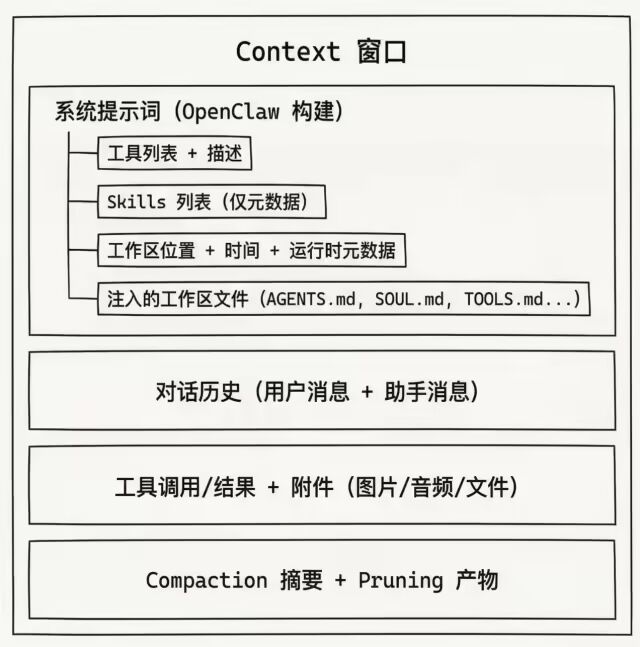
注意:Context ≠ Memory。记忆可持久化到磁盘,Context 是模型当前窗口内的内容。
3.6.2 上下文窗口管理
上下文解析优先级:
1.显式覆盖contextTokensOverride → 直接使用
2.配置参数context1m: true (Anthropic 1M 模型) → 1,048,576 tokens
3.模型注册表 → 从 models.json 或 provider catalog 发现
4.配置文件覆盖→ models.providers.*.models[].contextWindow
5.Fallback→ 使用传入的默认值
上下文窗口守卫:src/agents/context-window-guard.ts
CONTEXT_WINDOW_HARD_MIN_TOKENS = 16_000 // 低于此值阻断运行CONTEXT_WINDOW_WARN_BELOW_TOKENS = 32_000 // 低于此值警告
三种检查结果:
shouldWarn: 窗口 < 32K tokens(可能体验不佳)
shouldBlock: 窗口 < 16K tokens(无法正常工作)
来源标记:
model|modelsConfig|agentContextTokens|default
3.6.3 上下文压缩
压缩机制
src/agents/compaction.ts
当会话接近或超过上下文窗口时,OpenClaw 自动触发压缩:
旧消息 ──→ LLM 总结 ──→ 紧凑摘要条目 ──→ 持久化到 JSONL核心流程:
1.Token 估算 (estimateMessagesTokens) - 计算当前消息总 token
2.分块 (chunkMessagesByMaxTokens) - 按 token 限制分块
3.摘要生成 (summarizeWithFallback) - 带重试的摘要生成
4.历史裁剪 (pruneHistoryForContextShare) - 裁剪旧消息保持预算
自适应分块
BASE_CHUNK_RATIO = 0.4 // 基础分块比例MIN_CHUNK_RATIO = 0.15 // 最小分块比例SAFETY_MARGIN = 1.2 // 20% 缓冲补偿估算误差
当消息平均大小 > 上下文 10% 时,自动减小分块比例。
过大消息处理
isOversizedForSummary(msg, contextWindow)// 单条消息 > 上下文 50% → 无法安全压缩
处理策略:
1.尝试完整压缩
2.失败 → 只压缩小消息,记录过大消息
3.最终回退 → 返回消息计数说明
3.6.4 上下文剪枝
与压缩的区别
特性 | Compaction | Pruning |
作用范围 | 整个历史 | 仅 toolResult 消息 |
持久化 | ✓ 写入 JSONL | ✗ 仅内存 |
触发时机 | 接近窗口上限 | 每次请求前 (TTL 过期时) |
内容变更 | 生成摘要 | 软修剪/硬清除 |
剪枝配置
src/agents/pi-extensions/context-pruning/settings.ts
DEFAULT_CONTEXT_PRUNING_SETTINGS = {mode: "cache-ttl",ttlMs: 5 * 60 * 1000, // 5 分钟 TTLkeepLastAssistants: 3, // 保护最后 3 条助手消息softTrimRatio: 0.3, // 上下文占用 > 30% 触发软修剪hardClearRatio: 0.5, // 上下文占用 > 50% 触发硬清除minPrunableToolChars: 50_000,softTrim: {maxChars: 4_000, // > 4K 字符触发软修剪headChars: 1_500, // 保留头部 1500 字符tailChars: 1_500, // 保留尾部 1500 字符},hardClear: {enabled: true,placeholder: "[Old tool result content cleared]",},}
剪枝执行流程
src/agents/pi-extensions/context-pruning/pruner.ts
1. 检查 TTL 是否过期↓ 过期2. 计算上下文占用比例↓ 超过 softTrimRatio3. 软修剪:对可修剪工具结果截取 head + tail↓ 仍超过 hardClearRatio4. 硬清除:替换为占位符
保护机制:
不修改用户/助手消息
跳过包含图片的 toolResult
保护 bootstrap 阶段消息(第一条用户消息之前)
保护最后 N 条助手消息之后的工具结果
3.6.5 工具结果上下文守卫
src/agents/pi-embedded-runner/tool-result-context-guard.ts
单条工具结果限制
SINGLE_TOOL_RESULT_CONTEXT_SHARE = 0.5 // 单条最多占上下文 50%TOOL_RESULT_CHARS_PER_TOKEN_ESTIMATE = 2// 更保守的估算
执行逻辑
// 1. 每条工具结果限制maxSingleToolResultChars = contextWindowTokens * 2 * 0.5// 2. 总上下文预算 (75% headroom)contextBudgetChars = contextWindowTokens * 4 * 0.75// 3. 超预算时压缩最旧的工具结果// 替换为 "[compacted: tool output removed to free context]"
3.6.6 运行时上下文注入
工作区文件注入
默认注入文件(如果存在):
AGENTS.md- 项目规则
SOUL.md - 角色定义
TOOLS.md - 工具指南
IDENTITY.md - 身份信息
USER.md - 用户偏好
HEARTBEAT.md - 心跳状态
BOOTSTRAP.md - 首次运行引导
截断配置:
{"agents": {"defaults": {"bootstrapMaxChars": 20000, // 单文件上限"bootstrapTotalMaxChars": 150000 // 总上限}}}
压缩后上下文刷新
src/auto-reply/reply/post-compaction-context.ts
压缩完成后,重新注入 AGENTS.md 中的关键章节:
## Session Startup
## Red Lines
目的:确保模型在压缩后仍遵循关键规则。
Sandbox 上下文
src/agents/sandbox/context.ts
为沙箱会话提供:
容器信息 (
containerName,containerWorkdir)工作区映射 (
workspaceDir,agentWorkspaceDir)Docker 配置 (
docker)工具权限 (
tools)浏览器桥接 (
browser,fsBridge)
3.6.7 检查与调试命令
命令 | 作用 |
| 快速查看窗口占用率 + 会话设置 |
| 查看注入文件大小、工具 schema 大小 |
| 详细分解各组件大小 |
| 每次回复显示 token 使用量 |
| 手动触发压缩 |
3.6.8 关键配置汇总
{"agents": {"defaults": {// 上下文窗口"contextTokens": 200000, // 硬性上限// Bootstrap 注入"bootstrapMaxChars": 20000,"bootstrapTotalMaxChars": 150000,// 压缩配置"compaction": {"mode": "auto","targetTokens": 0.7 // 目标占用率},// 剪枝配置"contextPruning": {"mode": "cache-ttl","ttl": "5m","keepLastAssistants": 3,"softTrimRatio": 0.3,"hardClearRatio": 0.5}}},// 模型上下文窗口覆盖"models": {"providers": {"anthropic": {"models": [{ "id": "claude-sonnet-4", "contextWindow": 200000 }]}}}}
3.7 SubAgent 架构详解
3.7.1 核心概念
SubAgent(子智能体)是从现有 Agent 运行中生成的后台独立运行实例。它们在独立的会话中执行任务,完成后将结果自动通告回请求者的聊天渠道。
关键特征
会话隔离:每个 SubAgent 拥有独立的会话键
agent:<agentId>:subagent:<uuid>后台执行:非阻塞式运行,支持并行处理
结果通告:完成时自动向父会话推送结果摘要
嵌套支持:支持多层嵌套(最大5层深度,推荐2层)
3.7.2 架构组件
会话键系统
会话键格式与深度:
深度 | 会话键格式 | 角色 | 能否派生子智能体 |
0 |
| 主智能体 | 总是可以 |
1 |
| 子智能体(编排者) | 仅当 |
2 |
| 子子智能体(叶子工作者) | 永远不能 |
深度计算逻辑(subagent-depth.ts:124-176):
export function getSubagentDepthFromSessionStore(sessionKey: string | undefined | null,opts?: { cfg?: OpenClawConfig; store?: Record<string, SessionDepthEntry> }): number {// 从会话键解析基础深度const fallbackDepth = getSubagentDepth(raw);// 读取会话存储中的 spawnDepth 字段const storedDepth = normalizeSpawnDepth(entry?.spawnDepth);// 或通过 spawnedBy 链递归计算父深度 + 1const parentDepth = depthFromStore(spawnedBy);return parentDepth + 1;}
注册表
核心数据结构(subagent-registry.types.ts:6-35):
export type SubagentRunRecord = {runId: string; // 运行标识符childSessionKey: string; // 子会话键requesterSessionKey: string; // 请求者会话键requesterOrigin?: DeliveryContext; // 请求者来源(渠道、账号等)task: string; // 任务描述cleanup: "delete" | "keep"; // 清理策略label?: string; // 显示标签model?: string; // 使用的模型runTimeoutSeconds?: number; // 运行超时spawnMode?: SpawnSubagentMode; // 运行模式createdAt: number; // 创建时间startedAt?: number; // 开始时间endedAt?: number; // 结束时间outcome?: SubagentRunOutcome; // 运行结果suppressAnnounceReason?: "steer-restart" | "killed"; // 抑制通告原因endedReason?: SubagentLifecycleEndedReason; // 结束原因};
核心职责:
1.运行跟踪:维护所有活跃和历史 SubAgent 运行记录
2.生命周期监听:通过 onAgentEvent 监听 lifecycle 事件(start/error/end)
3.持久化:运行记录持久化到磁盘,支持网关重启后恢复
4.级联停止:停止父运行时自动停止所有子运行
5.孤儿检测:恢复时检测并清理孤儿运行(缺失会话条目)
初始化流程(subagent-registry.ts:488-518):
functionrestoreSubagentRunsOnce(){if(restoreAttempted) return;restoreAttempted = true;// 1. 从磁盘恢复运行记录const restoredCount = restoreSubagentRunsFromDisk({runs: subagentRuns,mergeOnly: true,});// 2. 协调孤儿运行if(reconcileOrphanedRestoredRuns()) {persistSubagentRuns();}// 3. 恢复未完成的工作for(const runId of subagentRuns.keys()) {resumeSubagentRun(runId);}}
派生逻辑
核心流程(subagent-spawn.ts:166-550):
┌─────────────────────────────────────────────────────────────┐│ 1. 权限与深度检查 ││ - 检查调用者深度 < maxSpawnDepth ││ - 检查活跃子运行数 < maxChildrenPerAgent ││ - 检查 agentId 允许列表 │└─────────────────────────────────────────────────────────────┘↓┌─────────────────────────────────────────────────────────────┐│ 2. 创建子会话 ││ - 生成子会话键: agent:<id>:subagent:<uuid> ││ - 通过 sessions.patch 设置 spawnDepth ││ - 设置模型和思考级别 │└─────────────────────────────────────────────────────────────┘↓┌─────────────────────────────────────────────────────────────┐│ 3. 线程绑定(可选) ││ - 调用 subagent_spawning 钩子准备线程绑定 ││ - 失败时回滚删除会话 │└─────────────────────────────────────────────────────────────┘↓┌─────────────────────────────────────────────────────────────┐│ 4. 启动子运行 ││ - 构建子智能体系统提示 ││ - 调用 gateway.agent() 启动运行 ││ - 使用专属 lane: AGENT_LANE_SUBAGENT │└─────────────────────────────────────────────────────────────┘↓┌─────────────────────────────────────────────────────────────┐│ 5. 注册运行记录 ││ - 调用 registerSubagentRun() 注册到 registry ││ - 开始等待完成 ││ - 触发 subagent_spawned 钩子 │└─────────────────────────────────────────────────────────────┘
系统提示构建(subagent-announce.ts:921-1025):
export function buildSubagentSystemPrompt(params: {requesterSessionKey?: string;childSessionKey: string;label?: string;task?: string;childDepth?: number;maxSpawnDepth?: number;}) {const canSpawn = childDepth < maxSpawnDepth;const lines = ["# Subagent Context",`You are a **subagent** spawned by the ${parentLabel} for a specific task.`,"","## Your Role",`- You were created to handle: ${taskText}`,"- Complete this task. That's your entire purpose.","","## Rules","1. **Stay focused** - Do your assigned task, nothing else","2. **Complete the task** - Your final message will be automatically reported","3. **Don't initiate** - No heartbeats, no proactive actions, no side quests","4. **Be ephemeral** - You may be terminated after task completion","5. **Trust push-based completion** - Descendant results auto-announce","6. **Recover from compacted/truncated tool output** - Re-read with smaller chunks",// ...];if (canSpawn) {lines.push("## Sub-Agent Spawning","You CAN spawn your own sub-agents using `sessions_spawn`.","Use the `subagents` tool to steer, kill, or check status.","Your sub-agents will announce their results back to you automatically.",// ...);} elseif (childDepth >= 2) {lines.push("## Sub-Agent Spawning","You are a leaf worker and CANNOT spawn further sub-agents.",// ...);}}
通告机制
核心流程(subagent-announce.ts:1053-1382):
┌─────────────────────────────────────────────────────────────┐│ 1. 等待运行结束 ││ - 等待嵌入式运行完成(如果是嵌入式) ││ - 调用 agent.wait 等待运行完成 ││ - 读取最新助手回复或工具结果 │└─────────────────────────────────────────────────────────────┘↓┌─────────────────────────────────────────────────────────────┐│ 2. 构建通告消息 ││ - 提取运行结果文本 ││ - 计算运行统计(运行时间、token使用量、成本) ││ - 生成状态标签(成功/超时/失败) │└─────────────────────────────────────────────────────────────┘↓┌─────────────────────────────────────────────────────────────┐│ 3. 确定投递目标 ││ - 检查线程绑定路由(bound 模式) ││ - 调用 subagent_delivery_target 钩子(hook 模式) ││ - 回退到请求者来源(fallback 模式) │└─────────────────────────────────────────────────────────────┘↓┌─────────────────────────────────────────────────────────────┐│ 4. 投递通告 ││ - 直接投递:调用 gateway.agent() 或 gateway.send() ││ - 队列投递:当请求者忙时入队等待 ││ - 嵌套处理:如果请求者是子智能体,向上冒泡 │└─────────────────────────────────────────────────────────────┘↓┌─────────────────────────────────────────────────────────────┐│ 5. 清理 ││ - 更新会话标签(如果有) ││ - 删除子会话(如果 cleanup: "delete") ││ - 触发 subagent_ended 钩子 │└─────────────────────────────────────────────────────────────┘
嵌套通告冒泡(subagent-announce.ts:1222-1253):
// 如果请求者子智能体已结束,向上冒泡到其父if (requesterIsSubagent && !isSubagentSessionRunActive(targetRequesterSessionKey)) {// 检查父会话是否还存在const parentSessionEntry = loadSessionEntryByKey(targetRequesterSessionKey);const parentSessionAlive = parentSessionEntry?.sessionId?.trim();if (!parentSessionAlive) {// 父会话已删除,回退到祖父const fallback = resolveRequesterForChildSession(targetRequesterSessionKey);if (fallback?.requesterSessionKey) {targetRequesterSessionKey = fallback.requesterSessionKey;targetRequesterOrigin = fallback.requesterOrigin;requesterDepth = getSubagentDepthFromSessionStore(targetRequesterSessionKey);requesterIsSubagent = requesterDepth >= 1;}}// 如果父会话存活(只是没有活跃运行),继续向父注入}
工具系统
工具定义(subagents-tool.ts:342-680):
动作:
list:列出活跃和最近的子运行
kill <target>:停止指定的子运行(支持级联)
steer <target> <message>:向运行中的子智能体发送指导消息
权限模型:
function resolveRequesterKey(params: {cfg: ReturnType<typeof loadConfig>;agentSessionKey?: string;}): ResolvedRequesterKey {const callerSessionKey = resolveInternalSessionKey({ key: callerRaw, alias, mainKey });if (!isSubagentSessionKey(callerSessionKey)) {// 主智能体:查看自己的子运行return { requesterSessionKey: callerSessionKey, callerIsSubagent: false };}const callerDepth = getSubagentDepthFromSessionStore(callerSessionKey, { cfg });const maxSpawnDepth = cfg.agents?.defaults?.subagents?.maxSpawnDepth ?? DEFAULT_SUBAGENT_MAX_SPAWN_DEPTH;if (callerDepth < maxSpawnDepth) {// 编排者子智能体:查看自己的子运行return { requesterSessionKey: callerSessionKey, callerIsSubagent: true };}// 叶子子智能体:查看父的子运行(兄弟运行)const spawnedBy = callerEntry?.spawnedBy?.trim();return { requesterSessionKey: spawnedBy || callerSessionKey, callerIsSubagent: true };}
级联停止(subagents-tool.ts:276-318):
async function cascadeKillChildren(params: {cfg: ReturnType<typeof loadConfig>;parentChildSessionKey: string;cache: Map<string, Record<string, SessionEntry>>;}): Promise<{ killed: number; labels: string[] }> {const childRuns = listSubagentRunsForRequester(params.parentChildSessionKey);let killed = 0;const labels: string[] = [];for (const run of childRuns) {if (!run.endedAt) {const stopResult = await killSubagentRun({ cfg, entry: run, cache });if (stopResult.killed) {killed += 1;labels.push(resolveSubagentLabel(run));}}// 递归停止孙运行const cascade = await cascadeKillChildren({cfg,parentChildSessionKey: run.childSessionKey,cache,});killed += cascade.killed;labels.push(...cascade.labels);}return { killed, labels };}
3.7.3 配置与限制
核心配置项
{agents: {defaults: {subagents: {maxSpawnDepth: 2, // 最大派生深度(1-5,默认1)maxChildrenPerAgent: 5, // 每个会话最大活跃子运行数(1-20)maxConcurrent: 8, // 全局并发上限(默认8)runTimeoutSeconds: 900, // 默认超时(0=无超时)archiveAfterMinutes: 60, // 自动归档时间(默认60分钟)model: "claude-3-haiku", // 子智能体默认模型thinking: "medium", // 默认思考级别},},list: [{agentId: "orchestrator",subagents: {allowAgents: ["*"], // 允许派生任意 agentId},}],},tools: {subagents: {tools: {deny: ["gateway", "cron"], // 工具黑名单allow: ["read", "exec"], // 工具白名单},},},}
工具策略
默认策略:
叶子子智能体:无会话工具(
sessions_*)编排者子智能体(深度1,当 maxSpawnDepth >= 2):
获得
sessions_spawn、subagents、sessions_list、sessions_history仍被拒绝:
sessions_send、sessions_delete等系统工具
工具过滤逻辑(docs:229-236):
// 深度1编排者获得会话工具if (isSubagentSessionKey(sessionKey) && depth === 1 && maxSpawnDepth >= 2) {allowedTools.push("sessions_spawn", "subagents", "sessions_list", "sessions_history");}// 深度2叶子工作者无会话工具if (depth >= 2) {denySet.add("sessions_spawn");}
3.7.4 插件钩子系统
钩子类型
钩子名称 | 触发时机 | 用途 |
| 派生前 | 准备线程绑定,验证权限 |
| 派生成功后 | 记录日志,更新UI状态 |
| 确定投递目标 | 自定义通告路由 |
| 运行结束 | 清理资源,发送告别消息 |
Discord 扩展示例(extensions/discord/src/subagent-hooks.ts):
// 注册钩子export function registerDiscordSubagentHooks(){const hookRunner = getGlobalHookRunner();hookRunner.register("subagent_spawning", async (event, ctx) => {// 创建 Discord 线程并绑定到子智能体会话const thread = await createDiscordThread({channelId: event.requester.to,name: `Subagent: ${event.label || event.agentId}`,});return {status: "ok",threadBindingReady: true,threadId: thread.id,};});hookRunner.register("subagent_delivery_target", async (event, ctx) => {// 将通告路由到绑定的 Discord 线程const binding = getThreadBinding(event.childSessionKey);if (binding) {return {origin: {channel: "discord",to: binding.channelId,threadId: binding.threadId,},};}return { origin: event.requesterOrigin };});}
3.7.5 并发与队列
Lane 系统(src/process/lanes.ts)
exportconstenumCommandLane {Main = "main", // 主会话Cron = "cron", // 定时任务Subagent = "subagent", // 子智能体Nested = "nested", // 嵌套调用}
并发控制:
子智能体使用专属
Subagentlane全局并发上限由
maxConcurrent控制(默认8)每个会话的子运行数由
maxChildrenPerAgent控制(默认5)
队列集成(subagent-announce.ts:645-702)
当请求者会话忙时,通告会被入队:
async function maybeQueueSubagentAnnounce(params): Promise<"steered" | "queued" | "none"> {const queueSettings = resolveQueueSettings({ cfg, channel, sessionEntry });const isActive = isEmbeddedPiRunActive(sessionId);// 1. 尝试 steer 模式const shouldSteer = queueSettings.mode === "steer" || queueSettings.mode === "steer-backlog";if (shouldSteer) {const steered = queueEmbeddedPiMessage(sessionId, params.triggerMessage);if (steered) return"steered";}// 2. 尝试 followup/collect 模式const shouldFollowup =queueSettings.mode === "followup" ||queueSettings.mode === "collect" ||queueSettings.mode === "steer-backlog" ||queueSettings.mode === "interrupt";if (isActive && shouldFollowup) {enqueueAnnounce({key: buildAnnounceQueueKey(canonicalKey, origin),item: { announceId, prompt, sessionKey, origin },settings: queueSettings,send: sendAnnounce,});return"queued";}return"none";}
3.7.6 认证与安全
认证继承(docs:196-204)
// 子智能体认证由 agentId 决定,而非会话类型const authStore = loadAuthStore({ agentId: targetAgentId });// 主智能体认证作为回退合并const mainAuthStore = loadAuthStore({ agentId: requesterAgentId });const mergedAuth = mergeAuthStores(authStore, mainAuthStore, {agentProfilesOverride: true, // 子智能体配置优先});
允许列表(docs:122-128)
// 子智能体认证由 agentId 决定,而非会话类型const authStore = loadAuthStore({ agentId: targetAgentId });// 主智能体认证作为回退合并const mainAuthStore = loadAuthStore({ agentId: requesterAgentId });const mergedAuth = mergeAuthStores(authStore, mainAuthStore, {agentProfilesOverride: true, // 子智能体配置优先});
3.7.7 典型场景
并行研究
用户: "研究这三个主题并生成报告"主智能体:- sessions_spawn(task: "研究主题A", label: "research-a")- sessions_spawn(task: "研究主题B", label: "research-b")- sessions_spawn(task: "研究主题C", label: "research-c")[等待通告...]research-a: ✅ 完成 - [结果摘要]research-b: ✅ 完成 - [结果摘要]research-c: ✅ 完成 - [结果摘要]主智能体: 综合结果生成最终报告
编排者模式(maxSpawnDepth=2)
用户: "重构这个大型项目"主智能体:- sessions_spawn(task: "协调重构工作",agentId: "orchestrator",label: "refactor-coordinator")refactor-coordinator(深度1编排者):- sessions_spawn(task: "重构模块A", label: "worker-a")- sessions_spawn(task: "重构模块B", label: "worker-b")- sessions_spawn(task: "重构模块C", label: "worker-c")[等待子运行通告...]worker-a: ✅ 完成worker-b: ✅ 完成worker-c: ✅ 完成refactor-coordinator: 综合结果,通知主智能体主智能体: 向用户报告完成
线程绑定会话
用户(在 Discord 线程中): "监控这个服务的性能"主智能体:- sessions_spawn(task: "启动性能监控",thread: true,mode: "session")[Discord 扩展创建专用线程][子智能体在专用线程中运行]用户(在同一 Discord 线程): "当前状态如何?"[消息路由到绑定的子智能体会话]子智能体: "当前 CPU 45%, 内存 2.1GB..."用户: "/unfocus"[解除线程绑定,后续消息路由回主智能体]
3.7.8 总结
SubAgent 架构的设计哲学:
1.隔离与独立:每个子智能体在独立会话中运行,拥有独立的上下文、token 配额和工具集
2.推式通知:结果自动通告,避免轮询开销和复杂性
3.嵌套编排:支持多层嵌套,实现复杂的编排模式
4.资源可控:通过深度限制、并发上限和工具策略控制资源消耗
5.可扩展性:通过插件钩子系统支持自定义行为(线程绑定、路由策略等)
关键设计决策:
使用会话键深度而非独立字段跟踪嵌套层级
通告机制而非返回值,支持异步和非阻塞语义
工具策略按深度区分,编排者获得管理工具而工作者专注任务
持久化注册表确保网关重启后不丢失运行状态
这套架构使 OpenClaw 能够高效处理并行任务、长时间运行作业和复杂的多智能体协作场景。
篇幅原因更多精彩内容在《深入理解OpenClaw技术架构与实现原理(下)》,请持续关注~