 夜雨聆风
夜雨聆风build-apple:name: build-${{ matrix.rid }}if: >-github.event.pull_request.draft == falseruns-on: macOS-lateststrategy:fail-fast: falsematrix:include:- rid: ios-arm64os: OS64- rid: iossimulator-arm64os: SIMULATORARM64- rid: iossimulator-x64os: SIMULATOR64- rid: osxos: MAC_UNIVERSAL- rid: osx-arm64os: MAC_ARM64- rid: osx-x64os: MACsteps:- name: Checkoutuses: actions/checkout@v6with:submodules: true- name: Clone nngrun: |git clone https://github.com/nanomsg/nng.gitpushd nnggit checkout ${{ env.NNG_VERSION }}popd- name: Run unamerun: uname -m- name: Configurerun: >cmake-S nng-B build-DBUILD_SHARED_LIBS=ON-DCMAKE_TOOLCHAIN_FILE=${{ github.workspace }}/toolchains/ios-cmake/ios.toolchain.cmake-DPLATFORM=${{ matrix.os }}-DCMAKE_BUILD_TYPE=${{ env.BUILD_TYPE }}-DCMAKE_INSTALL_PREFIX=${{ env.INSTALL_PREFIX }}-DCMAKE_MACOSX_BUNDLE=OFF-DNNG_ELIDE_DEPRECATED=ON-DNNG_ENABLE_COVERAGE=OFF-DNNG_ENABLE_NNGCAT=ON-DNNG_ENABLE_TLS=OFF-DNNG_TESTS=OFF-DNNG_TOOLS=ON- name: Build & Installrun: |cmake --build build --target install- name: Run file commandrun: file ./${{ env.INSTALL_PREFIX }}/lib/*- name: Upload artifactsuses: actions/upload-artifact@v7with:name: nng-${{ env.NNG_VERSION }}-${{ matrix.rid }}path: ${{ env.INSTALL_PREFIX }}
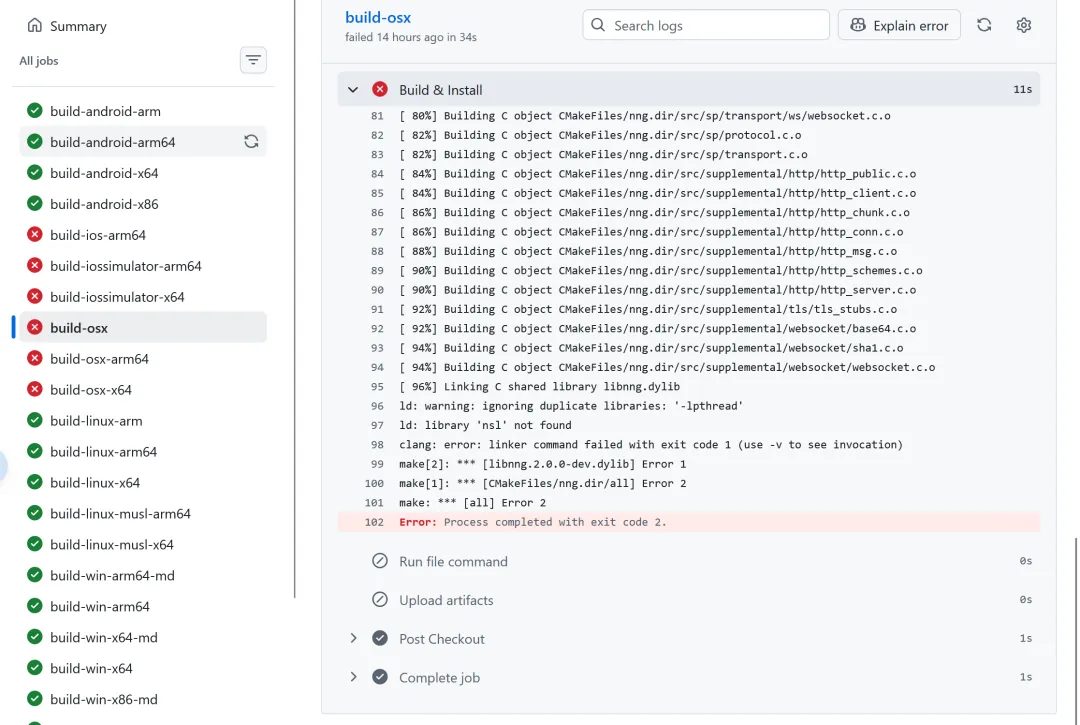
ld: library 'nsl' not foundclang: error: linker command failed with exit code 1 (use -v to see invocation)make[2]: *** [libnng.2.0.0-dev.dylib] Error 1make[1]: *** [CMakeFiles/nng.dir/all] Error 2make: *** [all] Error 2
# src/platform/posix/CMakeLists.txtif (NNG_PLATFORM_SUNOS)nng_defines(NNG_HAVE_SOCKETPAIR)nng_check_lib(nsl gethostbyname NNG_HAVE_LIBNSL)nng_check_lib(socket socket NNG_HAVE_LIBSOCKET)else()nng_check_lib(nsl gethostbyname NNG_HAVE_LIBNSL)nng_check_lib(socket socket NNG_HAVE_LIBSOCKET)endif()
# cmake/NNGHelpers.cmakefunction(nng_check_lib LIB SYM DEF)check_library_exists(${LIB} ${SYM} "" ${DEF})if (${DEF})target_compile_definitions(nng PRIVATE ${DEF}=1)target_compile_definitions(nng_testing PUBLIC ${DEF}=1)target_compile_definitions(nng_private INTERFACE ${DEF}=1)target_link_libraries(nng PRIVATE ${LIB})target_link_libraries(nng_testing PRIVATE ${LIB})endif ()endfunction(nng_check_lib)
在 macOS 上用 CMake 编译时,如果你使用 gethostbyname,通常会遇到和 Linux 不同的情况——不需要额外链接 -lnsl,因为相关符号已经在系统库里(libSystem)提供了。
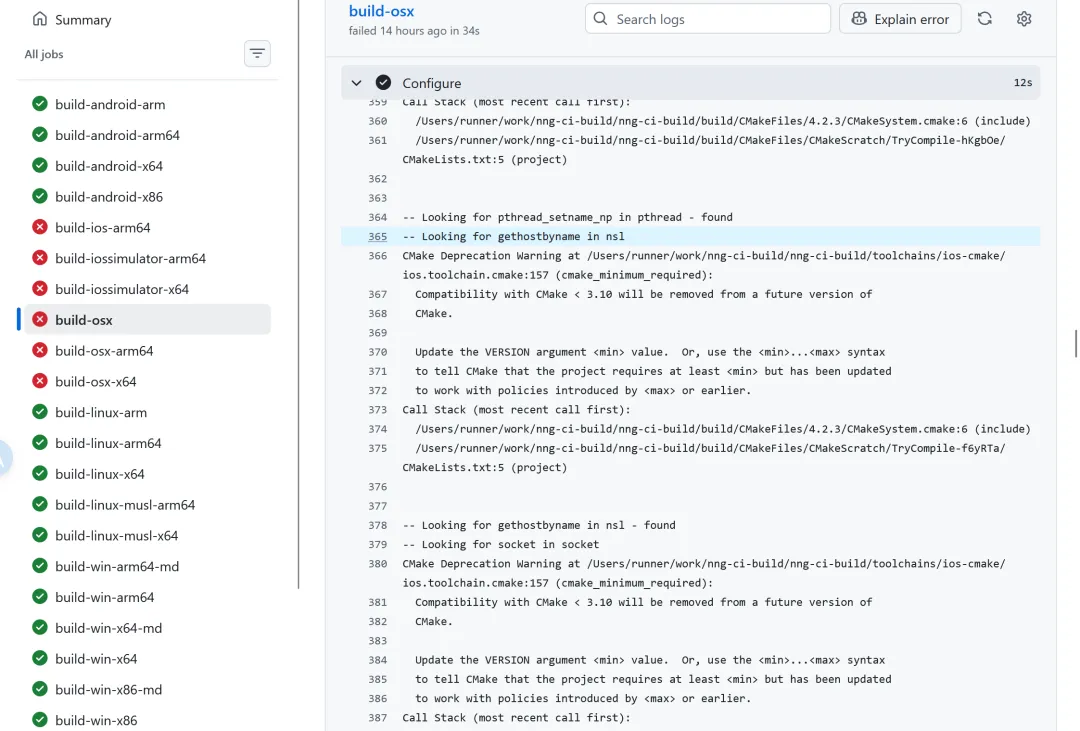
-- Looking for gethostbyname in nsl-- Looking for gethostbyname in nsl - found
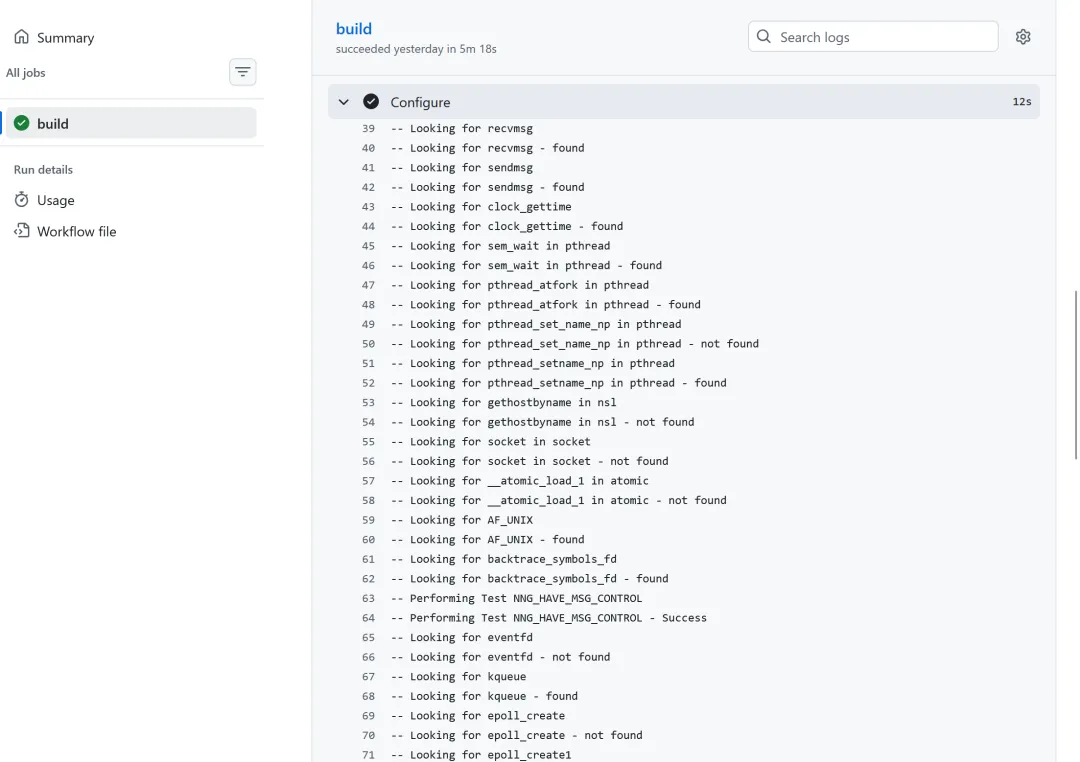
-- Looking for gethostbyname in nsl-- Looking for gethostbyname in nsl - not found
通过 GitHub Actions 使用 ios-cmake 在 macOS 构建 nng 动态库时,报错:ld: library 'nsl' not found但是,nng 官方仓库的构建(不使用 ios-cmake)就不会报错。我看了一下,前者 check_library_exist(nsl gethostbyname "") 会提示在 nsl 中找到 gethostbyname,但后者就是没找到。为什么?
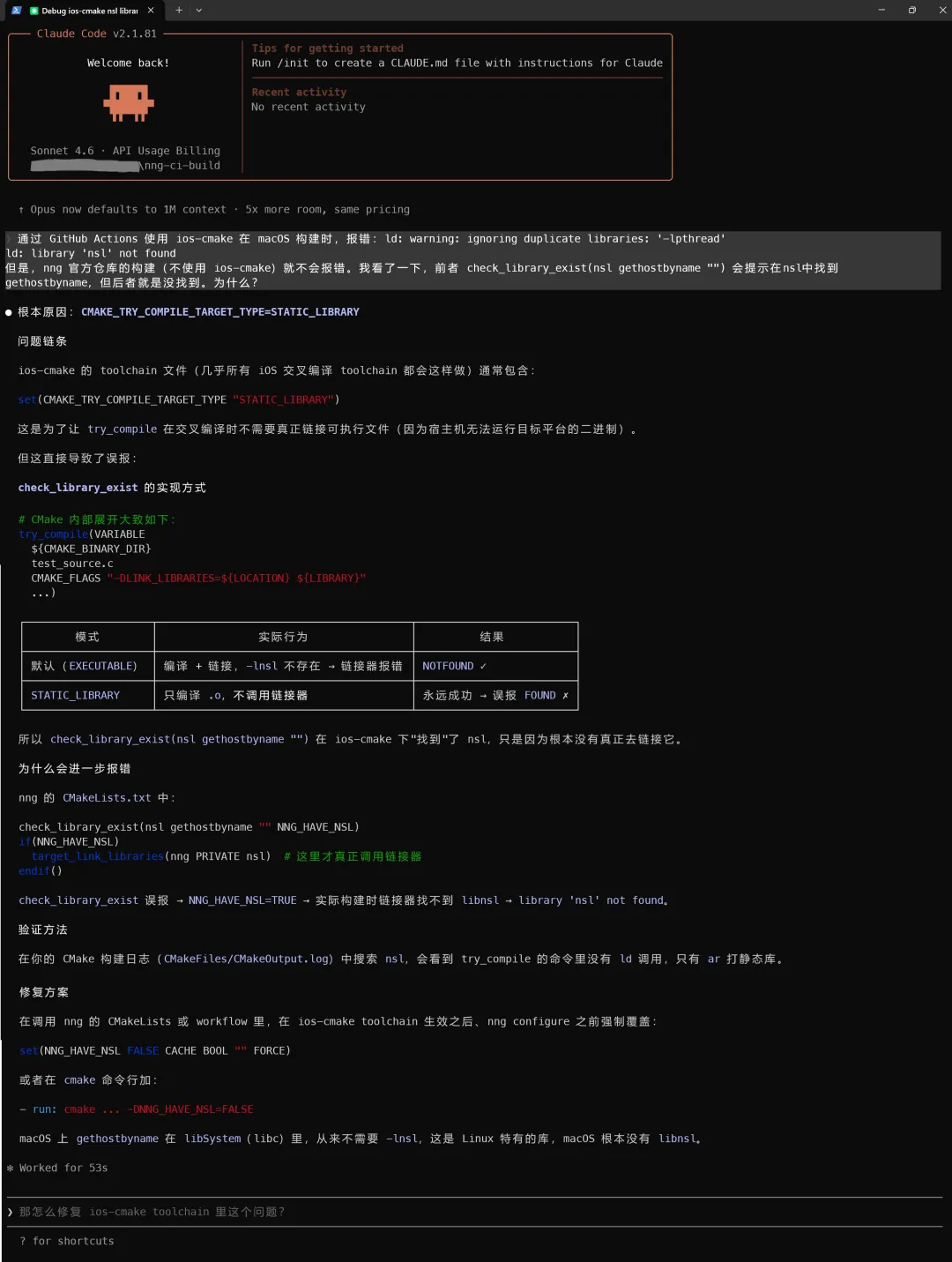
● 根本原因:CMAKE_TRY_COMPILE_TARGET_TYPE=STATIC_LIBRARY问题链条ios-cmake 的 toolchain 文件(几乎所有 iOS 交叉编译 toolchain 都会这样做)通常包含:set(CMAKE_TRY_COMPILE_TARGET_TYPE "STATIC_LIBRARY")这是为了让 try_compile 在交叉编译时不需要真正链接可执行文件(因为宿主机无法运行目标平台的二进制)。但这直接导致了误报:check_library_exist 的实现方式# CMake 内部展开大致如下:try_compile(VARIABLE${CMAKE_BINARY_DIR}test_source.cCMAKE_FLAGS "-DLINK_LIBRARIES=${LOCATION} ${LIBRARY}"...)┌────────────────────┬────────────────────────────────────────┬─────────────────────────┐│ 模式 │ 实际行为 │ 结果 │├────────────────────┼────────────────────────────────────────┼─────────────────────────┤│ 默认(EXECUTABLE) │ 编译 + 链接,-lnsl 不存在 → 链接器报错 │ NOTFOUND ✓ │├────────────────────┼────────────────────────────────────────┼─────────────────────────┤│ STATIC_LIBRARY │ 只编译 .o,不调用链接器 │ 永远成功 → 误报 FOUND ✗ │└────────────────────┴────────────────────────────────────────┴─────────────────────────┘所以 check_library_exist(nsl gethostbyname "") 在 ios-cmake 下"找到"了 nsl,只是因为根本没有真正去链接它。为什么会进一步报错nng 的 CMakeLists.txt 中:check_library_exist(nsl gethostbyname "" NNG_HAVE_NSL)if(NNG_HAVE_NSL)target_link_libraries(nng PRIVATE nsl) # 这里才真正调用链接器endif()check_library_exist 误报 → NNG_HAVE_NSL=TRUE → 实际构建时链接器找不到 libnsl → library 'nsl' not found。验证方法在你的 CMake 构建日志(CMakeFiles/CMakeOutput.log)中搜索 nsl,会看到 try_compile 的命令里没有 ld 调用,只有 ar 打静态库。修复方案在调用 nng 的 CMakeLists 或 workflow 里,在 ios-cmake toolchain 生效之后、nng configure 之前强制覆盖:set(NNG_HAVE_NSL FALSE CACHE BOOL "" FORCE)或者在 cmake 命令行加:- run: cmake ... -DNNG_HAVE_NSL=FALSEmacOS 上 gethostbyname 在 libSystem(libc)里,从来不需要 -lnsl,这是 Linux 特有的库,macOS 根本没有 libnsl。
STATIC_LIBRARY 关键字,发现了一个相关配置项:# ENABLE_STRICT_TRY_COMPILE: (ON|OFF) Enables or disables strict try_compile() on all Check* directives (will run linker# to actually check if linking is possible). Default OFF (will set CMAKE_TRY_COMPILE_TARGET_TYPE to STATIC_LIBRARY)
-DENABLE_STRICT_TRY_COMPILE=ON