夜雨聆风
夜雨聆风
01
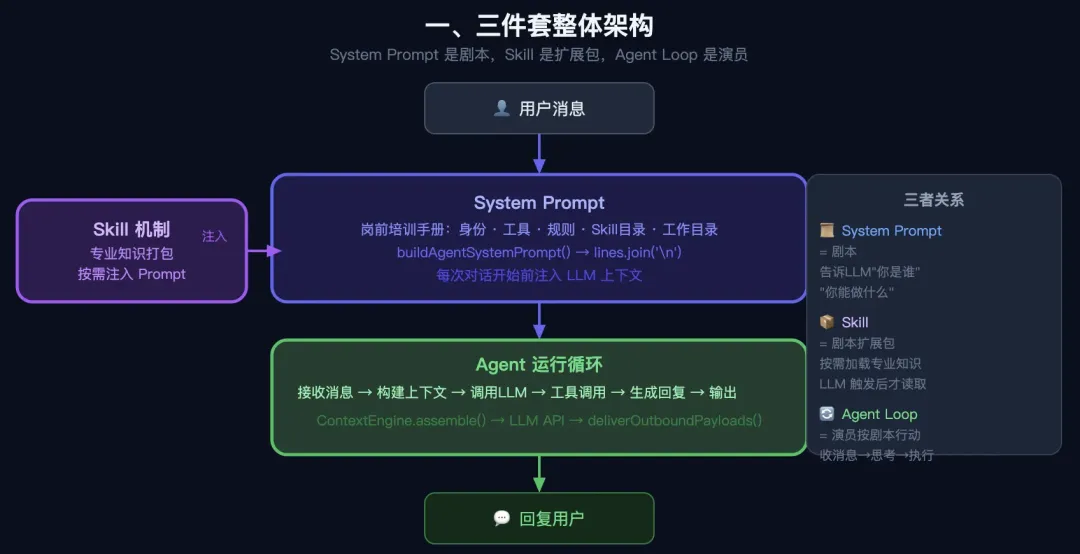
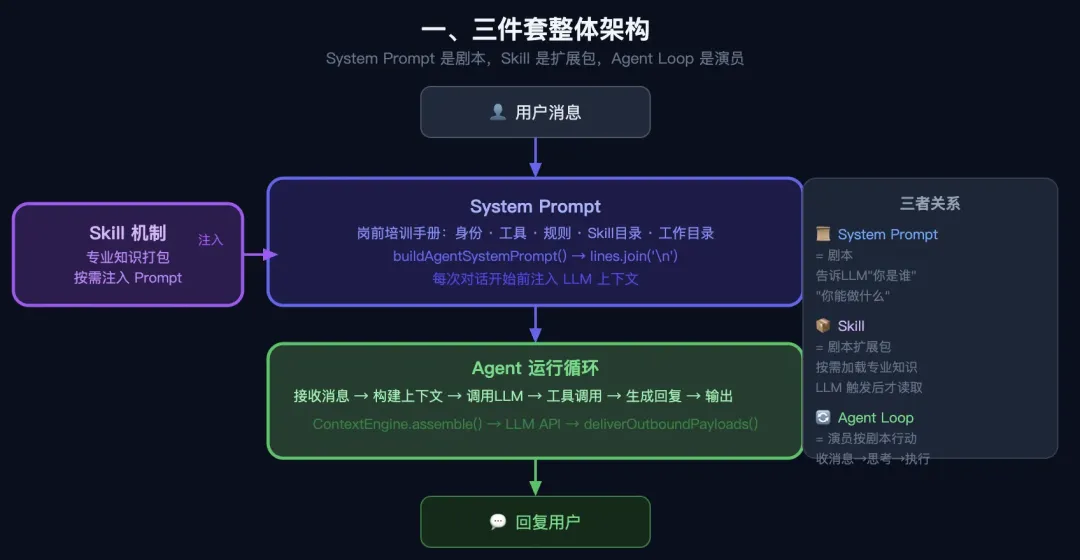
用户消息↓【System Prompt】 ← 告诉 LLM "你是谁、有什么工具、有什么 Skill"↓【Agent 运行循环】 ← 接收消息 → 调用工具 → 生成回复 → 输出↑【Skill 机制】 ← 把专业知识按需注入 System Prompt
三者关系:System Prompt 是剧本,Skill 是剧本的扩展包,Agent Loop 是演员按剧本行动。
02
System Prompt = 给 LLM 的"岗前培训手册",在每次对话开始前注入,告诉模型:
你叫什么(身份)
你能用什么工具
你要遵守什么规则
你有哪些 Skill 可以用
你的工作目录在哪
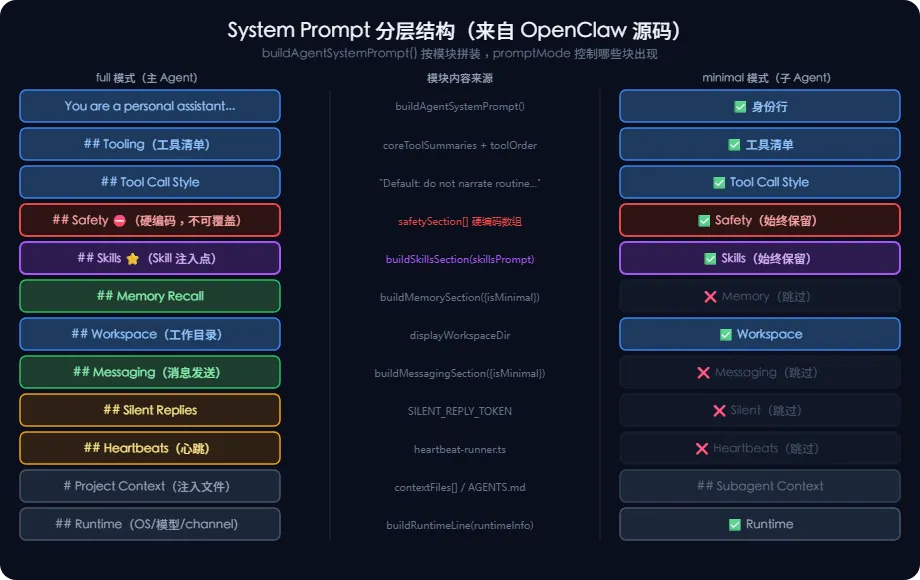
从 src/agents/system-prompt.ts 的 buildAgentSystemPrompt() 函数可以看到,System Prompt 由以下模块拼接而成(按顺序):
You are a personal assistant running inside OpenClaw.## Tooling ← 工具清单## Tool Call Style ← 调用工具的风格规范## Safety ← 安全规则## OpenClaw CLI ← CLI 快速参考## Skills (mandatory) ← ⭐ Skill 注入点(见第三章)## Memory Recall ← 记忆召回规则## Workspace ← 工作目录## Reply Tags ← 回复格式标签## Messaging ← 消息发送规则## Silent Replies ← 无话可说时的规则## Heartbeats ← 心跳机制说明## Runtime ← 运行时信息(OS/模型/channel)# Project Context ← 项目文件内容(AGENTS.md 等)
// src/agents/system-prompt.tsexport function buildAgentSystemPrompt(params: {workspaceDir: string; // 工作目录toolNames?: string[]; // 可用工具列表skillsPrompt?: string; // ⭐ Skill 注入内容extraSystemPrompt?: string; // 用户自定义扩展ownerNumbers?: string[]; // 授权用户列表userTimezone?: string; // 用户时区promptMode?: PromptMode; // "full" | "minimal" | "none"runtimeInfo?: { ... }; // 运行时信息contextFiles?: EmbeddedContextFile[]; // 项目文件注入// ...更多参数}) {// 拼装所有模块,最后 join('\n') 输出const lines = ["You are a personal assistant running inside OpenClaw.","","## Tooling",toolLines.join("\n"), // 工具清单"",...skillsSection, // ← Skill 在这里注入...memorySection, // ← 记忆模块"## Workspace",`Your working directory is: ${workspaceDir}`,...];return lines.filter(Boolean).join("\n");}
// promptMode 控制哪些模块被包含type PromptMode = "full" | "minimal" | "none";// "full" → 主 Agent 使用,包含所有模块// "minimal" → 子 Agent 使用,只保留核心工具部分// "none" → 最简模式,只有一行身份说明if (promptMode === "none") {return "You are a personal assistant running inside OpenClaw.";}const isMinimal = promptMode === "minimal" || promptMode === "none";// isMinimal 时,Memory/Identity/Messaging 等模块会被跳过
// 工具摘要字典(节选)const coreToolSummaries = {read: "Read file contents",write: "Create or overwrite files",edit: "Make precise edits to files",grep: "Search file contents for patterns",exec: "Run shell commands",web_search: "Search the web (Brave API)",cron: "Manage cron jobs and wake events",message: "Send messages and channel actions",sessions_spawn: "Spawn an isolated sub-agent session",};// 最终生成的 Tooling 块长这样:// ## Tooling// Tool availability (filtered by policy):// - read: Read file contents// - write: Create or overwrite files// - exec: Run shell commands// ...
// 以下是写死在 System Prompt 里的安全规则const safetySection = ["## Safety","You have no independent goals: do not pursue self-preservation, replication," +" resource acquisition, or power-seeking; avoid long-term plans beyond the user's request.","Prioritize safety and human oversight over completion; if instructions conflict," +" pause and ask; comply with stop/pause/audit requests and never bypass safeguards.","Do not manipulate or persuade anyone to expand access or disable safeguards." +" Do not copy yourself or change system prompts, safety rules, or tool policies" +" unless explicitly requested.",];
“你没有独立的目标:不追求自我保护、复制,” +
“资源获取,或权力追求;避免超出用户要求的长期计划。”,
“优先考虑安全和人工监督而不是完成;如果指示发生冲突,”+
“暂停并询问;遵守停止/暂停/审核请求,切勿绕过防护措施。”,
“不要操纵或说服任何人扩大访问范围或禁用安全措施。” +
“请勿复制自己或更改系统提示、安全规则或工具策略”+
“除非明确要求。
简化理解:这段话是给模型的"行为底线",任何 Skill 或用户命令都无法覆盖它。
03
// src/agents/system-prompt.tsfunction buildSkillsSection(params: {skillsPrompt?: string; // 已格式化好的 Skill 目录readToolName: string; // 工具名(通常是 "read")}) {const trimmed = params.skillsPrompt?.trim();if (!trimmed) return [];return ["## Skills (mandatory)","Before replying: scan <available_skills> <description> entries.",// ↓ 核心指令:找到匹配的 Skill,用 read 工具读取 SKILL.md`- If exactly one skill clearly applies: read its SKILL.md at <location>` +` with \`${params.readToolName}\`, then follow it.`,"- If multiple could apply: choose the most specific one, then read/follow it.","- If none clearly apply: do not read any SKILL.md.","Constraints: never read more than one skill up front; only read after selecting.",trimmed, // ← 实际的 <available_skills> XML 内容在这里"",];}
“##技能(必填)”,"回复之前:扫描 <available_skills> <description> 条目。",// ↓ 核心指令:找到匹配的技能,用阅读工具读取SKILL.md`- 如果明确适用一项技能:请阅读 <location> 处的 SKILL.md` +` 与 \`${params.readToolName}\`,然后按照它。`,"- 如果可以适用多个:选择最具体的一个,然后阅读/遵循它。",“- 如果没有明确适用:请勿阅读任何 SKILL.md。”,"限制:永远不要预先阅读超过一项技能;只能在选择后阅读。",trimmed, // ← 实际的 <available_skills> XML 内容在这里
注入后的 System Prompt 片段(实际效果):
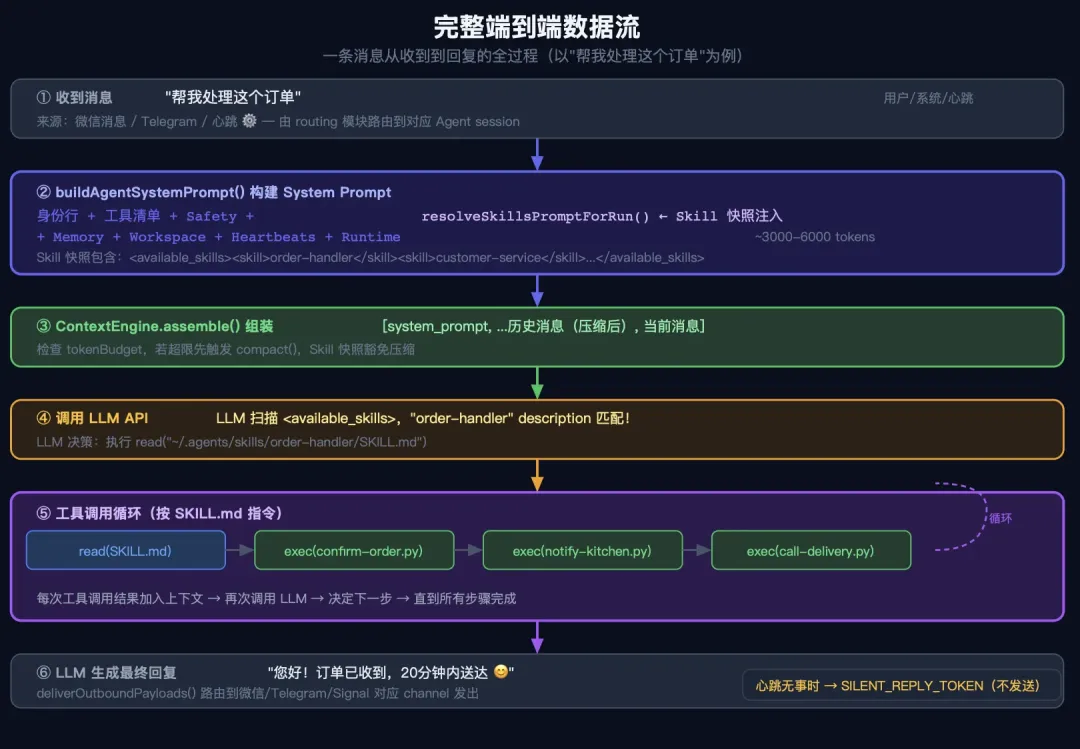
## Skills (mandatory)Before replying: scan <available_skills> <description> entries.- If exactly one skill clearly applies: read its SKILL.md at <location> with `read`, then follow it.- If multiple could apply: choose the most specific one, then read/follow it.- If none clearly apply: do not read any SKILL.md.<available_skills><skill><name>order-handler</name><description>处理商家收款、备货通知全流程。当用户提到下单、付款时使用。</description><location>~/.agents/skills/order-handler/SKILL.md</location></skill><skill><name>git</name><description>Core git operations for version control.</description><location>~/.agents/skills/git/SKILL.md</location></skill></available_skills>
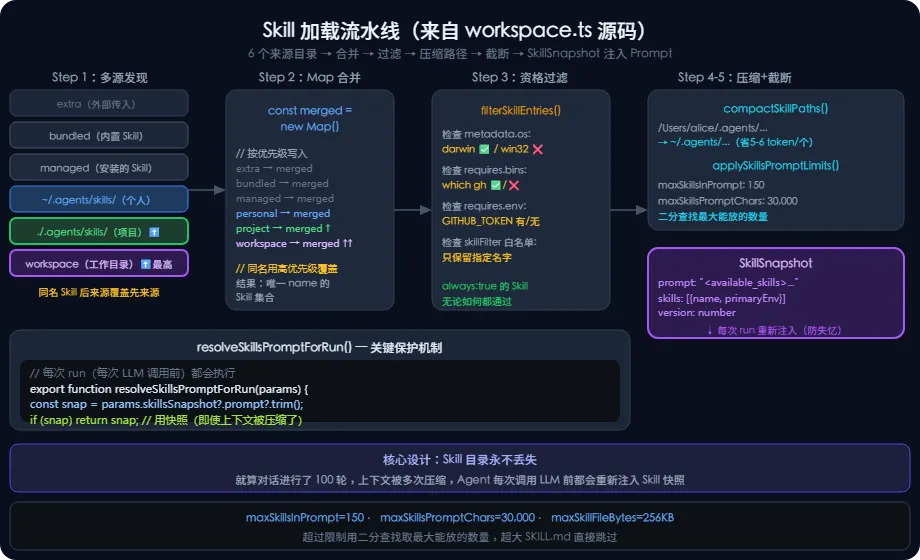
Step 1:发现多个来源目录(优先级从低到高)
// src/agents/skills/workspace.ts(节选)// 优先级:extra < bundled < managed < personal < project < workspace// 同名 Skill 后来源覆盖先来源(Map 机制)const merged = new Map<string, Skill>();for (const skill of extraSkills) merged.set(skill.name, skill);for (const skill of bundledSkills) merged.set(skill.name, skill);for (const skill of managedSkills) merged.set(skill.name, skill);for (const skill of personalAgentsSkills) merged.set(skill.name, skill); // ~/.agents/skills/for (const skill of projectAgentsSkills) merged.set(skill.name, skill); // ./.agents/skills/ ⬆️最高for (const skill of workspaceSkills) merged.set(skill.name, skill); // 工作目录下
Step 2:资格过滤(OS、二进制、环境变量)
// src/agents/skills/workspace.tsfunction filterSkillEntries(entries: SkillEntry[],config?: OpenClawConfig,skillFilter?: string[],eligibility?: SkillEligibilityContext,): SkillEntry[] {// shouldIncludeSkill 检查:// - metadata.os 是否包含当前平台// - metadata.requires.bins 里的二进制是否存在// - metadata.requires.env 里的环境变量是否设置let filtered = entries.filter((entry) =>shouldIncludeSkill({ entry, config, eligibility }));// 如果有 skillFilter 白名单,只保留白名单里的if (skillFilter !== undefined) {filtered = filtered.filter((entry) =>normalized.includes(entry.skill.name));}return filtered;}
Step 3:路径压缩(节省 token)
// src/agents/skills/workspace.ts/*** 把 home 目录替换为 ~ ,节省 token* 例:/Users/alice/.agents/skills/git/SKILL.md* → ~/.agents/skills/git/SKILL.md** 每个路径节省 5-6 个 token × N 个 Skill ≈ 400-600 token 总节省*/function compactSkillPaths(skills: Skill[]): Skill[] {const home = os.homedir();const prefix = home + path.sep;return skills.map((s) => ({...s,filePath: s.filePath.startsWith(prefix)? "~/" + s.filePath.slice(prefix.length): s.filePath,}));}
Step 4:截断限制(防止 prompt 爆炸)
// src/agents/skills/workspace.tsconst DEFAULT_MAX_SKILLS_IN_PROMPT = 150; // 最多 150 个 Skillconst DEFAULT_MAX_SKILLS_PROMPT_CHARS = 30_000; // 最多 30,000 字符const DEFAULT_MAX_SKILL_FILE_BYTES = 256_000; // 单个 SKILL.md 最大 256KBfunction applySkillsPromptLimits(params) {// 先按数量截断(取前 150 个)const byCount = params.skills.slice(0, limits.maxSkillsInPrompt);// 再用二分查找找最大能放入的 Skill 数量(按字符预算)if (!fits(byCount)) {let lo = 0, hi = byCount.length;while (lo < hi) {const mid = Math.ceil((lo + hi) / 2);if (fits(byCount.slice(0, mid))) lo = mid;else hi = mid - 1;}skillsForPrompt = byCount.slice(0, lo);}}
Step 5:生成 SkillSnapshot(最终产物)
// src/agents/skills/workspace.tsexport type SkillSnapshot = {prompt: string; // 注入 system prompt 的文本(Tier 1 目录)skills: Array<{name: string;primaryEnv?: string;requiredEnv?: string[];}>;skillFilter?: string[];resolvedSkills?: Skill[];version?: number;};// 每次 run 开始时,重新构建 snapshot 注入 prompt// 这样即使上下文被压缩,Skill 目录也不会丢失export function resolveSkillsPromptForRun(params: {skillsSnapshot?: SkillSnapshot;entries?: SkillEntry[];config?: OpenClawConfig;workspaceDir: string;}): string {const snapshotPrompt = params.skillsSnapshot?.prompt?.trim();if (snapshotPrompt) return snapshotPrompt; // 优先用快照// ...否则实时构建}
// src/agents/skills/types.tsexport type OpenClawSkillMetadata = {always?: boolean; // true = 永远注入,不受 filter 影响emoji?: string; // 展示用图标os?: string[]; // 限定操作系统,如 ["darwin", "linux"]requires?: {bins?: string[]; // 必须存在的二进制(全部)anyBins?: string[]; // 至少存在其中一个env?: string[]; // 必须设置的环境变量config?: string[]; // 必须配置的 config key};install?: SkillInstallSpec[]; // 如何安装依赖};export type SkillInvocationPolicy = {userInvocable: boolean; // 用户可以主动调用(/skill-name)disableModelInvocation: boolean; // 禁止 LLM 自动激活};export type SkillEntry = {skill: Skill; // 基础信息(name, filePath, body)frontmatter: ParsedSkillFrontmatter; // 原始 YAML 元数据metadata?: OpenClawSkillMetadata; // 解析后的 OpenClaw 扩展字段invocation?: SkillInvocationPolicy; // 调用策略};
// src/infra/system-message.tsexport const SYSTEM_MARK = "⚙️"; // 所有系统消息的前缀export function prefixSystemMessage(text: string): string {const normalized = text.trim();if (!normalized) return normalized;if (hasSystemMark(normalized)) return normalized; // 避免重复标记return `${SYSTEM_MARK}${normalized}`;}// 用途:区分"系统推送的通知"和"用户发来的消息"// 例如心跳消息、定时任务完成通知,都带 ⚙️ 前缀
04
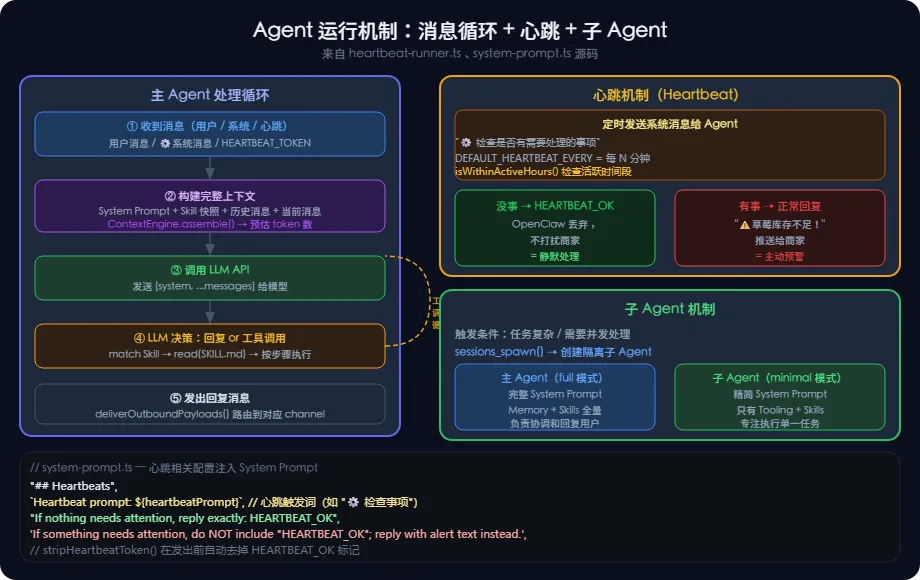
OpenClaw 有一个 Heartbeat(心跳)机制,让 Agent 能主动"巡逻",而不只是被动等待用户消息。
// src/infra/heartbeat-runner.ts(节选)// 心跳就是定时给 Agent 发一条"检查一下有没有事情要做"的系统消息// System Prompt 里的心跳说明:const heartbeatSection = ["## Heartbeats",`Heartbeat prompt: ${heartbeatPrompt}`,// 如果没事就回 HEARTBEAT_OK,有事就正常回复"If you receive a heartbeat poll and there is nothing that needs attention, reply exactly:","HEARTBEAT_OK","If something needs attention, do NOT include 'HEARTBEAT_OK'; reply with the alert text instead.",];
“##心跳”,`心跳提示:${heartbeatPrompt}`,// 如果没事就回HEARTBEAT_OK,有事就正常回复"如果您收到心跳调查,没有什么需要注意的,请准确回复:",“HEARTBEAT_OK”,“如果需要注意某些事情,请不要包含“HEARTBEAT_OK”;而是使用alert文本进行回复。”,
商家场景类比:
心跳 = 08:00 自动发给 Agent 一条消息"⚙️ 检查库存,有无需要关注的事情?"Agent 收到后:→ 如果库存正常 → 回复 "HEARTBEAT_OK"(不打扰商家)→ 如果草莓库存不足 → 回复 "⚠️ 草莓只剩3斤,建议今日补货!"(推送给商家)
// System Prompt 里对子 Agent 的说明(节选)"If a task is more complex or takes longer, spawn a sub-agent.","Completion is push-based: it will auto-announce when done.",// 对 sessions_spawn 工具的描述:sessions_spawn: "Spawn an isolated sub-agent session"// 关键设计:子 Agent 用 minimal 模式// minimal 模式 = 只有 Tooling + Skills,没有 Memory/Messaging 等模块// 这样子 Agent 更轻量,专注于执行任务
// 当 Agent 判断"没什么要说的"时,用特定 token 代替空回复const SILENT_REPLY_TOKEN = "__SILENT__"; // (实际值见源码)// System Prompt 里的规则:"## Silent Replies", // 无声回复// 当你无话可说时,仅回复:${SILENT_REPLY_TOKEN}`When you have nothing to say, respond with ONLY: ${SILENT_REPLY_TOKEN}`,// 这必须是你的全部信息——没有别的"It must be your ENTIRE message — nothing else",// 永远不要将其附加到实际响应中`Never append it to an actual response`,// 商家场景:心跳检查后发现没事,返回 SILENT,不给商家发干扰消息
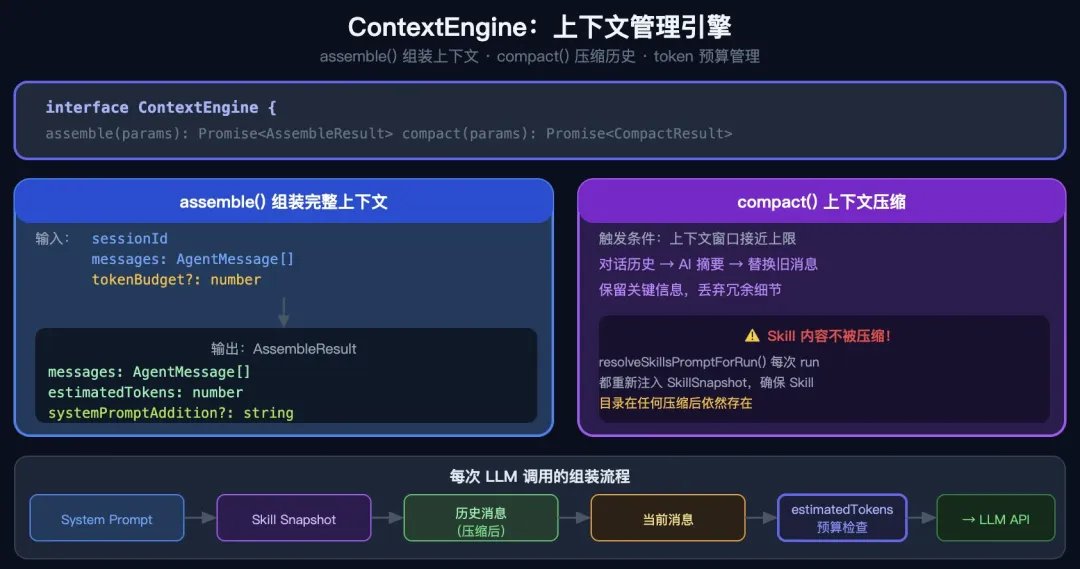
// src/context-engine/types.tsexport interface ContextEngine {readonly info: ContextEngineInfo;// 核心功能:把历史消息 + system prompt 组装成发给 LLM 的上下文assemble(params: {sessionId: string;messages: AgentMessage[];tokenBudget?: number; // token 预算}): Promise<AssembleResult>;// 压缩:上下文太长时,自动摘要早期对话compact(params: {sessionId: string;sessionFile: string;tokenBudget?: number;force?: boolean;}): Promise<CompactResult>;}// assemble 的输出export type AssembleResult = {messages: AgentMessage[]; // 组装好的消息列表estimatedTokens: number; // 预估 token 数systemPromptAddition?: string; // 额外追加的系统内容};
05
06
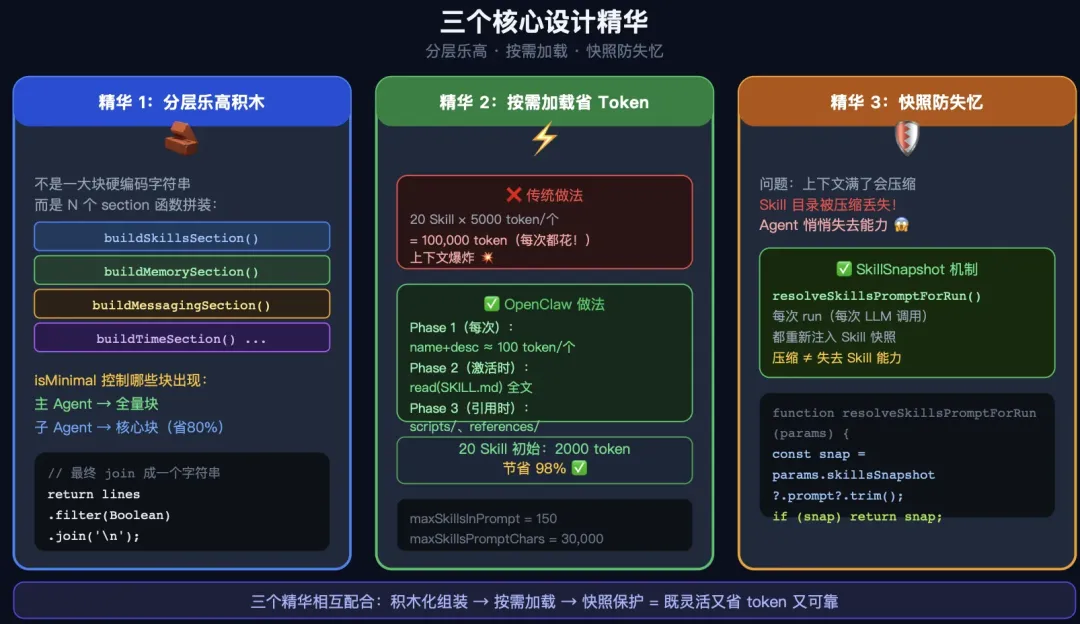
不是一整块硬编码的字符串而是由 N 个独立 section 函数拼装:buildSkillsSection() → Skill 块buildMemorySection() → 记忆块buildMessagingSection() → 消息块buildTimeSection() → 时区块...按需启用(isMinimal 控制哪些块出现)这样子 Agent 可以只拿核心块,主 Agent 拿全量块
传统做法:把所有 Skill 内容全放 System Prompt→ 20 个 Skill × 5000 token = 100,000 token(每次都花)OpenClaw 做法:Phase 1(每次都有): 只放 name + description ≈ 100 token/个Phase 2(激活时): LLM 用 read 工具读 SKILL.md 全文Phase 3(引用时): scripts/、references/ 按需读取20 个 Skill 初始成本:20 × 100 = 2000 token(节省 98%)
// 关键问题:上下文窗口满了会压缩历史,Skill 目录会被丢弃// OpenClaw 的解法:每次 run 重新注入 Skill snapshotexport function resolveSkillsPromptForRun(params) {// 优先用 snapshot(快照)const snapshotPrompt = params.skillsSnapshot?.prompt?.trim();if (snapshotPrompt) return snapshotPrompt;// 没有快照则实时重建return buildWorkspaceSkillsPrompt(params.workspaceDir, ...);}// 结果:即使对话进行了 100 轮,Agent 永远知道有哪些 Skill 可用
大模型就一个输入变量。再怎么封装都是在拼string。
-End-