 夜雨聆风
夜雨聆风07. nanobot 源码解读:消息处理细节
文档内容基于 HKUDS/nanobot: "🐈 nanobot: The Ultra-Lightweight Personal AI Agent" 的 main 分支 8e421eb9 提交进行说明。
目录
• 07. nanobot 源码解读:消息处理细节 • 目录 • 主流程 • _dispatch • _process_message • _dispatch_command_inline • command 详情
这次对 Agent Loop 流程中单个消息的处理流程进行详细说明。
源码位于
nanobot/agent/loop.py,部分实现细节较上次分析有了变化,代码模块化极大提升。此次分析不研究webui相关逻辑。
主流程
主流程不变:不停地从 InboundMessage Queue 中取出消息处理。
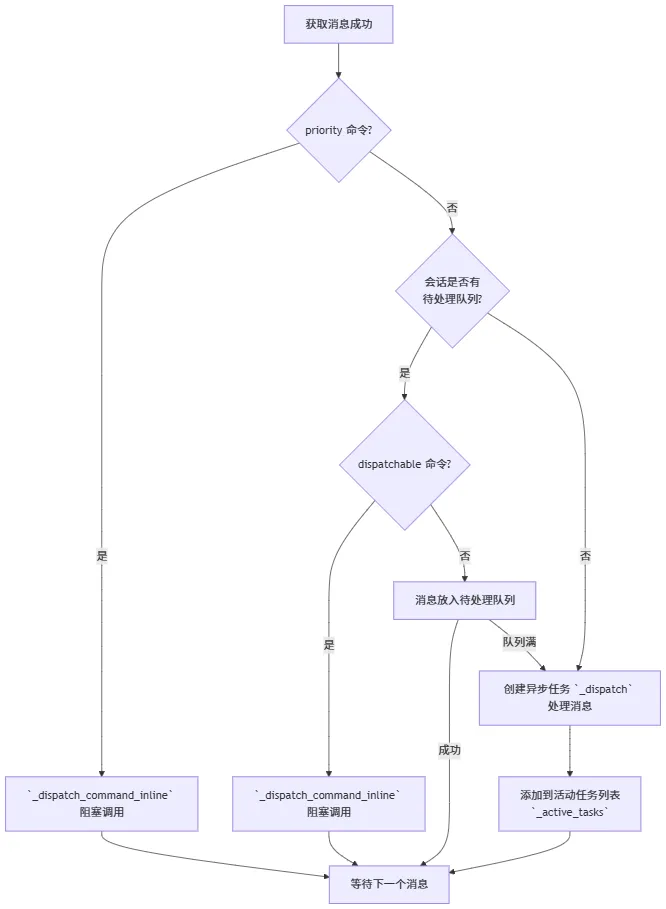
消息的处理要么走 _dispatch_command_inline,要么走 _dispatch,现对这两个流程进行分析。
_dispatch
在 _dispatch 中使用了两个锁来控制消息处理逻辑 _process_message 的并发。
• 全局锁:所有会话共用,默认不开启 • 会话锁:相同会话共用,一直开启
会话锁的作用:同一个会话同一时刻只能有一个消息进入 Agent Loop,新消息必须等待。因此引入了待处理消息队列。在 Agent Loop 流程执行期间,新消息来了塞入待处理消息队列,就可以不用等待之前消息的 Agent Loop 流程结束才能处理。
_process_message
_process_message 一改之前的大段串行代码,使用了状态机模式处理消息:

每个状态对应的 action 是一个名为 _state_{name.lower()} 的方法(如 RESTORE 对应 _state_restore)。action 方法返回字符串 event 以决定下一个状态,直到状态变为 DONE。状态机流转过程中使用 ctx: TurnContext 作为中间变量。
各状态说明:
• RESTORE:从媒体中提取内容(若存在)、设置ctx.session、持久化作用域、恢复运行时检查点、恢复待处理用户回合• COMPACT:获取对话的summary内容(若存在)• COMMAND:触发 command 执行逻辑(消息若匹配 command),若返回结果则直接进入DONE• BUILD:压缩 token,设置工具上下文,构建提示词• RUN:执行 Agent Loop 逻辑• SAVE:保存会话信息到磁盘{workspace}/sessions/{session_key}.jsonl• RESPOND:将需要回复的消息存到ctx.outbound• DONE:状态机结束,在状态机外返回ctx.outbound作为消息处理结果,消息处理结果会通过MessageBus回传给用户
整个流程简单讲就是:用户消息输入 → 用户消息落盘 → 用户消息处理 → 处理结果落盘 → 处理结果回复。诸多细节代码则是为了尽可能保证,在任何场景、任何时刻下,用户看到的会话消息都是一致的。
_dispatch_command_inline
_dispatch_command_inline 与状态机流程中的 COMMAND 状态的执行逻辑比较接近,详细对比下。
class AgentLoop: async def _dispatch_command_inline( self, msg: InboundMessage, key: str, raw: str, dispatch_fn: Callable[[CommandContext], Awaitable[OutboundMessage | None]],) -> None: """Dispatch a command directly from the run() loop and publish the result.""" ctx = CommandContext(msg=msg, session=None, key=key, raw=raw, loop=self) # dispatch_fn 在外部传入的值不同 # priority 命令传入的是 self.commands.dispatch_priority # dispatchable 命令传入的是 self.commands.dispatch,与 _state_command 中的一样 result = await dispatch_fn(ctx) if result: # 命令处理结果(若存在)直接回传给用户 await self.bus.publish_outbound(result) else: logger.warning("Command '{}' matched but dispatch returned None", raw) async def _state_command(self, ctx: TurnContext) -> str: raw = ctx.msg.content.strip() cmd_ctx = CommandContext( msg=ctx.msg, session=ctx.session, key=ctx.session_key, raw=raw, loop=self ) # 实际执行与 dispatchable 命令的 _dispatch_command_inline 分支一样 result = await self.commands.dispatch(cmd_ctx) if result is not None: ctx.outbound = result # Shortcut commands skip BUILD and SAVE, so we must persist the # turn here so WebUI history hydration after _turn_end sees the # message. Mark messages with _command so get_history can filter # them out of LLM context. /new is excluded because it # intentionally clears the session. if raw.lower() != "/new": ctx.user_persisted_early = self._persist_user_message_early( ctx.msg, ctx.session, _command=True ) ctx.session.add_message( "assistant", result.content, _command=True ) self.sessions.save(ctx.session) self._clear_pending_user_turn(ctx.session) # shortcut 会直接进入状态的终态 DONE return "shortcut" # 消息不是 command,或 command 处理结果为 None,继续状态机后续处理 # 目前仅发现 /goal 命令会返回 None,此时会将 msg 内容改为包含 goal 的特定提示词 return "dispatch"对比源码,二者实现极为接近。为什么 command 的执行还存在两种实现呢,尝试解答下。
Q1: 能不能都使用
_state_command(即通过_dispatch状态机)?A1: 不能。command 一般需要及时响应,如
/status直接返回状态,/new需要创建新会话,这些命令都不需要或者不应该等待老的 Agent Loop 流程结束,所以必须有能在_dispatch外快速响应的分支逻辑。另一个原因:当会话存在时,新消息会直接塞入待处理消息队列,此时 command 不会重走状态机,而是直接作为提示词输入,无法执行特定的操作。
Q2: 能不能都使用
_dispatch_command_inline(即现在的 priority 命令)?A2: 这个问题不是很好解释。比如 command 全部在
while循环中阻塞执行可能很耗时(但 command 执行都很快);_dispatch有完整的状态流转,有落盘保存,刷新还能看到历史消息(但会话存在时走_dispatch_command_inline就不能保证相同 command 逻辑一致)。
暂且认为 command 的实现是在 _dispatch 存在会话同步锁的基础上,加入了一个可以快速响应的 _dispatch_command_inline 逻辑分支。
command 详情
*nanobot/command/builtin.py* 中定义了 nanobot 的内置 command:
def register_builtin_commands(router: CommandRouter) -> None: """Register the default set of slash commands.""" router.priority("/stop", cmd_stop) router.priority("/restart", cmd_restart) router.priority("/status", cmd_status) router.exact("/new", cmd_new) router.exact("/status", cmd_status) router.exact("/model", cmd_model) router.prefix("/model ", cmd_model) router.exact("/history", cmd_history) router.prefix("/history ", cmd_history) router.exact("/goal", cmd_goal) router.prefix("/goal ", cmd_goal) router.exact("/dream", cmd_dream) router.exact("/dream-log", cmd_dream_log) router.prefix("/dream-log ", cmd_dream_log) router.exact("/dream-restore", cmd_dream_restore) router.prefix("/dream-restore ", cmd_dream_restore) router.exact("/help", cmd_help) router.exact("/pairing", cmd_pairing) router.prefix("/pairing ", cmd_pairing)梳理如下:
/stop | OutboundMessage | ||
/restart | OutboundMessage | ||
/status | OutboundMessage | ||
/new | OutboundMessage | ||
/model | OutboundMessage | ||
/history | OutboundMessage | ||
/goal | None | None 则触发 Agent Loop 流程 | |
/dream | OutboundMessage | ||
/dream-log | OutboundMessage | ||
/dream-restore | OutboundMessage | ||
/help | OutboundMessage | ||
/pairing | OutboundMessage |