ARTICLE · 996046
nginx源码安装
1、官方地址
nginx
下载安装包
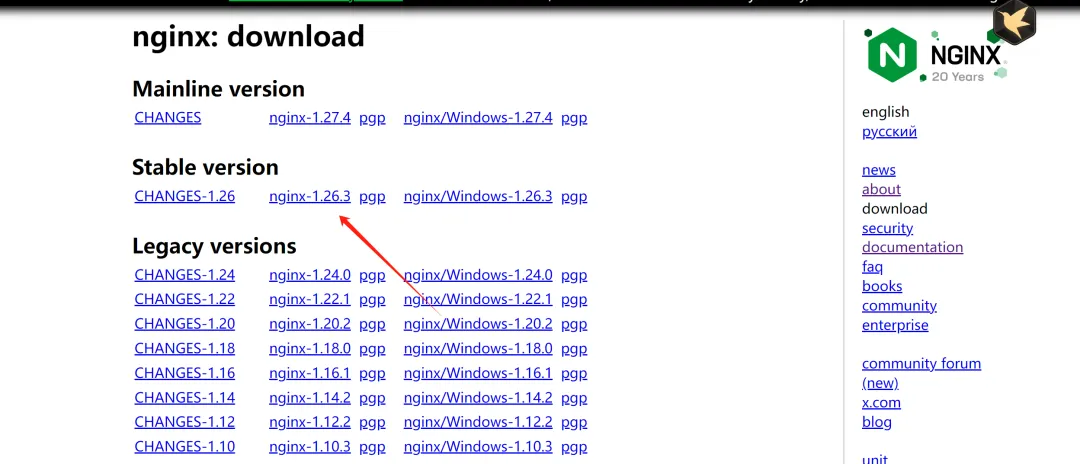
2、安装
wget http://nginx.org/download/nginx-1.24.0.tar.gztar -zxvf nginx-1.24.0.tar.gzcd nginx-1.24.0
配置Nginx
在编译之前,需要运行./configure来配置Nginx的编译选项。你可以根据需求选择不同的模块和配置选项。以下是一个常见的配置示例:
./configure \--prefix=/usr/local/nginx \--sbin-path=/usr/local/nginx/sbin/nginx \--conf-path=/usr/local/nginx/conf/nginx.conf \--error-log-path=/usr/local/nginx/logs/error.log \--http-log-path=/usr/local/nginx/logs/access.log \--pid-path=/usr/local/nginx/logs/nginx.pid \--with-http_ssl_module \--with-http_v2_module \--with-http_gzip_static_module \--with-http_stub_status_module \--with-pcre \--with-file-aio \--with-threads
参数说明:
--prefix:指定Nginx的安装目录。--with-http_ssl_module:启用SSL支持。--with-http_v2_module:启用HTTP/2支持。--with-http_gzip_static_module:启用静态文件Gzip压缩。--with-http_stub_status_module:启用状态页面模块(用于监控)。--with-pcre:启用正则表达式支持。--with-file-aio和--with-threads:启用异步I/O和线程支持。
编译并安装
运行以下命令编译并安装Nginx
makesudo make install
3、设置Nginx为服务
为了方便管理,可以将Nginx设置为系统服务。以下是一个systemd服务文件的示例:
创建服务文件/etc/systemd/system/nginx.service:
[Unit]Description=The NGINX HTTP and reverse proxy serverAfter=network.target remote-fs.target nss-lookup.target[Service]Type=forkingPIDFile=/usr/local/nginx/logs/nginx.pidExecStartPre=/usr/local/nginx/sbin/nginx -tExecStart=/usr/local/nginx/sbin/nginxExecReload=/usr/local/nginx/sbin/nginx -s reloadExecStop=/usr/local/nginx/sbin/nginx -s stop[Install]WantedBy=multi-user.target
然后运行以下命令启用服务
sudo systemctl daemon-reloadsudo systemctl enable nginxsudo systemctl start nginx
nginx.service配置信息
[Unit] 部分
这部分定义了服务的基本信息和依赖关系。
Description:含义:服务的描述信息。
示例:
Description=The NGINX HTTP and reverse proxy server解释:这里简单描述了这个服务是“Nginx HTTP和反向代理服务器”,用于在
systemctl status等命令中显示服务的说明。After:network.target:表示在启动网络服务之后启动。remote-fs.target:表示在远程文件系统挂载完成之后启动。nss-lookup.target:表示在DNS解析服务可用之后启动。这些依赖关系确保Nginx在依赖的服务启动之后再启动,避免因依赖服务未就绪而导致启动失败。
含义:指定该服务在哪些目标(target)之后启动。
示例:
After=network.target remote-fs.target nss-lookup.target解释:
[Service] 部分
这部分定义了服务的运行参数和行为。
Type:含义:指定服务的启动类型。
示例:
Type=forking解释:
forking表示Nginx会在启动时创建一个子进程,而主进程会退出。这是Nginx的典型启动方式。PIDFile:含义:指定Nginx主进程的PID文件路径。
示例:
PIDFile=/usr/local/nginx/logs/nginx.pid解释:
systemd通过这个文件来跟踪Nginx的主进程ID。ExecStartPre:含义:在启动服务之前执行的命令。
示例:
ExecStartPre=/usr/local/nginx/sbin/nginx -t解释:运行
nginx -t命令,用于检查Nginx配置文件是否正确。如果配置文件有错误,服务将不会启动。ExecStart:含义:启动服务时执行的命令。
示例:
ExecStart=/usr/local/nginx/sbin/nginx解释:运行Nginx的启动命令。
ExecReload:含义:重新加载服务配置时执行的命令。
示例:
ExecReload=/usr/local/nginx/sbin/nginx -s reload解释:运行
nginx -s reload命令,用于重新加载Nginx的配置文件而不中断现有连接。ExecStop:含义:停止服务时执行的命令。
示例:
ExecStop=/usr/local/nginx/sbin/nginx -s stop解释:运行
nginx -s stop命令,用于停止Nginx服务。
[Install] 部分
这部分定义了服务的安装和启动目标。
WantedBy:含义:指定该服务在哪个运行级别(target)下被启动。
示例:
WantedBy=multi-user.target解释:
multi-user.target是多用户图形界面或命令行界面的运行级别。这意味着Nginx会在系统进入多用户目标时自动启动。
通过这种方式,Nginx可以像其他系统服务一样被统一管理,例如:
启动:
systemctl start nginx停止:
systemctl stop nginx重启:
systemctl restart nginx查看状态:
systemctl status nginx
4、防火墙配置
sudo firewall-cmd --zone=public --add-port=80/tcp --permanentsudo firewall-cmd --zone=public --add-port=443/tcp --permanentsudo firewall-cmd --reload
5、配置全局命令
5.1 方案一:创建软链接(最常用,无需改环境变量)
把二进制程序软链接到系统全局 bin 目录 /usr/sbin
ln -s /usr/local/nginx/sbin/nginx /usr/sbin/nginx执行完成直接验证:
nginx -vnginx -t
5.2 方案 2:配置环境变量
编辑全局 profile,所有用户生效
vim /etc/profile文件末尾追加,把 nginx 的 sbin 目录加入 PATH:
export PATH=$PATH:/usr/local/nginx/sbin生效配置:
source /etc/profile