 夜雨聆风
夜雨聆风


Claude Code源码揭秘②:万字解析上下文压缩

今天的内容会涵盖到的要点有:
-
工具结果替换
-
Micro Compact
-
Snip Compact
-
Context Collapse
-
Auto Compact
-
提示词缓存
文章较长,建议收藏观看。


概览
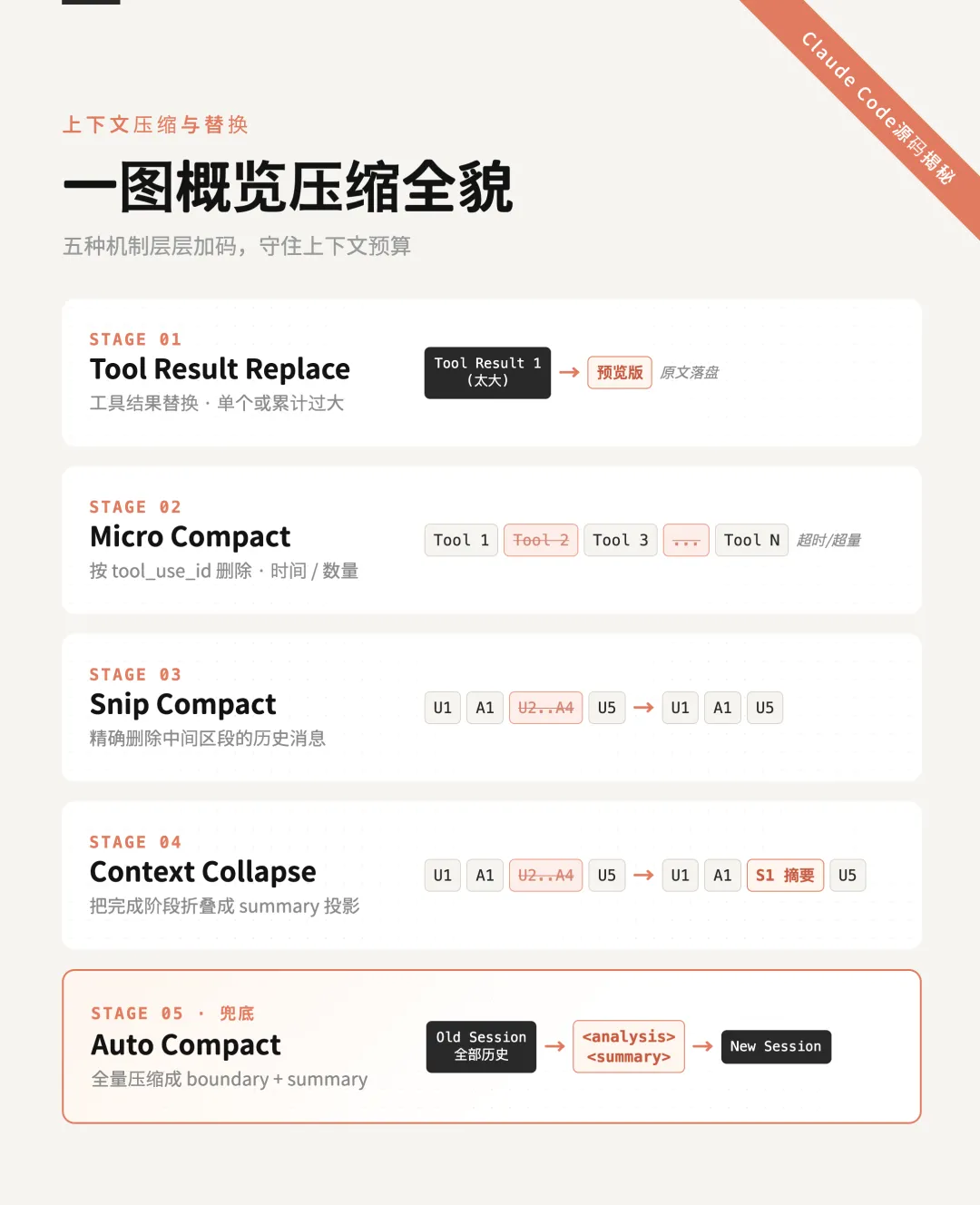
-
Raw messages。初始有效的消息状态,在内存中是一组消息数组。这个数组在每一轮的对话中都会根据对话中的变化,被更新成新的state.messages。 -
Model-Facing View。这是“真正准备发给模型”的那份消息视图。它不是原始消息原封不动拿去发,而是经过投影/过滤后的版本,过滤后的结果往往会成为下一轮对话的初始有效消息。例如:
let messagesForQuery = [...getMessagesAfterCompactBoundary(messages)]-
API Payload View。在Model-Facing View之后的步骤,它是在API层通过cache editing处理过的最终请求体消息。 -
UI Scrollback View。这是用户在界面里还能滚动看到的历史。它不是单独一份新存储,而更像是对原始消息的另一种渲染投影。它会保留一些其实已经没有发给大模型的消息。 -
Transcript / JSONL View。这是而是正式产出的消息流与元数据事件的 append-only持久化日志。在会话中断,需要恢复会话时,根据这里面的metadata进行重放,以构建最新的消息状态。
工具结果替换
const { mustReapply, frozen, fresh } = partitionByPriorDecision(...)-
mustReapply:以前已经被替换过,这次必须再用同一个 replacement string -
frozen:以前见过但没替换过,以后也不能再动 -
fresh:第一次见到,可以参与新决策
Micro Compact
|
改变的消息视图 |
触发机制 |
|
|
TimeBasedMicrocompact |
Model-Facing View |
与上一条assistant message的时间间隔超过阈值 |
|
cachedMicrocompact |
API payload View |
count based(工具数量) |
这个过程中比较复杂的是cachedMicrocompact,因为它不是直接改变内存的消息数组,而是将要删除的工具结果通过cache_edit发给API,在服务端视图里删除。在选定删除的工具之后,还有一系列的找稳定提示词前缀、重放之前几轮相同的替换结果的操作(与上一节的mustReapply和frozen概念类似)。
它工作的流程如下:
{type: 'cache_edits',edits: [{ type: 'delete', cache_reference: 'toolu_123' }]}

举例:一轮microcompact

0 user(question)1 assistant(tool_use A)2 user(tool_result A)3 user(comment)=== 第一轮 microcompact ===
0 user(question)1 assistant(tool_use A)2 user(tool_result A, cache_reference="toolu_A")3 user(cache_edits: delete "toolu_A",text/comment + cache_control)

举例:两轮microcompact

0 user(question)1 assistant(tool_use A)2 user(tool_result A)3 user(comment)= 第一轮 microcompact =4 user(question)5 assistant(tool_use B)6 user(tool_result B)7 assistant(tool_use C)8 user(tool_result C)= 第二轮 microcompact =
// Add cache_reference to tool_result blocks that are strictly before// the last cache_control marker. The API requires cache_reference to// appear "before or on" the last cache_control — we use strict "before"// to avoid edge cases where cache_edits splicing shifts block indices.for (let i = 0; i < lastCCMsg; i++) {....
0 user(question)1 assistant(tool_use A)2 user(tool_result A, cache_reference="toolu_A")3 user(cache_edits: delete "toolu_A", -----> pinnedtext/comment)4 user(question)5 assistant(tool_use B)6 user(tool_result B, cache_reference="toolu_B")7 assistant(tool_use C)8 user(cache_edits: delete "toolu_B", -----> newtool_result C + cache_control)
提示词缓存
为什么工具结果替换里,要用mustReapply和frozen来区分消息,达到重放幂等性呢?
为什么cachedMicrocompact不直接改本地消息,要用CacheEdits这样的方式曲线救国呢?
这里涉及到一个概念:提示词缓存(prompt cache)。
当你发送一个prompt时,模型会计算出它的“中间状态”(技术上称为 KV Cache)。
没有缓存时:每次对话,模型都要从第 1 个字符开始重新计算到第 N 个字符。
有缓存时:如果你请求的前缀(Prefix)部分和之前完全一致,模型会直接从硬盘或内存里把之前的计算结果拉出来。
一般来说,缓存部分的 Token 费用通常比正常处理便宜 50% 到 90%。当Agent设定很复杂(比如写了 2000 字的规则),而又需多轮对话的时候,缓存这些内容能让每次对话更省钱、回复更快。
这也是为什么不只claude code,主流的 AI 服务商都在用这个技术。
Snip Compact
-
精确删除中间区段的历史消息,让这些消息不再进入当前活跃上下文 -
但又不需要像 autocompact 那样把整段历史总结重写 -
也不只是像 microcompact 那样只清理旧 tool_result
Context Collapse
-
Snip是在删历史,而Context Collapase是在进行上下文折叠,产生一个总结。 -
Snip生成的removedUuids,持久化到了transcript主消息流里。而Context Collapase生成的commit log,则有一套专门的transcript entry类型(marble-origami-commit,marble-origami-snapshot),更像独立的checkpoint系统,而不是挂靠在主消息流上。我推测是因为Context Collapase本身的metadata和重放规则更复杂,需要一个更定制化的机制。
[U1, A1, U2, A2, U3, A3, U4, A4, U5]staged = [{startUuid: U2.uuid,endUuid: A4.uuid,summary: "之前已经完成了对 query.ts、microcompact、sessionStorage 的分析,结论是 ...",risk: 0.12,stagedAt: 1712345678901}]
commit = {firstArchivedUuid: U2.uuid,lastArchivedUuid: A4.uuid,summaryUuid: S1.uuid,summaryContent: "<collapsedid='...'>之前已经完成了对 ... 的分析</collapsed>"}
[U1, A1, S1, U5][U1, A1, U2, A2, U3, A3, U4, A4, U5]type: 'marble-origami-commit'collapseIdsummaryUuidsummaryContentsummaryfirstArchivedUuidlastArchivedUuidtype: 'marble-origami-snapshot'staged:startUuidendUuidsummaryriskstagedAtarmedlastSpawnTokens
Auto Compact

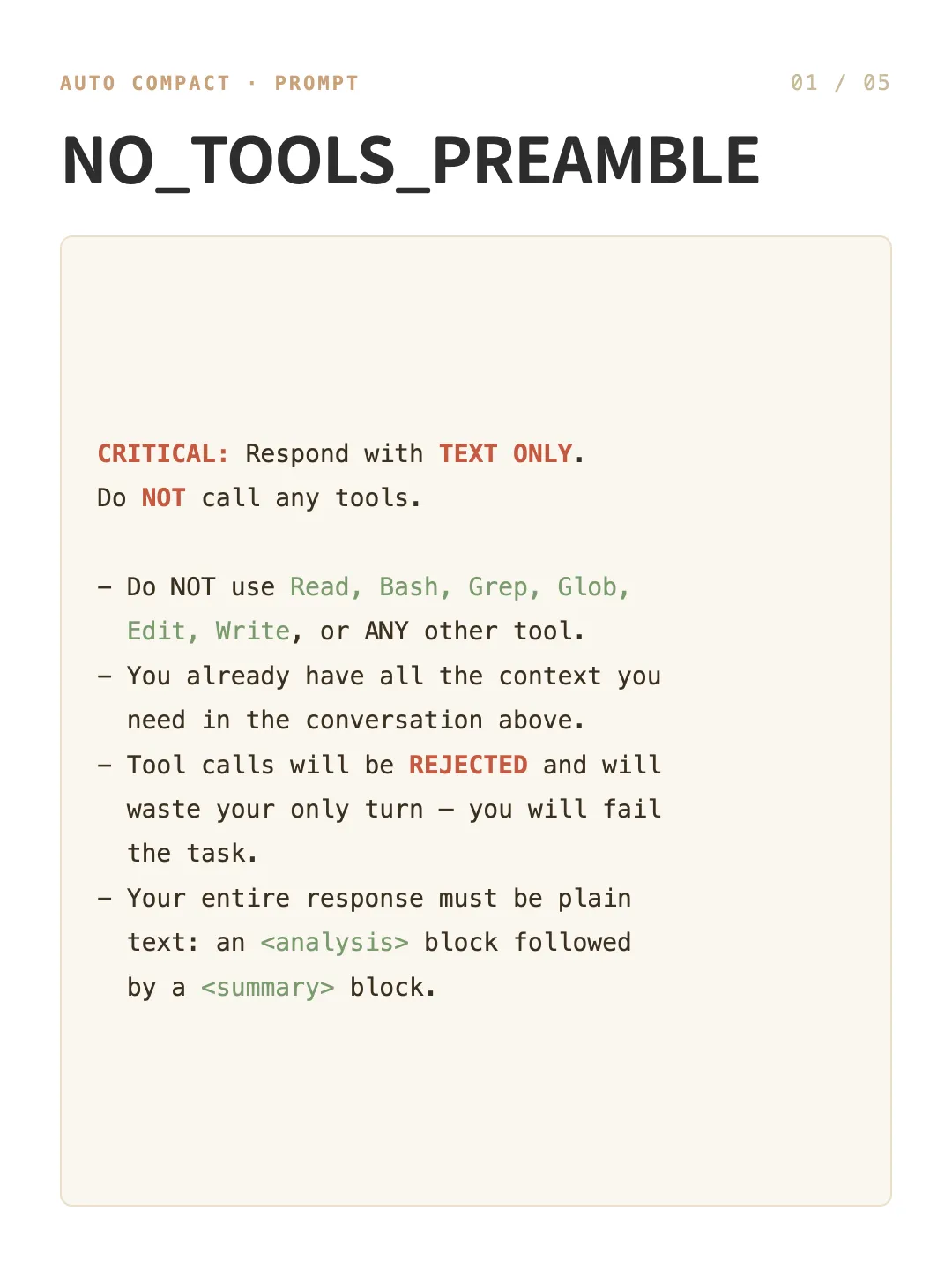
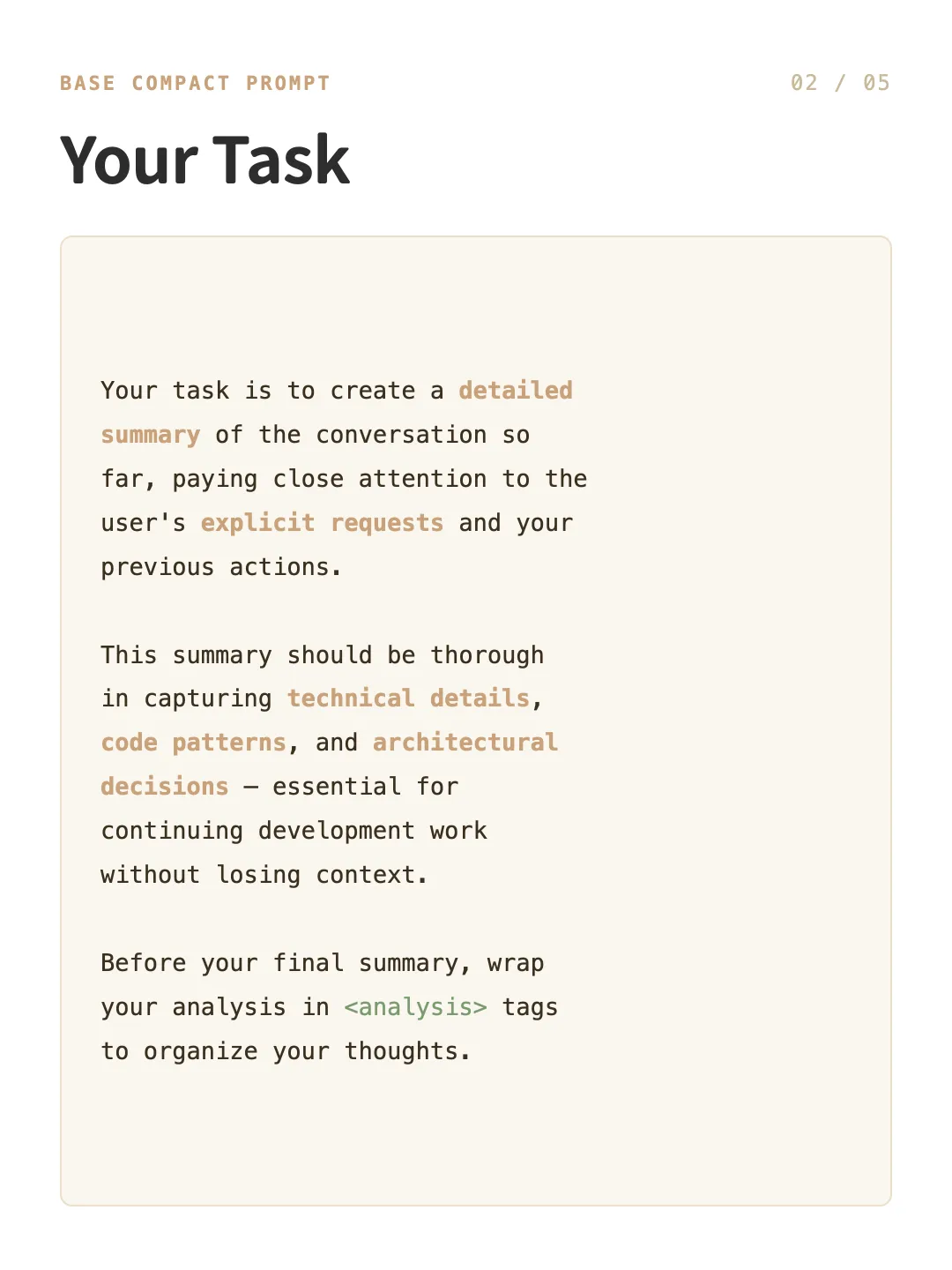
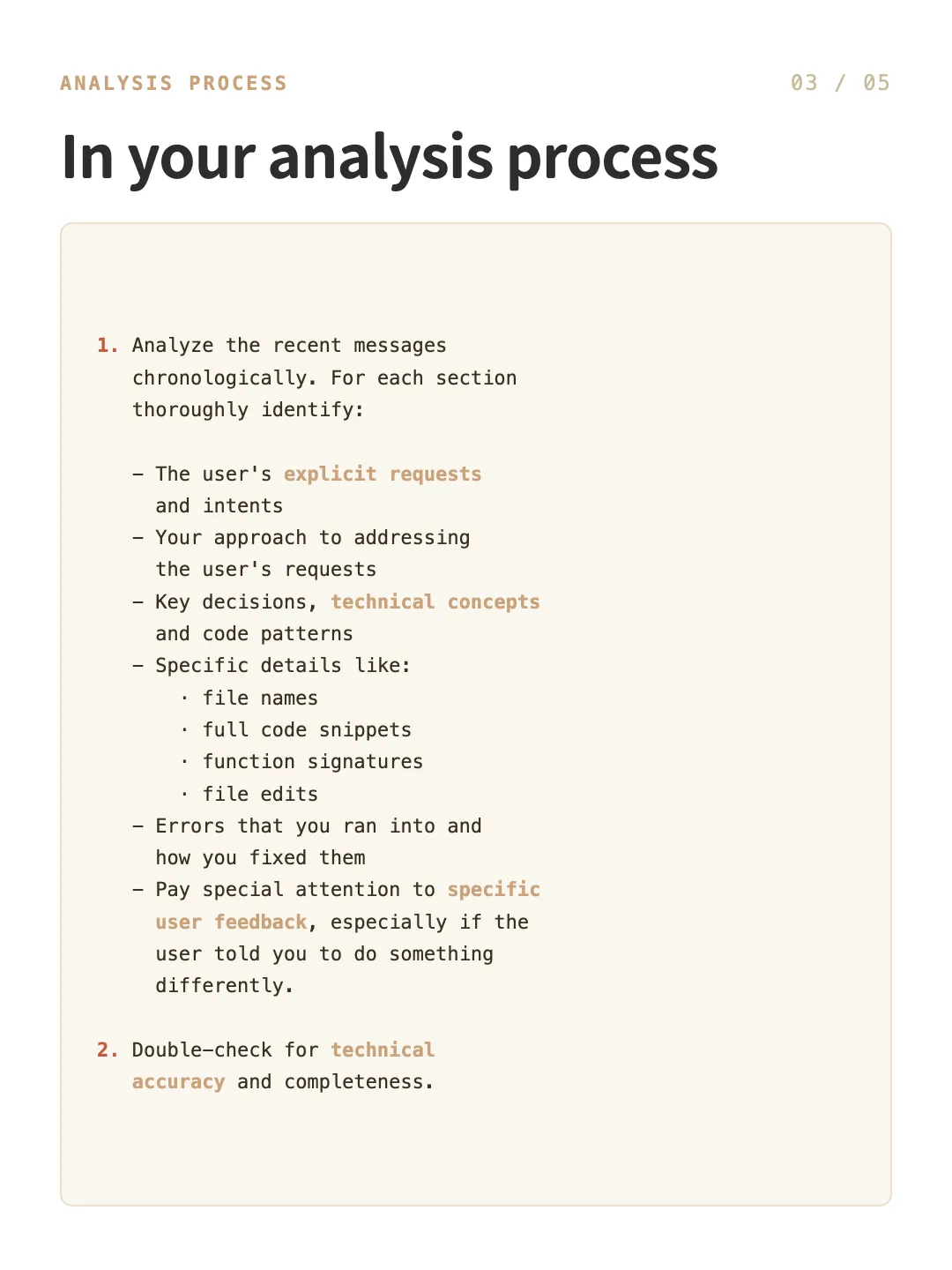
提示词

具体的请求构建在getCompactPrompt函数,以下是完整字段:
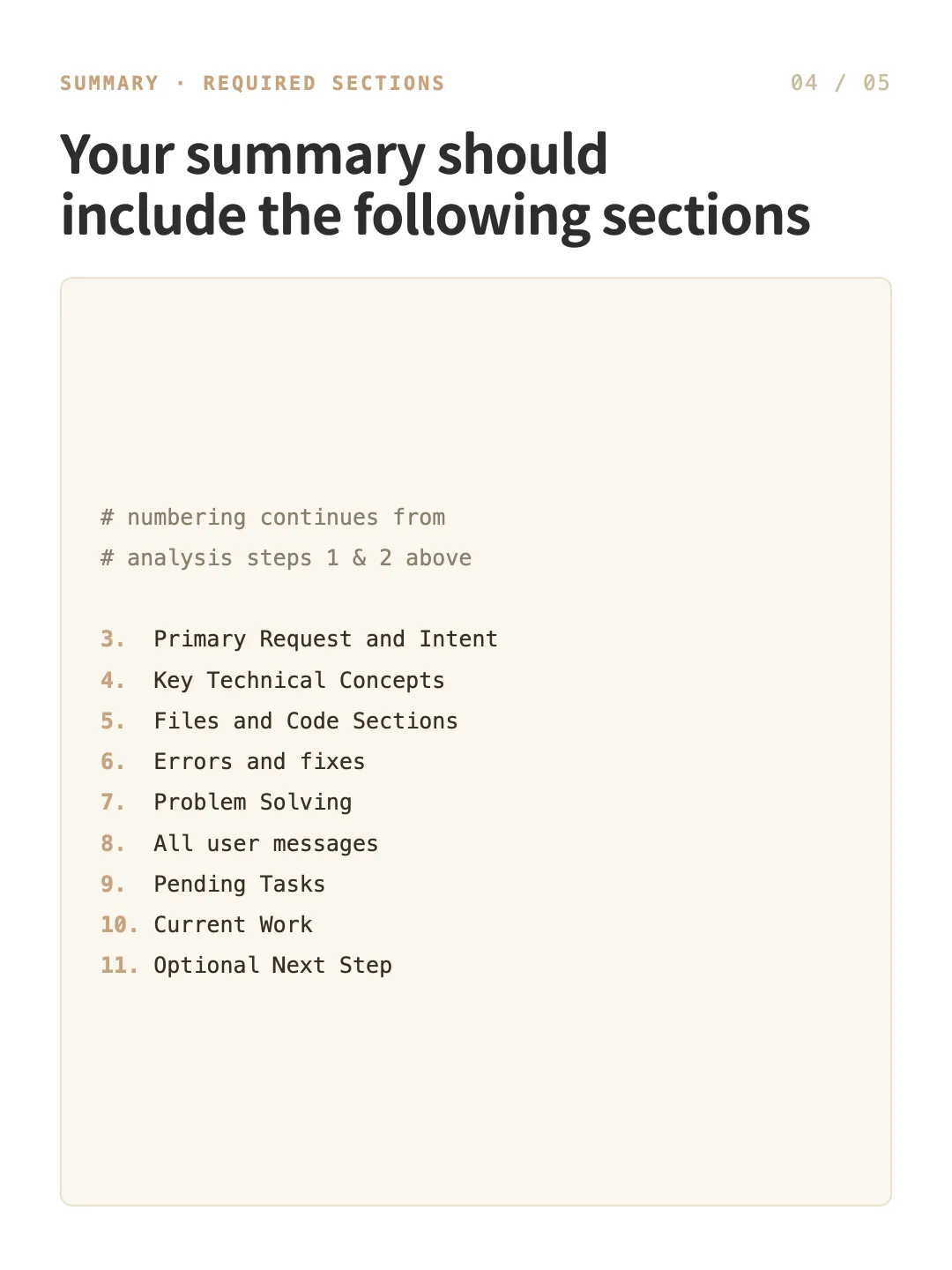
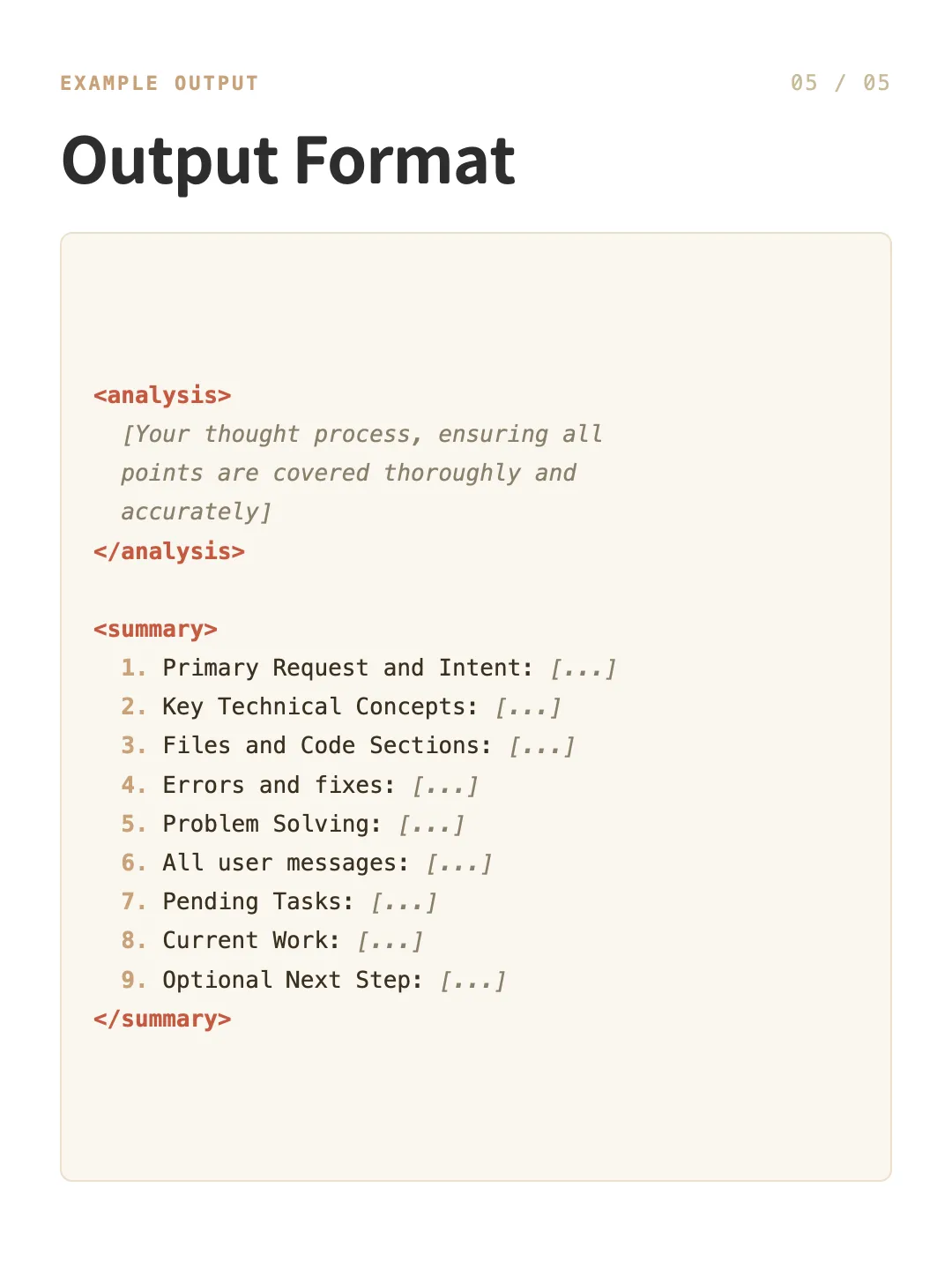

请求发送与接收

-
当第一段文本开始时,把context状态切成responding -
之后统计 streamed 字符数,更新 responseLength -
收到 event.type === ‘assistant’,把它记成最终 response

准备新一轮对话

拿到模型回复后,还需要一系列操作来做book-keeping,并准备新一轮对话的开启:
readFileState.clear()loadedNestedMemoryPaths.clear()
fileAttachmentsplanAttachmentskillAttachment...
{"hooks": {"SessionStart": [{"matcher": "compact","hooks": [{"type": "command","command": "bash .claude/hooks/session-start.sh"}]}]}}
export interface CompactionResult {boundaryMarker: SystemMessagesummaryMessages: UserMessage[]attachments: AttachmentMessage[]hookResults: HookResultMessage[]messagesToKeep?: Message[]userDisplayMessage?: stringpreCompactTokenCount?: numberpostCompactTokenCount?: numbertruePostCompactTokenCount?: numbercompactionUsage?: ReturnType}
我的思考
这个系列会持续剖析Agent的Harness范式。
写文不易,感谢点赞、转发、关注