 夜雨聆风
夜雨聆风





1.7k Stars让AI直接编辑Word文档的开源编辑器docx-editor
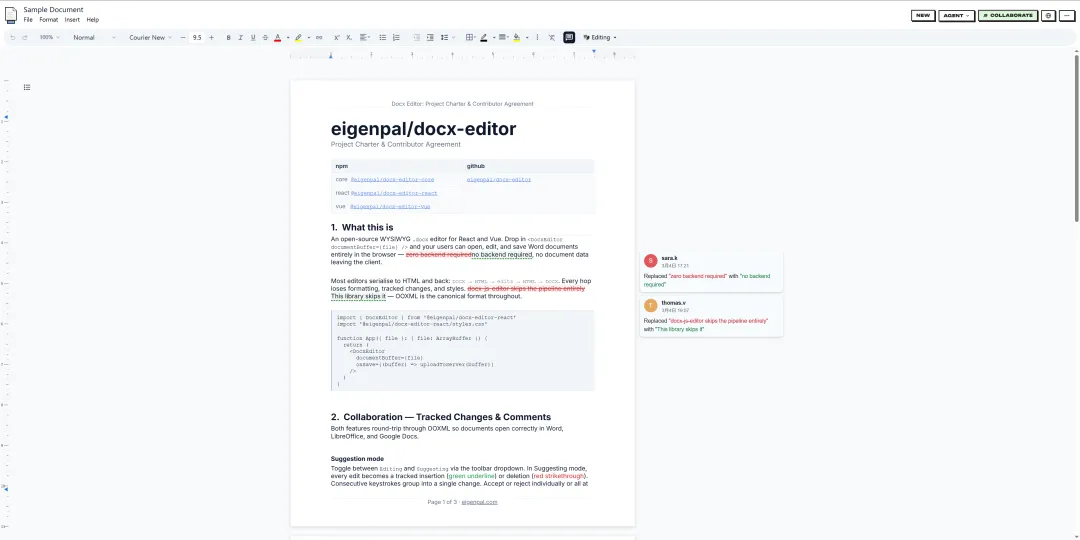
docx-editor 是一个开源的所见即所得(WYSIWYG) .docx 文档编辑器库,由 Y Combinator 孵化的 EigenPal 团队开发维护。
说人话:它让你在浏览器里像用 Google Docs 一样编辑 Word 文档,输入 .docx,输出还是 .docx,格式不丢、排版不乱。
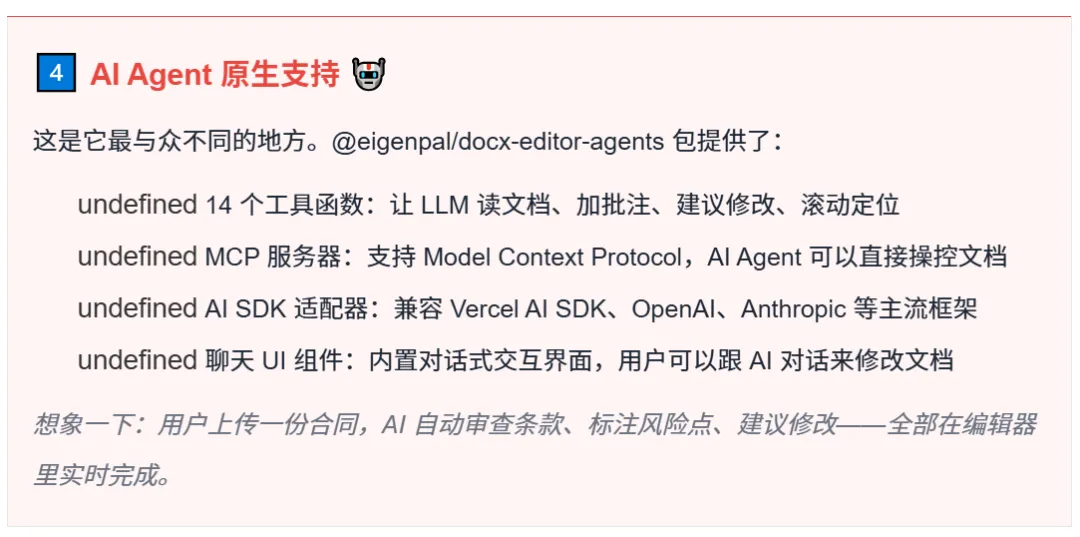
更猛的是,它天生就支持 AI Agent 操作文档——LLM 可以直接读文档、加批注、建议修改,甚至帮你自动改稿。
它专为法律、金融、保险这些“Word文档就是命”的行业而生,在这些领域,格式丢一个下划线都可能出大事。
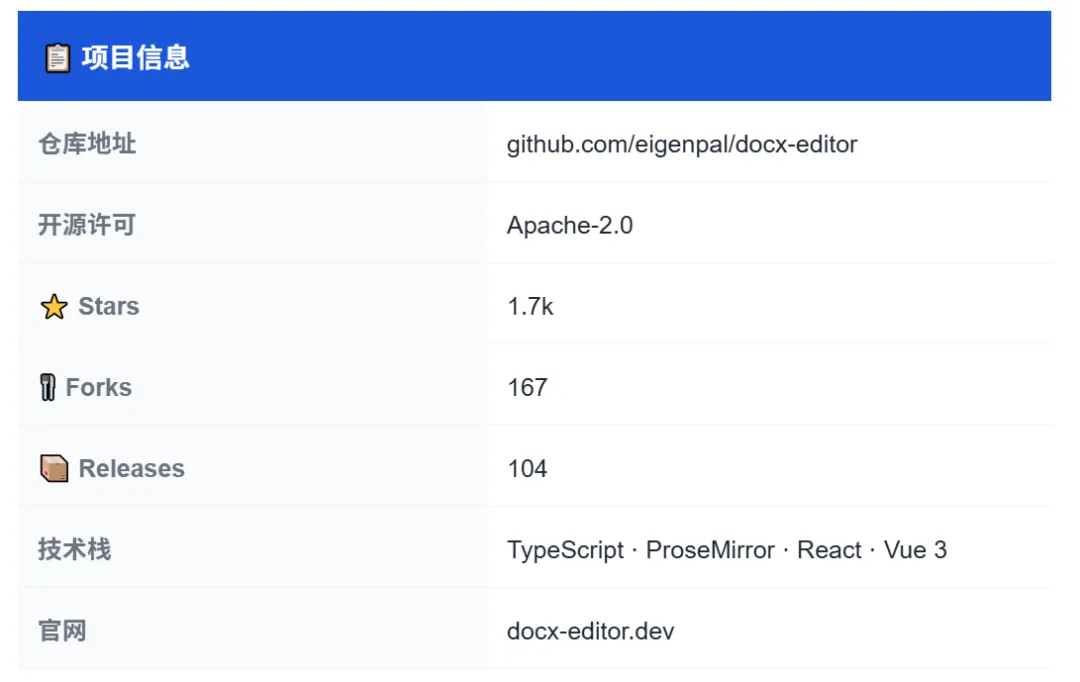
核心功能介绍
|
1️⃣ 原生 OOXML 格式,文档零损耗 这是最硬核的一点。docx-editor 基于 Canonical OOXML 标准,输入 .docx,编辑完输出还是标准 .docx。字体、颜色、加粗、斜体、高亮、浮动图片……该有的格式一个不少,跟 Microsoft Word 打开一模一样。再也不用担心“浏览器编辑完导出来排版全崩”的噩梦了。 |
|
2️⃣ 修订追踪 + 批注,审批流程全搞定 修订追踪(Track Changes):切到 suggesting 模式,每一次编辑自动标记为修订,带作者归属,可以逐条接受或驳回。线程式批注:锚定到文本范围的批注系统,支持回复、解决、删除,多人审稿协作无障碍。 |
|
3️⃣ 实时协作,多人同时编辑 接入 Yjs 即可多人实时协同编辑,带光标同步、用户在线状态、评论同步。支持 y-webrtc、PartyKit 等多种 Yjs provider,部署灵活。 |
|
5️⃣ React + Vue + Nuxt 全覆盖 一套核心引擎,三大框架通吃,团队用什么技术栈都能接入。 |
|
适配器 |
包名 |
状态 |
|
React |
@eigenpal/docx-editor-react |
✅ 稳定版 |
|
Vue 3 |
@eigenpal/docx-editor-vue |
🧪 Beta |
|
Nuxt 3/4 |
@eigenpal/nuxt-docx-editor |
✅ 自动导入 |
|
6️⃣ 插件系统 + 国际化 基于 ProseMirror 插件架构扩展自定义工具栏、快捷键、文档变换。内置 9 种语言:英语、德语、法语、希伯来语、印地语、波兰语、巴西葡语、土耳其语、简体中文,欢迎贡献更多语言。 |
使用与示例
React 项目接入
安装依赖:
|
bash npm install @eigenpal/docx-editor-react |
最小可用示例:
|
tsx import { useState } from ‘react’; import { DocxEditor } from ‘@eigenpal/docx-editor-react’; import ‘@eigenpal/docx-editor-react/styles.css’; export function App() { const [buffer, setBuffer] = useState<ArrayBuffer | null>(null); return ( <> <input type=”file” accept=”.docx” onChange={async (e) => setBuffer((await e.target.files?.[0]?.arrayBuffer()) ?? null) } /> {buffer && <DocxEditor documentBuffer={buffer} mode=”editing” />} </> ); } |
就这样,一个浏览器里的 Word 编辑器就跑起来了。
Vue 3 项目接入
|
bash npm install @eigenpal/docx-editor-vue |
|
vue <script setup lang=”ts”> import { ref } from ‘vue’; import { DocxEditor } from ‘@eigenpal/docx-editor-vue’; import ‘@eigenpal/docx-editor-vue/styles.css’; const buffer = ref<ArrayBuffer | null>(null); async function loadFile(e: Event) { const file = (e.target as HTMLInputElement).files?.[0]; buffer.value = file ? await file.arrayBuffer() : null; } </script> <template> <input type=”file” accept=”.docx” @change=”loadFile” /> <DocxEditor v-if=”buffer” :document-buffer=”buffer” mode=”editing” /> </template> |
Nuxt 3/4 一行配置搞定
|
bash npm install @eigenpal/nuxt-docx-editor |
|
ts // nuxt.config.ts export default defineNuxtConfig({ modules: [‘@eigenpal/nuxt-docx-editor’], }); |
Nuxt 模块会自动注册 <DocxEditor> 为客户端组件、自动导入 composables、自动处理 Vite 依赖优化配置——不需要手动包 <ClientOnly>,不需要手动配 optimizeDeps。
AI Agent 接入示例
|
tsx import { DocxEditor } from ‘@eigenpal/docx-editor-react’; import { useDocxAgentTools } from ‘@eigenpal/docx-editor-agents/react’; import { useChat } from ‘@ai-sdk/react’; function AgentEditor() { const editorRef = useRef(null); const agentTools = useDocxAgentTools(editorRef); const { messages, input, handleSubmit } = useChat({ maxSteps: 5, tools: agentTools, }); return ( <DocxEditor ref={editorRef} documentBuffer={buffer} mode=”editing” /> ); } |
14 个 Agent 工具函数,LLM 就能直接操作文档——读内容、加批注、插入文本、接受/拒绝修订,全部程序化完成。
插件扩展
|
tsx import { PluginHost, templatePlugin } from ‘@eigenpal/docx-editor-react/plugin-api’; <PluginHost plugins={[templatePlugin]}> <DocxEditor documentBuffer={buffer} /> </PluginHost> |
相关链接
在线体验:https://docx-editor.dev/editor
官方文档:https://docx-editor.dev/docs
GitHub 仓库:https://github.com/eigenpal/docx-editor
插件文档:https://docx-editor.dev/docs/plugins

觉得有用,点个 在看 👍,转发给需要的朋友
关注我,持续分享优质开源项目!