ARTICLE · 1132073
EXCEL VBA——工作表批量加密

加密工作表

将若干工作表批量加密
可视化的工作表/工作薄加密:
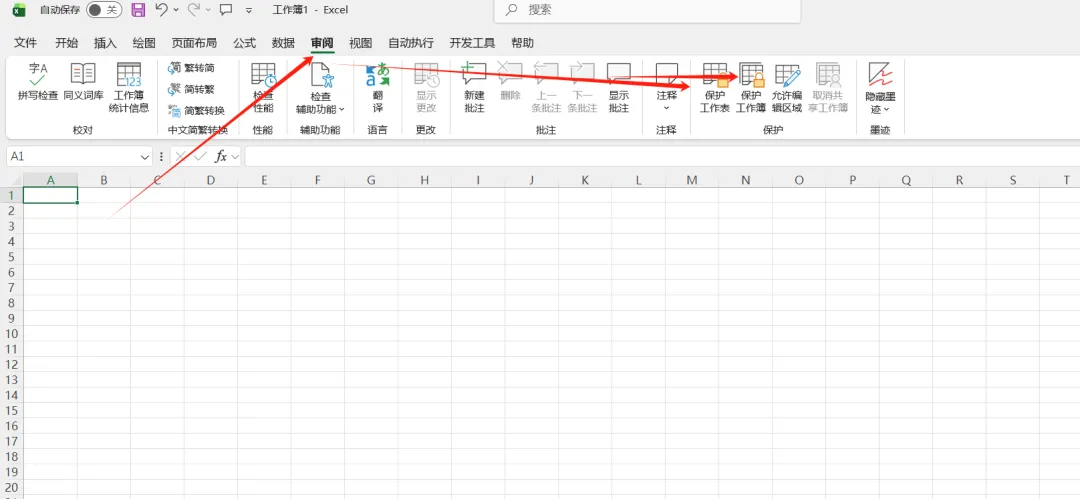
审阅选项卡——保护工作表/保护工作薄——勾选允许操作——设置密码——确定
使用宏步骤如下:
开发工具选项卡--Visual Basic--右键--插入--模块--粘贴宏--点击运行——选定锁定区域——设置密码
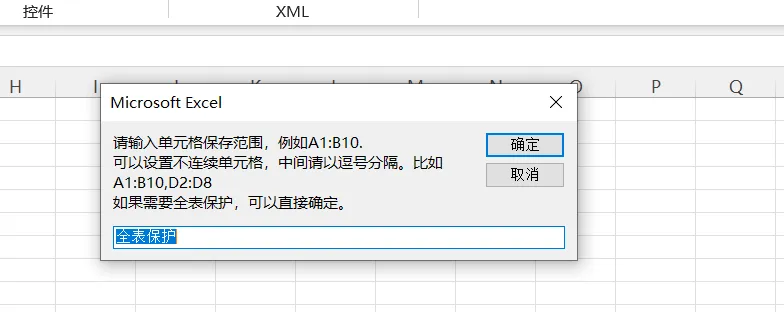
粘贴宏:
Sub ProtectSht()
Dim strAds As String, sht As Worksheet
Dim strKey As String, strTemp As String
Dim strMsg As String, strNoSht As String, strYesSht As String
On Error Resume Next
strAds = InputBox("请输入单元格保存范围,例如A1:B10。" & vbCr _
& "可以设置不连续单元格,中间请以逗号分隔。比如A1:B10,D2:D8" & vbCr _
& "如果需要全表保护,可以直接确定。", Default:="全表保护")
If StrPtr(strAds) = 0 Then Exit Sub
If strAds = "全表保护" Then strAds = Cells.Address
Set rng = Range(strAds)
If Err Then MsgBox "你输入的单元格区域地址不是正确的格式,请重新操作。": Exit Sub
strKey = InputBox("请输入保护密码。")
If StrPtr(strKey) = 0 Then Exit Sub
strTemp = InputBox("请再次输入保护密码。")
If StrPtr(strTemp) = 0 Then Exit Sub
If strKey <> strTemp Then MsgBox "你两次输入的密码不一致,系统退出,请重新操作。": Exit Sub
For Each sht In Worksheets
With sht
If .ProtectContents Then
strNoSht = strNoSht & "," & .Name
Else
.Cells.Locked = False
.Range(strAds).Locked = True
.Protect strKey, True, True, True
strYesSht = strYesSht & "," & .Name
End If
End With
Next
If strYesSht <> "" Then strMsg = "工作表:" & Mid(strYesSht, 2) & "的" & strAds & "区域保护完成"
If strNoSht <> "" Then strMsg = strMsg & vbCrLf & "以下工作表自身已有保护,无法再次保护:" & Mid(strNoSht, 2)
MsgBox strMsg
End Sub