 夜雨聆风
夜雨聆风The POWER-Z Android app is now available on Google Play. Simply search for “POWER-Z” in Google Play and tap Download. No professional testing equipment is required. Regular users can easily view key data such as real-time device power consumption, charging power, and battery temperature, with all important information clearly displayed. Search for the app and download it to get started.
How to Download
Download from Google Play: Open Google Play, search for “POWER-Z,” and tap Download
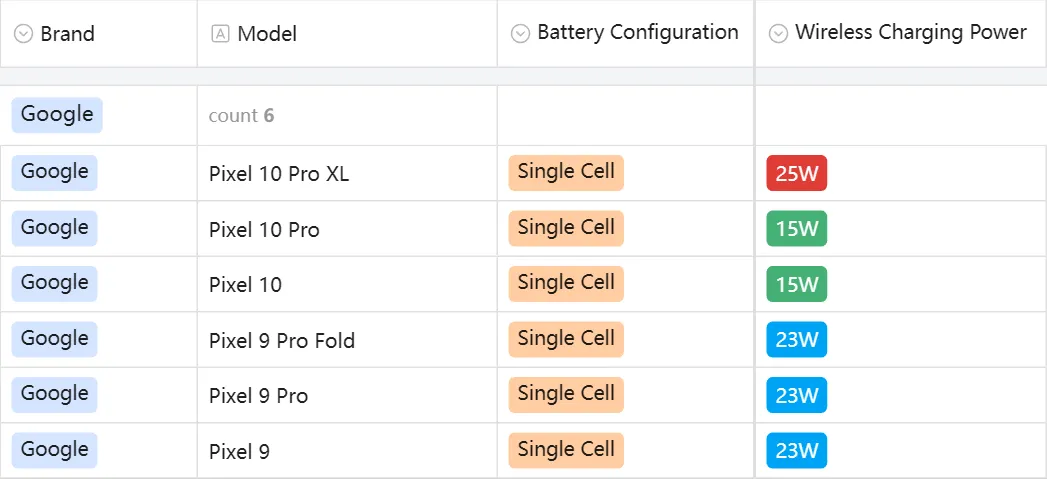
Currently Supported Models
Related Articles:
1. ChargerLAB POWER-Z App Adds Support for Nothing Phone (4a) Pro2. ChargerLAB POWER-Z KM003C Reveals the Fast-Charging Protocols of SHARGE Vision Mag Power Bank3. V.2.0.3 | The New Software Version of ChargerLAB POWER-Z KM003C
For more info, please refer to chargerlab.comFor business inquiries: info@chargerlab.com
Connect with us on social media:Youtube: @ChargerLABTikTok: @chargerlabTwitter: @chargerlabFacebook: @chargerlabTelegram: @ChargerLABchannelInstagram: @chargerlabs