ARTICLE · 1030775
Guide to Local AI Deployment

My article would borrow seven of your precious minutes and offer you 70 times the value. Today, we'll quickly introduce what local deployment of large AI models is. This article will be presented in a manual template format, without any embellishments, focusing solely on the essentials.
What is local deployment?
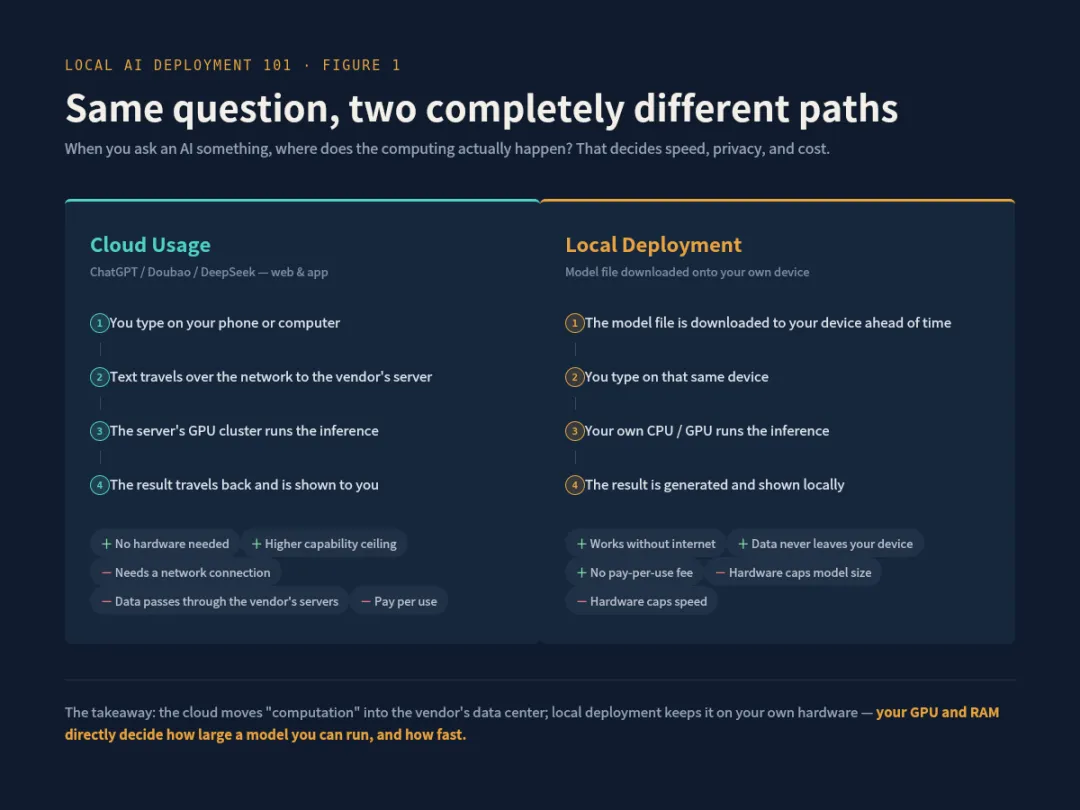
Nowadays, we commonly use generative Ai model such as ChatGPT, Cluade, and Gemini, etc. Well actually these models have their underlying connection running on the vendor's servers. In this way, text we type on our smart phones or computers is sent over the network to a remote server. In those server GPU cluster, performs the calculations and then sends the results back to us by request then we would receive a display. This process relies on a network connection, and our data passes through the vendor's servers; however, we have no access to the Ai model itself.
Basically, Ai local deployment refers to downloading the model file of a large language model to our own device and using the computing power of our own device to complete the inference calculation. In other words, the entire process of the model generating a response based on our input question and everything we do is completed locally. That means, no Wi-Fi, no internet and no download and upload during all these interactions.
The advantages of local deployment are that it can be used without an sharing data online, the user data doesn't leave our device, and there's no pay-per-use fee on the token. The trade-off is that our hardware or device performance directly determines the type of model we can run, how fast it runs, and the upper limit of the response quality.
Basic components of a large language model
To understand where the hardware requirements function, you need to know how these Ai models look inside a server.
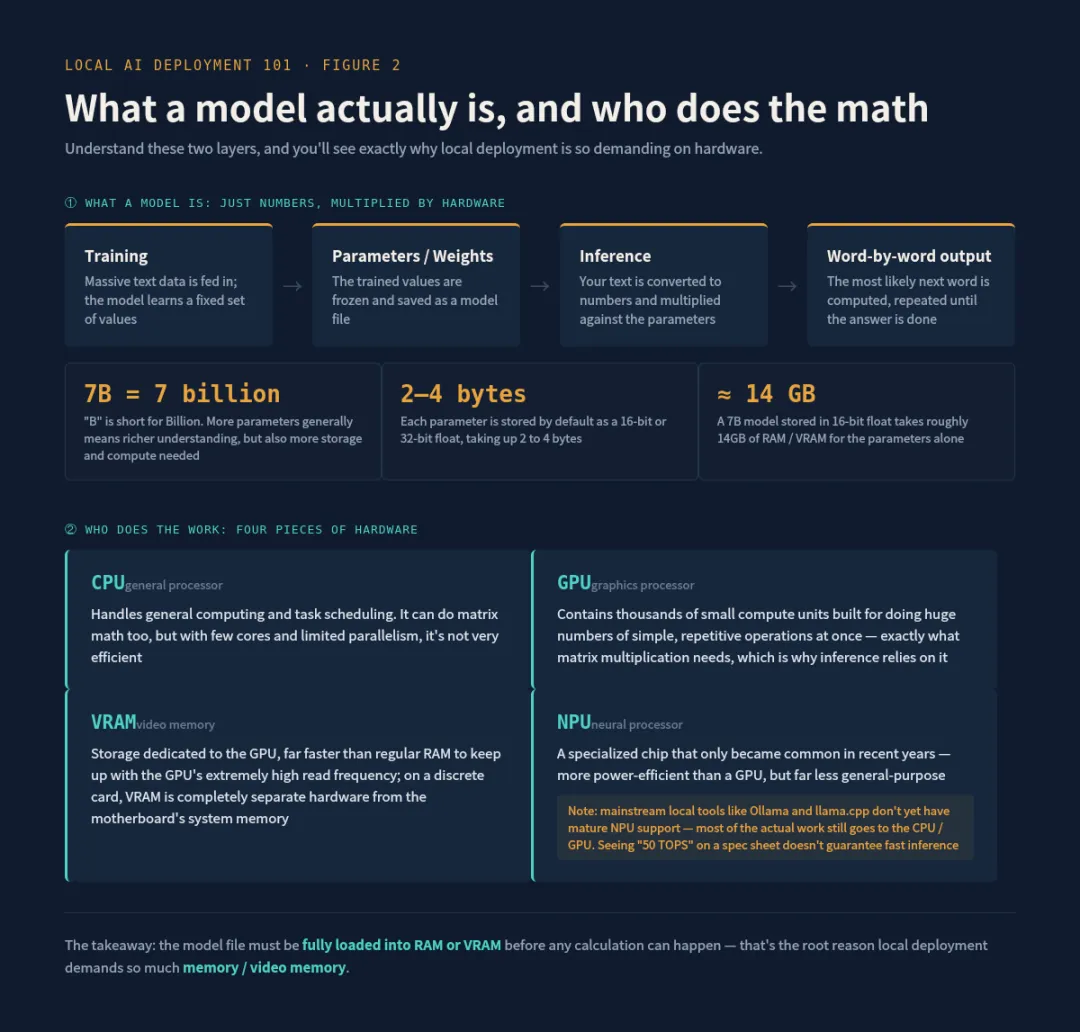
A large language model is essentially a matrix of numbers called parameters or weights. During the training phase, the model learns the specific values of these parameters from massive amounts of text data. After training is complete, these parameters are fixed and saved as a file, which is the model file we download to our local machine.
The number of parameters is usually represented by B, which is short for Billion. For example, a 7B model means it has 7 billion parameters. The more parameters a model has, the more information it can express and understand, but the more storage space and computational resources it requires.
When we input a question, the model's task is to convert our text into numbers, then perform numerous matrix multiplications with the model's 7 billion internal parameters to calculate the next most likely word. This process is repeated word by word to generate the answer. This computational process is called reasoning.
Here's a key point. These parameters are stored by default as 32-bit or 16-bit floating-point numbers, with each parameter occupying 2 to 4 bytes. A 7-byte model, if stored as 16-bit floating-point numbers, would require approximately 14GB of storage space and runtime memory just for the parameters themselves. This is why local deployments have high requirements for memory and video memory ; the model file must be fully loaded into memory or video memory for calculations to be performed.
Hardware fundamentals: The roles of CPU, GPU, memory, video memory, and NPU
Here we'll first explain some technical terms to help you understand the concept of the entire model deployment.
The CPU is responsible for general computing and task scheduling. It can perform matrix operations, but it is not very efficient because the number of CPU cores is small, and the amount of computation that can be processed in parallel at the same time is limited.
GPUs, on the other hand, contain thousands of small computing units that excel at performing a large number of repetitive, simple operations simultaneously, such as matrix multiplication. This is why large model inference primarily relies on GPUs, which are many times faster than CPUs.
Video memory (VRAM) is dedicated storage space for the GPU and is much faster than regular RAM because the GPU reads data at extremely high frequencies, requiring extremely fast access speeds. In traditional desktops or laptops, if a dedicated graphics card, such as NVIDIA's RTX series, is installed, this graphics card has its own independent VRAM chip, which is a completely separate piece of hardware from the system memory on the motherboard.
NPUs are specialized chips that have only become widespread in consumer processors in recent years. They are designed for specific AI computing scenarios and are more energy efficient than GPUs, meaning they consume less power and generate less heat for the same amount of computation. However, their versatility is not as good as GPUs. Currently, mainstream local deployment tools, such as Ollama and llama.cpp, do not yet have mature support for NPUs. In most scenarios, CPUs and GPUs are still the actual operating systems. NPUs are more often used in specific applications optimized by individual manufacturers. I must state this truthfully to avoid misunderstandings, such as thinking that seeing a number like 50 TOPS means that running large models will be very fast.
So why is quantification necessary?
After the model is trained, the parameters are stored by default in 16-bit floating-point format, which is called FP16. Earlier training methods used 32-bit format, called FP32. The number of bits refers to how many binary bits are used to represent the value of each parameter. The more bits, the higher the precision of the value that can be represented, but the more storage space it occupies.
A parameter stored in FP16 occupies 2 bytes. A 7B model, which has 7 billion parameters, requires 7 billion bytes of memory (2 bytes each), approximately 14GB. Adding the temporary computational data generated during inference, the actual memory usage during runtime will be slightly more than 14GB.
Quantization involves compressing these parameters from 16 bits to lower bit depths, such as 8 bits, 4 bits, or even lower, using fewer bytes to approximate the original value. The cost of this is a decrease in numerical precision and a slight loss in the quality of the model's responses, but the trade-offs are a significant reduction in model size, reduced computational load, and typically faster inference speed.
Common Quantification Levels
The most commonly used quantization scheme in the community comes from a project called llama.cpp, which defines a set of naming rules. When we download models in the future, we will often see labels like Q8, Q4_K_M, Q4_0.
The number after Q here roughly corresponds to the average number of bits occupied by each parameter. Q8 occupies about 1 byte per parameter, or 8 bits. Compared to the 16 bits of FP16, the size is reduced by half, and the loss of precision is very small, almost imperceptible.
Q4 uses approximately 4 bits per parameter, or half a byte, reducing the size to about a quarter of FP16. While there is a noticeable decrease in precision, this has little impact on everyday scenarios like chatting and writing. Suffixes like K_M and K_S indicate more refined quantization algorithms. Instead of uniformly compressing all parameters to the same number of bits, they retain slightly higher precision for the more critical parts of the model while controlling the rest more finely.
This aims to maintain performance within the same size framework. Currently, versions with the M and S suffixes are the most commonly used choices in the community.
There are also more extreme types like Q2 and Q3, which are smaller in size but suffer from a more significant loss of precision. They are generally only considered when hardware conditions are extremely tight.

Rough volume conversion formula
The storage space occupied by a quantized model can be roughly estimated by multiplying the number of parameters by the number of bytes occupied by each parameter.
For example, a 7B model using Q4 quantization has each parameter occupying approximately 0.5 bytes. 7 multiplied by 10 to the power of 9, then multiplied by 0.5 bytes, equals approximately 3.5GB. Similarly, a 7B model using Q8 quantization has each parameter occupying approximately 1 byte, resulting in a size of approximately 7GB.
Memory needs to be reserved for temporary data generated during inference. This extra overhead is related to the context length we set. The context length refers to how many words of dialogue content the model can remember at once; the longer the context length, the more memory is used. Generally, reserving roughly 20% to 30% of the model file size as a buffer is a safe approach.
Remember these points, and you'll understand the underlying logic of large-scale model deployment.
Handwritten content is hard to write, so if you find it helpful, please like and share to support the author's updates. Thank you!