ARTICLE · 1192356
[linux] Ubuntu24软件下载和安装汇总-自用

主要分享Ubuntu 24系统下软件的下载和安装方法,涵盖图形界面、chrome、QQ、微信等软件,还介绍了超级用户命令行提示符设置、禁用Snap、安装五笔输入法、安装wine等内容,同时给出了部分软件破解问题的解决办法。
经常重装系统,备份下,有用的也可以参考。
安装图形界面:
apt install ubuntu -desktop
systemctl set-default graphical.target
reboot
安装chrome
wget https://dl.google.com/linux/direct/google-chrome-stable_current_amd64.deb
apt install ./google-chrome-stable_current_amd64.deb
超级用户命令行带年月日 时分秒 绝对路径提示符
echo "export PS1='[\u \D{%Y-%m-%d} \t \w]$'" >> /root/.bashrc
Ubuntu 22.04 禁用(彻底移除)Snap:
https://sysin.cn/blog/ubuntu-remove-snap/
Linux的Beyond Compare安装(破解问题也解决了.doge)
https://blog.csdn.net/su749520/article/details/146965330
修改完成之后,要使此选项生效,请重新启动计算机,或注销计算机用户账户并重新登陆计算机界面。到期了,删除配置就行了:
rm -rf ~/.config/bcompare/
重启后就可以正常看到了哈。
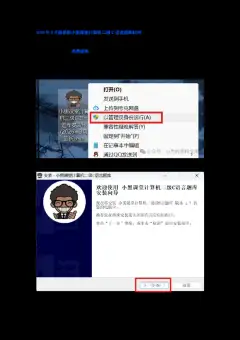
QQ下载与安装
wget https://dldir1.qq.com/qqfile/qq/QQNT/Linux/QQ_3.2.17_250429_amd64_01.deb
sudo dpkg -i QQ_3.2.17_250429_amd64_01.deb
微信下载与安装(Weixin for Linux 4.0.1 Test Version)
wget https://dldir1v6.qq.com/weixin/Universal/Linux/WeChatLinux_x86_64.deb
sudo dpkg -i WeChatLinux_x86_64.deb
安装五笔输入法
sudo apt-get -y install fcitx5 fcitx5-configtool fcitx5-chinese-addons
sudo apt-get remove --purge fcitx
sudo apt-get autoremove
sudo apt-get -y install fcitx5 fcitx5-configtool fcitx5-chinese-addons
vim ~/.profile
export GTK_IM_MODULE=fcitx
export QT_IM_MODULE=fcitx
export XMODIFIERS=@im=fcitx
#fcitx5 &
# region & Language install chinese(simple)
安装wine,有时候想用下notepad++,sourceinsight(破解问题也解决了.doge)
apt remove wine
rm -rf /root/.wine (有些软件如果破解的,到期的时候把这个目录删除,重新装一遍,几分钟)
dpkg --add-architecture i386 && apt-get update && apt-get install -y wine32:i386
sourceinsight有时候输入不太方便,30天试用完成,把/root一个什么文件夹删除,重装下sourceinsight又可以用了,现在年龄大了,看代码少了,影响倒不大。
下载自己的软件备份目录
git clone git@gitee.com:rulai_2/tools.git
原文链接:
https://blog.csdn.net/r77683962/article/details/148822150