ARTICLE · 1199836
EXCEL VBA ——批量解密工作薄
解密
第14

EXCEL|VBA|解密

01

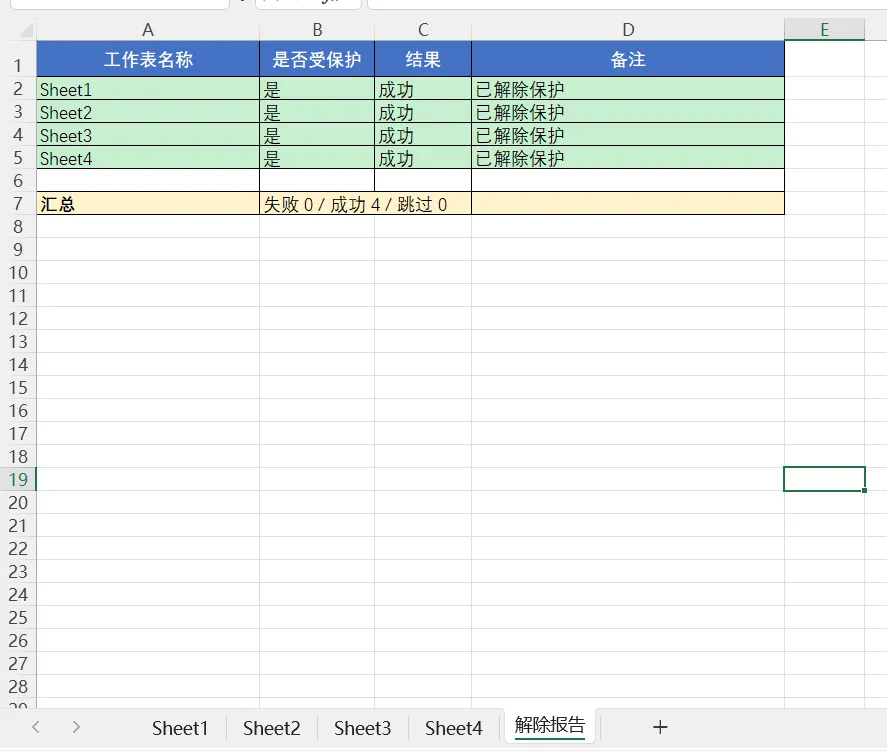
把加密的工作薄解密,能解密简单密码加密的表,生成一个解密情况的表格,包括解密成功、失败、跳过的情况。

02

步骤:开发工具选项卡——Visual Basic——右键——插入——模块——粘贴宏——点击运行

03

粘贴宏:
Option Explicit
'============================================================
' 主过程:检测并尝试解除所有工作表保护,结果写入报告表
' 无任何弹窗
'============================================================
Sub Unprotect_AllSheets_ToSheet()
Dim sht As Worksheet
Dim wsReport As Worksheet
Dim results() As Variant
Dim i As Long, n As Long
Application.ScreenUpdating = False
Application.DisplayAlerts = False
Application.EnableEvents = False
' 收集结果:每行 = 工作表名 / 是否受保护 / 结果状态 / 备注
n = ThisWorkbook.Worksheets.Count
ReDim results(1 To n, 1 To 4)
i = 0
For Each sht In ThisWorkbook.Worksheets
' 跳过报告表自身
If Not IsReportSheet(sht) Then
i = i + 1
Dim wasProtected As Boolean, ok As Boolean
wasProtected = IsStillProtected(sht)
results(i, 1) = sht.Name
If Not wasProtected Then
results(i, 2) = "否"
results(i, 3) = "跳过"
results(i, 4) = "原本未受保护"
Else
results(i, 2) = "是"
ok = TryUnprotect(sht)
If ok Then
results(i, 3) = "成功"
results(i, 4) = "已解除保护"
Else
results(i, 3) = "失败"
results(i, 4) = "可能需要密码或更强加密"
End If
End If
End If
Next sht
' 写报告表(失败在前、成功居中、跳过在后)
Set wsReport = WriteReport(results, i)
Application.EnableEvents = True
Application.DisplayAlerts = True
Application.ScreenUpdating = True
' 激活报告表(不弹窗)
wsReport.Activate
End Sub
'============================================================
' 将结果排序后写入报告工作表,返回该工作表对象
'============================================================
Private Function WriteReport(ByVal results As Variant, ByVal rowCount As Long) As Worksheet
Dim ws As Worksheet
Dim r As Long, c As Long
Dim tmp As Variant
Dim orderArr() As Long
Dim k As Long
' 复用或新建报告表
On Error Resume Next
Set ws = ThisWorkbook.Worksheets("解除报告")
On Error GoTo 0
If ws Is Nothing Then
Set ws = ThisWorkbook.Worksheets.Add(After:=ThisWorkbook.Worksheets(ThisWorkbook.Worksheets.Count))
ws.Name = "解除报告"
End If
ws.Cells.Clear
' ---- 排序:失败(0) < 成功(1) < 跳过(2) ----
ReDim orderArr(1 To rowCount)
For r = 1 To rowCount
orderArr(r) = r
Next
' 简单选择排序(行数一般不多)
Dim a As Long, b As Long, minIdx As Long, tmpIdx As Long
For a = 1 To rowCount - 1
minIdx = a
For b = a + 1 To rowCount
If RankOf(CStr(results(orderArr(b), 3))) < RankOf(CStr(results(orderArr(minIdx), 3))) Then
minIdx = b
End If
Next b
If minIdx <> a Then
tmpIdx = orderArr(a)
orderArr(a) = orderArr(minIdx)
orderArr(minIdx) = tmpIdx
End If
Next a
' ---- 表头 ----
ws.Range("A1:D1").Value = Array("工作表名称", "是否受保护", "结果", "备注")
With ws.Range("A1:D1")
.Font.Bold = True
.Interior.Color = RGB(68, 114, 196)
.Font.Color = RGB(255, 255, 255)
.HorizontalAlignment = xlCenter
End With
' ---- 数据行(按排序写入)----
r = 2
For k = 1 To rowCount
Dim srcRow As Long
srcRow = orderArr(k)
For c = 1 To 4
ws.Cells(r, c).Value = results(srcRow, c)
Next c
' 按状态上色
Select Case CStr(results(srcRow, 3))
Case "失败"
ws.Range(ws.Cells(r, 1), ws.Cells(r, 4)).Interior.Color = RGB(255, 199, 206)
Case "成功"
ws.Range(ws.Cells(r, 1), ws.Cells(r, 4)).Interior.Color = RGB(198, 239, 206)
Case "跳过"
ws.Range(ws.Cells(r, 1), ws.Cells(r, 4)).Interior.Color = RGB(242, 242, 242)
End Select
r = r + 1
Next k
' ---- 汇总行 ----
Dim failCnt As Long, okCnt As Long, skipCnt As Long
For k = 1 To rowCount
Select Case CStr(results(orderArr(k), 3))
Case "失败": failCnt = failCnt + 1
Case "成功": okCnt = okCnt + 1
Case "跳过": skipCnt = skipCnt + 1
End Select
Next k
r = r + 1
ws.Cells(r, 1).Value = "汇总"
ws.Cells(r, 1).Font.Bold = True
ws.Cells(r, 2).Value = "失败 " & failCnt & " / 成功 " & okCnt & " / 跳过 " & skipCnt
ws.Range(ws.Cells(r, 1), ws.Cells(r, 4)).Interior.Color = RGB(255, 242, 204)
' ---- 表格化 + 列宽 ----
Dim lastRow As Long
lastRow = r
ws.Range(ws.Cells(1, 1), ws.Cells(lastRow, 4)).Borders.LineStyle = xlContinuous
ws.Columns("A:A").ColumnWidth = 24
ws.Columns("B:B").ColumnWidth = 12
ws.Columns("C:C").ColumnWidth = 10
ws.Columns("D:D").ColumnWidth = 34
ws.Rows(1).RowHeight = 22
Set WriteReport = ws
End Function
'============================================================
' 状态排序权重:失败=0,成功=1,跳过=2,其它=3
'============================================================
Private Function RankOf(ByVal status As String) As Long
Select Case status
Case "失败": RankOf = 0
Case "成功": RankOf = 1
Case "跳过": RankOf = 2
Case Else: RankOf = 3
End Select
End Function
'============================================================
' 对单个工作表分层尝试解除保护
'============================================================
Private Function TryUnprotect(ByVal sht As Worksheet) As Boolean
On Error Resume Next
' 第 1 层:直接无密码解除
sht.Unprotect
If Not IsStillProtected(sht) Then
TryUnprotect = True
Exit Function
End If
' 第 2 层:经典"四次 Protect + Unprotect"技巧(旧格式可能有效)
sht.Protect DrawingObjects:=True, Contents:=True, Scenarios:=True, _
AllowFiltering:=True, AllowUsingPivotTables:=True
sht.Protect DrawingObjects:=False, Contents:=True, Scenarios:=False, _
AllowFiltering:=True, AllowUsingPivotTables:=True
sht.Protect DrawingObjects:=True, Contents:=True, Scenarios:=False, _
AllowFiltering:=True, AllowUsingPivotTables:=True
sht.Protect DrawingObjects:=False, Contents:=True, Scenarios:=True, _
AllowFiltering:=True, AllowUsingPivotTables:=True
sht.Unprotect
If Not IsStillProtected(sht) Then
TryUnprotect = True
Exit Function
End If
' 第 3 层:常见弱密码(不需要可删掉整段)
Dim pwdList As Variant, p As Variant
pwdList = Array("123", "1234", "12345", "123456", _
"password", "admin", "abc", "111", "0000")
For Each p In pwdList
sht.Unprotect Password:=CStr(p)
If Not IsStillProtected(sht) Then
TryUnprotect = True
Exit Function
End If
Next p
TryUnprotect = False
End Function
'============================================================
' 判断工作表是否仍受保护
'============================================================
Private Function IsStillProtected(ByVal sht As Worksheet) As Boolean
On Error Resume Next
IsStillProtected = sht.ProtectContents Or _
sht.ProtectDrawingObjects Or _
sht.ProtectScenarios
On Error GoTo 0
End Function
'============================================================
' 判断是否为报告表(避免处理自己)
'============================================================
Private Function IsReportSheet(ByVal sht As Worksheet) As Boolean
IsReportSheet = (sht.Name = "解除报告")
End Function