夜雨聆风
夜雨聆风字数 1041,阅读大约需 6 分钟
龙虾接入飞书,配置复杂麻烦,我替各位踩坑了。本文介绍如何创建飞书机器人、开通权限、设置事件回调、发布机器人、拿到appid和密钥、openclaw安装插件、实现多agent群聊。
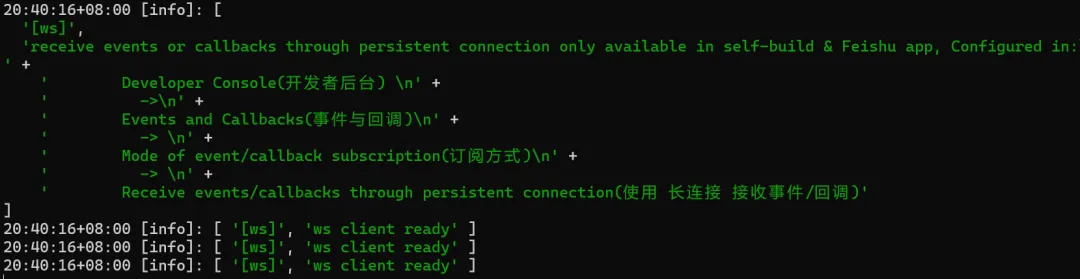
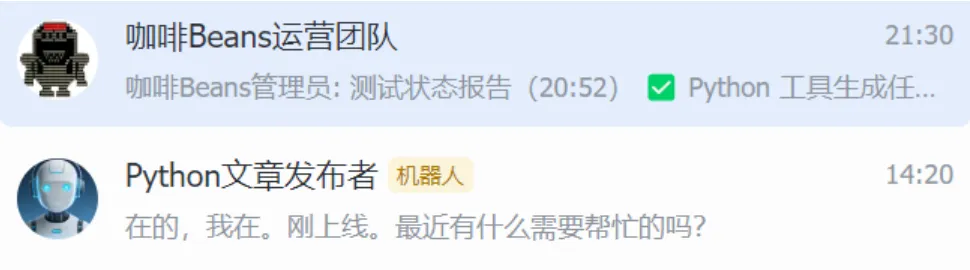
先看结果,连接好了终端可以看到响应
1.创建机器人
进入飞书开发者后台
https://open.feishu.cn/app?lang=zh-CN
企业自建应用

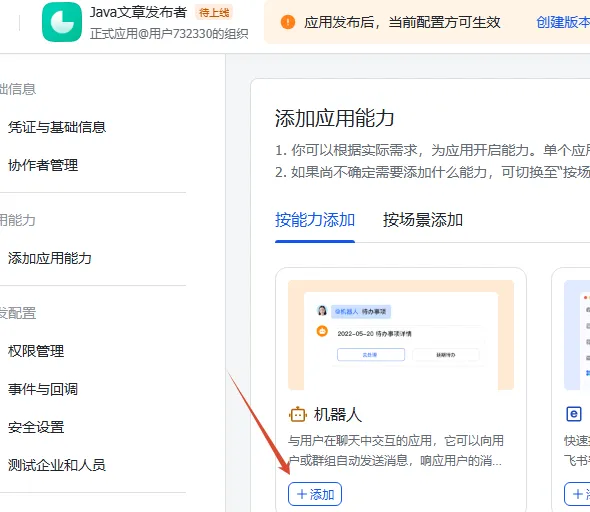
添加机器人
选择应用能力-机器人
2.开通权限->批量导入
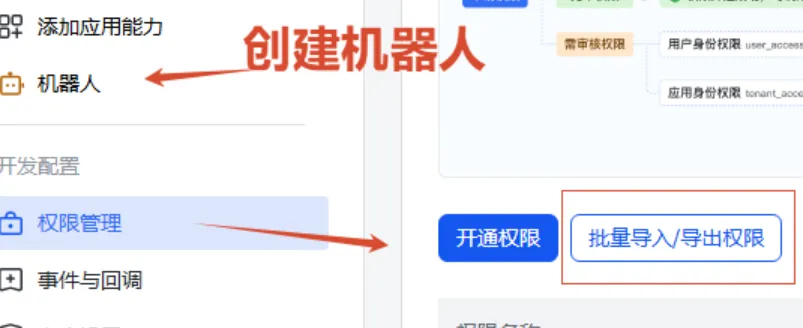
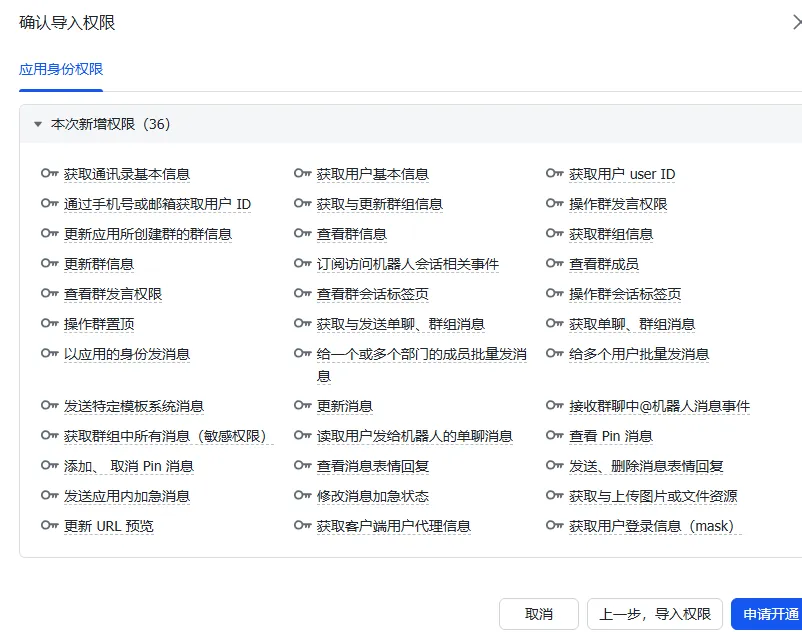
粘贴此json
{ "scopes": { "tenant": [ "contact:user.base:readonly", "contact:user.employee_id:readonly", "contact:user.id:readonly", "contact:contact.base:readonly", "im:chat", "im:chat.access_event.bot_p2p_chat:read", "im:chat.members:read", "im:chat.moderation:read", "im:chat.tabs:read", "im:chat.tabs:write_only", "im:chat.top_notice:write_only", "im:chat:moderation:write_only", "im:chat:operate_as_owner", "im:chat:read", "im:chat:readonly", "im:chat:update", "im:message", "im:message.group_at_msg:readonly", "im:message.group_msg", "im:message.p2p_msg:readonly", "im:message.pins:read", "im:message.pins:write_only", "im:message.reactions:read", "im:message.reactions:write_only", "im:message.urgent", "im:message.urgent.status:write", "im:message:readonly", "im:message:send_as_bot", "im:message:send_multi_depts", "im:message:send_multi_users", "im:message:send_sys_msg", "im:message:update", "im:resource", "im:url_preview.update", "im:user_agent:read", "passport:session_mask:readonly" ], "user": [] }}3.设置事件回调
【订阅方式】处选择长连接模式
点击 【添加事件】 ,搜索并添加im.message.receive_v1
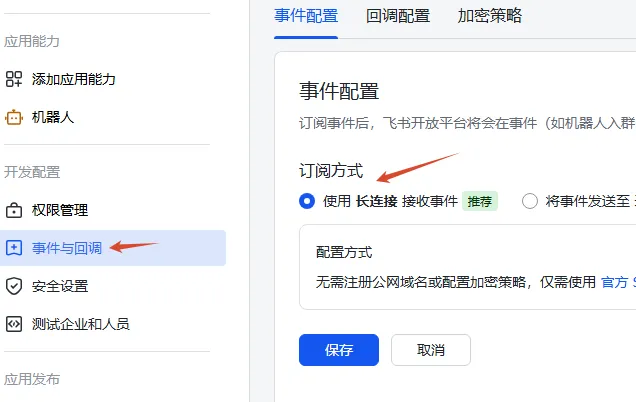
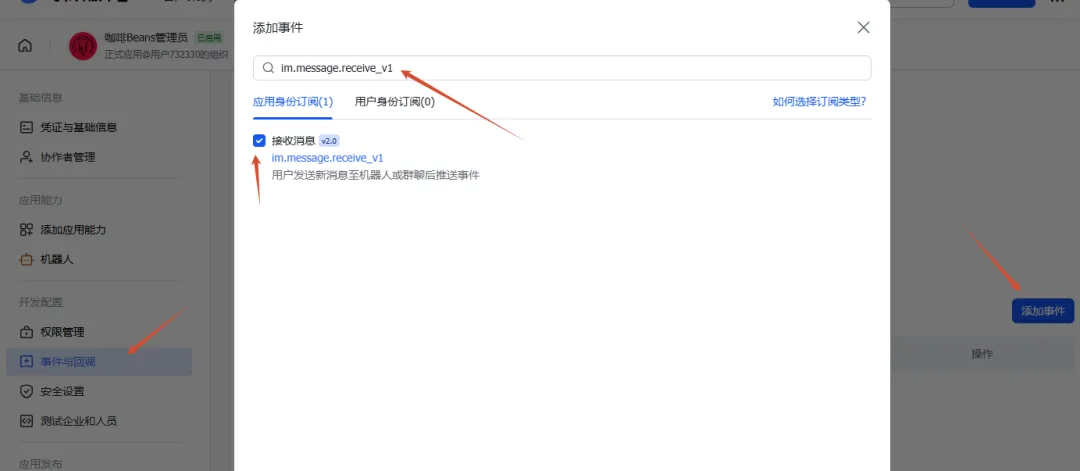
4.发布机器人
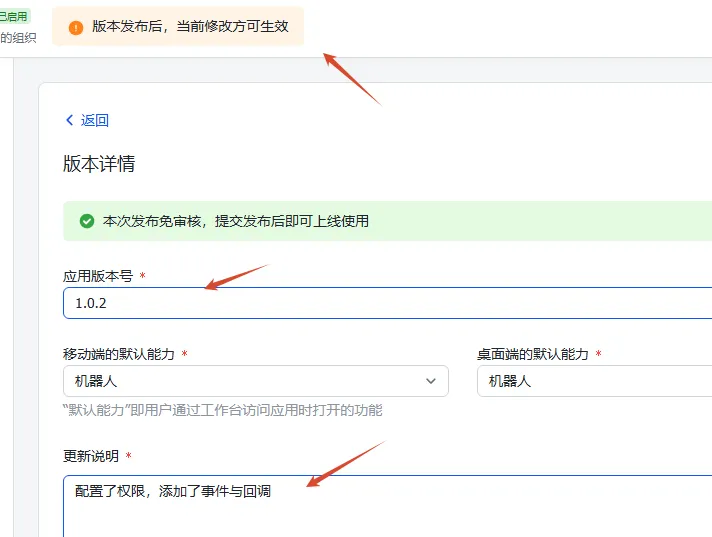
5.拿到appid和密钥
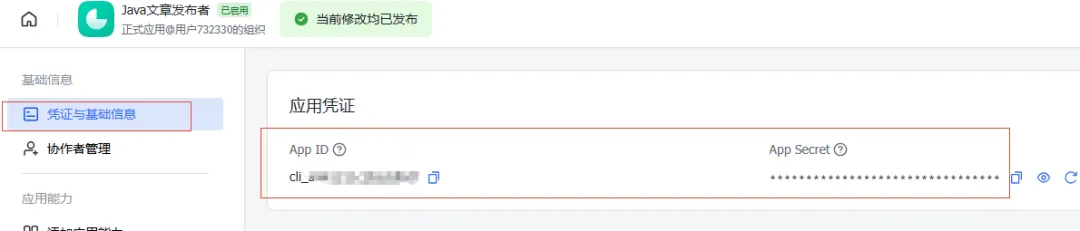
6.openclaw安装插件
方式一:
npx -y @larksuite/openclaw-lark install使用飞书app扫码绑定机器人
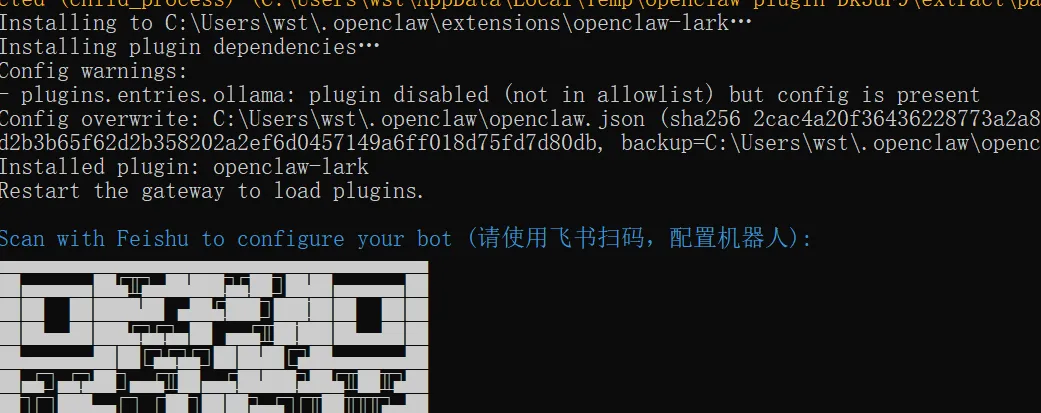
方式二:
openclaw channels add选择Feishu,然后输入 App ID 和 App Secret
方式三(推荐):
拿到飞书文档,让AI配置
参照以下文档安装飞书插件,实现多agent:https://bytedance.larkoffice.com/docx/MFK7dDFLFoVlOGxWCv5cTXKmnMhhttps://bytedance.larkoffice.com/docx/WNNXdhKxmo8KDJxMM9dc0GD5nFf按以下信息配置(App Secret是隐私信息,永远不要泄露)机器人内部ID:mainApp ID:xxx,App Secret:xxx让这个机器人对接代理main,私聊和群聊信息都给main处理机器人内部ID:[agent的id]App ID:xxx,App Secret:xxx让这个机器人对接代理[agent的id],私聊和群聊信息都给[agent的id]处理安装完后可参考飞书文档手动完善openclaw.json配置(有点多)
"agents": { "defaults": { "model": { "primary": "openrouter/stepfun/step-3.5-flash:free", //主要模型 "fallbacks": ["qwen-portal/coder-model"] //备用模型,自动切换 }, "models": { "qwen-portal/coder-model": { //可选模型 "alias": "qwen-portal" }, "openrouter/stepfun/step-3.5-flash:free": { //可选模型 "alias": "OpenRouter" } }, "compaction": { "mode": "safeguard" //保守保护模式(默认推荐)将上下文压缩,避免 AI"失忆" 或对话崩溃 }, "subagents": { "thinking": "normal" //子 Agent 采用标准思考级别,输出完整思考过程与决策步骤 } }, "list": [ { "id": "main", //主agentid "name": "main", //主agent名 "default":true, //默认agent "workspace": "C:\\Users\\xxx\\.openclaw\\workspace", //工作区 "model": "openrouter/stepfun/step-3.5-flash:free", //默认模型 "subagents": { //可控制的子agent "allowAgents": [ "agent的id" ] }, "tools": { //允许调用的飞书工具权限 "alsoAllow": [ "self_manage", "browser", "read", "feishu_bitable_app", "feishu_bitable_app_table", "feishu_bitable_app_table_field", "feishu_bitable_app_table_record", "feishu_bitable_app_table_view", "feishu_calendar_calendar", "feishu_calendar_event", "feishu_calendar_event_attendee", "feishu_calendar_freebusy", "feishu_chat", "feishu_chat_members", "feishu_create_doc", "feishu_doc_comments", "feishu_doc_media", "feishu_drive_file", "feishu_fetch_doc", "feishu_get_user", "feishu_im_bot_image", "feishu_im_user_fetch_resource", "feishu_im_user_get_messages", "feishu_im_user_get_thread_messages", "feishu_im_user_message", "feishu_im_user_search_messages", "feishu_oauth", "feishu_oauth_batch_auth", "feishu_search_doc_wiki", "feishu_search_user", "feishu_sheet", "feishu_task_comment", "feishu_task_subtask", "feishu_task_task", "feishu_task_tasklist", "feishu_update_doc", "feishu_wiki_space", "feishu_wiki_space_node" ], "deny": [ "tts" ] } }, { "id": "agent的id", "name": "agent的id", "workspace": "C:\\Users\\xxx\\.openclaw\\workspace-agent的id", "agentDir": "C:\\Users\\xxx\\.openclaw\\agents\\agent的id\\agent", "model": "openrouter/stepfun/step-3.5-flash:free", "tools": { "alsoAllow": [ "self_manage", "feishu_bitable_app", "feishu_bitable_app_table", "feishu_bitable_app_table_field", "feishu_bitable_app_table_record", "feishu_bitable_app_table_view", "feishu_calendar_calendar", "feishu_calendar_event", "feishu_calendar_event_attendee", "feishu_calendar_freebusy", "feishu_chat", "feishu_chat_members", "feishu_create_doc", "feishu_doc_comments", "feishu_doc_media", "feishu_drive_file", "feishu_fetch_doc", "feishu_get_user", "feishu_im_bot_image", "feishu_im_user_fetch_resource", "feishu_im_user_get_messages", "feishu_im_user_get_thread_messages", "feishu_im_user_message", "feishu_im_user_search_messages", "feishu_oauth", "feishu_oauth_batch_auth", "feishu_search_doc_wiki", "feishu_search_user", "feishu_sheet", "feishu_task_comment", "feishu_task_subtask", "feishu_task_task", "feishu_task_tasklist", "feishu_update_doc", "feishu_wiki_space", "feishu_wiki_space_node" ] } } ] }, "tools": { "profile": "full", //放大龙虾的操作权限 "sessions": { "visibility": "all" //会话可见性,要打开 }, "agentToAgent": { //agent之间通信,要打开 "enabled":true, "allow": [ //允许互相通信的agent有哪些 "main", "agent的id" ] } }, "bindings": [ //飞书路由绑定,推荐同名绑定 { "agentId": "main", "match": { "channel": "feishu", "accountId": "main" } }, { "agentId": "agent的id", "match": { "channel": "feishu", "accountId": "agent的id" } } } ], "session": { "dmScope": "per-account-channel-peer" //会话间隔离 多账号推荐,每个机器人与每个用户的会话完全独立。 }, "channels": { "feishu": { //配置飞书机器人 "enabled":true, "threadSession":true, "replyMode": "auto", "appId": "cli_xxx1", "appSecret": "密钥1", "accounts": { "default": {}, "main": { "appId": "cli_xxx1", "appSecret": "密钥1", "botName": "机器人名1", "requireMention":true, //true 需要艾特才回复,false 不需要艾特会主动回复 "dmPolicy": "open", //允许所有用户私聊(需要在 allowFrom 中添加 "*") "allowFrom": [ "*" ] }, "agent的id": { "appId": "cli_xxx2", "appSecret": "密钥2", "botName": "机器人名2", "requireMention":true, "dmPolicy": "open", "allowFrom": [ "*" ] } }, "groups": { "oc_飞书聊天群ID": { //绑定飞书群,前提是把机器人拉进群 "requireMention":true, "groupPolicy": "open" } }, "groupPolicy": "open", "groupAllowFrom": [ "*" ] } }, "plugins": { "allow": [ "openclaw-lark" ], "entries": { "feishu": { "enabled":false }, "openclaw-lark": { "enabled":true, "config": {} } }, "installs": { "openclaw-lark": { "source": "archive", "sourcePath": "C:\\Users\\xxx\\AppData\\Local\\Temp\\openclaw-lark-rEXpi9\\larksuite-openclaw-lark-2026.3.30.tgz", "installPath": "C:\\Users\\xxx\\.openclaw\\extensions\\openclaw-lark", "version": "2026.3.30", "installedAt": "2026-03-31T07:44:17.727Z" } } }7.愉快地聊天
配置完后记得重启openclaw网关