 夜雨聆风
夜雨聆风


uniapp小程序颜色选择器组件
已关注
关注
重播 分享 赞
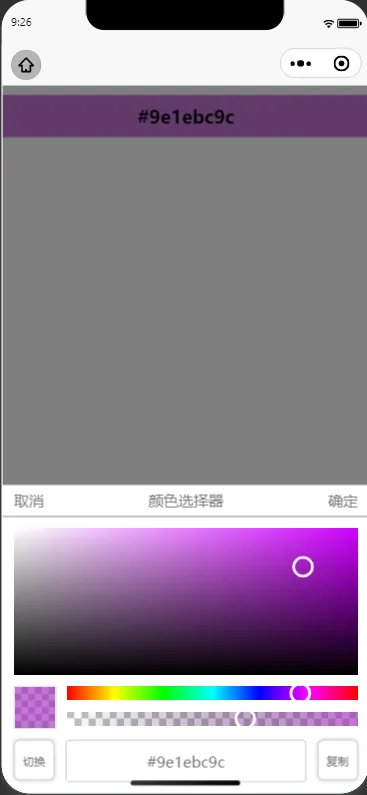
底部是颜色选择区域和颜色选择滑块和颜色透明度滑块,再下则为切换和选中的颜色和复制颜色。
<viewv-if="show"class="my-color-picker"><viewclass="my-color-picker-bg"></view><viewclass="my-color-picker-dialog"><viewclass="my-color-picker-title-box"><text @click="cancel">取消</text><text>{{title}}</text><text @click="confirm">确定</text></view><viewclass="my-color-picker-main"><!-- 颜色选择区 --><viewclass="my-canvas-box"><canvasclass="my-color-picker-canvas"id="my-color-picker-canvas-bg"canvas-id="my-color-picker-canvas-bg"></canvas><canvasclass="my-color-picker-canvas"id="my-color-picker-canvas"canvas-id="my-color-picker-canvas"@touchstart="touchSelectColor"@touchmove="touchSelectColor"></canvas></view><viewclass="my-select-color-box"><!-- 显示颜色选择区 --><viewclass="my-show-color"><canvasclass="my-canvas-show-color"id="my-canvas-show-color"canvas-id="my-canvas-show-color"></canvas></view><viewclass="my-slider-box"><!-- 颜色滑块 --><viewclass="my-canvas-slider"><canvasclass="my-canvas-color-slider"id="my-canvas-color-slider-bg"canvas-id="my-canvas-color-slider-bg"></canvas><canvasclass="my-canvas-color-slider"id="my-canvas-color-slider"canvas-id="my-canvas-color-slider"@touchstart="touchSlider"@touchmove="touchSlider"></canvas></view><!-- 透明度滑块 --><viewclass="my-canvas-slider"><canvasclass="my-canvas-color-slider"id="my-canvas-color-slider-tm-bg"canvas-id="my-canvas-color-slider-tm-bg"></canvas><canvasclass="my-canvas-color-slider"id="my-canvas-color-slider-tm"canvas-id="my-canvas-color-slider-tm"@touchstart="touchSliderTM"@touchmove="touchSliderTM"></canvas></view></view></view><viewclass="my-code-box"><viewclass="my-code-but" @click="codeType=!codeType">切换</view><inputv-if="codeType"class="my-hex-inp"placeholder="请输入正确的HEX代码"v-model="hex"@blur="initColor(hex)" /><viewv-elseclass="my-rgba-inp"><viewclass="my-rgba-item"><inputv-model="color.R"type="number" @blur="rgbaChange(color.R,'R')" /><text>R</text></view><viewclass="my-rgba-item"><inputv-model="color.G"type="number" @blur="rgbaChange(color.G,'G')" /><text>G</text></view><viewclass="my-rgba-item"><inputv-model="color.B"type="number" @blur="rgbaChange(color.B,'B')" /><text>B</text></view><viewclass="my-rgba-item"><inputv-model="opacity"type="number" @blur="rgbaChange(opacity,'A')" /><text>A</text></view></view><viewclass="my-code-but" @click="copy(codeType?hex:rgba)">复制</view></view></view></view></view>
// 初始化颜色显示canvasconst initColorShow = async()=>{// 初始化背景图const ctx_bg = uni.createCanvasContext('my-canvas-show-color',instance);const {width,height} = await getNodeInfo('.my-canvas-show-color');// 绘制网格 网格的宽高const size = height/6;for(let i=0;i<width/size;i++){for(let j=0;j<6;j++){if(i%2){if(j%2){ctx_bg.setFillStyle('#fff');ctx_bg.fillRect(i*size, j*size, size, size);}else{ctx_bg.setFillStyle('#c0c2c3');ctx_bg.fillRect(i*size, j*size, size, size);}}else{if(j%2){ctx_bg.setFillStyle('#c0c2c3');ctx_bg.fillRect(i*size, j*size, size, size);}else{ctx_bg.setFillStyle('#fff');ctx_bg.fillRect(i*size, j*size, size, size);}}}}const {R,G,B} = color.value;ctx_bg.setFillStyle(`rgba(${R},${G},${B},${opacity.value})`);ctx_bg.fillRect(0, 0, width, height);ctx_bg.draw();};
// 颜色选中canvas监听const touchSelectColor =(e)=>{let {x,y} = e.touches[0];// 超出canvasif(e.touches[0].x>canvasWidth.value){x = canvasWidth.value;}if(e.touches[0].x<0){x = 0;}if(e.touches[0].y>canvasHeight.value){y = canvasHeight.value;}if(e.touches[0].y<0){y = 0;}// 拿到色调const {R,G,B} = slider_color.value;const {h} = rgbToHsv(R,G,B);// 计算出饱和度const s = x /canvasWidth.value;// 计算出亮度const v = 1 - (y / canvasHeight.value);color.value = hsvToRgb(h,s,v);// 绘制标注点drawBZ({x,y});};
以上仅为组件实现的部分代码说明。本组依托uniapp+vue3+ts开发而成,适用于微信小程序,可根据实际场景参考开发,下面附上组件的完整代码和组件在父组件中的简单使用。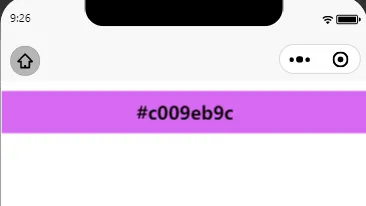
组件的使用:本示例中组件文件为ColorPicker.vue<template><view><viewclass="test-box uni-row"><viewclass="tb-block"><viewclass="tbb-picker" @tap="openColorPicker()":style="'background-color:'+chooseColor+';'">{{ chooseColor }}</view></view></view><ColorPickerref="colorsPicker":defaultColor="chooseColor" @confirm="subColor" @cancel="cancel" /></view></template><scriptsetup>import ColorPicker from "@/components/picker/ColorPicker.vue";import { onMounted,ref,nextTick } from "vue";const colorsPicker = ref(null); //组件const chooseColor = ref("#ff0000");//选中的颜色const blendResult = ref({rgb:'',hex:''});//融合的结果//打开颜色选择器const openColorPicker = () => {nextTick();colorsPicker.value.open();};// 选中颜色确认回调const subColor = (e) => {const {hex,rgba} = e;chooseColor.value = hex;};//取消并关闭选择器const cancel = () => {};</script><stylelang="scss">.test-box{width: 100vw;height: 100vh;overflow: hidden;}.tb-block{width: 100%;padding: 20rpx 0rpx;}.tbb-picker{width: 100%;padding: 20rpx 0rpx;text-align: center;font-size: 1.2rem;font-weight: bold;}</style>
组件代码:
<template><viewv-if="show"class="my-color-picker"><viewclass="my-color-picker-bg"></view><viewclass="my-color-picker-dialog"><viewclass="my-color-picker-title-box"><text @click="cancel">取消</text><text>{{title}}</text><text @click="confirm">确定</text></view><viewclass="my-color-picker-main"><!-- 颜色选择区 --><viewclass="my-canvas-box"><canvasclass="my-color-picker-canvas"id="my-color-picker-canvas-bg"canvas-id="my-color-picker-canvas-bg"></canvas><canvasclass="my-color-picker-canvas"id="my-color-picker-canvas"canvas-id="my-color-picker-canvas"@touchstart="touchSelectColor"@touchmove="touchSelectColor"></canvas></view><viewclass="my-select-color-box"><!-- 显示颜色选择区 --><viewclass="my-show-color"><canvasclass="my-canvas-show-color"id="my-canvas-show-color"canvas-id="my-canvas-show-color"></canvas></view><viewclass="my-slider-box"><!-- 颜色滑块 --><viewclass="my-canvas-slider"><canvasclass="my-canvas-color-slider"id="my-canvas-color-slider-bg"canvas-id="my-canvas-color-slider-bg"></canvas><canvasclass="my-canvas-color-slider"id="my-canvas-color-slider"canvas-id="my-canvas-color-slider"@touchstart="touchSlider"@touchmove="touchSlider"></canvas></view><!-- 透明度滑块 --><viewclass="my-canvas-slider"><canvasclass="my-canvas-color-slider"id="my-canvas-color-slider-tm-bg"canvas-id="my-canvas-color-slider-tm-bg"></canvas><canvasclass="my-canvas-color-slider"id="my-canvas-color-slider-tm"canvas-id="my-canvas-color-slider-tm"@touchstart="touchSliderTM"@touchmove="touchSliderTM"></canvas></view></view></view><viewclass="my-code-box"><viewclass="my-code-but" @click="codeType=!codeType">切换</view><inputv-if="codeType"class="my-hex-inp"placeholder="请输入正确的HEX代码"v-model="hex"@blur="initColor(hex)" /><viewv-elseclass="my-rgba-inp"><viewclass="my-rgba-item"><inputv-model="color.R"type="number" @blur="rgbaChange(color.R,'R')" /><text>R</text></view><viewclass="my-rgba-item"><inputv-model="color.G"type="number" @blur="rgbaChange(color.G,'G')" /><text>G</text></view><viewclass="my-rgba-item"><inputv-model="color.B"type="number" @blur="rgbaChange(color.B,'B')" /><text>B</text></view><viewclass="my-rgba-item"><inputv-model="opacity"type="number" @blur="rgbaChange(opacity,'A')" /><text>A</text></view></view><viewclass="my-code-but" @click="copy(codeType?hex:rgba)">复制</view></view></view></view></view></template><scriptsetup>import { ref,watch,getCurrentInstance, nextTick} from 'vue';const instance =getCurrentInstance();const pors = defineProps({title: { //标题type: String,default:()=>{return "颜色选择器";}},defaultColor: { // 初始化颜色,格式为 HEXtype: String,default:()=>{return "#ff0000";}}});//组件变量const show =ref(false);//是否显示const ctx_bg =ref(null);//canvas 颜色选择区背景const ctx =ref(null);//标注点canvas 颜色选择滑块const grd =ref(null);//透明度滑块const canvasWidth =ref(0);// canvas的宽度const canvasHeight =ref(0);//canvas的高度const color =ref({R:255,G:0,B:0});// 当前选中的颜色rbgaconst color_positinon =ref({x:0,y:0});//当前选择的位置const slider_color =ref({R:255,G:0,B:0});//滑块颜色const slider_color_positinon =ref({x:0,y:0});//当前滑块选择的位置const opacity =ref(1);//透明度const codeType =ref(true);//切换模式 true 为hex false 为rgbaconst hex =ref('');//颜色代码// 初始化颜色显示canvasconst initColorShow = async()=>{// 初始化背景图const ctx_bg = uni.createCanvasContext('my-canvas-show-color',instance);const {width,height} = await getNodeInfo('.my-canvas-show-color');// 绘制网格,网格的宽高const size = height/6;for(let i=0;i<width/size;i++){for(let j=0;j<6;j++){if(i%2){if(j%2){ctx_bg.setFillStyle('#fff');ctx_bg.fillRect(i*size, j*size, size, size);}else{ctx_bg.setFillStyle('#c0c2c3');ctx_bg.fillRect(i*size, j*size, size, size);}}else{if(j%2){ctx_bg.setFillStyle('#c0c2c3');ctx_bg.fillRect(i*size, j*size, size, size);}else{ctx_bg.setFillStyle('#fff');ctx_bg.fillRect(i*size, j*size, size, size);}}}}const {R,G,B} = color.value;ctx_bg.setFillStyle(`rgba(${R},${G},${B},${opacity.value})`);ctx_bg.fillRect(0, 0, width, height);ctx_bg.draw();};// 初始化滑动条canvasconst initCanvasSlider = async()=>{// 初始化背景图const ctx_bg = uni.createCanvasContext('my-canvas-color-slider-bg',instance);const {width,height} = await getNodeInfo('.my-canvas-color-slider');const grd = ctx_bg.createLinearGradient(0, 0, width, 0);grd.addColorStop(0, 'rgb(255,0,0)');grd.addColorStop(0.16, 'rgb(255,255,0)');grd.addColorStop(0.33, 'rgb(0,255,0)');grd.addColorStop(0.5, 'rgb(0,255,255)');grd.addColorStop(0.66, 'rgb(0,0,255)');grd.addColorStop(0.83, 'rgb(255,0,255)');grd.addColorStop(1, 'rgb(255,0,0)');ctx_bg.setFillStyle(grd);ctx_bg.fillRect(0, 0, width, height);ctx_bg.draw();};// 绘制滑块const drawHK = async({x,y})=>{slider_color_positinon.value = {x,y};const {height} = await getNodeInfo('.my-canvas-color-slider');const ctx = uni.createCanvasContext('my-canvas-color-slider',instance);ctx.arc(x, height/2, 10, 0, 2 * Math.PI);ctx.setStrokeStyle('#fff');ctx.setLineWidth(3);ctx.stroke();ctx.draw();};// 滑块监听const touchSlider = async(e)=>{const {width} = await getNodeInfo('.my-canvas-color-slider');let {x,y} = e.touches[0];// 超出canvasif(e.touches[0].x>width){x = width;}if(e.touches[0].x<0){x = 0;}// 计算出色调const h = (x / width) * 360;slider_color.value = hsvToRgb(h,1,1);const {R,G,B} = slider_color.value;// 绘制标注点drawHK({x,y});// 改变背景色setCanvasBgColor(`rgba(${R},${G},${B},${1})`);// 更新选择的颜色touchSelectColor({touches:[color_positinon.value]});};// 初始化透明度滑动条canvasconst initCanvasSliderTM = async()=>{// 初始化背景图const ctx_bg = uni.createCanvasContext('my-canvas-color-slider-tm-bg',instance);const {width,height} = await getNodeInfo('.my-canvas-color-slider');// 绘制网格// 网格的宽高const size = height/2;for(let i=0;i<width/size;i++){if(i%2){ctx_bg.setFillStyle('#fff');ctx_bg.fillRect(i*size, 0, size, size);ctx_bg.setFillStyle('#c0c2c3')ctx_bg.fillRect(i*size, size, size, size);}else{ctx_bg.setFillStyle('#c0c2c3');ctx_bg.fillRect(i*size, 0, size, size);ctx_bg.setFillStyle('#fff')ctx_bg.fillRect(i*size, size, size, size);}}// 绘制渐变透明const grd = ctx_bg.createLinearGradient(0, 0, width, 0);grd.addColorStop(0, 'transparent');const {R,G,B} = color.value;grd.addColorStop(1, `rgba(${R},${G},${B},${opacity.value})`);ctx_bg.setFillStyle(grd);ctx_bg.fillRect(0, 0, width, height);ctx_bg.draw();};// 绘制滑块(透明度)const drawTM = async({x,y})=>{const {height,width} = await getNodeInfo('.my-canvas-color-slider');const ctx = uni.createCanvasContext('my-canvas-color-slider-tm',instance);ctx.arc(x, height/2, 10, 0, 2 * Math.PI);ctx.setStrokeStyle('#fff');ctx.setLineWidth(3);ctx.stroke();ctx.draw();// 计算出透明度opacity.value = (x/width).toFixed(2);// 显示当前颜色initColorShow();};// 滑块监听(透明度)const touchSliderTM = async(e)=>{const {width} = await getNodeInfo('.my-canvas-color-slider');// 超出canvasif(e.touches[0].x>width || e.touches[0].x<0) return;// 绘制标注点drawTM(e.touches[0]);};// 确定const confirm =()=>{const {R,G,B} = color.value;emit('confirm', {hex:hex.value,rgba:{...color.value,A:Number(opacity.value)}})show.value = false;};// 取消const cancel =()=>{emit('cancel')show.value = false;};// 打开颜色选择器const open =()=> {console.log(show.value,"显示");show.value = true;nextTick(()=>{init();})};// 初始化const init = async()=>{// 获取canvas的宽高const {width,height} = await getNodeInfo('.my-color-picker-canvas');canvasWidth.value = width;canvasHeight.value = height;// 初始化背景图ctx.value = uni.createCanvasContext('my-color-picker-canvas',instance);ctx_bg.value = uni.createCanvasContext('my-color-picker-canvas-bg',instance);// 初始化滑块await initCanvasSlider();// 初始化透明度滑块await initCanvasSliderTM();// 显示当前颜色await initColorShow();// 根据颜色初始化颜色选择器await initColor(pors.defaultColor);};// 绘制标注点const drawBZ =({x,y})=>{color_positinon.value = {x,y};ctx.value.arc(x, y, 10, 0, 2 * Math.PI);ctx.value.setStrokeStyle('#EEEEEE');ctx.value.setLineWidth(3);ctx.value.stroke();ctx.value.draw();};// 设置canvas-bg的颜色const setCanvasBgColor =(color)=>{grd.value = ctx_bg.value.createLinearGradient(0, 0,canvasWidth.value, 0);grd.value.addColorStop(0,'#fff');grd.value.addColorStop(1,color);ctx_bg.value.setFillStyle(grd.value);ctx_bg.value.fillRect(0, 0, canvasWidth.value,canvasHeight.value);// 黑色到透明的渐变const grd_black = ctx_bg.value.createLinearGradient(0, canvasHeight.value, 0, 0);grd_black.addColorStop(0,'#000');grd_black.addColorStop(1,'transparent');ctx_bg.value.setFillStyle(grd_black);ctx_bg.value.fillRect(0, 0, canvasWidth.value, canvasHeight.value);ctx_bg.value.draw();};// 颜色选中canvas监听const touchSelectColor =(e)=>{let {x,y} = e.touches[0];// 超出canvasif(e.touches[0].x>canvasWidth.value){x = canvasWidth.value;}if(e.touches[0].x<0){x = 0;}if(e.touches[0].y>canvasHeight.value){y = canvasHeight.value;}if(e.touches[0].y<0){y = 0;}// 拿到色调const {R,G,B} = slider_color.value;const {h} = rgbToHsv(R,G,B);// 计算出饱和度const s = x /canvasWidth.value;// 计算出亮度const v = 1 - (y / canvasHeight.value);color.value = hsvToRgb(h,s,v);// 绘制标注点drawBZ({x,y});// 改变透明度滑块initCanvasSliderTM();// 显示当前颜色initColorShow();};// 获取节点的信息(宽高)const getNodeInfo =(selector)=>{return new Promise((res,rej)=>{uni.createSelectorQuery().in(instance).select(selector).fields({size:true},(data)=>{res(data);}).exec();})};// 将 RGB 值转换为两位十六进制const rgbaToHex =({R,G,B,A})=> {let rHex = Math.round(R).toString(16).padStart(2, '0');let gHex = Math.round(G).toString(16).padStart(2, '0');let bHex = Math.round(B).toString(16).padStart(2, '0');if(A==1) return `#${rHex}${gHex}${bHex}`;A*=255;let aHex = Math.round(A).toString(16).padStart(2, '0');return `#${rHex}${gHex}${bHex}${aHex}`;};// hex 转 rgbaconst hexToRgba =(hex)=> {if(typeof hex != "string" || hex[0] != "#") return false;let alpha = 1;// 移除前导 #hex = hex.replace(/^#/, '');// 处理 3 位颜色代码if (hex.length === 3) {hex = hex.split('').map(char => char + char).join('');}// 处理 8 位颜色代码(带有透明度)if (hex.length === 8) {alpha = parseInt(hex.substring(6, 8), 16) / 255;hex = hex.substring(0, 6);}// 超出范围if (hex.length < 3 || hex.length == 4 || hex.length == 7 || hex.length > 8) {return false;}// 解析 R, G, Bconst R = parseInt(hex.substring(0, 2), 16);const G = parseInt(hex.substring(2, 4), 16);const B = parseInt(hex.substring(4, 6), 16);return {R,G,B,A:alpha};};// hsv 转 rgbconst hsvToRgb =(h, s, v)=> {// 确保色相值在0到360之间h = h % 360;let r, g, b;let C = v * s;let X = C * (1 - Math.abs(((h / 60) % 2) - 1));let m = v - C;if (0 <= h && h < 60) {r = C; g = X; b = 0;} else if (60 <= h && h < 120) {r = X; g = C; b = 0;} else if (120 <= h && h < 180) {r = 0; g = C; b = X;} else if (180 <= h && h < 240) {r = 0; g = X; b = C;} else if (240 <= h && h < 300) {r = X; g = 0; b = C;} else if (300 <= h && h < 360) {r = C; g = 0; b = X;}return {R: Math.round((r + m) * 255),G: Math.round((g + m) * 255),B: Math.round((b + m) * 255)};};// rgb 转 hsvconst rgbToHsv =(r, g, b)=> {r /= 255;g /= 255;b /= 255;let max = Math.max(r, g, b);let min = Math.min(r, g, b);let h, s, v = max;let d = max - min;s = max === 0 ? 0 : d / max;if (d === 0) {h = 0;} else {switch (max) {case r:h = (g - b) / d + (g < b ? 6 : 0);break;case g:h = (b - r) / d + 2;break;case b:h = (r - g) / d + 4;break;}h /= 6;}return {h: h * 360, // 0 - 360s: s,v: v};};// 复制颜色编码const copy =(data)=>{uni.setClipboardData({data});};// 给一个颜色,颜色选择器初始化到这个颜色的选择位置const initColor = async(color)=>{let r,g,b,a;if(typeof color == 'string'){const rgba = hexToRgba(color);if(!rgba) return;const {R,G,B,A} = rgba;r = R;g = G;b = B;a = A;color = rgba;}else{const {R,G,B,A} = color;r = R;g = G;b = B;a = A;}color.value = color;opacity.value = a;const {h,s,v} = rgbToHsv(r,g,b);// 初始化颜色滑块const {width} = await getNodeInfo('.my-canvas-color-slider');const slider_x = (h / 360) * width;touchSlider({touches:[{x:slider_x,y:0}]});// 初始化颜色选择const x = s * canvasWidth.value;const y = (1 - v) * canvasHeight.value;touchSelectColor({touches:[{x,y}]});// 初始化透明度滑块const slider_tm_x = a * width;touchSliderTM({touches:[{x:slider_tm_x,y:0}]});};// rgba改变进行判断const rgbaChange =(val,key)=>{val = Number(val);minRgba(val,key);maxRgba(val,key);initColor({...color.value,A:opacity.value});};// rgba最小值const minRgba =(val,key)=> {if(val < 0 && key != 'A') color.value[key] = 0;if(val < 0 && key == 'A') opacity.value = 0;};// rgba最大值const maxRgba =(val,key)=> {if(val > 255 && key != 'A') color.value[key] = 255;if(val > 1 && key == 'A') opacity.instance = 1;};//监听颜色的变化watch(()=>color.value,(newVal)=>{const {R,G,B} = newVal;hex.value = rgbaToHex({R,G,B,A:opacity.value});});//监听透明度的变化watch(()=>opacity.value,(newVal)=>{hex.value = rgbaToHex({R:color.value.R,G:color.value.G,B:color.value.B,A:newVal});});const emit = defineEmits(['cancel','confirm']); //返回函数关闭和选中//组件函数暴露给父组件defineExpose({open});</script><stylescoped>.my-color-picker{position: fixed;top: 0;left: 0;width: 100vw;height: 100vh;z-index: 20;box-sizing: border-box;}.my-color-picker-bg{position: absolute;top: 0;left: 0;width: 100%;height: 100%;background-color: rgba(0,0,0,0.5);}.my-color-picker-dialog{position: absolute;bottom: 0;left: 0;width: 100%;background-color: #fff;}.my-color-picker-title-box{padding: 12rpx 24rpx;border-bottom: 1rpx #797979 solid;color: #797979;display: flex;justify-content: space-between;}.my-color-picker-main{padding: 24rpx;}.my-canvas-box{position: relative;height: 300rpx;width: 100%;}.my-color-picker-canvas{width: 100%;height: 300rpx;position: absolute !important;left: 0;top: 0;}.my-canvas-slider{width: 100%;height: 30rpx;position: relative;}.my-canvas-slider:last-child{margin-top: 24rpx;}.my-canvas-color-slider{width: 100%;height: 100%;position: absolute !important;left: 0;top: 0;}.my-select-color-box{display: flex;justify-content: center;margin-top: 24rpx;}.my-slider-box{flex: 1;margin-left: 24rpx;}.my-canvas-show-color{width: 84rpx;height: 84rpx;}.my-show-color{border: 1rpx #c7c7c7 solid;}.my-code-box{display: flex;justify-content: center;margin-top: 24rpx;color: #737373;}.my-code-inp{flex: 1;margin: 0 24rpx;border: 1rpx #c7c7c7 solid;border-radius: 8rpx;display: flex;justify-content: center;align-items: center;}.my-code-but{box-sizing: border-box;width: 84rpx;height: 84rpx;border: 1rpx #c7c7c7 solid;border-radius: 12rpx;text-align: center;display: flex;justify-content: center;align-items: center;font-size: 24rpx;padding: 12rpx;/* 阴影 */box-shadow: 0 0 8rpx #c7c7c7;}.my-hex-inp{flex: 1;height: 84rpx;margin: 0 24rpx;border: 1rpx #c7c7c7 solid;border-radius: 8rpx;text-align: center;}.my-rgba-inp{flex: 1;height: 84rpx;margin: 0 24rpx;display: grid;grid-template-columns: repeat(4,1fr);grid-gap: 12rpx;}.my-rgba-item{display: flex;flex-direction: column;align-items: center;}.my-rgba-item input{height: 50rpx;border: 1rpx #c7c7c7 solid;border-radius: 8rpx;text-align: center;}</style>