 夜雨聆风
夜雨聆风


智能体开发|AI问答系统(一)

功能与设计分析
AI问答系统是目前极为常见的一种AI大模型的基础应用,很多AI应用均在此基础之上进行拓展。
利用JavaScript和FastAPI实现基于前后端交互的AI问答,本章节主要包括以下功能。
(1)利用FastAPI与阿里云的大模型实现对接,并处理流式响应。
(2)实现基于纯文本的AI问答,与平时使用的AI聊天应用类似。
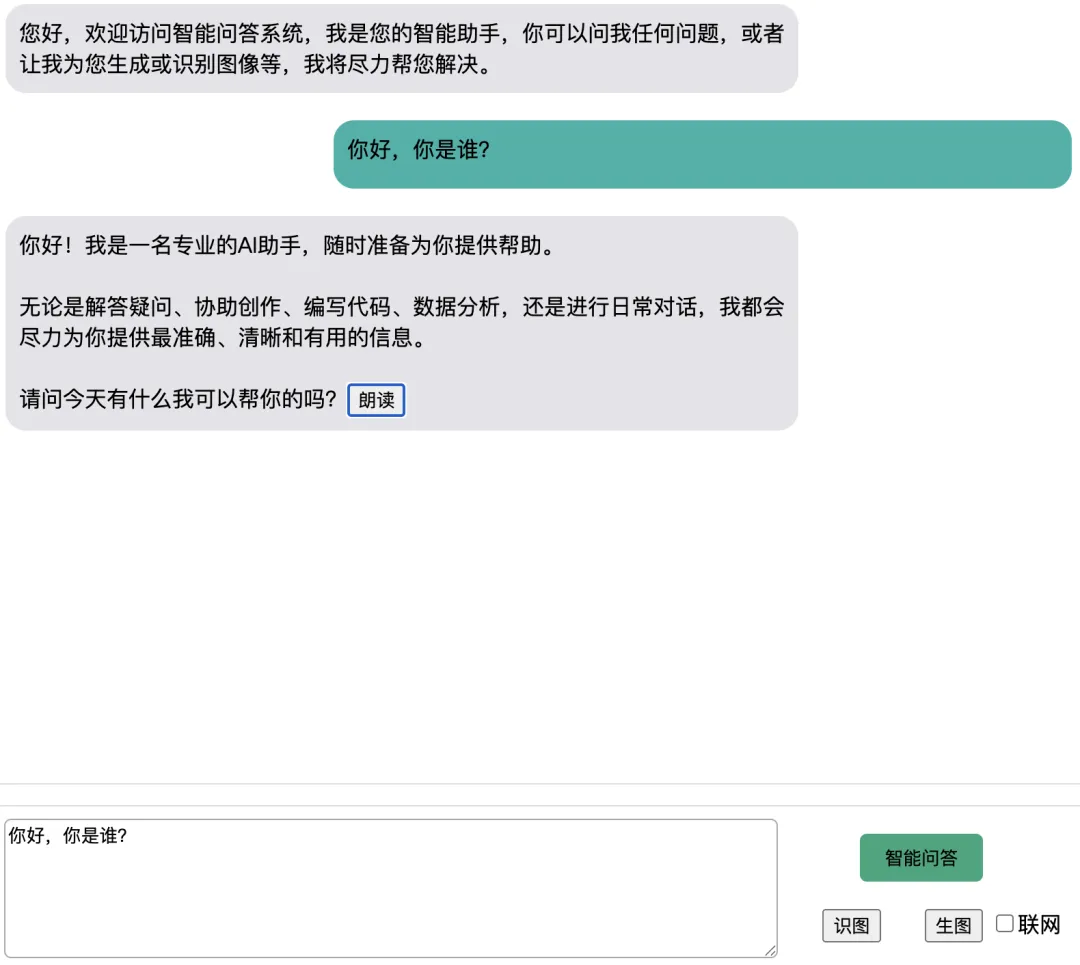

主要html内容
<divid="chatbox"><!-- 打开界面的提示词 --><divclass="answer-box">您好,欢迎访问智能问答系统,我是您的智能助手,你可以问我任何问题,或者让我为您生成或识别图像等,我将尽力帮您解决。</div></div><divid="bottom"><!-- 实现图像识别的预览图和文件上传组件,默认均不显示 --><divstyle="float:left;display:none;"id="imageDiv"><inputtype="file"id="imageInput"onchange="saveAndPreview()"style="display:none;" /><imgid="preview"style="display:none;" /></div><divstyle="float:left;"><textareaid="question"onkeyup="doEnter(event)">你好,你是谁?</textarea></div><divstyle="float: right;text-align: center;width: 210px;"><buttononclick="doask()"id="qa-button">智能问答</button><br><buttononclick="addImage()"id="recognize-image">识图</button> <buttononclick="generateImage()"id="generate-image">生图</button><inputtype="checkbox"id="net-search"/>联网</div></div>

CSS
#chatbox {width: 800px;height: 580px;border: solid 1px gainsboro;margin: auto;overflow-y: scroll;}#bottom {width: 800px;height: 120px;border: solid 1px gainsboro;margin: auto;margin-top: 15px;}#question {width: 560px;height: 96px;border: solid 1px darkgrey;margin: 9px;border-radius: 5px;}#qa-button {width: 90px;height: 35px;background-color: rgb(38, 167, 124);border: 0;border-radius: 5px;margin-top: 20px;margin-right: 30px;margin-bottom: 20px;}#welcome {width: 70%;border: solid 0px blue;margin: 10px;min-height: 30px;padding: 10px;float: left;border-radius: 15px;}.ask-box {width: 65%;border: solid 0px green;margin: 10px;min-height: 30px;padding: 10px;float: right;border-radius: 15px;background-color: lightseagreen;}.answer-box {width: 70%;border: solid 0px blue;margin: 10px;min-height: 30px;padding: 10px;float: left;border-radius: 15px;background-color: #e5e5ea;}.read-button {width: 50px;height: 28px;background-color: darkgrey;margin-left: 20px;border: 0px;border-radius: 5px;}#preview {width: 100px;height: 100px;margin: 10px 0 0 10px;}

Javascript
let switch_voice = false;//全局变量,默认关闭语音播报功能const synth = window.speechSynthesis;// 全局变量,语音合成对象// 定义语言朗读代码function speak(content) {// 实例体语言合成对象,并将要朗读的文件作为参数传入let utterance = new SpeechSynthesisUtterance(content);// 设置语言合成对象的属性utterance.lang = "zh-CN";// 设置语言为中文utterance.rate = 1.0;// 设置语速为1倍utterance.volume = 1.0;// 设置音量为100%utterance.pitch = 1.0;// 设置音调为1倍utterance.onend = function () {console.log("朗读结束");};// 调用语音合成对象的speak方法,朗读文件synth.speak(utterance);}// 定义朗读与停止的功能切换function readText(obj) {// 参数obj代表AI回复过程中动态生成的“朗读”按钮let chatbox = document.getElementById("chatbox");if (switch_voice) {// 如果语音播放已开启,则将其关闭obj.innerHTML = "朗读";switch_voice = false;synth.cancel()} else {// 如果语音播放已关闭,则将其开启obj.innerHTML = "停止";switch_voice = true;synth.cancel()// 获取该按钮父容器中的内容,即AI回复的DIV中的内容// 由于“朗读”按钮也定义在该Div的innerHTML中,因此要将其删除let content = obj.parentNode.innerText;if (content) {speak(content);}}}function doEnter(event) {// 如果按下的是回车键,则调用doask函数if (event.keyCode == 13) {doask();}}// 普通文本问答的前端代码实现function doAnswer() {//创建AI回复的DIV元素,并设置class属性为answer-box,以匹配CSSlet answer = document.createElement("div");answer.setAttribute("class", "answer-box");document.getElementById("chatbox").append(answer);let content = document.getElementById("question").value;// 此参数search设为false表示不进行联网搜索params = { "content": content, "search": false }// 调用fetch()函数实现后端响应流的读取和解析并将其添加到回复DIV中fetch("/stream", {method: "POST",headers: {"Content-Type": "application/json"},body: JSON.stringify(params)}).then(async response => {if (!response.ok || !response.body) {answer.innerHTML = "请求失败,请稍后重试。";return;}const reader = response.body.getReader();const textDecoder = new TextDecoder("utf-8");let buffer = "";while (true) {const { done, value } = await reader.read();if (value) {buffer += textDecoder.decode(value, { stream: true });}let jsonList = buffer.split("\n");buffer = jsonList.pop() || "";for (let i = 0; i < jsonList.length; i++) {const line = jsonList[i].trim();if (!line) {continue;}try {let json = JSON.parse(line);let content = json.content || "";answer.innerHTML += content.replaceAll("\n","<br>");} catch (e) {console.error("解析流式 JSON 失败:", line, e);}}if (done) {// 将“朗读”按钮直接添加到回复的内容后面answer.innerHTML +="<button onclick='readText(this)' class='read-btn'>朗读</button>";scrollToBottom() // 滚动到底部break};}}).catch(err => {console.error("请求失败:", err);answer.innerHTML = "请求失败,请检查网络或稍后重试。";});}// 创建提问的DIV并将问题内容添加进来function doask() {// 创建一个提问的DIV元素,并设置其class属性为ask-box,以匹配CSSlet ask = document.createElement("div");ask.setAttribute("class", "ask-box");ask.innerHTML = document.getElementById("question").value;// 将该DIV元素添加到chatbox提问框div中作为一个元素document.getElementById("chatbox").append(ask);scrollToBottom() // 滚动到底部doAnswer() // 调用doAnswer()函数实现问答功能}function scrollToBottom() {var chatbox = document.getElementById("chatbox");chatbox.scrollTop = chatbox.scrollHeight;}

FastAPI
from fastapi import FastAPI,Requestfrom fastapi.templating import Jinja2Templatesfrom fastapi.staticfiles import StaticFilesfrom qa import qafrom dotenv import load_dotenvimport uvicornload_dotenv()app = FastAPI()# 设置静态目录为static,且设置前端的引用路径为/staticapp.mount("/static", StaticFiles(directory="static"), name="static")templates = Jinja2Templates(directory="templates")app.include_router(qa)@app.get("/")def index(request: Request):return templates.TemplateResponse(name = "019_AIQA.html", request= request)if __name__ == "__main__":uvicorn.run(app, host="0.0.0.0", port=8000)

qa.py
from fastapi import APIRouter,Bodyfrom fastapi.responses import StreamingResponseimport os,jsonfrom openai import OpenAIfrom dotenv import load_dotenvload_dotenv()qa = APIRouter()messages =[{"role":"system","content":"你是一名专业的AI助手,可以帮助用户解答任何问题."}]# 定义接口,并将生成器输出封装到响应中@qa.post("/stream")def stream_chat(question: dict=Body(...)):# 读取JSON的值content = question['content']search = question['search']message = {"role":"user","content":content}def stream_chat():messages.append(message)client = OpenAI(api_key=os.getenv('Qwen_API_KEY'),base_url="http://X.XX.XXX.X:XXXX/v1",)response = client.chat.completions.create(model="qwen3.6",messages=messages,extra_body={"top_k": 20,"chat_template_kwargs": {"enable_thinking": False},},stream=True,stream_options={"include_usage": False},)# 定义变量reply,用于保存本次回复内容,以便实现聊天记忆功能reply = ""for chunk in response:# 使用生成器迭代输出每一个数据流,以JSON字符串输出,并添加换行符choice = chunk.choices[0].delta.contentif choice is None:continuereply += choiceyield json.dumps({"content": choice}) + "\n"# 循环结束后,将AI回复添加到messages中messages.append({"role":"assistant","content":reply})# 以流式响应的方式响应给前端return StreamingResponse(stream_chat(),media_type="text/event-stream")