夜雨聆风
夜雨聆风在检索增强生成(RAG)系统的构建过程中,文档解析能力往往成为决定系统性能的关键瓶颈。现实企业环境中,数据源形式多样——从扫描版PDF、复杂表格、PPT演示文稿到各类办公文档,如何高效、准确地将这些非结构化数据转化为可供大模型理解和检索的结构化信息,是每个RAG开发者必须面对的核心挑战。
本文将从RAG基础认知出发,系统介绍多格式文档解析的技术难点、主流工具选型,并重点讲解 unstructured.io 库的实践应用及其与LlamaIndex框架的集成方案,为构建生产级RAG系统提供完整的技术指引。
一、RAG基础与文档解析挑战
1.1 为什么需要RAG?
通用大模型在实际应用中存在明显局限:训练数据的时效性导致知识可能过时,生成内容可能出现“幻觉”,无法访问企业私有知识库,回答缺乏具体出处引用,以及上下文窗口的限制。RAG(检索增强生成)正是为解决这些问题而生——它让大模型学会“查资料”后再回答问题,通过从外部数据源检索相关信息来修正和增强生成内容。
RAG的核心优势在于:灵活性强、可显著提高回答准确性、成本相对较低、且易于个性化定制。
1.2 文档解析的核心挑战
在真实企业场景中,特别是金融领域的财报、报表等场景下,文档解析需求尤为突出。常见的文档类型包括PDF、Word、Excel、PPT、CSV、图片等,每种格式都有其独特的解析难点:
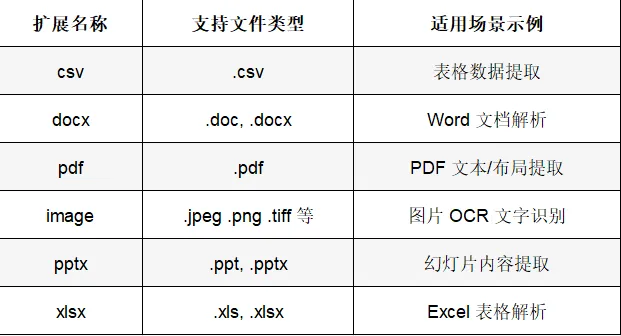
布局解析困难:PDF文件的布局可能因作者、工具或用途而异,多列文本、图像插入、表格中断等复杂布局给解析带来挑战。
格式错综复杂:文档中可能混合文字、图像、表格等多种格式内容。
复合表格处理:包含纵向/横向合并的复杂表格,在抽象还原时最难处理。
元素顺序提取:确保文本、图片、表格按正确顺序提取是一项重要课题。
文档结构还原:包括标题、目录等信息的还原,是实现自动化文档处理的关键。
扫描件处理:需要依赖OCR模型进行有效提取,涉及清晰度、模型稳定性等问题。
公式提取:在学术领域,LaTeX等数学公式的完整提取对RAG问答是有效补充。
二、技术选型与工具对比
2.1 主流解析工具对比
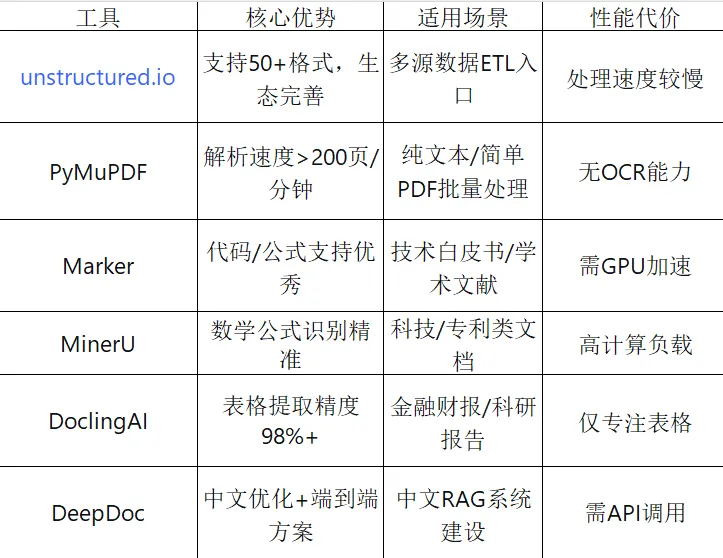
针对不同场景和需求,当前主流文档解析工具各有侧重:
2.2 技术选型决策指南
根据实际需求选择合适的技术方案:
数字原生PDF:优先选择PyMuPDF,利用其渲染效率优势处理纯文本或简单表格的批量任务。
扫描PDF:必须启用OCR流程,可搭配Unstructured的"ocr_only"策略。
复杂学术文档:推荐Marker(代码/公式支持)或MinerU(数学公式识别),但需考虑GPU加速需求。
2.3 PDF解析技术核心差异
不同PDF解析技术的核心差异体现在对文档结构的处理逻辑上:
PyMuPDF采用渲染优先策略,通过直接解析页面绘制指令实现高效文本提取。它并非直接“寻找”可读文字,而是像打印机一样,通过理解和执行页面渲染过程来重建页面内容,处理速度可达200页/分钟,在规则表格识别中表现出坐标精度优势。但缺点是缺乏OCR能力,无法处理扫描件,对复杂公式和代码块支持有限。
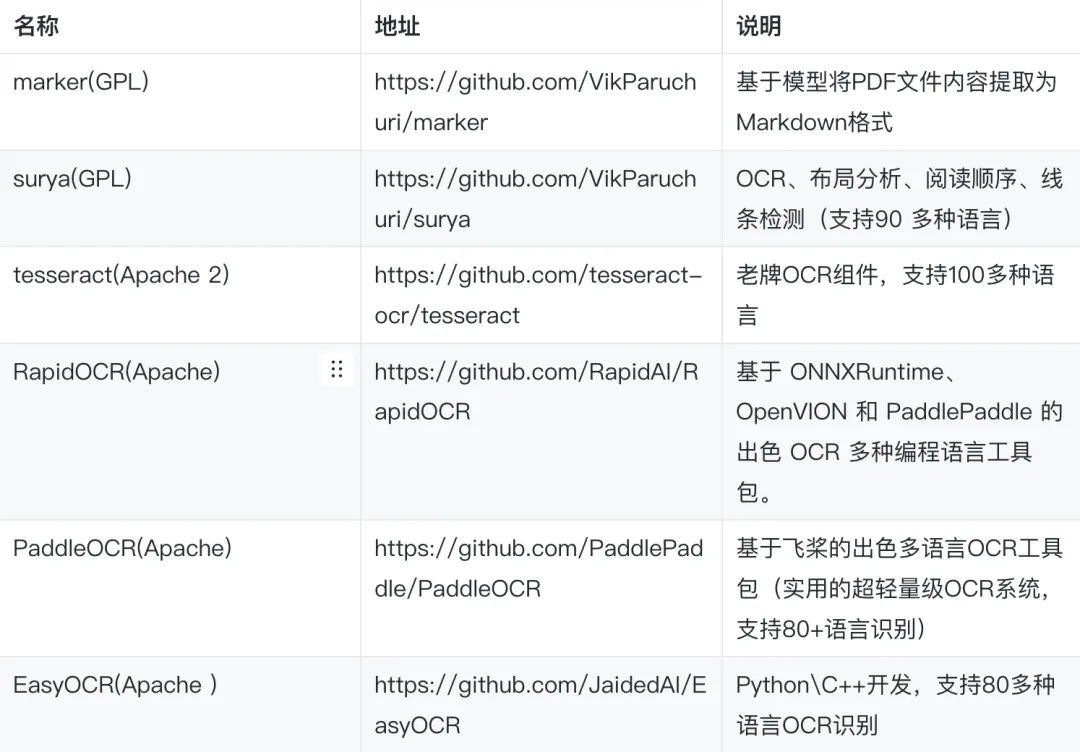
OCR技术则针对无文本层的扫描件,通过光学字符识别提取文字。开源组件生态丰富,包括Tesseract、PaddleOCR等。OCR(光学字符识别)最终的目的是将非结构化的图像信息,转化为结构化的、可计算和可理解的数据,所以本质上是对图片内容的理解,可以考虑的开源组件如下:
2.4 Unstructured.io的集成优势
Unstructured.io作为集成框架,通过strategy参数实现后端自适应切换:
"fast"策略:调用PyMuPDF等轻量引擎处理规则文档
"hi_res"策略:激活YOLOX目标检测模型进行布局分析,配合detectron2实现表格与图像的精准提取
"ocr_only"策略:使用OCR模型进行图文识别
"vlm"策略:针对极端复杂场景调用GPT-4o等多模态模型
这种混合架构使其在金融财报(表格提取精度98%+)和科研报告等场景中表现突出。更重要的是,Unstructured库通过与LangChain、LlamaIndex等主流框架的深度集成,已成为RAG pipeline中的关键预处理节点,有效解决了“数据输入异构性”这一核心痛点。
三、unstructured.io库入门与实践
3.1 环境安装与配置
推荐使用Python 3.9及以上版本
(1). 基础安装
此安装方式适用于处理纯文本:
pip install unstructureduv add unstructured
(2). 全量安装(多类型文档处理)
针对需要处理多类型文档(如PDF、Office格式、图片等)的场景,全量安装会包含docx、pptx、pdf、image等扩展依赖,适合企业级全场景文档处理需求:
包含本地推理能力(支持PDF/图片OCR等)
pip install "unstructured[local-inference]"支持所有文档类型(不含本地推理,需依赖外部API)
pip install "unstructured[all-docs]"uv add "unstructured[all-docs]"
(3). 特定文档类型安装
如需进一步精简依赖,可按目标文件类型单独安装扩展模块,格式为unstructured[<extra>],支持同时指定多个扩展,以逗号分隔:
仅安装PDF和DOCX处理能力
pip install "unstructured[pdf,docx]"(4). Serverless API安装
Serverless API通过优化处理流程,将文档处理启动时间从30分钟缩短至3秒以内,并支持多区域横向扩展,有效提升了高并发场景下的吞吐量:
pip install unstructured-client(5). Docker安装
docker pull downloads.unstructured.io/unstructured-io/unstructured:latestdocker run -dt --name unstructured downloads.unstructured.io/unstructured-io/unstructured:latestdocker exec -it unstructured
3.2. 核心系统依赖配置
(1). Tesseract OCR:图像文本识别
提供图像文本识别能力,是处理扫描版PDF和图片文件的核心组件。
安装指南:https://tesseract-ocr.github.io/ 多语言支持:tesseract-lang扩展包
windows安装:
下载安装包:https://github.com/UB-Mannheim/tesseract/wiki 安装文档参考:https://developer.baidu.com/article/detail.html?id=3803413

macOS安装:
brew install tesseractbrew install tesseract-lang
Linux安装:
sudo apt-get install tesseract-ocrsudo apt-get install tesseract-ocr-chi-sim # 中文简体支持
验证安装:
tesseract --list -langs # 查看已安装的语言包(2). Poppler:PDF内容提取底层引擎
通过pdf2image库将PDF转换为图像格式,为后续OCR处理提供输入。
安装配置:https://pdf2image.readthedocs.io/
macOS安装:
brew install popplerLinux安装:
sudo apt-get install poppler-utils(3). Pandoc:富文本格式转换
处理EPUB、RTF等富文本格式的转换工具,必须使用2.14.2及以上版本以确保RTF文件解析兼容性。
(4). libmagic:跨平台文件类型检测
Linux和macOS系统需手动安装,Windows环境可忽略此依赖。
(5). 常见依赖问题解决方案
注意事项:本地完整安装可能触发依赖链报错(如"Could not build wheels for pikepdf"),需预先安装qpdf、libheif和pillow等图像处理依赖。
3.3 unstructured核心功能理解
一般来说,这些功能分为几类:
分区(Partitioning):将原始文档分解为标准的结构化元素
清理(Cleaning):从文档中删除不需要的文本,例如样板文件和句子片段
暂存(Staging):函数格式化下游任务的数据,例如ML推理和数据标记
分块(Chunking):功能将文档分割成更小的部分,以便在RAG应用程序和相似性搜索中使用
嵌入(Embedding):编码器类提供了一个接口,可以轻松地将预处理的文本转换为向量
# UnstructuredIO核心组件from unstructured.partition.auto import partitionfrom typing import Listfrom unstructured.documents.elements import Element# 使用partition函数自动检测文件类型并解析,默认strategy策略是auto,还会有fast策略,速度比image-to-text models的快100倍elements: List[Element] = partition(filename="RAG评估.md", strategy="auto")# 元素的文本内容print(elements[0].text)print("===========================")# 元素的类型print(elements[0].category)print("==================")# 元素的元数据print(elements[0].metadata.__dict__)print("===========================")
基于元素的方法优势
为什么这种基于元素的方法如此重要?
结构为王:通过将文档分解为这些语义元素,可以保留原始文档的大部分逻辑结构。您获得的不仅仅是原始文本;你得到的是带有上下文的文本
精细控制:您可以迭代这些元素,按类型过滤(例如,"过滤所有Table元素"),或者根据它们的类别以不同的方式处理它们
丰富的元数据:每个元素都包含有用的元数据:其文本内容、它来自的页码、通常是它在页面上的坐标(边界框)、原始文件名、HTML格式的元素以及检测到的语言。这允许精确的下游处理或链接回源
元数据的应用价值
这些元数据让你能够:
精确定位:知道文本在PDF中的确切位置
页面管理:按页码组织和检索内容
多语言处理:根据语言选择合适的处理策略
布局理解:利用坐标信息进行版面分析
从本质上讲,unstructured不仅仅是"读取"PDF文档;它理解文档并进行解构它,这对于基于正则表达式来进行抓取的方式来说,这种解析方式无疑是一种对文档的更强大、更具语义性的理解。
3.4. Partition功能实践
partition通用参数如下:
encoding:指定输入文本/文档读取时使用的字符编码。对于非 UTF-8 文档非常有用
include_page_breaks:如果设置为 True,当文档支持 “分页” 时,输出中会包含 PageBreak 元素,以标识不同页的边界
strategy:指定解析策略,尤其对于 PDF/Image 文档,控制“快速 vs 高保真 vs OCR”方式
ocr_languages/languages:当文档含有图像文字或扫描件时,可指定 OCR 语言包,如 ["eng","deu"]
skip_infer_table_types:可指定跳过表格类型推断的文档类型,减少表格识别错误
fields_include:控制输出 JSON 中包含哪些字段。可用于减小输出大小或过滤敏感字段["element_id","text","type","metadata"]
metadata_include / metadata_exclude:用于控制在输出元素的 metadata 字段中,保留哪些键或者排除哪些键,默认全部输出
content_type:在使用 URL 或文件流时,指定 MIME 类型提示,提高文件类型识别准确性
starting_page_number:当处理文档是某个较大文档的一部分时,可以指定起始页号,用于 metadata
(1)Markdown文档解析
# coding:utf-8from typing import List, Dict, Any, Optional, Sequencefrom pathlib import Pathfrom unstructured.documents.elements import Elementfrom unstructured.partition.auto import partition# 自定义解析函数,支持任意类型的文件格式def parse_file_with_unstructured(file_path: str):"""使用UnstructuredIO解析单个文件Args:file_path: 文件路径Returns:Dict: 包含解析结果和统计信息的字典"""print(f"\n 解析文件: {file_path}")try:# 使用partition函数自动检测文件类型并解析,默认strategy策略是auto,还会有fast策略,速度比image-to-text models的快100倍elements: List[Element] = partition(filename=file_path, strategy="auto")# 分析解析结果analysis = {"file_path": file_path,"file_extension": Path(file_path).suffix.lower(),"total_elements": len(elements),"element_types": {},"elements": elements,"text_content": "","statistics": {}}# 统计元素类型for element in elements:element_type = type(element).__name__analysis["element_types"][element_type] = analysis["element_types"].get(element_type, 0) + 1# 提取文本内容text_parts = []for element in elements:if hasattr(element, 'text') and element.text:text_parts.append(element.text)analysis["text_content"] = "\n\n".join(text_parts)# 计算统计信息analysis["statistics"]["total_characters"] = len(analysis["text_content"])print(f" 解析完成")print(f" 元素总数: {analysis['total_elements']}")print(f" 元素类型: {analysis['element_types']}")print(f" 总字符数: {analysis['statistics']['total_characters']}")print(f" 文本内容: {analysis['text_content'][:200]} ")except Exception as e:print(f"文件解析失败: {e}")return {}parse_file_with_unstructured("RAG评估.md")
from unstructured.partition.md import partition_mdfrom typing import Listfrom unstructured.documents.elements import Element# 使用partition_md函数检测markdown文件类型解析,include_page_breaks若希望在 Markdown 中标识页面断点(少见场景)elements: List[Element] = partition_md(filename="RAG评估.md", languages=["zho"],include_page_breaks=True)# 元素的元数据print(elements[0].metadata.__dict__)print("===========================")# 元素的文本内容print(elements[0].text)print("===========================")# 元素的类型print(elements[0].category)print("===========================")
(2). HTML文档解析
parse_file_with_unstructured("html-tags-decode.html")from unstructured.partition.html import partition_htmlfrom typing import Listfrom unstructured.documents.elements import Element# 使用partition_html函数检测html网页类型解析elements = partition_html(url="https://docs.unstructured.io/welcome",headers={"User-Agent":"MyBot"},ssl_verify=False,include_page_breaks=False,encoding="utf-8")#elements: List[Element] = partition_html(url="https://docs.unstructured.io/welcome", languages=["zho"])# 元素的元数据print(elements[1].metadata.__dict__)print("===========================")# 元素的文本内容print(elements[1].text)print("===========================")# 元素的类型print(elements[1].category)print("===========================")
支持 URL 输入、headers、ssl 验证选项
除通用参数外:
url:直接给出网页 URL,无需先下载。
headers:HTTP 请求头(User-Agent 等)。
ssl_verify:是否验证 SSL 证书(False 可用于测试环境)。
file/filename/text:支持本地文件、文件流或网页文本输入。
content_type:可指定 text/html。
(3). EXCEL文档解析
parse_file_with_unstructured("销售数据统计.xlsx")from unstructured.partition.xlsx import partition_xlsxfrom typing import Listfrom unstructured.documents.elements import Element# 使用partition_xlsx函数检测excel文件类型并解析elements: List[Element] = partition_xlsx(filename="销售数据统计.xlsx", languages=["zho"])# 元素的元数据print(elements[0].metadata.__dict__)print("===========================")# 元素的文本内容print(elements[0].text)print("===========================")# 元素的类型print(elements[0].category)print("===========================")
(4). CSV文档解析
parse_file_with_unstructured("训练数据.csv")相对简单,主要表格抽取。
可调参数少,通常只使用通用参数如 encoding、include_page_breaks。
输出为一个 Table 元素,其 metadata.text_as_html 包含 HTML 表格。
from unstructured.partition.csv import partition_csvfrom typing import Listfrom unstructured.documents.elements import Element# 使用partition_csv函数检测csv文件类型并解析elements = partition_csv(filename="训练数据.csv", encoding="utf-8")# 元素的元数据#print(elements[0].metadata.__dict__)print("===========================")# 元素的文本内容print(elements[0].text[:400])print("===========================")# 元素的类型print(elements[0].category)print("===========================")
(5). Word文档解析
parse_file_with_unstructured("数组.docx")支持 .docx(样式信息)和 .doc(需 LibreOffice 转换)。
参数:同通用参数。
from unstructured.partition.docx import partition_docxfrom unstructured.partition.doc import partition_docfrom typing import Listfrom unstructured.documents.elements import Element# 使用partition_docx函数检测word文件类型并解析,include_page_breaks当文档支持 “分页” 时,以标识不同页的边界elements = partition_docx(filename="数组.docx", encoding="utf-8", include_page_breaks=True)# 元素的元数据print(elements[0].metadata.__dict__)print("===========================")# 元素的文本内容print(elements[0].text[:400])print("===========================")# 元素的类型print(elements[0].category)
(6). Image图片解析
模型下载说明
在对Image图片进行解析时,默认下载的Yolox模型来进行识别。默认是从huggingface上下载模型,所以需要科学上网。
安装完poppler-utils、tesseract-ocr后,成功下载yolox模型即可正常使用。
parse_file_with_unstructured("PDF解析截图.png")from unstructured.partition.image import partition_imagefrom typing import Listfrom unstructured.documents.elements import Element# 使用partition_image函数检测png类型并解析,strategy="ocr_only"使用ocr来进行图片内容文字识别elements = partition_image(filename="PDF解析截图.png",strategy="ocr_only",include_page_breaks=False)# 元素的元数据print(elements[0].metadata.__dict__)print("===========================")# 元素的文本内容print(elements[0].text[:400])print("===========================")# 元素的类型print(elements[0].category)print("===========================")
需要注意:OCR的识别效果很大程度上取决于原始图像的质量。如果识别结果不理想,可以尝试对图像进行预处理,例如二值化、降噪、倾斜校正等。
(7). PDF文件解析
parse_file_with_unstructured("甬兴证券-AI行业点评报告:海外科技巨头持续发力AI,龙头公司中报业绩亮眼.pdf")关键额外参数:
auto(默认):适用于无图像嵌入文本的标准PDF,解析速度快
hi_res:使用布局检测模型(例如 会调用布局检测模型 Detectron2/YOLOX/自研Chipper等)提取结构信息。
fast:快速解析,以可提取文本为主。
ocr_only:针对扫描件/图像版 PDF,只做 OCR 提取。
vlm:VLM模型,如OpenAI/Anthropic等提供的视觉语言模型
strategy:PDF解析策略的选择直接影响提取效果,可选 "auto"(默认)、"hi_res"、"fast"、"ocr_only"。控制解析方式。
extract_images_in_pdf(布尔):当 strategy 为 hi_res 时,可控制是否提取嵌入图像块。
extract_image_block_types(列表):指定提取哪些类型(如 ["Image","Table"])的图像块。
extract_image_block_to_payload(布尔):是否把提取块转换为 payload(例如 base64)输出。
extract_image_block_output_dir(字符串):如果不转换为 payload,可将提取图像块保存到指定目录。
max_partition:当使用 ocr_only 策略时,限制单个元素(文本块)最大字符长度。默认为 1500。
languages 或 ocr_languages:对 OCR 使用的语言包列表。
skip_infer_table_types:可以跳过表格类型推断以提高速度。
split_pdf_page:True,大文件分块处理,可实现大文件分块处理,提升解析效率
infer_table_structure:True,表格结构推断,是否尝试推断表格结构
表格提取功能已集成至unstructured库核心模块,无需再向unstructured-inference传递extract_tables参数。通过elements对象的category属性可精准筛选表格元素。
from unstructured.partition.pdf import partition_pdffrom typing import Listfrom unstructured.documents.elements import Element# 使用partition_pdf函数检测pdf类型并解析elements = partition_pdf(filename="甬兴证券-AI行业点评报告:海外科技巨头持续发力AI,龙头公司中报业绩亮眼.pdf",strategy="hi_res", # 使用hi_res模式进行高精度解析extract_images_in_pdf=True, # 提取pdf中的图片extract_image_block_types=["Table","Image"], # 提取表格和图片extract_image_block_output_dir="./images", # 保存图片到images目录languages=["eng","zho"],split_pdf_page=True, # 大文件分块处理,优化性能infer_table_structure=True, # 是否尝试推断表格结构,会下载一个ocr模型include_page_breaks=True) # 是否包含页码信息# 元素的元数据print(elements[0].metadata.__dict__)print("===========================")# 元素的文本内容print(elements[0].text[:400])print("===========================")# 元素的类型print(elements[0].category)print("===========================")
在加上infer_table_structure=True(是否尝试推断表格结构)参数以后会直接下载一个ocr模型。
(8). Element对象核心字段
返回的Element对象包含以下核心字段:
text:元素的文本内容(表格会以Markdown表格格式呈现)
category:元素类型,如Title、NarrativeText、ListItem、Table等
metadata:元素的元数据
(9). category元素类型详解
Title(标题):文档的标题和副标题
NarrativeText(叙事文本):纯文本的段落
Table(表格):表格数据
Text(段落):文本段落
Image(图像):所有图片
Formula(数学公式):文本 y = Wx + b
Header/Footer(页眉/页脚):可以将它们与主要内容区分开来
(10). metadata元数据详解
页码(page_number):该文本块所在的页码(从1开始)
坐标信息(coordinates):points即文本块在页面上的边界框坐标(4个角的坐标点),其格式:
[左上, 左下, 右下, 右上],单位是像素点。system:坐标系统类型(PixelSpace = 像素坐标系
layout_width/height:页面的总宽度和高度(像素)
语言(languages):检测到的文档语言(如
["zho"]= 中文,ISO 639-3语言代码)
文件基本信息:
filename:原始文件名
last_modified:文件最后修改时间(ISO 8601格式)
filetype:文件MIME类型(如application/pdf)
(11)下游RAG应用优化
在检索增强生成(RAG)系统中:
通过category过滤非文本元素(如图像)
或优先使用标题元素构建文档层次结构,提升检索准确性
(12)额外配置:指定OCR Agent
如果你想切换OCR引擎(例如用Paddle OCR做中文识别更好),可以在环境中设置OCR_AGENT:
官方文档:https://docs.unstructured.io/open-source/how-to/set-ocr-agent?utm_source=chatgpt.com
使用Tesseract(默认)
export OCR_AGENT="unstructured.partition.utils.ocr_models.tesseract_ocr.OCRAgentTesseract"或使用Paddle OCR(若已安装)
export OCR_AGENT="unstructured.partition.utils.ocr_models.paddle_ocr.OCRAgentPaddle"3.5 常见问题与解决方案
中文识别问题:确认Tesseract已安装中文语言包,使用
languages=["chi_sim","eng"]表格转换错位:在hi_res下调整表格推断参数,或使用pandas进行后处理hi_res本地安装复杂:使用unstructured-api远程推理端点,或在Linux/GPU容器中部署
性能优化:大量电子PDF用fast策略;需高质量表格边界时用hi_res
四、LlamaIndex框架集成
4.1 LlamaIndex简介
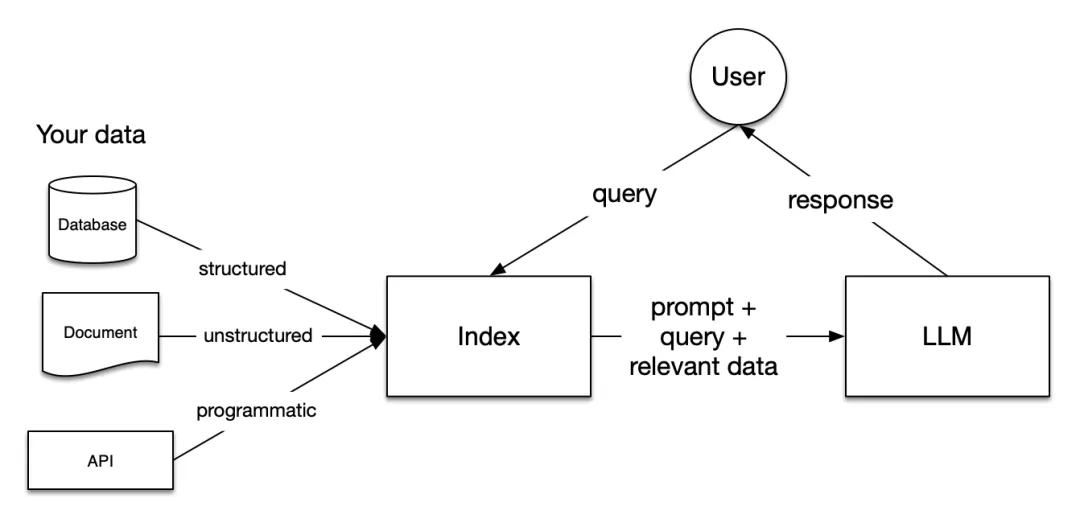
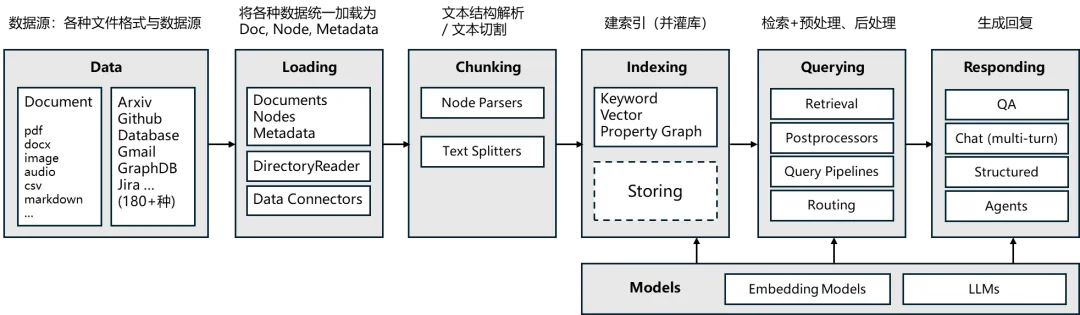
LlamaIndex是一个专为开发“上下文增强”大语言模型应用而设计的框架,特别擅长文档理解与RAG的索引、检索、问答。其核心理念是“数据接口(Data Index + Query Engine)”,强调数据到知识的映射。
4.2 LlamaIndex 核心模块
4.3 LlamaIndex集成与进阶
(1). LlamaIndex环境准备
核心库安装:LlamaIndex版本0.14.x
pip install llama-index-core llama-index解析库安装
pip install llama-parse unstructured nest-asyncio python-multipart llama-index-readers-filepip install pytestpip install "unstructured[md]"
(2). LlamaIndex常用组件
常用组件:
SimpleDirectoryReader
LlamaParse(针对复杂 PDF)
UnstructuredReader(多格式文档)
PandasReader(表格类文件)
官方文档申请api_key:https://llamaindex.org.cn/blog/pdf-parsing-llamaparse
from llama_index.core import SimpleDirectoryReaderfrom llama_parse import LlamaParse# 如果文档结构复杂,优先使用 LlamaParse# parser = LlamaParse(api_key="YOUR_LLAMA_CLOUD_API_KEY")# documents = parser.load_data("sample.pdf")# 或者使用简单读取器documents = SimpleDirectoryReader(input_files=["RAG评估.md"]).load_data()print(documents[0].metadata)print("===========================")print(documents[0].text)print("===========================")
(3). LlamaIndex集成unstructured
LlamaIndex与Unstructured的关系
LlamaIndex本身并不专注于文件解析(Parsing),而专注于:
"结构化地管理与大模型交互的外部知识(即索引、检索、问答)。"
而Unstructured.io是一个独立的"文档解析引擎",核心职责是:"将各种复杂格式(PDF、DOCX、HTML、Excel、图片等)解析成统一的文本元素(elements)。"
因此:
LlamaIndex是知识管理层(Knowledge Layer)
Unstructured是文档提取层(Extraction Layer)
两种集成方式对比
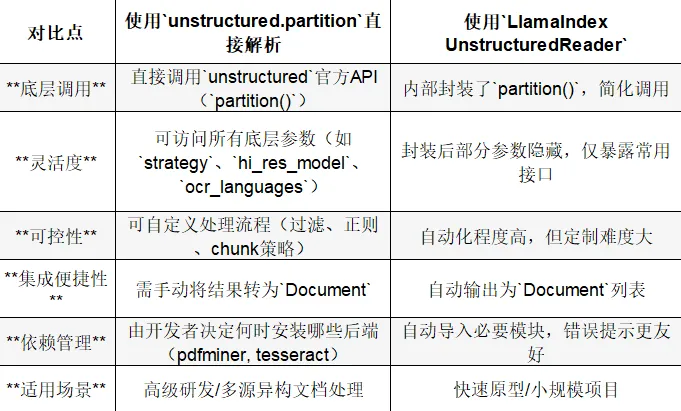
方式一:直接使用UnstructuredReader
推荐场景:快速测试/教学/单格式文件读取
优点:
写法极简 自动生成Document对象 无需显式调用 partition
缺点:
无法细调OCR、chunk_size、文本清洗 对图片、HTML、公式等复杂结构支持有限 Document对象只保留了文本和元数据,没有数据类型
from llama_index.readers.file.unstructured import UnstructuredReaderfrom pathlib import Pathreader = UnstructuredReader()documents = reader.load_data(file=Path("甬兴证券-AI行业点评报告:海外科技巨头持续发力AI,龙头公司中报业绩亮眼.pdf"))print("打印列表长度:" + str(len(documents)))print("==================================")print("打印解析的文本内容:" + documents[0].text[:100])print("==================================")print("打印元数据信息:" + str(documents[0].metadata))
方式二:独立使用unstructured.partition + 自定义逻辑
推荐场景:生产级RAG应用/多格式数据管线/高可控性需求
优点:
可自由控制解析策略(OCR、chunk、去噪、正则) 可在加载前后插入清洗逻辑(例如表格转结构化文本) 易于扩展(批量处理/并行任务/自定义metadata)
from unstructured.partition.auto import partition# 使用LlamaIndex的Document对象,将解析后的元素转换为Document对象from llama_index.core import Document# 使用partition函数自动检测文件类型并解析elements = partition(filename="甬兴证券-AI行业点评报告:海外科技巨头持续发力AI,龙头公司中报业绩亮眼.pdf",strategy="hi_res",split_pdf_page=True,infer_table_structure=True,languages=["eng","chi_sim"])# 将解析后的元素转换为Document对象docs = [Document(text=e.text,metadata={"source":"甬兴证券-AI行业点评报告:海外科技巨头持续发力AI,龙头公司中报业绩亮眼.pdf","type": e.category})for e in elements]print(docs[0].text)
方式三:最佳混合方案(推荐实践)
结合两者优势:
from llama_index.readers.file.unstructured import UnstructuredReaderfrom unstructured.partition.auto import partitionfrom llama_index.core import Documentfrom pathlib import Pathdef smart_load(file_path):"""智能文档加载器:根据文件类型选择最佳解析策略Args:file_path: 文件路径Returns:解析后的Document对象列表"""file_path = Path(file_path)file_ext = file_path.suffix.lower()# 定义复杂文件类型(需要高精度解析)complex_types = {'.pdf', # PDF文档(可能包含表格、图像、复杂布局)'.png', '.jpg', '.jpeg', '.gif', '.bmp', '.tiff', # 图片文件(需要OCR)'.docx', '.doc', # Word文档(可能包含复杂格式)'.pptx', '.ppt', # PowerPoint(复杂布局)'.xlsx', '.xls' # Excel(表格结构)}# 简单文件类型(可以用Reader直接处理)simple_types = {'.txt', '.md', '.csv', '.html', '.xml', '.json'}if file_ext in complex_types:# 复杂文件使用底层解析,获得更好的结构识别print(f"检测到复杂文件类型 {file_ext},使用partition高精度解析")try:elements = partition(filename=str(file_path),# 使用hi_res模式进行高精度解析strategy="hi_res",# 支持中文、英文languages=["eng", "chi_sim"],# 推断表格结构infer_table_structure=True)# 将解析元素转换为Document对象return [Document(text=e.text, metadata={"source": str(file_path),"element_type": type(e).__name__,"file_type": file_ext}) for e in elements if e.text.strip()] # 过滤空文本except Exception as e:print(f"高精度解析失败,回退到Reader: {e}")# 回退到Readerreader = UnstructuredReader()return reader.load_data(file=file_path)else:# 简单文件或未知类型优先使用Readerprint(f"检测到简单文件类型 {file_ext},使用Reader解析")try:# 直接使用Reader进行简单解析reader = UnstructuredReader()# 加载解析后的文档,返回 Document 对象列表docs = reader.load_data(file=file_path)return docsexcept Exception as e:print(f"Reader解析失败,回退到partition: {e}")# 回退到底层解析elements = partition(filename=str(file_path), strategy="auto")return [Document(text=e.text, metadata={"source": str(file_path)}) for e in elements]documents = smart_load("甬兴证券-AI行业点评报告:海外科技巨头持续发力AI,龙头公司中报业绩亮眼.pdf")print(documents[0].text)
这种做法在实际RAG框架开发中非常常见:
90%文件走LlamaIndex内置Reader 特殊格式(扫描件、混合HTML、表格)回退到底层 unstructured
总结一句话
LlamaIndex的
UnstructuredReader= 快速封装,适合上层应用**unstructured.partition= 底层引擎,适合复杂数据管线**在原型阶段用
UnstructuredReader,在生产阶段直接集成unstructured。
(4). 基础索引案例实现
基础文档解析实现
PDF文档需要先转换成Markdown带有标签的格式,有了文本和图片等标签以后,再进行对应部分的操作,会更加的方便。
解析得到的
documents可以直接用于构建LlamaIndex的向量索引,这是RAG系统的核心。
pip install llama-index-embeddings-openai llama-index-llms-openaifrom llama_index.core import VectorStoreIndexfrom llama_index.embeddings.openai import OpenAIEmbeddingfrom llama_index.llms.openai import OpenAI # 导入OpenAI LLM类from llama_index.core.settings import Settingsfrom dotenv import load_dotenv# 加载环境变量load_dotenv()# 设置为全局默认Embedding模型Settings.embed_model = OpenAIEmbedding(model="text-embedding-3-small",api_key=os.getenv("OPENAI_API_KEY"),api_base=os.getenv("OPENAI_BASE_URL", "https://api.openai.com/v1"))# 设置为全局默认 LLMSettings.llm = OpenAI(model="gpt-3.5-turbo",api_key=os.getenv("OPENAI_API_KEY"),api_base=os.getenv("OPENAI_BASE_URL", "https://api.openai.com/v1"))# 解析pdf文档documents = smart_load("甬兴证券-AI行业点评报告:海外科技巨头持续发力AI,龙头公司中报业绩亮眼.pdf")# 构建索引index = VectorStoreIndex.from_documents(documents)# 生成查询引擎query_engine = index.as_query_engine()# 测试提问response = query_engine.query("请用中文总结这些文档的主要内容")print(response)
文档解析是RAG系统的“第一道关卡”,其质量直接影响后续检索和生成的最终效果。在实践中,掌握多格式文档解析技术,将使你在构建RAG系统时事半功倍,真正释放大模型在企业级应用中的潜力。
学习资源与参考
官方资源
unstructured官网:https://unstructured.io/
unstructured GitHub:https://github.com/Unstructured-IO/unstructured
LlamaIndex官方文档:https://docs.llamaindex.org.cn/en/stable/
Tesseract OCR官方文档:https://tesseract-ocr.github.io/
pdf2image文档:https://pdf2image.readthedocs.io/
LlamaIndex 的更多功能
智能体(Agent)开发框架:https://docs.llamaindex.ai/en/stable/module_guides/deploying/agents/
RAG 的评测:https://docs.llamaindex.ai/en/stable/module_guides/evaluating/
过程监控:https://docs.llamaindex.ai/en/stable/module_guides/observability/
此外,LlamaIndex 针对生产级的 RAG 系统中遇到的各个方面的细节问题,总结了很多高端技巧: https://docs.llamaindex.ai/en/stable/optimizing/production_rag/,对实战很有参考价值,非常推荐阅读。
技术文档
AWS SDK介绍:https://aws.amazon.com/cn/what-is/sdk/
SDK和API的区别:https://aws.amazon.com/cn/compare/the-difference-between-sdk-and-api/