 夜雨聆风
夜雨聆风在数学课堂上,讲解正比例函数s = vt时,如果图像能随着速度的输入实时变化,N那该有多直观?今天,我们就手把手教你用 HTML + CSS + JavaScript从零写出一个高颜值、可交互的函数图像演示工具。不需要任何后端,用浏览器直接打开就能用!
第一步:唤醒 AI,一键生成代码
打开你常用的 AI 对话工具(如 DeepSeek、ChatGPT、智谱清言等),将下面这段提示词直接复制粘贴进去,点击发送,等待几秒钟即可获得完整的 HTML 源代码:
创建一个HTML演示工具,用于展示正比例函数图像,并且速度可以任意输入,图像会根据速度变化而实时更新。
这个HTML演示工具具有以下特点:界面布局:包含顶部菜单栏、中间的坐标系图像区域和底部的控制面板功能特点:
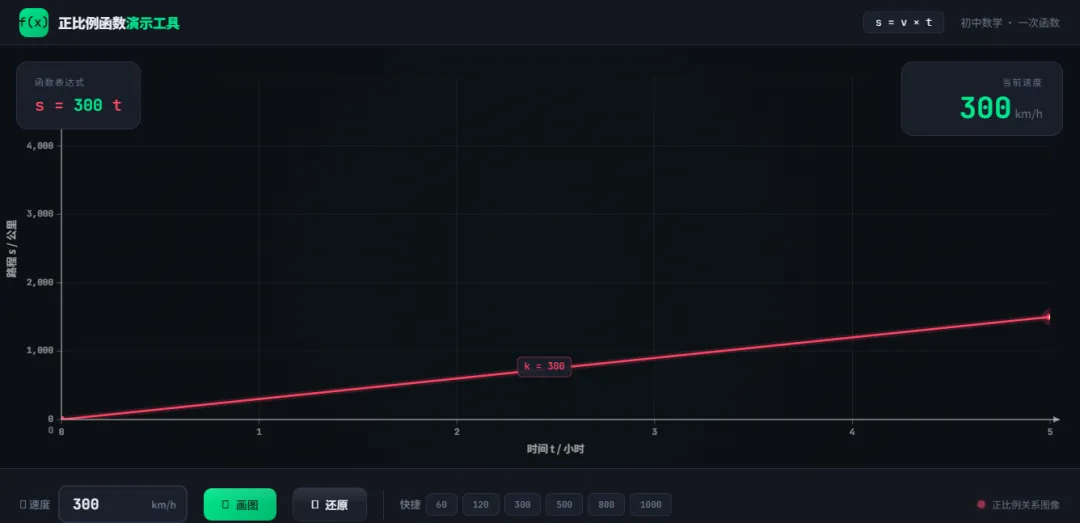
速度输入框:可以输入任意速度值(1-1000 km/h) 实时更新:输入速度后,图像会立即更新 坐标系显示:X轴表示时间(小时),Y轴表示路程(公里),数值固定不变 正比例函数图像:红色直线表示路程与时间的关系 速度显示:右上角显示当前速度值交互功能: "画图"按钮:根据输入的速度值更新图像 "还原"按钮:将速度重置为300 km/h 实时输入:输入框支持实时更新视觉效果: 网格背景便于观察 清晰的坐标轴和刻度 专业的数学函数图像展示
第二步:保存文件,两步搞定
在电脑桌面上新建一个文本文档(code.txt),将 AI 生成的全部代码粘贴进去。然后把这个文件的扩展名从 code.txt 改为 code.html,保存即可。
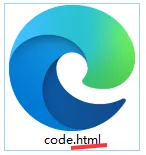
💡 小提示:如果保存后看不到 code
.html后缀,说明电脑隐藏了文件扩展名。打开文件夹的"查看"选项,勾选"文件扩展名"就能看到了。
第三步:打开即用,课堂开讲
双击这个 code.html 文件,浏览器会自动打开它。一个深色科技风的交互式函数图像工具就呈现在屏幕上了——输入不同速度,红色直线实时变化,鼠标移上去还能追踪坐标点,直接投屏到教室大屏就能带着学生互动起来。
源代码如下:
<!DOCTYPE html>
<html lang="zh-CN">
<head>
<meta charset="UTF-8">
<meta name="viewport" content="width=device-width, initial-scale=1.0">
<title>正比例函数图像演示 — s = vt</title>
<link href="https://fonts.googleapis.com/css2?family=JetBrains+Mono:wght@400;700&family=Noto+Sans+SC:wght@300;400;600;800&display=swap" rel="stylesheet">
<link href="https://cdnjs.cloudflare.com/ajax/libs/font-awesome/6.5.0/css/all.min.css" rel="stylesheet">
<style>
:root {
--bg: #0c0f14;
--bg-secondary: #141820;
--card: #1a1f2b;
--border: #2a3040;
--fg: #e8ecf4;
--muted: #6b7a90;
--accent: #00e68a;
--accent-dim: rgba(0, 230, 138, 0.15);
--red: #ff4466;
--red-glow: rgba(255, 68, 102, 0.3);
--grid: rgba(255, 255, 255, 0.04);
--grid-major: rgba(255, 255, 255, 0.08);
}
* { margin: 0; padding: 0; box-sizing: border-box; }
body {
font-family: 'Noto Sans SC', sans-serif;
background: var(--bg);
color: var(--fg);
min-height: 100vh;
display: flex;
flex-direction: column;
overflow: hidden;
}
/* 顶部菜单栏 */
header {
background: var(--bg-secondary);
border-bottom: 1px solid var(--border);
padding: 0 28px;
height: 56px;
display: flex;
align-items: center;
justify-content: space-between;
flex-shrink: 0;
position: relative;
z-index: 10;
}
.logo {
display: flex;
align-items: center;
gap: 12px;
}
.logo-icon {
width: 36px;
height: 36px;
background: linear-gradient(135deg, var(--accent), #00b86e);
border-radius: 10px;
display: flex;
align-items: center;
justify-content: center;
font-family: 'JetBrains Mono', monospace;
font-weight: 700;
font-size: 16px;
color: var(--bg);
}
.logo-text {
font-weight: 800;
font-size: 17px;
letter-spacing: -0.3px;
}
.logo-text span {
color: var(--accent);
}
.header-info {
display: flex;
align-items: center;
gap: 20px;
font-size: 13px;
color: var(--muted);
}
.header-info .formula {
font-family: 'JetBrains Mono', monospace;
color: var(--fg);
background: var(--card);
padding: 4px 14px;
border-radius: 6px;
border: 1px solid var(--border);
font-size: 13px;
}
/* 主体区域 */
main {
flex: 1;
display: flex;
flex-direction: column;
min-height: 0;
position: relative;
}
/* 图像区域 */
.graph-container {
flex: 1;
position: relative;
min-height: 0;
overflow: hidden;
}
/* 右上角速度显示 */
.speed-badge {
position: absolute;
top: 20px;
right: 24px;
z-index: 5;
background: rgba(26, 31, 43, 0.92);
backdrop-filter: blur(12px);
border: 1px solid var(--border);
border-radius: 14px;
padding: 16px 24px;
text-align: right;
min-width: 200px;
transition: all 0.3s ease;
}
.speed-badge:hover {
border-color: var(--accent);
box-shadow: 0 0 20px var(--accent-dim);
}
.speed-badge .label {
font-size: 11px;
color: var(--muted);
text-transform: uppercase;
letter-spacing: 1.5px;
margin-bottom: 6px;
}
.speed-badge .value {
font-family: 'JetBrains Mono', monospace;
font-size: 36px;
font-weight: 700;
color: var(--accent);
line-height: 1;
transition: color 0.3s;
}
.speed-badge .unit {
font-size: 14px;
color: var(--muted);
font-weight: 400;
margin-left: 4px;
}
/* 左上角函数表达式 */
.func-badge {
position: absolute;
top: 20px;
left: 24px;
z-index: 5;
background: rgba(26, 31, 43, 0.92);
backdrop-filter: blur(12px);
border: 1px solid var(--border);
border-radius: 14px;
padding: 16px 22px;
transition: all 0.3s ease;
}
.func-badge:hover {
border-color: var(--red);
box-shadow: 0 0 20px var(--red-glow);
}
.func-badge .label {
font-size: 11px;
color: var(--muted);
text-transform: uppercase;
letter-spacing: 1.5px;
margin-bottom: 8px;
}
.func-badge .expr {
font-family: 'JetBrains Mono', monospace;
font-size: 20px;
font-weight: 700;
color: var(--red);
}
.func-badge .expr .var-v {
color: var(--accent);
}
/* 坐标提示 */
.coord-tooltip {
position: absolute;
z-index: 6;
background: rgba(26, 31, 43, 0.95);
backdrop-filter: blur(8px);
border: 1px solid var(--accent);
border-radius: 8px;
padding: 8px 14px;
font-family: 'JetBrains Mono', monospace;
font-size: 12px;
color: var(--fg);
pointer-events: none;
opacity: 0;
transition: opacity 0.15s;
white-space: nowrap;
}
.coord-tooltip.visible {
opacity: 1;
}
canvas {
display: block;
width: 100%;
height: 100%;
}
/* 底部控制面板 */
.controls {
background: var(--bg-secondary);
border-top: 1px solid var(--border);
padding: 20px 28px;
display: flex;
align-items: center;
gap: 20px;
flex-shrink: 0;
flex-wrap: wrap;
}
.control-group {
display: flex;
align-items: center;
gap: 10px;
}
.control-label {
font-size: 13px;
color: var(--muted);
font-weight: 600;
white-space: nowrap;
}
.speed-input-wrapper {
position: relative;
display: flex;
align-items: center;
}
.speed-input {
font-family: 'JetBrains Mono', monospace;
font-size: 18px;
font-weight: 700;
width: 160px;
padding: 10px 60px 10px 16px;
background: var(--card);
border: 2px solid var(--border);
border-radius: 10px;
color: var(--fg);
outline: none;
transition: all 0.25s;
}
.speed-input:focus {
border-color: var(--accent);
box-shadow: 0 0 0 3px var(--accent-dim);
}
.speed-input::placeholder {
color: var(--muted);
font-weight: 400;
font-size: 14px;
}
.input-unit {
position: absolute;
right: 14px;
font-size: 12px;
color: var(--muted);
font-weight: 600;
pointer-events: none;
}
.btn {
font-family: 'Noto Sans SC', sans-serif;
font-size: 14px;
font-weight: 600;
padding: 10px 22px;
border: none;
border-radius: 10px;
cursor: pointer;
display: flex;
align-items: center;
gap: 8px;
transition: all 0.2s;
position: relative;
overflow: hidden;
}
.btn::after {
content: '';
position: absolute;
inset: 0;
background: linear-gradient(180deg, rgba(255,255,255,0.1) 0%, transparent 50%);
pointer-events: none;
}
.btn-primary {
background: linear-gradient(135deg, var(--accent), #00b86e);
color: var(--bg);
}
.btn-primary:hover {
transform: translateY(-1px);
box-shadow: 0 6px 24px rgba(0, 230, 138, 0.3);
}
.btn-primary:active {
transform: translateY(0);
}
.btn-secondary {
background: var(--card);
color: var(--fg);
border: 1px solid var(--border);
}
.btn-secondary:hover {
border-color: var(--muted);
background: var(--border);
}
.separator {
width: 1px;
height: 36px;
background: var(--border);
flex-shrink: 0;
}
/* 快捷速度按钮 */
.preset-group {
display: flex;
gap: 6px;
align-items: center;
}
.preset-btn {
font-family: 'JetBrains Mono', monospace;
font-size: 11px;
font-weight: 600;
padding: 6px 12px;
background: var(--card);
border: 1px solid var(--border);
border-radius: 7px;
color: var(--muted);
cursor: pointer;
transition: all 0.2s;
}
.preset-btn:hover {
color: var(--accent);
border-color: var(--accent);
background: var(--accent-dim);
}
/* 提示消息 */
.toast {
position: fixed;
bottom: 90px;
left: 50%;
transform: translateX(-50%) translateY(20px);
background: var(--card);
border: 1px solid var(--red);
color: var(--red);
padding: 10px 24px;
border-radius: 10px;
font-size: 13px;
font-weight: 600;
opacity: 0;
pointer-events: none;
transition: all 0.3s ease;
z-index: 100;
}
.toast.show {
opacity: 1;
transform: translateX(-50%) translateY(0);
}
/* 动画线条指示器 */
.line-indicator {
display: flex;
align-items: center;
gap: 8px;
margin-left: auto;
}
.indicator-dot {
width: 10px;
height: 10px;
border-radius: 50%;
background: var(--red);
box-shadow: 0 0 8px var(--red-glow);
animation: pulse-dot 2s infinite;
}
@keyframes pulse-dot {
0%, 100% { opacity: 1; }
50% { opacity: 0.5; }
}
.indicator-text {
font-size: 12px;
color: var(--muted);
}
/* 背景装饰 */
.bg-glow {
position: fixed;
width: 400px;
height: 400px;
border-radius: 50%;
filter: blur(120px);
opacity: 0.06;
pointer-events: none;
z-index: 0;
}
.bg-glow.g1 {
top: -100px;
left: -100px;
background: var(--accent);
}
.bg-glow.g2 {
bottom: -100px;
right: -100px;
background: var(--red);
}
/* 响应式 */
@media (max-width: 768px) {
.controls { padding: 14px 16px; gap: 12px; }
.speed-input { width: 120px; font-size: 15px; }
.preset-group { display: none; }
.header-info .formula { display: none; }
.speed-badge { padding: 12px 16px; }
.speed-badge .value { font-size: 28px; }
.func-badge { padding: 12px 16px; }
.func-badge .expr { font-size: 16px; }
.line-indicator { display: none; }
}
@media (prefers-reduced-motion: reduce) {
.indicator-dot { animation: none; }
* { transition-duration: 0s !important; }
}
</style>
</head>
<body>
<!-- 背景装饰 -->
<div class="bg-glow g1"></div>
<div class="bg-glow g2"></div>
<!-- 顶部菜单栏 -->
<header>
<div class="logo">
<div class="logo-icon">f(x)</div>
<div class="logo-text">正比例函数<span>演示工具</span></div>
</div>
<div class="header-info">
<div class="formula">s = v × t</div>
<span>初中数学 · 一次函数</span>
</div>
</header>
<!-- 主体 -->
<main>
<!-- 图像区域 -->
<div class="graph-container" id="graphContainer">
<canvas id="graphCanvas"></canvas>
<!-- 函数表达式 -->
<div class="func-badge" id="funcBadge">
<div class="label">函数表达式</div>
<div class="expr">s = <span class="var-v" id="exprV">300</span> t</div>
</div>
<!-- 速度显示 -->
<div class="speed-badge" id="speedBadge">
<div class="label">当前速度</div>
<div><span class="value" id="speedValue">300</span><span class="unit">km/h</span></div>
</div>
<!-- 坐标提示 -->
<div class="coord-tooltip" id="coordTooltip"></div>
</div>
<!-- 底部控制面板 -->
<div class="controls">
<div class="control-group">
<span class="control-label"><i class="fas fa-tachometer-alt"></i> 速度</span>
<div class="speed-input-wrapper">
<input
type="text"
class="speed-input"
id="speedInput"
value="300"
placeholder="1 - 1000"
aria-label="速度输入"
autocomplete="off"
>
<span class="input-unit">km/h</span>
</div>
</div>
<button class="btn btn-primary" id="drawBtn" aria-label="画图">
<i class="fas fa-pen-nib"></i> 画图
</button>
<button class="btn btn-secondary" id="resetBtn" aria-label="还原">
<i class="fas fa-undo"></i> 还原
</button>
<div class="separator"></div>
<div class="control-group preset-group">
<span class="control-label">快捷</span>
<button class="preset-btn" data-speed="60">60</button>
<button class="preset-btn" data-speed="120">120</button>
<button class="preset-btn" data-speed="300">300</button>
<button class="preset-btn" data-speed="500">500</button>
<button class="preset-btn" data-speed="800">800</button>
<button class="preset-btn" data-speed="1000">1000</button>
</div>
<div class="line-indicator">
<div class="indicator-dot"></div>
<span class="indicator-text">正比例关系图像</span>
</div>
</div>
</main>
<!-- 提示消息 -->
<div class="toast" id="toast"></div>
<script>
(function() {
// === 元素引用 ===
const canvas = document.getElementById('graphCanvas');
const ctx = canvas.getContext('2d');
const container = document.getElementById('graphContainer');
const speedInput = document.getElementById('speedInput');
const drawBtn = document.getElementById('drawBtn');
const resetBtn = document.getElementById('resetBtn');
const speedValueEl = document.getElementById('speedValue');
const exprVEl = document.getElementById('exprV');
const coordTooltip = document.getElementById('coordTooltip');
const toastEl = document.getElementById('toast');
const presetBtns = document.querySelectorAll('.preset-btn');
// === 状态 ===
let currentSpeed = 300;
let animationProgress = 0; // 0~1 动画进度
let animationId = null;
let dpr = window.devicePixelRatio || 1;
// 绘图区域边距(CSS像素)
const PADDING = { top: 40, right: 40, bottom: 60, left: 80 };
// === 工具函数 ===
// 显示提示消息
function showToast(msg) {
toastEl.textContent = msg;
toastEl.classList.add('show');
clearTimeout(showToast._timer);
showToast._timer = setTimeout(() => toastEl.classList.remove('show'), 2000);
}
// 计算合适的刻度间距
function niceStep(range, targetTicks) {
targetTicks = targetTicks || 8;
const rough = range / targetTicks;
const pow = Math.pow(10, Math.floor(Math.log10(rough)));
const normalized = rough / pow;
let nice;
if (normalized <= 1) nice = 1;
else if (normalized <= 2) nice = 2;
else if (normalized <= 5) nice = 5;
else nice = 10;
return nice * pow;
}
// 数字格式化
function formatNum(n) {
if (n >= 10000) return (n / 1000).toFixed(0) + 'k';
if (n >= 1000) return n.toLocaleString();
if (Number.isInteger(n)) return n.toString();
return n.toFixed(1);
}
// === 调整 Canvas 尺寸 ===
function resizeCanvas() {
const rect = container.getBoundingClientRect();
canvas.width = rect.width * dpr;
canvas.height = rect.height * dpr;
canvas.style.width = rect.width + 'px';
canvas.style.height = rect.height + 'px';
ctx.setTransform(dpr, 0, 0, dpr, 0, 0);
}
// === 核心绘图 ===
function draw(progress) {
const w = canvas.width / dpr;
const h = canvas.height / dpr;
const plotLeft = PADDING.left;
const plotTop = PADDING.top;
const plotRight = w - PADDING.right;
const plotBottom = h - PADDING.bottom;
const plotW = plotRight - plotLeft;
const plotH = plotBottom - plotTop;
// 清空
ctx.clearRect(0, 0, w, h);
// 背景
ctx.fillStyle = '#0c0f14';
ctx.fillRect(0, 0, w, h);
// 微妙的径向渐变背景
const bgGrad = ctx.createRadialGradient(w / 2, h / 2, 0, w / 2, h / 2, Math.max(w, h) * 0.6);
bgGrad.addColorStop(0, 'rgba(0, 230, 138, 0.02)');
bgGrad.addColorStop(1, 'rgba(0, 0, 0, 0)');
ctx.fillStyle = bgGrad;
ctx.fillRect(0, 0, w, h);
// 坐标范围计算
// X轴固定 0~5 小时
const xMax = 5;
// Y轴自动适应:最大值 = v * xMax,再留一点余量
const yDataMax = currentSpeed * xMax;
const yMax = Math.ceil(yDataMax / niceStep(yDataMax, 6)) * niceStep(yDataMax, 6);
const yStep = niceStep(yMax, 6);
const xStep = niceStep(xMax, 6);
// 坐标映射函数
function toCanvasX(t) { return plotLeft + (t / xMax) * plotW; }
function toCanvasY(s) { return plotBottom - (s / yMax) * plotH; }
function toDataX(cx) { return ((cx - plotLeft) / plotW) * xMax; }
function toDataY(cy) { return ((plotBottom - cy) / plotH) * yMax; }
// === 绘制网格 ===
ctx.save();
ctx.beginPath();
ctx.rect(plotLeft, plotTop, plotW, plotH);
ctx.clip();
// 次网格
const xMinorStep = xStep / 5;
const yMinorStep = yStep / 5;
ctx.strokeStyle = 'rgba(255, 255, 255, 0.025)';
ctx.lineWidth = 0.5;
for (let x = 0; x <= xMax; x += xMinorStep) {
const cx = toCanvasX(x);
ctx.beginPath();
ctx.moveTo(cx, plotTop);
ctx.lineTo(cx, plotBottom);
ctx.stroke();
}
for (let y = 0; y <= yMax; y += yMinorStep) {
const cy = toCanvasY(y);
ctx.beginPath();
ctx.moveTo(plotLeft, cy);
ctx.lineTo(plotRight, cy);
ctx.stroke();
}
// 主网格
ctx.strokeStyle = 'rgba(255, 255, 255, 0.06)';
ctx.lineWidth = 0.8;
for (let x = 0; x <= xMax; x += xStep) {
const cx = toCanvasX(x);
ctx.beginPath();
ctx.moveTo(cx, plotTop);
ctx.lineTo(cx, plotBottom);
ctx.stroke();
}
for (let y = 0; y <= yMax; y += yStep) {
const cy = toCanvasY(y);
ctx.beginPath();
ctx.moveTo(plotLeft, cy);
ctx.lineTo(plotRight, cy);
ctx.stroke();
}
// === 绘制函数线(带动画) ===
const endT = xMax * progress;
const endS = currentSpeed * endT;
// 线条发光
ctx.strokeStyle = 'rgba(255, 68, 102, 0.15)';
ctx.lineWidth = 8;
ctx.lineCap = 'round';
ctx.beginPath();
ctx.moveTo(toCanvasX(0), toCanvasY(0));
ctx.lineTo(toCanvasX(endT), toCanvasY(endS));
ctx.stroke();
// 线条主体
ctx.strokeStyle = '#ff4466';
ctx.lineWidth = 2.5;
ctx.beginPath();
ctx.moveTo(toCanvasX(0), toCanvasY(0));
ctx.lineTo(toCanvasX(endT), toCanvasY(endS));
ctx.stroke();
// 端点圆
if (progress > 0.01) {
const ex = toCanvasX(endT);
const ey = toCanvasY(endS);
// 外圈发光
ctx.fillStyle = 'rgba(255, 68, 102, 0.2)';
ctx.beginPath();
ctx.arc(ex, ey, 10, 0, Math.PI * 2);
ctx.fill();
// 内圈
ctx.fillStyle = '#ff4466';
ctx.beginPath();
ctx.arc(ex, ey, 4, 0, Math.PI * 2);
ctx.fill();
// 白心
ctx.fillStyle = '#fff';
ctx.beginPath();
ctx.arc(ex, ey, 1.5, 0, Math.PI * 2);
ctx.fill();
}
// 绘制起点标记
ctx.fillStyle = '#ff4466';
ctx.beginPath();
ctx.arc(toCanvasX(0), toCanvasY(0), 4, 0, Math.PI * 2);
ctx.fill();
ctx.restore();
// === 绘制坐标轴 ===
ctx.strokeStyle = 'rgba(255, 255, 255, 0.5)';
ctx.lineWidth = 1.5;
// X轴
ctx.beginPath();
ctx.moveTo(plotLeft, plotBottom);
ctx.lineTo(plotRight + 12, plotBottom);
ctx.stroke();
// X轴箭头
ctx.fillStyle = 'rgba(255, 255, 255, 0.5)';
ctx.beginPath();
ctx.moveTo(plotRight + 12, plotBottom);
ctx.lineTo(plotRight + 4, plotBottom - 4);
ctx.lineTo(plotRight + 4, plotBottom + 4);
ctx.closePath();
ctx.fill();
// Y轴
ctx.beginPath();
ctx.moveTo(plotLeft, plotBottom);
ctx.lineTo(plotLeft, plotTop - 12);
ctx.stroke();
// Y轴箭头
ctx.beginPath();
ctx.moveTo(plotLeft, plotTop - 12);
ctx.lineTo(plotLeft - 4, plotTop - 4);
ctx.lineTo(plotLeft + 4, plotTop - 4);
ctx.closePath();
ctx.fill();
// === 刻度和标签 ===
ctx.font = '600 11px "JetBrains Mono", monospace';
ctx.textAlign = 'center';
ctx.textBaseline = 'top';
// X轴刻度
for (let x = 0; x <= xMax; x += xStep) {
if (x === 0) continue;
const cx = toCanvasX(x);
// 刻度线
ctx.strokeStyle = 'rgba(255, 255, 255, 0.3)';
ctx.lineWidth = 1;
ctx.beginPath();
ctx.moveTo(cx, plotBottom);
ctx.lineTo(cx, plotBottom + 6);
ctx.stroke();
// 标签
ctx.fillStyle = 'rgba(255, 255, 255, 0.5)';
ctx.fillText(formatNum(x), cx, plotBottom + 10);
}
// Y轴刻度
ctx.textAlign = 'right';
ctx.textBaseline = 'middle';
for (let y = 0; y <= yMax; y += yStep) {
if (y === 0) continue;
const cy = toCanvasY(y);
// 刻度线
ctx.strokeStyle = 'rgba(255, 255, 255, 0.3)';
ctx.lineWidth = 1;
ctx.beginPath();
ctx.moveTo(plotLeft, cy);
ctx.lineTo(plotLeft - 6, cy);
ctx.stroke();
// 标签
ctx.fillStyle = 'rgba(255, 255, 255, 0.5)';
ctx.fillText(formatNum(y), plotLeft - 10, cy);
}
// 原点标签
ctx.textAlign = 'right';
ctx.textBaseline = 'top';
ctx.fillStyle = 'rgba(255, 255, 255, 0.4)';
ctx.fillText('O', plotLeft - 10, plotBottom + 8);
// 轴名称
ctx.font = '600 13px "Noto Sans SC", sans-serif';
ctx.fillStyle = 'rgba(255, 255, 255, 0.6)';
ctx.textAlign = 'center';
ctx.textBaseline = 'top';
ctx.fillText('时间 t / 小时', plotLeft + plotW / 2, plotBottom + 30);
// Y轴名称(旋转)
ctx.save();
ctx.translate(18, plotTop + plotH / 2);
ctx.rotate(-Math.PI / 2);
ctx.textAlign = 'center';
ctx.textBaseline = 'middle';
ctx.fillText('路程 s / 公里', 0, 0);
ctx.restore();
// === 斜率标注(动画完成后显示) ===
if (progress > 0.95) {
const labelAlpha = Math.min(1, (progress - 0.95) / 0.05);
// 在线段中间附近标注
const midT = xMax * 0.45;
const midS = currentSpeed * midT;
const mx = toCanvasX(midT);
const my = toCanvasY(midS);
ctx.save();
ctx.globalAlpha = labelAlpha;
// 标注背景
const label = 'k = ' + currentSpeed;
ctx.font = '700 12px "JetBrains Mono", monospace';
const tm = ctx.measureText(label);
const lw = tm.width + 16;
const lh = 24;
const lx = mx + 14;
const ly = my - 20;
ctx.fillStyle = 'rgba(26, 31, 43, 0.9)';
ctx.beginPath();
ctx.roundRect(lx, ly, lw, lh, 5);
ctx.fill();
ctx.strokeStyle = 'rgba(255, 68, 102, 0.4)';
ctx.lineWidth = 1;
ctx.stroke();
ctx.fillStyle = '#ff4466';
ctx.textAlign = 'left';
ctx.textBaseline = 'middle';
ctx.fillText(label, lx + 8, ly + lh / 2);
ctx.restore();
}
// 保存映射函数供鼠标交互使用
draw._toDataX = toDataX;
draw._toDataY = toDataY;
draw._toCanvasX = toCanvasX;
draw._toCanvasY = toCanvasY;
draw._plotLeft = plotLeft;
draw._plotRight = plotRight;
draw._plotTop = plotTop;
draw._plotBottom = plotBottom;
draw._xMax = xMax;
draw._yMax = yMax;
}
// === 动画 ===
function startAnimation() {
if (animationId) cancelAnimationFrame(animationId);
animationProgress = 0;
const duration = 600; // 毫秒
const startTime = performance.now();
function tick(now) {
const elapsed = now - startTime;
animationProgress = Math.min(1, elapsed / duration);
// 缓动函数
const eased = 1 - Math.pow(1 - animationProgress, 3);
draw(eased);
if (animationProgress < 1) {
animationId = requestAnimationFrame(tick);
}
}
animationId = requestAnimationFrame(tick);
}
// === 更新速度 ===
function setSpeed(v) {
v = Math.round(v);
if (isNaN(v) || v < 1 || v > 1000) {
showToast('请输入 1 到 1000 之间的速度值');
return false;
}
currentSpeed = v;
speedValueEl.textContent = v;
exprVEl.textContent = v;
speedInput.value = v;
startAnimation();
return true;
}
// === 事件绑定 ===
// 画图按钮
drawBtn.addEventListener('click', function() {
const v = parseFloat(speedInput.value);
setSpeed(v);
});
// 还原按钮
resetBtn.addEventListener('click', function() {
setSpeed(300);
});
// 实时输入(input事件)
speedInput.addEventListener('input', function() {
const v = parseFloat(this.value);
if (!isNaN(v) && v >= 1 && v <= 1000) {
setSpeed(v);
}
});
// 回车确认
speedInput.addEventListener('keydown', function(e) {
if (e.key === 'Enter') {
const v = parseFloat(this.value);
setSpeed(v);
}
});
// 快捷按钮
presetBtns.forEach(function(btn) {
btn.addEventListener('click', function() {
const v = parseInt(this.dataset.speed);
setSpeed(v);
});
});
// 鼠标移动 - 坐标提示
container.addEventListener('mousemove', function(e) {
const rect = canvas.getBoundingClientRect();
const mx = e.clientX - rect.left;
const my = e.clientY - rect.top;
if (!draw._plotLeft) return;
const { _plotLeft: pl, _plotRight: pr, _plotTop: pt, _plotBottom: pb, _toDataX: tdx, _toDataY: tdy, _xMax: xMax, _yMax: yMax } = draw;
if (mx >= pl && mx <= pr && my >= pt && my <= pb) {
const t = tdx(mx);
const s = tdy(my);
const sOnLine = currentSpeed * t;
coordTooltip.innerHTML =
'<span style="color:var(--muted)">t</span> = ' + t.toFixed(2) + ' h' +
' <span style="color:var(--muted)">s</span> = ' + sOnLine.toFixed(1) + ' km';
coordTooltip.style.left = (mx + 16) + 'px';
coordTooltip.style.top = (my - 10) + 'px';
coordTooltip.classList.add('visible');
// 重绘并高亮交叉点
draw(animationProgress >= 1 ? 1 : animationProgress);
// 画十字参考线
const cx = draw._toCanvasX(t);
const cy = draw._toCanvasY(sOnLine);
ctx.save();
ctx.setLineDash([4, 4]);
ctx.strokeStyle = 'rgba(0, 230, 138, 0.3)';
ctx.lineWidth = 1;
// 垂直线
ctx.beginPath();
ctx.moveTo(cx, pb);
ctx.lineTo(cx, pt);
ctx.stroke();
// 水平线
ctx.beginPath();
ctx.moveTo(pl, cy);
ctx.lineTo(pr, cy);
ctx.stroke();
ctx.setLineDash([]);
// 交叉点
ctx.fillStyle = 'rgba(0, 230, 138, 0.25)';
ctx.beginPath();
ctx.arc(cx, cy, 8, 0, Math.PI * 2);
ctx.fill();
ctx.fillStyle = '#00e68a';
ctx.beginPath();
ctx.arc(cx, cy, 3.5, 0, Math.PI * 2);
ctx.fill();
ctx.restore();
} else {
coordTooltip.classList.remove('visible');
}
});
container.addEventListener('mouseleave', function() {
coordTooltip.classList.remove('visible');
draw(animationProgress >= 1 ? 1 : animationProgress);
});
// 窗口尺寸变化
let resizeTimer;
window.addEventListener('resize', function() {
clearTimeout(resizeTimer);
resizeTimer = setTimeout(function() {
dpr = window.devicePixelRatio || 1;
resizeCanvas();
draw(animationProgress >= 1 ? 1 : animationProgress);
}, 50);
});
// === 初始化 ===
resizeCanvas();
startAnimation();
})();
</script>
</body>
</html>