ARTICLE · 946277
HTML前端导出Excel功能,后端java
HTML前端导出Excel功能,后端java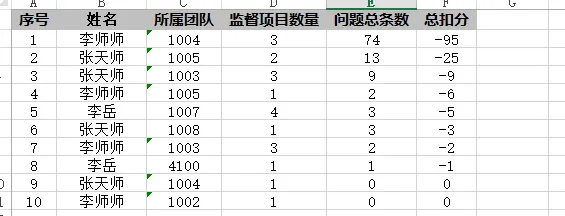
2. Controller 新增导出接口(Controller) 3、前端完整页面(增加导出按钮 + 行点击跳转)
一、后端:导出 Excel 接口
1. 先确认 pom.xml 有 POI 依赖(没有就加上)
<dependency><groupId>org.apache.poi</groupId><artifactId>poi</artifactId><version>4.1.2</version></dependency><dependency><groupId>org.apache.poi</groupId><artifactId>poi-ooxml</artifactId><version>4.1.2</version></dependency>
import org.apache.poi.ss.usermodel.*;import org.apache.poi.xssf.usermodel.XSSFWorkbook;import javax.servlet.http.HttpServletResponse;import java.io.OutputStream;import java.net.URLEncoder;/*** 导出员工扣分统计Excel*/@GetMapping("/exportEngineerStat")public void exportEngineerStat(KhSearchForm queryForm, HttpServletResponse response, HttpSession session) {// 权限校验Object qxObj = session.getAttribute("qx");if (qxObj == null) {return;}List<EngineerKoufenStatVO> list = khuserinfoMapper.statEngineerKoufen(queryForm);try (Workbook workbook = new XSSFWorkbook()) {Sheet sheet = workbook.createSheet("员工扣分统计");// 表头样式CellStyle headerStyle = workbook.createCellStyle();headerStyle.setFillForegroundColor(IndexedColors.GREY_25_PERCENT.getIndex());headerStyle.setFillPattern(FillPatternType.SOLID_FOREGROUND);headerStyle.setAlignment(HorizontalAlignment.CENTER);Font headerFont = workbook.createFont();headerFont.setBold(true);headerStyle.setFont(headerFont);// 表头String[] headers = {"序号", "员工姓名", "所属部门", "监督项目数量", "问题总条数", "总扣分"};Row headerRow = sheet.createRow(0);for (int i = 0; i < headers.length; i++) {Cell cell = headerRow.createCell(i);cell.setCellValue(headers[i]);cell.setCellStyle(headerStyle);}// 数据行CellStyle dataStyle = workbook.createCellStyle();dataStyle.setAlignment(HorizontalAlignment.CENTER);for (int i = 0; i < list.size(); i++) {EngineerKoufenStatVO item = list.get(i);Row row = sheet.createRow(i + 1);row.createCell(0).setCellValue(i + 1);row.createCell(1).setCellValue(item.getEngineerName() == null ? "" : item.getEngineerName());row.createCell(2).setCellValue(item.getTeamName() == null ? "" : item.getTeamName());row.createCell(3).setCellValue(item.getProjectCount() == null ? 0 : item.getProjectCount());row.createCell(4).setCellValue(item.getIssueCount() == null ? 0 : item.getIssueCount());row.createCell(5).setCellValue(item.getTotalKoufen() == null ? 0 : item.getTotalKoufen().doubleValue());for (int c = 0; c < headers.length; c++) {row.getCell(c).setCellStyle(dataStyle);}}// 列宽自适应for (int i = 0; i < headers.length; i++) {sheet.autoSizeColumn(i);sheet.setColumnWidth(i, sheet.getColumnWidth(i) * 17 / 10);}// 文件名String fileName = "员工扣分统计_" + System.currentTimeMillis() + ".xlsx";response.setContentType("application/vnd.openxmlformats-officedocument.spreadsheetml.sheet");response.setHeader("Content-Disposition", "attachment;filename=" + URLEncoder.encode(fileName, "UTF-8"));OutputStream out = response.getOutputStream();workbook.write(out);out.flush();out.close();} catch (Exception e) {e.printStackTrace();}}
import lombok.Data;import java.math.BigDecimal;@Datapublic class EngineerKoufenStatVO {/**姓名 xmbz*/private String engineerName;/**所属团队 tuandui*/private String teamName;/**监督项目数量(该工程师项目条数)*/private Integer projectCount;/**总扣分*/private BigDecimal totalKoufen;/**问题总条数*/private Integer issueCount;}
/*** 工程师扣分统计列表* @param searchForm 查询条件* @return*/List<EngineerKoufenStatVO> statEngineerKoufen(@Param("query") KhSearchForm searchForm);
<!--工程师扣分统计列表--><selectid="statEngineerKoufen"resultType="kaohe.vo.EngineerKoufenStatVO">SELECTk.xmbz AS engineerName,k.tuandui AS teamName,COUNT(DISTINCT k.id) AS projectCount,COUNT(l.id) AS issueCount,IFNULL(SUM(l.koufen),0) AS totalKoufenFROM userinfo kLEFT JOIN wentilist l ON k.id = l.userid<where>1=1<!--团队筛选--><iftest="query.tuandui != null and query.tuandui !=''">AND k.tuandui = #{query.tuandui}</if><!--监督日期区间 --><iftest="query.jdrqStart !=null and query.jdrqStart !=''">AND k.jdrq >= #{query.jdrqStart}</if><iftest="query.jdrqEnd !=null and query.jdrqEnd !=''">AND k.jdrq <= #{query.jdrqEnd}</if><!--过滤姓名不为空,过滤空编制人-->AND k.xmbz IS NOT NULL AND k.xmbz !=''</where>GROUP BY k.xmbz,k.tuanduiORDER BY totalKoufen DESC</select>
<!DOCTYPE html><htmlxmlns:th="http://www.thymeleaf.org"><head><metaname="renderer"content="webkit"/><metaname="force-rendering"content="webkit"/><metahttp-equiv="X-UA-Compatible"content="IE=Edge,chrome=1"/><metahttp-equiv="Content-Type"content="text/html; charset=utf-8"/><metaname="viewport"content="width=device-width, user-scalable=no, minimum-scale=1.0, maximum-scale=1.0"><title>所有项目监督记录汇总</title><style>.val_yes {background-color: #ea5757;color: #fff !important;border-radius: 3px;padding: 2px 5px;}.search-row {margin: 8px 0;display: flex;align-items: center;flex-wrap: wrap;gap: 12px;}.search-item {display: flex;align-items: center;}.search-item label {margin-right: 6px;white-space: nowrap;}.bor.int {padding: 4px;}select.bor.int {width: 130px;}.badge-status span {padding: 3px 8px;border-radius: 4px;color: #fff;font-size: 12px;white-space: nowrap;}.status-wait { background-color: #f53f3f; }.status-done { background-color: #00b42a; }.status-unknown { background-color: #86909c; }.status-pass { background-color: #00b42a; }.status-fail { background-color: #f53f3f; }/*员工统计卡片样式*/.stat-engineer-wrap{margin:15px 8px;border:1px solid #e8e8e8;padding:16px 20px;background:#ffffff;border-radius:8px;box-shadow: 0 1px 4px rgba(0,0,0,0.06);}.stat-toolbar{margin-bottom:14px;display:flex;align-items:center;gap:10px;}.stat-tip{margin-left:12px;color:#606266;font-size:13px;}/*统计表格*/#engineerStatTable{width:100%;border-collapse:collapse;font-size:13px;}#engineerStatTable th,#engineerStatTable td{border:1px solid #e5e7eb;padding:9px 12px;text-align:center;}#engineerStatTable th{background:#f2f3f5;font-weight:bold;}#engineerStatTable tbody tr{cursor:pointer;transition:background 0.15s;}#engineerStatTable tbody tr:hover{background:#ecf5ff !important;}#engineerStatTable tbody tr:nth-child(even){background:#fafafa;}.empty-tip{text-align:center;padding:60px 0;color:#909399;font-size:14px;}.btn-export{background:#67c23a;color:#fff;border:1px solid #67c23a;padding:4px 14px;border-radius:4px;cursor:pointer;}.btn-export:hover{background:#5daf34;}</style></head><body><divclass="cssout"><divclass="menuboxs"><ul><li><ahref="index">返回首页</a></li></ul><divclass="clear"></div></div><spanclass="fastsou"><formclass="list-form layui-form"name="searchform"action="tongji"method="get"><divclass="search-row"><!-- 团队筛选 --><divclass="search-item"><label>团队:</label><selectname="tuandui"id="tuandui"class="bor int"><optionvalue="">全部团队</option><optionth:each="item : ${teamList}"th:value="${item.tdjc}"th:text="${item.tdname}"th:selected="${form.tuandui == item.tdjc}"></option></select></div><!-- 文档类型筛选 --><divclass="search-item"><label>文档类型:</label><selectname="dalx"id="dalx"class="bor int"><optionvalue="">全部文档</option><optionth:each="item : ${daList}"th:value="${item.daleixingjc}"th:text="${item.daname}"th:selected="${form.dalx == item.daleixingjc}"></option></select></div><!-- 文档归还状态 --><divclass="search-item"><label>归还状态:</label><selectname="daghzt"id="daghzt"class="bor int"><optionvalue="">全部</option><optionvalue="0"th:selected="${form.daghzt == 0}">未还</option><optionvalue="1"th:selected="${form.daghzt == 1}">已还</option></select></div><!-- 文档合格状态 --><divclass="search-item"><label>合格状态:</label><selectname="dahgzt"id="dahgzt"class="bor int"><optionvalue="">全部</option><optionvalue="0"th:selected="${form.dahgzt == 0}">未知</option><optionvalue="1"th:selected="${form.dahgzt == 1}">合格</option><optionvalue="2"th:selected="${form.dahgzt == 2}">不合格</option></select></div><!-- 监督日期区间 --><divclass="search-item"><label>监督日期:</label><inputname="jdrqStart"id="jdrqStart"type="text"class="bor int"placeholder="起始"th:value="${form.jdrqStart}"onClick="WdatePicker({el:this})" readonly="readonly" style="width:100px;"><span>~</span><inputname="jdrqEnd"id="jdrqEnd"type="text"class="bor int"placeholder="结束"th:value="${form.jdrqEnd}"onClick="WdatePicker({el:this})" readonly="readonly" style="width:100px;"></div><!-- 搜索按钮 --><divclass="search-item"><inputtype="submit"id="fast_sou_btn"name="submit"class="btn1 btnsou"value="搜 索"/><buttontype="button"class="btn1 btnsou"onclick="refreshStat()">刷新统计</button></div></div><inputid="CurrentPage"type="hidden"name="currentPage"value="1"/></form></span><divclass="clear"></div></div><divclass="bgdiv"></div><divclass="cssout"><divclass="stat-engineer-wrap"><divclass="stat-toolbar"><buttontype="button"class="btn-export"onclick="exportExcel()"><iclass="fa fa-download"></i> 导出Excel</button><spanclass="stat-tip">统计说明:按总扣分降序排列;点击表格行可跳转查看该员工项目明细</span></div><divid="statTableWrap"></div></div></div><scriptth:inline="javascript">$(function (){refreshStat();});// 收集当前筛选条件function getQueryParams(){return {tuandui:$("#tuandui").val(),dalx:$("#dalx").val(),daghzt:$("#daghzt").val(),dahgzt:$("#dahgzt").val(),jdrqStart:$("#jdrqStart").val(),jdrqEnd:$("#jdrqEnd").val()};}function refreshStat(){$.get("/statEngineerData", getQueryParams(), function(res){if(res.success){renderTable(res.data);}else{alert(res.msg||"获取统计失败");}},"json");}function renderTable(list){if(!list || list.length ===0){$("#statTableWrap").html('<div class="empty-tip">暂无员工统计数据</div>');return;}let html = `<table id="engineerStatTable"><thead><tr><th>序号</th><th>员工姓名</th><th>所属团队</th><th>监督项目数量</th><th>问题总条数</th><th>总扣分</th></tr></thead><tbody>`;for(let i=0;i<list.length;i++){let item = list[i];// 行点击跳转:把员工姓名作为keyname,携带所有筛选条件let jumpUrl = buildJumpUrl(item.engineerName);html += `<tr onclick="jumpToProjectList('${jumpUrl}')"><td>${i+1}</td><td>${item.engineerName||""}</td><td>${item.teamName||""}</td><td>${item.projectCount}</td><td>${item.issueCount}</td><td>${item.totalKoufen}</td></tr>`;}html += "</tbody></table>";$("#statTableWrap").html(html);}// 构建跳转URL:员工姓名作为keyname(编制人搜索),携带当前筛选条件function buildJumpUrl(engineerName){let p = getQueryParams();let url = "kaohejghz?";url += "keyname=" + encodeURIComponent(engineerName || "");if(p.tuandui) url += "&tuandui=" + encodeURIComponent(p.tuandui);if(p.dalx) url += "&dalx=" + encodeURIComponent(p.dalx);if(p.daghzt) url += "&daghzt=" + encodeURIComponent(p.daghzt);if(p.dahgzt) url += "&dahgzt=" + encodeURIComponent(p.dahgzt);if(p.jdrqStart)url += "&jdrqStart="+ encodeURIComponent(p.jdrqStart);if(p.jdrqEnd) url += "&jdrqEnd=" + encodeURIComponent(p.jdrqEnd);return url;}// 行点击跳转项目列表function jumpToProjectList(url){window.location.href = url;}// 导出Excel:携带当前筛选条件function exportExcel(){let p = getQueryParams();let url = "/exportEngineerStat?";let arr = [];for(let k in p){if(p[k]) arr.push(k + "=" + encodeURIComponent(p[k]));}url += arr.join("&");window.location.href = url;}</script><divclass="h50b"></div><divclass="fixed_bg"><divclass="pagenums"><div>© 2026 测试程序</div></div></div></body></html>
功能说明
1. 导出 Excel
工具栏新增绿色【导出 Excel】按钮,点击直接下载 xlsx 文件 导出内容与当前筛选条件一致(团队、档案类型、归还 / 合格状态、日期区间) 表头加粗灰底,数据居中,列宽自适应 文件名带时间戳,避免重复
2. 行点击跳转项目列表
表格行鼠标悬浮变浅蓝色,手型光标,提示可点击 点击后跳转到 /kaohejghz(管理人员综合查看页)跳转时自动携带: keyname= 工程师姓名(利用该页原有的 "综合搜索 - 编制人" 筛选) 当前页面所有筛选条件(团队、档案类型、状态、日期区间) 跳转后项目列表自动筛选出该工程师的项目,无需手动再输入
3. 注意事项
如果项目列表页 /kaohejghz的keyname不支持按编制人搜索,需要在该页 Mapper XML 的 keyname 条件里加上OR k.xmbz LIKE ...,确保工程师姓名能搜到导出接口路径 /exportEngineerStat,确保 Controller 类上有@RequestMapping("/kaohe")POI 版本 4.1.2 兼容 JDK 8,和你现有环境一致