 夜雨聆风
夜雨聆风


使用AO工具借助AI帮我创建故事
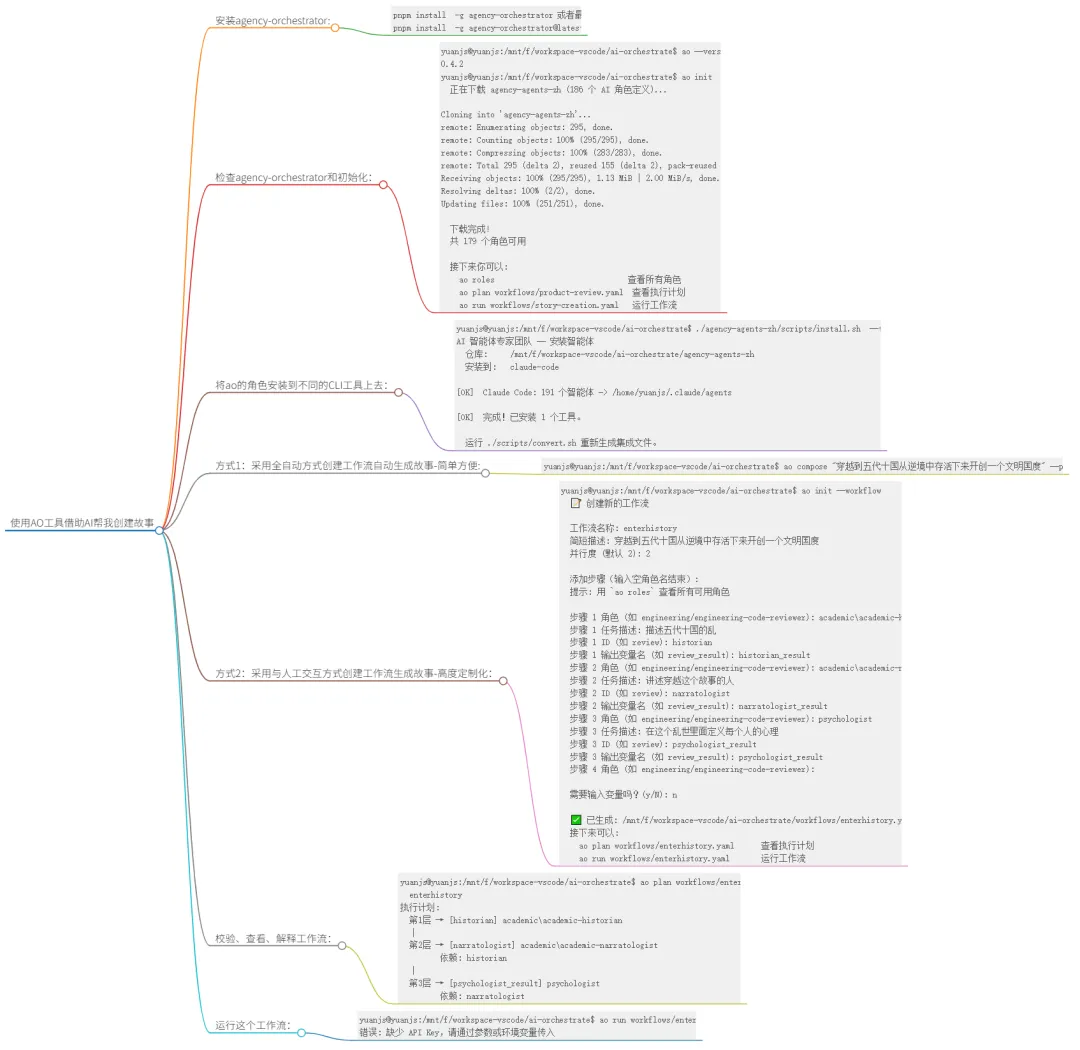
安装agency-orchestrator:
pnpm install  -g agency-orchestrator 或者最新版本
pnpm install  -g agency-orchestrator@latest
检查agency-orchestrator和初始化:
yuanjs@yuanjs:/mnt/f/workspace-vscode/ai-orchestrate$ ao --version
0.4.2
yuanjs@yuanjs:/mnt/f/workspace-vscode/ai-orchestrate$ ao init
  正在下载 agency-agents-zh (186 个 AI 角色定义)...

Cloning into 'agency-agents-zh'...
remote: Enumerating objects: 295, done.
remote: Counting objects: 100% (295/295), done.
remote: Compressing objects: 100% (283/283), done.
remote: Total 295 (delta 2), reused 155 (delta 2), pack-reused 0 (from 0)
Receiving objects: 100% (295/295), 1.13 MiB | 2.00 MiB/s, done.
Resolving deltas: 100% (2/2), done.
Updating files: 100% (251/251), done.

  下载完成!
  共 179 个角色可用

  接下来你可以:
    ao roles                              查看所有角色
    ao plan workflows/product-review.yaml  查看执行计划
    ao run workflows/story-creation.yaml   运行工作流
将ao的角色安装到不同的CLI工具上去:
yuanjs@yuanjs:/mnt/f/workspace-vscode/ai-orchestrate$ ./agency-agents-zh/scripts/install.sh  --tool claude-code
AI 智能体专家团队 -- 安装智能体
  仓库:     /mnt/f/workspace-vscode/ai-orchestrate/agency-agents-zh
  安装到:   claude-code

[OK]  Claude Code: 191 个智能体 -> /home/yuanjs/.claude/agents

[OK]  完成!已安装 1 个工具。

  运行 ./scripts/convert.sh 重新生成集成文件。
方式1:采用全自动方式创建工作流自动生成故事-简单方便:
ao compose “穿越到五代十国从逆境中存活下来开创一个文明国度”
yuanjs@yuanjs:/mnt/f/workspace-vscode/ai-orchestrate$ ao compose "穿越到五代十国从逆境中存活下来开创一个文明国度" --provider claude-code
注意如果报告如下错误,请添加“ –provider claude-code”: 错误: 缺少 API Key,请通过参数或环境变量传入
方式2:采用与人工交互方式创建工作流生成故事-高度定制化:
yuanjs@yuanjs:/mnt/f/workspace-vscode/ai-orchestrate$ ao init --workflow
  📝 创建新的工作流

  工作流名称: enterhistory
  简短描述: 穿越到五代十国从逆境中存活下来开创一个文明国度
  并行度 (默认 2): 2

  添加步骤(输入空角色名结束):
  提示: 用 `ao roles` 查看所有可用角色

  步骤 1 角色 (如 engineering/engineering-code-reviewer): academic\academic-historian
  步骤 1 任务描述: 描述五代十国的乱
  步骤 1 ID (如 review): historian
  步骤 1 输出变量名 (如 review_result): historian_result
  步骤 2 角色 (如 engineering/engineering-code-reviewer): academic\academic-narratologist
  步骤 2 任务描述: 讲述穿越这个故事的人
  步骤 2 ID (如 review): narratologist
  步骤 2 输出变量名 (如 review_result): narratologist_result
  步骤 3 角色 (如 engineering/engineering-code-reviewer): psychologist
  步骤 3 任务描述: 在这个乱世里面定义每个人的心理
  步骤 3 ID (如 review): psychologist_result
  步骤 3 输出变量名 (如 review_result): psychologist_result
  步骤 4 角色 (如 engineering/engineering-code-reviewer):

  需要输入变量吗?(y/N): n

  ✅ 已生成: /mnt/f/workspace-vscode/ai-orchestrate/workflows/enterhistory.yaml
  接下来可以:
    ao plan workflows/enterhistory.yaml      查看执行计划
    ao run workflows/enterhistory.yaml       运行工作流
校验、查看、解释工作流:
-
ao validate <workflow.yaml> 校验工作流定义 -
ao plan <workflow.yaml> 查看执行计划 -
ao explain <workflow.yaml> 用自然语言解释执行计划
例如:
yuanjs@yuanjs:/mnt/f/workspace-vscode/ai-orchestrate$ ao plan workflows/enterhistory.yaml
  enterhistory
执行计划:
  第1层 → [historian] academic\academic-historian
  │
  第2层 → [narratologist] academic\academic-narratologist
         依赖: historian
  │
  第3层 → [psychologist_result] psychologist
         依赖: narratologist
运行这个工作流:
yuanjs@yuanjs:/mnt/f/workspace-vscode/ai-orchestrate$ ao run workflows/enterhistory.yaml
错误: 缺少 API Key,请通过参数或环境变量传入
为了解决上面错误,修改 workflows/enterhistory.yaml 中的内容:
将: provider: deepseek
改为: provider: claude-code
然后更改这个yaml文件为如下内容,就可以运行起来 ,ai-orchestrate\workflows\enterhistory.yaml 文件内容如下:
name:"enterhistory"
description:"穿越到五代十国从逆境中存活下来开创一个文明国度"

agents_dir:"agency-agents-zh"

llm:
provider:claude-code
model:claude-code
max_tokens:4096

concurrency:2

steps:
-id:"step1"
role:"academic/academic-historian"
task:"描述五代十国的乱"
output:"historian_result"
-id:"step2-1"
role:"academic/academic-narratologist"
task:"讲述穿越这个故事"
output:"narratologist_result"
depends_on:[step1]
-id:"step2-2"
role:"academic/academic-psychologist"
task:"在这个乱世里面定义每个人的心理,从心理推导出其行为"
output:"psychologist_result"
depends_on:[step1]
-id:"step3"
role:"academic/academic-narratologist"
task:"讲述穿越到这个时代从逆境中存活下来开创一个文明国度的故事"
output:"narratologist_result"
depends_on:[step2-1,step2-2]