ARTICLE · 1066626
科研效率工具|CyVerse批量下载神器:一键获取大规模组学数据并自动打包ZIP
摘要
在进行基因组学、转录组学和多组学研究时,研究者经常需要从公共数据库下载大量数据文件。
以MaizeGDB qTeller FPKM 数据库为例,一个材料通常包含多个组织和时期的数据,包括:
Embryo(胚)
Endosperm(胚乳)
Root(根)
Shoot(茎)
Anther(花药)
Tassel(雄穗)
传统下载方式需要:
打开网页 → 点击下载 → 等待 → 重复几十次
不仅效率低,而且容易出现:
文件遗漏
文件命名混乱
浏览器限制多文件下载
下载过程中断
本教程介绍一种自动化方案:
利用 Tampermonkey(篡改猴)+ Python,实现 CyVerse 数据批量下载,并自动压缩为 ZIP 文件。
一、工具介绍
1. Tampermonkey(篡改猴)
Tampermonkey 是一款浏览器脚本管理插件,可以运行自定义 JavaScript 脚本,实现网页自动化。
本教程中用于:
自动识别 CyVerse 下载链接
批量发送下载任务
2. Python
Python 用于后台处理:
接收下载链接
自动下载数据
自动命名文件
自动生成 ZIP 压缩包
二、环境准备
1. 安装Python依赖
打开 CMD:
pip install flask requests2. 安装Tampermonkey
浏览器安装 Tampermonkey 插件。
打开:
扩展程序 → Tampermonkey → 新建脚本三、安装自动化脚本
1. 创建Tampermonkey脚本
复制以下代码:
// ==UserScript==// @name CyVerse ZIP Downloader// @namespace http://tampermonkey.net/// @version 2.0// @description CyVerse batch download// @match https://de.cyverse.org/*// @grant GM_xmlhttpRequest// @connect 127.0.0.1// ==/UserScript==(function () {'use strict';function createButton(){if(document.getElementById("cy_zip_button"))return;let btn=document.createElement("button");btn.id="cy_zip_button";btn.innerHTML="📦 生成 CyVerse ZIP";btn.style.position="fixed";btn.style.top="120px";btn.style.right="30px";btn.style.zIndex="999999";btn.style.padding="15px";btn.style.background="#dc3545";btn.style.color="white";btn.style.border="none";btn.style.borderRadius="10px";btn.onclick=function(){let links=[];document.querySelectorAll("a").forEach(function(a){let url=a.href;if(url.includes("de.cyverse.org/api/download")){if(!links.includes(url))links.push(url);}});if(links.length===0){alert("没有找到下载链接");return;}GM_xmlhttpRequest({method:"POST",url:"http://127.0.0.1:5000/download",headers:{"Content-Type":"application/json"},data:JSON.stringify({urls:links})});};document.body.appendChild(btn);}setInterval(createButton,1000);})();
保存即可。
安装完成后,打开 CyVerse 页面,会出现
📦 生成 CyVerse ZIP2. Python后台程序
在桌面新建:cyverse_server.py
保存位置:
例如:E:\桌面\cyverse_server.py
在cyverse_server.py内写入以下代码:
from flask import Flask,requestimport requestsimport osimport zipfileimport tempfileimport threadingimport shutilimport timefrom urllib.parse import urlparse,parse_qs,unquoteapp=Flask(__name__)ZIP保存位置SAVE_DIR=r"E:\桌面\Taxa"ZIP_NAME="CyVerse_download.zip"def get_name(url): query=parse_qs( urlparse(url).query ) path=query["path"][0] path=unquote(path) return os.path.basename(path)def download_file(url,path): headers={ "User-Agent": "Mozilla/5.0" } for i in range(5): try: r=requests.get( url, headers=headers, stream=True, timeout=180, verify=False ) r.raise_for_status() with open(path,"wb") as f: for chunk in r.iter_content( 1024*1024 ): if chunk: f.write(chunk) return True except Exception: time.sleep(3) return Falsedef make_zip(urls): temp=tempfile.mkdtemp() files=[] for i,url in enumerate(urls): name=get_name(url) path=os.path.join( temp, name ) print( i+1, name ) if download_file( url, path ): files.append(path) zip_path=os.path.join( SAVE_DIR, ZIP_NAME ) with zipfile.ZipFile( zip_path, "w", zipfile.ZIP_DEFLATED ) as z: for file in files: z.write( file, os.path.basename(file) ) shutil.rmtree( temp, ignore_errors=True ) print( "完成:", zip_path )@app.route("/download",methods=["POST"])def download(): urls=request.json["urls"] threading.Thread( target=make_zip, args=(urls,) ).start() return "开始下载"if name=="main": print( "CyVerse ZIP服务启动" ) app.run( host="127.0.0.1", port=5000 )
四、正式使用流程
第一步
启动Python:
CMD输入:
python "E:\桌面\cyverse_server.py"看到:
CyVerse ZIP服务启动Running on http://127.0.0.1:5000
说明启动成功。
第二步
打开 CyVerse:
进入:CyVerse Discovery Environment(原 iPlant)里的数据管理页面,MaizeGDB(玉米遗传与基因组数据库)共享的数据目录,具体是NAM Consortium(Nested Association Mapping 群体)转录组表达数据文件夹,以此为例
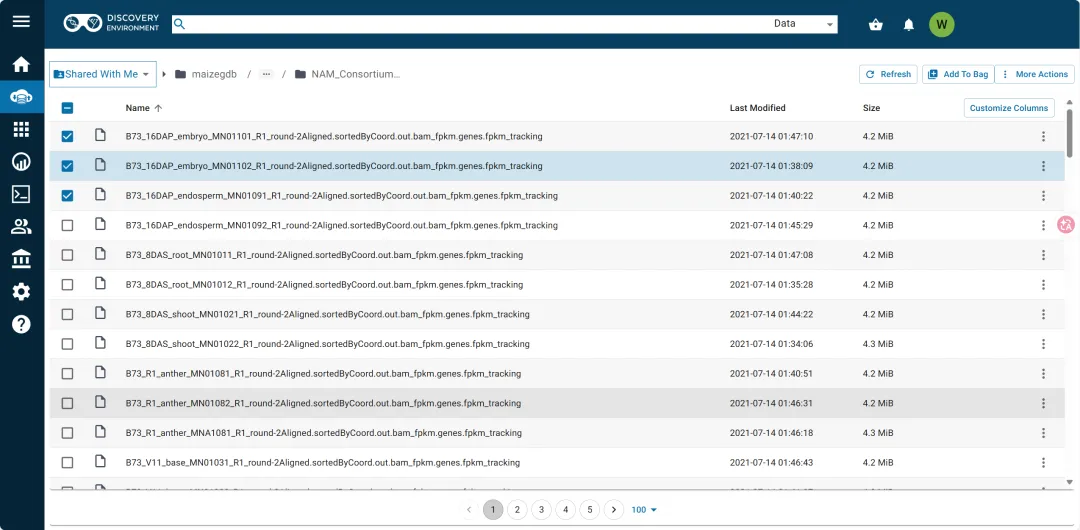
选择需要的下载的文件,并点击右上角的add to bag
点击完后再点击右上的ues bag,可以看到以下选择好的项目
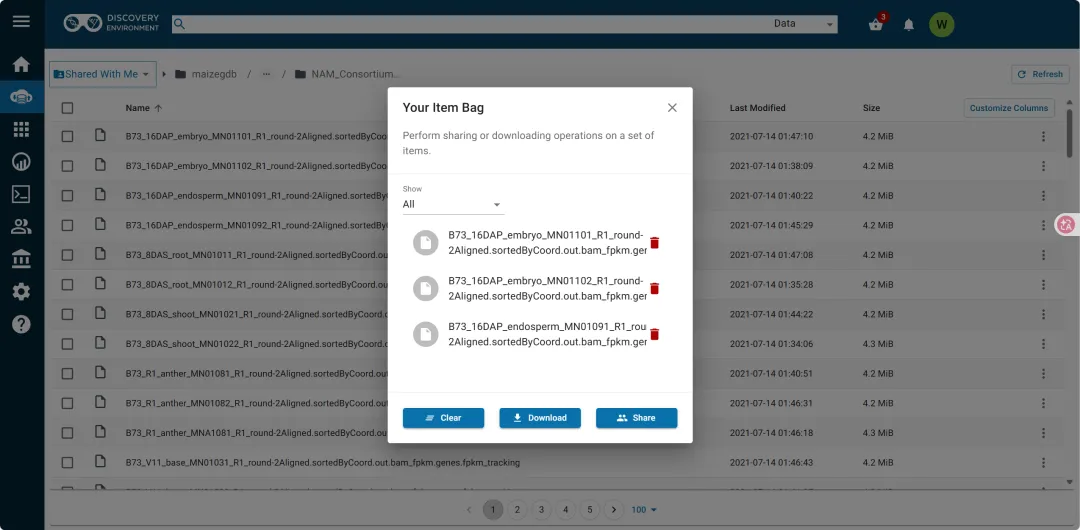
然后点击download,就会出现以下链接
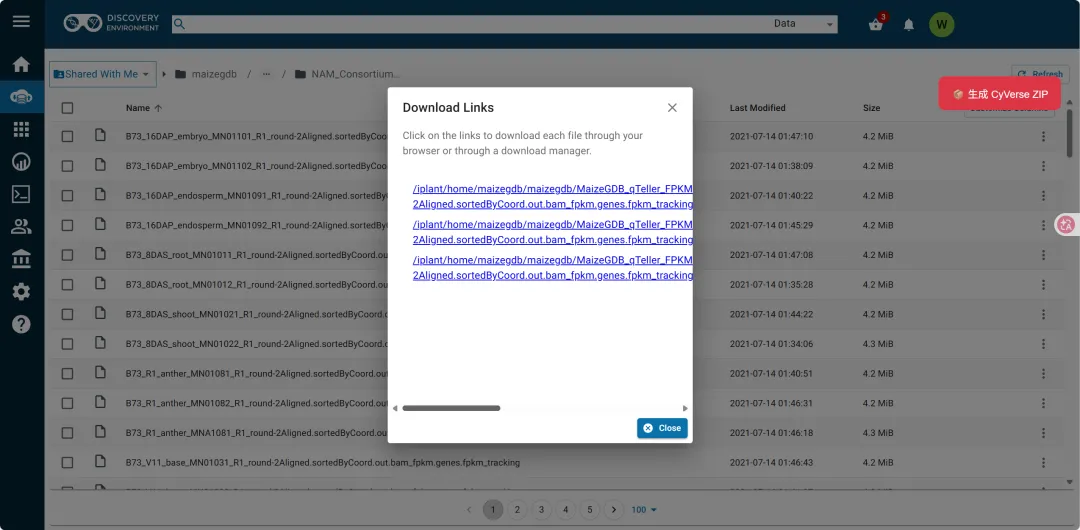
现在我们可以点击右上角红色按钮(注意:这个是要写好了篡改猴的脚本才会出现的哦)
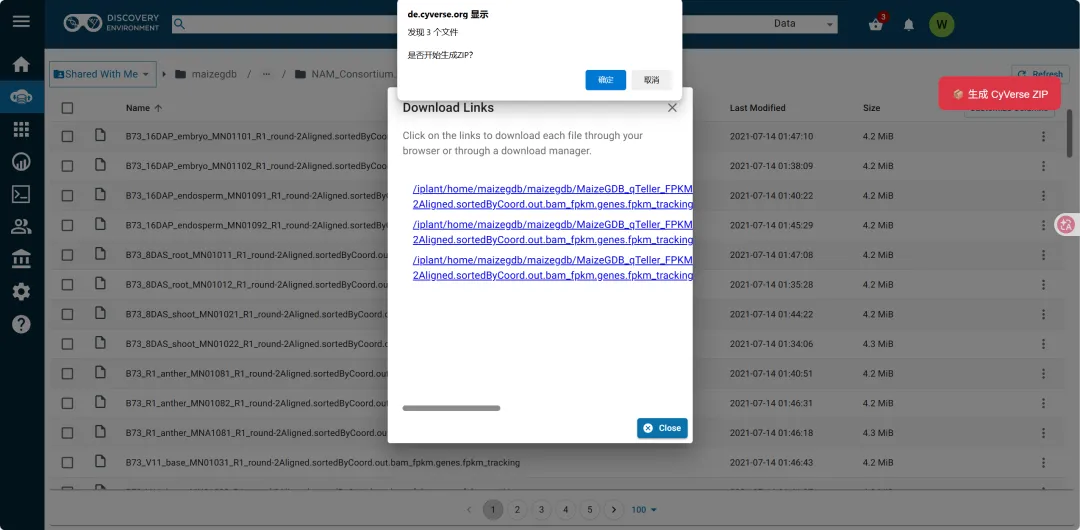
连续点击两个确认之后,可以在cmd里面看到正在下载了
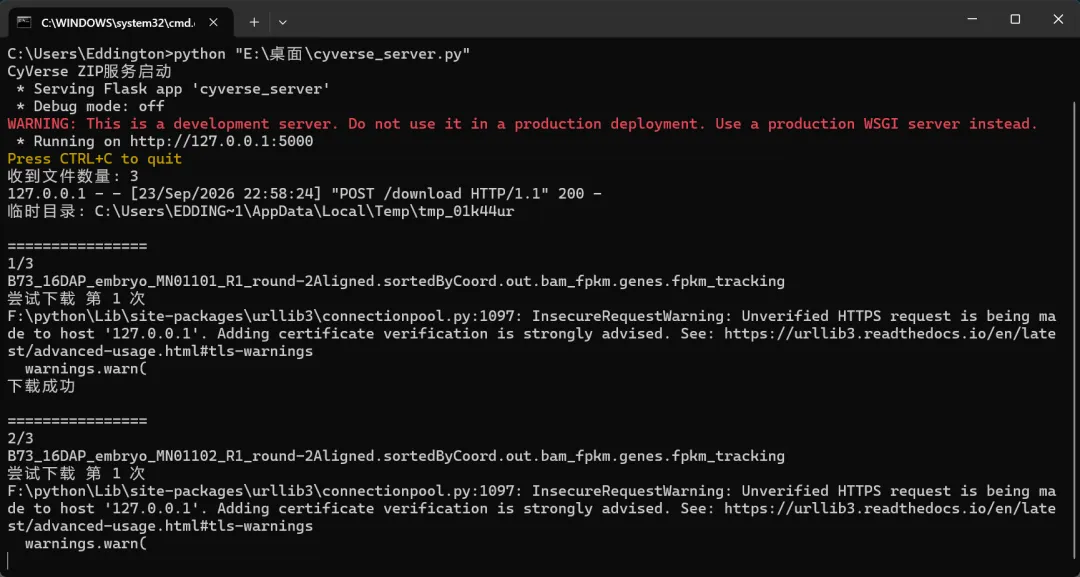
最终会生成E:\桌面\Taxa\CyVerse_download.zip(注意:我这个文件地址是在前面Python代码中设定好的,你可以根据你需要自己修改)
