ARTICLE · 1076074
推荐C++项目:腾讯QQ客户端软件(三)
 感谢大家的关注,今天是作者的第3次更新【QQ客户端(密码找回功能)】。现在我们先将【腾讯QQ客户端软件(三)】实现,后面继续更新所有功能,各位朋友们大家学会整体技术栈(可以写到【个人简历】),即可从事C++软件开发相关岗位。
【本文后面介绍QQ服务器和QQ客户端使用技术体系】
一:【项目运行效果】
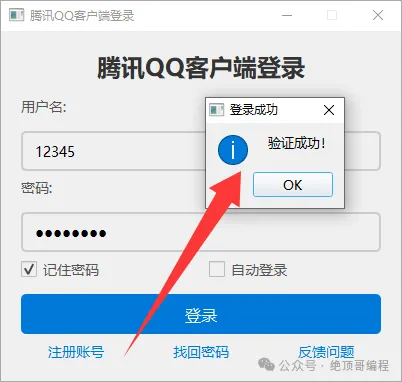
1:登录验证成功
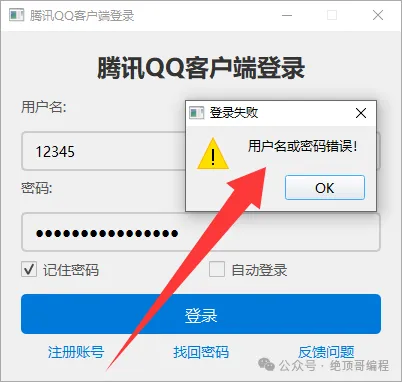
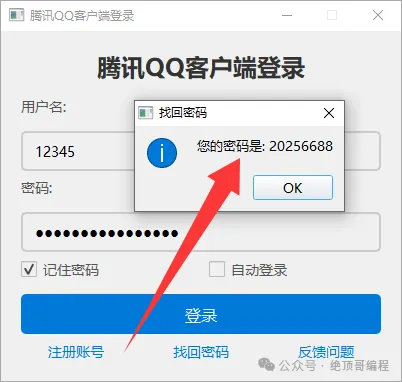
2:如果你输入用户名正确,密码错误?点击【找回密码】
二:【项目源码实现】
1:main.cpp文件代码
#include"qqlogin.h"#include<QApplication>intmain(int argc, char *argv[]){QApplication a(argc, argv);// 全局样式设置a.setStyle("Fusion");QFont font("Microsoft YaHei", 10);a.setFont(font);// 设置调色板QPalette palette;palette.setColor(QPalette::Window, QColor(240, 243, 255));a.setPalette(palette);// 初始化 SQLite 数据库QSqlDatabase db = QSqlDatabase::addDatabase("QSQLITE", "init_connection"); // 使用自定义连接名称db.setDatabaseName("users.db"); // 数据库文件名if (!db.open()) {QMessageBox::critical(nullptr, "数据库错误", "无法打开数据库!");return -1;}// 创建用户表(如果不存在)QSqlQuery query(db);if (!query.exec("CREATE TABLE IF NOT EXISTS users (""id INTEGER PRIMARY KEY AUTOINCREMENT, ""username TEXT UNIQUE NOT NULL, ""password TEXT NOT NULL)")) {QMessageBox::critical(nullptr, "数据库错误", "无法创建用户表!");db.close();return -1;}// 关闭数据库db.close();//QSqlDatabase::removeDatabase("init_connection"); // 移除自定义连接// 显示登录窗口LoginWindow window;window.show();return a.exec();}
2:qqlogin.h文件代码
#ifndef QQLOGIN_H#define QQLOGIN_H#include <QWidget>#include <QWidget>#include <QVBoxLayout>#include <QHBoxLayout>#include <QLabel>#include <QLineEdit>#include <QPushButton>#include <QCheckBox>#include <QMessageBox>#include <QFile>#include <QTextStream>#include <QDialog>#include <QtSql>// 注册对话框类class RegisterDialog : public QDialog {Q_OBJECTpublic:RegisterDialog(QWidget *parent = nullptr) : QDialog(parent) {// 设置窗口标题setWindowTitle("注册账号");// 设置窗口大小setFixedSize(300, 250);// 创建布局QVBoxLayout *mainLayout = new QVBoxLayout(this);// 用户名输入框QLabel *usernameLabel = new QLabel("用户名:", this);usernameLineEdit = new QLineEdit(this);usernameLineEdit->setPlaceholderText("请输入用户名");usernameLineEdit->setMinimumHeight(40);usernameLineEdit->setStyleSheet("QLineEdit {"" border: 2px solid #ccc;"" border-radius: 5px;"" padding: 10px;"" font-size: 14px;""}""QLineEdit:focus {"" border-color: #0078d7;""}");mainLayout->addWidget(usernameLabel);mainLayout->addWidget(usernameLineEdit);// 密码输入框QLabel *passwordLabel = new QLabel("密码:", this);passwordLineEdit = new QLineEdit(this);passwordLineEdit->setPlaceholderText("请输入密码");passwordLineEdit->setEchoMode(QLineEdit::Password);passwordLineEdit->setMinimumHeight(40);passwordLineEdit->setStyleSheet("QLineEdit {"" border: 2px solid #ccc;"" border-radius: 5px;"" padding: 10px;"" font-size: 14px;""}""QLineEdit:focus {"" border-color: #0078d7;""}");mainLayout->addWidget(passwordLabel);mainLayout->addWidget(passwordLineEdit);// 确认密码输入框QLabel *confirmPasswordLabel = new QLabel("确认密码:", this);confirmPasswordLineEdit = new QLineEdit(this);confirmPasswordLineEdit->setPlaceholderText("请再次输入密码");confirmPasswordLineEdit->setEchoMode(QLineEdit::Password);confirmPasswordLineEdit->setMinimumHeight(40);confirmPasswordLineEdit->setStyleSheet("QLineEdit {"" border: 2px solid #ccc;"" border-radius: 5px;"" padding: 10px;"" font-size: 14px;""}""QLineEdit:focus {"" border-color: #0078d7;""}");mainLayout->addWidget(confirmPasswordLabel);mainLayout->addWidget(confirmPasswordLineEdit);// 注册按钮QPushButton *registerButton = new QPushButton("注册", this);registerButton->setMinimumHeight(40);registerButton->setStyleSheet("QPushButton {"" background-color: #0078d7;"" color: white;"" border-radius: 5px;"" padding: 10px;"" font-size: 16px;""}""QPushButton:hover {"" background-color: #005bb5;""}");mainLayout->addWidget(registerButton);// 连接注册按钮的点击信号到槽函数connect(registerButton, &QPushButton::clicked, this, &RegisterDialog::onRegisterClicked);// 设置布局setLayout(mainLayout);}private slots:void onRegisterClicked() {QString username = usernameLineEdit->text();QString password = passwordLineEdit->text();QString confirmPassword = confirmPasswordLineEdit->text();// 检查用户名和密码是否为空if (username.isEmpty() || password.isEmpty() || confirmPassword.isEmpty()) {QMessageBox::warning(this, "注册失败", "用户名或密码不能为空!");return;}// 检查两次输入的密码是否一致if (password != confirmPassword) {QMessageBox::warning(this, "注册失败", "两次输入的密码不一致!");return;}// 将用户名和密码保存到数据库if (saveToDatabase(username, password)) {QMessageBox::information(this, "注册成功", "账号注册成功!");close(); // 关闭注册窗口} else {QMessageBox::warning(this, "注册失败", "注册失败,请重试!");}}private:// 将用户名和密码保存到数据库bool saveToDatabase(const QString &username, const QString &password) {QSqlDatabase db = QSqlDatabase::addDatabase("QSQLITE", "register_connection"); // 使用自定义连接名称db.setDatabaseName("users.db"); // 数据库文件名// 打开数据库if (!db.open()) {QMessageBox::critical(this, "数据库错误", "无法打开数据库!");return false;}// 创建用户表(如果不存在)QSqlQuery query(db);if (!query.exec("CREATE TABLE IF NOT EXISTS users (""id INTEGER PRIMARY KEY AUTOINCREMENT, ""username TEXT UNIQUE NOT NULL, ""password TEXT NOT NULL)")) {QMessageBox::critical(this, "数据库错误", "无法创建用户表!");db.close();return false;}// 插入新用户query.prepare("INSERT INTO users (username, password) VALUES (:username, :password)");query.bindValue(":username", username);query.bindValue(":password", password);if (!query.exec()) {QMessageBox::critical(this, "注册失败", "用户名已存在!");db.close();return false;}// 关闭数据库db.close();QSqlDatabase::removeDatabase("register_connection"); // 移除自定义连接return true;}private:QLineEdit *usernameLineEdit;QLineEdit *passwordLineEdit;QLineEdit *confirmPasswordLineEdit;};// 登录窗口类class LoginWindow : public QWidget {Q_OBJECTpublic:LoginWindow(QWidget *parent = nullptr) : QWidget(parent) {// 设置窗口标题setWindowTitle("腾讯QQ客户端登录");// 设置窗口大小setFixedSize(400, 350);// 设置窗口背景颜色setStyleSheet("background-color: #f0f0f0;");// 创建主布局QVBoxLayout *mainLayout = new QVBoxLayout(this);mainLayout->setSpacing(15); // 设置控件间距mainLayout->setContentsMargins(20, 20, 20, 20); // 设置边距// 添加“腾讯QQ客户端登录”字样QLabel *titleLabel = new QLabel("腾讯QQ客户端登录", this);titleLabel->setAlignment(Qt::AlignCenter); // 居中显示titleLabel->setStyleSheet("font-size: 24px; font-weight: bold; color: #333;"); // 设置字体样式mainLayout->addWidget(titleLabel);// 用户名输入框QLabel *usernameLabel = new QLabel("用户名:", this);usernameLabel->setStyleSheet("font-size: 14px; color: #555;");usernameLineEdit = new QLineEdit(this);usernameLineEdit->setPlaceholderText("请输入用户名");usernameLineEdit->setMinimumHeight(40);usernameLineEdit->setStyleSheet("QLineEdit {"" border: 2px solid #ccc;"" border-radius: 5px;"" padding: 10px;"" font-size: 14px;""}""QLineEdit:focus {"" border-color: #0078d7;""}");mainLayout->addWidget(usernameLabel);mainLayout->addWidget(usernameLineEdit);// 密码输入框QLabel *passwordLabel = new QLabel("密码:", this);passwordLabel->setStyleSheet("font-size: 14px; color: #555;");passwordLineEdit = new QLineEdit(this);passwordLineEdit->setPlaceholderText("请输入密码");passwordLineEdit->setEchoMode(QLineEdit::Password);passwordLineEdit->setMinimumHeight(40);passwordLineEdit->setStyleSheet("QLineEdit {"" border: 2px solid #ccc;"" border-radius: 5px;"" padding: 10px;"" font-size: 14px;""}""QLineEdit:focus {"" border-color: #0078d7;""}");mainLayout->addWidget(passwordLabel);mainLayout->addWidget(passwordLineEdit);// 创建水平布局用于“记住密码”和“自动登录”QHBoxLayout *checkboxLayout = new QHBoxLayout();rememberPasswordCheckBox = new QCheckBox("记住密码", this);rememberPasswordCheckBox->setStyleSheet("QCheckBox {"" font-size: 14px;"" color: #555;""}""QCheckBox::indicator {"" width: 16px;"" height: 16px;""}");autoLoginCheckBox = new QCheckBox("自动登录", this);autoLoginCheckBox->setStyleSheet("QCheckBox {"" font-size: 14px;"" color: #555;""}""QCheckBox::indicator {"" width: 16px;"" height: 16px;""}");checkboxLayout->addWidget(rememberPasswordCheckBox);checkboxLayout->addWidget(autoLoginCheckBox);mainLayout->addLayout(checkboxLayout);// 登录按钮QPushButton *loginButton = new QPushButton("登录", this);loginButton->setMinimumHeight(40);loginButton->setStyleSheet("QPushButton {"" background-color: #0078d7;"" color: white;"" border-radius: 5px;"" padding: 10px;"" font-size: 16px;""}""QPushButton:hover {"" background-color: #005bb5;""}");mainLayout->addWidget(loginButton);// 创建水平布局用于“注册账号”、“找回密码”、“反馈问题”QHBoxLayout *buttonLayout = new QHBoxLayout();QPushButton *registerButton = new QPushButton("注册账号", this);QPushButton *forgotPasswordButton = new QPushButton("找回密码", this);QPushButton *feedbackButton = new QPushButton("反馈问题", this);// 设置按钮样式QString buttonStyle ="QPushButton {"" background-color: transparent;"" color: #0078d7;"" border: none;"" font-size: 14px;""}""QPushButton:hover {"" text-decoration: underline;""}";registerButton->setStyleSheet(buttonStyle);forgotPasswordButton->setStyleSheet(buttonStyle);feedbackButton->setStyleSheet(buttonStyle);buttonLayout->addWidget(registerButton);buttonLayout->addWidget(forgotPasswordButton);buttonLayout->addWidget(feedbackButton);mainLayout->addLayout(buttonLayout);// 连接信号与槽connect(loginButton, &QPushButton::clicked, this, &LoginWindow::onLoginClicked);connect(registerButton, &QPushButton::clicked, this, &LoginWindow::onRegisterClicked);connect(forgotPasswordButton, &QPushButton::clicked, this, &LoginWindow::onForgotPasswordClicked);connect(feedbackButton, &QPushButton::clicked, this, &LoginWindow::onFeedbackClicked);// 设置布局setLayout(mainLayout);}private slots:void onLoginClicked() {QString username = usernameLineEdit->text();QString password = passwordLineEdit->text();// 验证用户名和密码if (validateLogin(username, password)) {QMessageBox::information(this, "登录成功", "验证成功!");} else {QMessageBox::warning(this, "登录失败", "用户名或密码错误!");}}void onRegisterClicked() {// 创建注册对话框RegisterDialog registerDialog;registerDialog.exec(); // 显示注册对话框}void onForgotPasswordClicked() {QString username = usernameLineEdit->text();// 检查用户名是否为空if (username.isEmpty()) {QMessageBox::warning(this, "找回密码", "请输入用户名!");return;}// 查找用户名对应的密码QString password = findPassword(username);if (!password.isEmpty()) {QMessageBox::information(this, "找回密码", "您的密码是: " + password);} else {QMessageBox::warning(this, "找回密码", "用户名不存在!");}}void onFeedbackClicked() {QMessageBox::information(this, "反馈问题", "跳转到反馈问题页面(未实现)");}private:// 验证用户名和密码bool validateLogin(const QString &username, const QString &password) {QSqlDatabase db = QSqlDatabase::addDatabase("QSQLITE", "login_connection"); // 使用自定义连接名称db.setDatabaseName("users.db"); // 数据库文件名// 打开数据库if (!db.open()) {QMessageBox::critical(this, "数据库错误", "无法打开数据库!");return false;}// 查询用户名和密码QSqlQuery query(db);query.prepare("SELECT password FROM users WHERE username = :username");query.bindValue(":username", username);if (!query.exec()) {QMessageBox::critical(this, "数据库错误", "查询失败!");db.close();return false;}// 检查用户名是否存在if (query.next()) {QString storedPassword = query.value(0).toString();if (storedPassword == password) {db.close();QSqlDatabase::removeDatabase("login_connection"); // 移除自定义连接return true; // 密码匹配}}// 关闭数据库db.close();QSqlDatabase::removeDatabase("login_connection"); // 移除自定义连接return false; // 用户名或密码错误}// 查找用户名对应的密码QString findPassword(const QString &username) {QSqlDatabase db = QSqlDatabase::addDatabase("QSQLITE", "find_password_connection"); // 使用自定义连接名称db.setDatabaseName("users.db"); // 数据库文件名// 打开数据库if (!db.open()) {QMessageBox::critical(this, "数据库错误", "无法打开数据库!");return "";}// 查询用户名对应的密码QSqlQuery query(db);query.prepare("SELECT password FROM users WHERE username = :username");query.bindValue(":username", username);if (!query.exec()) {QMessageBox::critical(this, "数据库错误", "查询失败!");db.close();return "";}// 检查用户名是否存在if (query.next()) {QString password = query.value(0).toString();db.close();QSqlDatabase::removeDatabase("find_password_connection"); // 移除自定义连接return password;}// 关闭数据库db.close();QSqlDatabase::removeDatabase("find_password_connection"); // 移除自定义连接return ""; // 用户名不存在}private:QLineEdit *usernameLineEdit;QLineEdit *passwordLineEdit;QCheckBox *rememberPasswordCheckBox;QCheckBox *autoLoginCheckBox;};#endif // QQLOGIN_H
三:【技术栈总线】
2.1:【新增功能说明】
【找回密码功能】:
在
onForgotPasswordClicked函数中,通过查询数据库查找用户名对应的密码。如果用户名存在,弹出对话框显示密码;否则提示。
四:【腾讯QQ客户端和服务器所采用技术栈】
4.1:【客户端技术栈】
Qt Core: 核心模块,提供事件循环、信号槽、多线程等基础功能。
Qt GUI: 用于图形用户界面开发。
Qt Widgets: 提供丰富的UI控件(如按钮、列表、输入框等)。
Qt Network: 支持TCP、UDP、HTTP等网络通信。
Qt Multimedia: 支持音视频播放和录制。
Qt WebEngine: 用于嵌入Web内容(如网页聊天窗口)。
QML: 用于声明式UI设计,适合动态和复杂的用户界面。
4.1.2:网络通信
TCP/UDP: 与服务器进行实时通信。
WebSocket: 支持双向实时通信(如聊天消息推送)。
HTTP/HTTPS: 用于文件传输或调用服务器API。
4.1.2:UI/UX设计
Qt Designer: 可视化UI设计工具,快速构建界面。
QSS(Qt Style Sheets): 用于美化界面,类似CSS。
动画与特效: 使用QML或Qt动画框架提升用户体验。
4.1.3:数据存储
SQLite: 本地存储用户信息、聊天记录等。
JSON/XML: 用于配置文件或数据解析。
4.1.5:加密与安全
SSL/TLS: 保障数据传输安全。
加密算法: 如AES、RSA,用于数据加密和用户认证。
4.1.6:音视频处理
WebRTC: 支持实时音视频通信。
FFmpeg: 用于音视频编解码。
4.1.7:多线程与并发
Qt Concurrent: 简化多线程编程。
C++11/14/17多线程库: 如
std::thread、std::async。
4.1.8.:日志系统
Qt Logging: 提供日志功能。
spdlog: 高性能日志库。
4.1.9:第三方库
Protobuf/FlatBuffers: 高效数据序列化。
OpenSSL: 提供加密支持。
4.1.10:测试与调试
Qt Test: 单元测试框架。
GDB/LLDB: 调试工具。
4.1.11:打包与部署
Qt Installer Framework: 创建安装包。
CPack: 跨平台打包工具。
4.2:【服务器技术栈】
Qt Core: 核心模块,提供事件循环、信号槽、多线程等基础功能。
Qt Network: 支持TCP、UDP、HTTP等网络通信。
Qt Concurrent: 简化多线程编程。
4.2.2:网络通信
TCP/UDP: 与客户端进行实时通信。
WebSocket: 支持双向实时通信。
HTTP/HTTPS: 提供RESTful API接口。
4.2.3:数据库
MySQL/PostgreSQL: 存储用户信息、聊天记录等。
Redis: 用于缓存和实时消息队列。
4.2.4:加密与安全
SSL/TLS: 保障数据传输安全。
加密算法: 如AES、RSA,用于数据加密和用户认证。
4.2.5:多线程与并发
Qt Concurrent: 简化多线程编程。
C++11/14/17多线程库: 如
std::thread、std::async。
4.2.6:日志系统
Qt Logging: 提供日志功能。
spdlog: 高性能日志库。
4.2.7:负载均衡与高可用
Nginx: 反向代理和负载均衡。
Docker/Kubernetes: 容器化部署和管理。
4.2.8:消息队列
RabbitMQ: 用于消息队列和异步任务处理。
Kafka: 处理高吞吐量的实时消息。
4.2.9:RESTful API
Qt Network: 提供HTTP服务。
JSON/XML: 用于数据解析和传输。
4.2.10:第三方库
Protobuf/FlatBuffers: 高效数据序列化。
OpenSSL: 提供加密支持。
4.2.11:测试与调试
Qt Test: 单元测试框架。
GDB/LLDB: 调试工具。
4.2.12:性能优化
Profiling工具: 如
gprof、Valgrind,用于性能分析。
4.2.13:云服务集成
RESTful API: 与云服务交互。
OAuth: 用户认证。
4.2.14:即时通讯协议
XMPP: 开源即时通讯协议。
MQTT: 轻量级消息传输协议。
4.2.15:文件存储
FTP/SFTP: 文件传输协议。
MinIO: 分布式文件存储。
4.3:客户端与服务器总结
客户端: 侧重于UI/UX设计、音视频处理、本地数据存储和网络通信。
服务器: 侧重于高并发处理、数据库管理、消息队列、负载均衡和安全性。
共同点: 都需要网络通信、加密、多线程和跨平台支持。