 夜雨聆风
夜雨聆风Strix 是一个开源 AI 渗透测试工具,它的目标是让 autonomous AI agents 执行应用安全测试:动态运行代码、发现漏洞,并通过实际 proof-of-concept 对漏洞进行验证。项目面向开发团队和安全团队,核心输出包括可操作的漏洞发现、修复建议、补丁生成能力和渗透测试报告。
项目概览
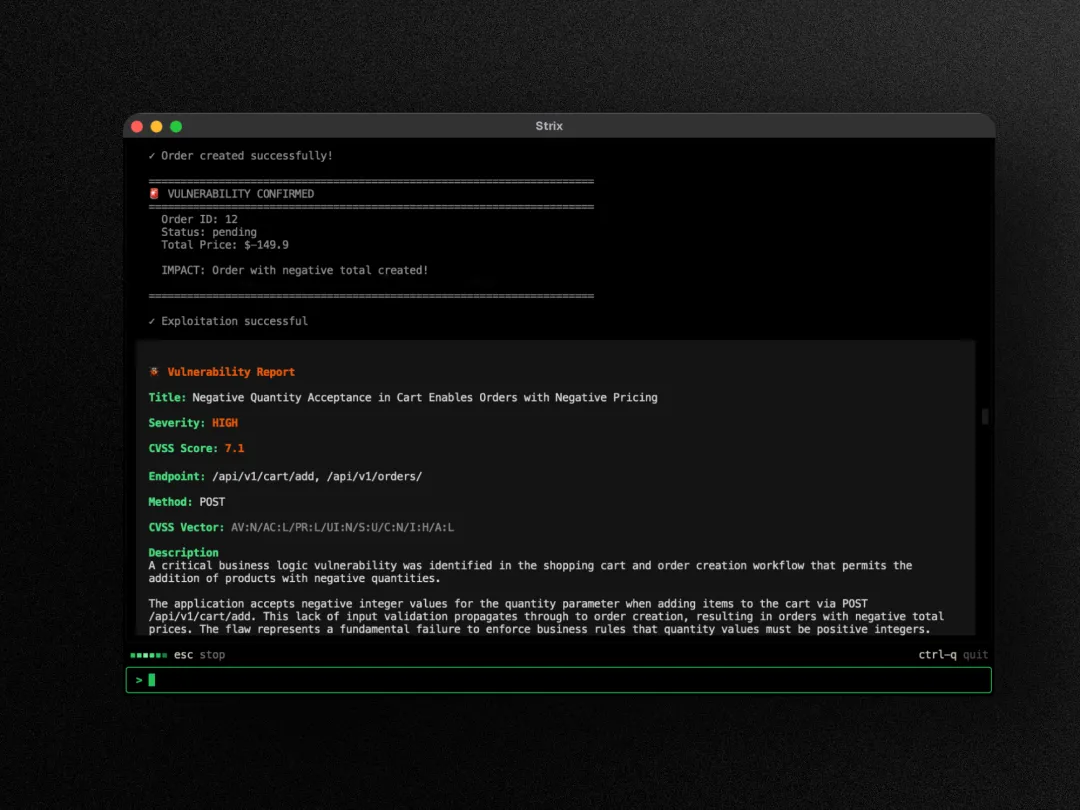
Strix 使用 AI agents 执行渗透测试流程。Agent 会动态运行代码,查找漏洞,并通过可执行 PoC 验证漏洞结果。
README 中列出的核心能力包括:
完整渗透测试工具链:内置侦察、利用和验证能力 多 Agent 编排:多个 AI pentesters 可以协作并扩展测试范围 真实利用验证:生成可运行 PoC,用于验证漏洞发现 面向开发者的 CLI:输出可操作 findings 和 remediation guidance 自动修复与报告:生成 patches 和合规场景可用的 pentest reports
Strix 也提供 GitHub Actions 与 CI/CD 集成能力,可以在 pull request 阶段运行安全测试,并在代码进入生产环境前暴露漏洞风险。
使用场景
Strix 的使用场景分为四类:
应用安全测试
对应用进行安全测试,检测并验证关键漏洞。
快速渗透测试
在较短时间内完成渗透测试流程,并生成合规报告。
Bug Bounty 自动化
辅助自动化 bug bounty research,并生成用于提交报告的 PoC。
CI/CD 集成
在持续集成流程中运行测试,在部署前发现漏洞。
快速开始
运行 Strix 需要两个前置条件:
Docker 已启动 一个受支持 LLM provider 的 API key,例如 OpenAI、Anthropic、Google 等
安装并运行第一次扫描:
# 安装 Strixcurl -sSL https://strix.ai/install | bash# 配置 AI providerexport STRIX_LLM="openai/gpt-5.4"export LLM_API_KEY="your-api-key"# 运行第一次安全评估strix --target ./app-directory首次运行时,Strix 会自动拉取 sandbox Docker image。扫描结果会保存到:
strix_runs/<run-name>Strix Platform
除了开源 CLI,README 也介绍了 Strix Platform:
平台版支持连接 repositories 和 domains,并启动 full-stack penetration test。README 中列出的能力包括:
带 PoC 的 validated findings:每个漏洞包含可运行 proof-of-concept exploit 和复现步骤 One-click autofix:生成 AI security patches,并以 ready-to-merge pull requests 形式提交 Continuous pentesting:持续扫描,跟随部署节奏进行安全测试 DevSecOps integrations:支持 GitHub、GitLab、Bitbucket、Slack、Jira、Linear 和 CI/CD pipelines Continuous learning:基于历史 findings 适配代码库,并降低误报
功能特性
Agentic Pentesting Tools
Strix agents 配备一组 offensive security toolkit。README 中列出的工具能力包括:
HTTP Interception Proxy:通过 Caido 完成 request/response 操作与分析 Browser Exploitation:使用自动化浏览器测试 XSS、CSRF、clickjacking 和 auth bypass flows Shell & Command Execution:交互式终端,用于 exploit development 与 post-exploitation Custom Exploit Runtime:Python sandbox,用于编写和验证 proof-of-concept exploits Reconnaissance & OSINT:自动 attack surface mapping、subdomain enumeration 和 fingerprinting Static & Dynamic Code Analysis:覆盖 SAST 与 DAST 的应用安全测试能力 Vulnerability Knowledge Base:结构化 findings,支持 CVSS scoring 和 OWASP classification
综合漏洞扫描
Strix 覆盖 OWASP Top 10 及更多漏洞类别。README 中列出的类别包括:
Broken Access Control:IDOR、privilege escalation、auth bypass Injection Attacks:SQL injection、NoSQL injection、OS command injection、SSTI Server-Side Vulnerabilities:SSRF、XXE、insecure deserialization、RCE Client-Side Attacks:stored/reflected/DOM XSS、prototype pollution、CSRF Business Logic Flaws:race conditions、payment manipulation、workflow bypass Authentication & Session:JWT attacks、session fixation、credential stuffing vectors Infrastructure & Cloud:misconfigurations、exposed services、cloud security issues API Security:broken authentication、mass assignment、rate limiting bypass
Graph of Agents
Strix 支持 multi-agent pentesting。README 中列出的编排能力包括:
Distributed Pentesting:为 recon、exploitation 和 post-exploitation 分配 specialized AI agents Scalable Security Testing:针对多个 targets 并行执行测试 Dynamic Coordination:agents 共享发现、串联漏洞,并协同完成 red team 风格测试
使用示例
基础用法
扫描本地代码库:
strix --target ./app-directory对 GitHub repository 做安全评审:
strix --target https://github.com/org/repo对 Web 应用做 black-box assessment:
strix --target https://your-app.com高级测试场景
带认证信息的 grey-box testing:
strix --target https://your-app.com --instruction "Perform authenticated testing using credentials: user:pass"同时提供源码和已部署应用:
strix -t https://github.com/org/app -t https://your-app.com本地 repository 的 source-aware scan:
strix --target ./app-directory --scan-mode standard通过自定义 instruction 聚焦特定风险:
strix --target api.your-app.com --instruction "Focus on business logic flaws and IDOR vulnerabilities"通过文件提供详细 instruction,例如 rules of engagement、scope 和 exclusions:
strix --target api.your-app.com --instruction-file ./instruction.md在 PR 场景中强制使用 diff-scope,并指定 base branch:
strix -n --target ./ --scan-mode quick --scope-mode diff --diff-base origin/mainHeadless Mode
Strix 支持通过 -n 或 --non-interactive 运行 headless mode,适合服务器和自动化任务。
strix -n --target https://your-app.com在 headless mode 中,CLI 会实时打印 vulnerability findings,并在退出前输出最终报告。发现漏洞时,进程会以 non-zero code 退出。
GitHub Actions 集成
Strix 可以加入 GitHub Actions 工作流,在 pull request 阶段运行安全测试。
name:strix-penetration-teston:pull_request:jobs:security-scan:runs-on:ubuntu-lateststeps:-uses:actions/checkout@v6with:fetch-depth:0-name:InstallStrixrun:curl-sSLhttps://strix.ai/install|bash-name:RunStrixenv:STRIX_LLM:${{secrets.STRIX_LLM}}LLM_API_KEY:${{secrets.LLM_API_KEY}}run:strix-n-t./--scan-modequick在 CI pull request runs 中,Strix 会自动把 quick reviews 限定到 changed files。diff-scope 解析失败时,需要确保 checkout 使用完整历史:
fetch-depth:0也可以显式传入:
--diff-base origin/main配置方法
基础配置如下:
export STRIX_LLM="openai/gpt-5.4"export LLM_API_KEY="your-api-key"可选配置:
export LLM_API_BASE="your-api-base-url"# 使用本地模型时可配置,例如 Ollama、LMStudioexport PERPLEXITY_API_KEY="your-api-key"# 启用 search capabilitiesexport STRIX_REASONING_EFFORT="high"# 控制 thinking effort,默认 high,quick scan 为 mediumStrix 会自动把配置保存到:
~/.strix/cli-config.jsonREADME 推荐的模型包括:
OpenAI GPT-5.4: openai/gpt-5.4Anthropic Claude Sonnet 4.6: anthropic/claude-sonnet-4-6Google Gemini 3 Pro Preview: vertex_ai/gemini-3-pro-preview
完整 provider 列表见官方 LLM Providers 文档:
https://docs.strix.ai/llm-providers/overview
资料来源
GitHub:https://github.com/usestrix/strix README:https://github.com/usestrix/strix/blob/main/README.md Docs:https://docs.strix.ai PyPI:https://pypi.org/project/strix-agent/ Release v1.0.4:https://github.com/usestrix/strix/releases/tag/v1.0.4