 夜雨聆风
夜雨聆风


在OpenClaw中部署Hindsight长期记忆插件的完整过程
字数 2098,阅读大约需 11 分钟
前言
在Hermes 中使用了Hindsight感觉效果还行,然后OpenClaw的梦境系统用起来貌似没有传闻中的那么好用,于是想把Hindsight配置给OpenClaw,接下来将详细记录在 OpenClaw 中部署和调试 Hindsight 插件的完整过程,包括遇到的各种问题及其解决方案。
一、环境准备
1.1 系统要求
-
• OpenClaw 版本:2026.4.22+ -
• Node.js:v22.22.0 -
• Hindsight 服务:已部署在 http://192.168.1.119:8888 -
• Bank ID: openclaw
1.2 Hindsight 插件功能
Hindsight 是一个生物启发的长期记忆系统,核心能力:
|
|
|
|---|---|
| autoRetain |
|
| autoRecall |
|
| Fact Extraction |
|
| Cross-session |
|
二、安装插件
2.1 一键安装
1 openclaw plugins install @vectorize-io/hindsight-openclaw
2.2 预期输出
1 2 3 4 5 6 7 8 9 10 Resolving clawhub:@vectorize-io/hindsight-openclaw…Downloading @vectorize-io/hindsight-openclaw…Extracting…/tmp/…/vectorize-io-hindsight-openclaw-0.6.5.tgz…Plugin "hindsight-openclaw" has 2 suspicious code pattern(s).Installing to /root/.openclaw/extensions/hindsight-openclaw…Installing plugin dependencies…Exclusive slot "memory" switched from "memory-core" to "hindsight-openclaw".Disabled other "memory" slot plugins: memory-core, memory-lancedb, memos-local-openclaw-plugin.Installed plugin: hindsight-openclawRestart the gateway to load plugins.
⚠️ 安装完成后必须重启 Gateway 才能加载插件。
2.3 重启 Gateway
1 openclaw gateway restart
三、配置插件
3.1 使用官方 setup 工具配置(推荐)
不要手动编辑 JSON,使用官方提供的 setup.js 工具:
1 2 3 npx hindsight-openclaw-setup --mode api \ --api-url http://192.168.1.119:8888 \ --bank openclaw
关键点: 使用 --bank 参数指定 bank_id,这样会自动配置正确的配置键名。
3.2 最终正确配置
配置写入 ~/.openclaw/openclaw.json:
1 2 3 4 5 6 7 8 9 10 11 12 13 14 { "plugins": { "entries": { "hindsight-openclaw": { "enabled":true, "config": { "hindsightApiUrl": "http://192.168.1.119:8888", "bankId": "openclaw", "dynamicBankId":false } } } }}
3.3 配置键名对照表
开始参考Hermes直接改了openclaw.json配置,结果报错了,后面用使用官方 setup 工具配置.
|
|
|
|
|---|---|---|
api_url |
hindsightApiUrl |
|
bank_id |
bankId |
|
|
|
dynamicBankId |
|
四、遇到的问题与解决方案
问题一:插件重复初始化警告
现象:
1 hindsight: plugin entry invoked (repeated)
原因: 正常现象,插件被多个 agent 多次调用。只在初始化时生效一次。
解决: 无需处理,不影响功能。
问题二:客户端未初始化(client not initialized, skipping retain)
现象:
1 hindsight: client not initialized, skipping retain
原因: 配置了 hindsightApiUrl 但插件未正确识别,导致客户端未初始化。
解决: 使用官方 setup.js 工具重新配置,不要手动编辑 JSON:
1 2 3 npx hindsight-openclaw-setup --mode api \ --api-url http://192.168.1.119:8888 \ --bank openclaw
问题三:重启 Gateway 时 SIGTERM 信号
现象:
1 Command aborted by signal SIGTERM
原因:openclaw gateway restart 在执行期间收到 SIGTERM 信号,但这通常不影响 Gateway 实际重启。
解决: 重启后执行 openclaw gateway status 确认状态是否为 active。
问题四:wiki_search 工具不搜索 Hindsight 记忆
现象: 使用 wiki_search 返回 “No wiki or memory results”,但 Hindsight 后台也没有数据。
原因:wiki_search 工具搜索的是 wiki 插件文档,不会触发 Hindsight 的记忆搜索。
解决:
-
• Hindsight 的 autoRecall会在对话时自动召回相关记忆,无需手动搜索 -
• 使用 backfill 工具导入历史会话数据验证功能正常
问题五:不同 agent 使用不同的 bank(最关键问题!)
现象: 在 Hindsight 后台查看,发现 main、helper、coder、ru 四个 agent 分别创建了不同的 bank,数据分散。
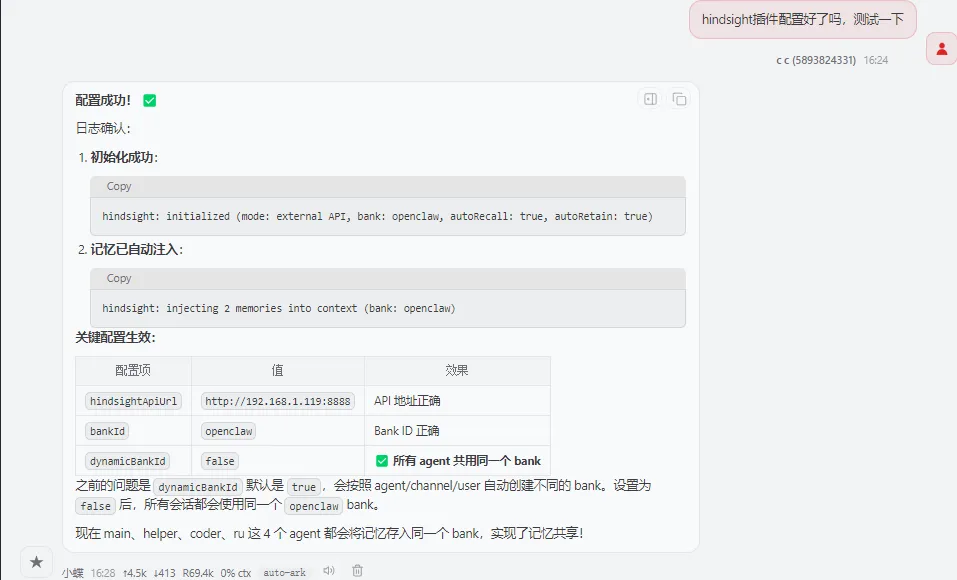
原因: Hindsight 插件默认启用 dynamicBankId: true,会按照 agent/channel/user 自动派生不同的 bank_id。
解决: 在配置中添加 "dynamicBankId": false:
1 2 3 4 5 6 7 8 9 10 11 12 13 14 { "plugins": { "entries": { "hindsight-openclaw": { "enabled":true, "config": { "hindsightApiUrl": "http://192.168.1.119:8888", "bankId": "openclaw", "dynamicBankId":false } } } }}
dynamicBankId 配置策略:
|
|
|
|
|---|---|---|
true
|
|
|
false
bankId |
|
|
五、验证安装
5.1 检查 Gateway 状态
1 openclaw gateway status
预期输出包含:Runtime: running (pid xxx, state active)
5.2 检查日志确认初始化成功
1 tail -f /tmp/openclaw/openclaw-$(date +%Y-%m-%d).log | grep hindsight
预期日志:
1 2 hindsight: initialized (mode: external API, bank: openclaw, autoRecall: true, autoRetain: true)hindsight: injecting 2 memories into context (bank: openclaw)
5.3 导入历史会话数据
1 hindsight-openclaw-backfill --limit 10
预期输出:
1 2 3 helper openclaw xxx enqueuedhelper openclaw xxx enqueued{"discovered_sessions":5,"imported_sessions":5}
5.4 验证 Bank 数据
1 curl http://192.168.1.119:8888/v1/default/banks/openclaw/documents
预期返回:{"items":[...],"total":N}(N > 0)
六、最终验证清单
|
|
|
|
|---|---|---|
|
|
|
active |
|
|
client not initialized错误 |
|
|
|
initialized (mode: external API, bank: openclaw) |
|
|
|
dynamicBankId
false |
|
|
|
|
|
|
|
|
|
|
|
|
|
七、常见问题排查
7.1 查看日志
1 2 3 4 5 # 实时查看 hindsight 相关日志tail -50 /tmp/openclaw/openclaw-$(date +%Y-%m-%d).log | grep -i hindsight# 查看完整插件日志grep -i "hindsight\|plugin" /tmp/openclaw/openclaw-$(date +%Y-%m-%d).log
7.2 查看文档数据
1 curl http://192.168.1.119:8888/v1/default/banks/openclaw/documents | python3 -m json.tool
7.3 重新配置
如果配置有问题,删除插件配置块后重新运行 setup 工具:
1 2 3 4 5 6 7 8 9 10 11 12 # 编辑配置openclaw config edit# 删除 plugins.entries["hindsight-openclaw"] 配置块后保存# 重新运行 setupnpx hindsight-openclaw-setup --mode api \ --api-url http://192.168.1.119:8888 \ --bank openclaw# 重启openclaw gateway restart
八、完整配置示例
1 2 3 4 5 6 7 8 9 10 11 12 13 14 { "plugins": { "entries": { "hindsight-openclaw": { "enabled":true, "config": { "hindsightApiUrl": "http://192.168.1.119:8888", "bankId": "openclaw", "dynamicBankId":false } } } }}
九、总结
部署 Hindsight 插件的核心要点:
-
1. 使用 setup.js工具配置,避免手动编辑 JSON 导致键名错误 -
2. 必须配置 bankId,否则客户端无法正确初始化 -
3. 设置 dynamicBankId: false实现所有 agent 共享同一个 bank -
4. 重启 Gateway 后验证日志,确认 initialized状态 -
5. 使用 backfill 导入历史数据 验证功能正常
掌握以上几点,就能快速完成 Hindsight 插件的部署,实现 OpenClaw 的长期记忆功能,让 AI 助手记住所有对话上下文,实现真正的个性化服务。