ARTICLE · 1412978
SpringBoot 整合 MinIO 实战:全套工具类实现文件上传下载

来源:blog.csdn.net/y_wu794/
● 前言
● 一、配置
●
● 1.配置文件:application.yml
● 2.配置类:MinioProperties
● 3.工具类:MinioUtil
● 二、使用示例
●
● 1.控制器类:FileController
● 2.服务类
● 3.效果展示
● 总结
01前言
● Minio 是一个高性能的分布式对象存储系统,专为云原生应用而设计
● 作为 Amazon S3 的兼容替代品,它提供了简单易用的 API,支持海量非结构化数据存储
● 在微服务架构中,文件存储是常见需求,而 Minio 以其轻量级、高可用和易部署的特点成为理想选择
02一、配置
1.配置文件:application.yml
vehicle:
minio:
url: http://localhost:9000 # 连接地址,如果是线上的将:localhost->ip
username: minio # 登录用户名
password: 12345678 # 登录密码
bucketName: vehicle # 存储文件的桶的名字
●url: Minio 服务器地址,线上环境替换为实际 IP 或域
●username/password: Minio 控制台登录凭证
●bucketName: 文件存储桶名称,类似文件夹概念
●HTTPS 注意: 若配置域名访问,URL 需写为 https://your.domain.name:9090
2.配置类:MinioProperties
import lombok.Data;
import org.springframework.boot.context.properties.ConfigurationProperties;
import org.springframework.stereotype.Component;
@Component
@Data
@ConfigurationProperties(prefix = "vehicle.minio")
public class MinioProperties {
private String url;
private String username;
private String password;
private String bucketName;
}
●@ConfigurationProperties:将配置文件中的属性绑定到类字段
●@Component:使该类成为 Spring 管理的 Bean
● 提供 Minio 连接所需的所有配置参数
3.工具类:MinioUtil
import cn.hutool.core.lang.UUID;
import com.fc.properties.MinioProperties;
import io.minio.*;
import io.minio.errors.*;
import lombok.RequiredArgsConstructor;
import org.apache.commons.compress.utils.IOUtils;
import org.springframework.stereotype.Component;
import org.springframework.web.multipart.MultipartFile;
import io.minio.http.Method;
import javax.annotation.PostConstruct;
import javax.servlet.http.HttpServletResponse;
import java.io.ByteArrayInputStream;
import java.io.IOException;
import java.io.InputStream;
import java.io.OutputStream;
import java.net.URLEncoder;
import java.nio.charset.StandardCharsets;
import java.nio.file.Files;
import java.nio.file.Path;
import java.security.InvalidKeyException;
import java.security.NoSuchAlgorithmException;
import java.time.LocalDateTime;
import java.time.format.DateTimeFormatter;
import java.util.concurrent.TimeUnit;
/**
* 文件操作工具类
*/
@RequiredArgsConstructor
@Component
publicclassMinioUtil {
privatefinal MinioProperties minioProperties;//配置类
private MinioClient minioClient;//连接客户端
private String bucketName;//桶的名字
// 初始化 Minio 客户端
@PostConstruct
publicvoidinit() {
try {
//创建客户端
minioClient = MinioClient.builder()
.endpoint(minioProperties.getUrl())
.credentials(minioProperties.getUsername(), minioProperties.getPassword())
.build();
bucketName = minioProperties.getBucketName();
// 检查桶是否存在,不存在则创建
booleanbucketExists= minioClient.bucketExists(BucketExistsArgs.builder().bucket(bucketName).build());
if (!bucketExists) {
minioClient.makeBucket(MakeBucketArgs.builder().bucket(bucketName).build());
}
} catch (Exception e) {
thrownewRuntimeException("Minio 初始化失败", e);
}
}
/*
* 上传文件
*/
public String uploadFile(MultipartFile file,String extension) {
if (file == null || file.isEmpty()) {
thrownewRuntimeException("上传文件不能为空");
}
try {
// 生成唯一文件名
StringuniqueFilename= generateUniqueFilename(extension);
// 上传文件
minioClient.putObject(PutObjectArgs.builder()
.bucket(bucketName)
.object(uniqueFilename)
.stream(file.getInputStream(), file.getSize(), -1)
.contentType(file.getContentType())
.build());
return"/" + bucketName + "/" + uniqueFilename;
} catch (Exception e) {
thrownewRuntimeException("文件上传失败", e);
}
}
/**
* 上传已处理的图片字节数组到 MinIO
*
* @param imageData 处理后的图片字节数组
* @param extension 文件扩展名(如 ".jpg", ".png")
* @param contentType 文件 MIME 类型(如 "image/jpeg", "image/png")
* @return MinIO 中的文件路径(格式:/bucketName/yyyy-MM-dd/uuid.extension)
*/
public String uploadFileByte(byte[] imageData, String extension, String contentType) {
if (imageData == null || imageData.length == 0) {
thrownewRuntimeException("上传的图片数据不能为空");
}
if (extension == null || extension.isEmpty()) {
thrownewIllegalArgumentException("文件扩展名不能为空");
}
if (contentType == null || contentType.isEmpty()) {
thrownewIllegalArgumentException("文件 MIME 类型不能为空");
}
try {
// 生成唯一文件名
StringuniqueFilename= generateUniqueFilename(extension);
// 上传到 MinIO
minioClient.putObject(
PutObjectArgs.builder()
.bucket(bucketName)
.object(uniqueFilename)
.stream(newByteArrayInputStream(imageData), imageData.length, -1)
.contentType(contentType)
.build()
);
return"/" + bucketName + "/" + uniqueFilename;
} catch (Exception e) {
thrownewRuntimeException("处理后的图片上传失败", e);
}
}
/**
* 上传本地生成的 Excel 临时文件到 MinIO
* @param localFile 本地临时文件路径
* @param extension 扩展名
* @return MinIO 存储路径,格式:/bucketName/yyyy-MM-dd/targetName
*/
public String uploadLocalExcel(Path localFile, String extension) {
if (localFile == null || !Files.exists(localFile)) {
thrownewRuntimeException("本地文件不存在");
}
try (InputStreamin= Files.newInputStream(localFile)) {
StringobjectKey= generateUniqueFilename(extension); // 保留日期目录
minioClient.putObject(
PutObjectArgs.builder()
.bucket(bucketName)
.object(objectKey)
.stream(in, Files.size(localFile), -1)
.contentType("application/vnd.openxmlformats-officedocument.spreadsheetml.sheet")
.build());
return"/" + bucketName + "/" + objectKey;
} catch (Exception e) {
thrownewRuntimeException("Excel 上传失败", e);
}
}
/*
* 根据URL下载文件
*/
publicvoiddownloadFile(HttpServletResponse response, String fileUrl) {
if (fileUrl == null || !fileUrl.contains(bucketName + "/")) {
thrownewIllegalArgumentException("无效的文件URL");
}
try {
// 从URL中提取对象路径和文件名
StringobjectUrl= fileUrl.split(bucketName + "/")[1];
StringfileName= objectUrl.substring(objectUrl.lastIndexOf("/") + 1);
// 设置响应头
response.setContentType("application/octet-stream");
StringencodedFileName= URLEncoder.encode(fileName, StandardCharsets.UTF_8).replaceAll("\\+", "%20");
response.setHeader("Content-Disposition", "attachment; filename=\"" + encodedFileName + "\"");
// 下载文件
try (InputStreaminputStream= minioClient.getObject(GetObjectArgs.builder()
.bucket(bucketName)
.object(objectUrl)
.build());
OutputStreamoutputStream= response.getOutputStream()) {
// 用IOUtils.copy高效拷贝(内部缓冲区默认8KB)
IOUtils.copy(inputStream, outputStream);
}
} catch (Exception e) {
thrownewRuntimeException("文件下载失败", e);
}
}
/**
* 根据 MinIO 路径生成带签名的直链
* @param objectUrl 已存在的 MinIO 路径(/bucketName/...)
* @param minutes 链接有效期(分钟)
* @return 可直接访问的 HTTPS 下载地址
*/
public String parseGetUrl(String objectUrl, int minutes) {
if (objectUrl == null || !objectUrl.startsWith("/" + bucketName + "/")) {
thrownewIllegalArgumentException("非法的 objectUrl");
}
StringobjectKey= objectUrl.substring(("/" + bucketName + "/").length());
try {
return minioClient.getPresignedObjectUrl(
GetPresignedObjectUrlArgs.builder()
.method(Method.GET)
.bucket(bucketName)
.object(objectKey)
.expiry(minutes, TimeUnit.MINUTES)
.build());
} catch (Exception e) {
thrownewRuntimeException("生成直链失败", e);
}
}
/*
* 根据URL删除文件
*/
publicvoiddeleteFile(String fileUrl) {
try {
// 从URL中提取对象路径
StringobjectUrl= fileUrl.split(bucketName + "/")[1];
minioClient.removeObject(RemoveObjectArgs.builder()
.bucket(bucketName)
.object(objectUrl)
.build());
} catch (Exception e) {
thrownewRuntimeException("文件删除失败", e);
}
}
/*
* 检查文件是否存在
*/
publicbooleanfileExists(String fileUrl) {
if (fileUrl == null || !fileUrl.contains(bucketName + "/")) {
returnfalse;
}
try {
StringobjectUrl= fileUrl.split(bucketName + "/")[1];
minioClient.statObject(StatObjectArgs.builder()
.bucket(bucketName)
.object(objectUrl)
.build());
returntrue;
} catch (ErrorResponseException | InsufficientDataException | InternalException | InvalidKeyException |
InvalidResponseException | IOException | NoSuchAlgorithmException | ServerException |
XmlParserException e) {
if (e instanceof ErrorResponseException && ((ErrorResponseException) e).errorResponse().code().equals("NoSuchKey")) {
returnfalse;
}
thrownewRuntimeException("检查文件存在失败", e);
}
}
/**
* 生成唯一文件名(带日期路径 + UUID)
*/
private String generateUniqueFilename(String extension) {
StringdateFormat= LocalDateTime.now().format(DateTimeFormatter.ofPattern("yyyy-MM-dd"));
Stringuuid= UUID.randomUUID().toString().replace("-", ""); // 去掉 UUID 中的 "-"
return dateFormat + "/" + uuid + extension;
}
}
3.1 初始化方法
使用 @PostConstruct 在 Bean 初始化后自动执行
创建 MinioClient 客户端实例
检查并创建存储桶(若不存在)
3.2 核心功能
3.3 关键技术点
●唯一文件名生成: 日期目录/UUID.扩展名 格式避免重名
●大文件流式传输: 避免内存溢出
●响应头编码处理: 解决中文文件名乱码问题
●异常统一处理: Minio 异常转换为运行时异常
●预签名URL: 生成临时访问链接
03二、使用示例
1.控制器类:FileController
import com.fc.result.Result;
import com.fc.service.FileService;
import io.swagger.annotations.Api;
import io.swagger.annotations.ApiOperation;
import lombok.RequiredArgsConstructor;
import org.springframework.web.bind.annotation.*;
import org.springframework.web.multipart.MultipartFile;
import javax.servlet.http.HttpServletResponse;
import java.io.IOException;
@Api(tags = "文件")
@RestController
@RequestMapping("/file")
@RequiredArgsConstructor
publicclassFileController {
privatefinal FileService fileService;
@ApiOperation("图片上传")
@PostMapping("/image")
public Result<String> imageUpload(MultipartFile file)throws IOException {
Stringurl= fileService.imageUpload(file);
return Result.success(url);
}
@ApiOperation("图片下载")
@GetMapping("/image")
publicvoidimageDownLoad(HttpServletResponse response, String url)throws IOException {
fileService.imageDownload(response, url);
}
@ApiOperation("图片删除")
@DeleteMapping("/image")
public Result<Void> imageDelete(String url) {
fileService.imageDelete(url);
return Result.success();
}
}
2.服务类
FileService
import org.springframework.web.multipart.MultipartFile;
import javax.servlet.http.HttpServletResponse;
import java.io.IOException;
publicinterfaceFileService {
String imageUpload(MultipartFile file)throws IOException;
voidimageDownload(HttpServletResponse response, String url)throws IOException;
voidimageDelete(String url);
}
FileServiceImpl
import com.fc.exception.FileException;
import com.fc.service.FileService;
import com.fc.utils.ImageUtil;
import com.fc.utils.MinioUtil;
import lombok.RequiredArgsConstructor;
import org.springframework.stereotype.Service;
import org.springframework.web.multipart.MultipartFile;
import javax.servlet.http.HttpServletResponse;
import java.io.IOException;
@Service
@RequiredArgsConstructor
publicclassFileServiceImplimplementsFileService {
privatefinal MinioUtil minioUtil;
@Override
public String imageUpload(MultipartFile file)throws IOException {
byte[] bytes = ImageUtil.compressImage(file, "JPEG");
return minioUtil.uploadFileByte(bytes, ".jpeg", "image/jpeg");
}
@Override
publicvoidimageDownload(HttpServletResponse response, String url)throws IOException {
minioUtil.downloadFile(response, url);
}
@Override
publicvoidimageDelete(String url) {
if (!minioUtil.fileExists(url)) {
thrownewFileException("文件不存在");
}
minioUtil.deleteFile(url);
}
}
3.效果展示
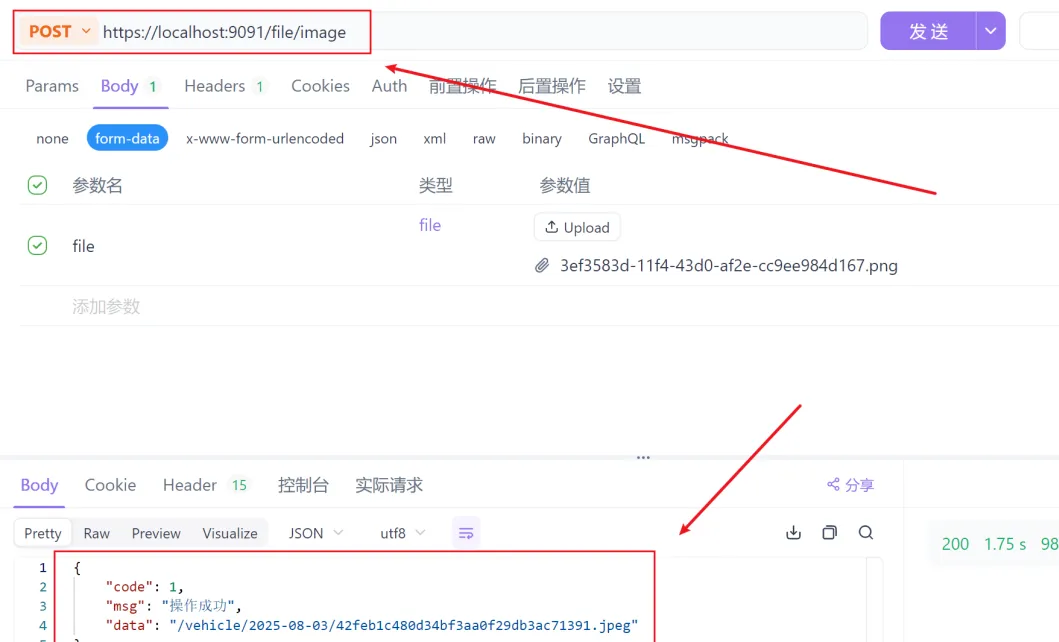
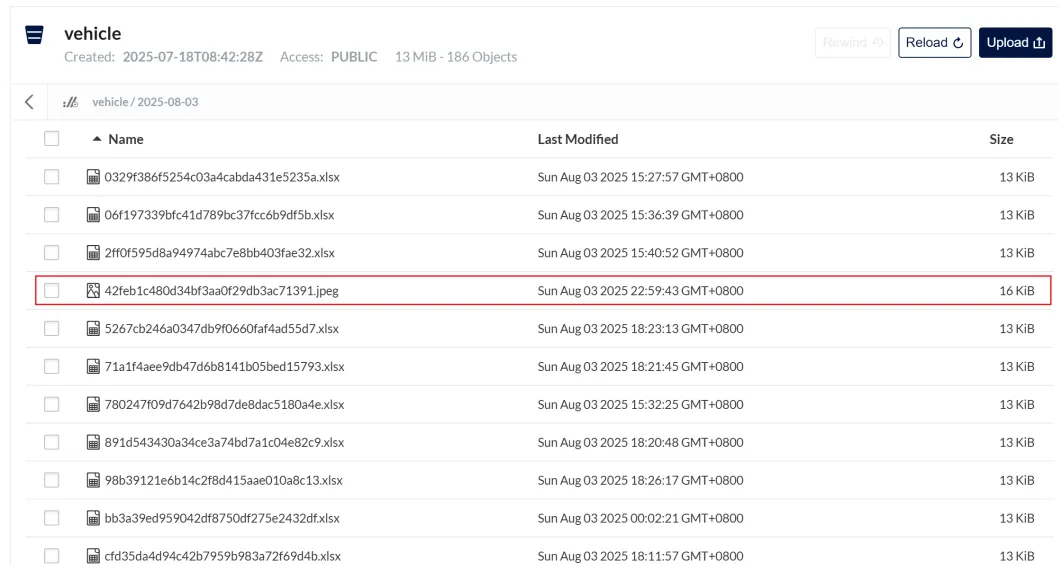
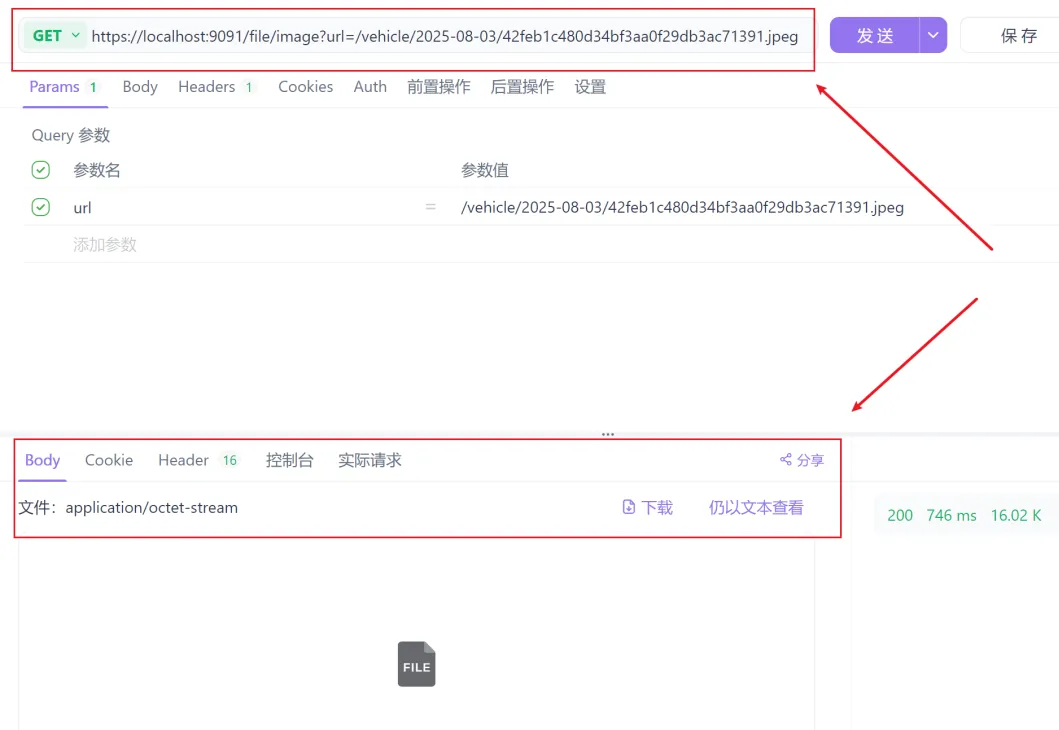
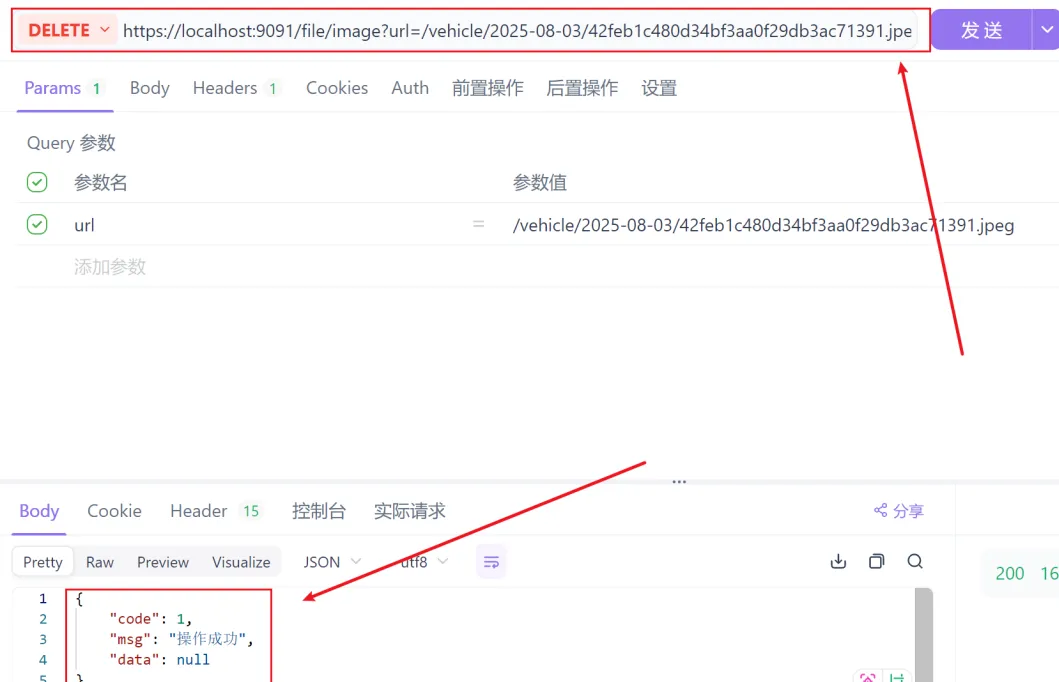
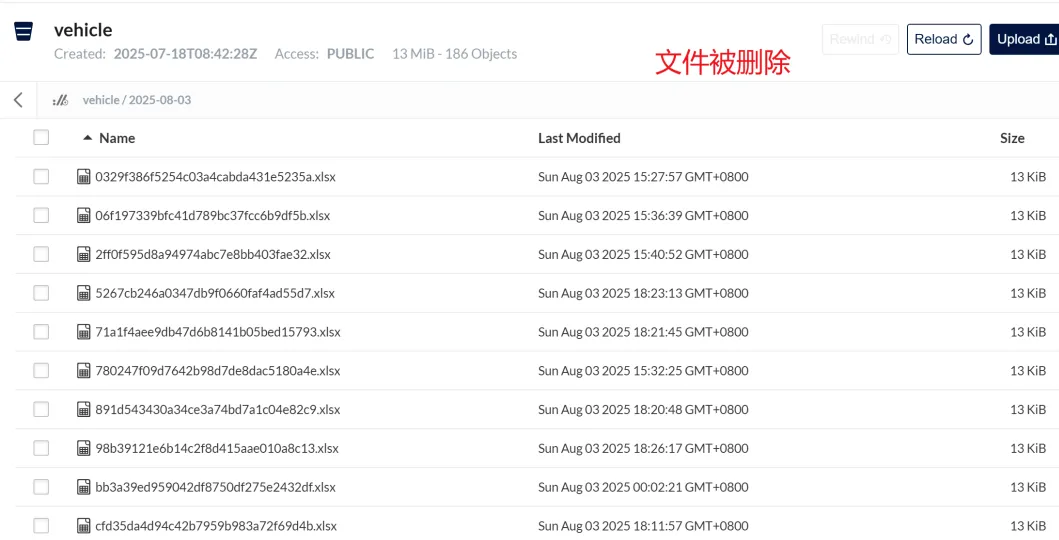
利用Apifox测试下三个接口
图片上传
图片下载
删除图片
04总结
本文通过 “配置 - 工具 - 业务” 三层架构,实现了 Spring Boot 与 MinIO 的集成,核心优势如下:
●易用性: 通过配置绑定和工具类封装,简化 MinIO 操作,开发者无需关注底层 API 细节。
●灵活性: 支持多种文件类型(表单文件、字节流、本地文件),满足不同场景需求(如图片压缩、Excel 生成)。
●可扩展性: 可基于此框架扩展功能,如添加文件权限控制(通过 MinIO 的 Policy)、文件分片上传(大文件处理)、定期清理过期文件等。
MinIO 作为轻量级对象存储方案,非常适合中小项目替代本地存储或云厂商 OSS(降低成本)。实际应用中需注意:生产环境需配置 MinIO 集群确保高可用;敏感文件需通过预签名 URL 控制访问权限;定期备份桶数据以防丢失。通过本文的方案,开发者可快速搭建稳定、可扩展的文件存储服务,为应用提供可靠的非结构化数据管理能力。
如喜欢本文,请点击右上角,把文章分享到朋友圈

往期推荐
PREVIOUS RECOMMENDATIONS


因公众号更改推送规则,请点“在看”并加“星标”第一时间获取精彩技术分享
·END·