 夜雨聆风
夜雨聆风
为什么普通卸载无法彻底清除OpenClaw
macOS:注册为 LaunchAgent(ai.openclaw.gateway),在登录时自动加载 Linux :创建 systemd 用户服务(openclaw-gateway.service),随会话启动 Windows:创建计划任务,在用户登录时启动 OpenClaw 网关进程
快速卸载(一键命令)
openclaw uninstall --all--yes --non-interactive不会撤销外部服务上的 OAuth 令牌,你的 Google、Slack、Discord 等账户仍然保持连接 不会删除早期版本的遗留配置目录(~/.clawdbot、~/.moltbot、~/.molthub) 可能无法移除通过 npm install -g openclaw 安装的 npm 全局包 不会清理通过 OPENCLAW_CONFIG_PATH 环境变量设置的自定义配置路径
macOS 卸载指南
openclaw gateway 终止pkill -f "openclaw gateway"launchctl bootout gui/$UID/ai.openclaw.gatewayrm -f ~/Library/LaunchAgents/ai.openclaw.gateway.plistlaunchctl bootout gui/$UID/com.openclaw.gateway 2>/dev/nulllaunchctl bootout gui/$UID/com.clawdbot.gateway 2>/dev/nullrm -f ~/Library/LaunchAgents/com.openclaw.gateway.plistrm -f ~/Library/LaunchAgents/com.clawdbot.gateway.plistopenclaw uninstall --all --yesrm -rf ~/.openclaw ~/.clawdbot ~/.moltbot ~/.molthubnpm uninstall -g openclawbrew uninstall openclawlaunchctl list | grep -i openclawlaunchctl list | grep -i clawdbotwhich openclawls ~/.openclaw 2>/dev/nullls ~/.clawdbot 2>/dev/nullls ~/.moltbot 2>/dev/nullWindows 卸载指南
openclaw gateway 终止schtasks /Delete /TN "OpenClaw Gateway"/Fschtasks /Delete /TN "ClawdBot Gateway"/F 2>$nullopenclaw uninstall --all --yesRemove-Item-Recurse -Force "$env:USERPROFILE\.openclaw"Remove-Item-Recurse -Force "$env:USERPROFILE\.clawdbot"Remove-Item-Recurse -Force "$env:USERPROFILE\.moltbot"Remove-Item-Recurse -Force "$env:USERPROFILE\.molthub"Remove-Item-Recurse -Force "$env:APPDATA\openclaw" 2>$nullRemove-Item-Recurse -Force "$env:LOCALAPPDATA\openclaw" 2>$nullnpm uninstall -g openclawwhere openclawschtasks /Query /TN "OpenClaw Gateway" 2>$nullTest-Path"$env:USERPROFILE\.openclaw"Linux 卸载指南
步骤1:停止网关进程
openclaw gateway 终止pkill-f"openclaw gateway"systemctl --user disable --now openclaw-gateway.servicerm-f ~/.config/systemd/user/openclaw-gateway.servicesystemctl --user daemon-reload
systemctl --user disable --now clawdbot-gateway.service 2>/dev/nullrm-f ~/.config/systemd/user/clawdbot-gateway.servicesystemctl --user daemon-reload
openclaw uninstall --all--yesrm-rf ~/.openclaw ~/.clawdbot ~/.moltbot ~/.molthubrm-rf ~/.config/openclawrm-rf ~/.local/share/openclaw
npm uninstall -g openclawsystemctl --user status openclaw-gateway.servicewhich openclawls ~/.openclaw 2>/dev/nullls ~/.clawdbot 2>/dev/null
关键步骤:撤销 OAuth!!!
这是整个卸载过程中最重要的一步,也是大多数人容易忽略的步骤。当你将OpenClaw连接到Google、Slack、Discord、GitHub等服务时,它会获取长期有效的OAuth令牌。这些令牌存储在服务提供商的服务器上,而不是你的本地机器上。删除本地文件并不能撤销这些令牌,任何人只要获得这些令牌,仍然可以访问你的账户。
撤销各平台OAuth令牌的具体步骤
Google(Gmail、日历、云端硬盘)
访问myaccount.google.com/permissions 在第三方应用访问列表中找到OpenClaw、ClawdBot或MoltBot 点击应用名称,然后点击"移除访问权限" 如果连接了多个Google账户,请为每个账户重复此操作
Slack
访问slack.com/apps/manage(必须登录到你的工作区) 搜索OpenClaw或ClawdBot 点击应用,然后点击"移除应用" 如果你是工作区管理员,请检查"设置与管理" > "管理应用",确保应用已在工作区范围内移除
Discord
打开Discord,进入用户设置(齿轮图标) 导航到"已授权的应用" 找到OpenClaw、Clawd或ClawdBot 点击"取消授权"
GitHub
访问github.com/settings/applications 点击"已授权的OAuth应用" 找到OpenClaw或ClawdBot 点击应用名称,然后点击"撤销访问" 同时检查同一设置区域中的GitHub应用,因为某些版本的OpenClaw可能注册为GitHub应用而非OAuth应用
Microsoft(Outlook、OneDrive、Teams)
访问account.live.com/consent/Manage 在有权限的应用列表中找到OpenClaw或ClawdBot 点击应用旁边的"编辑",然后点击"移除这些权限"
Notion
打开Notion,进入"设置与成员" 点击"我的连接"(旧版UI为"集成") 找到OpenClaw或ClawdBot 点击三点菜单,选择"断开连接"
为什么不能跳过这一步
如果你跳过 OAuth 撤销步骤,即使本地卸载完全干净,以下情况仍然存在:
OpenClaw 的令牌仍然可以读取你的电子邮件和日历事件 仍然可以向你的 Slack 频道和 Discord 服务器发送消息 仍然可以访问你的 GitHub 仓库,包括私有仓库 仍然可以读取和修改你的 Notion 页面
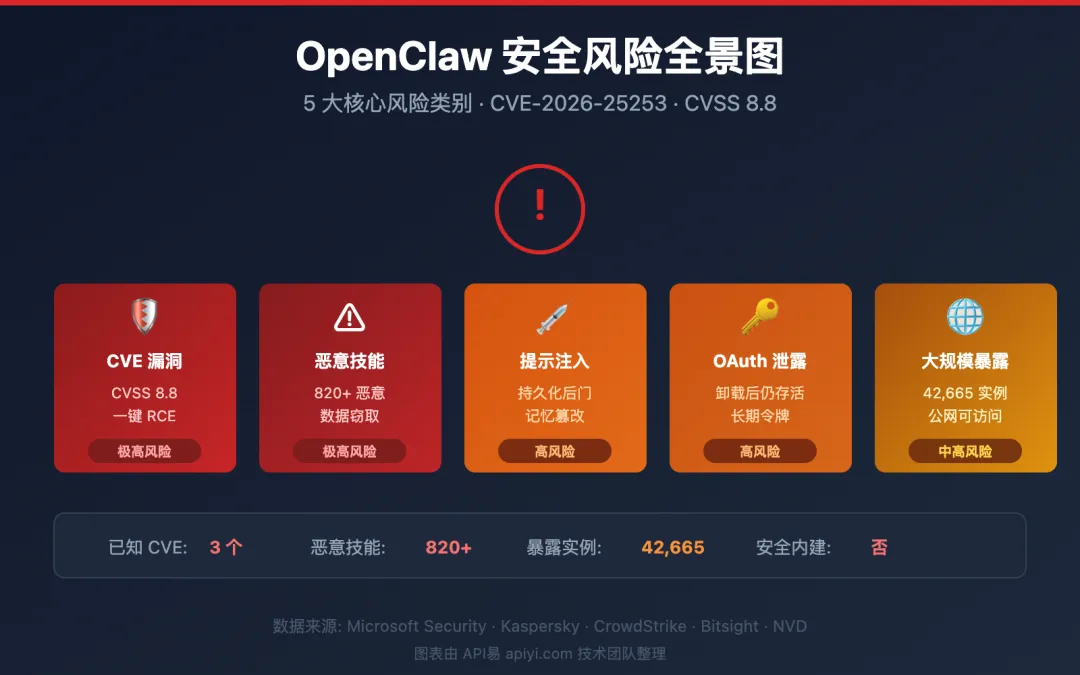
这并非危言耸听。安全研究人员已经发现许多暴露的 OpenClaw 实例,包含对数十个连接服务的有效令牌。撤销 OAuth 访问是关闭这种安全漏洞的唯一方法。
验证彻底卸载完成
# macOS / Linuxps aux |grep-i openclaw |grep-vgrep# Windows (PowerShell)Get-Process | Where-Object {$_.ProcessName -match"openclaw"}
# macOS / Linuxls-la ~/.openclaw ~/.clawdbot ~/.moltbot ~/.molthub 2>&1# Windows (PowerShell)Test-Path "$env:USERPROFILE\.openclaw", "$env:USERPROFILE\.clawdbot", "$env:USERPROFILE\.moltbot"
# macOS / Linuxwhich openclaw# Windowswhere openclaw
# macOSlaunchctl list |grep-i openclaw# Linuxsystemctl --user list-units |grep-i openclaw# Windows (PowerShell)Get-ScheduledTask | Where-Object {$_.TaskName -match"openclaw|clawdbot"}
# macOS / Linuxecho$OPENCLAW_CONFIG_PATHgrep OPENCLAW_CONFIG_PATH ~/.bashrc ~/.zshrc ~/.bash_profile 2>/dev/null# Windows (PowerShell)echo$env:OPENCLAW_CONFIG_PATH
rm-rf"$OPENCLAW_CONFIG_PATH"source ~/.zshrc # 或~/.bashrc,取决于你的shell[Environment]::SetEnvironmentVariable("OPENCLAW_CONFIG_PATH",$null,"User")