 夜雨聆风
夜雨聆风一、项目简介

农产品管理主要实现对农产品管理。
(1)新增农产品
(2)查询农产品。用户可以查询农产品,以列表的形式进行展示。展示的信息包括:农产品名称。
(3)编辑农产品
用户可以编辑农产品信息,包括:修改农产品信息和删除农产品。
(4)删除农产品。
二、数据库准备
SET NAMES utf8mb4;SET FOREIGN_KEY_CHECKS = 0;-- ------------------------------ Table structure for t_account-- ----------------------------DROP TABLE IF EXISTS `t_account`;CREATE TABLE `t_account` (`uid` int NOT NULL AUTO_INCREMENT COMMENT '用户id号',`uaccount` varchar(20) CHARACTER SET utf8mb4 COLLATE utf8mb4_0900_ai_ci NOT NULL COMMENT '账号',`upassword` varchar(20) CHARACTER SET utf8mb4 COLLATE utf8mb4_0900_ai_ci NOT NULL COMMENT '密码',`unick` varchar(10) CHARACTER SET utf8mb4 COLLATE utf8mb4_0900_ai_ci NULL DEFAULT NULL COMMENT '昵称',PRIMARY KEY (`uid`) USING BTREE) ENGINE = InnoDB AUTO_INCREMENT = 4 CHARACTER SET = utf8mb4 COLLATE = utf8mb4_0900_ai_ci ROW_FORMAT = Dynamic;-- ------------------------------ Records of t_account-- ----------------------------INSERT INTO `t_account` VALUES (1, 'ldy', '123', NULL);INSERT INTO `t_account` VALUES (2, 'ldy123', '123456789', 'ldy333');-- ------------------------------ Table structure for t_agr-- ----------------------------DROP TABLE IF EXISTS `t_agr`;CREATE TABLE `t_agr` (`aid` int NOT NULL AUTO_INCREMENT COMMENT '农产品id号',`uid` int NOT NULL COMMENT '账号id号',`aname` varchar(50) CHARACTER SET utf8mb4 COLLATE utf8mb4_0900_ai_ci NOT NULL COMMENT '农产品名称',`atype` varchar(10) CHARACTER SET utf8mb4 COLLATE utf8mb4_0900_ai_ci NULL DEFAULT NULL COMMENT '农产品类型',`aprice` decimal(10, 2) NOT NULL DEFAULT 0.00 COMMENT '农产品价格',`anum` decimal(10, 2) NOT NULL DEFAULT 0.00 COMMENT '农产品库存量',`adesc` varchar(255) CHARACTER SET utf8mb4 COLLATE utf8mb4_0900_ai_ci NULL DEFAULT NULL COMMENT '农产品简介',`aphoto` varchar(500) CHARACTER SET utf8mb4 COLLATE utf8mb4_0900_ai_ci NULL DEFAULT NULL COMMENT '农产品图片链接',PRIMARY KEY (`aid`) USING BTREE) ENGINE = InnoDB AUTO_INCREMENT = 4 CHARACTER SET = utf8mb4 COLLATE = utf8mb4_0900_ai_ci ROW_FORMAT = Dynamic;-- ------------------------------ Records of t_agr-- ----------------------------INSERT INTO `t_agr` VALUES (1, 1, '甘蔗1号', '水果', 1.25, 1000.00, '云南红甘蔗', NULL);INSERT INTO `t_agr` VALUES (2, 1, '西瓜', '水果', 1.00, 1222.00, '宁夏大西瓜', NULL);INSERT INTO `t_agr` VALUES (3, 1, '玉米', '粮食', 12.00, 1111.00, '21212', NULL);SET FOREIGN_KEY_CHECKS = 1;
三、项目搭建及配置
1、使用maven创建web项目
2、创建系统开发所需的包、目录、配置文件
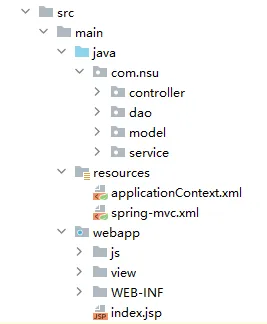
3、配置ApplicationContext容器监听,Spring MVC前端控制器,字符编码
<!--配置ApplicationContext容器,加载applicationContext.xml文件--><context-param><param-name>contextConfigLocation</param-name><param-value>classpath:applicationContext.xml</param-value></context-param><listener><listener-class>org.springframework.web.context.ContextLoaderListener</listener-class></listener><!--配置SpringMVC前端控制器(本质上是个Servlet)--><servlet><servlet-name>DispatcherServlet</servlet-name><servlet-class>org.springframework.web.servlet.DispatcherServlet</servlet-class><!--配置spring-mvc.xml文件,初始化SpringMVC--><init-param><param-name>contextConfigLocation</param-name><param-value>classpath:spring-mvc.xml</param-value></init-param></servlet><servlet-mapping><servlet-name>DispatcherServlet</servlet-name><url-pattern>/</url-pattern></servlet-mapping><!--解决中文乱码--><filter><filter-name>CharacterEncodingFilter</filter-name><filter-class>org.springframework.web.filter.CharacterEncodingFilter</filter-class><!--设置编码--><init-param><param-name>encoding</param-name><param-value>UTF-8</param-value></init-param></filter><filter-mapping><filter-name>CharacterEncodingFilter</filter-name><url-pattern>/*</url-pattern></filter-mapping>
4、设置Spring配置文件,配置数据库、开启注解
<?xml version="1.0" encoding="UTF-8"?><beansxmlns="http://www.springframework.org/schema/beans"xmlns:xsi="http://www.w3.org/2001/XMLSchema-instance"xmlns:context="http://www.springframework.org/schema/context"xmlns:aop="http://www.springframework.org/schema/aop" xmlns:tx="http://www.springframework.org/schema/tx"xsi:schemaLocation="http://www.springframework.org/schema/beanshttp://www.springframework.org/schema/beans/spring-beans-4.3.xsd http://www.springframework.org/schema/context https://www.springframework.org/schema/context/spring-context.xsd http://www.springframework.org/schema/aop https://www.springframework.org/schema/aop/spring-aop.xsd http://www.springframework.org/schema/tx http://www.springframework.org/schema/tx/spring-tx.xsd"><!--开启Spring注解开发--><context:annotation-config /><!--配置包扫描,实现Bean实例化、装配--><context:component-scanbase-package="com.nsu.*"/><!--配置数据库--><!--配置数据源--><beanid="dataSource"class="org.springframework.jdbc.datasource.DriverManagerDataSource"><propertyname="driverClassName"value="com.mysql.jdbc.Driver"/><propertyname="url"value="jdbc:mysql://localhost:3306/rg25302agr?useUnicode=true&characterEncoding=UTF-8&useSSL=false&serverTimezone=Asia/Shanghai&rewriteBatchedStatements=true"/><propertyname="username"value="root"/><propertyname="password"value="ldy123456"/></bean><!--配置JdbcTemplate--><beanid="jdbcTemplate"class="org.springframework.jdbc.core.JdbcTemplate"><propertyname="dataSource"ref="dataSource"/></bean><!--事务管理--><beanid="transactionManager"class="org.springframework.jdbc.datasource.DataSourceTransactionManager"><propertyname="dataSource"ref="dataSource"/></bean><!--开启事务管理注解--><tx:annotation-driventransaction-manager="transactionManager"/></beans>
5、设置Spring MVC配置文件,配置处理器映射信息、视图解析器
<?xml version="1.0" encoding="UTF-8" ?><beansxmlns="http://www.springframework.org/schema/beans"xmlns:xsi="http://www.w3.org/2001/XMLSchema-instance"xmlns:mvc="http://www.springframework.org/schema/mvc"xmlns:context="http://www.springframework.org/schema/context"xsi:schemaLocation="http://www.springframework.org/schema/beanshttp://www.springframework.org/schema/beans/spring-beans-4.3.xsdhttp://www.springframework.org/schema/mvchttp://www.springframework.org/schema/mvc/spring-mvc-4.3.xsdhttp://www.springframework.org/schema/contexthttp://www.springframework.org/schema/context/spring-context-4.3.xsd"><!--配置处理器映射信息(包扫描)--><context:component-scanbase-package="com.nsu.controller"/><!--配置视图解析器--><beanclass="org.springframework.web.servlet.view.InternalResourceViewResolver"><!--配置前缀,存放视图的目录--><propertyname="prefix"value="/view/"/><!--配置后缀,视图的文件的后缀名--><propertyname="suffix"value=".jsp"/></bean><!-- 必须启用Spring MVC注解驱动 --><mvc:annotation-driven /><!-- 配置静态资源映射 --><mvc:resourcesmapping="/js/**"location="/js/"/></beans>