 夜雨聆风
夜雨聆风


免费开源是Markdown 转 Word 软件分享
Markdown <-> Word 文档转换工具
步骤一、安装Pandoc
1、访问 Pandoc 官网(https://pandoc.org/installing.html)
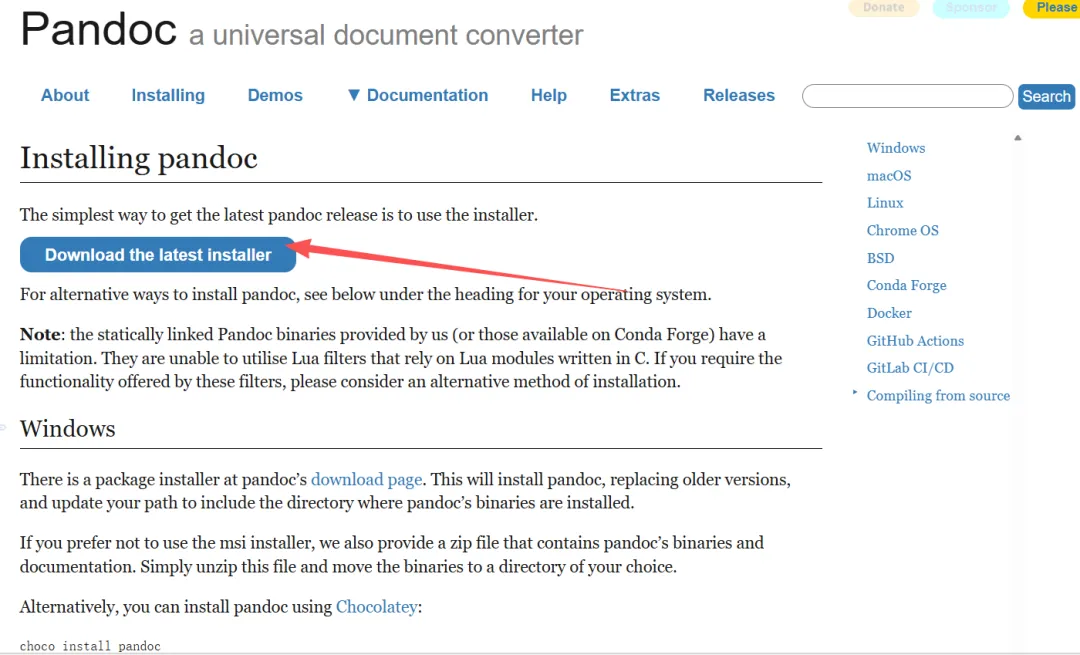
26459262-c32d-4cb2-8d5a-2c3ca02f8637
2、双击文件安装。
3、Win+X键,选择【终端】看安装是否成功
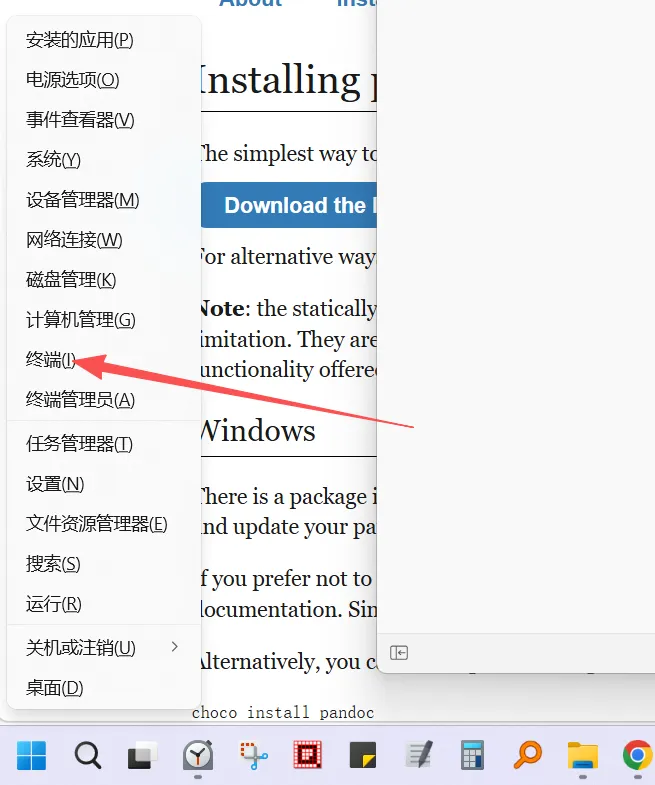
b70d1025-80e0-4f98-80ed-af2907cf177e
4、复制粘贴下面代码,然后按Enter:
pandoc—version
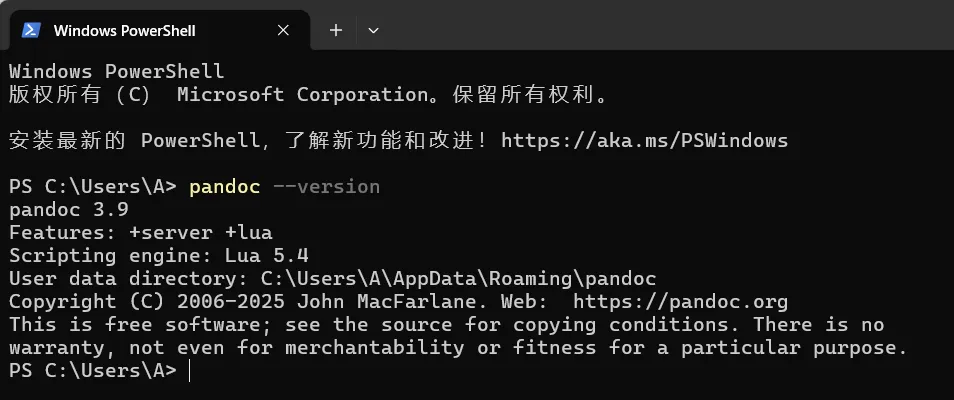
f98d58ff-b4f1-4300-ac59-c4a3e21a0eac
5、能够看到【pandoc 3.9】或者是【pandoc 数字】就是成功。
步骤二(选做)、安装markdown阅读器
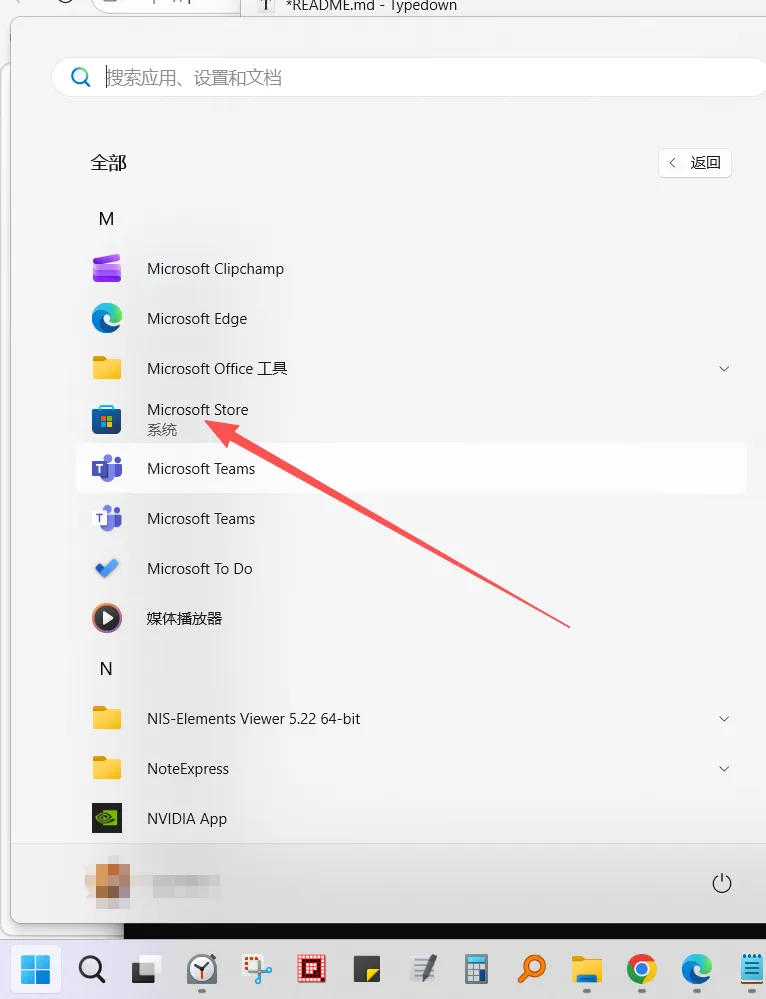
cad47b46-1539-4b22-9e89-a1fa33da4e94
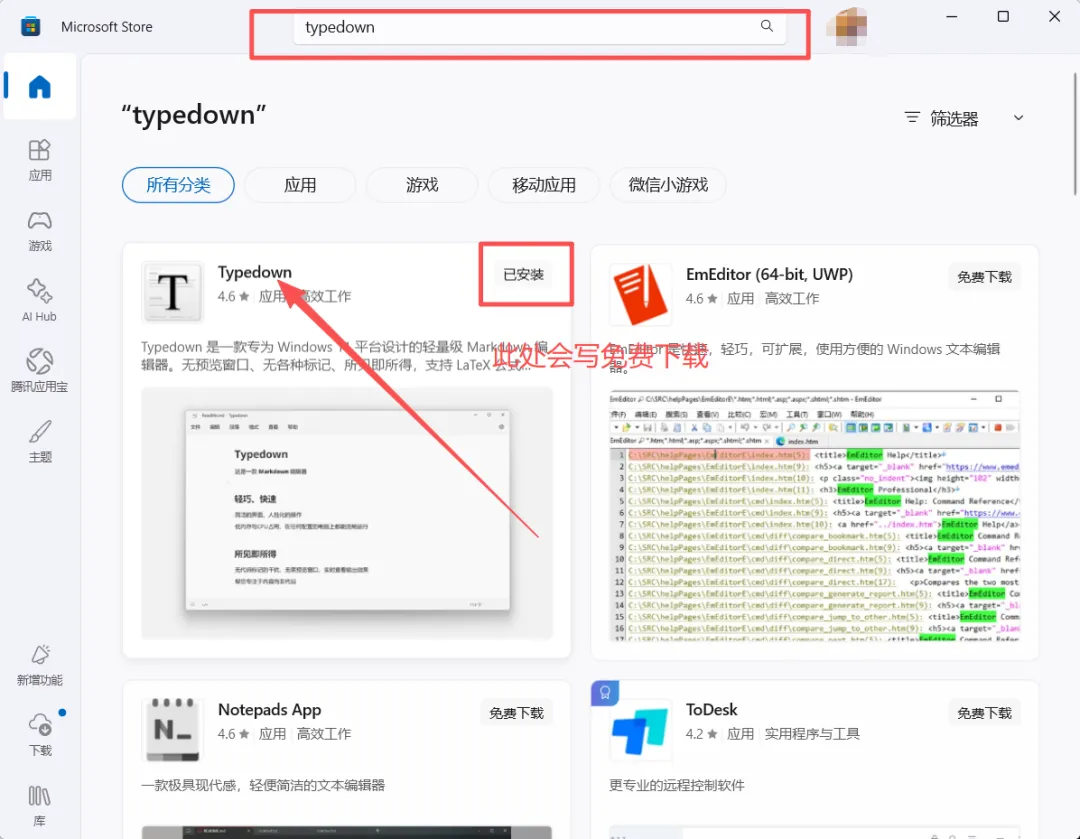
2、下载并安装Typedown
2f767047-65cd-4c51-b5d4-65f49f7a435b
3、说明:如果你已经安装了付费的Typora,效果更好。步骤二其实可以不做。
步骤三、MD 转 DOCX
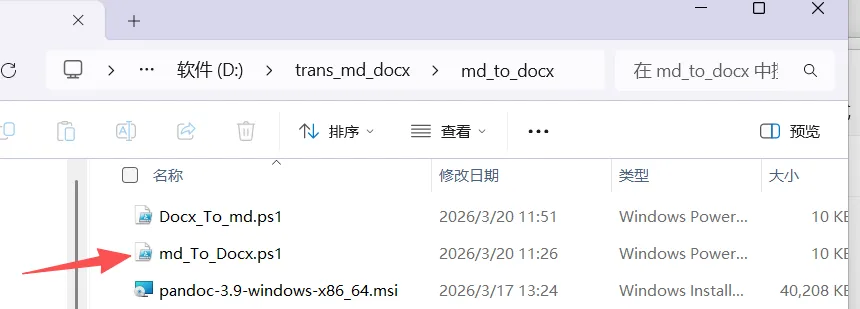
1、把下载的压缩文件夹解压,打开文件夹
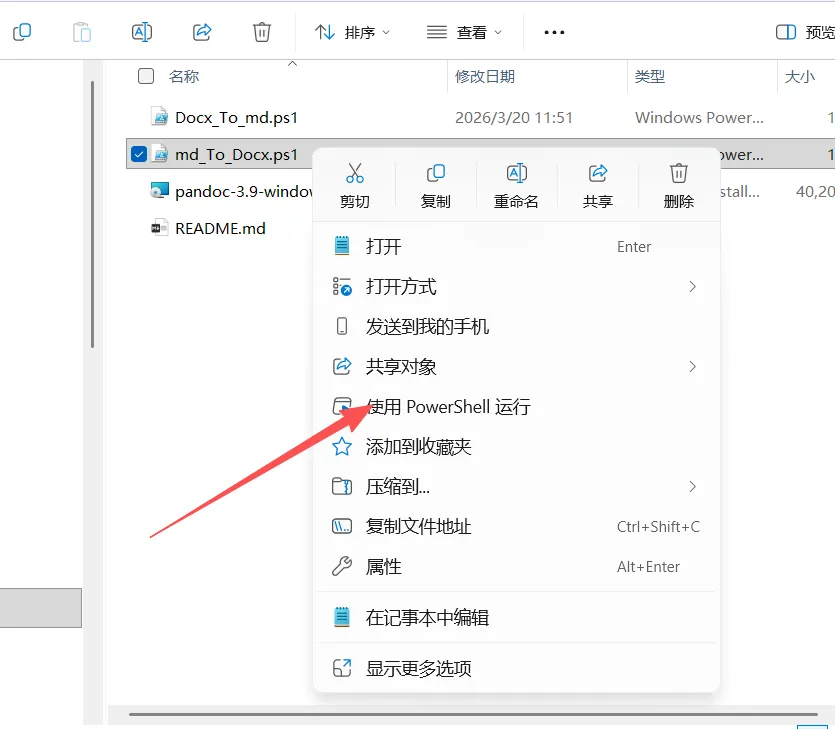
2、此处注意是右键单击,选择【使用PowerShell运行】
f86b6f80-5e4f-4232-81d4-b45441d0d1a7
beb0fdb9-305d-4f07-a800-d04ed6e03309
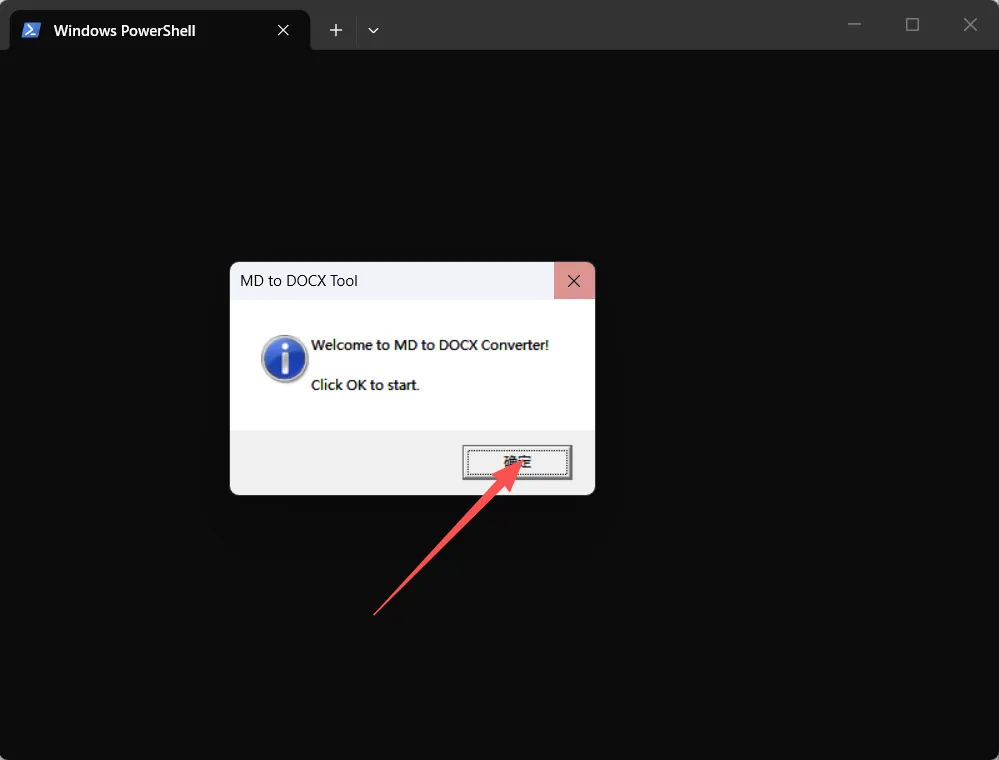
3、弹出的页面选择【确定】
73da376c-601e-478d-a2dd-47a963f9973c
4、选择【This PC】就是【我的电脑】,找到你要转换的markdown格式文件所在的文件夹。
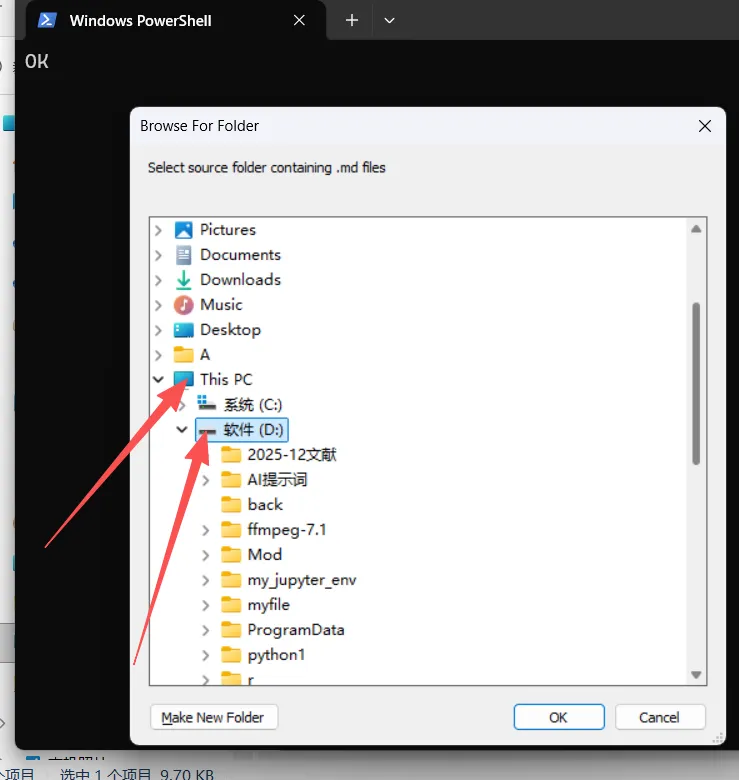
4d01c79d-8d2a-43e7-a60d-30c9b8660d76
5、系统帮你找出你选择的文件夹下所有的md,选择要转换的,点击【OK】
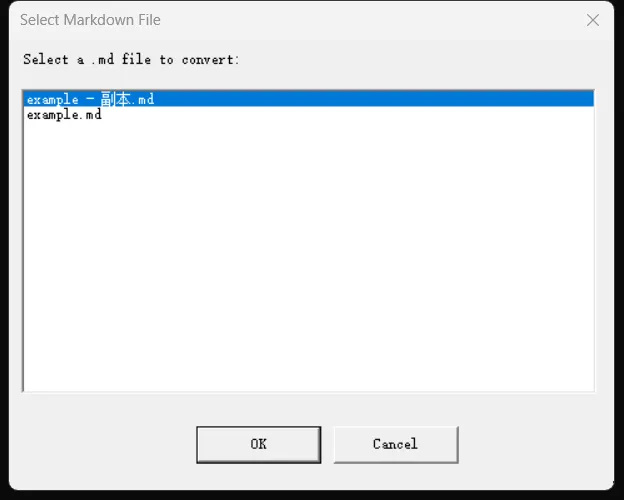
e59cf64c-b710-4123-9c2b-0f9ed7854c69
6、可以改word文件的名字。点击【OK】
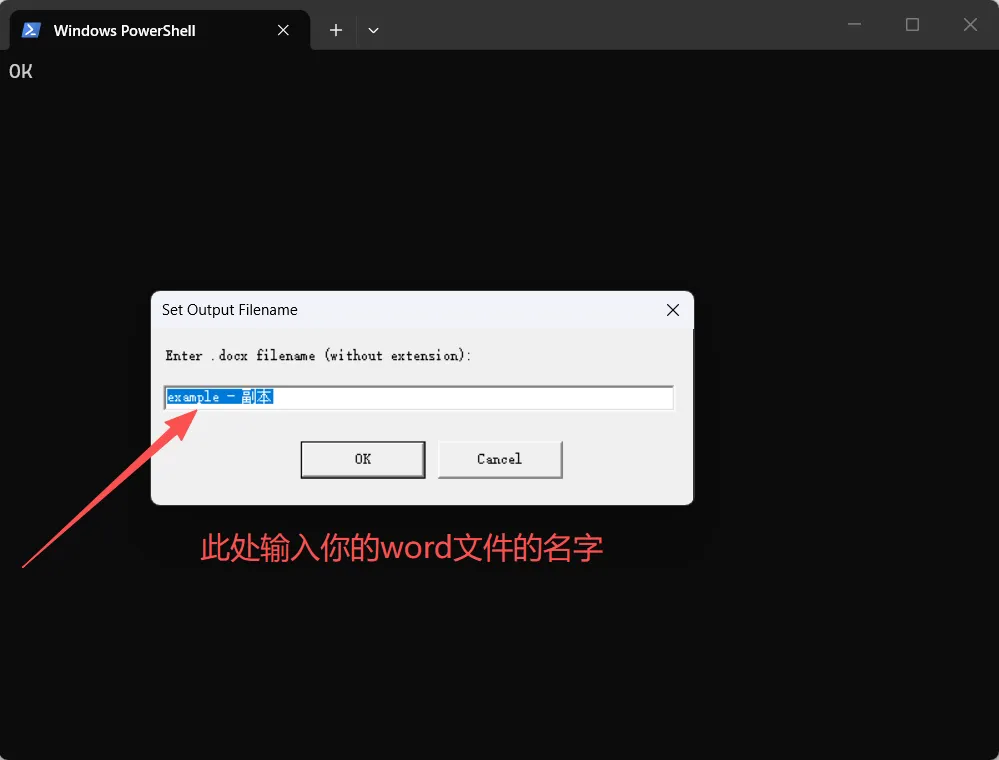
bcd3ae0f-61cd-4ba2-b078-fe7c25e55339
7、选择保存位置。
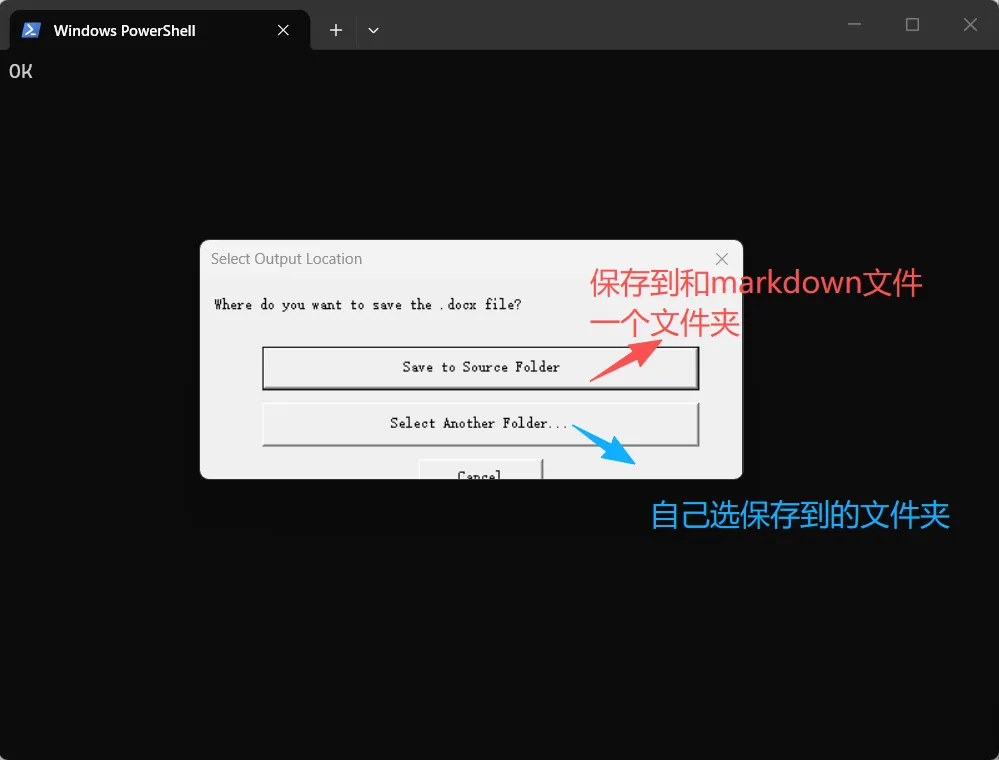
67565f86-eb1e-4c7e-a137-60dbe0a161f9
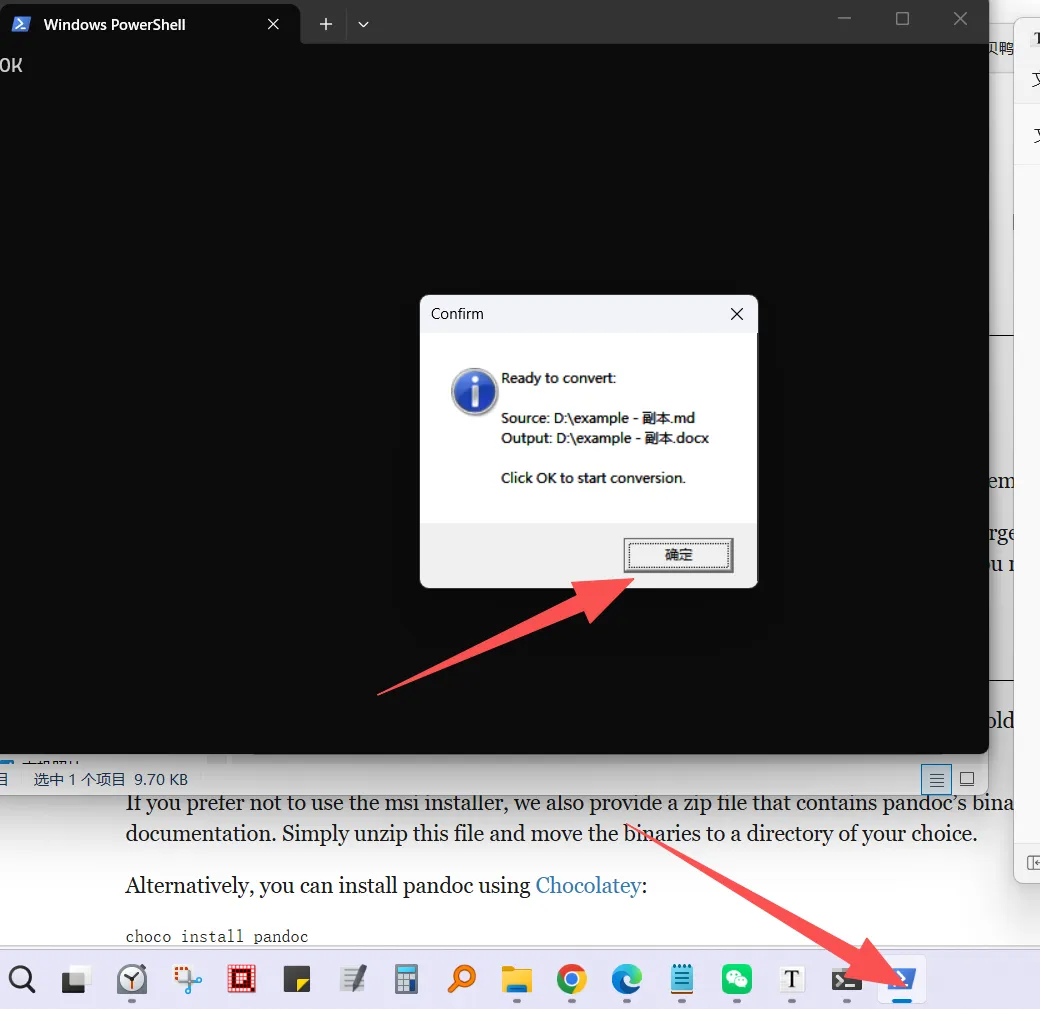
8、点击任务栏下面蓝色的图标,点击确定
d7ae68a5-a6a5-4237-ba61-94b27a24c15d
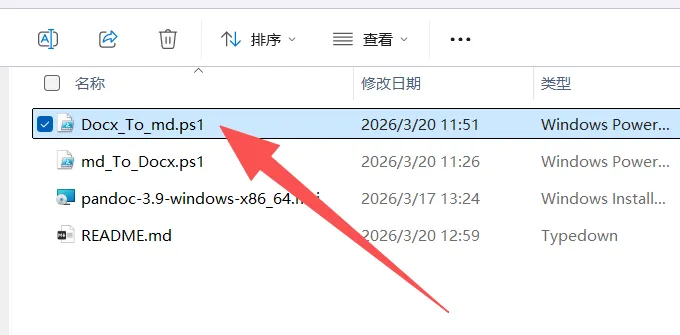
9、会弹出你保存的位置和看到docx文件
63d513f5-deb4-4c74-b7f3-f3a60d06abc3
步骤五、GitHub文件说明
nihuanhe/md-docx-converter: PowerShell tools for converting between Markdown and Word documents
下面是md_To_Docx.ps1的代码
[Console]::OutputEncoding = [System.Text.Encoding]::UTF8$OutputEncoding = [System.Text.Encoding]::UTF8Add-Type -AssemblyName System.Windows.FormsAdd-Type -AssemblyName System.DrawingfunctionShow-Message {param([string]$Message,[string]$Title = "Tip",[string]$Type = "Info")switch ($Type) {"Error" { [System.Windows.Forms.MessageBox]::Show($Message, $Title, "OK", "Error") }"Warning" { [System.Windows.Forms.MessageBox]::Show($Message, $Title, "OK", "Warning") }default { [System.Windows.Forms.MessageBox]::Show($Message, $Title, "OK", "Information") }}}functionSelect-Folder {param([string]$Description = "Select folder")$folderBrowser = New-Object System.Windows.Forms.FolderBrowserDialog$folderBrowser.Description = $Description$folderBrowser.ShowNewFolderButton = $trueif ($folderBrowser.ShowDialog() -eq "OK") {return $folderBrowser.SelectedPath}return $null}functionSelect-MdFile {param([string]$FolderPath)$mdFiles = Get-ChildItem -Path $FolderPath -Filter "*.md" -Fileif ($mdFiles.Count -eq 0) {Show-Message "No .md files found in selected folder!" "Warning" "Warning"return $null}$form = New-Object System.Windows.Forms.Form$form.Text = "Select Markdown File"$form.Size = New-Object System.Drawing.Size(500, 400)$form.StartPosition = "CenterScreen"$form.FormBorderStyle = "FixedDialog"$form.MaximizeBox = $false$form.MinimizeBox = $false$label = New-Object System.Windows.Forms.Label$label.Text = "Select a .md file to convert:"$label.Location = New-Object System.Drawing.Point(10, 10)$label.Size = New-Object System.Drawing.Size(460, 25)$form.Controls.Add($label)$listBox = New-Object System.Windows.Forms.ListBox$listBox.Location = New-Object System.Drawing.Point(10, 40)$listBox.Size = New-Object System.Drawing.Size(460, 250)$listBox.SelectionMode = "One"foreach ($file in $mdFiles) {$listBox.Items.Add($file.Name) | Out-Null}$listBox.SelectedIndex = 0$form.Controls.Add($listBox)$btnConfirm = New-Object System.Windows.Forms.Button$btnConfirm.Text = "OK"$btnConfirm.Location = New-Object System.Drawing.Point(150, 310)$btnConfirm.Size = New-Object System.Drawing.Size(100, 30)$btnConfirm.DialogResult = "OK"$form.Controls.Add($btnConfirm)$btnCancel = New-Object System.Windows.Forms.Button$btnCancel.Text = "Cancel"$btnCancel.Location = New-Object System.Drawing.Point(260, 310)$btnCancel.Size = New-Object System.Drawing.Size(100, 30)$btnCancel.DialogResult = "Cancel"$form.Controls.Add($btnCancel)$form.AcceptButton = $btnConfirm$form.CancelButton = $btnCancel$result = $form.ShowDialog()if ($result -eq "OK" -and $listBox.SelectedItem) {$selectedFileName = $listBox.SelectedItem.ToString()return Join-Path $FolderPath $selectedFileName}return $null}functionGet-DocxFileName {param([string]$OriginalName)$defaultName = [System.IO.Path]::GetFileNameWithoutExtension($OriginalName)$form = New-Object System.Windows.Forms.Form$form.Text = "Set Output Filename"$form.Size = New-Object System.Drawing.Size(450, 180)$form.StartPosition = "CenterScreen"$form.FormBorderStyle = "FixedDialog"$form.MaximizeBox = $false$form.MinimizeBox = $false$label = New-Object System.Windows.Forms.Label$label.Text = "Enter .docx filename (without extension):"$label.Location = New-Object System.Drawing.Point(10, 15)$label.Size = New-Object System.Drawing.Size(410, 25)$form.Controls.Add($label)$textBox = New-Object System.Windows.Forms.TextBox$textBox.Location = New-Object System.Drawing.Point(10, 45)$textBox.Size = New-Object System.Drawing.Size(410, 25)$textBox.Text = $defaultName$textBox.SelectAll()$form.Controls.Add($textBox)$btnConfirm = New-Object System.Windows.Forms.Button$btnConfirm.Text = "OK"$btnConfirm.Location = New-Object System.Drawing.Point(120, 90)$btnConfirm.Size = New-Object System.Drawing.Size(100, 30)$btnConfirm.DialogResult = "OK"$form.Controls.Add($btnConfirm)$btnCancel = New-Object System.Windows.Forms.Button$btnCancel.Text = "Cancel"$btnCancel.Location = New-Object System.Drawing.Point(230, 90)$btnCancel.Size = New-Object System.Drawing.Size(100, 30)$btnCancel.DialogResult = "Cancel"$form.Controls.Add($btnCancel)$form.AcceptButton = $btnConfirm$form.CancelButton = $btnCancel$result = $form.ShowDialog()if ($result -eq "OK") {$fileName = $textBox.Text.Trim()if ([string]::IsNullOrWhiteSpace($fileName)) {return $defaultName}return $fileName}return $null}functionSelect-OutputLocation {param([string]$SourceFolder)$form = New-Object System.Windows.Forms.Form$form.Text = "Select Output Location"$form.Size = New-Object System.Drawing.Size(450, 200)$form.StartPosition = "CenterScreen"$form.FormBorderStyle = "FixedDialog"$form.MaximizeBox = $false$form.MinimizeBox = $false$label = New-Object System.Windows.Forms.Label$label.Text = "Where do you want to save the .docx file?"$label.Location = New-Object System.Drawing.Point(10, 15)$label.Size = New-Object System.Drawing.Size(410, 25)$form.Controls.Add($label)$btnSourceFolder = New-Object System.Windows.Forms.Button$btnSourceFolder.Text = "Save to Source Folder"$btnSourceFolder.Location = New-Object System.Drawing.Point(50, 55)$btnSourceFolder.Size = New-Object System.Drawing.Size(350, 35)$btnSourceFolder.Tag = "Source"$btnSourceFolder.DialogResult = "OK"$form.Controls.Add($btnSourceFolder)$btnOtherFolder = New-Object System.Windows.Forms.Button$btnOtherFolder.Text = "Select Another Folder..."$btnOtherFolder.Location = New-Object System.Drawing.Point(50, 100)$btnOtherFolder.Size = New-Object System.Drawing.Size(350, 35)$btnOtherFolder.Tag = "Other"$btnOtherFolder.DialogResult = "OK"$form.Controls.Add($btnOtherFolder)$btnCancel = New-Object System.Windows.Forms.Button$btnCancel.Text = "Cancel"$btnCancel.Location = New-Object System.Drawing.Point(175, 145)$btnCancel.Size = New-Object System.Drawing.Size(100, 30)$btnCancel.DialogResult = "Cancel"$form.Controls.Add($btnCancel)$script:selectedOption = $null$btnSourceFolder.Add_Click({$script:selectedOption = "Source"$form.Tag = "Source"})$btnOtherFolder.Add_Click({$script:selectedOption = "Other"$form.Tag = "Other"})$result = $form.ShowDialog()if ($result -eq "OK") {$option = $form.Tagif ($option -eq "Source") {return $SourceFolder} elseif ($option -eq "Other") {return Select-Folder "Select folder to save .docx file"}}return $null}functionConvert-MdToDocx {param([string]$InputFile,[string]$OutputFile)try {$psi = New-Object System.Diagnostics.ProcessStartInfo$psi.FileName = "pandoc"$psi.Arguments = "-s `"$InputFile`" -o `"$OutputFile`""$psi.UseShellExecute = $false$psi.RedirectStandardOutput = $true$psi.RedirectStandardError = $true$psi.StandardOutputEncoding = [System.Text.Encoding]::UTF8$psi.StandardErrorEncoding = [System.Text.Encoding]::UTF8$process = [System.Diagnostics.Process]::Start($psi)$process.WaitForExit()if ($process.ExitCode -eq 0) {return $true} else {return $false}} catch {return $false}}functionMain {Show-Message "Welcome to MD to DOCX Converter!`n`nClick OK to start." "MD to DOCX Tool"$sourceFolder = Select-Folder "Select source folder containing .md files"if ([string]::IsNullOrWhiteSpace($sourceFolder)) {Show-Message "No source folder selected. Exit." "Warning" "Warning"return}$mdFile = Select-MdFile -FolderPath $sourceFolderif ([string]::IsNullOrWhiteSpace($mdFile)) {Show-Message "No file selected. Exit." "Warning" "Warning"return}$docxName = Get-DocxFileName -OriginalName (Split-Path $mdFile -Leaf)if ([string]::IsNullOrWhiteSpace($docxName)) {Show-Message "No output filename set. Exit." "Warning" "Warning"return}$outputFolder = Select-OutputLocation -SourceFolder (Split-Path $mdFile -Parent)if ([string]::IsNullOrWhiteSpace($outputFolder)) {Show-Message "No save location selected. Exit." "Warning" "Warning"return}$docxFile = Join-Path $outputFolder "$docxName.docx"Show-Message "Ready to convert:`n`nSource: $mdFile`nOutput: $docxFile`n`nClick OK to start conversion." "Confirm"$success = Convert-MdToDocx -InputFile $mdFile -OutputFile $docxFileif ($success) {$openFolder = Show-Message "Conversion successful!`n`nOutput: $docxFile`n`nOpen output folder?" "Success"if ($openFolder -eq "OK") {Start-Process "explorer.exe" -ArgumentList "/select,`"$docxFile`""}} else {Show-Message "Conversion failed!`n`nPlease check:`n1. pandoc is installed correctly`n2. Source file is valid`n3. Output path has write permission" "Error" "Error"}}Main