 夜雨聆风
夜雨聆风


Markdown文件转Word文件
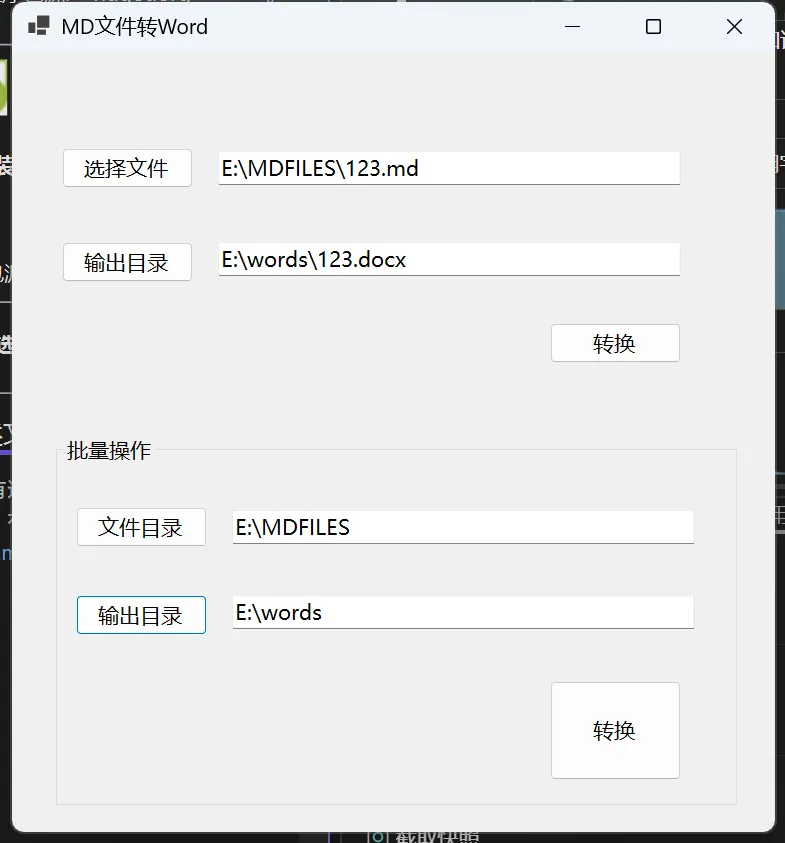
技术方案
核心库: MarkMyWord (NuGet 开源包)
1. 安装依赖
在 NuGet 包管理器中安装 MarkMyWord。
2. 单文件转换
privateboolconverterToWord(string mdFilePath, string wordFilePath){try{Cursor = Cursors.WaitCursor;using var fsIn = new FileStream(mdFilePath, FileMode.Open, FileAccess.Read, FileShare.Read);using var fsOut = new FileStream(wordFilePath, FileMode.Create, FileAccess.ReadWrite, FileShare.None);// 若需要传入转换选项,请替换 null 为合适的配置对象MarkdownConverter.ConvertToDocx(fsIn, fsOut, null);return true;}catch (Exception ex){return false;}finally{Cursor = Cursors.Default;}}
-
批量转换 文件过滤工具方法
publicstatic IEnumerable<string> GetFilesByExtensions(string folder, IEnumerable<string> extensions, bool includeSubdirectories = false){if (string.IsNullOrWhiteSpace(folder)) yield break;if (!Directory.Exists(folder)) yield break;var set = new HashSet<string>(extensions.Where(e => !string.IsNullOrWhiteSpace(e)).Select(e => e.StartsWith('.') ? e.ToLowerInvariant() : "." + e.ToLowerInvariant()));var option = includeSubdirectories ? SearchOption.AllDirectories : SearchOption.TopDirectoryOnly;foreach (var path in Directory.EnumerateFiles(folder, "*", option)){if (set.Contains(Path.GetExtension(path).ToLowerInvariant()))yield return path;}}
批量处理逻辑
//批量处理privatevoidbutton_saveAll_Click(object sender, EventArgs e){//获取目录中所有MarkDown文件var folder = textBox_mdFilesDir.Text;var exts = new[] { ".md" };// 同步用法var files = FileHelpers.GetFilesByExtensions(folder, exts, includeSubdirectories: true);foreach (var f in files){var wordFileName = Path.GetFileNameWithoutExtension(f) + ".docx";var wordFilePath = Path.Combine(textBox_wordFileDir.Text, wordFileName);converterToWord(f, wordFilePath);}}
总结
MarkMyWord为开源项目,可放心使用-
支持单文件和批量转换两种模式 -
通过文件扩展名过滤实现灵活的批量处理