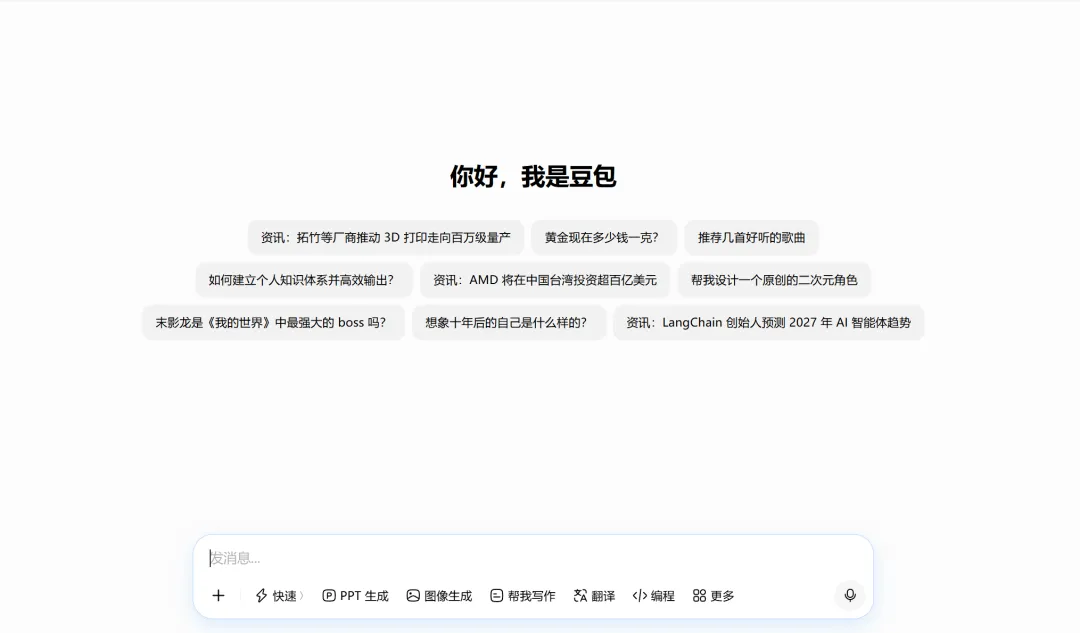
<template> <divclass="doubao-container"> <!-- 左侧侧边栏 --> <divclass="sidebar"> <divclass="logo"> <svgclass="logo-icon"viewBox="0 0 24 24"> <pathd="M12 2C6.48 2 2 6.48 2 12s4.48 10 10 10 10-4.48 10-10S17.52 2 12 2zm0 18c-4.41 0-8-3.59-8-8s3.59-8 8-8 8 3.59 8 8-3.59 8-8 8z"/> <pathd="M12 6.5c-2.49 0-4.5 2.01-4.5 4.5s2.01 4.5 4.5 4.5 4.5-2.01 4.5-4.5-2.01-4.5-4.5-4.5zm0 7c-1.38 0-2.5-1.12-2.5-2.5s1.12-2.5 2.5-2.5 2.5 1.12 2.5 2.5-1.12 2.5-2.5 2.5z"/> </svg> <span>豆包AI</span> </div> <divclass="menu-list"> <divclass="menu-item active"> <span>新对话</span> </div> <divclass="menu-item"> <span>历史对话</span> </div> <divclass="menu-item"> <span>使用指南</span> </div> </div> <divclass="user-info"> <imgsrc="https://picsum.photos/id/64/40/40"alt="头像" /> <span>Vue3用户</span> </div> </div> <!-- 右侧主内容区 --> <divclass="main-content"> <!-- 顶部导航 --> <divclass="top-bar"> <h2>与豆包对话</h2> <buttonclass="clear-btn" @click="clearChat">清空对话</button> </div> <!-- 对话消息区域 --> <divclass="chat-box"ref="chatBoxRef"> <divv-if="chatList.length === 0"class="empty-tip"> 开始和豆包聊天吧~ </div> <div v-for="(item, index) in chatList" :key="index" :class="['message-item', item.role]" > <!-- 头像 --> <img :src="item.role === 'user' ? 'https://picsum.photos/id/64/40/40' : 'https://picsum.photos/id/1005/40/40'" alt="头像" class="avatar" /> <!-- 消息内容 --> <divclass="message-content"> <spanv-if="item.showTyping"class="typing"> <spanclass="dot"></span> <spanclass="dot"></span> <spanclass="dot"></span> </span> <spanv-else>{{ item.content }}</span> </div> </div> </div> <!-- 底部输入框 --> <divclass="input-box"> <textarea v-model="inputText" @keydown.enter.exact="sendMessage" placeholder="请输入消息,按Enter发送" rows="1" ref="inputRef" ></textarea> <button @click="sendMessage":disabled="!inputText.trim()">发送</button> </div> </div> </div></template><scriptsetup>import { ref, reactive, onMounted, nextTick } from 'vue'// DOM引用const chatBoxRef = ref(null)const inputRef = ref(null)// 数据const inputText = ref('')const chatList = ref([])// 滚动到对话底部const scrollToBottom = () => { nextTick(() => { if (chatBoxRef.value) { chatBoxRef.value.scrollTop = chatBoxRef.value.scrollHeight } })}// 发送消息const sendMessage = () => { const text = inputText.value.trim() if (!text) return // 添加用户消息 chatList.value.push({ role: 'user', content: text }) inputText.value = '' scrollToBottom() // 模拟AI回复(打字效果) setTimeout(() => { const aiMsg = { role: 'ai', content: getRandomReply(text), showTyping: true } chatList.value.push(aiMsg) scrollToBottom() // 打字动画结束 setTimeout(() => { aiMsg.showTyping = false scrollToBottom() }, 1000) }, 500)}// 清空对话const clearChat = () => { chatList.value = []}// 随机回复const getRandomReply = (msg) => { const replies = [ `你好!我是豆包AI,很高兴为你解答:${msg}`, '收到!我已经理解你的问题啦~', 'Vue3非常好用,组合式API开发效率很高哦!', '这个功能可以用Vue3 + 组件化快速实现', '有任何问题都可以继续问我 😊' ] return replies[Math.floor(Math.random() * replies.length)]}onMounted(() => { inputRef.value?.focus()})</script><stylescoped>/* 整体布局 */.doubao-container { display: flex; width: 100vw; height: 100vh; margin: 0; padding: 0; background: #f5f7fa; font-family: -apple-system, BlinkMacSystemFont, 'Segoe UI', Roboto, sans-serif; overflow: hidden;}/* 侧边栏 */.sidebar { width: 240px; background: #fff; border-right: 1px solid #e5e6eb; display: flex; flex-direction: column; padding: 16px 0;}.logo { display: flex; align-items: center; gap: 8px; padding: 0 20px 20px; font-size: 18px; font-weight: 600; color: #1e293b;}.logo-icon { width: 24px; height: 24px; fill: #3b82f6;}.menu-list { flex: 1; padding: 0 12px;}.menu-item { display: flex; align-items: center; padding: 10px 16px; border-radius: 8px; cursor: pointer; margin-bottom: 4px; color: #64748b; transition: all 0.2s;}.menu-item:hover { background: #f1f5f9; color: #1e293b;}.menu-item.active { background: #eff6ff; color: #3b82f6; font-weight: 500;}.user-info { display: flex; align-items: center; gap: 10px; padding: 12px 20px; border-top: 1px solid #e5e6eb;}.user-info img { width: 36px; height: 36px; border-radius: 50%; object-fit: cover;}/* 主内容区 */.main-content { flex: 1; display: flex; flex-direction: column; overflow: hidden;}.top-bar { display: flex; justify-content: space-between; align-items: center; padding: 16px 24px; background: #fff; border-bottom: 1px solid #e5e6eb;}.top-bar h2 { margin: 0; font-size: 18px; color: #1e293b;}.clear-btn { padding: 6px 12px; border: 1px solid #e5e6eb; border-radius: 6px; background: #fff; cursor: pointer; transition: 0.2s;}.clear-btn:hover { background: #f1f5f9;}/* 对话区域 */.chat-box { flex: 1; padding: 24px; overflow-y: auto; background: #f8fafc;}.empty-tip { text-align: center; color: #94a3b8; margin-top: 60px; font-size: 14px;}.message-item { display: flex; gap: 12px; margin-bottom: 20px; align-items: flex-start;}.message-item.user { flex-direction: row-reverse;}.avatar { width: 36px; height: 36px; border-radius: 50%; object-fit: cover; flex-shrink: 0;}.message-content { max-width: 70%; padding: 10px 14px; border-radius: 14px; line-height: 1.5; font-size: 14px; position: relative;}/* AI消息样式 */.message-item.ai .message-content { background: #fff; border: 1px solid #e5e6eb; color: #1e293b; border-top-left-radius: 4px;}/* 用户消息样式 */.message-item.user .message-content { background: #3b82f6; color: #fff; border-top-right-radius: 4px;}/* 打字动画 */.typing { display: inline-flex; align-items: center; gap: 4px;}.dot { width: 6px; height: 6px; border-radius: 50%; background: #94a3b8; animation: typing 1.4s infinite ease-in-out;}.dot:nth-child(2) { animation-delay: 0.2s;}.dot:nth-child(3) { animation-delay: 0.4s;}@keyframes typing { 0%, 100% { transform: scale(0.8); opacity: 0.6; } 50% { transform: scale(1); opacity: 1; }}/* 输入框 */.input-box { display: flex; gap: 12px; padding: 16px 24px; background: #fff; border-top: 1px solid #e5e6eb;}.input-box textarea { flex: 1; padding: 12px 16px; border: 1px solid #e5e6eb; border-radius: 12px; resize: none; outline: none; font-size: 14px; line-height: 1.5; min-height: 44px; max-height: 120px;}.input-box textarea:focus { border-color: #3b82f6;}.input-box button { padding: 0 20px; border: none; border-radius: 12px; background: #3b82f6; color: #fff; font-weight: 500; cursor: pointer; transition: 0.2s; white-space: nowrap;}.input-box button:disabled { background: #94a3b8; cursor: not-allowed;}.input-box button:hover:not(:disabled) { background: #2563eb;}</style>
 夜雨聆风
夜雨聆风