 夜雨聆风
夜雨聆风


wordpress无需插件批量优化 WordPress 图片 Alt 和 Title
想必大家在维护网站的时候都会遇到一个问题、就是很多网站的历史图片都没有默认的”alt”、”title”信息、导致网站在图片seo这方面很差。
手动更改的话图片太多、更改起来工作量太大、而市面上的大部分插件都不太满足要求、并且很多是收费的。
今天给大家分享一串代码来解决这个问题。
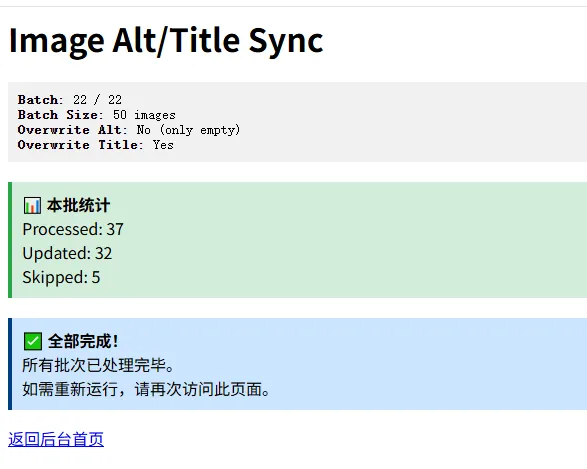
这段代码能做什么?
根据图片所属文章/产品的标题,自动填充图片的 alt 和 title。
核心能力包括:
– 自动识别图片所属内容(文章 / 页面 / 产品)
– 支持 WooCommerce(商品特色图 + 相册图)
– 分批批量处理,不会卡死服务器
– 支持“只改空值”或“强制覆盖”
使用方法:(代码注释有说明、可以根据需求开关)
-
把代码放进 functions.php、或者用代码片段插件插入代码
-
打开浏览器访问:/wp-admin/?run_image_meta_sync=1
-
在页面手动进行下一步操作
-
代码执行完后记得删除之前添加的代码。
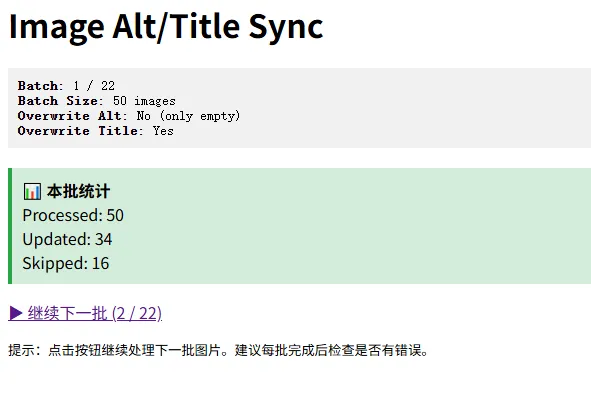
注意事项:
在执行脚本前请先备份数据库以及程序文件、操作不会影响程序文件、但是一起备份、避免出现不可知问题无法恢复。
代码如下:
add_action('admin_init', 'my_bulk_update_image_alt_title_from_parent_content');functionmy_bulk_update_image_alt_title_from_parent_content() {// 访问后台并带上这个参数才执行:// /wp-admin/?run_image_meta_sync=1if (!is_admin() || !current_user_can('manage_options') || !isset($_GET['run_image_meta_sync'])) {return;}// ===== 配置区 =====$overwrite_existing_alt = false; // true = 强制覆盖 alt;false = 只改空 alt$overwrite_existing_title = true; // true = 强制覆盖 title;false = 只改空 title$batch_size = 50; // 每批处理50张图片,更稳,避免超时$dry_run = false; // true = 只预览不写入;false = 实际写入// =================// 防止超时@set_time_limit(0);@ignore_user_abort(true);$paged = isset($_GET['img_page']) ? max(1, intval($_GET['img_page'])) : 1;$args = array('post_type' => 'attachment','post_status' => 'inherit','post_mime_type' => 'image','posts_per_page' => $batch_size,'paged' => $paged,'orderby' => 'ID','order' => 'ASC','fields' => 'ids',);$query = new WP_Query($args);$processed = 0;$updated = 0;$skipped = 0;// 输出样式和头部信息echo '<div class="wrap"><h1>Image Alt/Title Sync</h1>';if ($dry_run) {echo '<div style="background:#fff3cd; border-left:4px solid #ffc107; padding:10px; margin:10px 0;">';echo '<strong>⚠️ DRY RUN MODE (预览模式)</strong> - 没有实际写入数据库,只是预览将要进行的更改。<br>';echo '要实际写入,请将代码中的 $dry_run 改为 false。</div>';}echo '<div style="background:#f1f1f1; padding:10px; margin:10px 0; font-family:monospace;">';echo '<strong>Batch:</strong> ' . intval($paged) . ' / ' . intval($query->max_num_pages) . '<br>';echo '<strong>Batch Size:</strong> ' . intval($batch_size) . ' images<br>';echo '<strong>Overwrite Alt:</strong> ' . ($overwrite_existing_alt ? 'Yes' : 'No (only empty)') . '<br>';echo '<strong>Overwrite Title:</strong> ' . ($overwrite_existing_title ? 'Yes' : 'No (only empty)') . '<br>';echo '</div>';if (!empty($query->posts)) {foreach ($query->posts as $attachment_id) {$processed++;$target_title = my_get_best_title_for_attachment($attachment_id);if ($target_title === '') {$skipped++;continue;}$target_title = trim(wp_strip_all_tags($target_title));if ($target_title === '') {$skipped++;continue;}$did_update = false;$changes = array();// 更新 alt$current_alt = get_post_meta($attachment_id, '_wp_attachment_image_alt', true);$alt_was_empty = trim((string) $current_alt) === '';if ($overwrite_existing_alt || $alt_was_empty) {if (!$dry_run) {update_post_meta($attachment_id, '_wp_attachment_image_alt', $target_title);}$did_update = true;if ($alt_was_empty) {$changes[] = 'alt (was empty) → ' . $target_title;} else {$changes[] = 'alt (overwritten) → ' . $target_title;}}// 更新 title(附件 post_title)$attachment_post = get_post($attachment_id);$current_title = $attachment_post ? $attachment_post->post_title : '';$title_was_empty = trim((string) $current_title) === '';if ($overwrite_existing_title || $title_was_empty) {if (!$dry_run) {wp_update_post(array('ID' => $attachment_id,'post_title' => $target_title,));}$did_update = true;if ($title_was_empty) {$changes[] = 'title (was empty) → ' . $target_title;} else {$changes[] = 'title (overwritten) → ' . $target_title;}}if ($did_update) {$updated++;if ($dry_run) {// 预览模式下输出详细信息echo '<div style="font-size:12px; border-bottom:1px solid #eee; padding:2px 0;">';echo 'ID: ' . intval($attachment_id) . ' → ' . esc_html($target_title);if (!empty($changes)) {echo ' (' . esc_html(implode(', ', $changes)) . ')';}echo '</div>';flush();}} else {$skipped++;}}}// 输出结果统计echo '<div style="background:#d4edda; border-left:4px solid #28a745; padding:10px; margin:20px 0 10px 0;">';echo '<strong>📊 本批统计</strong><br>';echo 'Processed: ' . intval($processed) . '<br>';echo 'Updated: ' . intval($updated) . '<br>';echo 'Skipped: ' . intval($skipped) . '<br>';echo '</div>';// 下一页继续跑if ($paged < $query->max_num_pages) {$next_page_url = add_query_arg(array('run_image_meta_sync' => 1,'img_page' => $paged + 1,), admin_url());echo '<p><a class="button button-primary" href="' . esc_url($next_page_url) . '">▶ 继续下一批 (' . intval($paged + 1) . ' / ' . intval($query->max_num_pages) . ')</a></p>';echo '<p><small>提示:点击按钮继续处理下一批图片。建议每批完成后检查是否有错误。</small></p>';} else {echo '<div style="background:#cce5ff; border-left:4px solid #004085; padding:10px; margin:20px 0 10px 0;">';echo '<strong>✅ 全部完成!</strong><br>';echo '所有批次已处理完毕。<br>';echo '如需重新运行,请再次访问此页面。</div>';echo '<p><a class="button button-secondary" href="' . esc_url(admin_url()) . '">返回后台首页</a></p>';}echo '</div>';exit;}/*** 为附件找最合适的标题来源:* 1. 附件父级 post_parent* 2. WooCommerce 产品特色图* 3. WooCommerce 产品相册图* 4. 普通文章/页面特色图*/functionmy_get_best_title_for_attachment($attachment_id) {$attachment_id = intval($attachment_id);if (!$attachment_id) {return '';}// 1) 优先用附件父级$attachment = get_post($attachment_id);if ($attachment && !empty($attachment->post_parent)) {$parent_id = intval($attachment->post_parent);$parent = get_post($parent_id);if ($parent && in_array($parent->post_type, array('product', 'post', 'page'), true)) {$title = get_the_title($parent_id);if (!empty($title)) {return $title;}}}global $wpdb;// 2) WooCommerce 产品特色图$product_featured_id = $wpdb->get_var($wpdb->prepare("SELECT p.IDFROM {$wpdb->posts} pINNER JOIN {$wpdb->postmeta} pm ON p.ID = pm.post_idWHERE p.post_type = 'product'AND p.post_status IN ('publish', 'private', 'draft')AND pm.meta_key = '_thumbnail_id'AND pm.meta_value = %dLIMIT 1", $attachment_id));if ($product_featured_id) {$title = get_the_title($product_featured_id);if (!empty($title)) {return $title;}}// 3) WooCommerce 产品相册图$gallery_product_id = $wpdb->get_var($wpdb->prepare("SELECT p.IDFROM {$wpdb->posts} pINNER JOIN {$wpdb->postmeta} pm ON p.ID = pm.post_idWHERE p.post_type = 'product'AND p.post_status IN ('publish', 'private', 'draft')AND pm.meta_key = '_product_image_gallery'AND CONCAT(',', pm.meta_value, ',') LIKE CONCAT('%%,', %d, ',%%')LIMIT 1", $attachment_id));if ($gallery_product_id) {$title = get_the_title($gallery_product_id);if (!empty($title)) {return $title;}}// 4) 普通文章/页面/产品特色图$featured_post_id = $wpdb->get_var($wpdb->prepare("SELECT p.IDFROM {$wpdb->posts} pINNER JOIN {$wpdb->postmeta} pm ON p.ID = pm.post_idWHERE p.post_type IN ('post', 'page', 'product')AND p.post_status IN ('publish', 'private', 'draft')AND pm.meta_key = '_thumbnail_id'AND pm.meta_value = %dLIMIT 1", $attachment_id));if ($featured_post_id) {$title = get_the_title($featured_post_id);if (!empty($title)) {return $title;}}return '';}
加入代码后访问下面的地址:
你的域名/wp-admin/?run_image_meta_sync=1代码是直接更改的数据库的、所以更改完成后删除添加的代码即可、为了安全也建议删除。