 夜雨聆风
夜雨聆风目标: 模拟一个用 URDF 建模的行走机器人,并在 Rviz 中查看它。
教程级别: 中级
时间: 15 分钟
背景
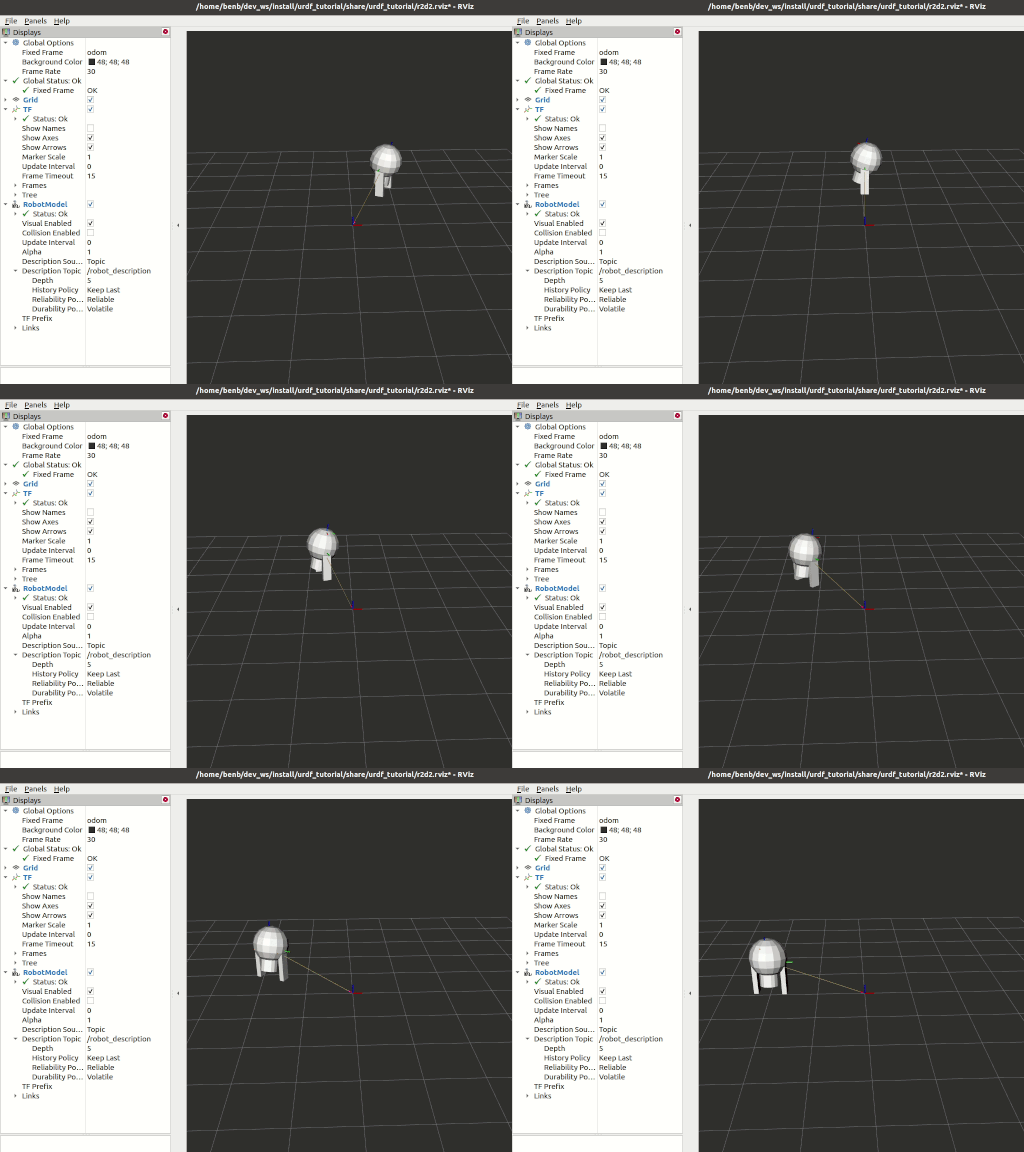
本教程将向您展示如何建模一个行走机器人,将状态作为 tf2 消息发布,并在 Rviz 中查看仿真。首先,我们创建描述机器人装配的 URDF 模型。接下来,我们编写一个模拟运动并发布 JointState 和变换的节点。然后我们使用 robot_state_publisher 将整个机器人状态发布到 /tf2。
前置条件
- rviz2
和往常一样,别忘了在打开的每个新终端中加载 ROS 2 环境。
任务
1 创建包
创建目录:
mkdir -p second_ros2_ws/src然后创建包:
cd second_ros2_ws/src
ros2 pkg create --build-type ament_python --license Apache-2.0 urdf_tutorial_r2d2 --dependencies rclpy
cd urdf_tutorial_r2d2
您现在应该看到一个 urdf_tutorial_r2d2 文件夹。接下来您将对其进行一些更改。
2 创建 URDF 文件
创建存储一些资源的目录:
mkdir -p urdf下载 URDF 文件并将其保存为 second_ros2_ws/src/urdf_tutorial_r2d2/urdf/r2d2.urdf.xml。下载 Rviz 配置文件并将其保存为 second_ros2_ws/src/urdf_tutorial_r2d2/urdf/r2d2.rviz。
3 发布状态
现在我们需要一种方法来指定机器人的状态。为此,我们必须指定所有三个关节和整体里程计。
启动您喜欢的编辑器,将以下代码粘贴到 second_ros2_ws/src/urdf_tutorial_r2d2/urdf_tutorial_r2d2/state_publisher.py 中:
from math import sin, cos, pi
import rclpy
from rclpy.executors import ExternalShutdownException
from rclpy.node import Node
from rclpy.qos import QoSProfile
from geometry_msgs.msg import Quaternion
from sensor_msgs.msg import JointState
from tf2_ros import TransformBroadcaster, TransformStamped

class StatePublisher(Node):
    def __init__(self):
        super().__init__('state_publisher')

        qos_profile = QoSProfile(depth=10)
        self.joint_pub = self.create_publisher(JointState, 'joint_states', qos_profile)
        self.broadcaster = TransformBroadcaster(self, qos=qos_profile)

        self.timer = self.create_timer(1/30, self.update)

        self.degree = pi / 180.0

        # robot state
        self.tilt = 0.
        self.tinc = self.degree
        self.swivel = 0.
        self.angle = 0.
        self.height = 0.
        self.hinc = 0.005

        # message declarations
        self.odom_trans = TransformStamped()
        self.odom_trans.header.frame_id = 'odom'
        self.odom_trans.child_frame_id = 'axis'

        self.joint_state = JointState()

        self.get_logger().info("{0} started".format(self.get_name()))

    def update(self):
        # update joint_state
        now = self.get_clock().now()
        self.joint_state.header.stamp = now.to_msg()
        self.joint_state.name = ['swivel', 'tilt', 'periscope']
        self.joint_state.position = [self.swivel, self.tilt, self.height]

        # update transform
        # (moving in a circle with radius=2)
        self.odom_trans.header.stamp = now.to_msg()
        self.odom_trans.transform.translation.x = cos(self.angle)*2
        self.odom_trans.transform.translation.y = sin(self.angle)*2
        self.odom_trans.transform.translation.z = 0.7
        self.odom_trans.transform.rotation = \
            euler_to_quaternion(0, 0, self.angle + pi/2)  # roll,pitch,yaw

        # send the joint state and transform
        self.joint_pub.publish(self.joint_state)
        self.broadcaster.sendTransform(self.odom_trans)

        # Create new robot state
        self.tilt += self.tinc
        if self.tilt < -0.5 or self.tilt > 0.0:
            self.tinc *= -1

        self.height += self.hinc
        if self.height > 0.2 or self.height < 0.0:
            self.hinc *= -1

        self.swivel += self.degree
        self.angle += self.degree/4

def euler_to_quaternion(roll, pitch, yaw):
    qx = sin(roll/2) * cos(pitch/2) * cos(yaw/2) - cos(roll/2) * sin(pitch/2) * sin(yaw/2)
    qy = cos(roll/2) * sin(pitch/2) * cos(yaw/2) + sin(roll/2) * cos(pitch/2) * sin(yaw/2)
    qz = cos(roll/2) * cos(pitch/2) * sin(yaw/2) - sin(roll/2) * sin(pitch/2) * cos(yaw/2)
    qw = cos(roll/2) * cos(pitch/2) * cos(yaw/2) + sin(roll/2) * sin(pitch/2) * sin(yaw/2)
    return Quaternion(x=qx, y=qy, z=qz, w=qw)

def main():
    try:
        with rclpy.init():
            node = StatePublisher()
            rclpy.spin(node)
    except (KeyboardInterrupt, ExternalShutdownException):
        pass

if __name__ == '__main__':
    main()
4 创建启动文件
创建一个新的 second_ros2_ws/src/urdf_tutorial_r2d2/launch 文件夹。打开您的编辑器并粘贴以下代码,将其保存为 second_ros2_ws/src/urdf_tutorial_r2d2/launch/demo_launch.py:
from launch import LaunchDescription
from launch.actions import DeclareLaunchArgument
from launch.substitutions import FileContent, LaunchConfiguration, PathJoinSubstitution
from launch_ros.actions import Node
from launch_ros.substitutions import FindPackageShare

def generate_launch_description():
    use_sim_time = LaunchConfiguration('use_sim_time', default='false')
    urdf = FileContent(
        PathJoinSubstitution([FindPackageShare('urdf_tutorial_r2d2'), 'r2d2.urdf.xml']))

    return LaunchDescription([
        DeclareLaunchArgument(
            'use_sim_time',
            default_value='false',
            description='Use simulation (Gazebo) clock if true'),

        Node(
            package='robot_state_publisher',
            executable='robot_state_publisher',
            name='robot_state_publisher',
            output='screen',
            parameters=[{'use_sim_time': use_sim_time, 'robot_description': urdf}],
            arguments=[urdf]),

        Node(
            package='urdf_tutorial_r2d2',
            executable='state_publisher',
            name='state_publisher',
            output='screen'),
    ])
5 编辑 setup.py 文件
您必须告诉 colcon 构建工具如何安装您的 Python 包。按如下方式编辑 second_ros2_ws/src/urdf_tutorial_r2d2/setup.py 文件:
- 包含这些 import 语句:
import os
from glob import glob
from setuptools import setup
from setuptools import find_packages- 在
data_files中添加这两行:
data_files=[
    ...
    (os.path.join('share', package_name, 'launch'), glob('launch/*')),
    (os.path.join('share', package_name), glob('urdf/*')),
],- 修改
entry_points表,以便您稍后可以从控制台运行 'state_publisher':
'console_scripts': [
    'state_publisher = urdf_tutorial_r2d2.state_publisher:main'
],
保存 setup.py 文件的更改。
6 安装包
cd second_ros2_ws
colcon build --symlink-install --packages-select urdf_tutorial_r2d2
加载设置文件:
source install/setup.bash7 查看结果
启动包:
ros2 launch urdf_tutorial_r2d2 demo_launch.py打开一个新终端,然后使用以下命令运行 Rviz:
rviz2 -d `ros2 pkg prefix urdf_tutorial_r2d2 --share`/r2d2.rviz有关如何使用 Rviz 的详细信息,请参阅用户指南。
总结
您创建了一个 JointState 发布者节点,并将其与 robot_state_publisher 结合使用来模拟一个行走机器人。